
Yaselley/deepfense-framework
Yaselley/deepfense-framework has 34 GitHub stars and 1 forks. GitHot measured 0 stars in 24 hours and 0 in 7 days. Last checked 2026-11-09 20:13 UTC. Last push 2026-11-04.
DeepFense: A Unified, Modular, and Extensible Framework for Robust Deepfake Audio Detection
Measured star growth
- in 24h
- 0
- in 7 days
- 0
- in 15 days
- Collecting history
- in 1 month
- Collecting history
Net star changes over overlapping periods, not daily totals. Missing measurements are left blank. Stars measure attention, not software quality.
README.md
Original
DeepFense
DeepFense: A Unified, Modular, and Extensible Framework for Robust Deepfake Audio Detection


Partial deepfake / PartialSpoof: This README and the default
masterbranch cover clip-level detection. For per-frame labels,TemporalDetector, Range EER, PartialSpoof metrics, and related configs, switch to thedeepfense-partialbranch:git fetch origin git checkout deepfense-partial
What is DeepFense?
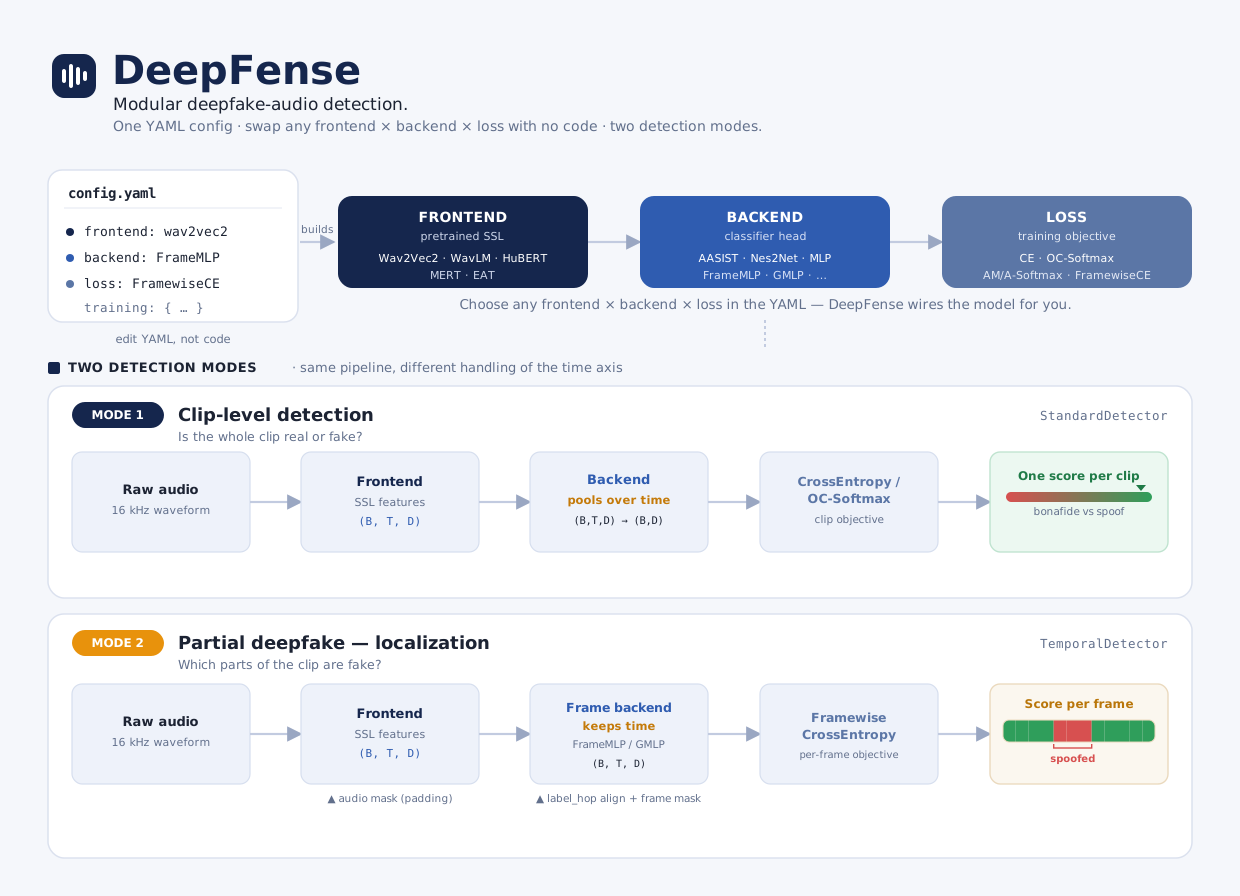
DeepFense lets you build deepfake audio detectors by combining frontends (pretrained feature extractors), backends (classifiers), and loss functions — all defined in a single YAML config. No code changes needed to run new experiments.
The diagram above shows both clip-level and partial deepfake pipelines. On master, training and docs focus on clip-level detection (one score per utterance). For partial deepfake, use git checkout deepfense-partial (see note above).
Raw Audio --> Frontend (Wav2Vec2, WavLM, HuBERT, ...) --> Backend (AASIST, MLP, ...) --> Loss --> Score
Install
conda create -n deepfense python=3.10
conda activate deepfense
pip install deepfense
Or install from source (for development):
conda create -n deepfense python=3.10
conda activate deepfense
git clone https://github.com/Yaselley/deepfense-framework
cd deepfense-framework
pip install -e .
Quick Start
1. Generate dummy test data
python tests/create_samples.py
2. Train
python train.py --config deepfense/config/train.yaml
3. Test
python test.py \
    --config deepfense/config/train.yaml \
    --checkpoint outputs/Wav2Vec2_Nes2Net_Example_*/best_model.pth
4. Multi-GPU Training
DeepFense supports multi-GPU training out of the box via PyTorch DDP. Just use torchrun:
# 2 GPUs on a single node
torchrun --nproc_per_node=2 train.py --config deepfense/config/train.yaml

# 4 GPUs
torchrun --nproc_per_node=4 train.py --config deepfense/config/train.yaml
No config changes required -- DDP is detected automatically. Checkpoints, logs, and evaluation run on rank 0 only. The saved checkpoints are identical to single-GPU ones and can be loaded without any DDP-specific handling.
5. Use real data
Create a Parquet file with columns ID, path, label ("bonafide" / "spoof"), then update the config:
data:
  train:
    parquet_files: ["/path/to/train.parquet"]
  val:
    parquet_files: ["/path/to/val.parquet"]
How Configuration Works
Everything is controlled by a single YAML file. Here is the anatomy:
# ---------- experiment ----------
exp_name: "my_experiment"
output_dir: "./outputs/"
seed: 42

# ---------- data ----------
data:
  sampling_rate: 16000
  label_map: {"bonafide": 1, "spoof": 0}
  train:
    parquet_files: ["train.parquet"]
    batch_size: 32
    base_transform:
      - type: "pad"
        max_len: 64600          # ~4 sec at 16 kHz
    augment_transform:          # training only
      - type: "rawboost"
        noise_ratio: 0.4
  val:
    parquet_files: ["val.parquet"]
    batch_size: 64
    base_transform:
      - type: "pad"
        max_len: 64600

# ---------- model ----------
model:
  type: "StandardDetector"
  frontend:
    type: "wav2vec2"                    # or wavlm, hubert, mert, eat
    args:
      source: "huggingface"             # or "fairseq" for local .pt files
      ckpt_path: "facebook/wav2vec2-xls-r-300m"
      freeze: True
  backend:
    type: "AASIST"                      # or MLP, Nes2Net, ECAPA_TDNN, RawNet2
    args:
      input_dim: 1024                   # must match frontend output dim
  loss:
    - type: "OCSoftmax"                 # or CrossEntropy, AMSoftmax, ASoftmax
      weight: 1.0
      embedding_dim: 32                 # must match backend output dim

# ---------- training ----------
training:
  epochs: 50
  device: "cuda"
  optimizer:
    type: "adam"
    lr: 0.0001
  scheduler:
    type: "cosine_annealing"
    T_max: 50
  monitor_metric: "EER"
  monitor_mode: "min"
  metrics:
    EER: {}
    ACC: {}
    minDCF: {Pspoof: 0.05}
See the Full Tutorial for a detailed walkthrough of every parameter.
Available Components
| Category | Options |
|---|---|
| Frontends | Wav2Vec2, WavLM, HuBERT, MERT, EAT |
| Backends | AASIST, ECAPA-TDNN, Nes2Net, RawNet2, MLP, TCM |
| Losses | CrossEntropy, OC-Softmax, AM-Softmax, A-Softmax |
| Augmentations | RawBoost, RIR, Codec, AdditiveNoise, SpeedPerturb, AddBabble, DropChunk, DropFreq |
| Metrics | EER, minDCF, actDCF, ACC, F1 |
List them from the CLI:
deepfense list
deepfense list --component-type backends
Pretrained Models & Datasets (HuggingFace Hub)
DeepFense publishes 455+ pretrained models and 12 datasets at huggingface.co/DeepFense.
# See what's available
deepfense download list-datasets
deepfense download list-models --filter WavLM

# Download a dataset (parquet files)
deepfense download dataset CompSpoof

# Download a pretrained model (checkpoint + config)
deepfense download model ASV19_WavLM_Nes2Net_NoAug_Seed42

# Test the downloaded model
python test.py \
    --config models/ASV19_WavLM_Nes2Net_NoAug_Seed42/config.yaml \
    --checkpoint models/ASV19_WavLM_Nes2Net_NoAug_Seed42/best_model.pth
Or in Python:
from deepfense.hub import download_dataset, download_model

parquets = download_dataset("CompSpoof")           # returns list of local paths
files    = download_model("ASV19_WavLM_Nes2Net_NoAug_Seed42")  # returns {"checkpoint": ..., "config": ...}
See the HuggingFace Hub Guide for full workflows (training, evaluation, inference).
Adding Your Own Component
Every component type follows the same pattern:
- Create a file (e.g.
deepfense/models/backends/my_backend.py) - Decorate with the registry:
from deepfense.utils.registry import register_backend from deepfense.models.base_model import BaseBackend @register_backend("MyBackend") class MyBackend(BaseBackend): def __init__(self, config): super().__init__() # ... def forward(self, x): # ... - Import it in the package
__init__.py - Use it in your config:
backend:
  type: "MyBackend"
  args: { ... }
The same pattern applies to frontends, losses, augmentations, datasets, optimizers, and metrics. See the user guides for detailed walkthroughs.
Project Structure
deepfense/
├── cli/             # CLI commands (train, test, list)
├── config/          # YAML configs + parquet generators
├── data/            # Dataset loading + transforms/augmentations
├── models/
│   ├── frontends/   # Wav2Vec2, WavLM, HuBERT, MERT, EAT
│   ├── backends/    # AASIST, ECAPA-TDNN, Nes2Net, MLP, ...
│   ├── losses/      # OC-Softmax, AM-Softmax, CrossEntropy, ...
│   └── modules/     # Shared layers (pooling, conformer, fairseq_local)
├── training/        # Trainer, evaluator, metrics, seed
└── utils/           # Registry, visualization
Documentation
| Guide | Description |
|---|---|
| Installation | Setup instructions |
| Quick Start | First model in 5 minutes |
| Full Tutorial | Every config option explained |
| Architecture | How DeepFense works internally |
| Configuration Reference | All YAML parameters |
| Library Usage | Use DeepFense as a Python library |
| HuggingFace Hub | Download datasets & pretrained models |
| CLI Reference | CLI commands |
| Components | Frontend, backend, loss, augmentation reference |
| User Guides | Adding custom components, training workflows |
Citation
@article{kheir2026deepfense,
  title={DeepFense: A Unified, Modular, and Extensible Framework for Robust Deepfake Audio Detection},
  author={Kheir, Yassine El and Das, Arnab and Xiao, Yixuan and Wang, Xin and Kallel, Feidi and Erdogan, Enes Erdem and Vu, Ngoc Thang and Polzehl, Tim and Moeller, Sebastian},
  journal={arXiv preprint arXiv:2604.08450},
  year={2026}
}
License
Apache 2.0 -- see LICENSE for details.
Explore related projects
tensorflow/tensorflow
An Open Source Machine Learning Framework for Everyone
201,400 starshuggingface/transformers
🤗 Transformers: the model-definition framework for state-of-the-art machine learning models in text, vision, audio, and multimodal models, for both inference and training.
168,668 starsAUTOMATIC1111/stable-diffusion-webui
Stable Diffusion web UI
165,261 starsComfy-Org/ComfyUI
The most powerful and modular diffusion model GUI, api and backend with a graph/nodes interface. The fastest local inference engine in the world.
145,835 stars