
Y0oshi/Project-Deep-Focus
Y0oshi/Project-Deep-Focus has 255 GitHub stars and 28 forks. Star changes are not measured yet. Last checked 2026-11-14 02:03 UTC. Last push 2026-09-24.
What you can do
- Scans IP ranges for open services (HTTP, FTP, SSH, VNC, RTSP, RDP)
- Identifies authentication requirements for discovered services
- Fingerprints service types and vendors
- Exports actionable intelligence in structured format
Measured star growth
- in 24h
- Collecting history
- in 7 days
- Collecting history
- in 15 days
- Collecting history
- in 1 month
- Collecting history
Net star changes over overlapping periods, not daily totals. Missing measurements are left blank. Stars measure attention, not software quality.
About
Your personal 'Mini Shodan'. A high-performance network reconnaissance engine designed for massive scale asset discovery. Specializes in identifying unsecured services (Open RTSP Cameras, No-Auth VNC, Anonymous FTP) and deeply fingerprints device models with a beautiful real-time terminal dashboard.
SecurityREADME.md
OriginalDeep Focus
A high-performance network reconnaissance tool for discovering and fingerprinting services across IP ranges. Built for security researchers and network administrators.
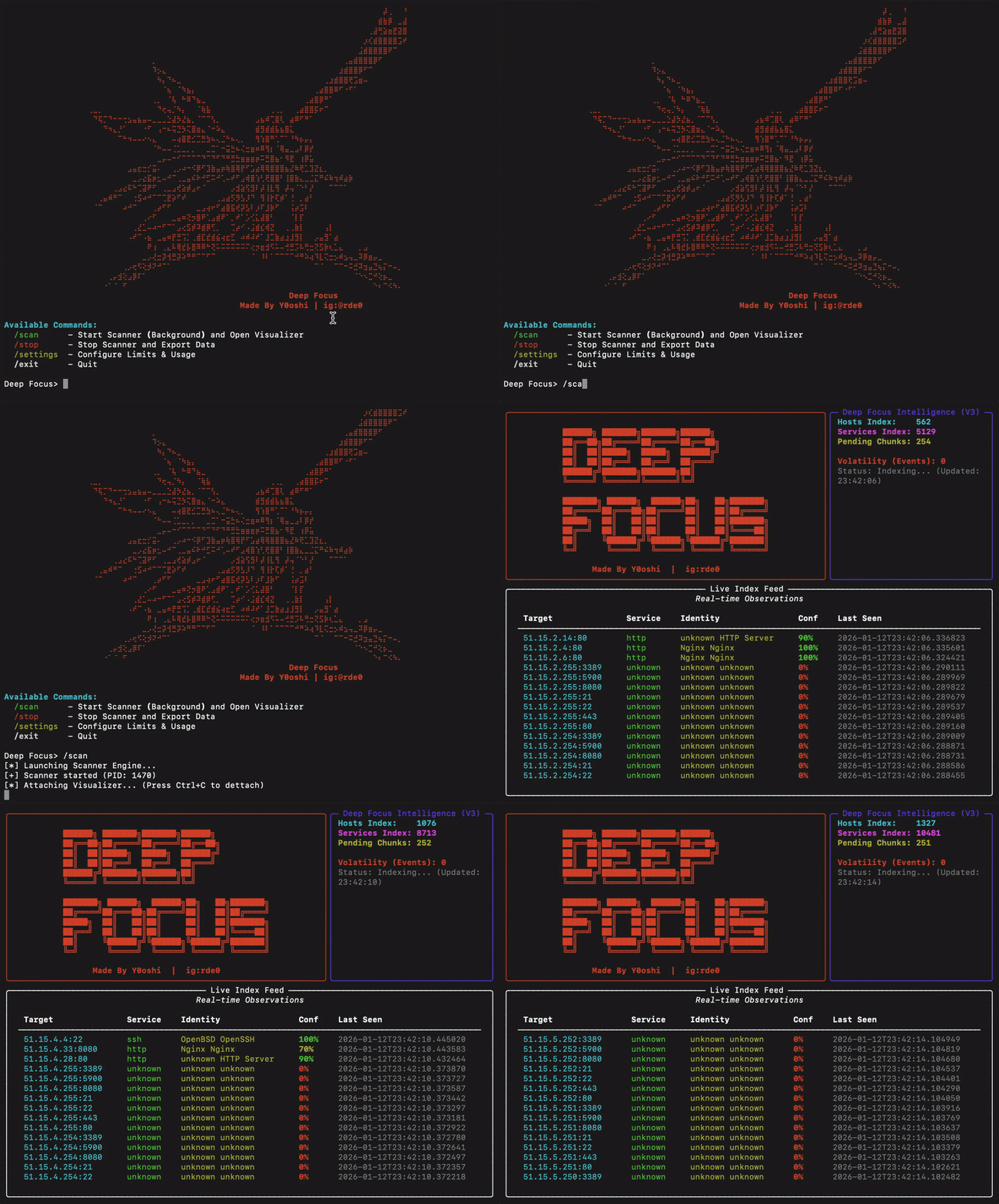
Table of Contents
- Overview
- Features
- Requirements
- Installation
- Usage
- Configuration
- Understanding Export Logs
- Target Selection Guide
- Troubleshooting
- License
Overview
Deep Focus is an asynchronous network scanner designed for large-scale service discovery. It performs intelligent probing of common network services and provides detailed authentication status information for each discovered service. You can consider it your personal mini Shodan.
The tool is optimized for passive cooling systems (such as Apple M-series laptops) with built-in thermal management that automatically throttles scanning when system load is high.
Key Capabilities
- Scans IP ranges for open services (HTTP, FTP, SSH, VNC, RTSP, RDP)
- Identifies authentication requirements for discovered services
- Fingerprints service types and vendors
- Exports actionable intelligence in structured format
- Manages system resources to prevent overheating
Features
Service Probes
| Service | Port | Detection Capabilities |
|---|---|---|
| HTTP/HTTPS | 80, 443, 8080 | Server type, TLS cipher, cert issuer, self-signed detection |
| FTP | 21 | Anonymous access detection |
| SSH | 22 | Version, key exchange, ciphers, MACs, host keys |
| Telnet | 23 | Banner grabbing for routers/IoT |
| SMTP | 25, 587 | STARTTLS detection, TLS cipher suite |
| VNC | 5900 | Authentication type (None, Password, TLS) |
| RTSP | 554 | Camera brand, authentication status |
| LDAPS | 636 | TLS cipher, cert info, self-signed detection |
| MQTT | 1883 | Broker access (No-Auth detection) |
| RDP | 3389 | Security mode detection (NLA, TLS, Legacy) |
Authentication Detection
The tool specifically identifies services that may be accessible without credentials:
- VNC: Detects "None" authentication type (passwordless access)
- FTP: Tests anonymous login capability
- RTSP: Identifies cameras without authentication requirements
- MQTT: Sends CONNECT handshake to detect open brokers (No-Auth)
Thermal Management
Built-in governor monitors system load and automatically pauses scanning when thresholds are exceeded, preventing thermal throttling on passively-cooled systems.
Requirements
- Python 3.8 or higher
- macOS, Linux, or Windows
- Network access to target ranges
Installation
Quick Start (Recommended)
Deep Focus comes with automated installers for all major platforms.
Download and Enter Directory:
git clone https://github.com/Y0oshi/Project-Deep-Focus.git
cd Project-Deep-Focus
Run Installer:
- macOS / Linux:
./install.sh - Windows:
.\install.bat
- macOS / Linux:
Launch: Restart your terminal, then type:
deepfocus
That's it! You can now run the tool from anywhere.
Manual Installation (Optional)
If you prefer to configure everything yourself:
- ensure python 3.8+ is installed.
- create a virtual environment:
python3 -m venv venv - activate it:
source venv/bin/activate - install packages:
pip install rich aiosqlite cryptography - run:
python3 deep_focus.py
Usage
Starting the Tool
deepfocus
Available Commands
| Command | Description |
|---|---|
/scan |
Start scanning and open the live dashboard |
/stop |
Stop scanning and export results |
/settings |
Configure scan parameters |
/help |
Show available commands |
/exit |
Exit the application |
Basic Workflow
- Launch the tool with
deepfocus - Configure target network with
/settings(Option 1) - Adjust scan speed if needed with
/settings(Option 3) - Start scanning with
/scan - Monitor progress in the live dashboard
- Press Ctrl+C to detach from dashboard (scanning continues)
- Use
/stopto halt scanning and export results
Configuration
Access configuration menu with /settings:
Option 1: Target Network
Specify the IP range to scan in CIDR notation.
Example: 192.168.1.0/24 (256 IPs)
Example: 10.0.0.0/16 (65,536 IPs)
Option 2: Power Level (10-100%)
Controls thermal limits. Higher values allow more aggressive scanning but increase heat generation.
| Power Level | Max System Load | Recommended For |
|---|---|---|
| 10-30% | Low | Laptops on battery |
| 40-60% | Medium | Normal operation |
| 70-100% | High | Desktop systems with active cooling |
Option 3: Scan Speed (100-1000 threads)
Controls concurrent connection attempts.
| Speed | Threads | Notes |
|---|---|---|
| 100-300 | Conservative | Recommended for home routers |
| 300-600 | Optimal | Best balance of speed and stability |
| 600-1000 | Aggressive | May cause router overload or heat issues |
Warning: Speeds above 600 threads may cause router instability or system overheating.
Option 4: Export Path
Directory where scan results will be saved.
Option 5: Ports
Comma-separated list of ports to scan. Defaults to:
80,443,22,21,8080,5900,554,3389,23,1883,25,587,636
Understanding Export Logs
Each export writes two files with the same timestamp:
deep_focus_export_[timestamp].txt— human-readable reportdeep_focus_export_[timestamp].json— machine-readable array of results
Log Entry Format
Each discovered service is recorded in the text report as:
Target:  192.168.1.100:21
Service: ftp
Details: 220 FTP Server Ready | Auth: [Anonymous Access ALLOWED]
------------------------------
Field Descriptions
| Field | Description |
|---|---|
| Target | IP address and port (ip:port) |
| Service | Identified service type |
| Details | Service banner and authentication status |
Authentication Status Indicators
FTP (Port 21)
| Status | Meaning |
|---|---|
Anonymous Access ALLOWED |
Anonymous login accepted |
Anonymous Access ALLOWED (No Pass) |
Anonymous accepted without a password |
Anonymous Access DENIED (530) |
Anonymous password rejected |
Anonymous User Rejected |
Anonymous user not allowed |
Anonymous User Rejected (550) |
Anonymous login not permitted |
Encryption Required (AUTH TLS) |
TLS required before login |
VNC (Port 5900)
| Status | Meaning |
|---|---|
None (OPEN) |
No password required |
VNC Auth |
Password authentication required |
VeNCrypt (TLS) |
TLS encryption required |
RTSP (Port 554)
| Status | Meaning |
|---|---|
No Auth Required (OPEN) |
Stream accessible without credentials |
Auth Required |
Credentials needed |
Forbidden |
Access denied |
Camera brands are identified when possible: Hikvision, Dahua, Axis, Foscam, Amcrest, Reolink, Ubiquiti.
SSH (Port 22)
| Type | Meaning |
|---|---|
OpenSSH X.X |
Standard OpenSSH server |
Dropbear (Embedded/IoT) |
Lightweight SSH, often on IoT devices |
MikroTik Router |
MikroTik network equipment |
Cisco IOS |
Cisco network device |
RDP (Port 3389)
| Status | Meaning |
|---|---|
RDP (CredSSP/NLA Required) |
Network Level Auth - most secure |
RDP (TLS Security) |
TLS encryption enabled |
RDP (Standard RDP Security) |
Legacy encryption only |
RDP (Legacy/No NLA) |
Old server, no modern auth |
Target Selection Guide
The included targets.json file contains a curated list of high-value IP ranges organized by provider and region. You can open this file to find tested IP ranges for various discovery goals.
Each entry in targets.json includes:
- Provider name
- Description of typical findings
- IP ranges in CIDR notation
Range Categories
| Category | Typical Findings |
|---|---|
| Cloud Providers (Hetzner, OVH, Vultr) | Web servers, dashboards, FTP, VNC |
| Budget Hosting (Contabo) | Forgotten servers, misconfigured services |
| Residential ISPs (Korea, Taiwan, China) | IoT devices, cameras, NAS drives |
Recommended Targets by Goal
| Goal | Recommended Providers |
|---|---|
| FTP/SSH Discovery | Contabo, Hetzner, OVH |
| Camera Discovery | Korea Telecom, Taiwan HiNet, China Telecom |
| VNC Access | Vultr, DigitalOcean, Contabo |
Troubleshooting
Scanner stops responding
The thermal governor may have paused scanning. Check system load and wait, or reduce power level in settings.
Low discovery rate
- Verify target range has active hosts
- Check network connectivity
- Some ranges may be heavily firewalled
Router becomes unstable
Reduce scan speed to 300-400 threads. High thread counts can overwhelm consumer routers.
Permission errors on export
Verify the export path exists and is writable.
License
This tool is provided for authorized security testing and network administration only. Users are responsible for ensuring compliance with applicable laws and regulations.
Author
Made by Y0oshi | Instagram: @rde0
Explore related projects
trimstray/the-book-of-secret-knowledge
A collection of inspiring lists, manuals, cheatsheets, blogs, hacks, one-liners, cli/web tools and more.
258,310 starsHack-with-Github/Awesome-Hacking
A collection of various awesome lists for hackers, pentesters and security researchers
125,464 starsswisskyrepo/PayloadsAllTheThings
A list of useful payloads and bypass for Web Application Security and Pentest/CTF
82,661 starscaddyserver/caddy
Fast and extensible multi-platform HTTP/1-2-3 web server with automatic HTTPS
79,027 stars