
WuKongOpenSource/Wukong-AICRM
WuKongOpenSource/Wukong-AICRM has 2,263 GitHub stars and 365 forks. GitHot measured +3 stars in 24 hours and +11 in 7 days. Last checked 2026-11-11 10:58 UTC. Last push 2026-10-09.
开源 AI CRM,Salesforce 开源替代 + ChatGPT 式 AI 助手:客户管理、知识库查询、任务执行,全程对话完成。Open-source AI CRM and Salesforce alternative powered by conversational AI.
Measured star growth
- in 24h
- +3
- in 7 days
- +11
- in 15 days
- Update delayed
- in 1 month
- Update delayed
Net star changes over overlapping periods, not daily totals. Missing measurements are left blank. Stars measure attention, not software quality.
docs/i18n/README.en-US.md
Original
Wukong AICRM
Salesforce + ChatGPT: AI-enabled CRM for sales, customer success, and business execution


Live Demo | Quick Start | Features | Community | 中文 | English
| Quick links |
|---|
| Try It Now | Features | Screenshots | Demo Scenarios | Architecture | Quick Start | Configuration |
English Edition
Wukong AICRM is a modern CRM platform that combines customer records, communication history, task scheduling, knowledge base, and AI-assisted operations into one workflow. It helps teams improve response speed, collaboration, and sales execution quality.
Try It Now
Wukong AICRM is available as a cloud demo and local install.
| Experience | Address / Account | Notes |
|---|---|---|
| Live Demo | https://www.72crm.ai/ | Register a cloud account to try it |
| Trial Account | Create a new account on the cloud platform | For testing and evaluation |
| Help & Discussion | Community Forum | Report issues and share ideas |
Tip: The public demo contains sample data, so you can log in directly to try core features.
Features
| Module | Core Value |
|---|---|
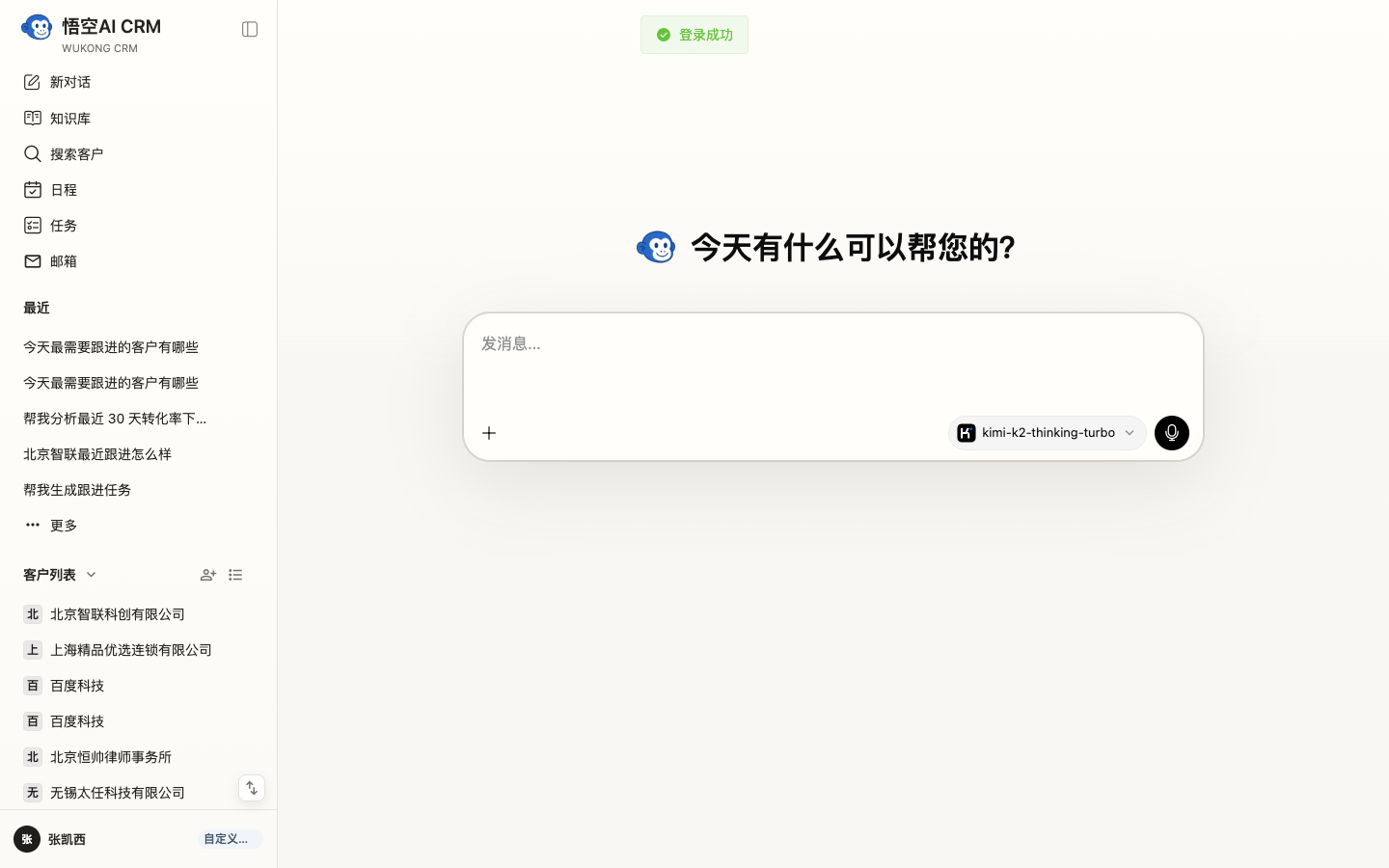
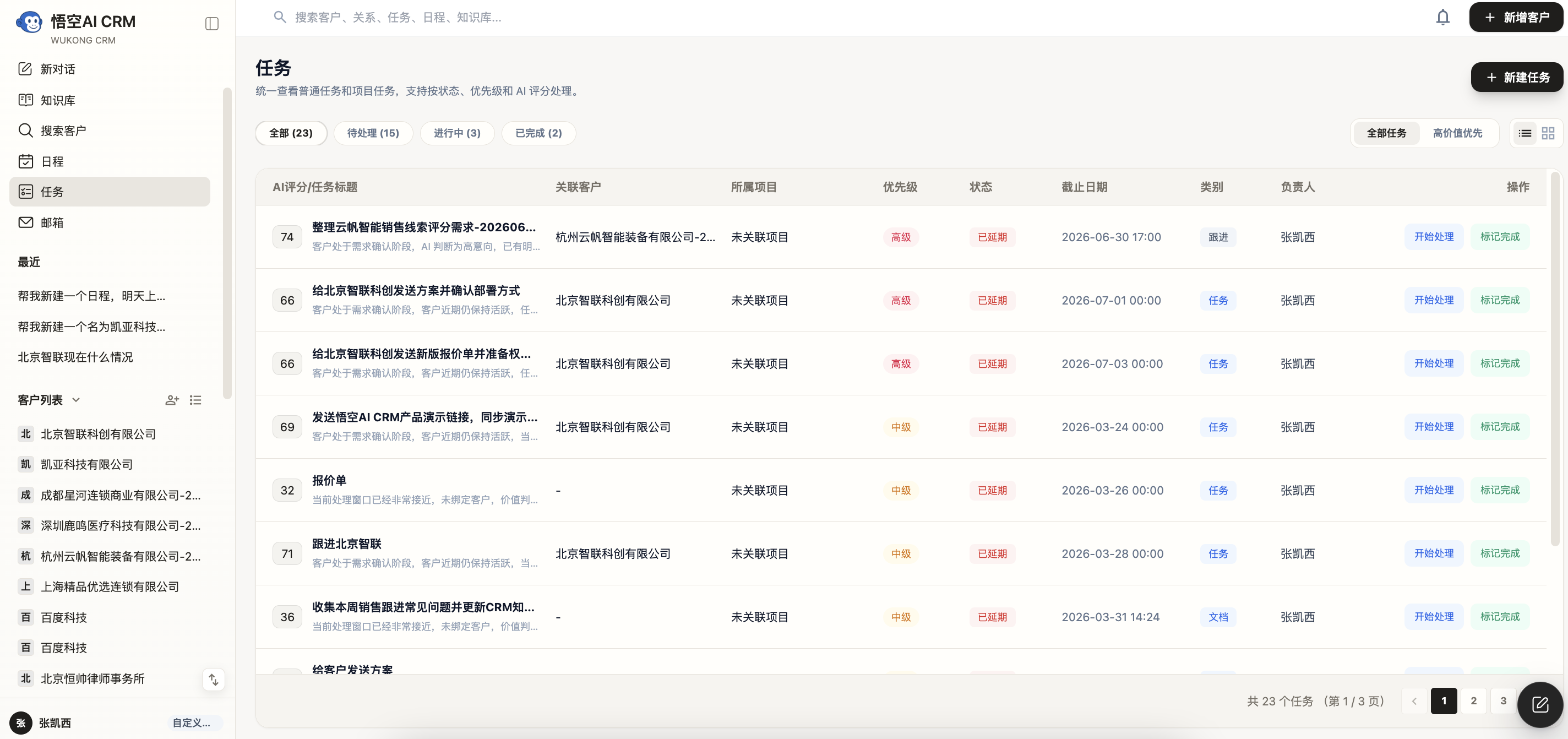
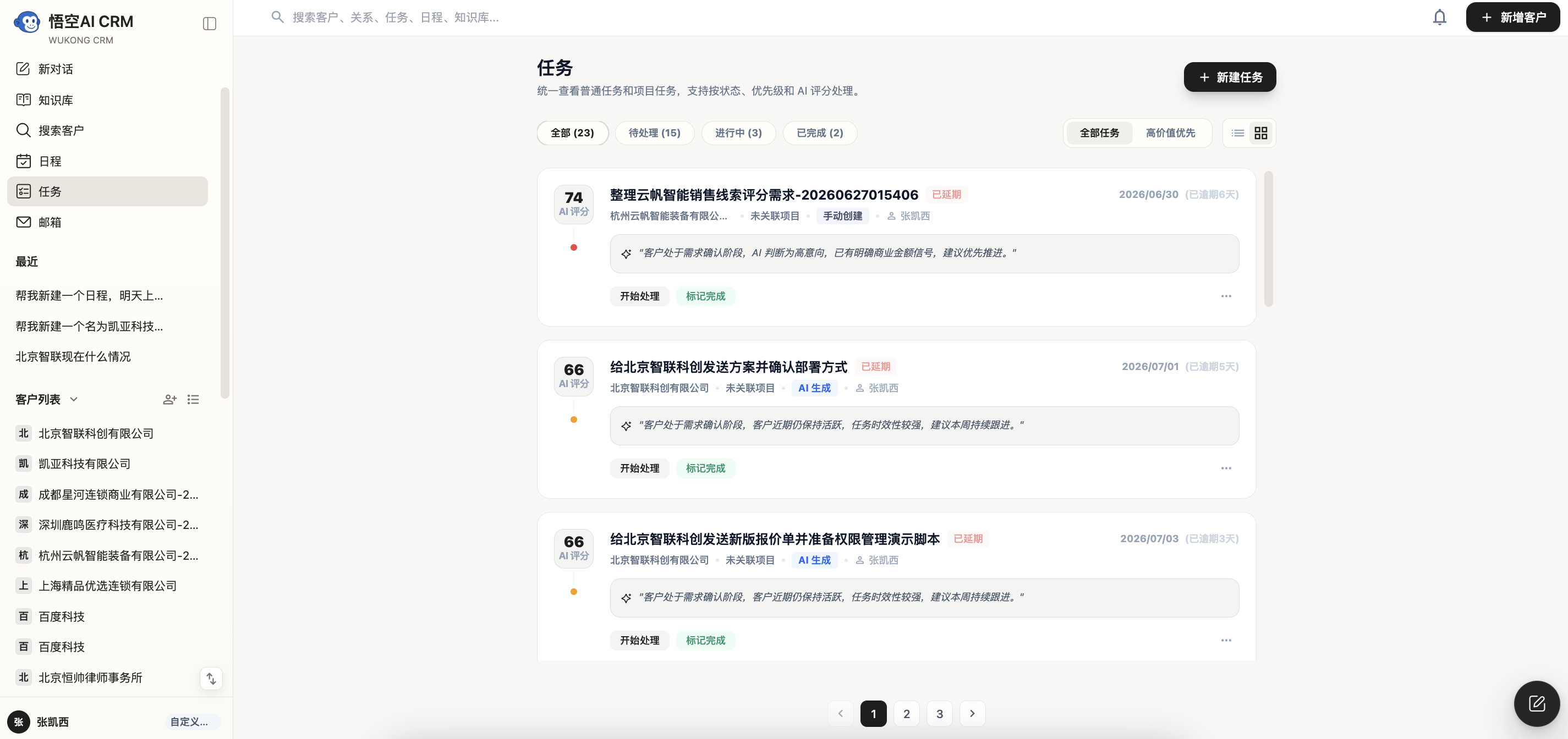
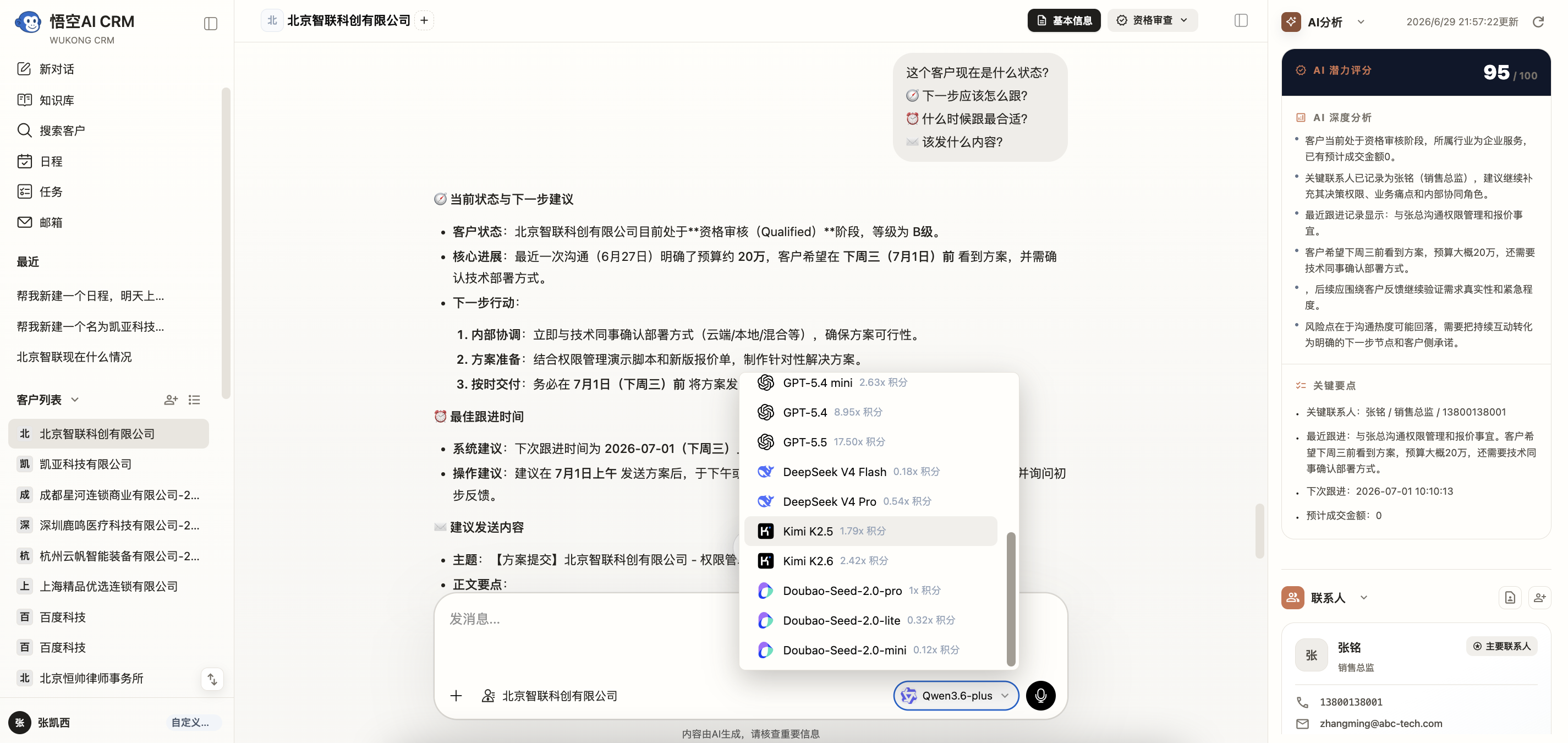
| AI Assistant | Ask business questions, get guidance, and execute actions from a unified conversation entry. |
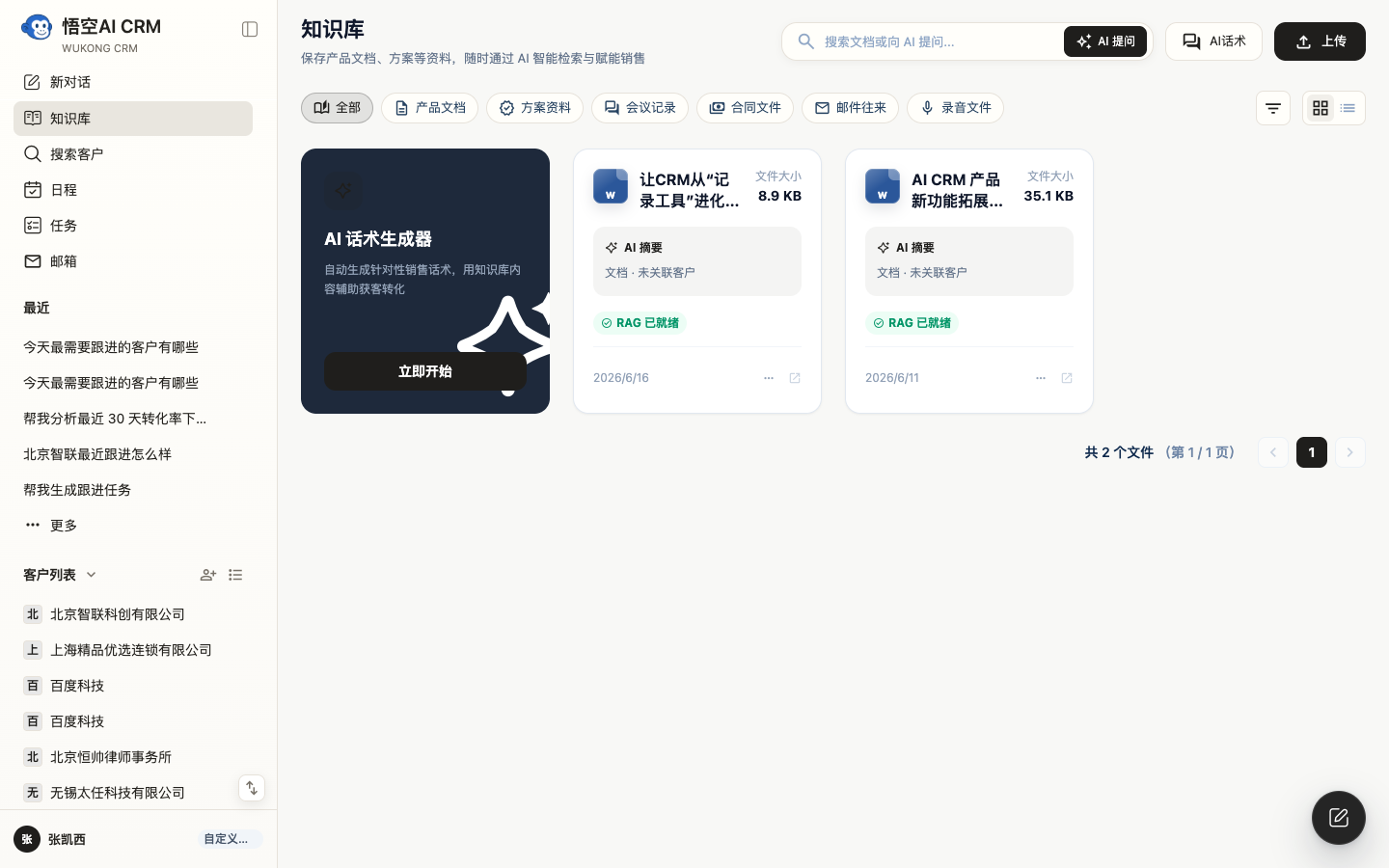
| Knowledge Base + RAG | Upload manuals, contracts, meeting notes, and reuse documents for accurate Q&A and summaries. |
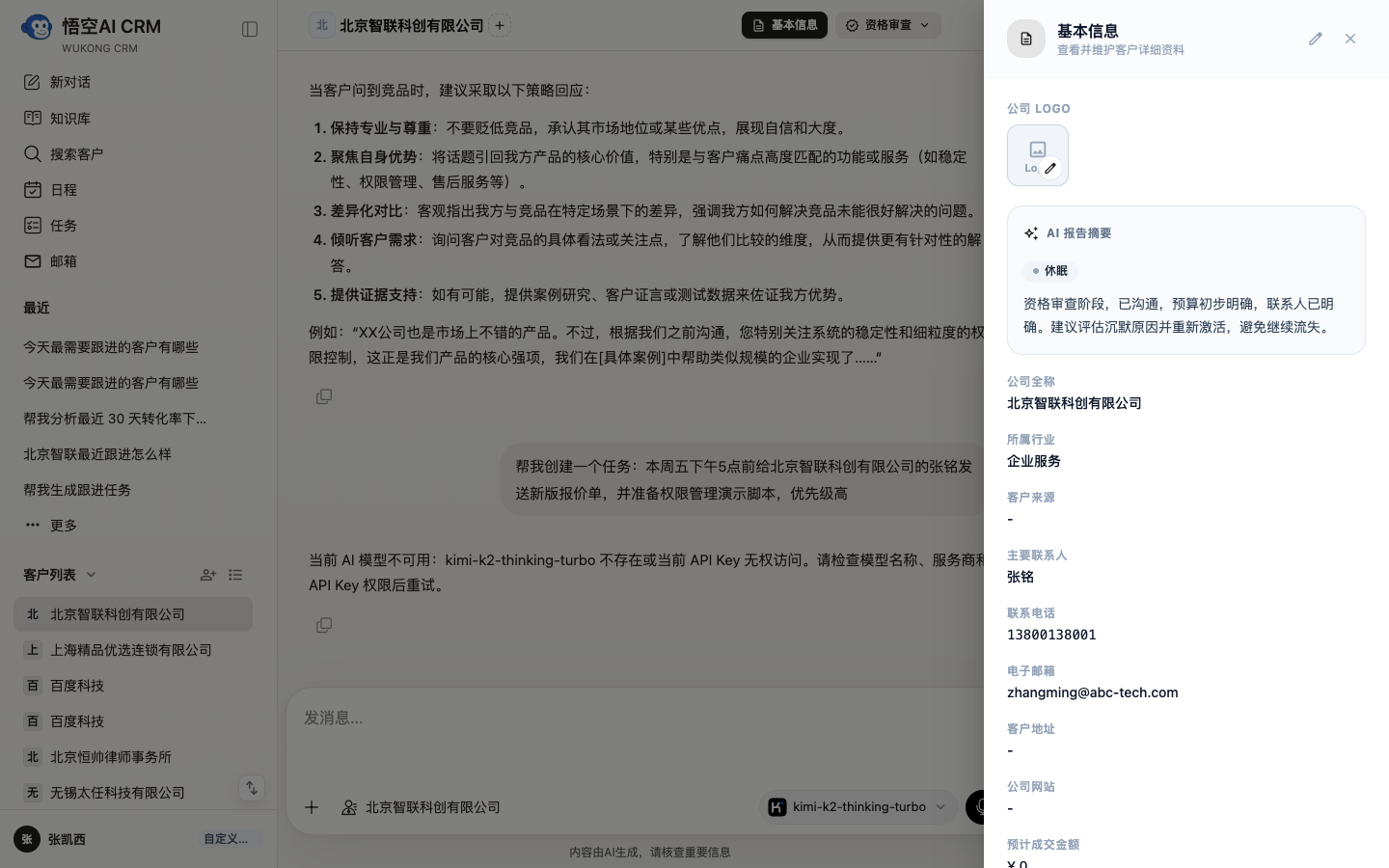
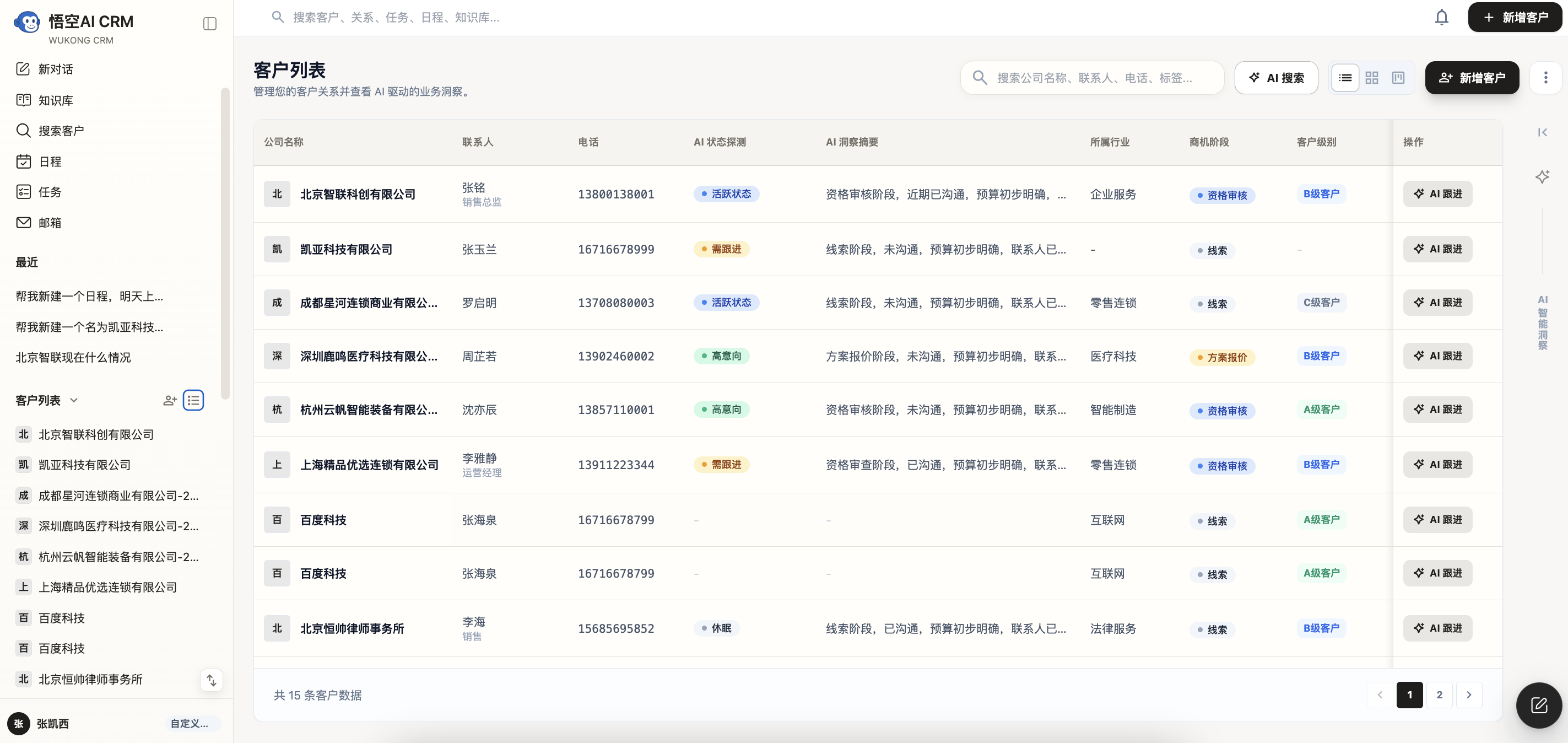
| Smart Customer Management | Centralize customer information, contacts, follow-ups, and automatically surface intent signals. |
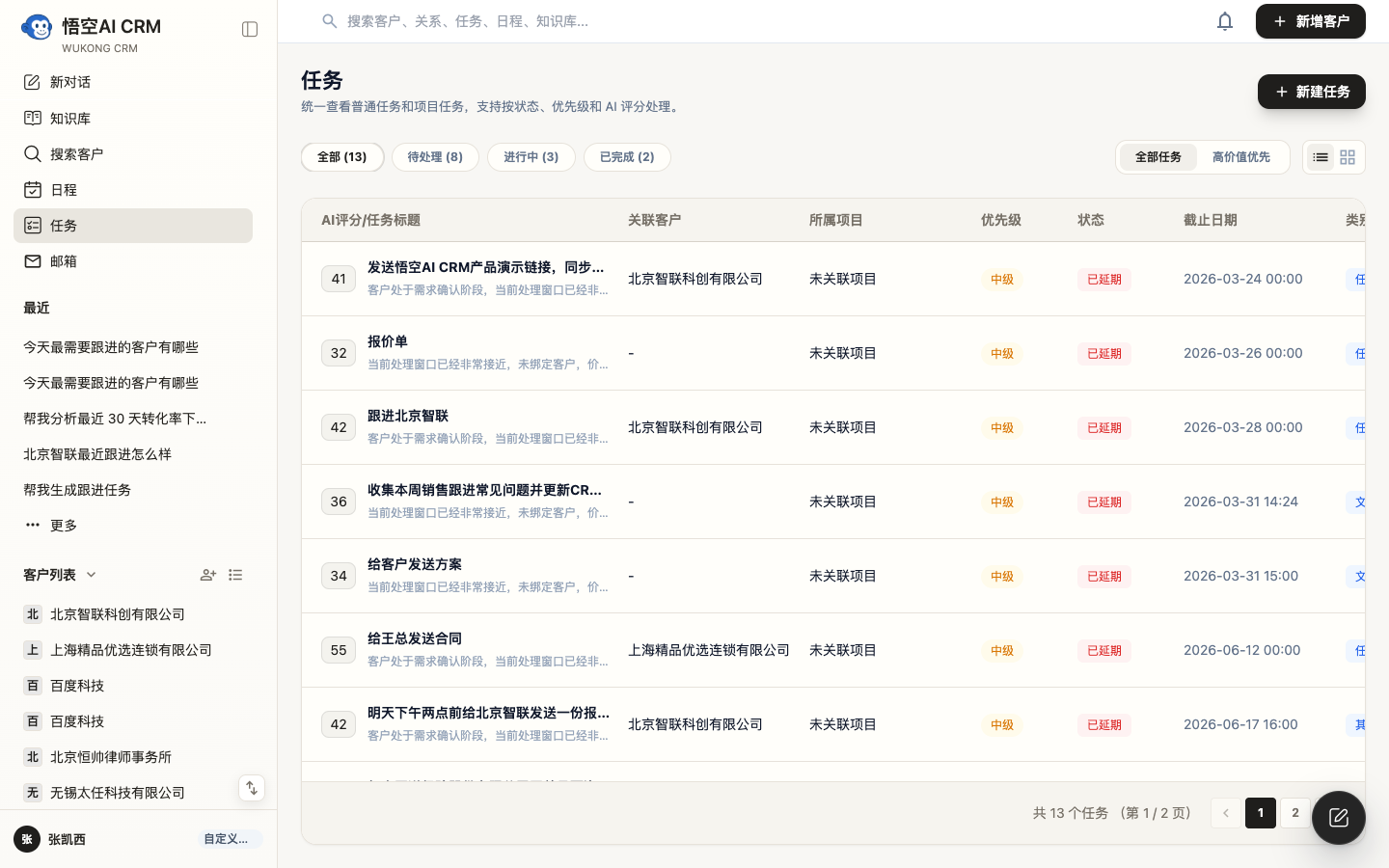
| AI Task Automation | Convert conversations into structured tasks with priorities, reminders, and owners. |
| Team Collaboration | Sync customer updates, task assignments, and knowledge in real time across teams. |
Technology Stack
- Backend: Java 21 + Spring Boot 3.x + Spring AI + PostgreSQL + Redis + MinIO
- Frontend: Vue 3 + TypeScript + Element Plus + Tailwind CSS
- Deployment: Docker Compose with full production-ready environment setup
Screenshots
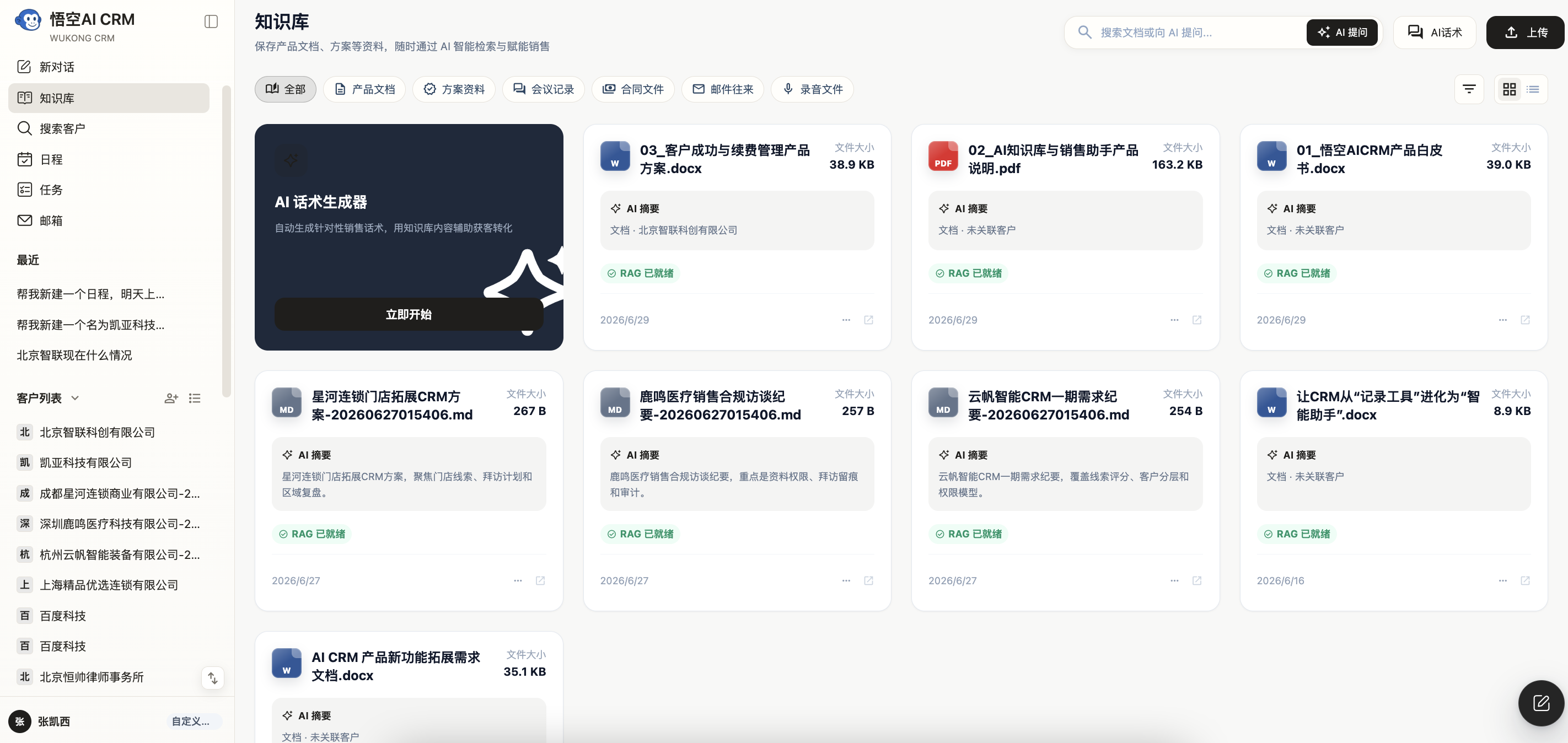
| AI Assistant | Customer Profile |
|---|---|
 |
 |
| Task Management | Knowledge Base |
|---|---|
 |
 |
Demo Scenarios
Sales Follow-Up
View daily priority customers, overdue tasks, and risk alerts at a glance. In customer details, AI summarizes records and follows history to suggest next best actions.
Supervisor Collaboration
Managers can identify stalled opportunities and overdue tasks quickly, then coordinate pre-sales, success, or executives at key points.
Customer Success
Customer success teams can proactively flag risk through interaction frequency and support issues, then arrange follow-ups and internal coordination before escalation.
Knowledge Reuse
Turn high-quality responses, templates, proposals, and winning patterns into reusable company knowledge. New team members can reuse proven wording and playbooks consistently.
System Architecture
AI Assistant connects customer management, knowledge retrieval, and task execution into one unified operating loop.
┌───────────────┐          ┌───────────────────┐
│    Frontend   │◀───────▶│  Backend Service  │
└───────────────┘          └─────────┬─────────┘
                                     │
         ┌───────────────┬───────────┴───────────┬───────────────┐
         │               │                       │               │
  ┌───────────────┐ ┌───────────────┐     ┌───────────────┐ ┌───────────────┐
  │ PostgreSQL DB  │ │     Redis     │     │     MinIO     │ │   AI Gateway  │
  └───────────────┘ └───────────────┘     └───────────────┘ └───────────────┘
Architecture
- Backend: Java 21, Spring Boot 3.x, Spring AI
- Frontend: Vue 3, TypeScript, Element Plus, Tailwind CSS, Vite
- Deployment: Docker Compose for one-click startup
Backend Tech Stack
| Technology | Version | Purpose |
|---|---|---|
| Java | 21 | Programming Language |
| Spring Boot | 3.3.12 | Application Framework |
| Spring AI | 1.0.0 | AI/LLM Integration |
| PostgreSQL | 17 | Main Database |
| MyBatis-Plus | 3.5.7 | ORM Framework |
| Redis | - | Cache & Session |
| MinIO | - | Object Storage |
Frontend Tech Stack
| Technology | Version | Purpose |
|---|---|---|
| Vue | 3.4 | Frontend Framework |
| TypeScript | 5.5 | Type Safety |
| Element Plus | 2.8 | UI Library |
| Pinia | 2.2 | State Management |
| Tailwind CSS | 3.4 | Utility-first Styles |
| Vite | 5.4 | Build Tool |
Project Structure
wk_ai_crm/
  backend/                 # Spring Boot backend project
    src/main/java/         # Java source
    src/main/resources/    # Config files
    pom.xml               # Maven config
  frontend/                # Vue frontend project
    src/                  # Frontend source
    package.json          # npm config
  docker/                  # Docker deployment files
    docker-compose.yaml   # Compose entry
  nginx/                   # Nginx config
  docs/                    # Docs
  LICENSE                  # License
  README.md                # Project README
Quick Start
We recommend Docker one-click deployment first. Use manual source installation for development.
Option 1: Docker One-Click Installation
Requirements:
- Docker
- Docker Compose
git clone https://github.com/WuKongOpenSource/Wukong-AICRM.git
cd Wukong-AICRM/docker
docker-compose up -d
Access the system at http://localhost.
Option 2: Local Source Installation
Requirements:
- JDK 21+
- Node.js 18+
- Maven 3.8+
- PostgreSQL 17
- Redis 6+
- Clone the repository
git clone https://github.com/WuKongOpenSource/Wukong-AICRM.git
cd Wukong-AICRM
- Start backend
cd backend
mvn clean install
mvn spring-boot:run
Backend runs at: http://localhost:8088
API docs: http://localhost:8088/doc.html
- Start frontend
cd frontend
npm install
npm run dev
Frontend runs at: http://localhost:5173
Then update backend/src/main/resources/application.yml for database, AI key, and required services.
Configuration Guide
Primary configuration file: backend/src/main/resources/application.yml
Database
spring:
  datasource:
    url: jdbc:postgresql://localhost:5432/wk_ai_crm
    username: postgres
    password: your_password
Redis
spring:
  data:
    redis:
      host: localhost
      port: 6379
      password: your_password
      database: 7
AI Service
spring:
  ai:
    openai:
      api-key: your_api_key
      base-url: https://api.openai.com/v1/
      chat:
        options:
          model: gpt-4
MinIO
minio:
  enabled: true
  endpoint: http://localhost:9000
  access-key: minioadmin
  secret-key: minioadmin
  bucket: ai-crm
WeKnora
weknora:
  enabled: true
  base-url: http://localhost:8080/api/v1
  api-key: your_api_key
  knowledge-base-id: your_kb_id
API Docs
After the backend starts:
http://localhost:8088/doc.html
FAQ
Q: Which AI models are supported?
A: Any OpenAI-compatible API model is supported, including OpenAI GPT, DeepSeek, Ollama and others. Configure your model provider and API key in Backend -> System Settings -> API/AI.
Q: Is data safe for commercial use?
A: The system can be fully self-hosted. Customer, task, and interaction data are all stored in your own infrastructure.
Q: How to get help?
A: Use our Community Forum or create an issue in GitHub.
Roadmap
- AI assistant workflow enhancement
- More AI task automation and prioritization
- Automated AI email drafting
- OAuth-based external integrations
- Enhanced data migration tools
- More modules and performance upgrades
Welcome Contributions
- Report issues via GitHub Issues
- Submit pull requests
- Improve docs and translations
- Share ideas in the community
Useful Links
- Official Website: https://www.72crm.com/
- Product Site: https://www.72crm.ai/
- Download: https://www.wukongcrm.com/
- Forum: https://bbs.72crm.com/
- GitHub: https://github.com/WuKongOpenSource/Wukong-AICRM
- Gitee: https://gitee.com/organizations/wukongcrm/projects
License
Wukong AICRM source code is open for learning, research, evaluation, and non-commercial use. Commercial deployment, hosted services, commercial derivative products, plugin/agent marketplace collaboration, and brand usage require separate commercial authorization.
Please read LICENSE, LICENSE.en.md, NOTICE, and TRADEMARKS.md.
Contact Us
If you have suggestions or need enterprise support, you can contact us via Issue or pull request.
Explore related projects
codecrafters-io/build-your-own-x
Master programming by recreating your favorite technologies from scratch.
561,904 starspublic-apis/public-apis
A collective list of free APIs
498,299 starsmorluto/rea
Reverse engineer anything with agents, from app behavior down to native binaries.
453,116 starsopenclaw/openclaw
The AI that really does things. Any OS. Any Platform. The lobster way. 🦞
394,369 stars