
Wranked1/DDNet-AI
Wranked1/DDNet-AI has 55 GitHub stars and 2 forks. GitHot measured 0 stars in 24 hours. Last checked 2026-11-15 15:34 UTC. Last push 2026-11-13.
Measured star growth
- in 24h
- 0
- in 7 days
- Update delayed
- in 15 days
- Update delayed
- in 1 month
- Update delayed
Net star changes over overlapping periods, not daily totals. Missing measurements are left blank. Stars measure attention, not software quality.
About
Бот, который сам играет в блок в DDNet · A bot that plays block in DDNet by itself. Windows, один exe / one exe, RU · EN.
Developer ToolsREADME.en.md
Original
DDNet AI
A bot that plays block in DDNet by itself
It throws the hook, swings the hammer, puts opponents into freeze and gets itself out of it.
Every move is checked in the game's real physics, 25 times a second.
Русский · English · Project page



Quick start · The window · How it plays · Controls · FAQ
Quick start
[!CAUTION] Official DDNet AI builds are distributed only through this repository and its GitHub Releases. Builds from Telegram, Discord, file-sharing sites, or other repositories are unofficial and may be modified by third parties. If you did not get the file here, do not run it. Releases publish
SHA256SUMS.txt; verify the hash before running.
- Download
ddnet-ai.zipfrom the latest release and unpack it anywhere. - Double-click
DDNet AI.exe.
Nothing else to install: the window and Node.js are inside. The window restarts the bot if it falls over, and keeps it updated.
[!NOTE]
DDNet AI.exeis not code-signed, so the first time Windows may show "Windows protected your PC". Click "More info", then "Run anyway".
The bot asks for its name, clan and skin, then goes to play. The server field can stay empty: the bot then joins the liveliest block server without a password by itself, and moves on when that one empties. The answers are saved in settings.json, and next time it joins the server by itself.
The window speaks English or Russian: it follows the system, and the language is also a setting (Settings, App, Language). The bot's page, its replies and its console follow the window.
Linux and macOS
Linux (x86_64): the window is here too, and Node.js does not have to be installed.
- Download
ddnet-ai-linux.tar.gzfrom the latest release and unpack it:tar xzf ddnet-ai-linux.tar.gz. - Run
./"DDNet AI.sh"in theddnet-aifolder (if it does not run, for example after an older updater copied it without the executable bit, runchmod +x "DDNet AI.sh"once or start it assh "DDNet AI.sh"). To get DDNet AI into the applications menu, run./"DDNet AI.sh" --install-desktoponce; theddnet-ai.desktopfile in the folder also opens with a double-click, but GNOME may ask you to "Allow Launching".
The window updates with the bot, as on Windows; if a new version asks for another Electron, DDNet AI.sh downloads it at launch. If the kernel does not allow Chromium's sandbox (Ubuntu 24.04, for one), the script starts the window without it: the window opens only its own pages and the bot's page on 127.0.0.1. The tray icon shows where there is a notification area (KDE, XFCE, GNOME with the AppIndicator extension); without one the close button closes the window. Under Wayland the global pause key may not work, and the window has a pause button. Starting with the system is not supported on Linux yet.
Without the window, in a console (a headless server, macOS): install Node.js 24 or newer and run ./run.sh in the bot's folder. The bot's page opens in the browser at http://localhost:7777, and you can type commands in the console. The desktop window is not built for macOS yet.
The window
 |
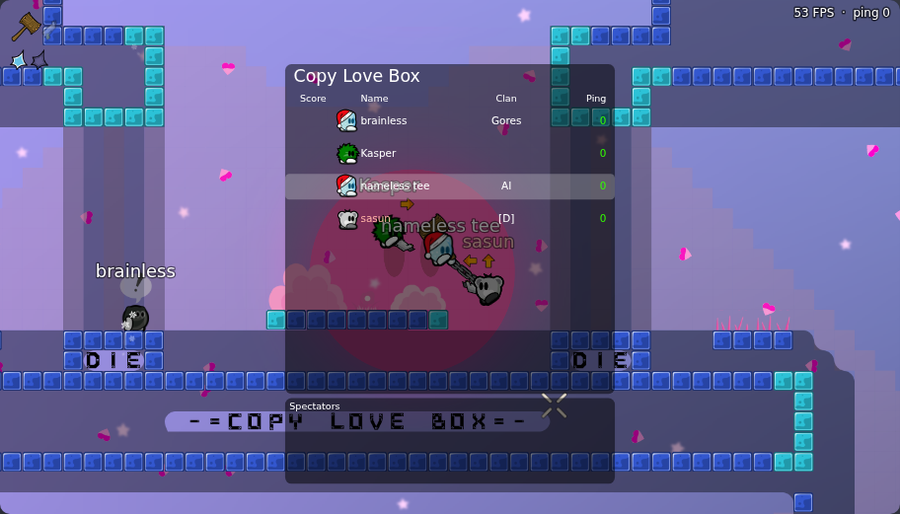 |
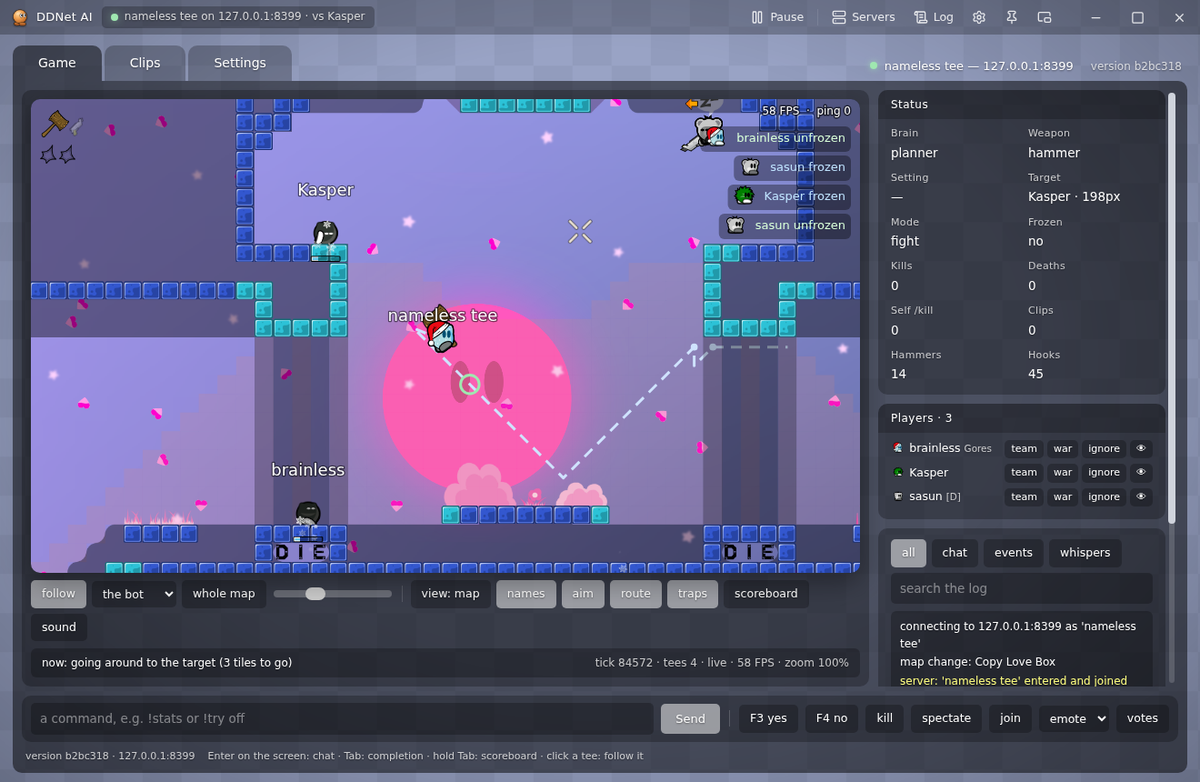
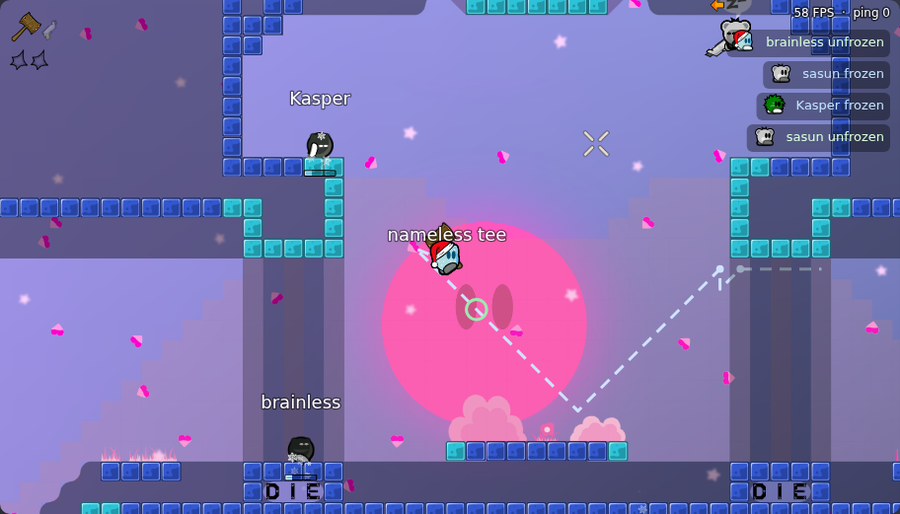
| The game in DDNet's graphics: skins, hook, freeze, names over the players | Scoreboard, freeze feed, ping |
 |
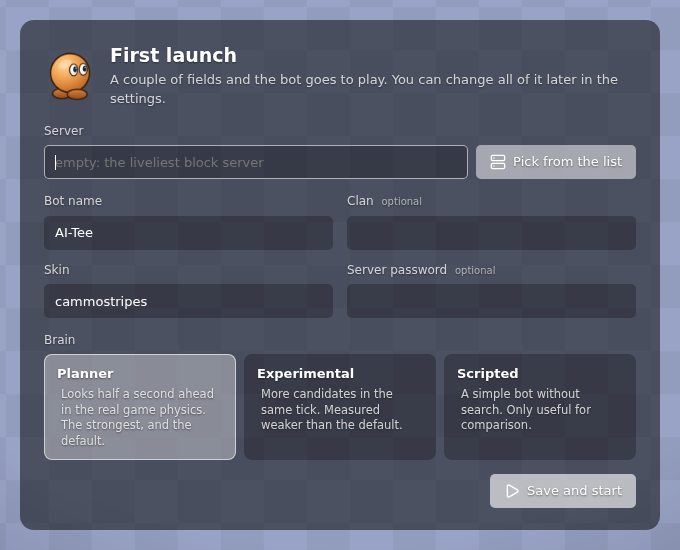 |
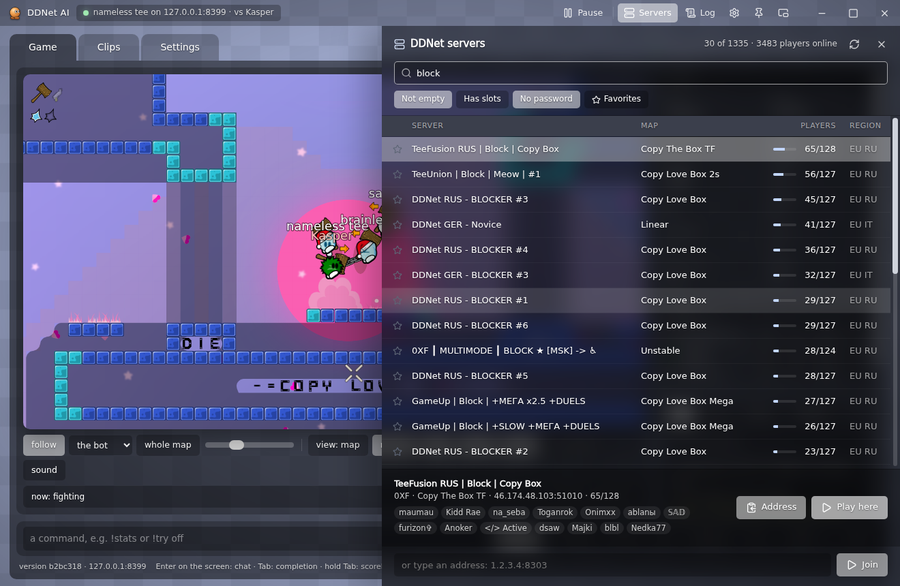
| DDNet servers, searchable by map, mode and player name | First launch: a couple of fields and the bot goes to play |
- The game as in the client. The map, skins, hook, hammer and emotes are drawn with the graphics of your own DDNet install. The camera follows the bot or any player.
- Servers. The whole DDNet list with search, filters and favorites. "Play here" moves the bot to the chosen server.
- Pause from anywhere. From the window, the tray, the taskbar thumbnail and with Ctrl+Shift+F9 from any program, even from the game itself.
- Team, war and ignore. Every player on the server has buttons: "team" (the bot leaves them alone), "war" (it always goes for them), "ignore" (it neither touches nor answers them). The same lists as
!friend,!warand!ignore. - Keys for the bot. F3 and F4 vote for it, and buttons make it
/kill, go to the spectators, show an emote or call a server vote. - Mini mode. A small window on top of everything, to watch the bot while you play yourself.
- Log and notifications. The bot disconnected, came back, updated: the window tells you.
- A bug report. "Collect a bug report" puts the clips, map memory and the demos you pick into one zip on the desktop. The server password stays out of it.
- Proxies. In Settings, the Server section, each bot can have its own SOCKS5 proxy (it has to be SOCKS5 with UDP: HTTP proxies do not carry the game), so the two bots join from different addresses.
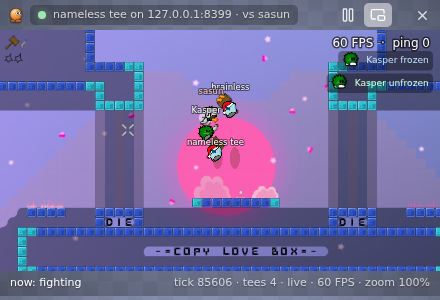
Mini mode over the game
How it plays
The bot keeps its own copy of DDNet 20 physics and on every step runs dozens of options half a second ahead in it: where to run, when to jump, where and when to throw the hook, when to hit. It picks the one after which the opponent is closer to freeze and the bot itself is further from it.
| Hooks from a distance | throws the hook from afar, like strong players do, instead of walking up close |
| Holds and drags | leads the opponent on the hook to the freeze and finishes with the hammer |
| Minds its ping | rolls the world forward by its own delay, counting the keys already on their way to the server |
| Picks its target | does not stick to someone already frozen when a free one is nearby |
| Gets out by itself | if it is stuck in freeze and nobody saves it, it does /kill |
[!NOTE] The bot does not look at the screen and presses nothing for you. It is a separate player: it joins the server by itself, like a normal client, and you can play DDNet on the same computer at the same time.
Controls
| Keys | What they do |
|---|---|
| Ctrl+Shift+F9 | pause and resume from any program (can be changed in the settings) |
| F3, F4 | vote yes / no for the bot, while the bot's window is focused |
| Esc | close the servers or settings panel |
| double-click the title bar | maximize the window |
Bot commands
Typed into the window's command line or into the console. They never reach the game chat. Anything typed without ! the bot says in the chat under its own name.
| Command | What it does |
|---|---|
!stop, !go |
stop / carry on |
!mode fight, passive, hold |
fight / touch nobody / hold the position |
!target <name>, !target - |
fight only this player / clear it |
!war <name>, !friend <name>, !ignore <name> |
always hit / never touch / never touch and never answer |
!clanwar <clan>, !clanfriend <clan> |
the same by clan |
!home <x> <y> |
where to go back to when there is nobody to fight |
!wb auto, !wb left, right, off |
hold the wayblock on Copy Love Box: it takes the side with fewer players, keeps it and throws whoever comes in into the freeze; !wb with no word shows the current state |
!duel on, off, auto |
a 1 on 1 duel: no WB and no walks; auto turns it on after an accepted duel |
!style default, wb, duel |
the window's three ways to play: as usual, WB, duel |
!d <command> |
a command to the second bot (the dummy), e.g. !d wb left |
!goto tele, !goto <x> <y>, !goto <name> |
walk to the teleporter, to a point or to a player (following them until it gets there) |
!clip [note] |
save the last 30 seconds of the game to a file |
!stats, !where |
counters / where the bot is and whom it fights |
!emote <name> |
show an emote |
!yes, !no, !votes, !vote <name> |
vote like F3 / F4, list the server's votes, call one |
!spec, !join |
go to the spectators / back into the game |
!kill, !reset |
kill itself and respawn |
!lang en, !lang ru |
the language of the console and the bot's page |
!quit |
quit |
From a phone
The bot can stay on the computer while you watch and control it from a phone: the bot's page opens in the phone's browser over Wi-Fi, with the game, the menu and the settings, as on the computer.
- Turn on "Access from the local network" on the bot's page: tab "Settings", card "From a phone" (or in the window, section "Bot", and restart the bot; or start with the
--lanflag; insettings.jsonit is"lan": "on"). It is off by default. - The same card on the bot's page shows an address like
http://192.168.1.5:7777/, a QR code and a six-digit code. The phone and the computer must be on the same network. - Open the address on the phone (or point the camera at the QR) and enter the code. The code is entered once: the phone stays signed in until the bot is restarted or the code is replaced with "New code".
The bot listens only on the network's private addresses (10.x, 172.16-31.x, 192.168.x), nothing opens from a phone without the code, and five wrong codes in a row close the sign-in for a minute. Turn it on only on a home network: on someone else's Wi-Fi anyone who sees the address can try codes. The addresses are found at start: if you change network, restart the bot. VPN adapters (WireGuard, OpenVPN, Tailscale and the like, by name) are skipped so the page does not open to everyone on the VPN. Twenty wrong codes in ten minutes (from any devices) close the sign-in for ten minutes; after fifty wrong ones the bot changes the code by itself (phones already signed in stay). Turning "Access from the local network" off signs every phone out. The connection is plain http, unencrypted: on an open Wi-Fi the code and the page can be seen by anyone nearby. If the page does not open, check that the Windows firewall is not blocking port 7777 (on the first start it asks about Node.js: allow it on private networks).
Updates
Nothing to do. The bot checks for a new version when it starts and every five minutes after, downloads it and restarts by itself, and the window updates with it. Settings, clips and map memory are left alone.
FAQ
The bot jumped into freeze by itself or plays strangely. How can I help?
Click the tray icon and choose "Collect a bug report" (or Settings → "About" → "Collect a bug report"). A zip appears on the desktop: the clips that show what went wrong, the map memory, the window's log and settings.json without passwords, proxies and keys; you pick the demos yourself. If you recorded a demo, add it too. Attach the zip to a GitHub issue and say the map, the ping and what happened. While the bot plays, !clip saves the last 30 seconds into runs/clips.
Windows says "Windows protected your PC" (SmartScreen)
DDNet AI.exe is not code-signed, so SmartScreen warns on the first launch. Click "More info", then "Run anyway". Before that, make sure you got the file from here, from GitHub Releases, and check its hash: in PowerShell run Get-FileHash .\ddnet-ai.zip -Algorithm SHA256; the result has to match the line in SHA256SUMS.txt of the same release. If the hashes differ, do not run it.
An antivirus flags the file
The program is unsigned and carries Electron and Node.js, which antiviruses sometimes find suspicious. Check the hash first (see above): if it matches, the file is genuine. If not, delete it and download again from the releases page. The source is open and can be read. If the hash matches and the antivirus still blocks it, allow the bot's folder in its exclusions.
The bot joined the server but stands still
Look at the status line on the bot's page (in the window it is at the bottom): "no target" means there is nobody to fight. The bot leaves alone:
- players who pressed nothing for more than 10 seconds (AFK), and those in the spectators or paused;
- friends (
!friend, the "team" button) and ignored players; - everybody, if the mode is
!mode passiveor!mode hold, if you paused it (Ctrl+Shift+F9,!stop), or if!targetnames a player who is not around (the bot hits only that one).
On a map with a WB, when there is nobody to fight the bot goes to the WB and holds it (with !home set it does not hold the WB and goes back to that point). If "PC can't keep up" is lit in the status line too (see the ping answer below), the bot just cannot think fast enough.
"This map has no WB"
The bot holds the WB (wayblock) only on Copy Love Box and its copies with the same hall (JoniTee, Copy The Box TF, Copy Love Box 2s, Mega and some others). The !wb command tells you what this map has. A map with the same name but another version is checked by its tiles (the hall, the tube with its swing, the exit), and if something differs the bot does not hold it and says so in the log. On every other map the bot just fights wherever the game is. !wb off, !wb left, !wb right and !wb auto set the side.
What ping is shown, and why the bot lags
The ping on the scoreboard and in the window is what the server reports about the bot's connection. The bot rolls its world forward by its own measured delay (the ping when it has no measurement), but by no more than 6 ticks (120 ms): beyond that, prediction turns into invention. If the ping is steadily higher, the cause is the network (check Wi-Fi, a VPN, a proxy) or the server itself. If the ping is huge (hundreds, a thousand), the bot stands still and "PC can't keep up" is lit on the page, the processor is too slow: turn on "Mode for a weak PC" (the tick box on the bot's page, or !low on). The bot never turns it on by itself, and if "Strong mode" is on and the bot cannot keep up, turn that off (!strong off).
The proxy does not work
It has to be a SOCKS5 proxy with UDP support (UDP ASSOCIATE): the game runs over UDP, and HTTP proxies, SOCKS4 and many "SOCKS5 for the browser only" proxies do not carry it. The bot writes "The proxy does not support UDP" or "A SOCKS5 proxy is needed" in the log. The format is socks5://user:password@host:port or host:port. The proxy password does not go into the bug report.
Linux: no tray icon, the window does not open
The tray icon shows only where there is a notification area (KDE, XFCE, GNOME with the AppIndicator extension). Without one the close button closes the window together with the bot, and pause is a button in the window. If Chromium's sandbox is not allowed (Ubuntu 24.04, for one), DDNet AI.sh starts the window without it; you can choose yourself with a variable: DDNET_AI_SANDBOX=0 ./"DDNet AI.sh" for no sandbox, DDNET_AI_SANDBOX=1 to keep it. If the file does not run, chmod +x "DDNet AI.sh". More in "Linux and macOS" above.
The phone does not open the bot's page
Check in order: is "Access from the local network" on (it is off by default; if you turned it on in the window, restart the bot, and look for the address and QR code on the bot's page: "Settings", card "From a phone"), are the phone and the computer on the same network (not a guest Wi-Fi, not mobile data), is the address typed with its port (http://192.168.x.x:7777/, plain http), and is the Windows firewall blocking port 7777 (allow Node.js on private networks). If you changed network or turned a VPN on, restart the bot: the addresses are found at start. More in "From a phone".
Does it need a graphics card?
No. The bot thinks on the processor, and any graphics card is enough for the window.
A server with a password?
Type the password at the first launch or in the settings. It is kept only on your computer and is cleared when you move to another server.
Where are the settings and recordings?
| Path | What is there |
|---|---|
settings.json |
server, name, clan, skin, language |
runs/clips |
recordings of moments from the game |
runs/memory |
what the bot remembers about maps |
app-win, app-linux |
the window itself (Electron), which DDNet AI.exe opens (Linux: DDNet AI.sh) |
Security
Found a vulnerability: write to [email protected] or use a private GitHub report, not a public issue. There is a bug bounty: rewards up to $500, at the maintainer's discretion; the terms are in SECURITY.md. Reports are accepted in English only.
Support
DDNet AI is free and earns me nothing: I build it in my spare time. If the bot has been useful to you, you can support the project with crypto. It gives me the motivation to keep developing it.
| Network | Address |
|---|---|
| BTC | bc1qpkaeksf84tsmg8ma9thajdr3g07eghe9kedals |
| TON | UQAGz-ZisbbkNcUYxt98RPeZu7zxOfrfKFatfQr0Cn6209kg |
| SOL | 5GKAETatYe2knHJ5FtKpd1w4NgXgR1a5QAz4rBk5gJV8 |
| BSC | 0x295Ed37F5C9f120ce37b511A7e69f2cd0432bB89 |
| TRON | TBJNNRDXoaxNyxktfJoTAD8jcYMt2dJcSS |
| ETH | 0x295Ed37F5C9f120ce37b511A7e69f2cd0432bB89 |
BSC and ETH share one address (EVM networks). Check the network before sending. The wallets are in the window too: Settings → "Support me".
License
GPL-3.0 (see LICENSE and NOTICE). You may run, study and change the bot. Whoever publishes a version of it, changed or not, must name this project as the original and publish their source under the same license. The physics ported from DDNet stays under DDNet's license (zlib), the libraries under their own.