
Wamphyre/oXygen
Wamphyre/oXygen has 54 GitHub stars and 3 forks. GitHot measured 0 stars in 24 hours. Last checked 2026-11-15 08:04 UTC. Last push 2026-09-08.
Measured star growth
- in 24h
- 0
- in 7 days
- Collecting history
- in 15 days
- Collecting history
- in 1 month
- Collecting history
Net star changes over overlapping periods, not daily totals. Missing measurements are left blank. Stars measure attention, not software quality.
About
oXygen is a free and open-source mastering plugin built with C++ and JUCE. The project is focused on a practical mastering workflow: corrective EQ, multiband control, stereo shaping, final loudness, and an automatic Master Assistant that listens to the incoming mix and writes settings into the modules.
Creative & MediaREADME.md
OriginaloXygen Mastering Suite
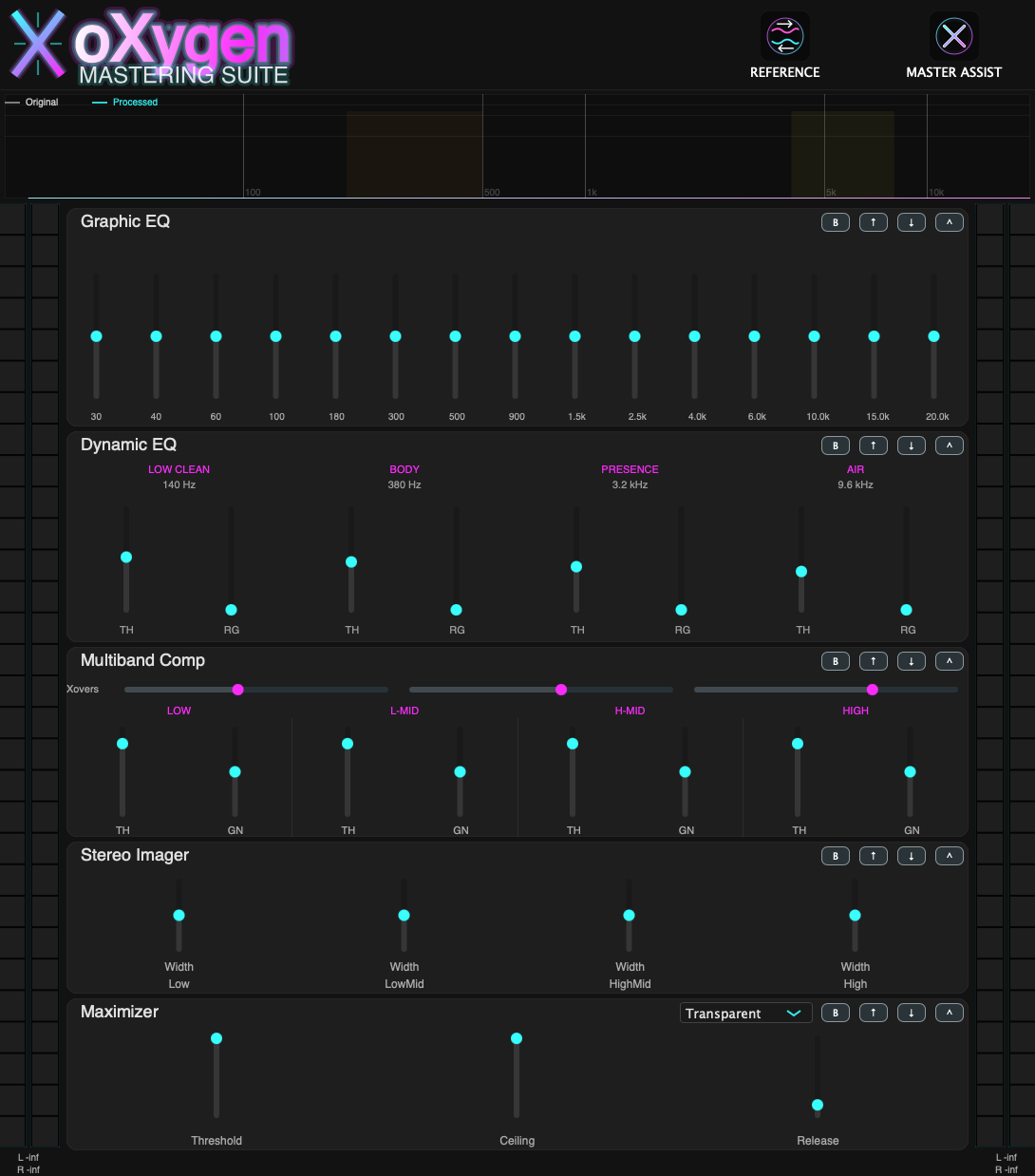
oXygen is a free and open-source mastering plugin built with C++ and JUCE. The project is focused on a practical mastering workflow: corrective EQ, dynamic resonance control, multiband control, stereo shaping, final loudness, an automatic Master Assistant that listens to the incoming mix and writes settings into the modules, and a Reference Match workflow that learns from an external reference file and adapts the rack toward that target.







Index
- Features
- Documentation
- System Requirements
- macOS Requirements
- Windows Requirements
- Linux Requirements
- Build from Source
- Usage
- Usage Guide
- Reference Match
- Manual Control
- Support & Donations
Features
Core Functionality
- Master Assistant: Listens to up to 60 seconds of incoming audio, analyzes tonal balance, dynamics, stereo spread, loudness, and true peak behaviour, then proposes settings for the processing chain.
- Reference Match: Loads an external
WAVorFLACreference, analyzes up to 60 seconds of that file plus up to 60 seconds of your incoming mix, then writes module settings that move the chain toward the reference profile, with strong priority on EQ matching. - 15-Band Graphic EQ: Fixed-band mastering EQ from
30 Hzto20 kHz, with smoothed gain changes and a musical Q contour across the spectrum. - Dynamic EQ: A 4-band dynamic cut stage focused on low cleanup, body control, presence taming, and air smoothing. It can be driven manually or written automatically by both Master Assistant and Reference Match.
- 4-Band Multiband Compressor: Low, Low-Mid, High-Mid, and High bands with stereo-linked detection, hybrid peak/RMS behaviour, and softer knee handling for better glue.
- Stereo Imager: Multiband width control with safeguards intended to keep the low end more mono-compatible and prevent obviously unstable widening.
- Gain Stage: Dedicated trim stage for workflow and level management inside the chain.
- Maximizer: Final loudness processor with hybrid true-peak limiting, internal 4x oversampling, adaptive release,
Transparent/Loud/Safemodes, latency-compensated bypass, and host latency reporting. - Mode-Aware Automation:
Master AssistantandReference Matchnow choose the maximizer mode automatically as part of their suggestion set.
Audio Engine
- Modular Signal Chain: Built on
juce::AudioProcessorGraphand designed around a mastering rack workflow. - Current Module Order:
Graphic EQ -> Dynamic EQ -> Multiband Comp -> Stereo Imager -> Gain -> Maximizer. - Reorder / Bypass / Collapse: Each module can be moved, bypassed, or collapsed from the rack UI. The maximizer mode selector lives in the module header so the rack layout stays compact.
- Original vs Processed Analyzer: The spectrum display overlays the incoming signal and the processed output so tonal changes can be checked visually.
- Mono / Stereo Compatibility: The plugin supports mono and stereo bus layouts and routes the chain coherently through to the final output.
- Single and Double Precision Host Paths: The plugin accepts both float and double precision processing from the host with consistent processing of variable host block lengths.
- Measured Automation: Master Assistant and Reference Match render the proposed pre-limiter rack offline, measure its loudness and reconstructed peak, and use the available headroom before allowing a bounded amount of peak reduction. Quiet mixes can receive substantial clean gain; already hot mixes can be trimmed down.
- Deterministic Analysis: Master Assistant and Reference Match use BS.1770-style K-weighted loudness, gated integration, stereo spectral energy, robust tonal profiles, and reconstructed true-peak analysis.
Fixed in 1.2.1
- Both assistants keep their progress dialog open while processing the captured audio, then show the Apply/Cancel confirmation. Closing the progress dialog programmatically no longer cancels the finished proposal.
- Cancellation interrupts analysis, including true-peak reconstruction and the offline preview, so closing the editor or unloading the plugin does not wait for the full analysis.
- Session guards discard stale modal and worker callbacks; confirmation remains exclusive until Apply or Cancel. Dialog messages and progress values have explicit ownership.
- Regression tests exercise both complete Apply workflows, cancellation, editor closure and processor teardown during analysis. See the 1.2.1 release notes.
New in 1.2.0
- Reference EQ fits the response of the actual 15 overlapping filters, separates tonal differences from playback level, and avoids chasing unsupported or near-silent frequency bands.
- Both assistants calibrate loudness using an offline render of the existing modules. Peak reduction is bounded independently of the clean gain needed by a quiet premaster, with an automatic ceiling of -1 dBFS or lower.
- Phase-matched multiband crossovers keep neutral settings flat in magnitude; stereo safety envelopes and Dynamic EQ transitions no longer depend on the DAW buffer size.
- The maximizer uses an exact sliding minimum instead of scanning its full lookahead window for every oversampled sample. Its three mode characters, 4x oversampling and latency are preserved, with extra internal margin for output reconstruction.
- Analysis runs in a background worker while the meters and editor remain responsive. The rack layout, module identities and saved parameter IDs are unchanged.
Documentation
- User Manual: See
user_manual.pdffor the end-user manual included in the repository. - Manual version: The included PDF describes version 1.0.2. Its editable source is not included in this checkout; use this README and the 1.2.0 release notes for current DSP behavior.
System Requirements
macOS
- Format: VST3
- Minimum macOS Version: Monterey (12.0)
- Status: Current primary development and validation platform
- Build Path: Supported directly with
build.shor manual CMake
Windows
- Format: VST3
- Status: Manual
CMake+Visual Studio 2022 / MSVCbuild path validated; packaging and broader host validation are still in progress - Build Path: Manual
CMake/ Visual Studio workflow with automatic Windows platform detection inCMakeLists.txt
Linux
- Format: VST3
- Status: Validated VST3 build path with
build.shand manual CMake - Build Path:
build.shor manual CMake workflow
Build from Source
Portable builds (important)
By default, CMakeLists.txt now avoids CPU-specific flags (-march=native / /arch:AVX2) so the generated plugin is portable to other machines with the same OS/architecture family.
If you want machine-specific optimizations for local use only, enable:
cmake -B build -DCMAKE_BUILD_TYPE=Release -DOXYGEN_ENABLE_NATIVE_OPTIMIZATIONS=ON
macOS
Dependencies
- Xcode Command Line Tools (
xcode-select --install) - CMake 3.22+
- Git
Build Steps
Clone the repository
git clone https://github.com/Wamphyre/oXygen.git
cd oXygen
Build with the helper script
./build.shOr build manually
cmake -B build -DCMAKE_BUILD_TYPE=Release
cmake --build build --config Release
Artifacts The build places the VST3 bundle in:
releases/oXygen.vst3
Note: if the
JUCE/folder is not present locally, CMake will fetch JUCE automatically during configuration.
Windows
Dependencies
- Visual Studio 2022 with
Desktop development with C++ - CMake 3.22+
- Git
Build Steps
Clone the repository
git clone https://github.com/Wamphyre/oXygen.git
cd oXygen
Configure
cmake -S . -B build -G "Visual Studio 17 2022" -A x64Build
cmake --build build --config ReleaseArtifacts
releases/oXygen.vst3
Note:
CMakenow auto-detects the Windows environment and applies Windows-specific compiler settings automatically. The manual build path has been validated with Visual Studio 2022 + MSVC, but packaging and wider host testing still need more iteration.
Linux
Dependencies
- GCC or Clang with C++20 support
- CMake 3.22+
- Git
- Ninja or Make
- The standard JUCE Linux/X11 development packages for your distribution
Build Steps
Clone the repository
git clone https://github.com/Wamphyre/oXygen.git
cd oXygen
Build with the helper script
./build.shThe script auto-detects Linux, prefers
Ninjawhen available, falls back toUnix Makefiles, and places the final bundle inreleases/oXygen.vst3.Or configure manually
cmake -B build -DCMAKE_BUILD_TYPE=Release
cmake --build build --config Release
Artifacts
releases/oXygen.vst3
WebKit2GTK is not required: oXygen does not use JUCE's embedded web browser.
DSP regression tests
The optional regression target checks exact limiter lookahead equivalence, flat crossover response at 44.1/48/96 kHz, variable blocks and float/double consistency, reference tonal-error reduction, level-independent EQ matching, quiet-source mastering, reconstructed peaks, crest preservation, and invalid/mono input:
cmake -B build-tests -DCMAKE_BUILD_TYPE=Debug -DOXYGEN_BUILD_TESTS=ON
cmake --build build-tests --target oXygenDSPTests
ctest --test-dir build-tests --output-on-failure
For the isolated lookahead benchmark, run build-tests/oXygenDSPTests_artefacts/Debug/oXygenDSPTests --benchmark (use a Release build for representative timing).
Usage
Usage Guide
- Insert oXygen on your master bus. The plugin is mainly intended for stereo mix-bus / master-bus mastering, but it can also be used on stems or individual tracks when needed.
- Feed it representative material. If you plan to use Master Assistant or Reference Match, play the loudest or most information-rich section of the mix rather than a quiet intro.
- Run Master Assist. The plugin enters a listening state, shows a progress window, and captures up to 60 seconds of real incoming audio.
- Confirm the proposal. After the listening pass, oXygen generates suggested settings and asks for confirmation before writing them into the modules, including
Dynamic EQwhen cleanup or resonance control is needed. - Check the analyzer overlay. Use the
OriginalandProcessedspectrum curves to verify what changed instead of judging only by output loudness. - Refine manually. Treat the assistant as a starting point, then fine-tune EQ, compression, stereo width, gain staging, the maximizer mode, and final loudness settings.
- Level-match your decisions. Louder often sounds better at first; compare with care when deciding whether processing is actually improving the mix.
Reference Match
- Click
REFERENCEand load aWAVorFLACfile. - Let oXygen analyze the reference file. The plugin extracts a representative slice of up to 60 seconds from the reference.
- Play your own mix through the plugin. oXygen then listens to up to 60 seconds of the incoming material in real time.
- Confirm the match. After analysis, the plugin proposes a rack state that moves your master toward the reference, with EQ profile matching as the main priority and dynamics, dynamic EQ cleanup, stereo width, and loudness following behind it.
- Refine to taste. Reference Match is intended to get you close to the target quickly; the final EQ, compression, image, and loudness decisions can still be adjusted manually.
Manual Control
- Graphic EQ: Use it for broad tonal correction and enhancement. Remove obvious mud, harshness, or imbalance before pushing top-end shine.
- Dynamic EQ: Use it to catch moving low-mid build-up, upper-mid bite, or overly sharp air bands without applying a constant static cut.
- Multiband Comp: Use it for glue and control, not constant pumping. Small moves usually work better than extreme thresholds.
- Stereo Imager: Widen upper bands carefully. Keep low frequencies conservative if you want safer mono translation.
- Gain: Use this stage to manage level into the maximizer and keep the overall chain under control.
- Maximizer: Use it as the final loudness stage.
Transparentis the most neutral starting point,Loudis for denser modern masters, andSafeis the conservative choice when the mix is already hot or spiky.
Support & Donations
If you find oXygen useful and want to support its development, consider supporting the project:
