
W0rthlessS0ul/nRF24_jammer
W0rthlessS0ul/nRF24_jammer has 1,015 GitHub stars and 103 forks. GitHot measured +3 stars in 24 hours. Last checked 2026-11-11 23:16 UTC. Last push 2026-10-15.
The nRF24 jammer is a powerful tool that requires an ESP32 and configurable numbers of NRF24 modules to assemble. It is designed to create interference, disrupting the normal operation of Bluetooth devices 🔊, BLE technology 📱, drones 🚁, Wi-Fi networks 📶 and Zigbee 📡. Additionally, it features a user-friendly web interface 🌐.
Measured star growth
- in 24h
- +3
- in 7 days
- Collecting history
- in 15 days
- Collecting history
- in 1 month
- Collecting history
Net star changes over overlapping periods, not daily totals. Missing measurements are left blank. Stars measure attention, not software quality.
README.md
Original
🌟 nRF24 Jammer 🌟
Welcome to the nRF24 Jammer repository! 🎉 Dive into the world of RF interference with this unique project based on the ESP32 and nRF24 technology.
📚 Table of Contents
- 🚀 What Can You Do with This?
- 📱 Ported Firmware
- 📟 Supported & Community PCBs
- 📋 List of Components
- 🧑🔧 Let's Get Started with Soldering!
- 🛠️ Build From Source
- 📦 Flash Firmware
- 🎮 Device Control
- 🌐 Web Interface
- 🔌 Serial Interface
- 🎉 Final Outcome
- 🙏 Acknowledgments
- 🤝 Project Supporters
- ❤️ Support the project
- ⭐ Star History
🚀 What Can You Do with This?
This amazing jammer is built on the ESP32 architecture integrated with configurable numbers of nRF24 modules. With its extraordinary capabilities, you can effectively disrupt signals across different technologies including:
- Bluetooth 🔊
- BLE 📱
- Drones 🚁
- Wi-Fi 📶
- Zigbee📡
📱 Ported Firmware
| Device | Repository URL |
|---|---|
| Flipper Zero | FZ_nRF24_jammer |
| LOLIN32 Lite | nRF24_jammer |
📋 List of Components
To bring this project to life, you will need the following components:
nRF24 modules 🛠️
Any nRF24 modules are suitable, but CDEBYTE E01-2G4M27D is recommended
ESP-WROOM-32 ⚙️
16V capacitors rated at 100µF 🔋
128x32 or 128x64 OLED display 📺 (optional)
Tactile button 🔘 (optional)
📟 Supported & Community PCBs
| Preview | Author | Rev | Board README |
|---|---|---|---|
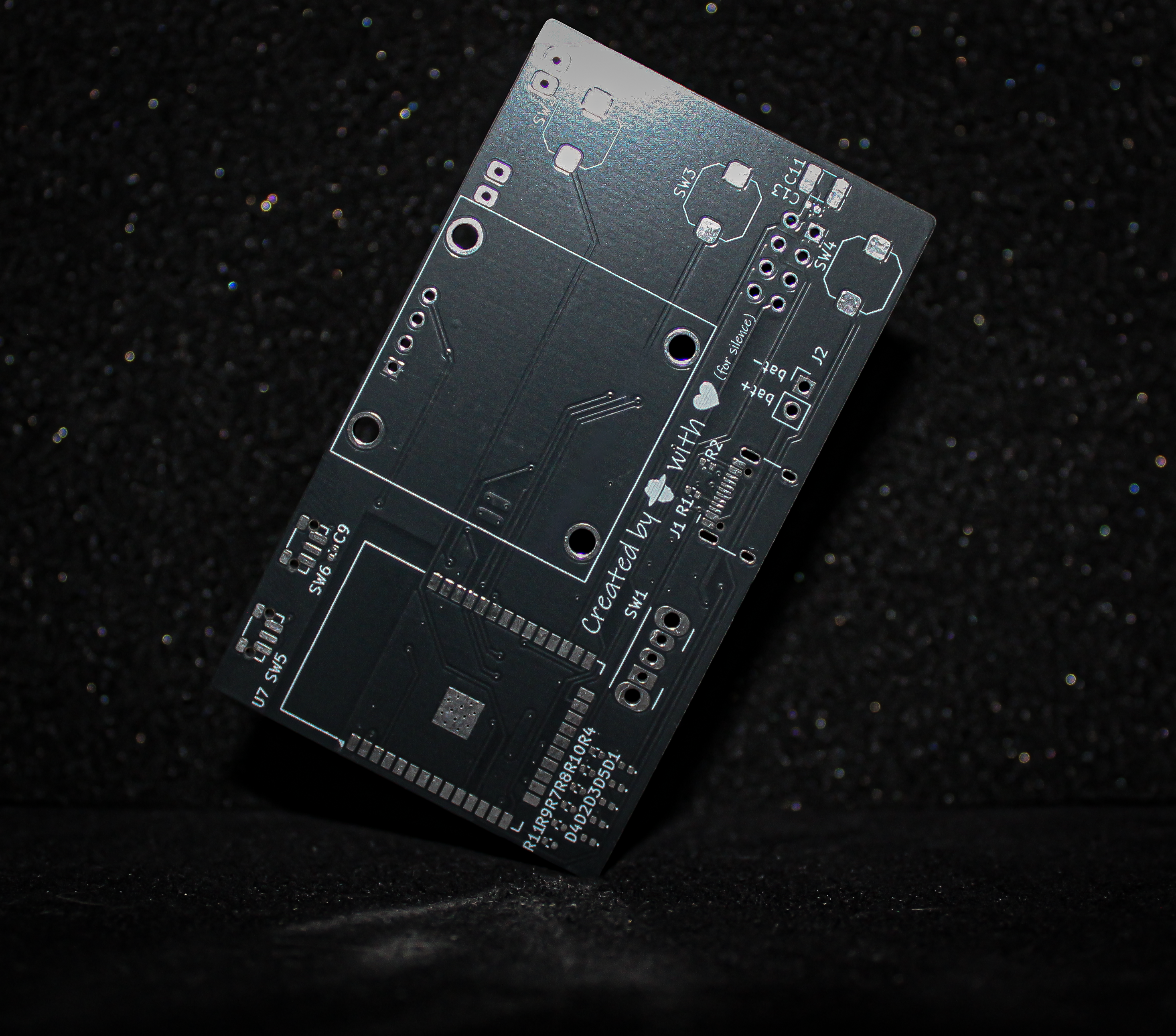 |
@W0rthlessS0ul | v1.0.0 |
README |
💡 Want to contribute your own PCB design?
If you feel confident in designing a high-quality PCB, feel free to submit your board via a Pull Request!
- Well-engineered and verified designs will be merged directly into the repository.
- If there are any doubts regarding layout quality, routing, or component selection, a thread will be opened in Discussions so the community can review, discuss, and vote on whether it should be added.
🧑🔧 Let's Get Started with Soldering!
Connecting First nRF24 module (optional)
| Pin Name | ESP32 GPIO | Connection |
|---|---|---|
| VCC | 3.3V | (+) capacitor |
| GND | GND | (-) capacitor |
| CE | GPIO 16 | |
| CSN | GPIO 15 | |
| SCK | GPIO 14 | |
| MOSI | GPIO 13 | |
| MISO | GPIO 12 | |
| IRQ |
Connecting Second nRF24 module (optional)
| Pin Name | ESP32 GPIO | Connection |
|---|---|---|
| VCC | 3.3V | (+) capacitor |
| GND | GND | (-) capacitor |
| CE | GPIO 18 | |
| CSN | GPIO 17 | |
| SCK | GPIO 14 | |
| MOSI | GPIO 13 | |
| MISO | GPIO 12 | |
| IRQ |
Connecting Third nRF24 module (optional)
| Pin Name | ESP32 GPIO | Connection |
|---|---|---|
| VCC | 3.3V | (+) capacitor |
| GND | GND | (-) capacitor |
| CE | GPIO 23 | |
| CSN | GPIO 19 | |
| SCK | GPIO 14 | |
| MOSI | GPIO 13 | |
| MISO | GPIO 12 | |
| IRQ |
Connecting Fourth nRF24 module (optional)
| Pin Name | ESP32 GPIO | Connection |
|---|---|---|
| VCC | 3.3V | (+) capacitor |
| GND | GND | (-) capacitor |
| CE | GPIO 5 | |
| CSN | GPIO 4 | |
| SCK | GPIO 14 | |
| MOSI | GPIO 13 | |
| MISO | GPIO 12 | |
| IRQ |
Connecting Fifth nRF24 module (optional)
| Pin Name | ESP32 GPIO | Connection |
|---|---|---|
| VCC | 3.3V | (+) capacitor |
| GND | GND | (-) capacitor |
| CE | GPIO 33 | |
| CSN | GPIO 32 | |
| SCK | GPIO 14 | |
| MOSI | GPIO 13 | |
| MISO | GPIO 12 | |
| IRQ |
OLED Connection (optional)
| Pin Name | ESP32 GPIO |
|---|---|
| VCC | 3.3V |
| GND | GND |
| SCL | GPIO 22 |
| SDA | GPIO 21 |
Button Connection (optional)
| Button Actions | ESP32 GPIO |
|---|---|
| OK | GPIO 25 |
| NEXT (Optional) | GPIO 26 |
| PREVIOUS (Optional) | GPIO 27 |
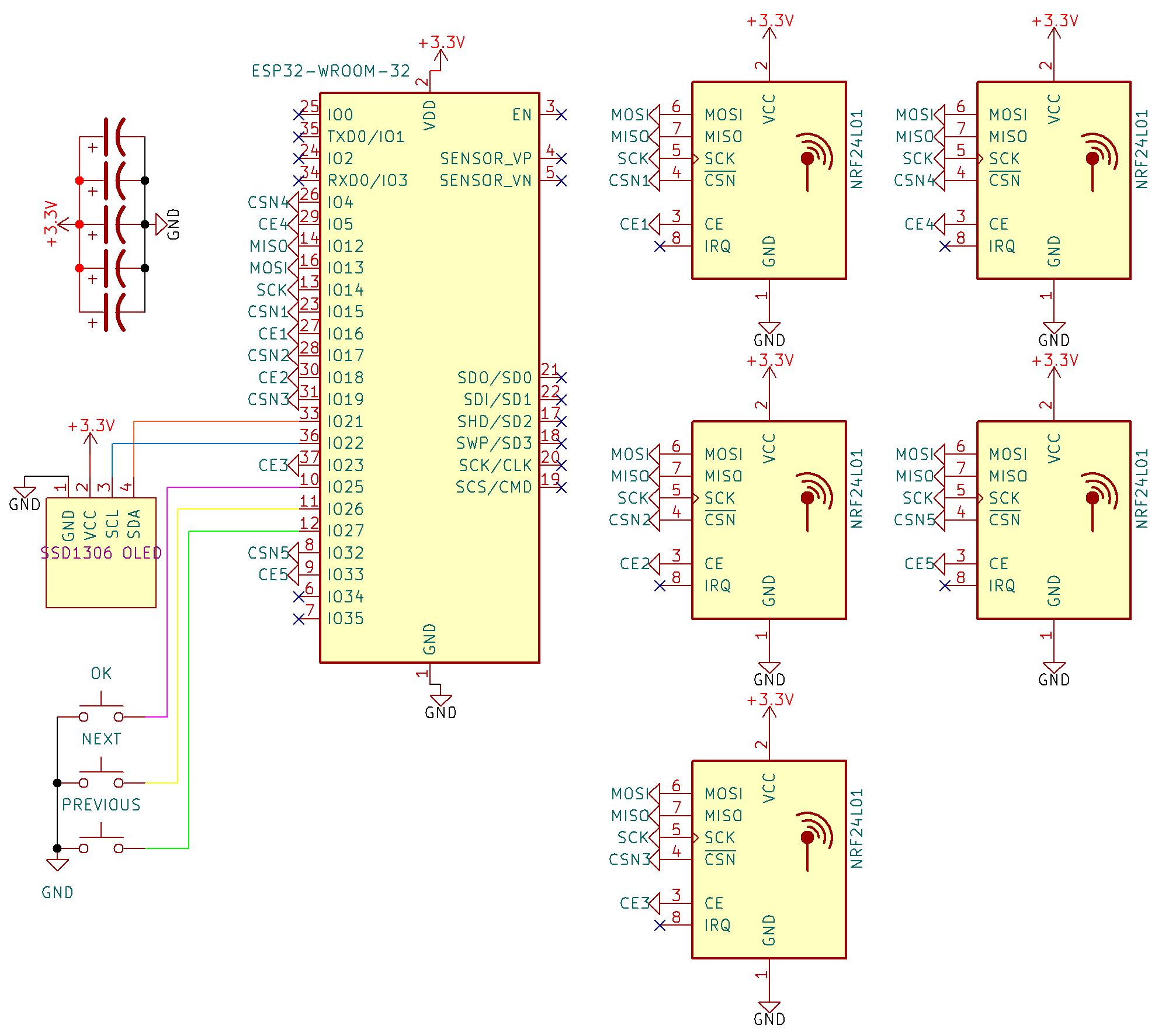
In all configurations the same SCK, MOSI, and MISO pins are used. This is not a mistake - SPI interfaces can share clock and data lines, while proper operation is ensured by separate control signals (CSN and CE)
🛠️ Build From Source
This section is addressed to contributors. If you are a regular user of the project, you can skip it
- Install PlatformIO IDE extension in VS Code
- Click the PlatformIO icon → Open → Open Project → select your project folder
- Wait until all dependencies are installed
- And now you can choose which project to compile in "PROJECT TASKS" or choose "Build all" to compile all kinds of firmware at once.
- Output .bin files appear in:
project_root/bin/[env_name]

⚠️ Important for source builds: Since v2.5.0, this project uses a modified RF24 library (see /lib).
📦 Flash Firmware
Manual Update
Follow these steps to flash the firmware:
- Download the firmware from the releases section that corresponds to your display
- Navigate to ESPWebTool: ESPWebTool
- Arrange the files as per the table below:
| Address | File Name |
|---|---|
| 0x1000 | bootloader.bin |
| 0x8000 | partitions.bin |
| 0x10000 | firmware.bin |
- Click "Flash," and once the installation is complete, restart your board and enjoy using your jammer!

OTA Update
This method can only be used if you have firmware version 1.9 or higher installed.
Follow these steps to flash the firmware:
- Download the firmware from the releases section that corresponds to your display
- Turn on your device and open a web browser
- Navigate to the web interface at 192.168.4.1
- Click on "OTA" and select the file "firmware.bin" (
⚠️️ make sure not to choose the bootloader or partitions files)

🎮 Device Control
🟢 1-Button Configuration
📋 Menu Navigation
- Short press → Next menu item
- Long press → Select menu item
📡 Misc Jammer
- Short press → Channel +1
- Long press → Continuous channel +1 (every 100ms)
- Double press → Select channel
📡 WiFi Attack
- Short press → Stop attack
- Double press → Switch between jam\deauth
🔵 2-Button Configuration
📋 Menu Navigation
- Next button short press → Next menu item
- OK button short press → Select menu item
📡 Misc Jammer
- Next button short press → Channel +1
- Next button long press → Continuous channel +1 (every 100ms)
- OK button short press → Select channel
📡 WiFi Attack
- Short press → Stop attack
- Next button → Switch between jam\deauth
🟣 3-Button Configuration
📋 Menu Navigation
- Next button short press → Next menu item
- Previous button short press → Previous menu item
- OK button short press → Select menu item
📡 Misc Jammer
- Next button short press → Channel +1
- Next button long press → Continuous channel +1 (every 100ms)
- Previous button short press → Channel -1
- Previous button long press → Continuous channel -1 (every 100ms)
- OK button short press → Select channel
📡 WiFi Attack
- Short press → Stop attack
- Next button → Switch between jam\deauth
- Previous button → Switch between jam\deauth
🌐 Web Interface
- To utilize the web interface, please follow the steps outlined below
- activate the nRF24 jammer
- Connect to the Wi-Fi network named
jammerusing the passwordW0rthlessS0ul - open your web browser and navigate to the IP address
192.168.4.1 - Now you can control your nRF24 jammer through an web interface

🔌 Serial Interface
- To utilize the serial interface, please follow the steps outlined below
- Activate the nRF24 jammer
- Connect the device to a PC or phone via USB
- You can use any serial terminals for control, for example: spacehuhn terminal
- Now write help to get a list of commands

🎉 Final Outcome
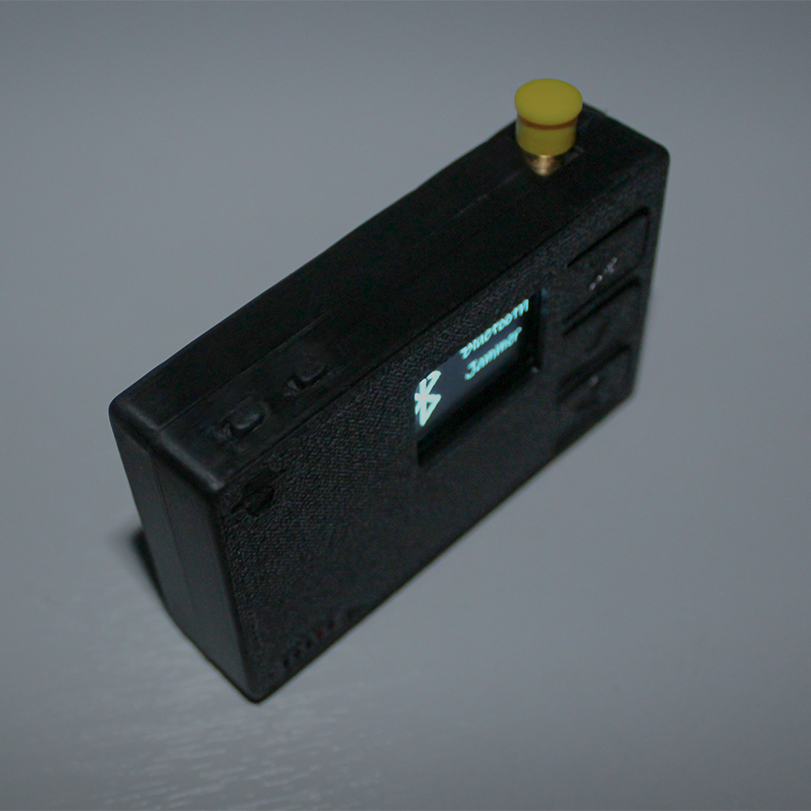
Normal Spectrum

Bluetooth Jam Spectrum

Drone Jam Spectrum

Wi-Fi Jam Spectrum

BLE Jam Spectrum

Zigbee Jam Spectrum

Misc Jam Spectrum

🙏 Acknowledgments
🤝 Project Supporters
| Supporter | Contribution |
|---|---|
| @sergey2735 | 40.7 ADA |
❤️ Support the Project
If you find this project useful and want to support its ongoing development, consider starring the repository ⭐, following the author, or buying a cup of coffee to keep things fueled! ☕

|

|
🪙 Direct Cryptocurrency Transfer
| Coin / Network | Direct Wallet Address |
|---|---|
| 🟧 Bitcoin (BTC) | bc1qvul4mlxxw5h2hnt8knnxdrxuwgpf4styyk20tm |
| 🔷 Ethereum (ETH) | 0x5c54eAb2acFE1c6C866FB4b050d8B69CfB1138Af |
| ⚪ Litecoin (LTC) | LbdzCsYbxuD341raar6Cg1yKavaDq7fjuV |
| ⚫ Ripple (XRP) | rKLLPzoBGfqY3pAQPwTFPRYaWjpHSwHNDw |
| 🔵 Cardano (ADA) | addr1qyz2aku0ucmxqnl60lza23lkx2xha8zmxz9wqxnrtvpjysgy4mdcle3kvp8l5l7964rlvv5d06w9kvy2uqdxxkcryfqs7pajev |
| 🟡 Dogecoin (DOGE) | DBzAvD62yQUkP4Cb7C5LuFYQEierF3D3oG |
Every donation is greatly appreciated and directly contributes to the development, testing, and new hardware revisions of this project!
⭐ Star History
Explore related projects
freeCodeCamp/freeCodeCamp
freeCodeCamp.org's open-source codebase and curriculum. Learn math, programming, and computer science for free.
459,013 starsdonnemartin/system-design-primer
Learn how to design large-scale systems. Prep for the system design interview. Includes Anki flashcards.
377,634 starsreact/react
The library for web and native user interfaces.
252,533 starsvuejs/vue
This is the repo for Vue 2. For Vue 3, go to https://github.com/vuejs/core
212,530 stars