
VyomKulshrestha/Heliox-OS
VyomKulshrestha/Heliox-OS has 70 GitHub stars and 96 forks. GitHot measured 0 stars in 24 hours and +1 in 7 days. Last checked 2026-11-18 12:16 UTC. Last push 2026-11-13.
What you can do
- Guarded task execution - Typed plans, source-scoped policy, approvals, cancellation, execution claims, and visible terminal results
- Adaptive app tasks - Bounded observe → act → verify loops with fresh screen evidence, target-window reacquisition, replanning, and no-progress termination
- Continuous voice - Faster-Whisper/OpenAI Whisper recognition, adaptive-noise VAD with pre-roll, wake-word and follow-up listening, coordinated TTS, barge-in, self-speech suppression, and a non-executing microphone test
- Interactive companion - Can warn, revise, stop, accept spoken or typed corrections, answer explicit questions without cancelling a running task, and offer grounded next steps after verified results
Measured star growth
- in 24h
- 0
- in 7 days
- +1
- in 15 days
- Collecting history
- in 1 month
- Collecting history
Net star changes over overlapping periods, not daily totals. Missing measurements are left blank. Stars measure attention, not software quality.
About
Open-source, local-first desktop AI agent for voice, gesture, gaze, browser and system automation with permission gates and verification.
AIREADME.md
OriginalHeliox OS — AI System Control Agent


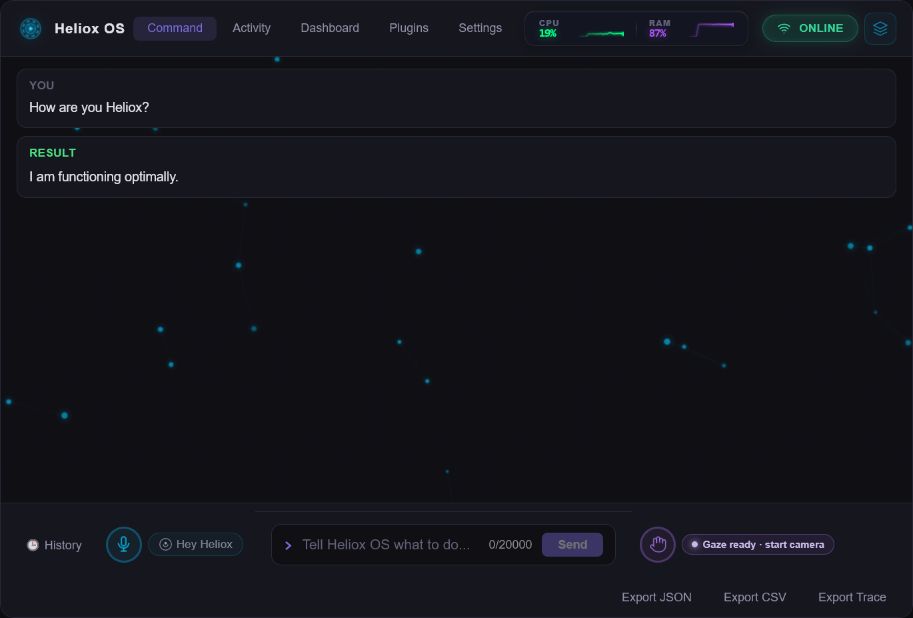
Control your computer with natural language, voice, and opt-in gestures.
Heliox plans supported work, applies permission gates, executes it locally, and verifies the result.
Website • Download • Evidence • Compare • Sponsor
What Heliox is
Heliox OS is an MIT-licensed, local-first desktop agent for Windows, macOS, and Linux. It translates typed or spoken requests into validated plans, routes actions to specialist providers, asks before risky or irreversible work, and reports completion only through the guarded execution path.
Heliox is an application that runs on top of an existing operating system; it is not an operating-system kernel. Local-first also does not mean every configuration is offline: cloud models and third-party integrations receive the context required for tasks that use them.
Name disambiguation: Heliox OS is this desktop-agent project at helioxos.dev and VyomKulshrestha/Heliox-OS. It is unrelated to heliox helium-oxygen medical gas and to other products named Heliox, including Heliox IDE.
User intent → Planner → Permission and risk gates → Specialist → Executor → Verifier
                    ↘ durable task state, memory, audit, cancellation and recovery ↗
Published release: v0.16.0 · Python 3.11+ · Windows is the primary hardware-development platform.
v0.16.0 adds a to-do list, "tell me when" watchers, repeating reminders and reminders for when an app opens, good morning and good night, habits, focus history, quick answers (sums, conversions, dates and world time), a password generator, answers about your files and downloads, a "why is my computer slow?" health check, opt-in clipboard history kept in memory, snippets and focus heads-ups. All 91 built-in commands are answered in code without a model. It builds on v0.15.0's per-task undo, signed task receipts, activity timeline and Today tab, and on v0.14.0's consented co-adaptation study, accessibility-grounded desktop control, durable autonomy, MCP tools and fail-closed approvals. Provider subscriptions, integrations, peers, hardware inputs, and host actions remain subject to their documented availability and safety boundaries.
Why Heliox
- Acts instead of only answering: supported browser, desktop, file, process, package, Git, integration, screen, and workflow operations enter a real execution path.
- Verifies instead of assuming: results pass through executor contracts, and selected actions also have independent post-condition checks.
- Keeps authority explicit: five permission tiers, irreversibility flags, per-action approvals, source-scoped gateway policy, cancellation, and fail-closed snapshot requirements bound risky work.
- Coordinates multiple inputs: text, continuous voice, gesture, gaze, screen context, and experimental neural intent share one priority-controlled interaction path.
- Runs locally by default: the daemon, action execution, preferences, audit stores, and supported local models remain on the user's computer.
- Exposes evidence: capability coverage, limitations, benchmark data, CI, release feeds, and machine-readable metadata are public.
Evidence snapshot
| Surface | Current evidence | Important boundary |
|---|---|---|
| Action schema | 162 declared action types | Availability depends on OS, dependencies, permissions, credentials, and policy |
| Specialist mesh | 21 executable specialists with providers for 162/162 declared actions | Provider coverage is not universal environment compatibility |
| Outcome verification | 22 actions have an independent observed post-condition verifier | The other 140 currently rely on the executor result |
| Guarded fast path | 25.234 ms median, 26.930 ms p95 across 100 non-LLM CPU-usage iterations; zero model calls (26 October 2026) | This is not provider, browser, voice, camera, TTS, neural, or full-workflow latency |
| Subscription planning | 3/3 fixed Codex CLI cases; 14.708 s median; zero executed or destructive actions | One account and planning only; not action-execution, Claude, or universal provider evidence |
| Intent dispatch | 59/59 curated bounded-intent and ambiguous-fall-through regression cases | Fixed corpus; not population-level language-understanding accuracy |
| Typed decisions | Gnomon v4.1 (Qwen3.5-2B QLoRA): 98.3% yes/no and 100% choice accuracy, 0 false allowances on a fresh 128-case authored set | Opt-in; reviews autonomous plans but can only ask for approval; authored labels; rating error 0.202 vs 0.024 for the hosted reference model |
| Learned risk model | 25,200 training, 5,400 calibration, and 5,400 temporal-validation samples; 5/5 direction invariants | Covers 12 coarse disk/process action transitions; deterministic policy remains authoritative |
| Async responsiveness | 65 heartbeats during a real one-second CPU monitor; 16.618 ms maximum heartbeat interval | Windows timer granularity and host load apply; this is not UI or hardware-input latency |
| Assistance co-adaptation | 3/3 policy agency audits passed on two simulated tuning families, five simulated people per family | In-sample simulation only; the adaptive engine does not beat the plain interface for every family; no human accuracy claim |
| Plugins | 6 manifests in the generated public catalog | Marketplace and local plugins remain capability-constrained |
| CI | Python, frontend, visual, Rust, marketplace, and installer gates | CI does not prove camera, microphone, speaker, EEG, or human accuracy |
| Windows signing | SignPath test-policy workflow signs and verifies EXE, MSI, and embedded application artifacts | The production certificate is pending; current public installers are not yet production-signed |
[!IMPORTANT] 162/162 provider coverage does not mean 162 independently verified outcomes. The generated catalog records the provider, permission tier, platform declarations, approval requirements, and verification method for every action.
- Human-readable evidence and limitations
- Detailed Markdown evidence
- Machine-readable capability catalog
- v0.16.0 release software benchmark snapshot (26 October 2026): includes the new built-in command suite (91/91 handled in code, 1.384 ms median, 14.111 ms p95 per reply, zero model calls)
- v0.15.0 snapshot (24 October) and earlier v0.14.0 snapshots: 18 October, 16 October
- Raw subscription-planning evidence
- Historical guarded fast-path benchmark
- Live CI history
- Release changelog and JSON release feed
Use-case guides
These pages describe the actual workflow, safety boundary, hardware requirements, and known limitations—not only the feature headline.
| Guide | What it answers |
|---|---|
| Voice-controlled desktop automation | Continuous listening, speech, approvals, barge-in, and microphone limits |
| Browser and application control | Target selection, application discovery, visible actions, and verified outcomes |
| Accessibility and hands-free operation | Alternative input paths, stop controls, and remaining validation needs |
| Gesture and gaze control | On-device signals, shared-camera behavior, calibration, and false-positive controls |
| Autonomous workflows | Durable jobs, bounded observe-act-verify loops, and approval boundaries |
| Plugin marketplace | Moderation, integrity verification, permissions, and constrained execution |
| Heliox OS neural intent research | BrainFlow synthetic and recorded EEG evidence; no validated live brain-control claim |
| Existing AI subscription models | Official CLI login, model selection, quota evidence, and credential boundaries |
Honest comparisons
The comparison pages are dated, source-linked, and explain when another product or deterministic automation is a better choice.
| Comparison | Decision focus |
|---|---|
| Heliox vs Copilot on Windows | Microsoft-integrated assistance versus inspectable cross-platform execution |
| Heliox vs Open Interpreter | Multimodal desktop companion versus coding-agent harness |
| Heliox vs scripts, macros, and RPA | Adaptive interaction versus deterministic repeatability |
No comparison declares a universal winner. See the transparent cost page for software, provider, model-download, and hardware costs.
Core capabilities
| Capability | Implemented behavior |
|---|---|
| Guarded task execution | Typed plans, source-scoped policy, approvals, cancellation, execution claims, and visible terminal results |
| Adaptive app tasks | Bounded observe → act → verify loops with fresh screen evidence, target-window reacquisition, replanning, and no-progress termination |
| Continuous voice | Faster-Whisper/OpenAI Whisper recognition, adaptive-noise VAD with pre-roll, wake-word and follow-up listening, coordinated TTS, barge-in, self-speech suppression, and a non-executing microphone test |
| Interactive companion | Can warn, revise, stop, accept spoken or typed corrections, answer explicit questions without cancelling a running task, and offer grounded next steps after verified results |
| Local chat sessions | Separate transcripts and task context with bounded cross-session preference and evidence memory |
| Gesture and gaze | 30+ gesture mappings, MediaPipe Tasks 3D landmarks, coarse gaze fusion, calibration, temporal rejection, and opt-in cursor control |
| Background workflows | Durable jobs with pause, resume, cancellation, restart recovery, and guarded autonomous execution |
| Hybrid risk model | Deterministic policy plus structured transitions, learned risk, executor-callback history, verified outcome adaptation, and optional shadow UI-JEPA; learned output can only add caution |
| Assistance co-adaptation | Opt-in, consented selection study inside Heliox's window: a world model of the person, the interface and Heliox predicts which help (larger targets, a confirm step, a clarifying question, another input) suits this person today, within rules the person sets; it changes presentation only and never approves or runs anything |
| Per-task undo | Before a file write, move, copy or delete, a clipboard change, an environment variable, or a volume or brightness change, Heliox keeps what it needs to reverse it. Each finished task's message in chat has Undo and Verify receipt. After the task, Review undo shows what will be put back, what you changed since (left alone) and what can never be undone (messages, web actions, commands); the approval dialog marks each action "Can undo" or "Can't undo" |
| Bounded learning | Provenance-aware temporal memory, repeated-evidence promotion, replay, drift detection, and reset controls |
| Plugin ecosystem | Reviewed GitHub marketplace, signed local plugins, per-file hashes, capability manifests, and constrained native/WASM brokers |
| Neural research | BrainFlow synthetic, recorded EEG playback, public EEGBCI benchmarking, calibrated SSVEP selection, replay-safe Tier 0/1 goals, and explicit staged autonomous task launch |
| MCP interfaces | Public read-only documentation MCP plus a local, separately authenticated stdio bridge whose tasks use visible Heliox approvals |
| Air Handoff | Opt-in same-LAN phone pairing and one-target encrypted transfer of a held screenshot, text value, or immutable file snapshot. Optionally, a paired phone can send a request that waits for Run on the computer; status checks can start at once and answer back to the phone. The phone never approves anything |
| Signed task receipts | After each task that ran actions, an Ed25519-signed, hash-chained receipt of what ran, what you approved and what happened; contents appear only as hashes, and python -m pilot.workflows.task_receipts verify checks one anywhere |
| Today view and brief | A Today tab shows what Heliox ran, where your time went and what can still be undone, with Undo on each task; an opt-in daily brief arrives at the time you choose, as a notification and in chat, optionally read aloud. "Undo the last two tasks" opens each task's undo preview in turn |
| Your data | Settings → Your data lists everything Heliox keeps on this computer with sizes and a Clear button for each; "forget my activity from the last hour"; backups to Downloads (never settings, tokens or keys) and restore |
| Command palette | Ctrl+K (or "what can I say?") lists every built-in command with working examples and your recent requests; choosing one fills the command box so you can check it before it runs |
| Notes, nudges, settings | "Note that the plumber comes Tuesday" / "read my notes"; "tell me if I spend more than an hour on YouTube today" (once a day, from the activity timeline, nothing blocked); "turn on the activity timeline" or "send me a daily brief at 7 pm" by voice (security settings never change by voice) |
| Setups and history | "Save this as my coding setup" remembers which apps are open and "open my coding setup" brings them back (with normal approvals); "when did I ask you to email the invoice?" searches your task history; "set a timer for 10 minutes" |
| Focus and reports | "Start a pomodoro", quiet hours ("focus every weekday from 9 to 12") and "say that again"; "Focus for 45 minutes" holds reminders and the brief and keeps Heliox quiet (approvals still come through), then gives one summary of where the time went; the Today tab adds This week and Export report (Markdown with every task and its receipt id) |
| Reminders and recall | "Remind me in 20 minutes to stretch" or "tomorrow at 9 to send the report" (kept across restarts, spoken when due); "where did you put my report?" from what Heliox moved or saved; Show what changed in the undo preview gives a line-by-line diff of each file Heliox wrote |
| Routines and shortcuts | "Do that every day at 9" turns the last task into a routine that may use only the actions that task used (you confirm on screen); "when I say start work, open VS Code and Slack" creates a voice shortcut; "do that again" repeats the last task with fresh approvals |
| Activity timeline | Opt-in local record of which app and window title were in front, so "what was I working on yesterday afternoon?" gets an answer by voice or chat (and "what did you do today?" is answered from receipts); never pixels or screen text, password managers and private windows skipped |
| To-do list and habits | "Add call the bank to my list" / "mark it as done"; "log a workout", "how many workouts this week", "what's my workout streak"; open items and habits show in the Today tab |
| Watchers and reminders | "Tell me when Chrome closes", "…when my download finishes", "…when my battery is full" (only looks, gives up after a day); "remind me every weekday at 9 to check email"; "remind me to submit my timesheet when I open Outlook" |
| Good morning and night | "Good morning" gives today's reminders, your list, streaks to keep and a nearly full drive; "good night" sums up the day with focus time and tomorrow's first reminder; "how long did I focus this week" |
| Quick answers | Sums and percentages, unit conversions, date countdowns and the time in about 60 cities, worked out exactly in code; "generate a password" (clipboard only, never kept), coin flips, dice, a stopwatch |
| Files and this computer | "What did I download today", "where is my budget spreadsheet" (your own folders, a few seconds at most) and "why is my computer slow" (processor, memory, disks and the biggest apps; closing still asks first) |
| Clipboard and snippets | Opt-in clipboard history in memory only (never passwords or private windows): "what did I copy earlier", "copy the second one back"; "save that as my signature" / "copy my signature"; "during focus, tell me if I open YouTube" |
| Secure integrations | Settings-managed CalDAV, IMAP/SMTP, and allowlisted SSH connections with secrets kept in the operating-system credential store |
While a task runs, choose Ask without stopping to ask a question, Correct task to interrupt the current step and replan, or Queue next task to submit another task for execution afterward. Spoken “quick question …”, status questions, and “next task …” use the corresponding paths. Queued interactive tasks are serialized through the normal approval and verification gates; they are not parallel desktop controllers. The passive screen monitor tracks the active window and visual changes; it does not continuously understand every pixel. “Read my screen” invokes local OCR on demand. Screen context never grants an action or bypasses approval.
Architecture
flowchart LR
    Input[Text · voice · gesture · gaze] --> Gateway[Interaction gateway]
    Gateway --> Planner[Planner + context]
    Planner --> Safety[Policy · risk · approval]
    Safety --> Mesh[21-specialist mesh]
    Mesh --> Executor[Shared executor]
    Executor --> Verifier[Outcome verifier]
    Verifier --> Result[Visible result]
    Verifier --> Memory[Ledger · memory · replay]
    Memory --> Planner
    Neurod[Synthetic / recorded / local neural sidecar] --> NeuralSelect[Bounded neural selection]
    NeuralSelect --> Gateway
    MCPHost[Local MCP host] --> MCPBridge[Least-privilege stdio bridge]
    MCPBridge --> Safety
    Safety --> Handoff[Explicit one-target Air Handoff]
The desktop is a Tauri/Svelte application. A local Python daemon owns planning, permissions, specialist routing, execution, verification, durable state, memory, and model adapters. Browser, OS, integration, plugin, and research paths enter the same safety and audit backbone.
Security and privacy
[!WARNING] Heliox can execute code, modify files, control applications, and invoke external services. Do not run it as root or Administrator for ordinary work. Review approval dialogs, keep backups, and treat model output as untrusted until execution evidence confirms the requested result.
Core guarantees:
- Structured schema validation before execution.
- Five permission tiers plus a separate irreversibility flag for effects that snapshots cannot undo.
- Per-action approval for system-modifying, destructive, root-critical, and irreversible work. An approval that is never answered, or whose reply never reaches the window, expires instead of running; a plan resumed after a restart runs only the actions that were ticked.
- A gesture can approve only a dialog that has been visible for a second, and only the ticked actions.
- Source-scoped gateway floors that a task override may narrow but cannot widen; an action family a profile does not list is read-only.
- Snapshot requirements that fail closed when a required backend is unavailable.
- Per-task undo computed in code, never by a model: it restores only what Heliox recorded, skips anything changed since, needs a click on the preview you saw, and never runs while a task is running.
- HMAC-chained audit records for elevated permission and gateway decisions.
- Real cancellation of in-flight commands and durable reconciliation after reconnect or restart.
- Learned risk, cognitive estimates, adaptation, and neural input cannot grant permission or remove deterministic warnings.
- OS credential stores for API keys; credentials are never written to
.envor included in plans. - Air Handoff is off by default; a paired phone can receive only content explicitly held and dropped to it, never daemon RPC or desktop-control authority. Phone requests are a separate opt-in: they wait for Run on the computer, and only a fixed list of status checks may start without you.
- Every task that ran actions leaves a signed, hash-chained receipt; the activity timeline is off by default and never stores pixels or screen text.
- Gesture cursor control is off by default and exits on an open palm, stop control, or disabled setting.
- Assistance co-adaptation is off by default and stores nothing without a per-purpose consent record. Its data is encrypted with a per-participant key in the OS keyring, and revoking, expiry or erasing deletes the data and the key. It never commits an ambiguous selection by guessing.
| Tier | Level | Default behavior | Examples |
|---|---|---|---|
| 0 | Read only | Auto-execute | file_read, system_info, clipboard_read |
| 1 | User write | Auto-execute | file_write, clipboard_write, env_set |
| 2 | System modify | Confirm | package_install, service_restart, wifi_connect |
| 3 | Destructive | Confirm | file_delete, process_kill, power_shutdown |
| 4 | Root critical | Confirm | privileged and disk operations |
Some lower-tier effects—such as sending email, invoking a remote SSH command, or pushing a commit—are still irreversible and therefore require confirmation.
Read SECURITY.md for the threat model, rollback boundaries, supervision controls, and responsible disclosure process. Read the privacy policy before enabling cloud models or integrations.
Installation
Download the desktop application
- Open the latest GitHub release.
- Download the package for your system:
- Windows:
Heliox-OS_<version>_x64-setup.exeor.msi - macOS Apple Silicon:
Heliox-OS_<version>_aarch64.dmg - macOS Intel:
Heliox-OS_<version>_x64.dmg - Linux:
.AppImage,.deb, or.rpm
- Windows:
- Install and open Heliox OS.
- Select a local model, add a provider key, or connect an eligible Codex/Claude Code subscription in Settings.
The desktop application requires Python 3.11 or newer and starts the local daemon automatically. First launch may take longer while Heliox creates its environment and downloads optional components. The UI continues reconnecting during initialization.
Windows installers are not yet production-signed. The SignPath test workflow is validated, but Windows may continue to show reputation warnings until the production certificate is issued and connected to the release workflow.
Build from source
git clone https://github.com/VyomKulshrestha/Heliox-OS.git
cd Heliox-OS/daemon
python -m pip install -e ".[all,dev]"
python -m pilot.server
In a separate terminal:
cd Heliox-OS/tauri-app/ui
npm ci
npm run dev
To run the native desktop shell:
cd Heliox-OS/tauri-app
npm install
npm run tauri dev
Windows contributors can use setup.ps1. See CONTRIBUTING.md for platform prerequisites and test commands.
Connect a local MCP host
Start the Heliox desktop application, then configure an MCP host to launch the
installed heliox-mcp command:
{
  "mcpServers": {
    "heliox-local": {
      "command": "heliox-mcp"
    }
  }
}
The local server exposes status, capabilities, task preview, submission, polling, cancellation, and optional local research-only typed-decision scoring with Gnomon for single or batched questions. Every submitted action requires visible approval in Heliox; neither the MCP client nor the research scorer can approve its own work. See MCP interfaces for the tool list and security boundary.
Give Heliox tools from other MCP servers
Heliox is also an MCP client. List servers in mcp_servers.json inside Heliox's
config folder, in the same format, and the planner can call their tools
(GitHub, Slack, Notion, databases and so on) as ordinary actions:
{
  "mcpServers": {
    "github": {
      "command": "npx",
      "args": ["-y", "@modelcontextprotocol/server-github"],
      "env": { "GITHUB_PERSONAL_ACCESS_TOKEN": "..." }
    }
  }
}
Tools the server marks read-only run straight away; every other tool asks for
approval with its arguments shown. Call mcp_client_refresh (or restart the
daemon) after editing the file.
Try these tasks
Show me my system information.
Open an installed application and verify its window appears.
Go to Wikipedia's artificial-intelligence page and summarize the introduction.
Create a Python project with tests and run them.
Monitor CPU usage and alert me above 80%.
List every Python file on my Desktop.
Take a screenshot and read the visible text.
Set my volume to 50%.
Risky and irreversible tasks may pause for approval. A completed plan is not by itself proof that the requested environmental outcome occurred.
Configuration
User configuration is stored at ~/.config/heliox-os/config.toml. Most settings are also available in the desktop Settings panel.
[model]
provider = "ollama"          # "ollama", "cloud", or "subscription"
ollama_model = "llama3.1:8b"
cloud_provider = "gemini"    # "gemini", "openai", "openrouter", "claude", or "meta"
cloud_model = ""             # OpenRouter defaults to "openrouter/auto"; try "deepseek/deepseek-v4-pro"
subscription_provider = "codex" # "codex" or "claude"
subscription_model = ""      # blank uses the official CLI default
subscription_timeout_seconds = 120
subscription_max_prompt_chars = 48000

[security]
root_enabled = false
snapshot_on_destructive = true

[vision]
mediapipe_backend = "tasks"
gaze_tracking_enabled = false

[gesture_cursor]
enabled = false

[voice]
transcription_engine = "auto"
whisper_model = "small"
language = "auto"
tts_engine = "kokoro_tts"

[undo]
enabled = true               # keep what is needed to undo file and clipboard changes
retention_days = 7
max_task_mb = 512            # larger changes still run, but are listed as not undoable
max_total_mb = 2048

[receipts]
enabled = true
retention_days = 90

[timeline]
enabled = false              # app and window-title history for "what was I working on?"
retention_days = 7

[brief]
enabled = false              # one summary of the day at `time`
time = "18:00"
speak = false

[clipboard]
history = false              # remember recent copies in memory for "what did I copy earlier?"

[suggestions]
enabled = false              # offer one gentle, code-computed nudge now and then; never acts

[co_adaptation]
enabled = false              # the selection study; also needs a consent record per participant
adaptive_enabled = false     # learned choices from the second session; also needs the adaptive_assistance purpose
learn_across_sessions = false
ambiguity_threshold = 0.25   # may only be made stricter; never learned
OpenRouter uses its OpenAI-compatible endpoint. Settings and first-run setup offer automatic routing, DeepSeek V4 Pro, the latest DeepSeek V4 Flash alias, and other current aliases; an exact OpenRouter catalog model ID can also be entered manually. Provider keys remain in the operating-system credential store.
Use an existing Codex or Claude subscription
Install and sign in through the provider's official CLI (codex login or
claude auth login), then choose Existing AI subscription in first-run
setup or Settings. Heliox does not copy browser sessions, read OAuth files, or
store these credentials. The CLI runs as a text-only model helper in a sterile
temporary directory; Codex is read-only and ephemeral, while Claude has tools,
browser integration, slash commands, and session persistence disabled. Heliox
still owns schema validation, policy, approval, execution, and verification.
See the official Codex with ChatGPT plan guide
and Claude Code authentication guide
for provider-owned installation and login requirements.
The provider CLI adds its own instruction overhead. Settings separates the Heliox prompt estimate from provider-reported input, cached input, uncached input, and output. Exact repeated requests use Heliox's response cache and do not consume provider quota. The prompt-context cap prevents unbounded history; simple deterministic commands continue to use local fast paths with zero model calls. Subscription allowance and model availability remain governed by the user's provider plan, not by Heliox.
Run the optional planning-only benchmark from daemon/ to measure latency,
plan quality, and reported usage without executing any proposed action:
python benchmarks/subscription_planning_suite.py --provider codex
Kokoro, Pocket TTS, gaze, gesture tracking, and the learned-risk model are CPU-capable; CUDA is not required. Kokoro and Pocket synthesis runs in a short-lived worker that remains available for a 10-second speech burst, then exits so PyTorch/CUDA libraries do not stay mapped in the control daemon. Optional models still consume storage, memory, CPU time, and download bandwidth while active.
Platform and research boundaries
| Surface | Current status |
|---|---|
| Windows 10/11 | Primary development and hardware-validation platform |
| Ubuntu/Debian | Python/UI CI plus desktop packages; integrations and permissions vary |
| macOS | Python/UI CI plus desktop packages; permissions and hardware require local validation |
| Camera gesture and gaze | Automated geometry, calibration, fusion, and false-positive tests; physical accuracy is not established across users and environments |
| Voice and TTS | Routing, fallback, interruption, cancellation, synthetic ASR, and non-executing microphone-test coverage; human microphone accuracy and audible quality still require human checks |
| Neural intent | Synthetic BrainFlow and recorded EEG paths are tested. A user may stage up to eight text-authored goals and use calibrated focus/select to launch one through normal autonomous decomposition, specialist routing, permissions, approvals, and verification. No live headset accuracy, unrestricted thought reading, medical use, or physical authority is established. |
| Cognitive HUD | Behavioural estimates from local interaction signals, not physiological or medical measurements |
| Assistance co-adaptation | Model, policy, consent store and in-app study are built and tested; every published result comes from simulated users. No claim about people until the pre-registered human study reports. EEG is not part of it. |
| Air Handoff | Automated pairing, cryptography, replay, expiry, file-snapshot, and browser-receiver tests pass. A real phone, LAN/firewall, QR scan, and mobile download still require a human hardware/network check. |
Troubleshooting
| Problem | First check |
|---|---|
| Daemon remains offline | Confirm Python 3.11+, inspect ~/.local/state/heliox-os/pilot.log, and ensure port 8785 is free |
| Provider key is rejected | Re-enter it through Settings and confirm the OS credential store is available; Heliox does not use .env keys |
| Voice or camera is unavailable | Grant OS/WebView permission, select the correct device, and close other applications using that hardware |
| Installed application is not found | Use its installed display name; missing or ambiguous application matches fail visibly |
| Optional Windows model reports missing DLLs | Install the Microsoft Visual C++ Redistributable and reinstall the relevant daemon extra in 64-bit Python |
Open a bug report with the operating system, Heliox version, logs, expected result, and observed result. Hardware-dependent reports should also include the device and environment.
Documentation
- Architecture
- MCP interfaces and local-host setup
- Security policy and threat model
- Windows signing
- Gesture and gaze control
- Plugin marketplace
- Neural intent research controls
- Intelligence evaluation and research map
- Assistance co-adaptation: model, consent and evidence
- Opt-in recorded workflows and local visual samples
- Gnomon typed-decision model: training, gates and results
- Public decision-corpus adaptation log
- Forensics runbook
- Contributing
- Website agent index and repository agent index
- CodeMeta, citation metadata, and machine-readable releases
Agent and search discovery
Heliox publishes public, read-only discovery surfaces so search engines and assistants can inspect current capabilities and limitations instead of inferring them from marketing copy:
- Agent index and machine-readable capabilities
- Public OpenAPI document and API catalog
- Read-only documentation MCP manifest
- Agent skills index
- Human evidence center, Markdown evidence, and release feed
These surfaces improve technical discoverability; they do not guarantee search ranking, citations, sponsorship, or funding. External visibility is measured separately through a recurring prompt and index audit.
The public documentation MCP is intentionally unable to control a computer. Local control uses the separately authenticated stdio bridge documented in MCP interfaces, and its work remains approval-gated in the desktop application.
Support Heliox
Heliox is free and open source. Sponsorship funds the physical validation that software-only CI cannot provide: microphones, cameras, accessibility devices, EEG acquisition hardware, clean-machine release testing, and cross-platform systems.
- Sponsor through GitHub Sponsors
- Read the funding goals and reporting policy
- Lend test hardware, contribute code, or publish reproducible hardware results
- Connect the project with accessibility, human-computer interaction, or neurotechnology laboratories
Sponsorship never purchases security exceptions, private user data, approval bypasses, or control over technical results.
Contributing
- Read CONTRIBUTING.md.
- Choose a good first issue.
- Review the Code of Conduct.
- Join GitHub Discussions.
License
Heliox OS is available under the MIT License.