
VladimirYugay/CalfVO
VladimirYugay/CalfVO has 89 GitHub stars and 1 forks. GitHot measured 0 stars in 24 hours. Last checked 2026-11-15 16:57 UTC. Last push 2026-10-12.
Measured star growth
- in 24h
- 0
- in 7 days
- Update delayed
- in 15 days
- Update delayed
- in 1 month
- Update delayed
Net star changes over overlapping periods, not daily totals. Missing measurements are left blank. Stars measure attention, not software quality.
About
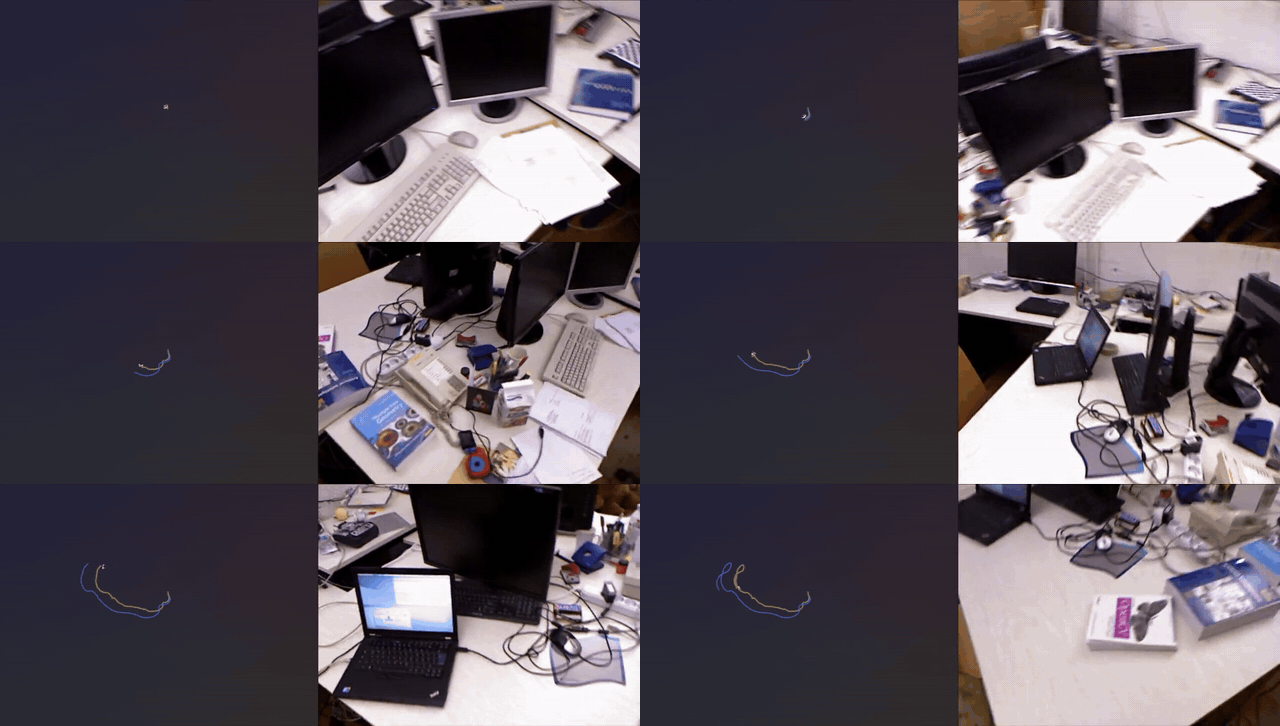
Monocular Visual Odometry without Calibration or Test-time Optimization
Creative & MediaREADME.md
Original
CalfVO: Monocular Visual Odometry without Calibration or Test-time Optimization
Vladimir Yugay* · Duy-Kien Nguyen* · Theo Gevers · Cees G. M. Snoek · Martin R. Oswald
*Equal contribution · University of Amsterdam
Project Page | arXiv
⚙️ Setting Things Up
Clone the repo:
git clone https://github.com/VladimirYugay/CalfVO.git
Make sure that nvcc --version matches nvidia-smi version. The optional
RoPE2D CUDA kernel is compiled against it.
Run the following commands to set up the environment
conda create -n calfvo python=3.10
conda activate calfvo
Install pytorch. We trained and evaluated with the CUDA 12.1 build and have not tried the other two:
# CUDA 11.8
pip install torch==2.5.1 torchvision==0.20.1 --index-url https://download.pytorch.org/whl/cu118
# CUDA 12.1  (tested)
pip install torch==2.5.1 torchvision==0.20.1 --index-url https://download.pytorch.org/whl/cu121
# CUDA 12.4
pip install torch==2.5.1 torchvision==0.20.1 --index-url https://download.pytorch.org/whl/cu124
Install FFmpeg, capped below version 8 (torchcodec only supports FFmpeg 4-7):
conda install -c conda-forge "ffmpeg<8"
Skipping this fails at the first import torchcodec with Could not load libtorchcodec.
Install other dependencies:
pip install -r requirements.txt
Fetch CroCo and DUSt3R. This clones naver/croco at 743ee71a and
naver/dust3r at c9e9336a, then patches one file in croco so it can be
imported as a package. --with-curope also builds the CUDA RoPE2D kernel. Without
it CroCo uses a pure PyTorch RoPE that gives the same answer and runs slower.
bash scripts/setup_dependencies.sh --with-curope
We tested our code on A100-SXM4-40GB GPUs with Ubuntu 22.
🔨 Running CalfVO
Getting the Data
Every dataset is stored the same way, one directory per sequence holding an all-intravideo.mp4, a poses.npz of camera-to-world
matrices, and an intrinsics.npz. Frame i of the video and pose
i are the same instant.
Every script below lives in scripts/data/.
| Corpus | Role | Getting the raw data | Preparing it |
|---|---|---|---|
| TartanAir v2 | train (45) | process_tartanv2.py fetches it from HuggingFace |
process_tartanv2.py |
| TartanAir v1 | test | process_tartanv1.py fetches it from HuggingFace |
process_tartanv1.py |
| ScanNet | train (40) + test | download_scannet.py, after accepting the ScanNet terms of use |
process_scannet.py |
| TUM RGB-D | test | download_tum.sh |
process_tum.py |
| EuRoC MAV | test | download_euroc.sh |
process_euroc.py |
| KITTI odometry | train 00–08 (20) + test 09–10 | manual, the odometry grayscale/colour set from cvlibs.net | process_kitti.py |
| Virtual KITTI 2 | train (20) | manual, the vkitti_2.0.3_rgb and vkitti_2.0.3_textgt tarballs from Naver Labs |
process_vkitti.py |
The two TartanAir scripts need no separate download. They pull one zip at a time from HuggingFace, convert it, and delete it before moving on, so you need room for one archive rather than the whole corpus.
Training
torchrun --nnodes=1 --nproc_per_node=16 train.py \
    --config_path configs/calfvo_croco.yaml
The schedule and the data mixture live in the config, and the paper explains the
choices. Runs log to wandb. To keep them on disk instead, set
logging.offline: True in the config or start the run with
WANDB_MODE=offline.
Checkpoints
Two trained models live on HuggingFace, one per backbone.| Config | Checkpoint | Encoder | Licence |
|---|---|---|---|
configs/calfvo_croco.yaml |
calfvo_croco.pth |
CroCo v2, as distributed with DUSt3R | CC BY-NC-SA 4.0 |
configs/calfvo_dinov2.yaml |
calfvo_dinov2.pth |
DINOv2 ViT-L/14 | Apache-2.0 |
The paper reports calfvo_croco.pth. Its encoder weights are
non-commercial, so use calfvo_dinov2.pth if that matters to you. It is
the weaker of the two on most metrics.
Evaluation
Scoring our released model takes nothing but the config. The checkpoint for its backbone is fetched from HuggingFace and cached, so there is no download step.
torchrun --nnodes=1 --nproc_per_node=16 test.py \
    --config_path configs/calfvo_croco.yaml
This scores every sequence in test_datasets and writes per-scene
metrics and trajectories, plus one summary per corpus.
Give --checkpoint_path a run directory to score a model you trained
yourself, and it reads that run's own config:
torchrun --nnodes=1 --nproc_per_node=16 test.py \
    --checkpoint_path /path/to/output/calfvo/calfvo_croco
Demo
Point it at any video and it writes the trajectory. Nothing needs preparing, and it does not need ground truth:python scripts/run_vo_demo.py \
--config configs/calfvo_croco.yaml \
--video /path/to/clip.mp4 \
--output_dir output/demo/vo
The checkpoint comes from HuggingFace here too, the released one for the config's
backbone. Pass --checkpoint to run a model of your own instead.
It writes the trajectory where the visualiser can read it, and prints the command to view it:
python scripts/visualize_trajectory.py \
    --trajectory_dir output/demo/vo \
    --video /path/to/clip.mp4 --output_file out/clip.rrd
That needs pip install rerun-sdk, which the training environment does
not include.
Training on Your Own Data
CalfVO is a neural network, not a foundation model and not an optimisation pipeline. It predicts what it was trained on, so on a camera or a motion unlike the corpora above it is better to train on your own recordings. Store your sequences the way the scripts in scripts/data/ store
theirs, one directory per sequence with a video.mp4 and a
poses.npz, then add an entry for it under
training_datasets.
- Frames go into a video to limit the number of files.
- They are stored as 288 px squares, which is the crop training reads anyway, so less is decoded per frame.
- Every frame is a keyframe. Training reads windows from random places in a sequence, and in an ordinary video each seek decodes forward from the last keyframe.
Set pose_stats to match your data. Translations are divided by these
before the loss sees them. The shipped numbers do not come from any one corpus,
they were picked to work across all of them. If your motion has a different scale,
take the mean and the standard deviation of your own frame to frame translations
and use those.
Results may differ slightly between runs because training samples data at random.
📌 Citation
If you find our paper and code useful, please cite us:
@misc{yugay2026calfvo,
      title={Monocular Visual Odometry without Calibration or Test-time Optimization},
      author={Vladimir Yugay and Duy-Kien Nguyen and Theo Gevers and Cees G. M. Snoek and Martin R. Oswald},
      year={2026},
      eprint={2510.03348},
      archivePrefix={arXiv},
      primaryClass={cs.CV},
      url={https://arxiv.org/abs/2510.03348},
}