
VladSez/easy-invoice-pdf
VladSez/easy-invoice-pdf has 1,120 GitHub stars and 112 forks. GitHot measured +1 stars in 24 hours. Last checked 2026-11-09 09:38 UTC. Last push 2026-11-02.
Free & Open-Source Invoice Generator - No Sign-Up, No Ads, Instant PDF Export, 100% In-Browser, and Fully Customizable Templates. ⭐ Star the repo if you like it
What you can do
- Live PDF preview: see every change as you type, then download in one click
- Two templates: a classic default layout and a Stripe-style layout, both with logo support
- Flexible taxes: VAT, GST, sales tax or your own label, calculated automatically
- Item discounts: take a percentage or a fixed amount off any line
Measured star growth
- in 24h
- +1
- in 7 days
- Update delayed
- in 15 days
- Update delayed
- in 1 month
- Update delayed
Net star changes over overlapping periods, not daily totals. Missing measurements are left blank. Stars measure attention, not software quality.
README.md
OriginalEasyInvoicePDF
A free and open-source invoice generator that runs in your browser.
No account, no ads, no limits. Your invoices stay in your browser.
Start invoicing · How it works · About · Changelog · Demo videos
What is EasyInvoicePDF?
EasyInvoicePDF is an invoice editor with a live PDF preview. You fill in a form, the PDF updates as you type, and you download it in one click.
Everything happens in your browser. Invoices are saved to your browser's local storage, and PDFs are generated on your device, so there is no server holding your clients' details.
What can it do?
- Live PDF preview: see every change as you type, then download in one click
- Two templates: a classic default layout and a Stripe-style layout, both with logo support
- Flexible taxes: VAT, GST, sales tax or your own label, calculated automatically
- Item discounts: take a percentage or a fixed amount off any line
- Saved seller and buyer profiles: reuse your details across invoices
- Shareable links: send an invoice as a link instead of an attachment
- Payment QR codes: add a payment link, UPI ID or any other text as a QR code
- Multi-page invoices: long invoices paginate automatically
- 10+ languages and 120+ currencies, with number formats you choose separately from the language
- Works on mobile: the editor and preview adapt to any screen
Read the full feature list.
Templates
| Default template | Stripe template |
|---|---|
Feature demos
Live PDF preview: the PDF updates as you type
Instant PDF download: one click, ready to print or send
Language and currency: switch between 10+ languages and 120+ currencies
Shareable links: send an invoice without an attachment
Custom tax labels: VAT, sales tax, IVA or anything else
QR codes and multi-page PDFs: payment QR codes and automatic page breaks
Demo video
A walkthrough of the live preview, the PDF download and the customization options. More videos are on YouTube.
https://github.com/user-attachments/assets/d46c6e4e-b78a-4aa1-ab44-d20d6485b682
What's new
v1.0.6: item discounts (October 20, 2026)
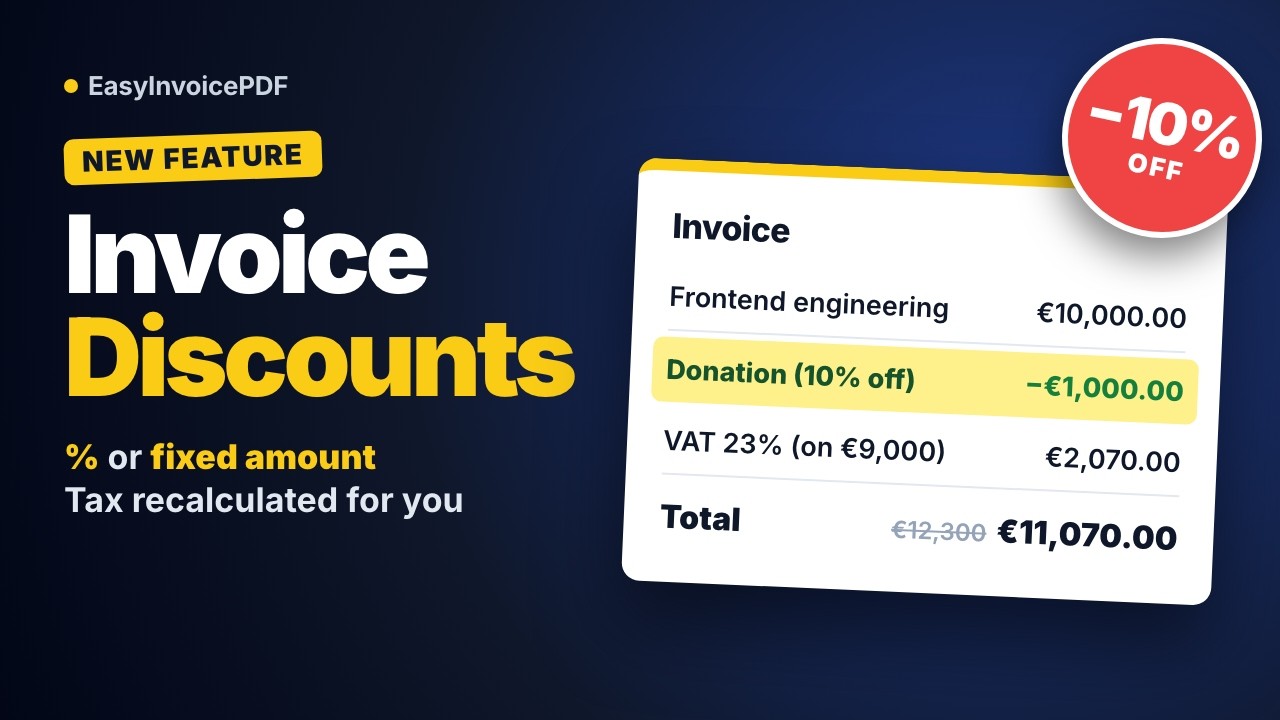
- Discounts on invoice items: take a percentage (
10%) or a fixed amount (50.00 EUR) off any line - Your own label: name the discount, for example
Charitable donation, and it shows on the invoice - Tax on the discounted amount: VAT, totals and the amount in words all use the discounted figures
- Both templates: a Discount column in the default template and a separate discount row in the Stripe template
Read the v1.0.6 release notes or the full changelog.
Earlier releases
v1.0.5: number formats and Brazilian Portuguese (September 24, 2026)
- Number format setting: choose how amounts are punctuated, separately from the invoice language, including a new International format (
321 200.00) - Keep the format when the language changes: write an invoice in your client's language and keep your own number formatting
- Brazilian Portuguese invoices: a new
Portuguese (Brazil)PDF language withCNPJ/CPFand Brazilian amounts in words - Large amounts fit their columns: wide amounts wrap at a thousands boundary instead of overlapping the next column

v1.0.4: faster PDF preview and mobile polish (September 4, 2026)
- Faster, flicker-free preview: the PDF is generated once and shared by the desktop preview, the mobile viewer and the download button
- Redesigned mobile tabs: a pill-shaped track with one indicator that slides between the form and the preview
- Dates in the form match the PDF: helper texts and the out-of-date banner use the invoice's language and date format
- Fixed missing first characters in labels:
Cobrar deno longer renders asobrar de
https://github.com/user-attachments/assets/3c87d026-a1c3-4d69-b161-f7d72616c394
v1.0.3: seller and buyer improvements (March 29, 2026)
- Email visibility toggle: choose whether seller and buyer email addresses appear on the PDF
- Discard confirmation: a warning about unsaved changes when you close the seller or buyer dialog
- Reworked seller and buyer forms: a new layout, locked-state banners and clearer field groups
- Out-of-date dates helper: lists outdated fields and updates all of them with one button
- Scroll position kept on mobile: the form returns to where you were when you switch tabs
https://github.com/user-attachments/assets/1b39eb6f-e2be-493f-9825-cbce3dc6fa16
v1.0.2: QR codes and multi-page PDFs (March 10, 2026)
- QR codes: add payment QR codes with custom descriptions to both templates
- Logo in the default template: upload a logo to the default template too
- Searchable currency picker: search by code, symbol or name, grouped by category
- Better multi-page PDFs: automatic pagination and page breaks for long invoices
v1.0.1: custom tax labels (January 12, 2026)
- Custom tax labels: VAT, GST, sales tax or any label, set per invoice language
- Better translations: tax labels update with the language, and currencies follow the locale
- Stricter VAT validation: accepts numeric values and specific strings
https://github.com/user-attachments/assets/4eef2b90-678b-4a55-9ee5-8fcf195c993a
v1.0.0: initial release (November 19, 2025)
- Live preview: the invoice updates as you type
- Instant PDF download: one click, no sign-up
- Default and Stripe-style templates: pick the look you want
- Shareable links: send invoices without attachments
- 10 languages and 120+ currencies
https://github.com/user-attachments/assets/23bb5448-c9fb-4ff2-98f3-0b80d75b7683
Run it locally
EasyInvoicePDF is licensed under AGPL v3, so you can run your own copy on your machine or your own infrastructure. You need Node.js and Corepack, which installs the pnpm version pinned in package.json.
Install pnpm and the dependencies:
corepack enable
corepack install
pnpm install
Create your environment file:
cp .env.example .env.localStart the dev server on localhost:3000:
pnpm dev
Environment variables
The invoice editor itself needs no external services. These ones are used only by the private /api/generate-invoice route and its Telegram bot, which send the author's monthly invoice:
| Service | Used for |
|---|---|
| Resend | Emailing the generated invoice |
| Upstash | Rate limiting and the job queue |
| Google Drive API | Uploading the generated PDFs |
| Telegram Bot API | Notifications and the /generate command |
Every script loads .env.local through dotenvx, so the file works plaintext or encrypted. To encrypt it:
pnpm exec dotenvx encrypt -f .env.local
Working with an encrypted .env.local
- Change a value:
pnpm exec dotenvx set KEY value -f .env.local - Read a value:
pnpm exec dotenvx get KEY -f .env.local - Restart
pnpm devafter a change: Next.js reloads.env.localon its own, but from an encrypted file it reads the rawencrypted:...strings - Missing private key (new machine, locked keychain): scripts stop with
DECRYPTION_FAILEDinstead of running
Tech stack
- Next.js, React and TypeScript
- @react-pdf/renderer for generating PDFs in the browser
- Tailwind CSS, shadcn/ui and Origin UI
Other tools used to build and run the project:
- Umami for privacy-friendly analytics
- zizmor for static analysis of GitHub Actions
- typescript-plugin-directives
- og.new for Open Graph images and shots.so for mockups
Support the project
EasyInvoicePDF is free and has no ads. If it saves you time, you can help keep it that way:
- Star the repository on GitHub
- Buy me a coffee on Buy Me a Coffee
- Follow the project on X
Author
Built by Vlad Sazonau, a product engineer and design enthusiast.
X · LinkedIn · YouTube · Website
Star history
License
EasyInvoicePDF is licensed under the GNU AGPL v3.
Explore related projects
freeCodeCamp/freeCodeCamp
freeCodeCamp.org's open-source codebase and curriculum. Learn math, programming, and computer science for free.
458,826 starsdonnemartin/system-design-primer
Learn how to design large-scale systems. Prep for the system design interview. Includes Anki flashcards.
377,475 starsreact/react
The library for web and native user interfaces.
252,467 starsvuejs/vue
This is the repo for Vue 2. For Vue 3, go to https://github.com/vuejs/core
212,625 stars