
Vincentwei1021/video-talkcraft
Vincentwei1021/video-talkcraft has 2,143 GitHub stars and 214 forks. GitHot measured +15 stars in 24 hours. Last checked 2026-11-07 00:04 UTC. Last push 2026-10-12.
Agent skill that turns Claude Code / Codex into a motion-design studio for voiceover-driven explainer videos — word-level voiceover sync, 109 motion recipe cards, an anti-slideshow camera system, Remotion rendering.
Measured star growth
- in 24h
- +15
- in 7 days
- Collecting history
- in 15 days
- Collecting history
- in 1 month
- Collecting history
Net star changes over overlapping periods, not daily totals. Missing measurements are left blank. Stars measure attention, not software quality.
README_EN.md
Original
video-talkcraft


An agent skill for crafting high-quality voiceover-driven videos: word-level voiceover sync · 108 motion recipe cards · a 7-layer anti-slideshow shot system · triple-gate QA
video-talkcraft is the voiceover-driven explainer installment of the video-shotcraft series: an AI agent skill that turns Claude Code or Codex into a motion-design studio for narrated explainer videos. Give it a narration script and a finished voiceover, and it aligns word-level timestamps locally, storyboards every semantic beat into a SHOTBOOK, then renders a polished explainer with Remotion — kinetic type, evidence screenshots, camera moves, plain-cut subtitles, and film-grade SFX, all locked to the voice.
The methodology docs and recipe cards are written in Chinese — the toolkit is built Chinese-narration-first (mixed Chinese/English narration is fully supported). Agents read them natively.
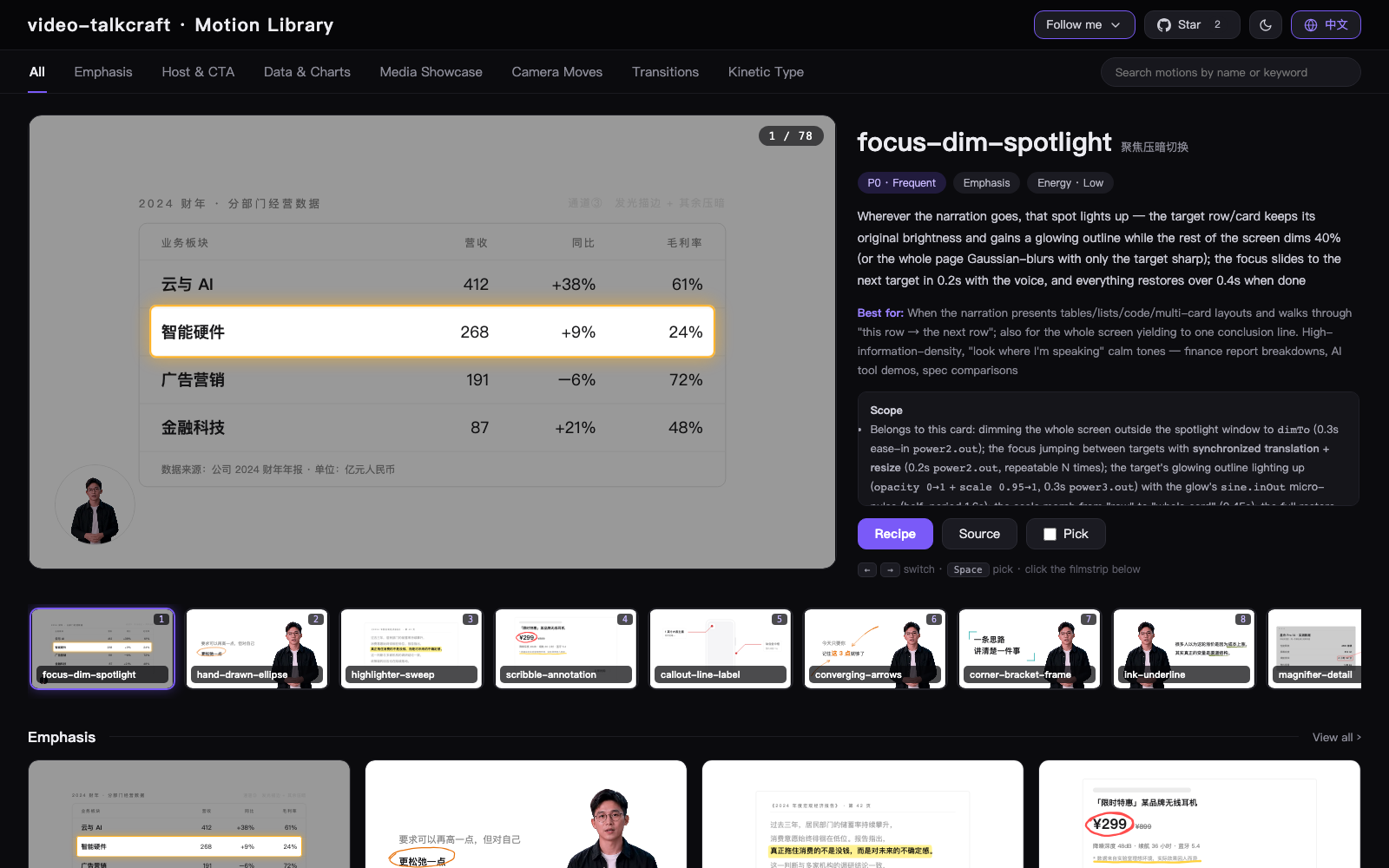
🖼️ Browse all 108 motion previews in the live Gallery »
🆕 What's new
2026-09-11
- ✂️ Voice pre-trim
scripts/voice_trim.py— a human recording is now cleaned before timestamping, using the script as ground truth to cut filler words / stutters and re-takes / over-long pauses (only insertions absent from the script are cut, ASR mishearings of scripted characters never are); word timings come from FireRed ASR, a per-character SRT or a word-level JSON, cut points snap to the frame grid, and the same EDL can trim the host video so audio and picture stay frame-aligned (→ SKILL.md ②-0). - 🫥 Workbench: right-click → export with alpha — right-click any motion clip on the timeline to render just that clip as a transparent video (MOV ProRes 4444 or WebM VP9 alpha) with a transparent canvas, the card's root backdrop and host-silhouette placeholder stripped automatically, ready as an overlay in CapCut / Premiere / After Effects; the same menu carries split / duplicate / delete (→
workbench/GUIDE.md⑦). - 📺 Workbench live production board (L1) — the workbench now attaches as soon as the ⑤-1 skeleton exists and stays open: a stage bar, a per-shot progress track (placeholder / implemented / rendered / passed / stale / open-issue dot), a shot view (single-shot preview, issues, SHOTBOOK excerpt) and a live composition card; status is derived from on-disk artifacts,
scripts/pipeline_state.mjs --pass/--issueonly records human verdicts, and half-written code no longer blanks the page (→ SKILL.md ⑤-2,workbench/docs/live-pipeline.md). - 🔗 Hardened workbench project linking —
kbsrcnow resolves through the real path, each contract module falls back to its stub individually, andsrc/kb/normalises export shapes: linking a regular skill-built project (Main.tsx+scenes/, no promo modules) no longer 500s the whole page, and "拆解导入" (split import) disables itself with a reason when the contract isn't met (→workbench/README.md, "接入口播成片工程").
2026-09-09
- 🎬 First shot before the rest — step ⑤ now scaffolds the whole composition with placeholder shots, builds only the sample shot, renders it as a single-shot preview with
--seg-audio(no full audio track) for user sign-off, and only then builds the remaining shots; ⑥-1.5 keeps just the "full render or shot by shot" question (→ SKILL.md ⑤-1).
2026-09-07
- ✏️ G5 line-art schematic system — every text-only shot must carry an icon + box + arrow line drawing, text is never placed bare, at least one visible change per sentence, and preflight WARNs when that companion row is missing (→
template/motion-systems/schematic.tsx,references/schematic.md). - 🎞️ Eight video theme frames + chapter theme layer — a single-video shot must sit inside one themed frame (browser window / film / instant photo / blueprint and four more; one frame per film, no fake player), and chapter cards switch colours plus a line-art motif per chapter (→
template/components/theme-frame.tsx, design-language §1.3).
2026-09-05
- 🔁 19 cards ported from video-shotcraft (89 → 108) — two review rounds over the sister library video-shotcraft kept 19 (freeze-frame annotate removed 2026-09-06, 18 remain), each tsx rewritten to this library's self-contained contract, source cited (→ batch ◎ in
references/taxonomy.md). - 🎨 Domain-driven style and card skinning — derive a style profile from the script's domain before storyboarding (SHOTBOOK G0); library cards are neutral UI and are re-skinned to that profile without touching their motion vitals, one skinning line per shot (→
references/design-language.md§0). - 🧩 10 new multi-asset cards (79 → 89) — parallel-sentence layouts, triptych relay, compare slider, filmstrip, stack fan-out, gallery-wall dolly / timeline photo strip and more; every card lists its input types and common scenarios, so card selection starts by filtering on the shot's material (→ input-type index in
references/taxonomy.md). - 📐 Layout spec
references/layout.md— 12-column grid, spacing tokens, minimum type sizes, non-overlapping boxes and a 9-point still check; each chosen card's pitfalls / placement checks must be copied into the SHOTBOOK. - 🎨 12 dynamic backdrops shipped —
template/motion-systems/backdrop.tsx, 6 dark / 6 light, frame-driven with zero randomness; defaults are now lightpastel-mesh-flow/ darkmesh-flow-dark.
2026-09-04
- 🎥 Motion system slimmed down — one very slow push / pull camera curve per scene plus the yield lifecycle; idle wobble, breathing and pulses are off by default.
- 🌐 Web pages are filmed, not pasted — pages are shot by the camera (scroll, tour, magnifier, highlighter) instead of appearing as static screenshots, with every coordinate read from Playwright measurements (→ SKILL.md §③,
references/shot-design.md§2④).
2026-09-02
🎛️ Motion workbench
workbench/— a CapCut-style post-production desk for finished videos: multi-track timeline, library (media / motion cards / SFX / backgrounds), schema-driven inspector, live preview and one-click Export. All 108 motion cards are parameterized (copy, colors, sizes, positions editable; timing vitals stay fixed). A narration video can be split into seven kinds of editable units — subtitles / transitions / environment / avatar / shots / voiceover / SFX. The skill opens it for you after delivery. → Illustrated guide (zh)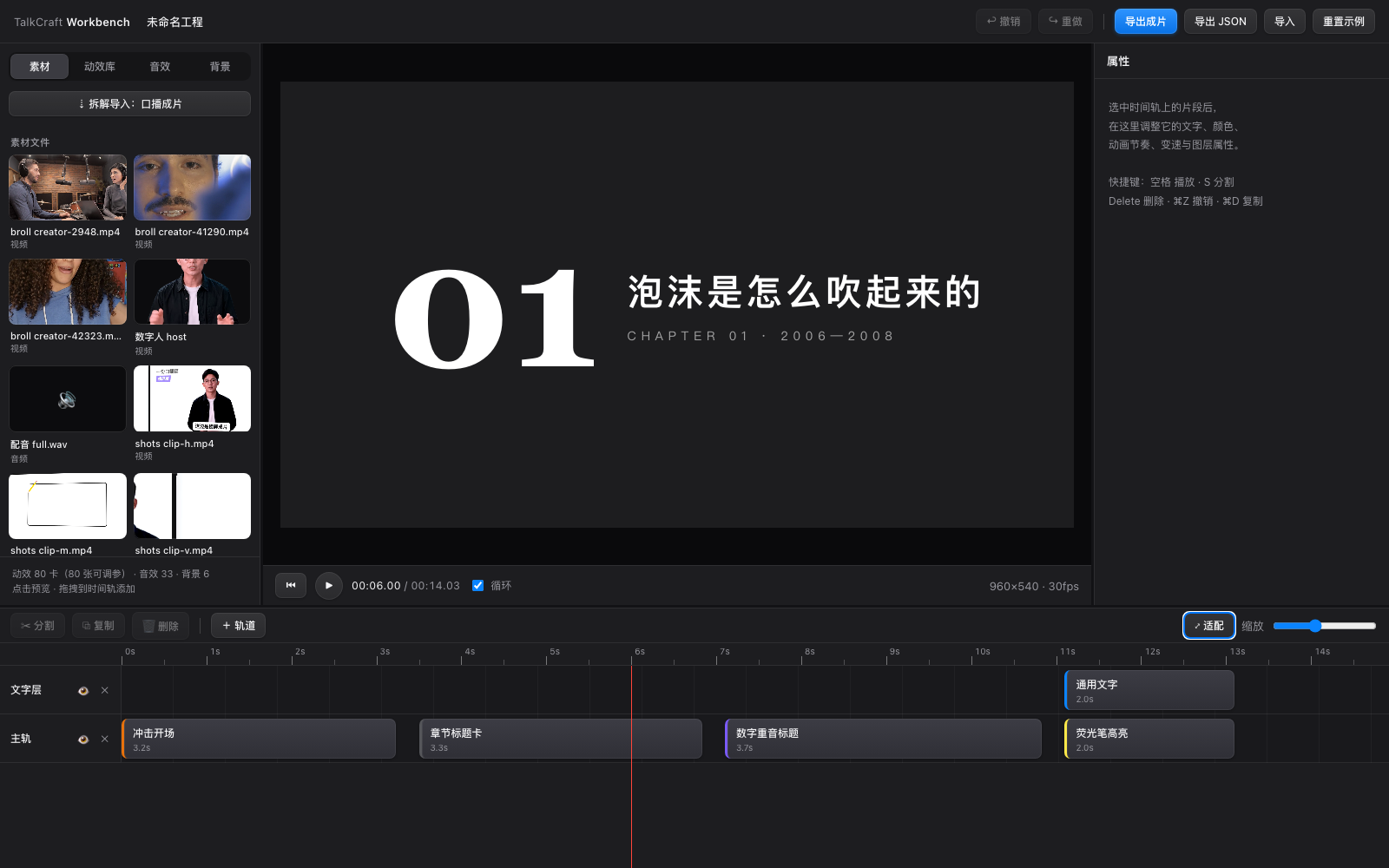
⚡ Faster renders: shot-segmented master rendering —
scripts/render_shots.mjsrenders per-shot segments in parallel (single-process inside each segment to keep rasterization consistent), then concatenates, mixes in the full audio track and asserts frame counts; changing one shot re-renders only that segment ± neighbours.scripts/render_stills.mjsrenders batches of stills from a single bundle.🧮 Fewer review tokens —
scripts/contact_sheet.pytiles QA frames into 3×4 sheets for the reviewer subagent; burst triples are extracted only at anchors flagged"burst": true(they used to be 2/3 of the review material).✅ One review round, then deliver — after the machine gates pass, a single independent review round fixes P0/P1 and the video ships; further rounds are opt-in (3 max) instead of "loop until clean".
| Measured (201 s vertical video) | Before | Now |
|---|---|---|
| Full first render | 13 min | 9 min |
| New video with audio after changing one shot | full re-render | 53 s |
| 43 sampled stills | 11 min | ~1 min |
| Reviewer reading 160 QA frames | ≈160k tokens / 21 min | ≈40k tokens / 7 min (sheets) |
- 🤝 New card: community-contributed douyin-follow-card (@scpcn01vision-oss) — 79 cards total.
✨ Highlights
- Word-level voiceover sync —
scripts/timestamps_cpu.pyaligns your script to the audio (FireRedASR2-CTC int8 by default, faster-whisper as the zero-download fallback). Benchmarked against a GPU forced aligner on a 110s mixed-language narration: median per-character offset 20–40 ms, worst case 200 ms, zero false QA flags. Every motion beat anchors to the exact word. - 108 motion recipe cards — each with intent, parameters, known pitfalls,
a copy-paste self-contained Remotion tsx source, and a runnable HTML
preview — browse them all in the
online Gallery or
locally with
open gallery/index.html. Kinetic type, data shots, evidence tours, six motion-carry transitions, a long-take world canvas, host compositing, and more. - A 7-layer anti-slideshow system — one very slow push-in or pull-out camera curve per scene, a yield lifecycle and six motion-carry transitions (slimmed down on 2026-09-04: subject idle and the breathing environment are no longer required). Statically frozen frames are structurally impossible (and automatically detected if they slip through).
- Layout discipline that survives review — semantic-beat storyboarding,
on-screen element budgets, whitespace anchors, pivot-sentence cut rules,
and face safety zones measured by real detection
(
scripts/face_bbox.py), not by eye. - Triple-gate QA — automated stillness detection, per-cue SFX energy verification on a solo track, and an independent-reviewer pass armed with anchor frames (plus burst triples at state-switch anchors, which catch time-domain defects single frames can't show).
🚀 Quick start
The most direct way: hand the repo link to your agent. In Claude Code / Codex or a similar agent, just say:
Install this skill for me: https://github.com/Vincentwei1021/video-talkcraft
Or install with the skills CLI / manually:
npx skills add Vincentwei1021/video-talkcraft
git clone https://github.com/Vincentwei1021/video-talkcraft.git
cd video-talkcraft
ln -s "$(pwd)" ~/.claude/skills/video-talkcraft   # Claude Code
# or
ln -s "$(pwd)" ~/.codex/skills/video-talkcraft    # Codex
Environment (the agent will set this up as needed):
- Node 18+ (Remotion render;
npm installinside the per-video project) - Python 3.10+
- For local CPU timestamp alignment:
pip install zhconv pypinyin sherpa-onnx soundfile numpy(downloads 767 MB FireRedASR2-CTC model once; or use--backend whisper) - For 1-step cloud TTS + timestamps (Fish Audio free tier):
pip install requests python-dotenv
- For local CPU timestamp alignment:
- ffmpeg
Then make requests like:
Use video-talkcraft to turn this narration script + voiceover.wav into a video.
Make a 100-second explainer about <topic>; here is the script and the audio.
🎙️ Optional: Fish Audio voiceover + character timestamps
Finished voiceover plus local CPU alignment remains the default workflow. When you need to synthesize narration, opt into Fish Audio. The script requests s2.1-pro-free by default; free quota and model availability are controlled by Fish Audio.
- Install
ffmpegand Python dependencies:pip install requests python-dotenv. - Copy
.env.exampleto.envand setFISH_AUDIO_API_KEY. Optionally setFISH_AUDIO_REFERENCE_IDto a voice ID from the voice library; leaving it empty uses the service's default voice. - Prepare
script.json, for example{"sentences": ["First sentence.", "Second sentence."]}. A JSON string array or a.txtfile with one sentence per line also works. - Generate audio and timestamps:
# Default: one request per sentence, with 0.25 seconds of actual silence inserted between requests
python3 scripts/tts_fishaudio.py script.json audio/full.wav audio/timestamps.json --timing-out remotion/src/timing.json
# One request for the whole script; retain the model's natural pacing
python3 scripts/tts_fishaudio.py script.json audio/full.wav audio/timestamps.json --timing-out remotion/src/timing.json --mode stream
Both modes receive SSE audio and alignment snapshots. Files are written after synthesis finishes; streaming playback is not implemented. --pause-sec controls additional silence in sentence mode only. Each response is decoded to PCM before concatenation and encoding; offsets use actual decoded sample counts. --format mp3|wav|opus selects the API response format; the audio output extension selects the saved format.
Chinese characters retain API alignment spans; English character times are interpolated within each word, with zero-duration punctuation. Empty audio, missing/invalid alignment, decoding failures, and mismatched normalized text cause an error exit. Normalization ignores punctuation, case and character width; it does not guess spoken-number substitutions such as 2 versus two. Use spoken-form text for such cases, or use local CPU alignment with an existing recording. match=1 / ok=true confirms text mapping, not pronunciation or independently verified timing accuracy; listen to the result.
Offline regression checks (no API key; requires requests and ffmpeg):
python3 -m unittest discover -s scripts -p 'test_*fish*.py' -v
🎞 What you bring vs. what it does
| You bring (inputs) | The skill does |
|---|---|
| Narration script | Word-level timestamp alignment, with per-sentence QA flags |
| Finished voiceover — any TTS or human recording | SHOTBOOK storyboarding: semantic beats, layer matrices, layout budgets |
| Optional host footage — ordinary video works (keying + face-zone tooling included; green screen keys cleanest) | Remotion implementation on four global systems (camera / parallax / yield / environment), transitions, SFX placement |
| Optional B-roll / screenshots | Render + triple-gate QA (machine gates all green + one independent review round with P0/P1 fixed, then deliver; optional extra rounds, 3 max), loudness-normalized delivery |
📦 What's included
| Content | Description |
|---|---|
| 108 motion recipe cards | Intent, energy, parameters, implementation notes, and known pitfalls — every card ships a self-contained Remotion tsx source (template/cards/, copy one file and go) plus a runnable HTML demo |
| Gallery | Online or local (open gallery/index.html) — browse and autoplay all 108 previews, search by name/keyword |
| Motion systems | CameraRig (slow push/pull), yield lifecycle, six transitions, long-take world canvas; parallax and environment layer optional (template/motion-systems/) |
| Components | Plain-cut subtitles, flower-word titles, smash words, highlight sweeps, pencil draw, number rolls, eight video container frames (template/components/) |
| Pipeline scripts | Word-level timestamps (2 ASR backends), face-zone detection, stillness check, SFX presence check, QA frame extraction (scripts/) |
| Methodology | Design language (Apple-paradigm default), shot design worksheets, cinematography rules, storyboard format, QA rubrics (references/) |
| Embedded SFX | Per-card sound cue tables with real samples embedded in the demo lib (licenses in demos/_lib/sfx/ATTRIBUTION.md) |
🗂 Repository structure
video-talkcraft/
├── SKILL.md                    # Agent entry point: the 8-step pipeline and hard rules
├── references/
│   ├── design-language.md      # Default visual system (palette/type/layout/subtitles)
│   ├── shot-design.md          # 3-plane worksheet + 7 shot-type presets
│   ├── cinematography.md       # 7-layer model, transitions, layout budget, QA gates
│   ├── shotbook-example.md     # A full storyboard example
│   ├── cards/                  # 108 motion recipe cards
│   ├── taxonomy.md             # Card index by category and source
│   ├── broll-sources.md        # Attribution-free stock sources (APIs, license traps)
│   ├── host-footage.md         # Host footage: input spec, keying, face safety zone
│   └── demo-spec.md            # Card/demo authoring spec
├── demos/                      # 108 runnable HTML previews (+ shared lib with embedded SFX)
├── gallery/                    # One-page local gallery
├── template/                   # Copy-paste Remotion code
│   ├── cards/                  # Per-card self-contained tsx sources (the skill's primary reference)
│   ├── motion-systems/         # Camera / parallax / yield / environment / transitions / long-take
│   └── components/             # Subtitles, flower words, smash words, pencil, etc.
└── scripts/                    # Timestamps, face bbox, QA tooling
For the full workflow, start at SKILL.md.
❓ FAQ
What is video-talkcraft? An open-source AI agent skill (for Claude Code / Codex) that turns a narration script plus a finished voiceover into a fully animated, voiceover-driven explainer video. It is not an editor and not a template site — the agent reads the methodology, picks motion recipe cards, writes Remotion code, and runs triple-gate QA to deliver a publish-ready explainer.
What kinds of videos can it make? Landscape, voiceover-driven explainer videos: knowledge explainers, product reviews, news breakdowns, opinion commentary. Designed Chinese-narration-first; mixed Chinese/English narration is fully supported.
What do I need to provide? A narration script (text) and a finished voiceover (any TTS or human recording); host footage and B-roll are optional.
Is it free? Free for personal, educational, and research use (PolyForm Noncommercial 1.0.0), and the videos you produce belong to you; commercial use of the toolkit itself requires prior authorization (see below).
📄 License
PolyForm Noncommercial 1.0.0 — free for personal, educational, and research use. Any commercial use of the toolkit requires prior authorization — email [email protected] or open a GitHub issue.
Videos you produce with this skill belong to you. If it helped, a mention of the author's accounts in your video description is appreciated — and entirely optional.
🔊 Audio and asset notes
- Embedded SFX samples: sources and licenses in demos/_lib/sfx/ATTRIBUTION.md.
- The B-roll sourcing guide only admits attribution-free stock (Pexels, Pixabay, Mixkit Free, Coverr, NASA) and documents the license traps of the ones it rejects — see references/broll-sources.md.
- The demo host footage (
demos/_lib/dh-host.webm) is an AI-generated presenter used as a placeholder; replace it with your own host footage in production.
🙏 Acknowledgements
- Remotion — the React video framework powering every render here (note its own license).
- FireRedASR2 via sherpa-onnx and faster-whisper — the timestamp backends; Qwen3-ASR/ForcedAligner served as the benchmarking reference.
- OpenCV YuNet — the face detector behind the face-safety-zone rule.
- Pexels · Pixabay · NASA · Mixkit — attribution-free asset sources.
- Claude Code — this library was built, iterated, and QA'd with an AI coding agent, using the same review loops the skill teaches.
Follow me



Explore related projects
affaan-m/ECC
The agent harness performance optimization system. Skills, instincts, memory, security, and research-first development for Claude Code, Codex, Opencode, Cursor and beyond.
298,754 starsNousResearch/hermes-agent
The agent that grows with you
261,292 starsmultica-ai/andrej-karpathy-skills
A single CLAUDE.md file to improve Claude Code behavior, derived from Andrej Karpathy's observations on LLM coding pitfalls.
230,390 starsfirecrawl/firecrawl
Supercharge your AI agents with data from the web and beyond. Building the library for superintelligence. 🔥
199,303 stars