
VibhuviOiO/ldap-manager
VibhuviOiO/ldap-manager has 29 GitHub stars and 1 forks. GitHot measured 0 stars in 24 hours and +1 in 7 days. Last checked 2026-11-12 06:11 UTC. Last push 2026-11-04.
Modern web-based management UI for OpenLDAP — multi-cluster, secure password caching, server-side pagination. Docker image: docker.io/vibhuvioio/ldap-manager
What you can do
- DIT tree browser - Lazy-loaded tree of the whole directory; inspect any entry's attributes
- Entry management - Create, edit, change passwords, manage group membership, delete
- Bulk operations - Select many entries and set an attribute, add them to a group, or delete
- LDIF editor - Syntax-highlighted, with Validate (dry run) and Apply; supports add, modify and delete
Measured star growth
- in 24h
- 0
- in 7 days
- +1
- in 15 days
- Collecting history
- in 1 month
- Collecting history
Net star changes over overlapping periods, not daily totals. Missing measurements are left blank. Stars measure attention, not software quality.
README.md
OriginalLDAP Manager - 📖 Docs




Modern web-based management interface for OpenLDAP servers with a React + TypeScript frontend and FastAPI Python backend.
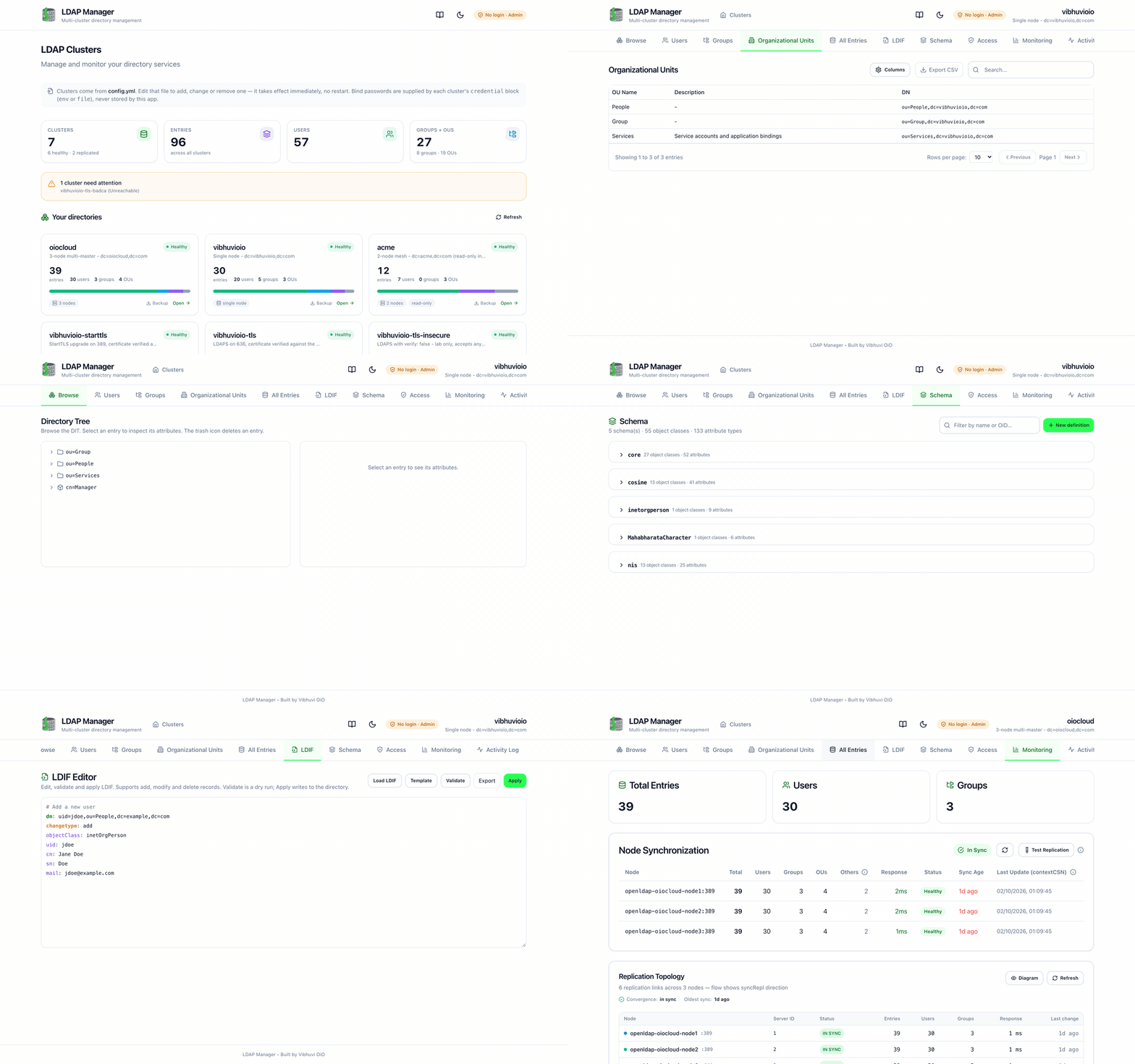
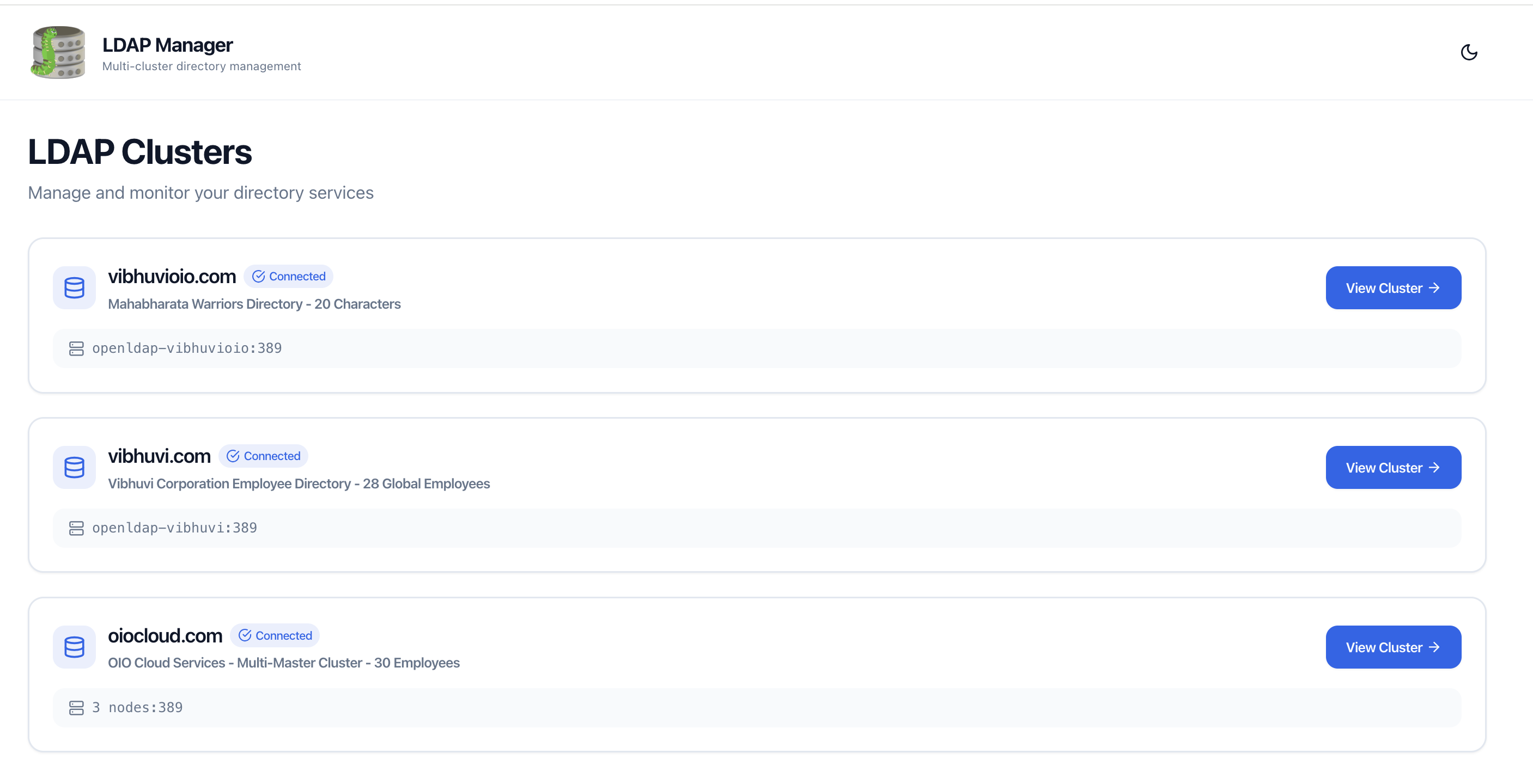
|
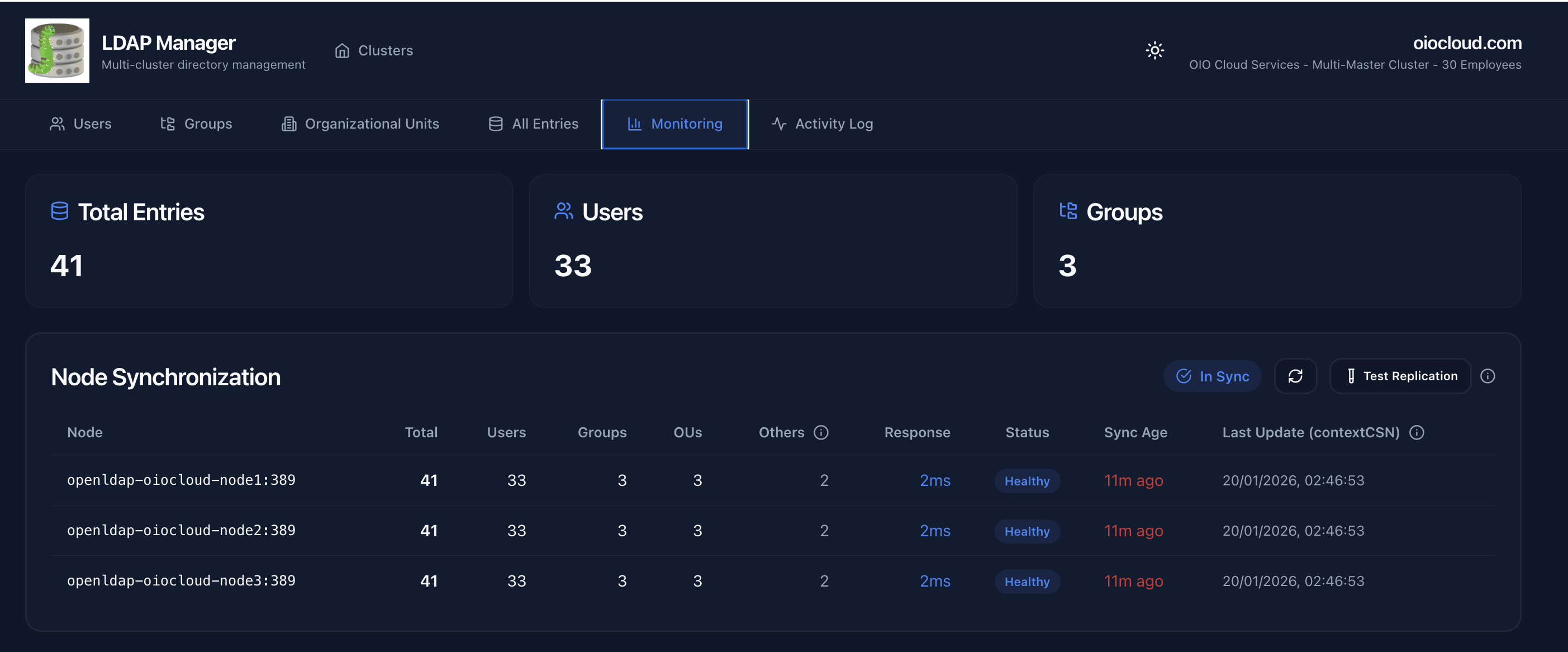
|
| LDAP Manager | Directory Data |
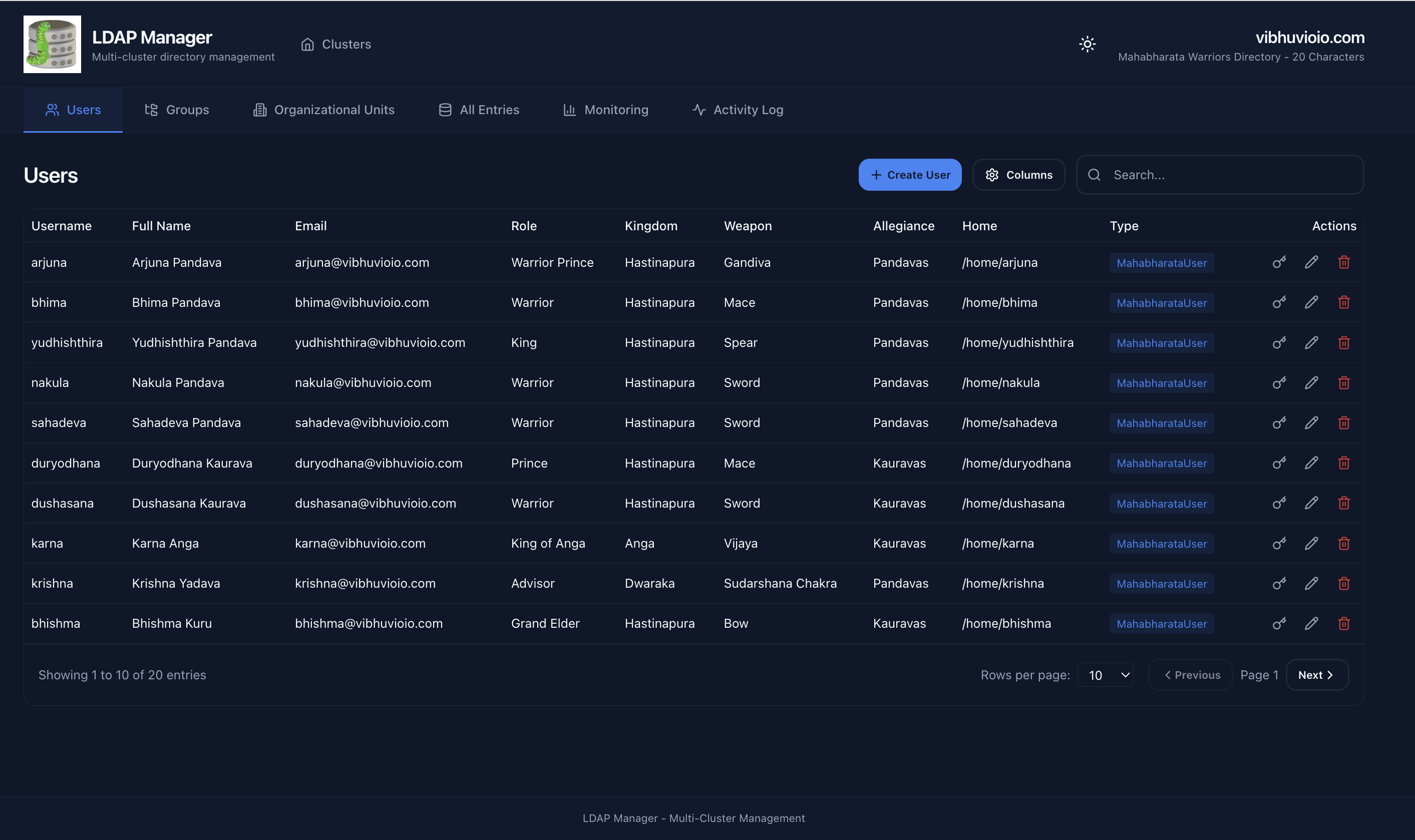
|
|
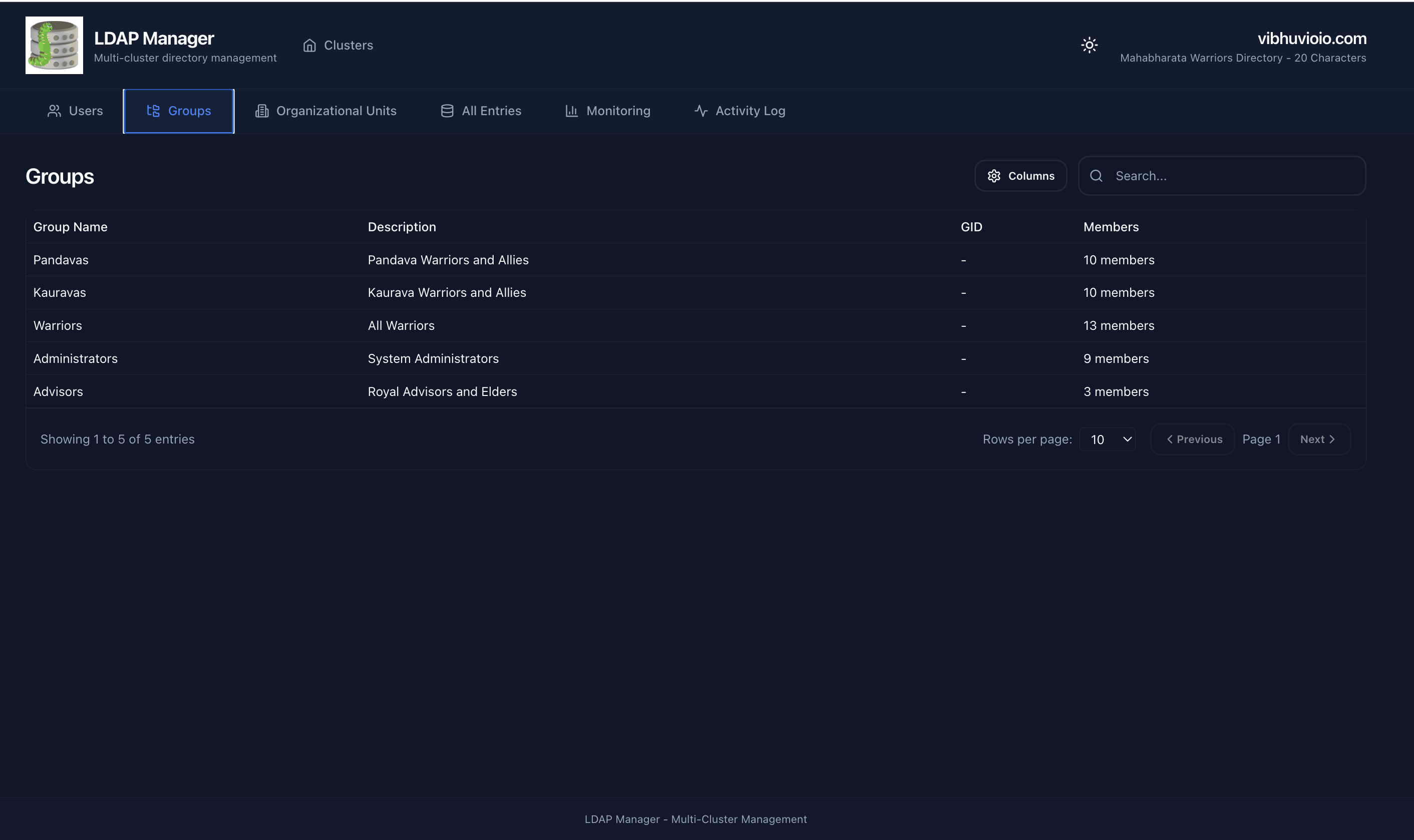
| Users | Groups |
Features
Directory
- DIT tree browser - Lazy-loaded tree of the whole directory; inspect any entry's attributes
- Entry management - Create, edit, change passwords, manage group membership, delete
- Bulk operations - Select many entries and set an attribute, add them to a group, or delete
- LDIF editor - Syntax-highlighted, with Validate (dry run) and Apply; supports add, modify and delete
- Export - Download any filtered view as CSV, or the full directory as LDIF
Schema and security
- Schema editor - Browse and edit
olcAttributeTypes/olcObjectClassesincn=schema - ACI editor - Read and edit
olcAccessrules per database, in evaluation order - Role-aware UI -
readonly,readwriteandadminsee different controls (see Roles)
Operational
- Multi-cluster - Many LDAP servers from one interface, file-owned or UI-owned
- Replication topology - Animated syncRepl view plus a per-node table
- TLS / LDAPS -
ldaps, StartTLS, CA and client-certificate verification per cluster - Health monitoring - Live cluster and node health
- Authentication -
none,localorldap, with per-user and per-group roles - Server-side pagination & search - Efficient on large directories (RFC 2696)
Quick Start
System Requirements
| Resource | Minimum | Recommended | Production (High Traffic) |
|---|---|---|---|
| CPU | 1 core | 2 cores | 4 cores |
| RAM | 512 MB | 1 GB | 2 GB |
| Disk | 500 MB | 1 GB | 2 GB |
Docker Run (Fastest)
# Download the config template
wget https://raw.githubusercontent.com/VibhuviOiO/ldap-manager/main/config.example.yml -O config.yml

# Edit config with your LDAP details
nano config.yml

# Run the Docker Hub image
docker run -d \
  --name ldap-manager \
  -p 8000:8000 \
  -v $(pwd)/config.yml:/app/config.yml:ro \
  vibhuvioio/ldap-manager:latest

# Access the UI at http://localhost:8000
Docker Compose (Recommended)
# Download the production compose file and config template
wget https://raw.githubusercontent.com/VibhuviOiO/ldap-manager/main/docker-compose.prod.yml
wget https://raw.githubusercontent.com/VibhuviOiO/ldap-manager/main/config.example.yml -O config.yml

# Edit config with your LDAP details
nano config.yml

# Start the application
docker compose -f docker-compose.prod.yml up -d

# Access the UI at http://localhost:8000
Registry note: The primary image is hosted on Docker Hub at
vibhuvioio/ldap-manager. The same image is also available on GHCR atghcr.io/vibhuvioio/ldap-managerif you prefer GitHub's registry.
Configuration
Basic Setup (config.yml)
clusters:
  - name: "Production LDAP"
    host: "ldap.example.com"
    port: 389
    bind_dn: "cn=Manager,dc=example,dc=com"
Authentication
Sign-in to LDAP Manager is your choice. Set auth.mode:
| mode | behaviour |
|---|---|
none |
No login. Use when nginx / oauth2-proxy / your SSO already authenticates users. Visitors get auth.default_role, readonly by default. |
local |
Built-in accounts with no external integration. On first start the UI shows a one-time wizard to create an admin, plus optional operator and viewer accounts. Passwords are hashed with scrypt and stored encrypted. |
ldap |
One of your clusters authenticates your users; the rest stay clusters to manage. Users sign in with their own directory password, so no cluster-wide bind secret is needed to log in. Their role comes from LDAP group membership. |
Three roles: readonly (browse, monitoring), readwrite (also create/edit/delete entries), admin (also clusters, credentials and backups).
With no
auth:block the app runs innonemode with thereadonlydefault role, so it is view-only. To keep full access behind your own proxy, setauth.default_role: admin.
auth:
  mode: ldap
  default_role: readonly        # for mode: none
  session:
    lifetime_hours: 12
  ldap:
    cluster: "Production LDAP"  # which cluster authenticates
    user_dn_template: "uid={username},ou=People,dc=example,dc=com"
    user_base_dn: "dc=example,dc=com"
    role_map:
      default: readonly
      groups:                   # member, uniqueMember and memberUid all work
        "cn=ldap-admins,ou=Group,dc=example,dc=com": admin
        "cn=ldap-ops,ou=Group,dc=example,dc=com": readwrite
How a role is decided, per mode
| mode | who you are | where the role comes from |
|---|---|---|
none |
everyone (no login) | auth.default_role — a single, operator-set role |
local |
a built-in account | that account's role, set when the account is created |
ldap |
a directory user (binds with their own password) | the first matching group in auth.ldap.role_map.groups; if none match, role_map.default. When several groups match, the highest role wins |
auth.default_role is deliberately not selectable in the UI. Letting an anonymous
visitor choose "admin" would be privilege escalation, not a feature. The header badge
always shows which role is in force and where it came from.
In local and ldap mode a login is required — anonymous requests get
401 Authentication required even for reads. Only none serves anonymous traffic.
Roles and what they see
| capability | readonly | readwrite | admin |
|---|---|---|---|
| Browse, DIT tree, search, export CSV | ✅ | ✅ | ✅ |
| Monitoring, topology, activity | ✅ | ✅ | ✅ |
| Schema and ACI viewing | ✅ | ✅ | ✅ |
| LDIF editor: Validate (dry run) | — | ✅ | ✅ |
| Create / edit / delete entries | — | ✅ | ✅ |
| Bulk set attribute, bulk group add, bulk delete | — | ✅ | ✅ |
| LDIF editor: Apply | — | ✅ | ✅ |
| Add / remove schema definitions | — | — | ✅ |
Add / remove olcAccess rules |
— | — | ✅ |
| Cluster management, backups, local users | — | — | ✅ |
Controls a role cannot use are hidden or disabled, and every check is enforced again server-side — the UI is a convenience, not the boundary.
TLS / LDAPS
Per cluster, so a plaintext lab and a hardened production directory can coexist:
clusters:
  - name: "secure"
    host: "ldap.example.com"
    port: 636
    bind_dn: "cn=admin,dc=example,dc=com"
    base_dn: "dc=example,dc=com"
    tls:
      mode: ldaps          # none (default) | ldaps | starttls
      ca_file: /certs/ca.crt
      verify: true         # false accepts any certificate - lab only
      # cert_file: /certs/client.crt   # mutual TLS
      # key_file: /certs/client.key
- The certificate paths are inside the container, so mount them:
-v ./certs:/certs:ro. mode: ldapswith a configured port of389is raised to636(logged), since 389 is the plaintext default. Setportexplicitly to use something else.mode: starttlsconnects onldap://and upgrades before binding.- A failed certificate check reports which settings were in play, e.g.
LDAP connection failed: ... certificate verify failed [TLS mode 'ldaps', CA /certs/ca.crt, certificate verification ON].
TLS applies to every connection the app opens - entries, monitoring, schema, ACI, backup, LDIF and LDAP authentication.
Schema and ACI editing (cn=config)
The schema and ACI editors read and write cn=schema,cn=config and olcAccess. The data
bind DN normally cannot see cn=config, so those clusters need a second credential:
    config:
      bind_dn: "cn=config"
      credential:
        source: env          # LDAP_MANAGER_CONFIG_<CLUSTER>_PASSWORD
Without this block the editors return a clear "no cn=config credential" message and the
rest of the app is unaffected. Both editors are admin-only; a bad schema definition is
rejected by the directory, while olcAccess is the one place a wrong change can lock
people out - the UI warns before applying.
Cluster credentials
Each cluster's bind password is read from wherever you supply it. LDAP Manager never stores a password: there is no runtime credential cache, and no UI or API writes one.
clusters:
  - name: "Production LDAP"
    # ...
    credential:
      source: env   # env | file | config
| source | where the password lives |
|---|---|
env (default) |
An environment variable, default LDAP_MANAGER_CLUSTER_<NAME>_PASSWORD |
file |
A mounted secret file (Docker/Kubernetes secret) |
config |
Plaintext bind_password in config.yml (logged as a warning) |
Clusters come from config.yml
Clusters are declared only in config.yml. The app reads that file on the next
request after an edit, so there is no restart and no way to change a cluster
from the browser:
clusters:
  - name: "Production LDAP"
    host: "ldap.example.com"
    bind_dn: "cn=admin,dc=example,dc=com"
    base_dn: "dc=example,dc=com"
config.yml stays operator-owned and is never written to by the app.
docker run -d --name ldap-manager -p 8000:8000 \
  -v $PWD/config.yml:/app/config.yml:ro \
  vibhuvioio/ldap-manager:latest
/app/.data is still used for the audit log, but no cluster definition or
password is ever written there.
Validating the configuration
Check config.yml before starting the app. Exit code is 0 when valid, 1 when not,
so it also works in CI or as a pre-flight step:
# inside the running container
docker exec ldap-manager python -m app.cli validate

# or against any file, without starting the app
docker run --rm -v "$PWD/config.yml:/app/config.yml:ro" \
  vibhuvioio/ldap-manager python -m app.cli validate

# also try to bind to each cluster (needs network access to your LDAP)
docker exec ldap-manager python -m app.cli validate --check-connections

# machine-readable, for CI
docker exec ldap-manager python -m app.cli validate --json
It checks the cluster schema, duplicate names, host/nodes exclusivity, node
ports, the form builder, each cluster's credential source (including whether an
env variable or secret file is actually present), and the auth block —
including that auth.ldap.cluster names a cluster that exists.
Warnings do not fail the run. Advisory examples:
warn  auth.mode is 'none' with default_role 'readonly': the app is READ-ONLY. ...
warn  Cluster 'prod': $LDAP_MANAGER_CLUSTER_PROD_PASSWORD is not set in this environment
warn  Cluster 'prod': password stored in PLAINTEXT in config.yml - prefer 'env' or 'file'
Backup
Admins can download a cluster's directory as LDIF from the cluster card, or directly:
curl -b cookie.txt -O -J http://localhost:8000/api/backup/Production%20LDAP
# ?scope=one&base_dn=ou=People,dc=example,dc=com   narrower export
# ?operational=true                                include operational attributes
The export is paged, base64-encodes binary attributes, and re-imports with ldapadd.
Multi-Master Cluster
clusters:
  - name: "LDAP Cluster"
    nodes:
      - host: "ldap1.company.com"
        port: 389
      - host: "ldap2.company.com"
        port: 389
    bind_dn: "cn=Manager,dc=company,dc=com"
Context Path (for integration)
# Production
CONTEXT_PATH=/ldap-manager docker compose -f docker-compose.prod.yml up -d

# Development
CONTEXT_PATH=/ldap-manager docker compose up
Documentation
- 📖 Full Documentation
- ⚙️ Configuration Guide
- 🧪 Testing Guide
- 🛠️ Development Setup
- 🔧 Context Path Setup
Technology Stack
Frontend: React 18, TypeScript, Vite, shadcn/ui, Tailwind CSS
Backend: FastAPI, Python 3.11+, python-ldap, PyYAML
Development
# Backend
cd backend
python -m venv venv
source venv/bin/activate
pip install -r requirements.txt
uvicorn app.main:app --reload --port 8000

# Frontend
cd frontend
npm install
npm run dev
Iterating without rebuilding the image
docker build takes minutes; a change should take seconds. Mount the working tree
and let uvicorn reload:
docker run -d --name ldap-dev --network ldap-shared-network -p 8000:8000 \
  -v "$PWD/backend/app:/app/app" \
  -v "$PWD/config.yml:/config.yml:ro" \
  -v ldap-manager-data:/app/.data -v ldap-manager-secrets:/app/.secrets \
  -e LDAP_MANAGER_CONFIG=/config.yml \
  -e LDAP_MANAGER_CLUSTER_EXAMPLE_PASSWORD='...' \
  ldap-manager:auth uvicorn app.main:app --reload --host 0.0.0.0 --port 8000
Backend edits reload automatically. For the frontend, rebuild the bundle into the served directory - about five seconds, still no image build:
cd frontend && npm run build && cp -r dist/* ../backend/app/static/
Mount
config.ymloutside/app. When/appis a bind mount ofbackend/, also mountingconfig.ymlat/app/config.ymlcollides with it and Docker refuses to start the container. Put it at/config.ymland setLDAP_MANAGER_CONFIG.
Stale UI?
index.htmlis servedno-cacheand content-hashed assets areimmutable, so a reload always picks up a new build. If you still see an old interface, you are running an old image or container - rebuild or recreate it.curl -s <url>/ | grep -o 'assets/index-[^\"]*\.js'shows which bundle is being served.
Kubernetes
The chart lives in its own repository so it can be versioned and published on its own:
helm repo add vibhuvioio https://VibhuviOiO.github.io/ldap-manager-helmchart
helm repo update
helm search repo vibhuvioio
# https://artifacthub.io/packages/helm/ldap-manager/ldap-manager
There is deliberately no copy of the chart in this repo: two charts drift, and the one
here had already fallen behind on a fix that keeps helm uninstall from deleting the
/app/.secrets volume. Install from the published chart.
If you need plain YAML instead of Helm, render it:
helm template ldap-manager vibhuvioio/ldap-manager -n directory > ldap-manager.yaml
kubectl apply -f ldap-manager.yaml
Testing
Two automated suites:
- Backend: pytest in
backend/tests/ - Frontend: Playwright in
frontend/tests/e2e/
Deployment audit
frontend/tests/e2e/audit/ checks a running instance rather than the dev server:
every view loads, makes no failing API calls, and renders the controls the current role
should see. It writes a screenshot per view to test-results/screenshots/, so a change
can be reviewed without opening a browser.
cd frontend
AUDIT_BASE_URL=http://localhost:8000 \
AUDIT_CLUSTER=vibhuvioio \
EXPECTED_ROLE=admin EXPECTED_CAN_WRITE=true \
npx playwright test -c playwright.audit.config.ts
RBAC across every auth mode
One command deploys the app in each auth mode and asserts that role's permissions -
none (admin and readonly), local (admin, readwrite, readonly) and ldap (same three,
resolved from group membership). The containers mount the working tree, so it always
tests current code:
./scripts/e2e-auth-matrix.sh
Each scenario starts a throwaway container, runs rbac.spec.ts with EXPECTED_ROLE,
captures screenshots, and tears it down; the script prints a pass/fail line per mode and
leaves the full logs behind.
# Backend tests
cd backend
pytest

# Frontend E2E tests (dev server)
cd frontend
npm install
npx playwright install
npx playwright test
Security
- Bind passwords are read from
env, a mounted secretfile, orconfig— never stored by the app - Built-in login accounts are hashed with scrypt; their encryption key lives in
/app/.secrets/with0600permissions - Use read-only LDAP accounts when possible
- Enable TLS/SSL for production (
ldaps://)
Compatible LDAP Servers
OpenLDAP only. This is a design choice, not a limitation waiting to be lifted.
| Server | Status |
|---|---|
| OpenLDAP 2.6.x | supported |
| OpenLDAP 2.5.x | supported |
| OpenLDAP 2.4.x | supported |
| Active Directory | not supported |
| 389 Directory Server | not supported |
| ApacheDS | not supported |
Schema and ACI editing read cn=config, which is OpenLDAP's configuration backend and has no
equivalent elsewhere. Version-specific behaviour will be tightened as issues are reported.
Requirements: LDAP v3. RFC 2696 (paged results) is recommended for large directories.
Contributing
- Fork the repository
- Create a feature branch (
git checkout -b feature/amazing-feature) - Commit changes (
git commit -m 'Add amazing feature') - Push to branch (
git push origin feature/amazing-feature) - Open a Pull Request
License
MIT License - See LICENSE file
Support
Developed by Vibhuvi OiO
Explore related projects
codecrafters-io/build-your-own-x
Master programming by recreating your favorite technologies from scratch.
561,955 starspublic-apis/public-apis
A collective list of free APIs
498,344 starsmorluto/rea
Reverse engineer anything with agents, from app behavior down to native binaries.
453,519 starsopenclaw/openclaw
The AI that really does things. Any OS. Any Platform. The lobster way. 🦞
394,372 stars