
Unheat/Kites
Unheat/Kites has 42 GitHub stars and 6 forks. GitHot measured 0 stars in 24 hours. Last checked 2026-11-14 10:49 UTC. Last push 2026-11-11.
Measured star growth
- in 24h
- 0
- in 7 days
- Collecting history
- in 15 days
- Collecting history
- in 1 month
- Collecting history
Net star changes over overlapping periods, not daily totals. Missing measurements are left blank. Stars measure attention, not software quality.
About
🪁 Read any manga in your language directly in-browser. 100% local-first AI translation with WebGPU OCR, clean background inpainting, and studio typesetting.
Web & AppsREADME.md
OriginalEnglish | 简体中文 | Tiếng Việt | 日本語
🪁 Kites
Read Any Manga in Your Language. Directly in Your Browser.
Zero Python • Zero Servers • 100% Private In-Browser Extension AI Translation








💡 Why Kites?
Traditional manga translators require installing complex Python scripts, gigabytes of CUDA packages, or uploading your private reading history to third-party cloud servers.
Kites changes that. It is a lightweight Chrome extension that runs state-of-the-art vision and language models directly on your graphics card via WebGPU.
- ⚡ Zero Setup: Install with 1-click from the Chrome Web Store and start reading immediately. No terminal, no Python, no dependencies.
- 🔒 100% Local & Private: Optical character recognition (OCR) and background cleaning happen on your device. Your images never leave your browser.
- 🎨 Intelligent Background Repair: AI inpainting erases foreign text cleanly while preserving linework, screentones, and textures.
- ✍️ Natural Typesetting: Automatically measures speech balloons, balances line breaks, fits font sizes, and adapts font colors.
- 🗨️ Smart Speech Bubble Fit: Advanced bubble detection (Heuristic & Neural YOLO) expands narrow CJK columns into roomy balloon chambers, eliminating tiny squeezed fonts.
- 🌈 Color-Bubble Detection & Wrap: Detects per-bubble text color automatically, matches font color, and wraps translated text inside original speech balloon shapes.
- 📜 Full Webtoon Strip Support: Seamlessly translates extreme long-strip webtoons ($>14,000\text{ px}$) with 1D in-memory canvas tiling at full native resolution.
- 🛠️ Built-in Studio: Fix mistranslations, resize text balloons, or tweak typography on the fly.
🖼️ See It in Action
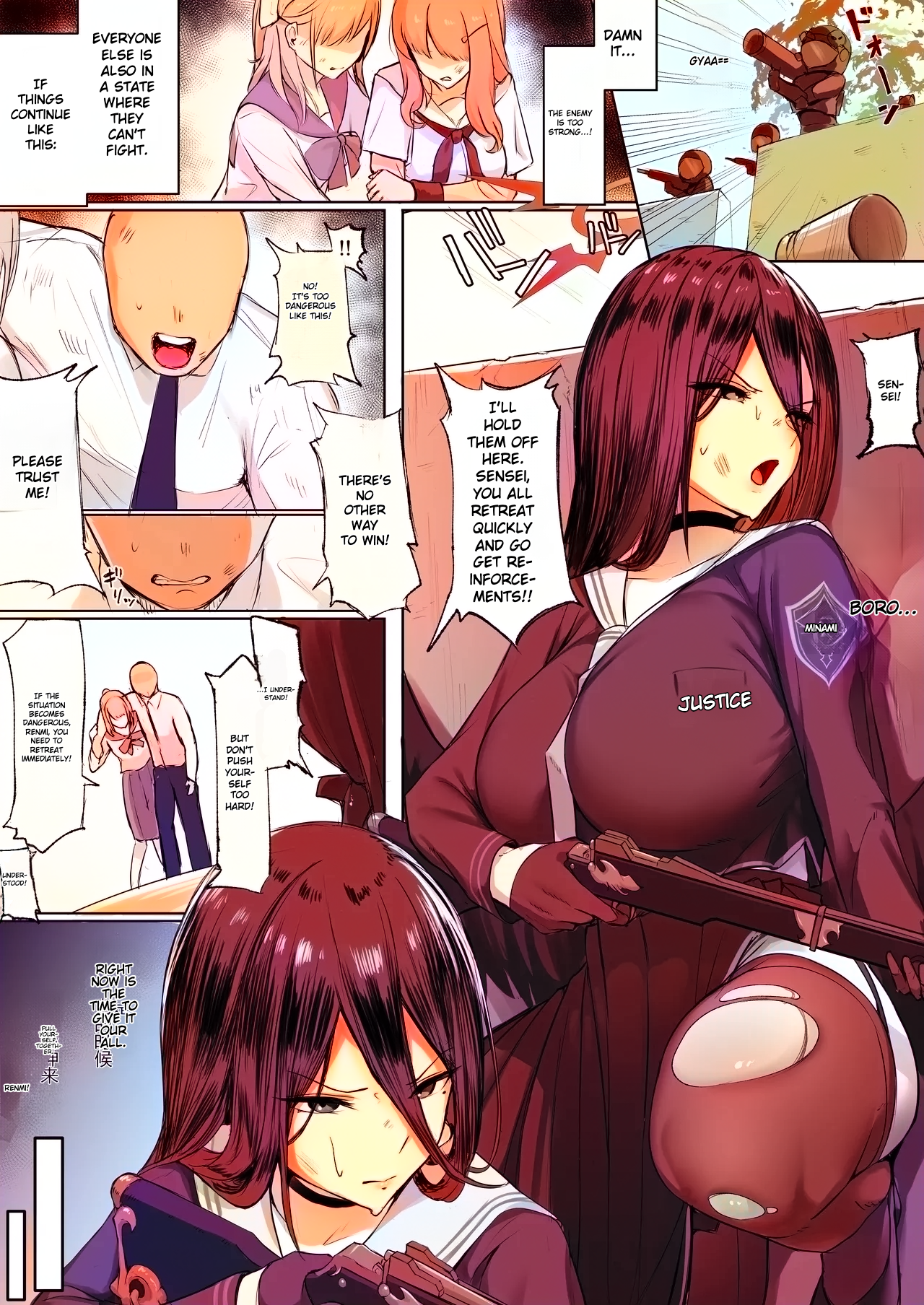
Full Translation + Colorization (Chinese → English)
Original grayscale Chinese page alongside the fully translated and colorized English result, with speech balloon wrapping. Artwork: @almondnuts117
| Original Chinese | Kites Translated + Colorized |
|---|---|

|
|
Japanese → English
Story: 佐藤さんは知っていた by @09ra_19ra
| Original Japanese | Kites Translated |
|---|---|

|

|
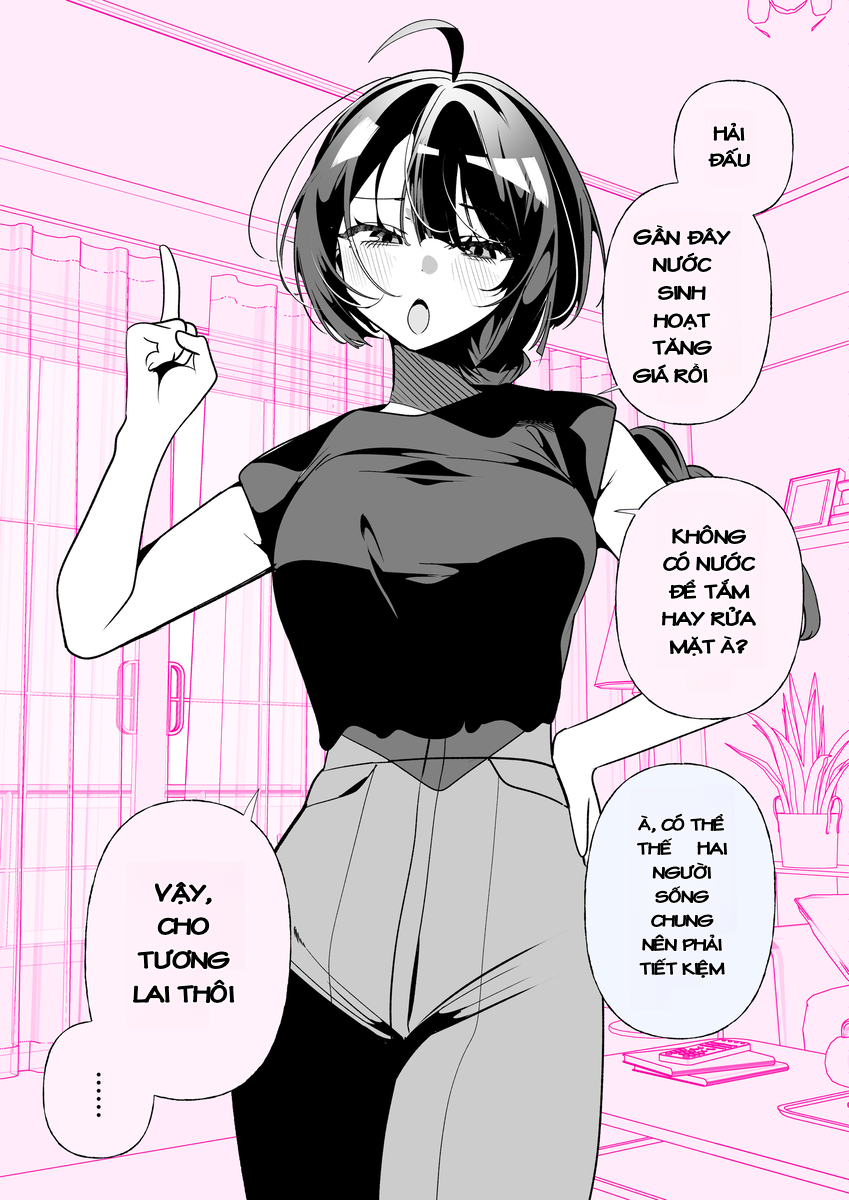
Japanese → Vietnamese
Source: Pixiv Artwork #145272482
| Original Japanese | Kites Translated |
|---|---|

|
|
🖱️ Instant In-Place Translation
Hover over any comic panel on Twitter/X, Pixiv, or manga sites. An unobtrusive floating badge appears using CSS Anchor Positioning—click it to translate dialogue directly inside the artwork with zero copy-pasting.
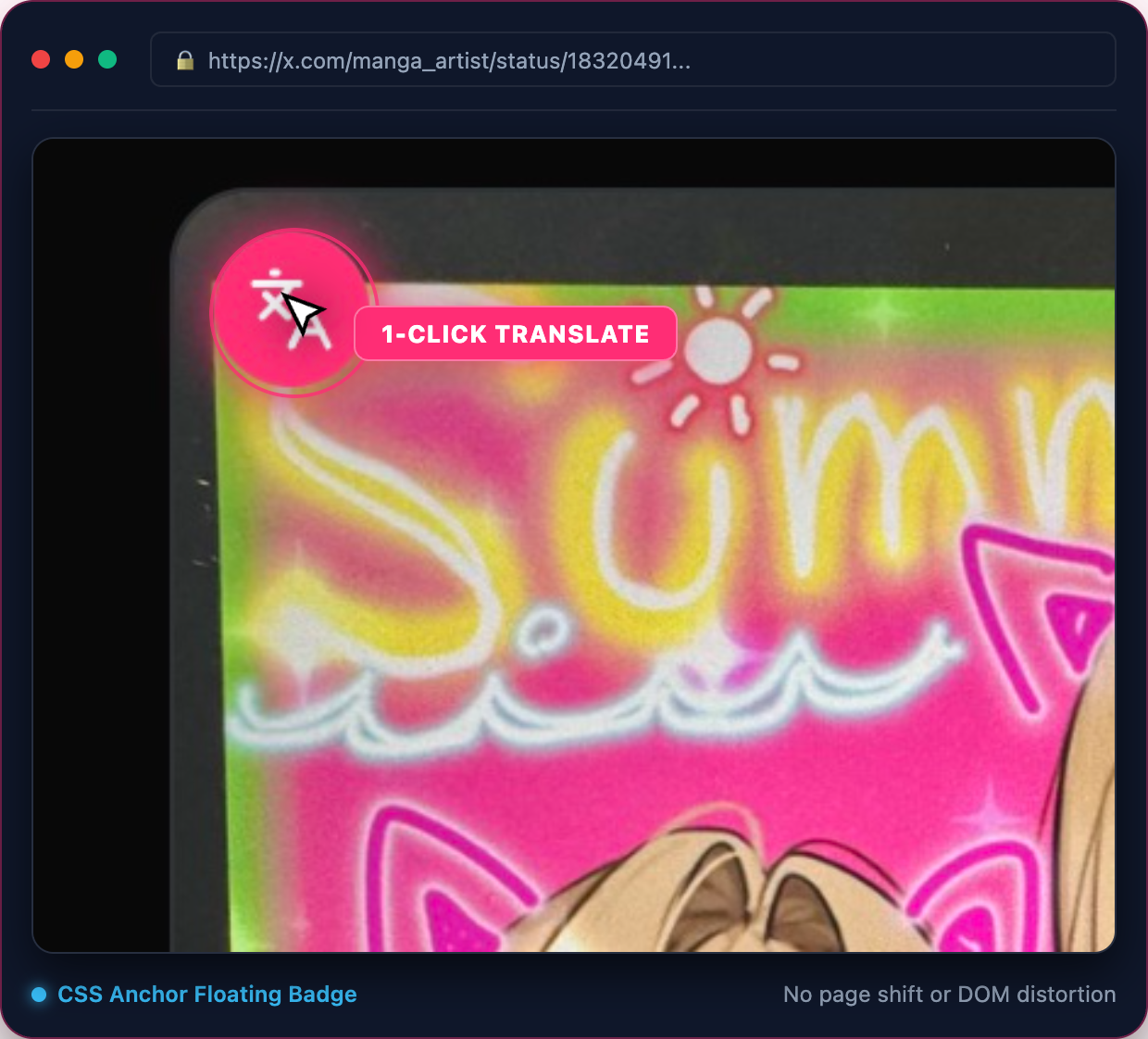
- 🖱️ Hover: Translate instantly by hovering over any comic panel.
- 📌 Persistent: Keep translate badges visible on all comic images.
- 🚀 Auto-Translate: Automatically translates new panels as you scroll down the page.
- ✂️ Screen Crop: Translate protected canvas elements, WebGL games, or custom crops via right-click or
Ctrl/Alt + Shift + X. - ⚡ Reading Hotkeys: Press
Fto instantly peek at the original raw image,Ctrl/Alt + Shift + Zto translate the hovered panel, andCtrl/Alt + Shift + Mto open the chapter reader. - 🎯 Right Click: Translate any image on the web via the browser context menu.
📖 Chapter Reader & Fast Scan
Read entire manga or webtoon chapters in one distraction-free view with automatic batch detection, continuous vertical webtoon mode, multi-page translation, and offline ZIP export:

- Fast Scan: Automatically auto-scrolls and queues all lazy-loaded manga panels across chapter pages.
- Flexible Reader Modes: Seamlessly switch between Webtoon continuous vertical strips, Single page, and Double spread layouts.
- Batch Chapter Translation: Translate the entire chapter in one click with progress tracking and offline preservation.
- 1-Click Chapter ZIP Export: Package all translated pages into a clean, numbered ZIP archive for offline reading and archiving with zero server uploads.
🛠️ Built-in Kites Studio
Need to polish a scanlation or adjust phrasing? Open the full-screen Kites Studio straight from the extension.

- Direct Inline Editing: Double-click any speech balloon to edit dialogue directly in place with subpixel vertical centering and live typesetting reflow.
- Interactive Canvas: Drag and resize speech bubbles with 8-point handles.
- Localized AI Inpaint Brush: Erase artwork defects, speech bubbles, or untranslated SFX with brush stroke precision.
- Side-by-Side Verification: Compare original, cleaned, and typeset views with one click.
- Typography Control: Live font sizing, colors, alignment, and line height adjustments.
- 1-Click Export: Download clean, translated pages at original resolution.
🎛️ Extension Controls & Presets
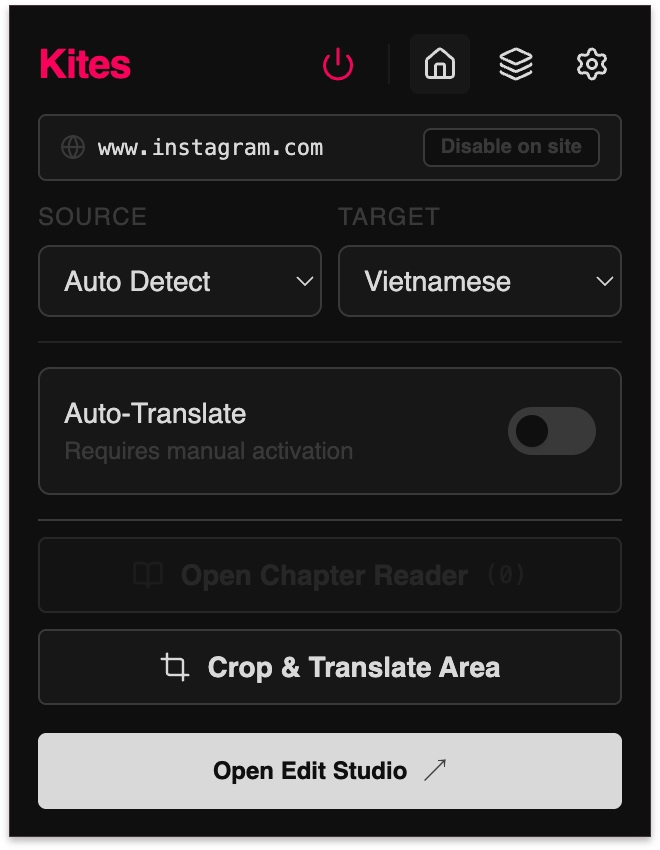
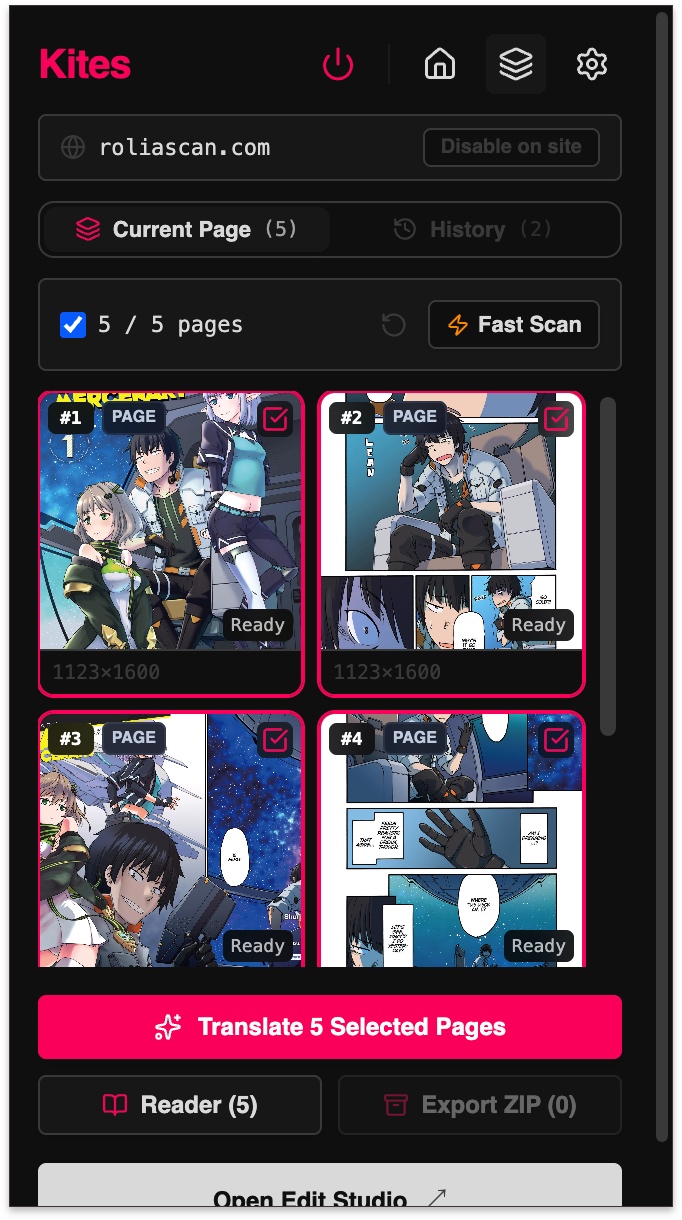
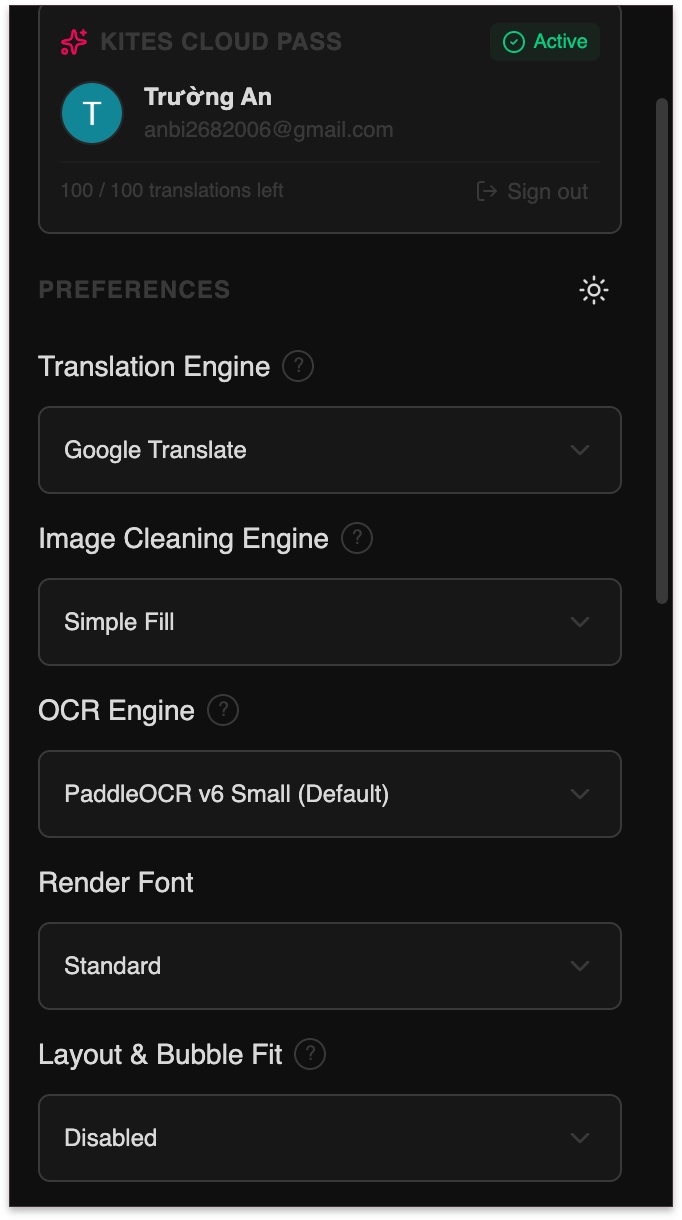
Customize target languages, neural OCR models, and inpainting algorithms from the clean popup:
| Quick Control Popup | Chapter Reader & Scanner | Customizable Engine Settings |
|---|---|---|
|
|
|
- Custom Glossary: Define character names, honorifics, and specialized terminology to guide local and cloud LLM outputs.
- Site Domain Rules: Enable, disable, or assign custom element selectors per domain.
🧠 Powered by Modern AI
| Component | Options | Description |
|---|---|---|
| Translation | WebLLM (Local WebGPU) Cloud Shared Pool (100/day free) Google Translate (Unlimited Free) Custom API (OpenAI, Claude, Gemini) |
Run unlimited local LLMs in-browser (Qwen 3.5, Qwen 3, Gemma 3, Llama 3.2), use unlimited Google Translate, access our shared cloud pool (100 free requests/day), or connect your own API key. |
| Inpainting | LaMa Manga (Neural) AOT-GAN (Fast Neural) Telea Diffusion (Instant) Simple Fill |
Erases text strictly inside character boundaries to preserve comic art. |
| OCR | PaddleOCR v3 – v6 | Industry-standard multilingual text detection and recognition with seamless 1D webtoon strip tiling. |
| Bubble Fit | Neural YOLO (WebGPU) Heuristic (Instant) Classic MST |
Expands dialogue into natural balloon whitespace with tail severing, eliminating tiny fonts. |
| Color-Bubble | Per-Bubble Detection (WebGPU) Font Color Match (Instant) Balloon Wrap (Instant) |
Detects individual bubble text color, matches font color to original, wraps translated text in original balloon shapes. |
🚀 Quick Start & Installation
Option 1: Chrome Web Store (Recommended • 1-Click Install)
The official and easiest way to install Kites. Includes automatic background updates and Google Web Store security review:

- Open Kites on the Chrome Web Store.
- Click Add to Chrome and confirm the prompt.
- Pin Kites to your browser toolbar for easy access.
- Browse any manga or comic page (on Twitter/X, Pixiv, MangaDex, etc.) and hover over a panel to translate!
Option 2: Pre-Built Zip (Manual Unpacked — Zero Terminal Required)
For offline environments, manual testing, or loading specific releases:
- Download
kites.zipfrom the latest GitHub Release. - Unzip the downloaded
.zipfile into a folder on your computer. - In Chrome, open
chrome://extensions/. - Enable Developer mode (toggle in the top-right corner).
- Click Load unpacked and select the unzipped folder.
- Pin Kites to your browser toolbar and start reading immediately!
Option 3: Build from Source (Developers)
# 1. Clone repository
git clone https://github.com/Unheat/Kites.git
cd Kites

# 2. Install dependencies & build extension
npm ci
npm run build
- In Chrome, open
chrome://extensions/. - Enable Developer mode (top-right toggle).
- Click Load unpacked and select the generated
dist/folder. - Pin Kites to your toolbar and start reading!
🤝 Contributing & Documentation
We warmly welcome contributions from developers, translators, and comic lovers!
- 📖 Documentation Hub — Architectural diagrams, pipeline specifications, and runtime contracts.
- 📐 Interactive Pipeline Map — Standalone interactive visualization of Kites' detection, inpainting, and typesetting algorithm.
- 🛠️ Contribution Guide — How to set up your dev environment, run tests, and submit PRs.
📜 License & Acknowledgements
Kites is licensed under the GNU General Public License v3.0.
Heartfelt thanks to the incredible open-source projects that made Kites possible:
- manga-image-translator (Cotrans): Groundbreaking spatial text grouping and typesetting algorithms.
- xianscan-rust: Dynamic patch inpainting architectures and OCR noise filters.
- koharu: Contour typesetting core — DP line breaking, contour font search, and hyphenation recovery ported 1:1.
- PaddleOCR: High-speed neural text detection models.
- @mlc-ai/web-llm: Browser-native WebGPU runtime for large language models.
- pyheal & OpenCV: The Telea Fast Marching Method inpainting implementation ported to TypeScript.
- InpaintWeb: Browser-side LaMa inpainting architecture reference.
- hypher & linebreak: On-demand Liang hyphenation patterns and UAX #14 line break opportunities.
- CRXJS (chrome-extension-tools): Manifest V3 Vite plugin powering the build toolchain.
- MTO Comic Fonts: Vietnamese scanlation-optimized community fonts bundled with the font library.
Full license texts, pinned revisions, and ported-functionality details: THIRD_PARTY_NOTICES.md.