
USC-InfoLab/rddc2020
USC-InfoLab/rddc2020 has 292 GitHub stars and 75 forks. GitHot measured 0 stars in 24 hours. Last checked 2026-11-19 07:08 UTC. Last push 2022-10-15.
Measured star growth
- in 24h
- 0
- in 7 days
- Collecting history
- in 15 days
- Collecting history
- in 1 month
- Collecting history
Net star changes over overlapping periods, not daily totals. Missing measurements are left blank. Stars measure attention, not software quality.
About
road damage detection challenge 2020
Developer ToolsREADME.md
Originalrddc2020
road damage detection challenge 2020
road damage detection challange 2020 IMSC submission
This repository contains source code and trained models for Road Damage Detection and Classification Challenge that was held as part of 2020 IEEE Big Data conference.
The best model achieved mean F1-score of 0.674878682854973 on test1 and 0.666213894130645 on test2 dataset of the competition.
Sample predictions:
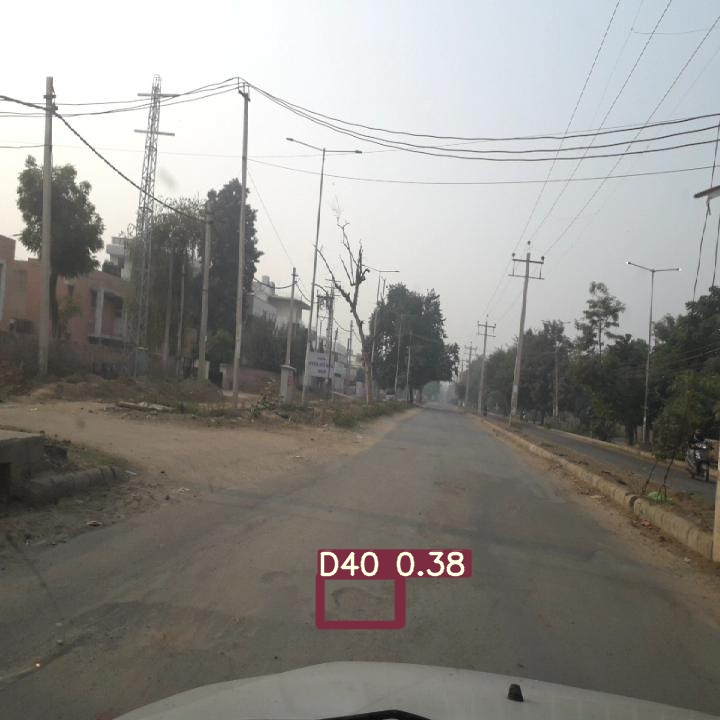
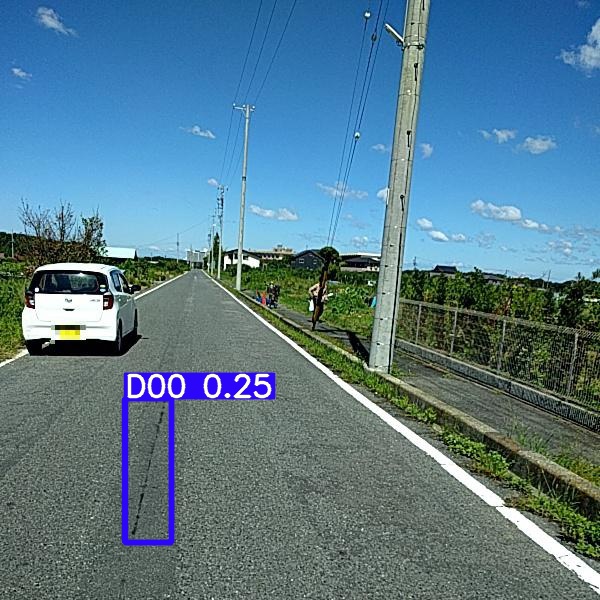
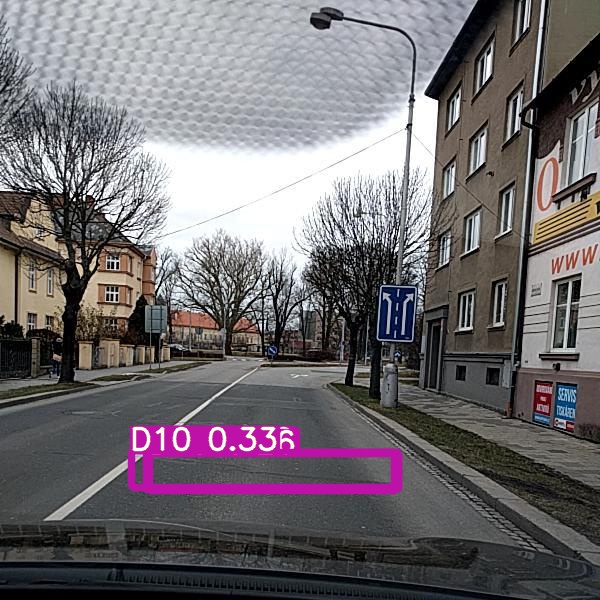

Table of contents
- Prerequisites
- Quick start
- RDCC Dataset Setup for YOLOv5
- IMSC YOLOv5 Model zoo
- Detection / Submission
- Performance on RDDC test datasets
- Training
Prerequisites
You need to install:
Use
requirements.txtto install required python dependencies# Python >= 3.6 is needed pip3 install -r requirements.txt
Quick-start
Clone the road-damage-detection repo into $RDD:
git clone https://github.com/USC-InfoLab/rddc2020.gitInstall python packages:
pip3 install -r requirements.txt
RDCC Dataset Setup for YOLOv5
NOTE: Entire process (step 1-4 explained in this section) of downloading and preparing GRDDC 2020 dataset can be done by executing yolov5/scripts/dataset_setup_for_yolov5.sh
bash yolov5/scripts/dataset_setup_for_yolov5.sh
OR
Go to
yolov5directorycd yolov5execute
download_road2020.shto downlaod train and test datasetbash scripts/download_road2020.shDetection: strcutre test datasets for inference using yolov5
bash scripts/prepare_test.shTraining: Generate the label files for yolov5 using scripts/xml2Yolo.py
python3 scripts/xml2yolo.py- Use
python3 scripts/xml2Yolo.py --helpfor command line option details
- Use
IMSC YOLOv5 Model zoo
Go to
yolov5directorycd yolov5download YOLOv5 model zoo:
bash scripts/download_IMSC_grddc2020_weights.sh
Detection / Submission
Download weights as mentioned in IMSC YOLOv5 Model zoo
Go to
yolov5directorycd yolov5Execute one of the follwoing commands to generate
results.csv(competition format) and predicated images underinference/output/:# inference using best ensemble model for test1 dataset python3 detect.py --weights weights/IMSC/last_95_448_32_aug2.pt weights/IMSC/last_95_640_16.pt weights/IMSC/last_120_640_32_aug2.pt --img 640 --source datasets/road2020/test1/test_images/ --conf-thres 0.22 --iou-thres 0.9999 --agnostic-nms --augment# inference using best ensemble model for test2 dataset python3 detect.py --weights weights/IMSC/last_95_448_32_aug2.pt weights/IMSC/last_95_640_16.pt weights/IMSC/last_120_640_32_aug2.pt weights/IMSC/last_100_100_640_16.pt --img 640 --source datasets/road2020/test2/test_images/ --conf-thres 0.22 --iou-thres 0.9999 --agnostic-nms --augment# inference using best non-ensemble model for test1 dataset python3 detect.py --weights weights/IMSC/last_95.pt --img 640 --source datasets/road2020/test1/test_images/ --conf-thres 0.20 --iou-thres 0.9999 --agnostic-nms --augment# inference using best non-ensemble model for test2 dataset python3 detect.py --weights weights/IMSC/last_95.pt --img 640 --source datasets/road2020/test2/test_images/ --conf-thres 0.20 --iou-thres 0.9999 --agnostic-nms --augment
Performance on RDDC test datasets
| YOLOv5x_448_32_aug2 | YOLOv5x_640_16_95 | YOLOv5x_640_16_100 | YOLOv5x_640_32 | YOLOv5x_640_16_aug2 | YOLOv5x_640_32_aug2 | test1 F1-score | test2 F1-score |
|---|---|---|---|---|---|---|---|
| :heavy_check_mark: | 0.66697383879131 | 0.651389430313506 | |||||
| :heavy_check_mark: | :heavy_check_mark: | :heavy_check_mark: | 0.674878682854973 | 0.665632401648316 | |||
| :heavy_check_mark: | :heavy_check_mark: | :heavy_check_mark: | :heavy_check_mark: | 0.674198239966431 | 0.666213894130645 |
Training
download pre-trained weights from yolov5 repo
bash weights/download_weights.shrun following command
python3 train.py --data data/road.yaml --cfg models/yolov5x.yaml --weights weight/yolov5x.pt --batch-size 64
visit yolov5 official source code for more training and inference time arguments