
TrisH0x2A/plynk
About
Fast, offline brutalist Kanban & Whiteboard desktop workspace
ProductivityWhat you can do
- Workspace Architecture: Organize projects across multiple discrete workspaces with isolated boards, lists, and activity streams.
- Fluid Drag & Drop: Instant list and card reordering powered by @hello-pangea/dnd with edge auto-scrolling.
- Status & Label System: Rich card lifecycle management (ACTIVE, IN PROGRESS, COMPLETED, POSTPONED) with classification tags.
- Vector Whiteboard Canvas: Infinite 2D whiteboard and blackboard with pressure-sensitive drawing, geometric shapes, sticky notes, text labels, and color controls.
Measured star growth
- in 24h
- 0
- in 7 days
- 0
- in 15 days
- +1
- in 1 month
- +1
Net star changes over overlapping periods, not daily totals. Missing measurements are left blank. Stars measure attention, not software quality.
README.md
Original
High-Performance, 100% Offline Brutalist Kanban & Whiteboard Desktop Workspace





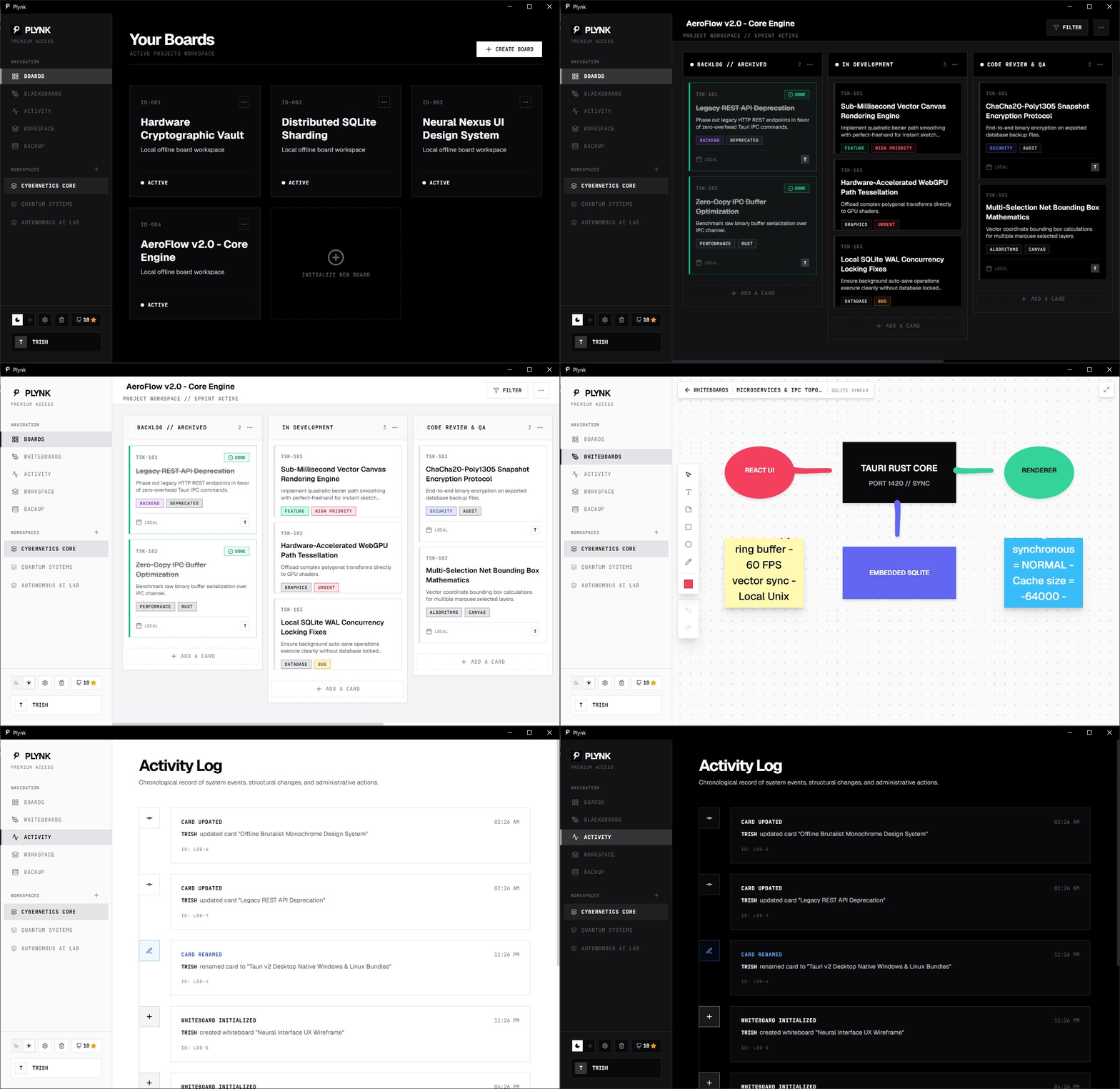
Overview
Plynk is an ultra-fast, local-first Kanban and whiteboard desktop application built from the ground up for developers and power users who value speed, privacy, and minimalist brutalist aesthetics.
Unlike cloud-dependent task management software, Plynk executes completely locally on your system, persists all state in an embedded SQLite database (plynk.db), and requires zero network access, zero account creation, and zero external telemetry.
Design System: Tech-Noir & Pure Monochrome
Plynk is engineered around a high-contrast industrial monochrome design language:
- Dark Mode: Deep charcoal and obsidian canvas (
#000000/#09090B), sharp zinc borders, stark white typography, and blackboards. - Light Mode: Inverted paper-white canvas (
#FFFFFF/#F4F4F5), solid dark ink borders, deep high-contrast status accents, and whiteboards. - Micro-Interactions: Hardware-accelerated transitions, fluid drag-and-drop feedback, and streamlined keyboard shortcuts.
Core Features
- Workspace Architecture: Organize projects across multiple discrete workspaces with isolated boards, lists, and activity streams.
- Fluid Drag & Drop: Instant list and card reordering powered by
@hello-pangea/dndwith edge auto-scrolling. - Status & Label System: Rich card lifecycle management (ACTIVE, IN PROGRESS, COMPLETED, POSTPONED) with classification tags.
- Vector Whiteboard Canvas: Infinite 2D whiteboard and blackboard with pressure-sensitive drawing, geometric shapes, sticky notes, text labels, and color controls.
- Recycle Bin & Recovery: Soft delete and restore system for workspaces, boards, whiteboards, lists, and cards.
- System Activity Timeline: Detailed chronological audit logging tracking structural events, renames, status transitions, and administrative actions.
- Local Backup & Restore: One-click binary SQLite database snapshot export and restore to any folder on your disk.
- Middle-Click Pan Navigation: Seamless mouse navigation across boards and canvas views.
- Persistent Theme Switcher: Instant switching between pure Monochrome Dark and Monochrome Light themes.
- Zero Telemetry & 100% Privacy: All cards, boards, whiteboards, and logs remain strictly on your local disk.
Download & Installation
Pre-compiled standalone binaries are available on the Releases Page.
Windows
- Download the latest
.msior.exeinstaller. - Run the setup installer and launch Plynk from your Start Menu or Desktop.
Linux (Debian / Ubuntu)
- Download the latest
.debpackage. - Install via terminal:
sudo dpkg -i plynk_*_amd64.deb
Linux (AppImage)
- Download the
.AppImagefile. - Make it executable and run:
chmod +x Plynk_*.AppImage
./Plynk_*.AppImage
Build from Source
Prerequisites
- Node.js: v18 or later
- pnpm:
npm install -g pnpm - Rust: Latest stable toolchain (
rustup default stable)
Steps
Clone the repository:
git clone https://github.com/TrisH0x2A/plynk.git
cd plynk
Install dependencies:
pnpm installRun in development mode:
pnpm tauri:devBuild production binaries:
pnpm tauri:buildCompiled output binaries are saved to
src-tauri/target/release/bundle/.
Tech Stack
| Layer | Technologies |
|---|---|
| Desktop Core | Tauri v2 (Rust 2021) |
| Database | Embedded SQLite via rusqlite (Bundled) |
| Frontend | React 18, TypeScript, Vite |
| State & Cache | TanStack React Query v5, Zustand |
| Styling | TailwindCSS, Radix UI Primitives, Lucide Icons |
| Package Manager | pnpm |
License
Distributed under the MIT License. See LICENSE for details.
Explore related projects
Loading…