
TiiZss/BreakingLab
TiiZss/BreakingLab has 38 GitHub stars and 2 forks. GitHot measured 0 stars in 24 hours. Last checked 2026-11-11 17:49 UTC. Last push 2026-10-26.
Bash script to manage insecure web apps using docker and hosts aliases for pentest practice
What you can do
- Modular Architecture: Clean separation of code (breakinglab.sh), configuration (config/), and libraries (lib/).
- GitHub Import: Import Docker projects directly from GitHub URLs with Auto-Sanitization and conflict resolution.
- Dynamic Menus: Interactive 2-column menu system with search-by-name/number and status indicators ([ON]/[OFF]).
- Public Exposure: Menu option 3 and startpublic publish one lab on this computer's LAN address. If another lab is already running, the menu asks before turning it off.
Measured star growth
- in 24h
- 0
- in 7 days
- Update delayed
- in 15 days
- Update delayed
- in 1 month
- Update delayed
Net star changes over overlapping periods, not daily totals. Missing measurements are left blank. Stars measure attention, not software quality.
README.md
OriginalBreakingLab


BreakingLab is a powerful Bash script to manage vulnerable web applications using Docker. It simplifies the process of setting up, running, and stopping various security testing labs locally or exposing them to a network.
Inspiration: Originally inspired by pentestlab.
🚀 Features (v2.5)
- Modular Architecture: Clean separation of code (
breakinglab.sh), configuration (config/), and libraries (lib/). - GitHub Import: Import Docker projects directly from GitHub URLs with Auto-Sanitization and conflict resolution.
- Dynamic Menus: Interactive 2-column menu system with search-by-name/number and status indicators (
[ON]/[OFF]). - Public Exposure: Menu option 3 and
startpublicpublish one lab on this computer's LAN address. If another lab is already running, the menu asks before turning it off. - Stack Grouping: Each lab is its own Compose project,
breakinglab_<name>, so Docker Desktop shows one stack per machine. Containers inside use that lab's name as a prefix (jvl2013_). - Fleet:
upstarts every lab on its own127.xaddress.downstops those BreakingLab stacks. - Layout: Launcher compose lives in
projects/. Third-party clones go tolabs/and stay out of git. - Images: Lab images are pulled from Docker Hub user
tiizss, with the version in the repository name. - Web interface:
./breakinglab.sh webopens the lab list at127.0.0.1:8765. The page is described under Web interface. - Cross-Platform: Fully compatible with Linux (Kali/Ubuntu) and Windows (WSL2).
- Safety: Built with
set -euo pipefailand extensive dependency checking.
🛠 Installation
Clone the repository:
git clone https://github.com/TiiZss/BreakingLab.git
cd BreakingLab
Run the installer (Optional): This ensures you have all dependencies (docker, git, curl, nc) and links the script globally.
chmod +x install.sh
./install.sh
Or just run it directly:
chmod +x breakinglab.sh
./breakinglab.sh
📖 Usage
You can use BreakingLab interactively via the menu or by passing arguments directly.
🖥️ Interactive Mode (Recommended)
Simply run the script with no arguments to launch the dashboard.
./breakinglab.sh
From here you can search for projects, start/stop them, and check their status using the number or name.
Web interface
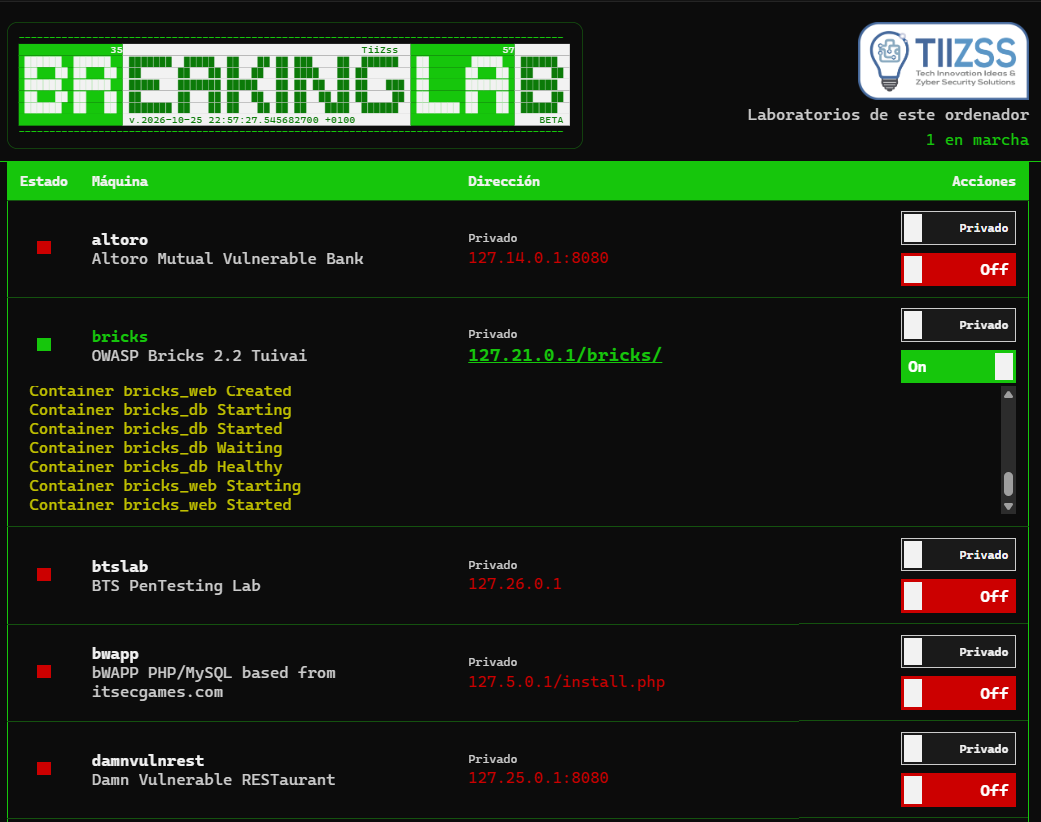
The same labs are in the browser. Needs python3 from WSL or Linux. No extra packages.
./breakinglab.sh web
Open http://127.0.0.1:8765. The server listens only on this computer. Students do not open the panel. They open the lab address when that lab is Público.
The header shows the BreakingLab ASCII banner and the TiiZss mark. Under that, the table has four columns:
| Column | What you see |
|---|---|
| Estado | A red square while the lab is off. It turns green when the lab is running. |
| Máquina | The lab key and its description. |
| Dirección | Privado shows the 127.x address. Público shows this computer's LAN addresses. The text is red while the lab is off. When it is on, the address is a larger green link. |
| Acciones | Público / Privado on the left, On / Off on the right. Both switches have the same width. |
On starts the lab. Off stops it. Público and Privado only choose the address. They do not start the machine. While the lab is on, that switch stays locked until you turn it off.
Only one lab can be public. If another one is already running, the page asks before turning it off and starting the one you chose.
Each lab keeps its own log under its row, in yellow. The log follows the last line.
The footer shows the same line as the Bash banner: the v. date of breakinglab.sh, TiiZss, GPL-3.0, and BETA.
⚡ CLI Mode (Advanced)
1. List Projects
View all available Docker and Online labs.
./breakinglab.sh list
2. Start a Lab (Localhost)
This will download the image, configure /etc/hosts (for WSL/Linux), and launch the container mapped to 127.x.x.x.
# Syntax: ./breakinglab.sh start [project_name]
./breakinglab.sh start bwapp
./breakinglab.sh start web4pentester
Note: The browser will open automatically. If not, click the URL shown in the terminal.
3. Expose a Lab (Public/LAN)
Want to host a lab for a class or CTF? Use startpublic.
# Syntax: ./breakinglab.sh startpublic [project_name] [bind_ip] [bind_port]

# Example: Bind bWAPP to all interfaces on port 8080
./breakinglab.sh startpublic bwapp 0.0.0.0 8080
The lab is published on that interface. The script prints the classroom URL, the LAN address of this computer. start still binds 127.x and is only visible here. Windows Firewall has to allow the inbound port.
Menu option 3 lists every lab and publishes it on 0.0.0.0. Only one lab can be up that way, because they share this computer's address. If another lab is already running, the menu asks before turning it off.
4. Stop a Lab
Stops and removes the container to free up resources.
./breakinglab.sh stop bwapp
5. Start or stop every lab
./breakinglab.sh up
./breakinglab.sh down
down stops every lab whose stack is breakinglab_<name>. Other containers stay up.
6. Check Status
See which labs are currently running (green for ON, red for OFF).
./breakinglab.sh status
7. Delete a Lab
Permanently removes the project configuration and cleans up associated resources (containers, hosts entries).
./breakinglab.sh delete <project_name>
8. Open Online Labs
Launches strictly online resources (like PortSwigger Academy or RedTiger).
./breakinglab.sh online portswigger
📦 Available Projects
BreakingLab includes a curated list of vulnerable apps configured to run out-of-the-box.
🐳 Docker Projects
- OWASP: bWAPP, WebGoat (7.1, 8.0, 8.1, 8.2), Juice Shop, Mutillidae II, Bricks 2.2, Security Shepherd.
- PentesterLab: Web For Pentester I.
- Injection: SQLi Labs (Audi, OxNinja), NoSQLi Lab, DVGA.
- CMS: Vulnerable WordPress.
- Others: DVWA, DVWS-node, Altoro Mutual, Security Ninjas, Java Vulnerable Lab, Java Vulnerable Lab 2013, Vulnado, SSRF-Lab, Damn Vulnerable RESTaurant, BTS Lab, exploit.co.il, Vulpy, Vulpy 5.
🌐 Online Labs
- PortSwigger Academy, TryHackMe, HackTheBox, VulnHub, RedTiger, Root-Me, and more.
🔮 Next Machines / Steps
- Include Web for Pentester II
- Include Drunk Admin Web Hacking Challenge
- Include OWASP Broken Web Applications Project
- Include GameOver
- Include VulHub project
- Include CSPF ASP Vulnerable Lab
- Include CSPF Android Vulnerable Lab
The order for adding them is in docs/workflow/plans/2026-10-25-proximas-maquinas.md.
🤝 Contributing
Contributions are welcome!
- Fork the repository.
- Create a feature branch (
git checkout -b feature/AmazingFeature). - Add a new Project:
- Copy
config/projects.d/_template.conf.exampletoconfig/projects.d/docker_yourproject.conf. - Fill in the details (Image, IP, Port, etc.).
- (Optional) If you need custom startup commands, create
scripts/hooks/yourproject_pre.shoryourproject_post.sh.
- Copy
- Commit your changes.
- Open a Pull Request.
Top Collaborators:
🗺 Planning
BreakingLab now includes internal planning documents to guide security hardening, runtime improvements, release process changes, and embedded-lab governance.
- Documentation index:
docs/README.md - Master planning prompt:
.github/prompts/plan-breakingLab.prompt.md - Execution prompt:
.github/prompts/plan-breakingLab-execution.prompt.md - Compact planning prompt:
.github/prompts/plan-breakingLab-compact.prompt.md - English planning prompt:
.github/prompts/plan-breakingLab-en.prompt.md - Roadmap document:
docs/plan-breakingLab-roadmap.md - RFC summary:
docs/rfc-breakingLab-roadmap.md - GitHub planning conventions:
docs/github-planning-conventions.md - First issue batch:
docs/issue-batch-1.md - Planning handoff:
docs/planning-handoff.md
If you are contributing to architecture, runtime safety, configuration changes, CI, or release process work, review these documents before opening a large pull request.
📄 License
Distributed under the GNU General Public License v3.0. See LICENSE for the full text.
Explore related projects
trimstray/the-book-of-secret-knowledge
A collection of inspiring lists, manuals, cheatsheets, blogs, hacks, one-liners, cli/web tools and more.
257,875 starsHack-with-Github/Awesome-Hacking
A collection of various awesome lists for hackers, pentesters and security researchers
125,254 starsswisskyrepo/PayloadsAllTheThings
A list of useful payloads and bypass for Web Application Security and Pentest/CTF
82,583 starscaddyserver/caddy
Fast and extensible multi-platform HTTP/1-2-3 web server with automatic HTTPS
78,959 stars