
TheSecuredAnalyst/security-suite
TheSecuredAnalyst/security-suite has 134 GitHub stars and 14 forks. GitHot measured 0 stars in 24 hours. Last checked 2026-11-15 04:21 UTC. Last push 2026-11-06.
What you can do
- OSINT - DNS, WHOIS, subdomains, ports, tech detection, headers, emails - nmap, Shodan, VirusTotal
- Web Scanner - XSS, SQLi, directory bruteforce, SSL/TLS analysis, crawling - Nuclei
- Code Scan - Leaked secrets (redacted), vulnerable dependencies (npm, Composer, pip via OSV), risky JS/PHP patterns with escaping-aware HTML-sink analysis; SARIF output - OSV.dev
- API Security - OpenAPI parsing, auth bypass, JWT testing, BOLA/IDOR, fuzzing - REST API
Measured star growth
- in 24h
- 0
- in 7 days
- Collecting history
- in 15 days
- Collecting history
- in 1 month
- Collecting history
Net star changes over overlapping periods, not daily totals. Missing measurements are left blank. Stars measure attention, not software quality.
About
Open-source security suite for OSINT, web scanning, API testing, SIEM integration, and AI-powered analysis
SecurityREADME.md
OriginalSecurity Suite


A comprehensive open-source security tools suite for OSINT reconnaissance, web security testing, API security assessment, and compliance checking with AI-powered analysis.
   ____            ____        _ __
  / __/__ ___     / __/_ __(_) /____
 _\ \/ -_) __/   _\ \/ // / / __/ -_)
/___/\__/\__/   /___/\_,_/_/\__/\__/

       =[ SecSuite v0.5.0 ]=
+ -- --=[ 11 OSINT modules | 6 Web scanners | 4 API security tools ]=--
+ -- --=[ AI-powered analysis with Ollama/Anthropic/OpenAI         ]=--
+ -- --=[ SIEM integration | Scheduled scans | REST API            ]=--
Quick Setup (One Command)
Clone the repo, then run the setup script for your OS. It installs Python, all dependencies, Ollama, and a local AI model automatically.
Linux / macOS
git clone https://github.com/TheSecuredAnalyst/security-suite.git
cd security-suite
bash setup.sh
Options:
bash setup.sh --model qwen2.5      # choose a different AI model
bash setup.sh --no-ollama          # skip Ollama / AI setup
bash setup.sh --no-extras          # skip nmap / searchsploit
Windows
Open PowerShell as a normal user (no administrator needed) and run:
git clone https://github.com/TheSecuredAnalyst/security-suite.git
cd security-suite
powershell -ExecutionPolicy Bypass -File setup.ps1
Options:
# Choose a different AI model
powershell -ExecutionPolicy Bypass -File setup.ps1 -Model qwen2.5

# Skip Ollama
powershell -ExecutionPolicy Bypass -File setup.ps1 -NoOllama

# Skip nmap
powershell -ExecutionPolicy Bypass -File setup.ps1 -NoExtras
Windows note: If you don't have
winget, the script will tell you what to install manually.wingetis built into Windows 10 (version 2004+) and Windows 11 via the App Installer in the Microsoft Store.
After setup, activate the environment whenever you open a new terminal:
# Linux / macOS
source venv/bin/activate

# Windows PowerShell
.\venv\Scripts\Activate.ps1
Highlights
| Module | Capabilities | Tools |
|---|---|---|
| OSINT | DNS, WHOIS, subdomains, ports, tech detection, headers, emails | nmap, Shodan, VirusTotal |
| Web Scanner | XSS, SQLi, directory bruteforce, SSL/TLS analysis, crawling | Nuclei |
| Code Scan | Leaked secrets (redacted), vulnerable dependencies (npm, Composer, pip via OSV), risky JS/PHP patterns with escaping-aware HTML-sink analysis; SARIF output | OSV.dev |
| API Security | OpenAPI parsing, auth bypass, JWT testing, BOLA/IDOR, fuzzing | REST API |
| AI Analysis | Finding correlation, executive summaries, interactive LLM remediation | Ollama, Anthropic, OpenAI |
| Correlation | Turns co-occurring findings into provenance-aware attack paths via community-contributable YAML rules | rules/correlation/ |
| REST API | Trigger scans and retrieve results programmatically via HTTP | FastAPI |
| SIEM | Splunk, Elasticsearch, Syslog, webhooks (Slack/Discord/PagerDuty) | CEF/LEEF |
| Scheduler | Cron-based recurring scans with persistent history | — |
| Compliance | OWASP Top 10, CIS Controls assessment | — |
| Exploit | Exploit search and CVE lookup | SearchSploit, Exploit-DB |
| Phishing | Security awareness campaigns and simulation | — |
Demo
DNS Enumeration
$ secsuite osint dns example.com

DNS Enumeration: example.com
╭──────────────────────── [INFO] IPv4 Addresses Found ─────────────────────────╮
│ Domain resolves to 2 IPv4 address(es)                                        │
╰──────────────────────────────────────────────────────────────────────────────╯
  addresses: ['104.18.27.120', '104.18.26.120']
...
Completed in 0.68s
SSL/TLS Analysis
$ secsuite scan ssl example.com

SSL/TLS Analysis: example.com
╭──────────────────────────── [HIGH] SSLv3 Enabled ────────────────────────────╮
│ SSLv3 is enabled - vulnerable to POODLE attack                               │
╰──────────────────────────────────────────────────────────────────────────────╯
Completed in 0.78s
REST API (Interactive Docs)
$ secsuite serve
Starting Security Suite API on http://0.0.0.0:8000
Interactive docs: http://localhost:8000/docs
Then open http://localhost:8000/docs in your browser to explore and test all endpoints interactively.
Architecture
┌──────────────────────────────────────────────────────────────────┐
│                         User Interface                           │
├───────────────────────────┬──────────────────────────────────────┤
│   CLI (Typer)             │  REST API (FastAPI)                  │
│   secsuite <command>      │  /api/v1/scans                       │
│                           │  /api/v1/apisec   ← API sec testing  │
│                           │  /api/v1/results                     │
│                           │  /api/v1/modules                     │
└───────────────────────────┴──────────────────────────────────────┘
                               │
                               ▼
┌──────────────────────────────────────────────────────────────────┐
│                     Core Infrastructure                          │
│  Target Model · Config · Logging · Caching · Error Handling     │
│  HTTP Client · Exporters (JSON/CSV/HTML/Markdown)               │
└──────────────────────────────────────────────────────────────────┘
                               │
                               ▼
┌──────────────────────────────────────────────────────────────────┐
│                      Scanning Modules                            │
│  OSINT (11)  ·  Web Scanner (6)  ·  API Security (4)           │
│  AI Analysis ·  SIEM (4)  ·  Scheduler  ·  Compliance          │
│  Exploit     ·  Phishing  ·  Vuln Scan  ·  Threat Intel        │
└──────────────────────────────────────────────────────────────────┘
Manual Installation
If you prefer not to use the setup script:
git clone https://github.com/TheSecuredAnalyst/security-suite.git
cd security-suite

# Create and activate virtual environment
python3 -m venv venv
source venv/bin/activate          # Linux/macOS
# .\venv\Scripts\Activate.ps1    # Windows PowerShell

# Install (pick one)
pip install -e .                  # base only
pip install -e ".[all]"           # everything (recommended)
pip install -e ".[dashboard]"     # adds FastAPI/uvicorn for the REST API
pip install -e ".[ai]"            # adds Anthropic/OpenAI SDK
Configuration
Copy .env.example to .env and add your API keys (all optional):
cp .env.example .env
| Variable | Service | Required |
|---|---|---|
SECSUITE_SHODAN_API_KEY |
Shodan host intelligence | No |
SECSUITE_VIRUSTOTAL_API_KEY |
VirusTotal malware analysis | No |
SECSUITE_ANTHROPIC_API_KEY |
Claude AI analysis | No |
SECSUITE_OPENAI_API_KEY |
GPT AI analysis | No |
SECSUITE_API_KEY |
Protect the REST API with a key | No |
Core features work without any API keys. For local AI with no keys, use Ollama (included in the setup scripts).
Usage
Correlation
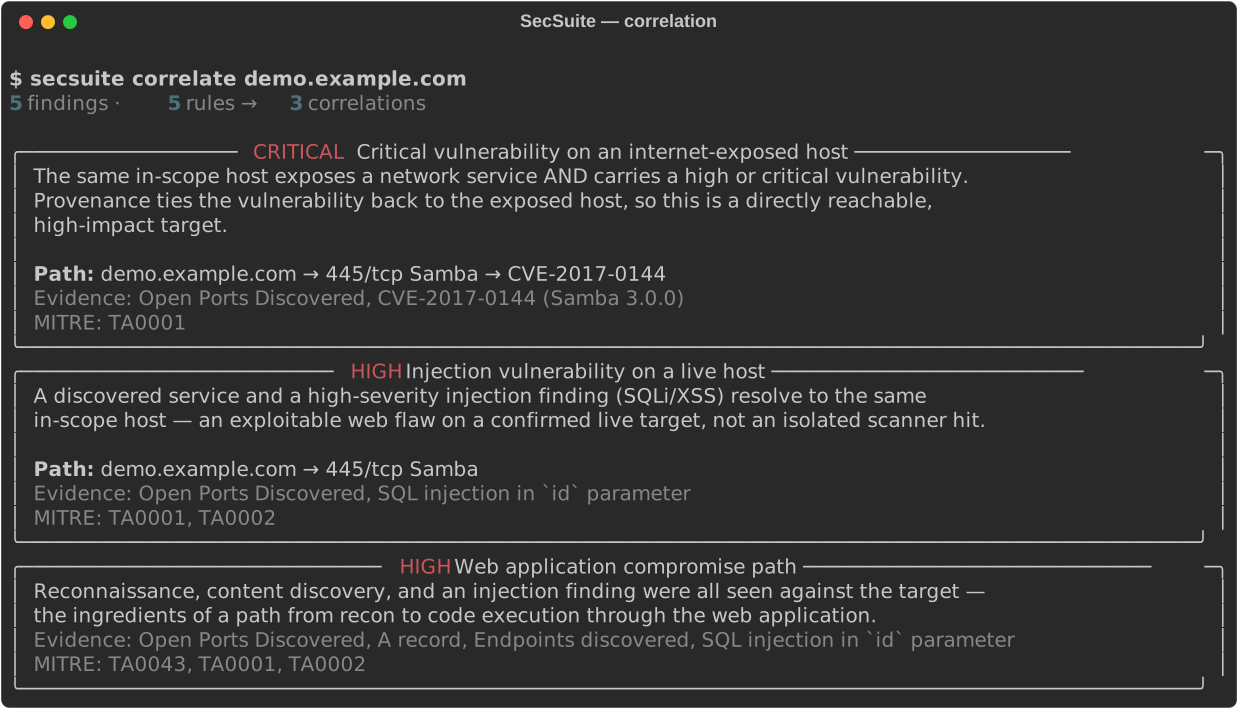
Turn a pile of findings into attack paths. Correlation rules are declarative YAML
(rules/correlation/), so anyone can contribute a detection — no code required.
secsuite correlate example.com              # run the rule pack over a scan
secsuite correlate example.com --json out.json
secsuite rules list                         # show loaded rules (bundled + custom)
secsuite rules validate rules/correlation   # validate a rule directory
secsuite correlate example.com --rules ./my-rules   # add your own rules
Host-scoped rules report the provenance chain that led to each result, e.g.
10.0.0.5 → 445/tcp → CVE-2017-0144. See rules/correlation/README.md
to write your own.
See it with no target or setup — a scripted run that prints real attack paths:
python examples/correlation_demo.py
OSINT Reconnaissance
secsuite osint dns example.com              # DNS enumeration
secsuite osint whois example.com            # WHOIS lookup
secsuite osint subdomains example.com       # Subdomain discovery
secsuite osint headers https://example.com  # HTTP security headers
secsuite osint ports 192.168.1.1            # Port scan (requires nmap)
secsuite osint tech https://example.com     # Technology detection
secsuite osint emails example.com           # Email harvesting
secsuite osint vt example.com               # VirusTotal lookup
secsuite osint shodan 8.8.8.8              # Shodan lookup
secsuite osint full example.com             # Run all OSINT modules
Web Security Scanning
secsuite scan crawl https://example.com
secsuite scan xss "https://example.com/search?q=test"
secsuite scan sqli "https://example.com/product?id=1"
secsuite scan dirs https://example.com
secsuite scan ssl example.com
secsuite scan nuclei https://example.com
Source Code Scanning
Reads files only. Dependency names and versions (never code) go to
OSV.dev; --offline skips that. Tests, dev servers and build
tooling are not shipped to users, so their findings are hidden unless you pass
--include-tests; development-only dependencies are reported one level lower.
secsuite code scan ./my-app
secsuite code scan ./monorepo/src --group 1                 # summary per app
secsuite code scan . --checks secrets --offline             # secrets only, no network
secsuite code scan . -o findings.sarif                      # for SecContext / GitHub code scanning
secsuite code scan . --confidence low                       # include weaker leads
HTML-sink checks (innerHTML, insertAdjacentHTML, dangerouslySetInnerHTML, …)
parse the value written and only report interpolated expressions that skip an
escaping helper, so a codebase that escapes consistently stays quiet. Pattern
findings are leads to confirm by reading the code, not verdicts.
API Security Testing — What You Need to Know First
If you're not familiar with APIs, here's the short version:
An API is how two programs talk to each other over the internet. For example, when a mobile app loads your account data, it's calling an API. An API has endpoints — specific URLs that do specific things (e.g.
/users/login,/orders/list).
An OpenAPI spec (also called a Swagger spec) is a document that describes all the endpoints of an API — what inputs they take, what they return, and whether they require a login. It's usually a
.jsonor.yamlfile. Security Suite reads this document to know what to test.
How to find the spec for your own app:
If you built your app with FastAPI, Django REST Framework, or similar frameworks, the spec is usually auto-generated. Common locations to try in your browser:
http://localhost:8000/openapi.json    ← FastAPI default
http://localhost:8000/swagger.json
http://localhost:8000/api-docs
http://localhost:8000/swagger/v1/swagger.json  ← .NET / ASP.NET
http://localhost:8000/v2/api-docs              ← Spring Boot
Or let Security Suite search for it automatically:
secsuite serve
# then:
curl -X POST http://localhost:8000/api/v1/apisec/discover \
  -H "Content-Type: application/json" \
  -d '{"base_url": "http://localhost:YOUR_APP_PORT"}'
A complete example — testing your own FastAPI app:
# Terminal 1: start your app (example)
uvicorn myapp:app --port 5000

# Terminal 2: run Security Suite against it
source venv/bin/activate
secsuite api scan http://localhost:5000/openapi.json
API Security Testing (CLI)
# Point at an OpenAPI/Swagger spec URL and run all tests
secsuite api scan https://api.example.com/openapi.json

# With a bearer token for authenticated endpoints
secsuite api scan https://api.example.com/openapi.json --token eyJhbGci...

# Fuzz all endpoints
secsuite api fuzz https://api.example.com/openapi.json --max 200

# Test authentication specifically
secsuite api auth-test https://api.example.com/openapi.json
REST API Server
# Start the server (opens docs at http://localhost:8000/docs)
secsuite serve

# Custom port
secsuite serve --port 9000

# With API key protection (callers must send X-API-Key header)
secsuite serve --api-key mysecretkey

# Dev mode (auto-reloads on code changes)
secsuite serve --reload
API security testing via REST:
# 1. Discover where the OpenAPI spec lives on a target API
curl -X POST http://localhost:8000/api/v1/apisec/discover \
  -H "Content-Type: application/json" \
  -d '{"base_url": "https://api.example.com"}'

# 2. Parse the spec to see what endpoints exist
curl -X POST http://localhost:8000/api/v1/apisec/parse \
  -H "Content-Type: application/json" \
  -d '{"base_url": "https://api.example.com/openapi.json"}'

# 3. Run a full API security scan
curl -X POST http://localhost:8000/api/v1/apisec/scan \
  -H "Content-Type: application/json" \
  -d '{
    "spec_url": "https://api.example.com/openapi.json",
    "modules": ["endpoints", "auth", "fuzzer"],
    "auth_token": "eyJhbGci..."
  }'

# 4. Poll for results using the scan_id from step 3
curl http://localhost:8000/api/v1/scans/{scan_id}
Available apisec modules:
| Module | What it checks |
|---|---|
endpoints |
BOLA/IDOR, SQL/NoSQL/command injection, mass assignment, info disclosure |
auth |
Auth bypass, broken auth, JWT weaknesses (none-alg, missing exp), rate limiting |
fuzzer |
Boundary values, injection payloads, malformed bodies — looks for crashes and leaks |
AI-Powered Analysis
# Analyse a target with a local AI model (no API key needed)
secsuite ai analyze example.com --provider ollama --model llama3.2

# Use Claude or GPT (requires API key in .env)
secsuite ai analyze example.com --provider anthropic
secsuite ai analyze example.com --provider openai

# Ask a security question
secsuite ai ask "How do I harden SSH on Ubuntu?" --provider ollama --model llama3.2

# Executive summary for leadership
secsuite ai executive example.com --provider ollama --model qwen2.5

# Correlate findings and identify attack chains
secsuite ai correlate example.com

# Interactive remediation — scans then walks you through fixes
secsuite ai remediate localhost --provider ollama --model qwen2.5
secsuite ai remediate localhost --dry-run   # preview without executing
Reports
secsuite report html example.com -o report.html
secsuite report html example.com -o report.html --ai --provider ollama --model llama3.2
secsuite report json example.com -o report.json
secsuite report remediation "sql injection"
Other Commands
secsuite vuln scan 192.168.1.0/24              # Network vulnerability scan
secsuite threat ip 8.8.8.8                     # IP threat intelligence
secsuite password audit "MyPassword123"        # Password strength check
secsuite password generate --length 24         # Generate secure password
secsuite schedule create "Weekly" --target example.com --frequency weekly
secsuite exploit search "apache 2.4"
secsuite phish templates
secsuite config                                 # Show current configuration
secsuite wordlists                              # Show wordlist status
Local LLM Setup (Ollama)
If you used the setup scripts, Ollama is already installed and a model is downloaded. To add more models:
# Small / fast (good for most systems)
ollama pull llama3.2          # 3B params, ~2 GB, fast
ollama pull qwen2.5:3b        # 3B params, excellent instruction following

# Better quality (needs ~6 GB RAM)
ollama pull qwen2.5:7b
ollama pull llama3.1:8b
ollama pull mistral:7b

# Use any model with secsuite
secsuite ai ask "Explain SSRF" --provider ollama --model qwen2.5:7b
AI-Driven Remediation
secsuite ai remediate scans a target, then interactively walks you through
fixing each finding using a local LLM. No cloud needed.
secsuite ai remediate localhost -p ollama -m qwen2.5:7b
SecSuite AI Remediation — localhost
Scan complete — 4 finding(s)

Finding 1/4 ──────────────────────────────────
  [HIGH] Redis running without authentication
  ✗  /etc/redis/redis.conf writable  → Run with sudo
  ✓  sudo access available
  ✓  redis service running

  Suggested commands (qwen2.5:7b):
    [CHECK]   redis-cli -h 127.0.0.1 ping
    [FIX]     sudo sed -i 's/^# requirepass .*/requirepass ChangeMe123/' /etc/redis/redis.conf
    [VERIFY]  sudo systemctl restart redis

  Apply? [y/n/e/s/q]: _
| Key | Action |
|---|---|
y |
Execute the suggested fix |
n |
Skip |
e |
Edit the command before running |
s |
Ask the LLM a follow-up question |
q |
Quit |
External Dependencies
Some features need external tools (all optional):
| Tool | Feature | Install |
|---|---|---|
| nmap | Port scanning | apt install nmap / winget install Insecure.Nmap |
| nuclei | Vulnerability scanning | github.com/projectdiscovery/nuclei |
| searchsploit | Exploit search | apt install exploitdb |
| Ollama | Local AI | Included in setup scripts |
Project Structure
security-suite/
├── setup.sh              ← Linux/macOS one-command setup
├── setup.ps1             ← Windows one-command setup
├── cli/                  # CLI commands (Typer)
├── core/                 # Shared models, config, logging, caching
├── api/                  # REST API (FastAPI)
│   └── routers/
│       ├── scans.py      # Scan CRUD endpoints
│       ├── results.py    # Export / summary endpoints
│       ├── modules.py    # Module info
│       ├── health.py     # Health check
│       └── apisec.py     # API security testing endpoints
├── modules/
│   ├── osint/            # 11 OSINT modules
│   ├── webscanner/       # 6 web security scanners
│   ├── apisec/           # 4 API security modules
│   ├── ai/               # AI analysis + remediation
│   ├── siem/             # SIEM integration (4 backends)
│   ├── vulnscan/         # Network vulnerability scanner
│   ├── codescan/         # Source code: secrets, dependencies, risky patterns
│   ├── threat_intel/     # IP threat intelligence
│   ├── password/         # Password audit + generation
│   ├── scheduler/        # Scheduled scans
│   ├── compliance/       # OWASP/CIS compliance
│   ├── exploit/          # Exploit search
│   └── phishing/         # Phishing simulation
├── dashboard/            # Web UI
├── tests/                # Test suite
├── .env.example          # Environment template
├── pyproject.toml        # Package config
└── USAGE.md              # Detailed usage examples
Development
pip install -e ".[dev]"
pytest                            # Run all tests
pytest --cov=core --cov=modules   # With coverage
ruff check .                      # Lint
mypy core modules                 # Type check
bandit -c pyproject.toml -r core modules cli api dashboard   # Static security scan
pip-audit                         # Dependency vulnerability audit
Security
Security Suite executes actions against remote systems, so the project is scanned and gated on every push:
- Guardrails (
core/guardrails.py) gate every exploit and AI-generated remediation behind an authorized engagement session, Rules-of-Engagement scope, and a destructive-command safety analyzer — deny-by-default. - CI runs
bandit(SAST) andpip-audit(dependency CVEs); CodeQL and Dependabot run on a schedule.
Found a vulnerability? Please report it privately — see SECURITY.md. Do not open a public issue.
Documentation
| Document | Description |
|---|---|
| QUICK_START.md | Step-by-step getting started guide with your first 5 scans |
| USAGE.md | Full CLI reference with examples |
| TROUBLESHOOTING.md | Fixes for common problems, including Windows-specific issues |
| ARCHITECTURE.md | System design and data flow |
| CHANGELOG.md | Release history and notable changes |
| SECURITY.md | Vulnerability disclosure policy |
Disclaimer
This tool is intended for authorized security testing and educational purposes only.
- Always obtain written permission before testing systems you do not own
- Phishing simulations must be part of an approved security awareness programme
- The developers are not responsible for misuse
License
AGPL-3.0 — see LICENSE.