
Terminal-3/private-doc-scanner
Terminal-3/private-doc-scanner has 13 GitHub stars and 0 forks. GitHot measured 0 stars in 24 hours. Last checked 2026-11-15 04:43 UTC. Last push 2026-11-10.
What you can do
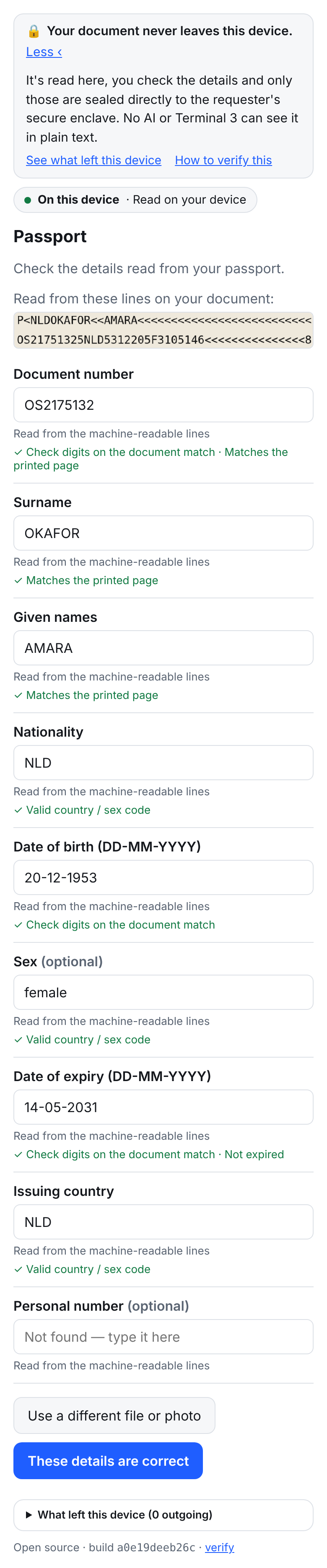
- ICAO 9303 MRZ check digits, plus the printed page cross-checked against the MRZ - Passports and ID cards
- Gross − deductions = net - Payslips
- Opening + money in − money out = closing; running balances - Bank statements
- IBAN mod-97, valid dates, not expired - Wherever those fields appear
Measured star growth
- in 24h
- 0
- in 7 days
- Collecting history
- in 15 days
- Collecting history
- in 1 month
- Collecting history
Net star changes over overlapping periods, not daily totals. Missing measurements are left blank. Stars measure attention, not software quality.
About
Open-source private document scanner for AI: reads documents on your device and seals private data to your own Terminal 3 (https://terminal3.io/products/agent-developer-kit) vault
Developer ToolsREADME.md
OriginalPrivate Doc Scanner
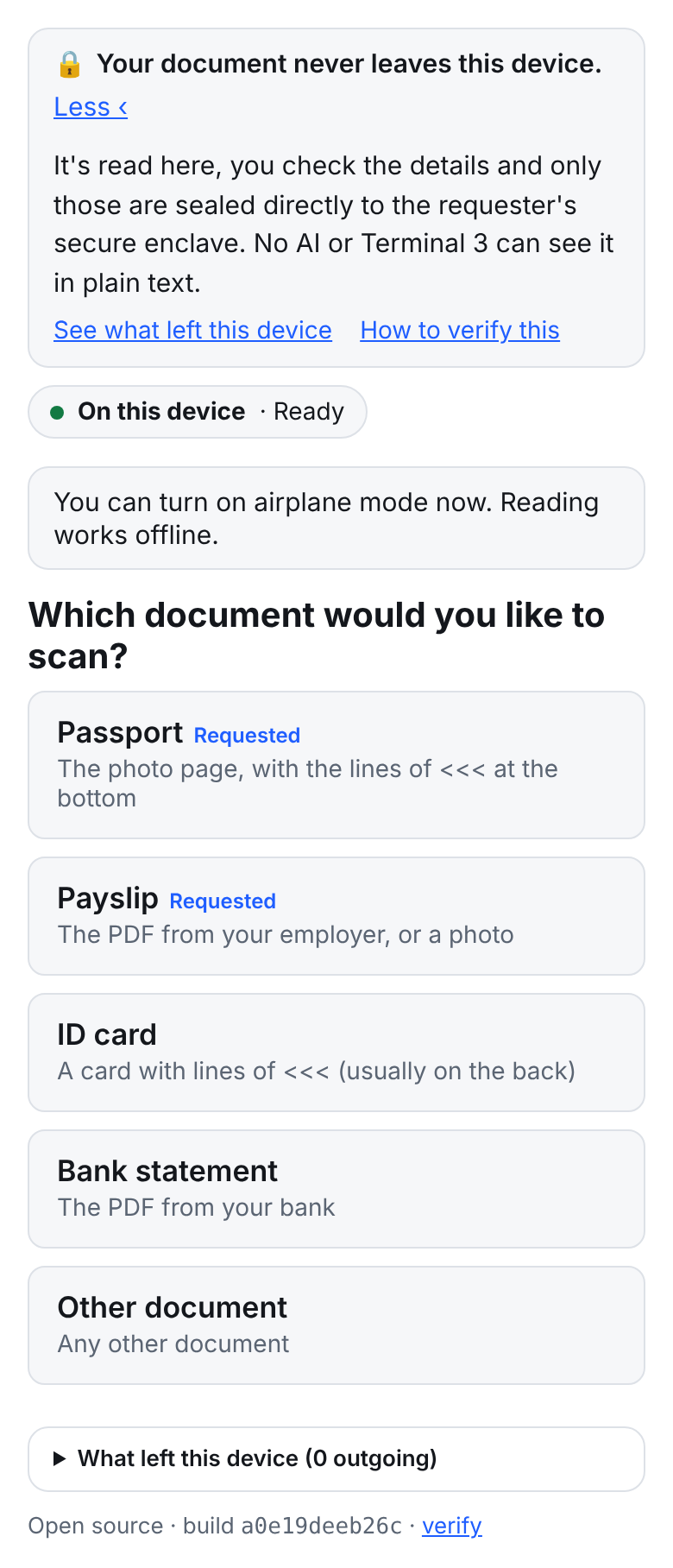
Open-source document scanner for AI: reads your passport, payslip or bank statement on your own device and saves it to your own hardware sealed vault (powered by Terminal 3 https://terminal3.io/products/agent-developer-kit) , so your AI can use it without seeing it.




Asking Claude or ChatGPT to "read this payslip" sends the whole document to the model provider. Private Doc Scanner reads it on your device instead, checks what it read, lets you confirm every field, and seals only those details to your own Terminal 3 vault. From there you can finally run fully autonomous transactions with your AI without it actually seeing or touching your sensitive data.
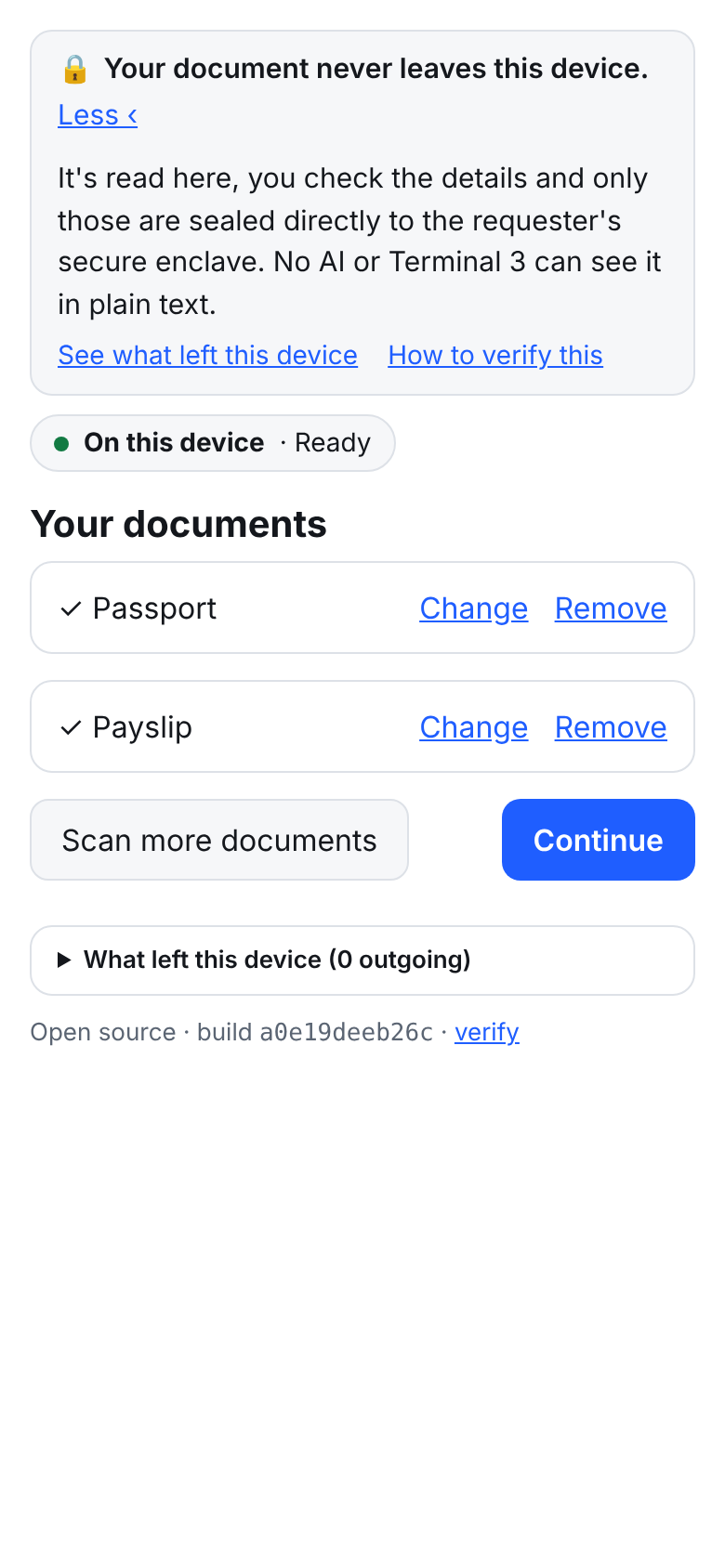
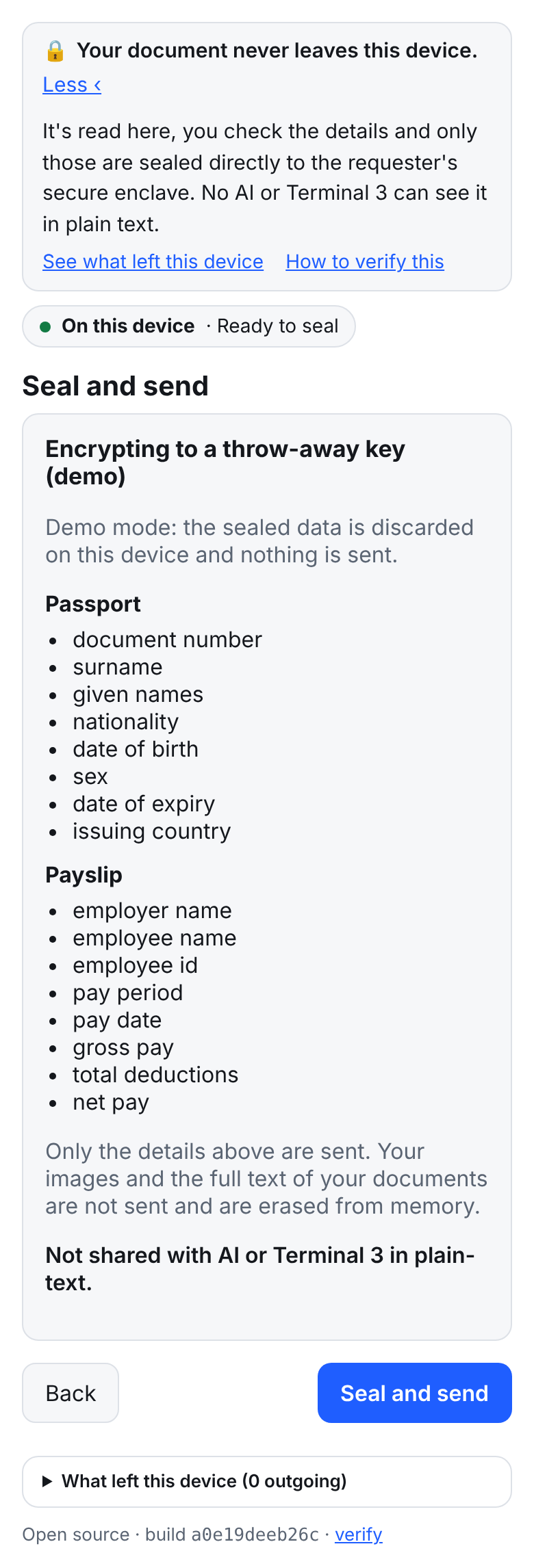
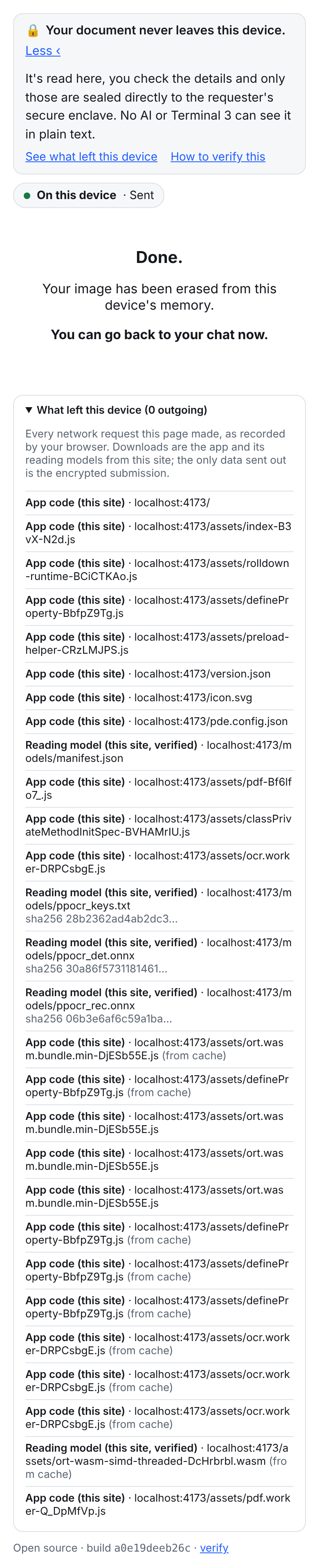
| Start | Review | Your documents | Seal | Done |
|---|---|---|---|---|
 |
 |
 |
 |
 |
Try it
- Scan, no account needed. Open the scanner on your phone, pick a document type, and upload a file or take a photo. It's read on the device and you see what it extracted, with the checks it ran. Everything happens on-device and nothing is sent anywhere.
- Let your AI use it. At "Seal and send", sign in with your email and the code it sends. First time, the scanner sets up your private vault (about 1,100 test credits on T3N testnet, once) and seals what you reviewed into it. (you need an existing Terminal 3 account with an active DID, get yours for free at https://terminal3.io/products/agent-developer-kit with pre-loaded credits)
- Connect your AI. Get your developer account and API key (below), then paste the setup prompt into Claude Code or Codex. Your assistant installs the T3N SDK, connects to your vault, and remembers the setup for next time.
Get your developer account and API key
Scanning doesn't need an account. Saving to your vault needs a Terminal 3 account (DID), and connecting an AI assistant also needs its API key. One sign-up gives you both.
- Sign up at terminal3.io/products/agent-developer-kit. Use the email you'll sign in to the scanner with, so the scanner and your assistant use the same account and vault. You get a
did:t3n(your account ID), an API key and free testnet credits. - Save the key somewhere safe straight away, such as a password manager. It's shown once.
- Give it to your assistant without pasting it into the chat:
- Claude Code or Codex on your computer: the setup prompt creates
starter/.env(git-ignored) with an emptyT3N_API_KEY=line. Open it in your editor, paste the key after the=, save, and tell your assistant "done". - Claude Code on the web or Codex cloud: add
T3N_API_KEYin the environment's secret or environment-variable settings, allow the hostcn-api.sg.testnet.t3n.terminal3.ioin its network settings, and start a new session. Your assistant gives you a prompt to paste there, so the new session can carry on without remembering anything (it's also instarter/prompts/continue.txt).
- Claude Code or Codex on your computer: the setup prompt creates
Prompts for your AI
These assume your assistant remembers nothing from earlier sessions (Claude Code on the web starts each session in a fresh container), so each one carries everything it needs. They work in Claude Code and Codex.
1. First-time setup
I'm using the open-source Private Doc Scanner with Terminal 3 (T3N): it reads my documents on my phone
and seals the details to my own T3N vault, so AI can use them without seeing them. Set me up.
Run the commands yourself; don't ask me to run anything.

Ground rules for this whole session:
- My T3N API key is in the environment as T3N_API_KEY, or in starter/.env (git-ignored). Never print it,
  ask me for it in the chat, or write it into code, git or memory.
- Never run starter/scripts/read-my-data.ts or anything else that shows my stored values.
- Never ask me to paste, upload or describe my documents. Documents go through the scanner link only.

Before anything else:
a. If ~/t3n-workspace/private-doc-scanner doesn't exist, clone https://github.com/Terminal-3/private-doc-scanner there
   (shallow is fine), then run npm install in its starter/ folder. Check Node.js is 22 or newer.
b. Check whether T3N_API_KEY is set in the environment or in starter/.env; tell me only "set" or "not set".
   If it's not set: copy starter/.env.example to starter/.env and stop. Tell me to paste my key after
   T3N_API_KEY= in my editor (or, on Claude Code on the web, add it in the environment's settings and start a
   new session). If I have no key, tell me to sign up at https://terminal3.io/products/agent-developer-kit
   with the email I'll use in the scanner. Never open or print the file's value.
c. Check that cn-api.sg.testnet.t3n.terminal3.io is reachable. If it isn't, stop and tell me to allow
   that host in my environment's network settings, then start a new session.
   Whenever you stop and ask me to start a new session, end your message with the full prompt in
   starter/prompts/continue.txt (print it with cat), word for word, so I can paste it into the new session.

Then:
1. In starter/, run npx tsx scripts/setup-vault.ts. It's safe to re-run. Tell me my did:t3n, my vault
   name, and that the first setup costs about 1,100 test credits.
2. Ask me which documents I want to store (passport, id_card, payslip, bank_statement, generic), then run
   npx tsx scripts/new-link.ts <those types> and give me the link to open on my phone.
3. Tell me to sign in on the scanner with the same email as my Terminal 3 account, and that the scanner's
   last screen gives me a prompt to paste back here to check the result.
2. Store another document
I'm using the open-source Private Doc Scanner with Terminal 3 (T3N). I want to store <passport / payslip /
bank_statement / id_card> in my own T3N vault without it entering this chat. Run the commands yourself.

Ground rules for this whole session:
- My T3N API key is in the environment as T3N_API_KEY, or in starter/.env (git-ignored). Never print it,
  ask me for it in the chat, or write it into code, git or memory.
- Never run starter/scripts/read-my-data.ts or anything else that shows my stored values.
- Never ask me to paste, upload or describe my documents. Documents go through the scanner link only.

Before anything else:
a. If ~/t3n-workspace/private-doc-scanner doesn't exist, clone https://github.com/Terminal-3/private-doc-scanner there
   (shallow is fine), then run npm install in its starter/ folder. Check Node.js is 22 or newer.
b. Check whether T3N_API_KEY is set in the environment or in starter/.env; tell me only "set" or "not set".
   If it's not set: copy starter/.env.example to starter/.env and stop. Tell me to paste my key after
   T3N_API_KEY= in my editor (or, on Claude Code on the web, add it in the environment's settings and start a
   new session). If I have no key, tell me to sign up at https://terminal3.io/products/agent-developer-kit
   with the email I'll use in the scanner. Never open or print the file's value.
c. Check that cn-api.sg.testnet.t3n.terminal3.io is reachable. If it isn't, stop and tell me to allow
   that host in my environment's network settings, then start a new session.
   Whenever you stop and ask me to start a new session, end your message with the full prompt in
   starter/prompts/continue.txt (print it with cat), word for word, so I can paste it into the new session.

Then, in starter/, run npx tsx scripts/new-link.ts <the types I named> and give me the link to open on
my phone. Tell me to sign in with the same email as my Terminal 3 account, and that the scanner's last
screen gives me a prompt to paste back here to check the result.
3. Check what I sealed
The scanner's last screen gives you this prompt with your reference and the right checks filled in. To write it yourself:
I'm using the open-source Private Doc Scanner with Terminal 3 (T3N). I sealed my <documents> to my own
T3N vault under the reference <reference>. Check the result. Run the commands yourself.

Ground rules for this whole session:
- My T3N API key is in the environment as T3N_API_KEY, or in starter/.env (git-ignored). Never print it,
  ask me for it in the chat, or write it into code, git or memory.
- Never run starter/scripts/read-my-data.ts or anything else that shows my stored values.
- Never ask me to paste, upload or describe my documents. Documents go through the scanner link only.

Before anything else:
a. If ~/t3n-workspace/private-doc-scanner doesn't exist, clone https://github.com/Terminal-3/private-doc-scanner there
   (shallow is fine), then run npm install in its starter/ folder. Check Node.js is 22 or newer.
b. Check whether T3N_API_KEY is set in the environment or in starter/.env; tell me only "set" or "not set".
   If it's not set: copy starter/.env.example to starter/.env and stop. Tell me to paste my key after
   T3N_API_KEY= in my editor (or, on Claude Code on the web, add it in the environment's settings and start a
   new session). If I have no key, tell me to sign up at https://terminal3.io/products/agent-developer-kit
   with the email I'll use in the scanner. Never open or print the file's value.
c. Check that cn-api.sg.testnet.t3n.terminal3.io is reachable. If it isn't, stop and tell me to allow
   that host in my environment's network settings, then start a new session.
   Whenever you stop and ask me to start a new session, end your message with the full prompt in
   starter/prompts/continue.txt (print it with cat), word for word, so I can paste it into the new session.

Then, in starter/:
1. Run npx tsx scripts/vault.ts status <reference>
2. Run npx tsx scripts/vault.ts evaluate <reference> '<checks, e.g. {"document_not_expired":true,"min_age":18}>'
   Checks: min_net_pay, min_age, document_not_expired, nationality_in, min_closing_balance,
   require_verified.
3. Tell me in plain words which fields arrived, which were verified on the document and which I edited,
   and whether each check passed. Don't show any values.
Or install it as a Claude Code plugin, which adds the skills to every project:
/plugin install private-doc-scanner --marketplace Terminal-3/private-doc-scanner
Then ask Claude "set up my private vault" or "store my passport privately".
The same prompts work in Codex. The repo's own CLAUDE.md, AGENTS.md and skills tell coding agents how to use it.
Next: book a flight with your sealed passport
Congratulations on sealing your passport in your vault! You can also clone a separate contract that lets your AI agent book flights for you without it ever seeing your passport details. Learn more.
Note: using it allows your passport details to be sent to the travel booking service you choose (not to the AI agent).
FAQ
How do I use my passport, payslip or bank statement with AI without uploading it?
Scan it here instead of attaching it to a chat. It's read on your device, you review the details, and only those are sealed to your T3N vault. You can then build workflows where your AI can request to be run with these data, without it actually seeing or touching the data.
Is it safe to paste my documents into ChatGPT or Claude?
Anything you attach or paste goes to the model provider. If the document is private, keep it out of the chat: scan it here and let the AI work with your vault instead.
How can an AI agent check my income or ID without seeing it?
You can write workflows and scripts for the vault to run inside a secure enclave (Intel TDX) on Terminal 3 Network, such as "net pay at least 3,000", "document not expired" or "nationality is one of …", and returns pass or fail plus which fields were verified on the document. Raw values are never returned.
Where should I keep API keys and secrets for an app I'm building with AI?
In your tool's secret settings or a git-ignored .env, never in a chat. The setup prompt above follows that rule and tells your assistant to keep following it.
Does my document ever leave my device?
No. The file is read into memory on your device and never uploaded. Only the details you confirm leave, encrypted to a T3N enclave whose hardware attestation is verified first. "What left this device" shows every request the page made. The scanner code is open-sourced and available for you to verify.
Do I need an account to try it?
Scanning and reviewing works without one. But to save data to your Terminal 3 vault, sign in with your email and a code at "Seal and send" or to connect an AI assistant, you would need a Terminal 3 account and a developer API key from the Agent Developer Kit sign-up. All new accounts come with free credits pre-funded.
What it checks (you can build your own scripts to run in your Terminal 3 vaults)
| Check | Where it applies |
|---|---|
| ICAO 9303 MRZ check digits, plus the printed page cross-checked against the MRZ | Passports and ID cards |
| Gross − deductions = net | Payslips |
| Opening + money in − money out = closing; running balances | Bank statements |
| IBAN mod-97, valid dates, not expired | Wherever those fields appear |
A field is marked verified only by a deterministic check like these. The benchmark fails CI if any verified field is wrong.
Safety and security features (everything is open-sourced and verifiable, it is your responsibility to check through and ensure it is safe enough for your use)
| Feature | How it's enforced |
|---|---|
| The document never leaves the device | Files are read into memory from the picker or camera and never uploaded. CSP connect-src 'self' <destination>. e2e test: no request body or URL contains document values. |
| Only reviewed fields leave, encrypted | pde.submission/v1 carries values plus provenance only: no images, page text or file names. Sealed by @terminal3/t3n-sdk (ML-KEM session) or HPKE (RFC 9180). e2e test decrypts it. |
| Encrypted only to a genuine enclave | handshake() verifies the Intel TDX attestation against an operator-signed trust manifest before sending. If that fails, Send is disabled (e2e test with a forged manifest). |
| Stored in a vault you own | Each user's data goes to a contract registered under their own DID (z:<their tid>:doc-intake), with private maps only that contract can read. The page shows whose vault it is before sealing. |
| You can check what left | "What left this device" lists the browser's own record of every request, including the OCR worker's. Any unexpected origin blocks submission. |
| Works offline | Self-hosted, hash-pinned models plus a service worker. e2e test reads a passport with the network turned off. |
Full threat model and limits: docs/privacy-model.md.
Accuracy
Synthetic documents, pnpm bench (Node, ONNX Runtime WASM, PP-OCRv4 mobile), 20 documents per scenario:
| Scenario | Field accuracy | Docs fully correct | Auto-accepted fields correct | Fields flagged for review | Verified but wrong | Median time (Node, 1 thread) |
|---|---|---|---|---|---|---|
| Payslip PDF (digital) | 100% | 100% | 100% | 0% | 0 / 60 | 15 ms |
| Bank statement PDF (digital) | 100% | 100% | 100% | 0% | 0 / 100 | 11 ms |
| Passport photo (clean) | 99.4% | 95% | 100% | 3% | 0 / 155 | 5.9 s |
| Passport photo (phone-like: ±3° tilt, noise, blur) | 83.1% | 65% | 100% | 31% | 0 / 108 | 5.3 s |
| Payslip photo (phone-like) | 87.5% | 60% | 100% | 72% | 0 / 39 | 3.6 s |
Digital PDFs are exact because no OCR is involved. Photos are harder; anything not vouched for by a check is highlighted for you. Known weak spots: handwriting, non-Latin scripts (the default model reads CJK and Latin), heavy glare, and complex multi-page tables.
Runs on most phones
The reading engine is picked at runtime: PP-OCRv4 on WebGPU on recent desktops and Android, PP-OCRv4 on WASM on Safari and iPhone, and Tesseract on low-memory devices. Text-layer PDFs are read without OCR everywhere. Peak memory stays around 300 MB, and OCR runs in a Web Worker.
What's in this repo
| Path | What |
|---|---|
apps/capture-pwa |
The scanner: a static web app with a strict CSP, offline support and a hash index of every deployed file |
packages/* |
The reader (engines-web: pdf.js, PaddleOCR on ONNX Runtime, Tesseract), the pipeline and document schemas (core), checks (validators), UI components (ui), and destinations (adapter-t3n, adapter-hpke) |
contracts/doc-intake |
The vault contract (Rust → WASM) that stores submissions and answers status / evaluate inside the enclave, never returning values |
starter/ |
Scripts your AI runs: set up a vault, make a scanner link, check a submission. See starter/README.md |
.claude/skills, CLAUDE.md, AGENTS.md |
Instructions for Claude Code and Codex |
deploy/ |
Host the scanner yourself: Vercel or a VPS with Caddy, both with the same-origin /t3 relay |
tools/t3 |
Testnet scripts: config generator, smoke test, agent status lookup |
bench/ |
Synthetic document generator and the accuracy benchmark |
Develop
pnpm install
pnpm dev                      # http://localhost:5173/?types=passport,payslip  (dry-run: nothing is sent)
pnpm lint && pnpm typecheck && pnpm test
pnpm bench                    # accuracy report
pnpm build && pnpm test:e2e   # production build + privacy e2e tests
Host your own copy: deploy/README.md. How the scanner talks to T3N: docs/integration-t3.md.
Licence
Apache-2.0. Third-party components are all permissive: pdf.js (Apache-2.0), ONNX Runtime Web (MIT), PaddleOCR models (Apache-2.0), tesseract.js (Apache-2.0), mrz (MIT), lit (BSD-3), uqr (MIT), @hpke/core (MIT), @terminal3/t3n-sdk (MIT).
See CONTRIBUTING.md and SECURITY.md.