
Techdox/trove
Techdox/trove has 65 GitHub stars and 0 forks. GitHot measured 0 stars in 24 hours, 0 in 7 days, and +1 in 15 days. Last checked 2026-11-14 22:31 UTC. Last push 2026-10-11.
What you can do
- Service catalog across platforms — containers, K8s workloads (with pods nested under their Deployments), Proxmox VMs/LXCs, and systemd units, all in one normalized view grouped by host. Docker Compose projects and Kubernetes namespaces are grouped in the catalogue and can be filtered as chips.
- Health + heartbeats — platform health where it exists (Docker healthchecks, K8s readiness), plus server-side staleness: an agent that goes quiet flags itself and all its services within ~90 seconds.
- Alerts & digest — instant notifications via webhook / Discord / ntfy when a host stops reporting, a service goes unhealthy or dies, or an image falls behind — with recovery notices, flap suppression, and a scheduled email digest. See docs/alerts.md.
- Operational dashboard — a calm needs-attention queue first, then infrastructure and the full catalogue; recent changes stay available as history rather than competing with current problems. Published ports and optional trove.url labels are links out to the thing you already use to fix it.
Measured star growth
- in 24h
- 0
- in 7 days
- 0
- in 15 days
- +1
- in 1 month
- Collecting history
Net star changes over overlapping periods, not daily totals. Missing measurements are left blank. Stars measure attention, not software quality.
About
Automatically discovered, read-only service catalogue for Docker, Kubernetes, Proxmox, and Linux.
Self-hostedREADME.md
Original

Read-only service catalogue for Docker, Kubernetes, Proxmox, and Linux.
Know what's running without giving it the keys.


Trove is an automatically discovered, read-only inventory of everything running in your homelab. Small agents sit next to your workloads — Docker hosts, Kubernetes clusters, Proxmox nodes, plain Linux boxes — and push what they see to one Trove service catalogue: what's running, where it lives, whether it's healthy, whether its image is outdated, and whether it is still reporting.
Trove is the place to start an investigation, not the place to make a change. It links the facts across your homelab without becoming a homepage, Grafana, Portainer, or an infrastructure management interface.
Built by Techdox.
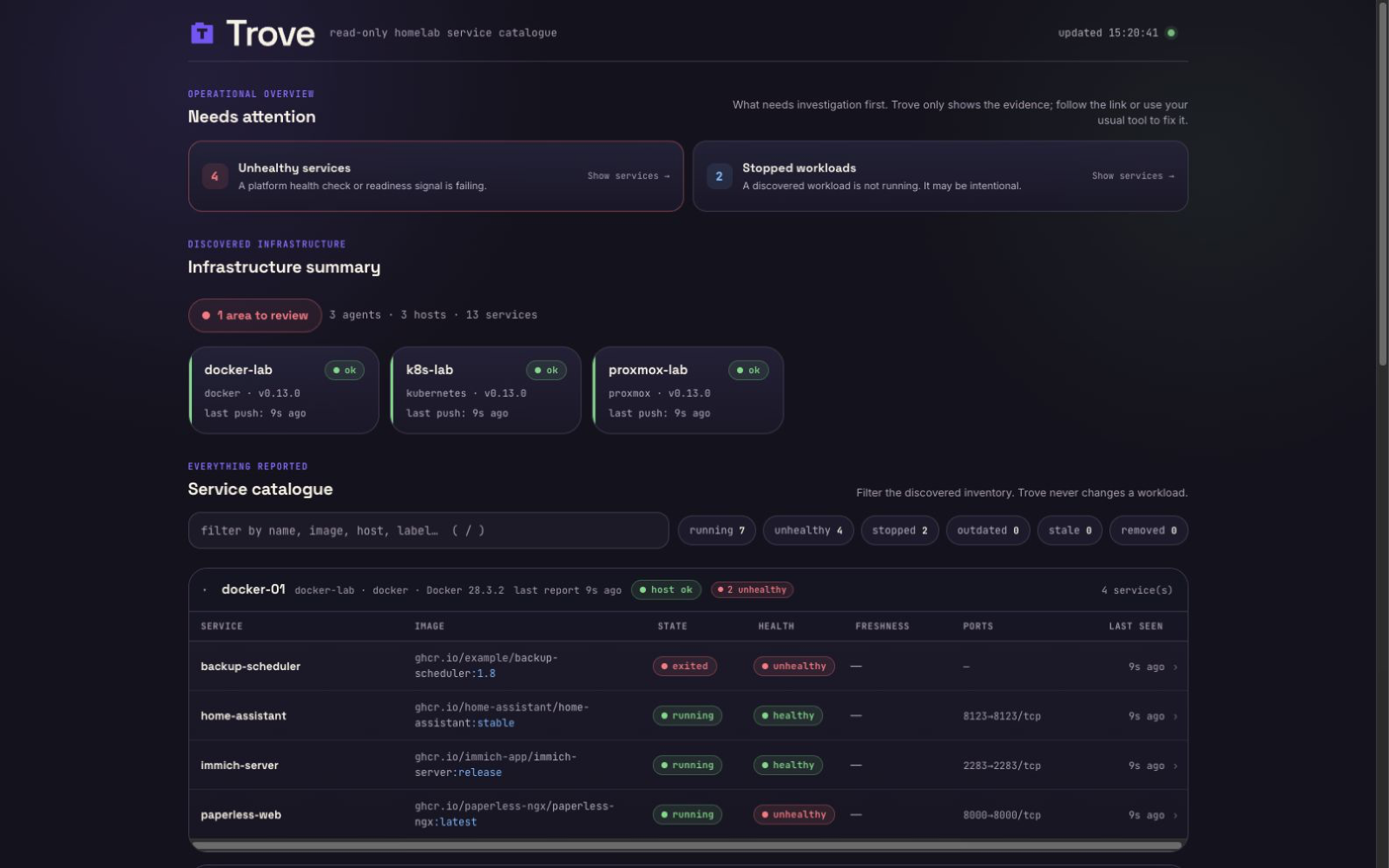
Dashboard shown with public fixture data. It contains example services only, never a real homelab.
Read-only by design. Trove can never deploy, restart, exec into, or edit anything. There is no code path that mutates a workload — agents only ever issue read/list calls to their platforms. This is an architectural constraint, not a feature toggle, and it's the project's one hard rule.
Features
- Service catalog across platforms — containers, K8s workloads (with pods nested under their Deployments), Proxmox VMs/LXCs, and systemd units, all in one normalized view grouped by host. Docker Compose projects and Kubernetes namespaces are grouped in the catalogue and can be filtered as chips.
- Health + heartbeats — platform health where it exists (Docker healthchecks, K8s readiness), plus server-side staleness: an agent that goes quiet flags itself and all its services within ~90 seconds.
- Host condition + resources — reporting health stays separate from the platform's host condition. Proxmox and Linux hosts surface CPU, load, memory, disk, and uptime; local Docker agents report the kernel metrics they can observe truthfully; Kubernetes rolls up node readiness plus CPU/memory when Metrics API is available. Open the dedicated host-stats drawer from each host.
- Image freshness — the server checks registries (batched, cached, rate-limit-aware) and badges services whose running image is behind its tag.
- Alerts & digest — instant notifications via webhook / Discord / ntfy when a host stops reporting, a service goes unhealthy or dies, or an image falls behind — with recovery notices, flap suppression, and a scheduled email digest. See docs/alerts.md.
- Operational dashboard — a calm needs-attention queue first, then
infrastructure and the full catalogue; recent changes stay available as
history rather than competing with current problems. Published ports and
optional
trove.urllabels are links out to the thing you already use to fix it. - Add or remove agents from the dashboard — mint a token and copy the Compose, Kubernetes, Proxmox, or systemd snippet for the next host, or remove an agent from the catalogue without touching the platform it watched.
- Fast, keyboard-friendly UI — no framework, auto-refreshing; use
/to filter,j/kto move, andenterto open details. - Trivial to operate — one static binary (or container) per role, SQLite storage, automatic schema migrations, push-model agents that work from behind NAT.
Documentation
Use this README for installation and quickstarts. Versioned operational guidance lives in the repository:
- Documentation index — ownership and the complete guide map.
- Configuration — every environment variable.
- Authentication and API.
- Upgrades, backup, and recovery.
- Security model and release verification.
The wiki is for discoverable walkthroughs, screenshots, and community-oriented guides. It links back to the repository for version-specific commands, configuration, authentication, upgrades, and security details.
Quickstart (5 minutes)
Trove is a server (the dashboard + API) plus one agent per platform you
want to watch. The server is the same everywhere; only the agent differs. Start
with the compose file that matches what you're watching — each one stands up the
server and the right agent together. Requires Docker with Compose on the
machine that will host the dashboard, and a user account that can run Docker
without sudo. Check that first with docker ps; if it reports permission
denied, follow Docker's post-install steps for your distribution and open a new
shell before continuing.
Docker host — server + an agent watching this box's containers:
mkdir trove && cd trove
curl -fsSLO https://raw.githubusercontent.com/techdox/trove/main/examples/docker-compose.yml

# Save the agent's token to .env — Compose loads it automatically and it
# survives restarts and upgrades. (Don't just `export` it: a new shell would
# lose it, and re-running with a fresh token silently breaks the agent.)
umask 077
echo "TROVE_TOKEN=trove_$(openssl rand -hex 24)" > .env
docker compose up -d
Proxmox VE — server + an agent watching your cluster's VMs and LXCs. First
create a read-only API token (the Proxmox guide has
the exact pveum commands), then:
mkdir trove && cd trove
curl -fsSLO https://raw.githubusercontent.com/techdox/trove/main/examples/docker-compose.proxmox.yml

# Save settings to .env (Compose loads it automatically; it persists across
# restarts). TROVE_TOKEN is Trove's own agent token; TROVE_PROXMOX_TOKEN is
# your Proxmox API token — two different credentials.
umask 077
{
  echo "TROVE_TOKEN=trove_$(openssl rand -hex 24)"
  echo "TROVE_PROXMOX_URL=https://YOUR-PVE-HOST:8006"
  echo "TROVE_PROXMOX_TOKEN=trove@pve!trove-agent=YOUR-TOKEN-SECRET"
} > .env
chmod 600 .env
# If PVE uses its default private CA, copy /etc/pve/pve-root-ca.pem from a node
# to ./pve-root-ca.pem and uncomment the CA lines in the Compose file.
# now edit .env to fill in your real PVE host and API token, then:
docker compose -f docker-compose.proxmox.yml up -d
Kubernetes or bare-metal Linux — the agent doesn't run in Compose
(the K8s agent runs in-cluster as a Deployment; the bare-metal agent runs as a
systemd unit). Stand up just the server —
docker-compose.server.yml runs the
server with no bundled agent — then deploy the agent from the
Kubernetes or bare-metal
guide.
The compose files auto-register this first agent from TROVE_TOKEN (via
TROVE_BOOTSTRAP_*), so you don't run agent create for it — every
additional host gets its own token from the dashboard Add agent button
or the CLI (below).
Open http://localhost:8080. Your services appear within ~30 seconds. First,
check Needs attention: a healthy first report shows a calm all-clear state;
an agent that stops reporting becomes stale and then offline. A newly registered
agent whose token has never been accepted remains unknown; its logs show the
server's 401 response.
If an agent does not show up, watch it connect with docker compose logs -f agent (add -f docker-compose.proxmox.yml if you used the Proxmox file).
⚠️ By default, the dashboard and read APIs are open. Keep Trove on a trusted network (LAN/VPN/tailnet), put it behind an authenticating reverse proxy, or enable native OIDC. See Dashboard authentication.
Adding more hosts and platforms
Each host or platform you watch runs its own agent — a separate process or
container, with its own image and its own token. You don't repoint an existing
agent at a new platform; you run another one. (Setting TROVE_PROXMOX_* on the
Docker agent, for example, does nothing — it's a different agent image; it will
connect, look healthy, and never report your Proxmox guests.)
On the dashboard, click Add agent, pick the platform, and copy the snippet it prints with the token already filled in. The CLI still works if you would rather mint from the server:
# server running via Docker Compose (the quickstart):
docker compose exec server trove-server agent create <name>

# server running as a bare-metal binary — point at the SAME database the server
# uses, or the token lands in a throwaway ./trove.db and the agent can't auth
# (the systemd unit sets TROVE_DB=/var/lib/trove/trove.db):
sudo TROVE_DB=/var/lib/trove/trove.db trove-server agent create <name>
# e.g. <name> = docker-nas, k8s-homelab, proxmox
If an agent token is exposed or the host changes hands, rotate it with
trove-server agent rotate <name>. Rotation immediately invalidates the old
token, without deleting the agent or its history. Follow the platform-specific
maintenance-window rotation guide before running the
command.
Then follow the guide for the platform:
| Platform | Agent | Guide |
|---|---|---|
| Docker host | trove-agent-docker |
docs/agents/docker.md |
| Kubernetes cluster | trove-agent-k8s |
docs/agents/kubernetes.md |
| Proxmox VE cluster | trove-agent-proxmox |
docs/agents/proxmox.md |
| Bare-metal Linux (systemd) | trove-agent-local |
docs/agents/local.md |
Container images (multi-arch amd64/arm64) live on GHCR:
ghcr.io/techdox/trove-server, ghcr.io/techdox/trove-agent-docker,
ghcr.io/techdox/trove-agent-k8s, ghcr.io/techdox/trove-agent-proxmox.
Static binaries for everything (including the bare-metal agent) are on the
releases page.
How it works
  docker host          k8s cluster         proxmox            nas (systemd)
 ┌────────────┐      ┌────────────┐      ┌────────────┐      ┌────────────┐
 │ agent      │      │ agent      │      │ agent      │      │ agent      │
 └─────┬──────┘      └─────┬──────┘      └─────┬──────┘      └─────┬──────┘
       │    POST /api/v1/report (Bearer token, every 30s)          │
       └───────────────┬───┴──────────────┬────────────────────────┘
                       ▼                  ▼
                  ┌─────────────────────────────┐
                  │ trove-server                │
                  │  SQLite · REST · dashboard  │
                  └─────────────────────────────┘
- Agents, hosts, services: an agent is one connection to the server (one token). It reports one or more hosts — a Docker host, each Proxmox node, a whole cluster — and each host has services (containers, VMs/LXCs, pods, systemd units). A Docker agent reports one host; one Proxmox agent reports every node in its cluster. On the dashboard, services are grouped by host.
- Push model: agents POST full-state snapshots on an interval. The server never reaches into your infrastructure — homelab/NAT friendly.
- Heartbeats: agents and hosts are tracked independently. Miss 3 intervals → stale; miss 10 → offline. Services follow their host's status, so one healthy host cannot hide another missing host from the same agent. Thresholds scale with each agent's own interval.
- Full-state reports are idempotent and tolerate lost pushes. Services
that disappear are soft-removed and pruned after 24h (configurable,
TROVE_REMOVED_RETENTION).
Server install options
Docker Compose — the quickstart above; data lives in the trove-data volume.
Bare metal — download the trove-server archive for your arch from the
latest release (the
trove-server.service unit is bundled inside it):
# pick the URL for your arch off the releases page, e.g.:
VERSION=0.18.1       # x-release-please-version; check https://github.com/techdox/trove/releases/latest for newer releases
curl -fLO "https://github.com/techdox/trove/releases/download/v${VERSION}/trove-server_${VERSION}_linux_amd64.tar.gz"
tar xzf trove-server_${VERSION}_linux_amd64.tar.gz

sudo install -m 0755 trove-server /usr/local/bin/
sudo cp deploy/systemd/trove-server.service /etc/systemd/system/
sudo systemctl enable --now trove-server
The server listens on :8080 and stores its database at
/var/lib/trove/trove.db (the unit creates that directory via
StateDirectory). Mint agent tokens against that same DB — see
Adding more hosts.
Go install (needs Go 1.26+):
go install github.com/techdox/trove/cmd/trove-server@latest
Configuration reference
Every environment variable lives in docs/configuration.md. That includes server settings, agent settings, registry credentials, retention, alerts, and OIDC.
Dashboard authentication (OIDC)
The dashboard is open unless you put it behind a reverse proxy or enable
native OIDC. The reverse-proxy path is the usual homelab setup; OIDC is
optional if you already have an identity provider. See
Dashboard authentication. Agent ingest
(POST /api/v1/report) and /healthz remain reachable without dashboard
auth.
API
| Method & path | Auth | Purpose |
|---|---|---|
POST /api/v1/report |
Bearer | Agent pushes a full-state report. |
POST /api/v1/agents |
OIDC or optional API token | Mint an agent token and return an install snippet. |
DELETE /api/v1/agents/{name} |
OIDC or optional API token | Remove an agent and its catalogue data. |
GET /api/v1/services |
OIDC or optional API token | Services grouped by host (dashboard data). |
GET /api/v1/agents |
OIDC or optional API token | Agents with derived heartbeat status. |
GET /api/v1/events |
OIDC or optional API token | Recent state-change events (?limit=&offset=&kind=&since=). |
GET /api/v1/me |
OIDC or optional API token | Current dashboard/API auth state. |
GET /metrics |
OIDC or optional API token | Prometheus text metrics. |
GET /healthz |
none | Database and enabled-worker health. |
Pagination, filtering, and metrics details are in docs/api.md.
The wire contract lives in pkg/model — the one package
agents import. Building an agent for a new platform means implementing one
interface; see CONTRIBUTING.md.
Security model
- Agent ingest is authenticated with per-agent bearer tokens (256-bit random, stored only as SHA-256 hashes). Revoke by deleting the agent.
- The dashboard and APIs support optional authentication. When all
authentication settings are unset, the dashboard is open — bind to a trusted
network or front it with an authenticating reverse proxy. Native OIDC is
optional. See Dashboard authentication.
POST /api/v1/agentsandDELETE /api/v1/agents/{name}use that same dashboard auth; they never mutate a monitored platform. - Agents cannot change anything on the platforms they watch — read-only is enforced in code, not convention. Details in SECURITY.md.
- Tagged binaries and container images ship with checksums, SPDX SBOMs, provenance, and keyless GitHub attestations. See Release integrity and provenance for the policy and verification commands.
Upgrades & backup
Schema migrations are automatic and additive, but the SQLite database is durable state and a verified backup is the rollback path. Upgrade the server before its agents.
The canonical procedure is docs/upgrades.md: it owns the
Compose, systemd, and go install commands; trove-server doctor; backup
creation and read-only verification; retention examples; restore rehearsal;
and rollback.
Building from source
git clone https://github.com/techdox/trove.git && cd trove
make native   # all binaries for your host platform → bin/
make build    # cross-compile linux amd64+arm64
make test     # go test ./...
docker compose up --build   # contributor dev stack
Pure Go, no CGO, no frontend build step — the dashboard is vanilla JS embedded into the server binary.
Roadmap & contributing
Current focus: operator confidence and the stability contract on the path to
v1.0.0. Helm packaging and certificate-expiry monitoring remain post-1.0 —
see ROADMAP.md for the gates and sequencing. Contributions
welcome: start with CONTRIBUTING.md.
License
MIT © Techdox