
TeamAudio/reaspeech
TeamAudio/reaspeech has 47 GitHub stars and 5 forks. GitHot measured 0 stars in 24 hours. Last checked 2026-11-15 01:58 UTC. Last push 2026-11-12.
Measured star growth
- in 24h
- 0
- in 7 days
- Collecting history
- in 15 days
- Collecting history
- in 1 month
- Collecting history
Net star changes over overlapping periods, not daily totals. Missing measurements are left blank. Stars measure attention, not software quality.
About
Speech recognition for REAPER
AIREADME.md
OriginalReaSpeech

Painless speech-to-text transcription inside REAPER
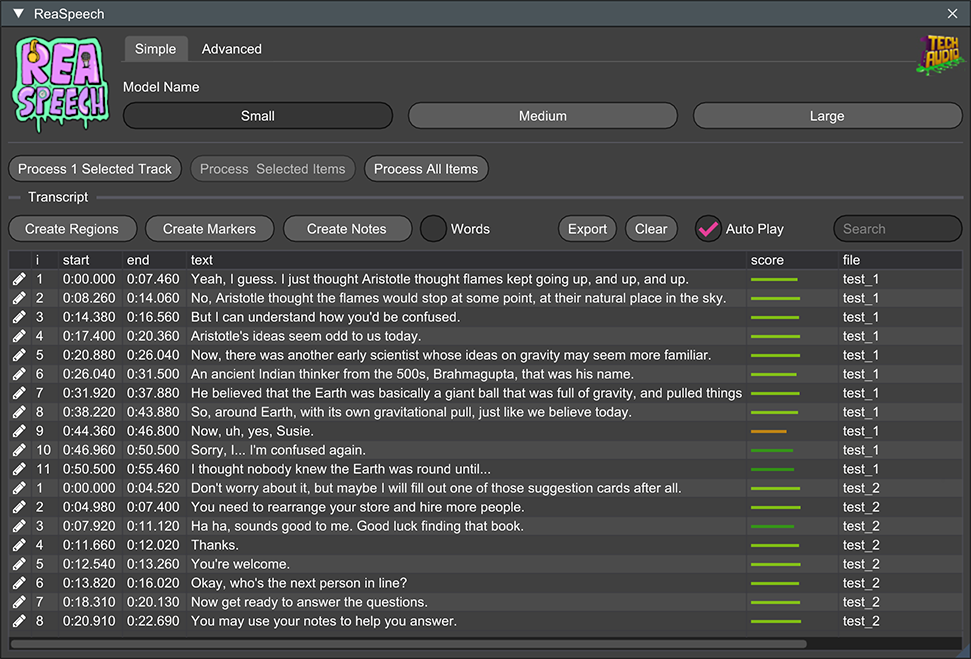
ReaSpeech is a ReaScript interface for transcribing REAPER media items. It builds a searchable, project-marker-based transcript while keeping REAPER responsive during recognition. Find that perfect take, jump to a spoken phrase, or give your scrubbing finger a well-earned break.
Requirements
- REAPER
- ReaImGui 0.10 or newer
- ReaSpeech Lib installed in REAPER's
UserPluginsdirectory
Install
Add the Team Audio repository to ReaPack:
https://github.com/TeamAudio/reascripts/raw/main/index.xml
Install ReaSpeech and one ReaSpeech Lib backend from ReaPack, then run ReaSpeech from REAPER's Actions window. The script is self-contained; its only runtime dependencies are ReaImGui and ReaSpeech Lib.
Select one or more media items and click Transcribe Selected Items. Recognition runs asynchronously, with progress and cancellation available in the existing ReaSpeech interface.
Coming from the Docker version?
Starting with ReaSpeech 1.0, transcription runs through ReaSpeech Lib instead of the Docker-hosted web service. Docker and the local web server are no longer required. To move from 0.7.x or another Docker-based version:
- Close the old ReaSpeech window. Install ReaSpeech and one ReaSpeech Lib backend through ReaPack using the instructions above, then restart REAPER to load the extension.
- In REAPER's Actions window, run the ReaPack-installed ReaSpeech script. Update any shortcuts or toolbar buttons that launch your old downloaded script to use this action instead. The old script still expects the web service; installing the new version does not update that separate copy.
- Transcribe a media item to check your new setup. Once it works, stop your old ReaSpeech Docker container and disable any automatic startup for it. You can remove the old script's action once your shortcuts have been updated.
You do not need to uninstall Docker or remove containers used by other tools.
If you still need an older Docker-based version, the legacy images remain on Docker Hub. We will continue hosting them for a limited time, so please plan to move to the new version. The old setup instructions are preserved in the 0.7.3 documentation.
Get involved
Found a bug, have a question, or want to help? Visit the issue tracker, read our contribution guidelines, or see Development to build and test ReaSpeech.
Credits
ReaSpeech team
Open source projects
- ReaSpeech Lib provides the transcription engine.
- ReaImGui by Christian Fillion powers the user interface.
- OpenMoji provides the emoji icons, licensed under CC BY-SA 4.0.
- json.lua by rxi handles JSON, and LuaUnit supports our tests.
Our earlier Docker-based versions built on Whisper ASR Webservice and Faster Whisper. Thank you to their contributors for helping ReaSpeech get its start.
License
ReaSpeech is distributed under the GNU General Public License v3.0. See LICENSE. Third-party components retain their own licenses; the earlier web service included code derived from the MIT-licensed Whisper ASR Webservice project.