
TKY-27/iris-3b-metal
TKY-27/iris-3b-metal has 58 GitHub stars and 2 forks. GitHot measured 0 stars in 24 hours and 0 in 7 days. Last checked 2026-11-14 22:41 UTC. Last push 2026-10-19.
Measured star growth
- in 24h
- 0
- in 7 days
- 0
- in 15 days
- Collecting history
- in 1 month
- Collecting history
Net star changes over overlapping periods, not daily totals. Missing measurements are left blank. Stars measure attention, not software quality.
About
Iris-3B pixel-space text-to-image on Apple Silicon GPUs: Metal-optimized engine, native macOS app, CLI, Python and local HTTP API
Machine LearningREADME.md
Original
Iris-3B Metal
Direct RGB pixel-space diffusion on Apple Silicon.
An independent MPS and Metal inference engine, with a native macOS app, CLI, Python API and local HTTP API.



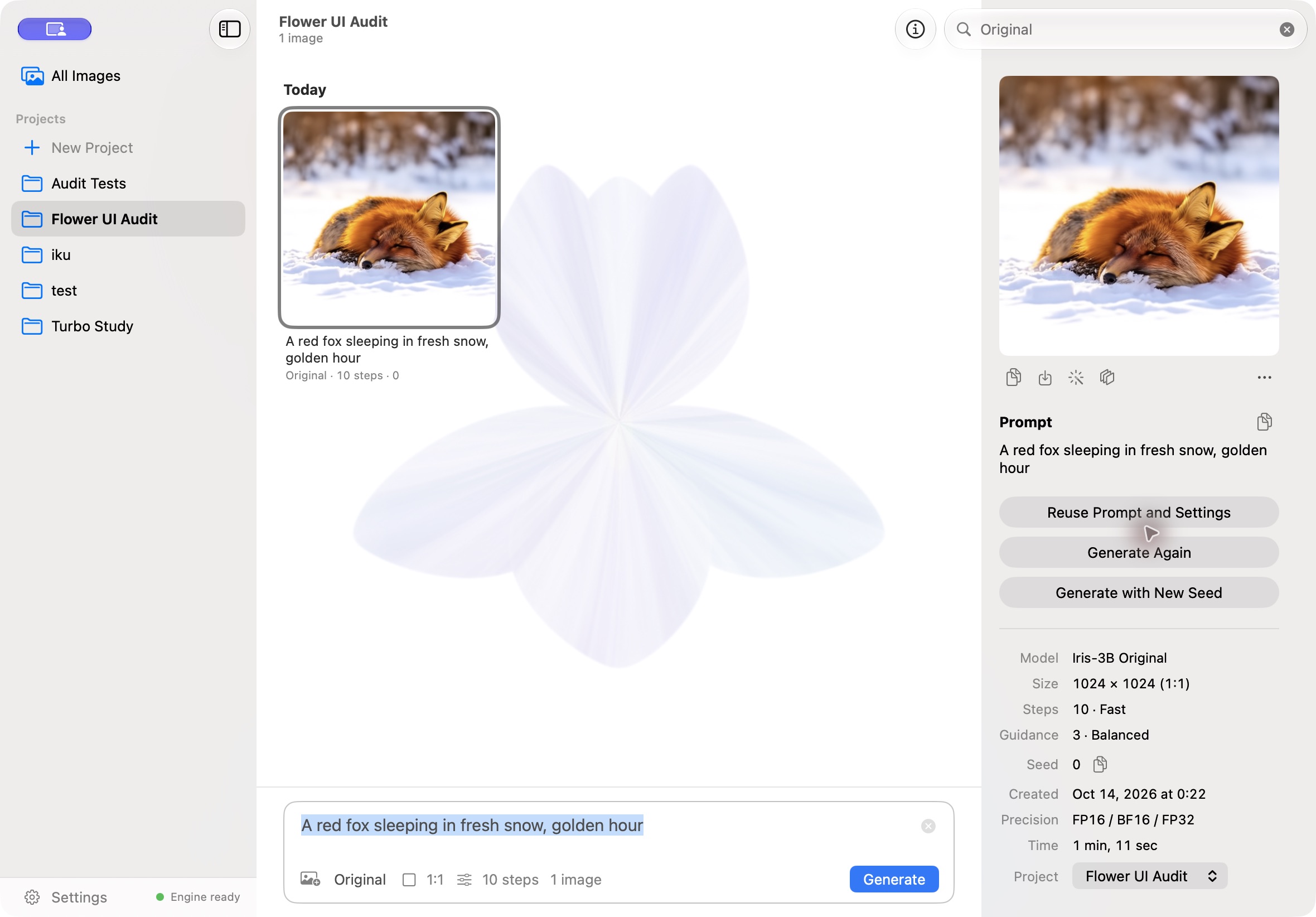
A real macOS app capture with an image generated by Iris-3B.
Why pixel space
Iris-3B is Speridlabs' 3B-parameter pixel-space diffusion transformer. Its text-to-image path denoises RGB pixel values directly and predicts their flow in pixel space; it uses no lossy VAE latent representation or VAE encode/decode stage. This avoids the VAE representation used by VAE-based latent diffusion, but it does not make inference automatically faster or every image better. The pixel-space transformer has substantial compute costs of its own.
| Upstream Iris-3B | Iris-3B Metal |
|---|---|
| Original model architecture, training code, weights, and depth and restoration fine-tunes by Speridlabs. | Independent Apple Silicon inference work: PyTorch MPS, custom Metal kernels, precision and memory optimizations, and streamed Qwen text encoding. Includes a macOS app, CLI, Python API and local HTTP API. |
The upstream depth and restoration fine-tunes reuse the Iris architecture for relative-depth estimation and image restoration. The model, original training and weights are upstream work; this repository does not claim them as its invention. The engine runs the official weights without fine-tuning or distillation.
At a glance
In the independent v0.6.0 audit on a base M5 MacBook Pro with 24 GiB, official Turbo (4 steps, 1024 × 1024) took 9.81 s versus 12.52 s for repeated prompts: 21.6% lower median pipeline latency, six requests per version. Changed-prompt medians were 14.05 s versus 18.30 s, four requests per version. Both comparisons used the real text encoder.
Fixed-input checks matched intermediate tensors, pre-clamp samples, pixels and metadata; they do not prove equivalence for every input. No Original speedup or peak-memory improvement was established. See conditions, ranges and limits. The v0.5.0 measurements below are a separate session, not a direct baseline for these numbers. Macs with 16 GB remain untested.
Examples and tasks
Text to image
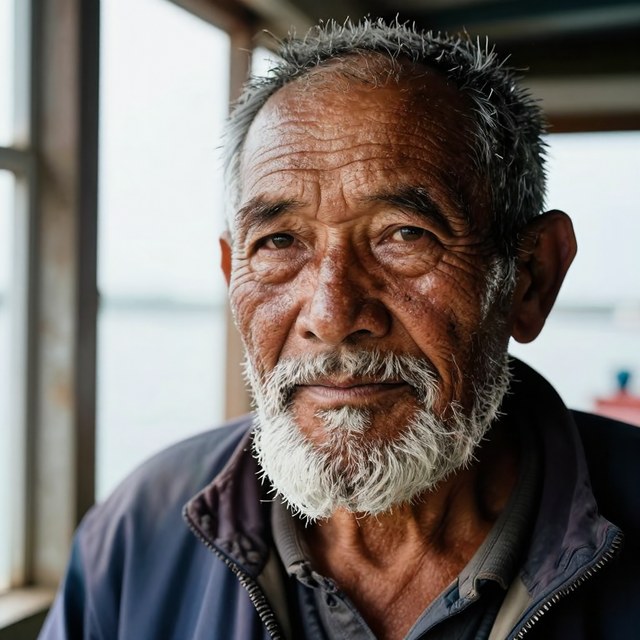
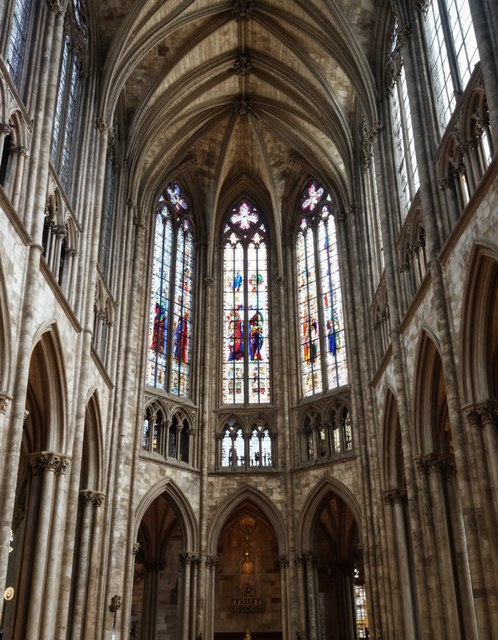
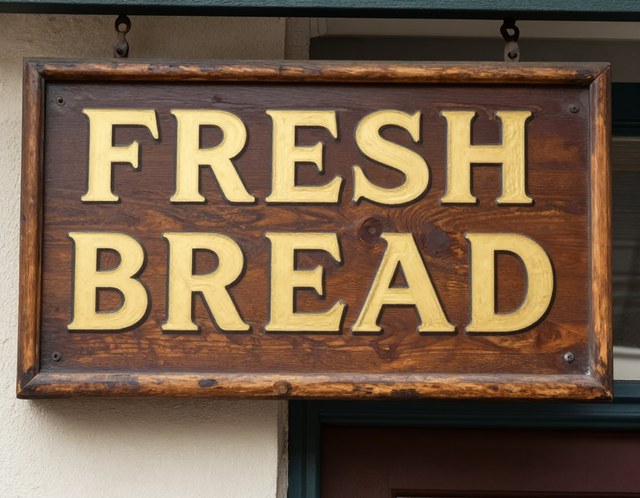
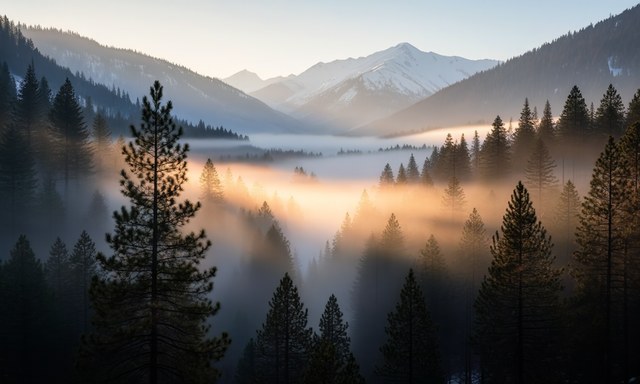
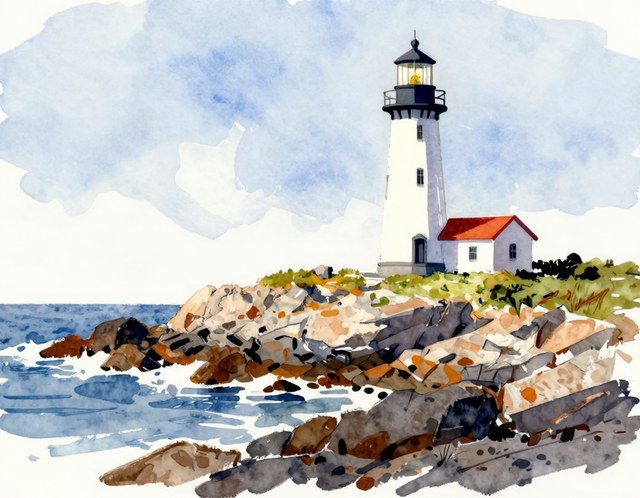
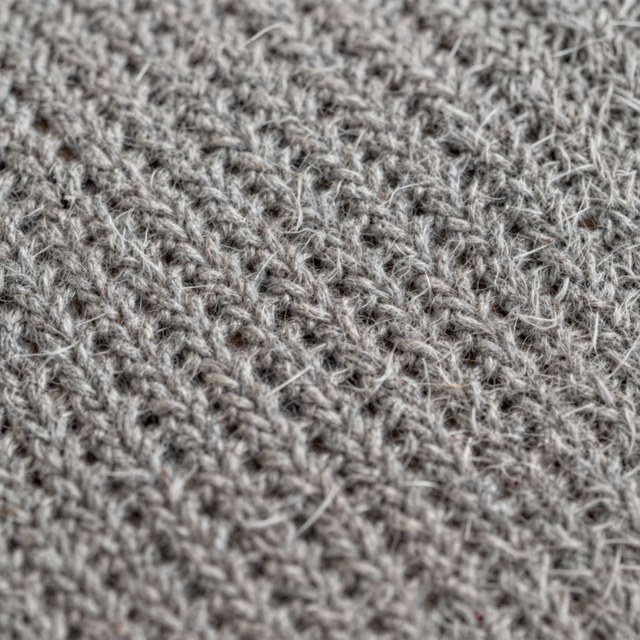
Generated by this engine at 100 steps, guidance 3 and seed 0, from the development prompts in benchmarks/prompts.json.
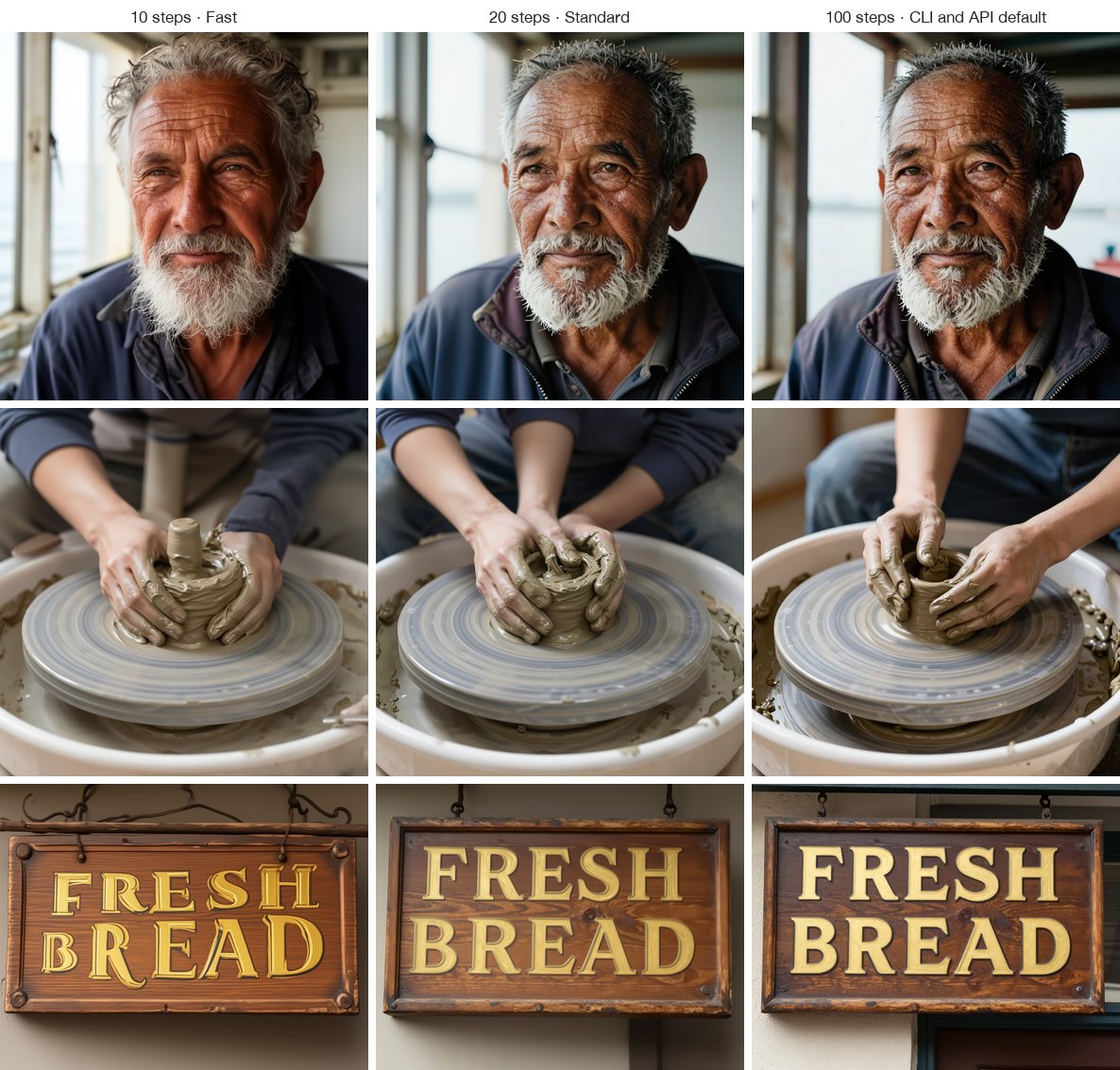
Fewer steps can preserve composition, but fine structure changes; 10 and 20 steps are not equivalent in detail to the model's 100-step setting.
Restoration and depth
| Image restoration and 4× upscaling | Relative depth estimation |
|---|---|
 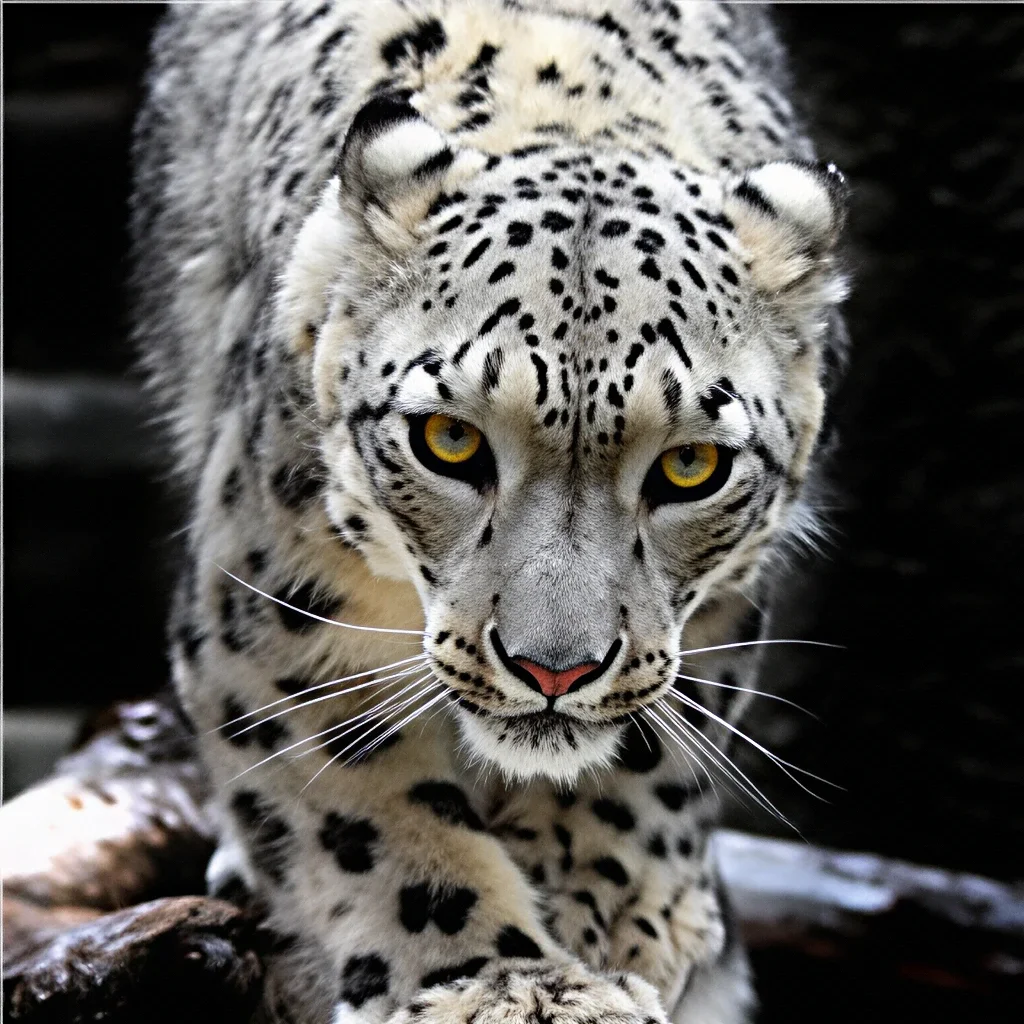 Before · Restored result |
 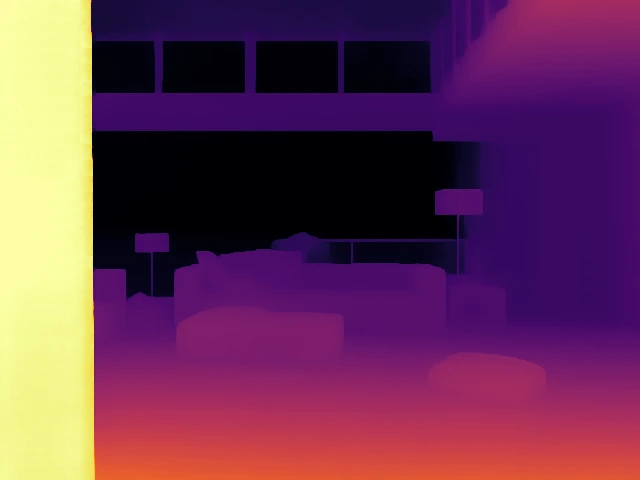 Photo · Depth map; near is brighter |
These are upstream Iris fine-tunes run through this engine. Depth is relative, not measured in metres. Restoration enlarges 4× and can redraw fine structure; compare the result with the input.
Quick start
Requirements: Apple Silicon, macOS 15 or later, and Python 3.11 or later. First use downloads only the selected text-to-image checkpoint: Original (12.0 GB) or official Turbo (6.0 GB BF16), plus the shared 8.9 GB Qwen3-VL-4B-Instruct text encoder from Hugging Face. Depth and restoration weights (about 12 GB each) download only when first used. Model weights are not included in the repository or release.
For the native app and engine, see Install the macOS release. That route does not require Git or Xcode. The v0.6.1 release files are an arm64 app ZIP and a matching Python wheel. The app uses a separately installed engine and does not include Python or model weights.
To install only the CLI or Python package from source, use the development instructions in Development. Installing the engine does not download model weights; the first inference does.
Explore: Usage · macOS app · Performance details · How it works · Image quality · Development · License and credits
What it supports
- Original text-to-image at about one megapixel, with aspect ratios from 4:1 to 1:4 (the model was trained on 21 sizes from 2048 × 512 to 512 × 2048). The upstream sampler is DPM-Solver++ (2nd order); steps, guidance, seed, size and negative prompt can be set.
- Official Iris-3B Turbo: the full-parameter distilled checkpoint, four fixed
deterministic flow-Euler steps with sigmas
1, 0.938, 0.833, 0.625. Guidance is baked into the weights; steps, CFG and negative prompts cannot be adjusted. This is a separate model with different image characteristics from Original. Turbo retains the official BF16 forward on MPS; see the v0.6.0 pipeline measurements. - Relative depth estimation and 4× image restoration/upscaling with the official upstream fine-tunes.
- A native SwiftUI macOS app,
iris-metalCLI,IrisPipelinePython API, and localhost HTTP API. - Local inference on Apple Silicon. Prompts and images are processed on the Mac; first use downloads model files from Hugging Face. The app's release checker contacts GitHub when enabled.
Iris-3B does not edit images from instructions, inpaint, or use earlier prompts or images. Each text-to-image request starts independently.
Usage
Command line
iris-metal "a lighthouse on a rocky coast, watercolor" --size 1152x896 --seed 7
iris-metal "a red panda in a bamboo forest" --steps 10
iris-metal "a red panda in a bamboo forest" --model turbo --seed 7
iris-metal depth photo.jpg           # depth/photo_depth.png and .npy
iris-metal upscale photo.jpg         # upscaled/photo_x4.png
The CLI and Python API default to Original and its 100 steps. Turbo always uses four steps. Without -o, the CLI
numbers outputs iris.png, iris-2.png, and so on without replacing existing
files. Depth and upscale skip names already taken. Inputs and outputs are
checked before a model loads; each command has --help.
Python
from iris_metal.cli import resolve_checkpoint
from iris_metal.pipeline import IrisPipeline

pipe = IrisPipeline(resolve_checkpoint("speridlabs/iris-3b", None))  # resolves the validated revision
image = pipe(["a red panda in a bamboo forest"], height=1024, width=1024, steps=20, seed=0)[0]
image.save("panda.png")
IrisPipeline also accepts a local directory containing config.yaml and
model.safetensors, and supports cfg_scale, negative_prompt and an
on_step(step, total) progress callback. It keeps the model loaded and caches
recent prompt encodings between calls. For Turbo, pass
resolve_checkpoint("speridlabs/iris-3b", None, model="turbo") and omit the three
unsupported controls. To keep reproduction metadata when saving through PIL,
use image.save("panda.png", pnginfo=iris_metal.turbo.png_info(image)) after
importing iris_metal.turbo; the CLI and HTTP server do this automatically.
HTTP API
iris-metal serve runs one resident engine on 127.0.0.1:8765:
curl -s localhost:8765/v1/images -H 'Content-Type: application/json' -d '{"prompt":"a tabby cat on a windowsill","steps":20}'  # {"id":"1"}
curl -s localhost:8765/v1/jobs/1                 # repeat until status is "done"
curl -s 'localhost:8765/v1/jobs/1?after=3&wait=5'  # or wait up to 5 s for a revision other than 3
curl -s localhost:8765/v1/jobs/1/image -o cat.png
curl -s -X DELETE localhost:8765/v1/jobs/1       # cancel
curl -s localhost:8765/v1/depth --data-binary @photo.jpg  # also /v1/upscale
/v1/images accepts model (original by default, or turbo), prompt,
width, height, steps, cfg_scale, seed and negative_prompt. For Turbo,
send e.g. {"model":"turbo","prompt":"a red fox","seed":0}; omit steps,
cfg_scale and negative_prompt or the server returns 400. /v1/health advertises
supported_models, loaded_model and max_job_wait_seconds. Job status carries a
revision that changes with status or progress; with after and wait the request
returns as soon as it changes or the job ends, waiting at most 10 s (at once when
16 requests already wait), and without them it answers at once. Completed jobs return reproduction
metadata, also embedded as JSON in the PNG iris text field. Jobs run in order in a bounded queue; a full queue
returns 429. Cancellation stops prompt encoding between layers, model loading
between tensors, generation at the next step and upscaling at the next tile. Switching between text-to-image, depth and restoration releases
the previous model, including when switching Original and Turbo.
--checkpoint, --turbo-checkpoint and --weights accept separate local
directories for offline use. Checkpoints download on first use, and Original
remains available after using Turbo.
The server has no authentication and must not be exposed beyond localhost. It rejects browser-origin requests and other host names. See SECURITY.md.
macOS app
The SwiftUI app is a client of iris-metal serve; it contains no model code.
The macOS release guide covers the downloadable app
and matching engine wheel, Python installation, checksums and model downloads.
Signing: this distribution has no Developer ID signature and no Apple notarization. It retains a valid ad-hoc signature for Apple Silicon execution. Ad-hoc signing does not verify the developer's identity with Apple.
- Download the app ZIP and matching engine files from the release page, verify the checksums, and install the engine as described in the release guide.
- Extract the ZIP, move
Iris.appto Applications, and open it. - If macOS blocks Iris, open System Settings > Privacy & Security (システム設定 > プライバシーとセキュリティ). Find the Iris notice and choose Open Anyway (このまま開く, verified on Japanese macOS 27.0.1), then follow the confirmation and authentication prompts. Other versions or languages may label the action Open.
- In Iris Settings, select the installed environment's absolute
bin/iris-metalpath. Approving the app does not install Python or its dependencies.
Do not disable Gatekeeper globally or remove quarantine attributes. Per-app approval does not repair a damaged signature, incomplete download or runtime failure. Replacing the app preserves models, settings and the image library outside its bundle.
To build v0.6.1 from source instead, install Git, Python 3.14 and Xcode 27, then
run these commands in a directory where iris-3b-metal does not already exist:
git clone --branch v0.6.1 https://github.com/TKY-27/iris-3b-metal.git
cd iris-3b-metal
python3.14 -m venv .venv
.venv/bin/python -m pip install -c apps/macos/engine-constraints.txt -e .
xcodebuild -project apps/macos/Iris.xcodeproj -scheme Iris -configuration Release -derivedDataPath apps/macos/build CODE_SIGNING_ALLOWED=NO build
codesign --force --sign - apps/macos/build/Build/Products/Release/Iris.app
open apps/macos/build/Build/Products/Release/Iris.app
In Iris Settings, set the engine path to the absolute path of this checkout's
.venv/bin/iris-metal. This build uses ad-hoc signing and needs no Apple
Developer Program membership. Keep the checkout and virtual environment at
their installed paths. For changes to the engine, see Development.
The app uses an engine already running on its port, or starts iris-metal serve from ~/.local/bin, /opt/homebrew/bin or /usr/local/bin. For a virtual environment, set the absolute path to its bin/iris-metal in Settings. The app does not install or update the engine.
The app can check GitHub for compatible stable releases and open their release pages. It does not download or install app updates. Automatic checks can be disabled in Settings. Iris does not upgrade or modify a Python environment; Settings reports engine compatibility and manual update instructions. See macOS releases and updates.
- Gallery. Every result appears in a gallery by day, newest first, with its model, prompt, seed and steps; projects keep their own images, and search finds images by prompt, model or seed. The prompt bar below the gallery generates batches of up to four images, and the prompt stays for the next request. The details panel shows the full prompt and settings, and can copy the seed, reuse the prompt and settings, or generate again with the same seed or a new seed. Results can be saved, copied, moved to a project, upscaled or turned into depth maps, and depth maps and restored images can be compared with their inputs.
- Language and focus. The app follows macOS’s preferred app language, with Japanese and English UI and an English fallback. Prompts and saved model identities stay unchanged. Hide or show the gallery from the toolbar or View menu (⇧⌘G); the choice persists across launches. Hidden galleries keep the prompt and generation progress available. Find Images (⌘F) brings the gallery back and focuses search.
- Motion. The background and active generation tile retain the pointer-reactive liquid field, shaped as an iris flower. Animation can be turned off in Settings and respects macOS Reduce Motion. The background stops drawing after the pointer settles, while the active generation tile keeps moving; hidden windows stop animation.
- Generation controls. The model menu selects Original or Turbo. Turbo only exposes shape and seed; its four steps are fixed. Original tuning is preserved when switching models. Original presets are Draft, Fast, Standard, High and Maximum at 4, 10, 20, 30 and 50 steps; Standard is the default. The exact controls include steps, guidance, seed and negative prompt. The model's evaluated 100-step setting is available by entering 100.
- Image sizes. Since v0.6.1, the shape menu starts with square, exact 16:9 (1280 × 720) and 9:16 (720 × 1280). The other training sizes remain under More sizes. The exact 16:9 pair is additional to the 21 training buckets.
- Progress and library. Generation reports step progress and can be stopped. Upscaling reports tiles. Images with their prompts and settings, and projects, live under
~/Library/Application Support/Iris. A legacyHistoryfolder from Iris 0.1 is imported once; existing chat entries remain visible. Saving upgrades the library to format 2 so older apps cannot silently discard Turbo model identity. Older apps refuse to modify this newer library. - Restoration limits. The restorer works at 4×. Inputs above 512 pixels on the short side or 1024 on the long side are reduced first, so a 1024 × 1024 input produces a 2048 × 2048 result. Same-size restoration is not offered: at 1× the model can redraw fine structure.
The app icon was generated by Iris-3B at 100 steps; its source is in apps/macos/icon.
Performance details
v0.6.0 independent audit
The October 19 audit of the October 18 optimizations compared the v0.5.0
reference (1bf1d73) with the implementation audited for v0.6.0. Turbo used
its unchanged official BF16 recipe and four-step schedule at 1024 × 1024,
with real Qwen text encoding and fox, typography and portrait prompts.
The M5 MacBook Pro had 24 GiB, macOS 27.0.1, Python 3.14.8, PyTorch 2.14.1
and Transformers 5.19.0; it ran on AC power with Low Power Mode off.
| Warm request | Reference median (min–max) | Audited implementation median (min–max) | Requests per version |
|---|---|---|---|
| Repeated prompt | 12.52 s (12.09–12.73) | 9.81 s (9.55–10.44) | 6 |
| Changed prompt | 18.30 s (16.68–19.49) | 14.05 s (13.47–15.32) | 4 |
ABBA ordering used two fresh processes per version. These warm requests reuse the loaded model; changed prompts include uncached text encoding. Timing covers the pipeline through image conversion and metadata, excluding process startup, PNG writing, HTTP transport and GUI persistence. Background GPU activity and system swap-outs occurred. Ranges describe these samples, not confidence intervals or guaranteed performance on other Macs. Peak process memory was 10.08 versus 10.04 GiB, which does not establish a memory improvement. The Original comparison at ten steps found no speedup and did not measure its 100-step setting.
Separate fixed-input captures matched all denoising outputs, pre-clamp FP32 tensor bytes, decoded pixels and metadata: three Turbo fixtures repeated twice, and two Original fixtures repeated twice at ten steps. Checks include dtype, shape, finiteness and signed zero. This finite suite does not establish universal numerical or perceptual equivalence. Source identities, exactness checks and measurement details.
The October 14 v0.5.0 table below used a single fox prompt, a different request sequence and different background and swap conditions. Its 12.07 s Turbo result must not be compared directly with 9.81 s to calculate a speedup. The 21.6% reduction above uses only the reference and candidate measured together in the October 19 ABBA block.
v0.5.0 final measurements
M5, 24 GiB, 1024 × 1024, fixed fox prompt and seed 0, offline local weights. Values are medians; warm ranges show min–max. Original has guidance 3.
| Model / path | Model load | First request | Warm request (min–max) | Peak process memory |
|---|---|---|---|---|
| Original · 10 steps | 6.95 s | 48.96 s | 38.38 s (37.98–39.19) | 10.03 GiB |
| Original · 20 steps | 6.54 s | 86.86 s | 76.04 s (75.30–76.54) | 10.02 GiB |
| Turbo · previous BF16 · 4 steps | 2.71 s | 18.63 s | 12.16 s (12.07–12.32) | 10.02 GiB |
| Official Turbo · released BF16 · 4 steps | 2.80 s | 18.66 s | 12.07 s (12.06–12.08) | 10.03 GiB |
| Rejected Turbo candidate · Metal FP16 · 4 steps | 2.62 s | 13.94 s | 7.63 s (7.52–7.78) | 7.92 GiB |
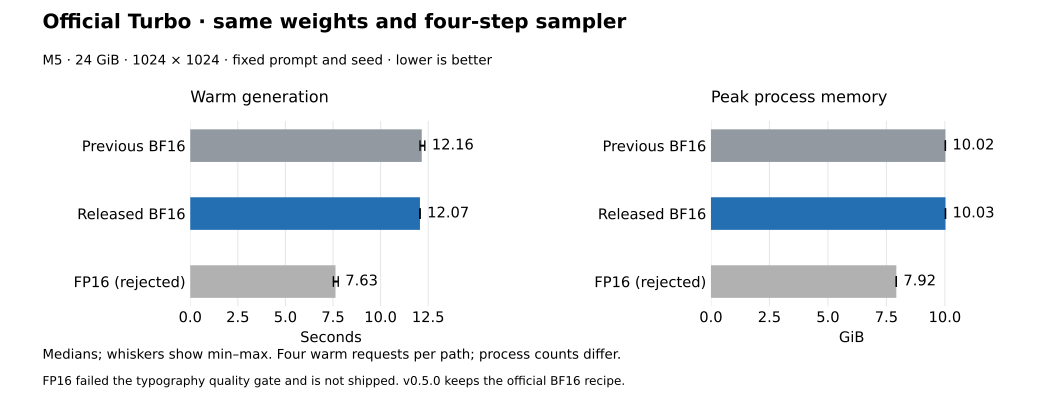
All rows use four warm requests. Original and released Turbo use two fresh processes each, with one cold and two warm requests per process. The earlier BF16/FP16 comparison used four fresh processes per path in alternating order. First requests include model loading and text encoding; timings end at the PNG-ready image with metadata and exclude Python imports, downloads, PNG writing, HTTP delivery, app library persistence and display. Model load is part of the first request, not an addition to it, and excludes text encoding. Other apps remained open; background GPU samples, swap activity and timing ranges are documented. These are session measurements, not idle-GPU or all-Mac guarantees. Raw records, exact boundaries and reproduction.
Turbo is the official four-step distilled checkpoint, with fixed steps,
embedded guidance and no negative-prompt control. Its weights and sampler
are identical across the Turbo rows. v0.5.0 ships the official BF16
recipe. The FP16 candidate was faster and used less memory, but failed the
release quality gate: a fixed storefront prompt changed BREAD to BRIEAD.
The released BF16 result restores pixel equality with the official recipe
for that fixture. Original uses different weights, a different sampler and
more steps, so its time is not an engine-speedup denominator.
The rejected FP16 candidate is numerically closer to FP32 on all eight study prompts (mean LPIPS 0.0325 versus 0.0785 for BF16). That does not establish better visual quality or outweigh a known prompt-following regression. Turbo quality is not identical to Original. Quality findings and remediation. The earlier FP16 study and official-recipe validation remain as historical evidence; their older timings are not pooled here.
Original prompt-to-image (October 11 baseline)
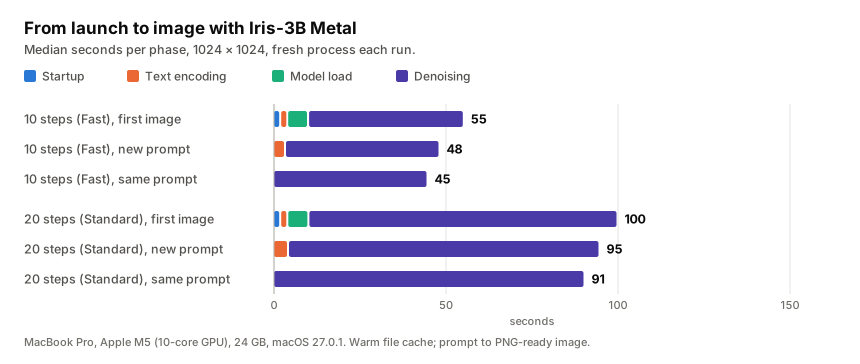
Measurements used a base M5 MacBook Pro with 24 GB, 1024 × 1024, guidance 3, FP16 trunk and attention, and warm file cache. The warm repeated-prompt values below are from scripts/benchmark.py; each 10- and 20-step value is the median of three fresh processes. The 100-step run was one process.
| Prompt to PNG-ready image | 10 steps | 20 steps | 100 steps |
|---|---|---|---|
| First image after launch, including model load | 55.5 s | 100.2 s | 464.9 s |
| Warm, same prompt cached, model loaded | 44.9 s | 90.5 s | 457.5 s |
| Warm, new prompt | 48.4 s | 94.9 s | 463.4 s |
| Peak process physical memory | 10.0 GiB | 10.0 GiB | 10.0 GiB |
Text encoding adds about 2 seconds for a new prompt (about 4 seconds including the tokenizer/text-encoder setup on first use); a repeated prompt is cached. Each sampling step evaluates the model twice for classifier-free guidance. The app and its progress callbacks add some system load, so results vary with background GPU work.
Same-input denoising comparison
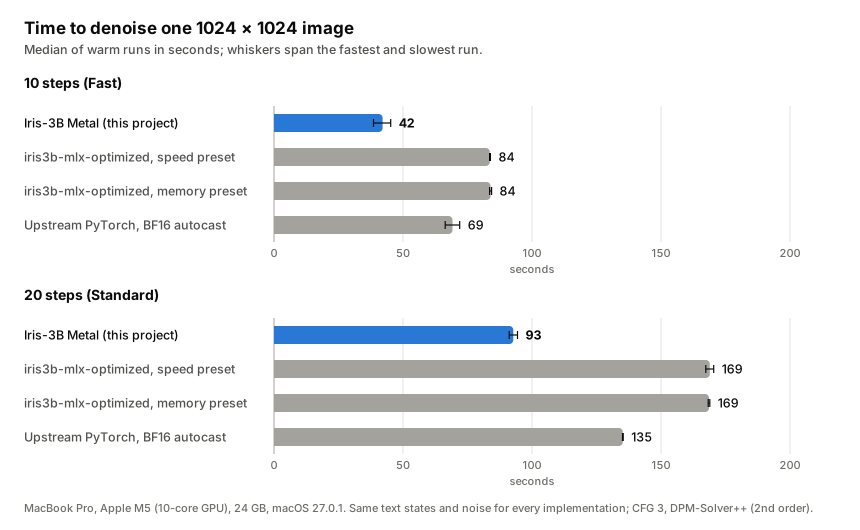
The figure and table use a saved fixture (text states and noise) with the same inputs for every implementation. These are denoising-only times: model load and text encoding are excluded. They are a different measurement scope from the prompt-to-image timings above.
| 1024 × 1024, warm fixture | 10 steps | 20 steps | Peak process memory (10-step fixture) |
|---|---|---|---|
| Iris-3B Metal | 42.1 s | 92.8 s | 10.0 GiB |
| iris3b-mlx-optimized, speed preset | 83.6 s | 168.9 s | 11.4 GiB |
| iris3b-mlx-optimized, memory preset | 84.0 s | 168.6 s | 10.1 GiB |
| Upstream PyTorch, BF16 autocast recipe | 69.2 s | 135.2 s | 17.9 GiB |
The comparison used two interleaved rounds where available, with the second round in reverse order. The MLX and BF16 runs are different inference implementations and precision recipes; these results do not establish a universal speed or image-quality ranking. The upstream Mac FP32 path was not part of this comparison: one separate 10-step measurement took 346 s and a 100-step measurement took 2940 s, with roughly 20 GiB use and heavy swapping on the 24 GB Mac. The earlier 8.2× headline divided the separate-day, swap-heavy 346 s FP32 single run by the 42.1 s saved-fixture result. It is not a controlled engine speedup or a repeatable guarantee.
For the full machine details, raw logs, commands and reproduction steps, see benchmark methodology and records.
Step count matters. The upstream model was evaluated at 100 steps. Ten and twenty steps can preserve composition while changing fine structure, including hands and small text; the app's Fast and Standard presets are previews, not claims of equivalent detail.
How it works
Upstream Iris-3B uses a 24-block transformer over 16 × 16 pixel patches (8 dual-stream blocks, then 16 single-stream blocks; grouped-query attention, gated attention and sandwich RMSNorm), followed by four pixel-transformer blocks that predict pixels within patches, conditioned on twelve hidden layers of Qwen3-VL-4B. A 1024 × 1024 image at 100 steps is about 4.6 PFLOP. For Original, src/iris_metal evaluates the upstream weights with an independent forward pass:
- Matrix multiplies and attention use PyTorch MPS kernels. At the trunk's shapes they run at 13.7–15.5 TFLOPS in FP16 or BF16 on the M5, 84–95% of a compute-only Metal 4
matmul2dkernel measured on the same GPU. Custom GEMMs, epilogue fusion and wider packed projections were measured and rejected because they showed no gain beyond thermal drift. Attention uses PyTorch's fused, memory-efficient SDPA. - Custom Metal kernels fuse work around the matrix multiplies: query/key RMSNorm, RoPE and head layout; input normalization and adaLN modulation; sandwich post-norm, gating and residual add on an FP32 residual stream; and the per-pixel half of each pixel block.
- Original's precision is chosen per part. The trunk's linear layers and attention take FP16 inputs, which have three more mantissa bits than BF16. Late single-stream QK-norm gains reach 27 and amplify query/key rounding. Norms, adaLN modulation and the residual stream stay FP32. The pixel stage and text adapter use BF16; the pixel stream reaches about 1.4 × 10⁴. The largest measured FP16 trunk value was 2520, and every result is checked for overflow.
- Qwen text encoding is streamed. One decoder layer is loaded at a time from checkpoint files for real prompt tokens, keeping the encoder process footprint near 1.5 GiB instead of loading the full 8 GB model at once. The next layer's transfer overlaps the current layer's compute.
- Repeated work is cached. The diffusion model stays resident between requests; recent prompt encodings and adapted conditioning (including the empty negative prompt) are cached; shared adaLN projections are computed once per step.
In a single-stream block at 1024 × 1024, measured GPU time was 66% matrix multiplies, 22% attention and 12% other work.
Turbo runs the upstream forward under BF16 autocast, with BF16 linear storage and FP32 non-linear parameters. Its official deterministic flow-Euler sampler makes four single-batch forwards without a negative conditioning branch. Prompt encodings and the adapted text of recent prompt batches remain cached, and shared modulation is computed once per step. On the GPU, each block's RMSNorm with modulation and its post-norm gated residual run as fused Metal kernels that round wherever the upstream expressions round and leave the reductions to PyTorch. All of this retains the official arithmetic bit for bit. The faster mixed-precision Metal candidate is available only in the numerical study script; it is not the released Turbo path (release decision).
Image quality
The Original engine is checked against upstream PyTorch on a randomly initialized copy of the architecture, through per-step velocity error against an FP32 forward of the real checkpoint, and through complete 100-step generations. scripts/evaluate.py records checkpoint, prompt, source and image metadata for the dev and holdout splits. Use dev to explore and holdout to confirm a decision. scripts/compare_runs.py requires each run to contain its complete expected prompt set. It checks that checkpoint, prompts, split, seed, scale and image sizes match. --vary allows experiments with steps, attention or cfg_scale; --subset is exploratory. The metrics measure fidelity to the reference, so inspect the contact sheet before judging image quality.
Initial noise is drawn on the CPU from the seed, so a seed starts from the same noise on every Mac. Pixels are reproducible on the same hardware and software; other GPUs, macOS or PyTorch versions can round differently.
Against upstream FP32. Prompt encodings and initial noise are saved so each implementation uses the same inputs and sampler. Across eight 512 × 512 prompts at 100 steps (six development and two held-out):
| Against upstream FP32 | Mean NRMSE | Median NRMSE | Mean LPIPS |
|---|---|---|---|
| Upstream code, BF16 autocast (its CUDA inference recipe) | 25.4% | 21.7% | 0.162 |
| This engine | 8.8% | 5.7% | 0.025 |
| This engine with BF16 instead of FP16 trunk weights | 9.2% | 7.7% | 0.030 |
NRMSE is numerical distance from FP32; LPIPS is perceptual distance. A diffusion trajectory amplifies differences, and individual outputs vary by prompt. Per-step velocity error is 0.85–1.4% relative L2 for this engine versus 8–15% for the BF16 autocast recipe at three noise levels; FP32 attention reduces the engine's error to 0.65–1.1% at 1.65× the time.
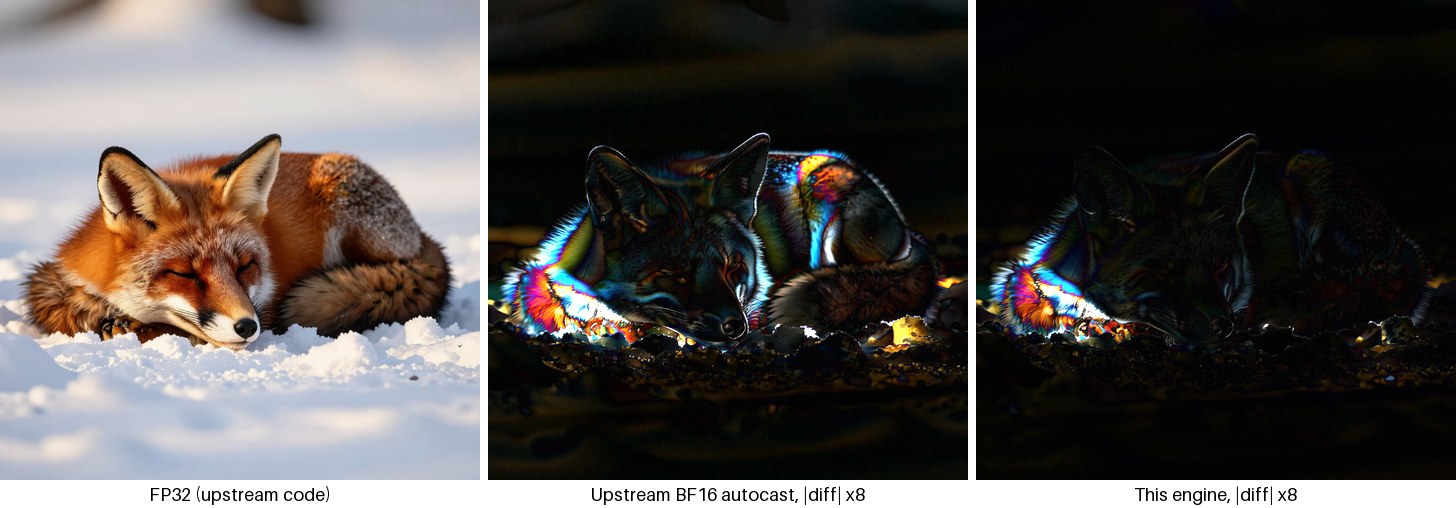
1024 × 1024, 100 steps. Mean absolute pixel difference from FP32: 3.2/255 for upstream BF16, 1.4/255 for this engine.
Depth and restoration. On upstream demo inputs and two generated images, depth maps differ from upstream FP32 by 0.2–0.5% relative L2 (BF16 recipe: 0.8–2.8%). Four-times restoration matches upstream at 54 dB PSNR (BF16 recipe: 47–51 dB). scripts/restore_study.py found that applying the restorer at 1× can redraw thin structure and worsen some softened or JPEG inputs, so the app offers restoration with upscaling.
Patch boundaries. Iris-3B predicts pixels in 16 × 16 patches. At 768 × 768 and 1024 × 1024, the tested outputs showed no visible patch seams at 3× magnification. A deblocking filter was rejected because it suppressed real detail.
Limitations
- The inference engine requires an Apple Silicon GPU; it has no CPU or CUDA path. The retained upstream training code supports CUDA. Performance and quality measurements are from one Mac.
- Ten- and twenty-step previews change fine detail. One hundred steps takes about 7.6 minutes per 1024 × 1024 image in the warm benchmark.
- Keep text-to-image sizes near one megapixel. At 512 × 512, the model can show its 16-pixel patch grid, as can upstream FP32; 2048 × 512 and 512 × 2048 were smoke-tested only.
- Python batches larger than one image are supported but untested at 1024 × 1024 on 24 GB. The app and server process one image at a time.
- Model errors are inherited: on a held-out prompt of hands on a piano, upstream FP32 also drew extra hands.
- The app requires macOS 15 or later. Release runtime testing covered an M5 Mac with 24 GB of memory. macOS 15 and 16 GB Macs were not tested.
- The engine does not call a remote inference or moderation service. Local execution does not guarantee what the underlying model can generate.
Development
pip install -e ".[dev]"
pytest tests/test_metal_*.py tests/test_compare_runs.py
For the complete Python suite, install the upstream training dependencies:
pip install -e ".[train,dev]"
pytest
The Codex Run action (script/build_and_run.sh) builds an isolated development
app and library under .scratch/macos-development. It does not use the user
library. Set IRIS_DEV_ROOT to choose a different development directory.
For macOS app work without a GPU or model download, start the fake HTTP engine:
python apps/macos/fake_engine.py
See CONTRIBUTING.md for CI checks, app work without a GPU and evidence for engine changes. The upstream training code is retained under src/iris3b/; UPSTREAM_README.md is preserved from upstream (read pip install -e . there as pip install -e ".[train]"). Only load trusted training .pth files: upstream resume, sampling and export commands use pickle; the Metal inference engine loads safetensors.
License and credits
Apache License 2.0, as is upstream. Iris-3B, its research, training code, weights and upstream fine-tunes are by Speridlabs (Hanqiu Li Cai and Chema Garabito): paper, code, weights. This is an independent project, not an official Speridlabs release. The text encoder, Qwen3-VL-4B-Instruct (Alibaba Cloud, Apache 2.0), downloads at runtime. No weights are included in this repository or its releases. NOTICE records upstream attribution and the files this distribution adds or modifies.
If you use Iris-3B, cite its paper:
@article{licai2026iris,
  title   = {Iris-3B: Going Beyond the Latent with Pixel-Space
             Diffusion Training, Conversion and Fine-Tuning},
  author  = {Li Cai, Hanqiu and Garabito, Chema},
  journal = {arXiv preprint arXiv:2610.09450},
  year    = {2026},
  url     = {https://arxiv.org/abs/2610.09450}
}