
SylphxAI/Google-Photos-Delete-Tool
SylphxAI/Google-Photos-Delete-Tool has 166 GitHub stars and 22 forks. GitHot measured +1 stars in 24 hours and +2 in 7 days. Last checked 2026-11-12 21:29 UTC. Last push 2026-11-03.
What you can do
- Find duplicates: scan the current view, group look-alike photos by perceptual hash at an adjustable similarity, review which to keep, then move the rest to Trash through the consent-gated flow. Pro adds keep rules, auto-accept for confident groups and a CSV export of the groups.
- Batch delete: up to 500 per batch (Google's selection cap); the engine detects the cap, scrolls and flushes the final partial batch.
- Pause / Resume / Stop: stop is instant; a stopped run never reports a false error.
- Dry run: scrolls and counts without clicking anything, and (with Pro) returns a per-type breakdown.
Measured star growth
- in 24h
- +1
- in 7 days
- +2
- in 15 days
- Update delayed
- in 1 month
- Update delayed
Net star changes over overlapping periods, not daily totals. Missing measurements are left blank. Stars measure attention, not software quality.
About
Google Photos duplicate finder and bulk delete tool: find and delete duplicate photos, bulk delete safely with dry run and empty trash. Chrome extension + userscript, runs in your browser.
Self-hostedREADME.md
OriginalGoogle Photos Delete Tool – Duplicate Finder & Bulk Delete
Google Photos Delete Tool finds and deletes duplicate photos in Google Photos, and bulk deletes safely: dry run first, batches of up to 500, optional empty trash. Made by Sylphx.
Get it on the Chrome Web Store or as a userscript. It runs in your browser; nothing is uploaded.
Product page: https://sylphxai.github.io/Google-Photos-Delete-Tool/ (source in site/).



Find duplicates
Google Photos only removes exact copies of the same file. Copies that were resized, re-saved, edited slightly, or uploaded twice from different apps stay in your library. Find duplicates finds them for you:
- Open the view you want to check (your library, an album, or a search).
- Click the extension icon, then Find duplicates (userscript: the Find duplicates button in the floating panel), then Scan this view.
- The tool scrolls the view and compares small thumbnails on your computer. Look-alike photos are shown in groups.
- In each group the best copy is kept (green) and the rest are marked for Trash (red). The best copy is the largest one when the size is known, otherwise the oldest. Click any photo to switch it. Each group always keeps at least one photo.
- Use the Similarity slider: 95% finds near-identical copies; lower values also group edits and burst shots, so check those groups.
- Preview (dry run) checks the chosen photos are still in the view without changing anything. Move to Trash hands them to the same safe delete flow as the rest of the tool: a one-time confirmation and batches. Stop at any time. Restoration is limited to items still in Trash under Google Photos’ current policy; see recovery limits.
- Pro review tools (free review is unchanged; see Pro) save time on big libraries: a keep rule for every group at once, auto-accept for near-identical groups, and a CSV export of the groups.
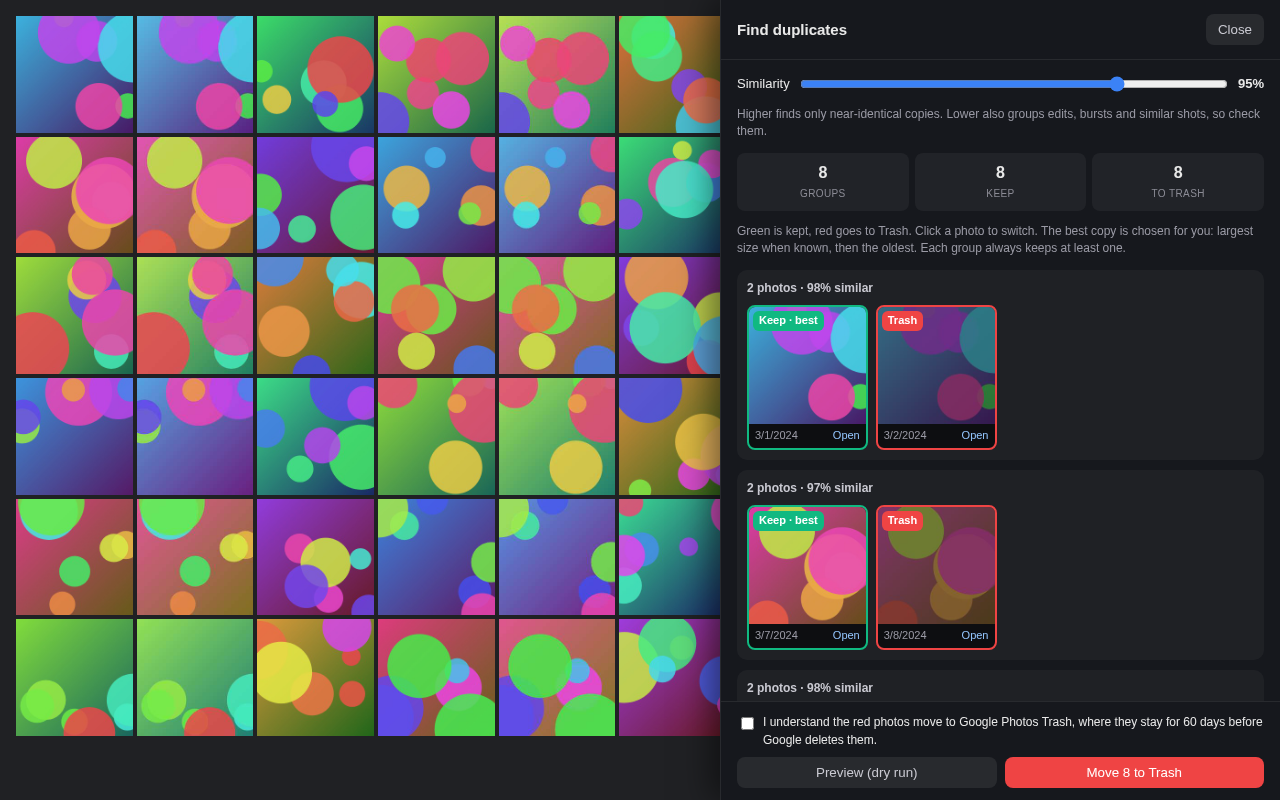
Test page with generated images, not real photos
(scripts/dupes-demo.mjs).
Private by design. Thumbnails are fetched only from Google's own image servers (the same ones the page already uses), turned into a 64-bit fingerprint in memory, and forgotten when you close the review. Nothing is uploaded; there is no server. Works for tens of thousands of photos: the comparison runs in short slices so the tab stays responsive, with progress and Cancel throughout. Large views take a while because Google Photos loads the grid only as you scroll.
Why not the Google Photos API? Since 31 March 2025 Google no longer lets apps read your whole library through the Photos API, so an external duplicate finder cannot scan your whole library. This tool works inside the Google Photos page you already have open instead.
Bulk delete
Google Photos has no "delete all". This tool runs the select, trash, confirm loop for you in batches of up to 500 until your current view is empty. It works in your browser by clicking the same controls a person would, because the Google Photos Library API has no delete endpoint.
Two surfaces, one engine
| Surface | Get it | Includes |
|---|---|---|
| Chrome / Firefox extension | Chrome Web Store listing; Firefox: zip on each GitHub release, loaded manually (no AMO listing yet); no Edge listing | Popup UI, badge, 10 languages, empty-trash flow |
| Userscript (Tampermonkey, Violentmonkey, Greasemonkey) | google-photos-delete.user.js from the latest release |
Same engine, floating panel, same safety model |
Built to be trusted
- Fail-closed matching. Delete, confirm and empty-trash buttons are matched
by positive multilingual keywords on
aria-label, tooltip or text. An unknown UI stops the run with an error; it never clicks a guess. - Consent gate. The first real run asks you to acknowledge what will happen. Nothing is scheduled or unattended.
- Limited Trash recovery. Restoration requires items still in Trash and
Google Photos’ current retention policy to allow it; no recovery period is
guaranteed. "Empty trash afterwards" is opt-in, cannot be undone, and is
reported
doneonly after the trash is verified empty. See recovery limits. - Accurate numbers. The progress bar is indeterminate while the total is unknown; ETA appears once a dry run has established a total.
- No telemetry, no server. Everything runs in your browser. Pro licence verification is local (Ed25519).
Features
- Find duplicates: scan the current view, group look-alike photos by perceptual hash at an adjustable similarity, review which to keep, then move the rest to Trash through the consent-gated flow. Pro adds keep rules, auto-accept for confident groups and a CSV export of the groups.
- Batch delete: up to 500 per batch (Google's selection cap); the engine detects the cap, scrolls and flushes the final partial batch.
- Pause / Resume / Stop: stop is instant; a stopped run never reports a false error.
- Dry run: scrolls and counts without clicking anything, and (with Pro) returns a per-type breakdown.
- Empty trash (opt-in): opens
/trash, empties it and verifies the result. - Type filters (Pro): delete only screenshots, videos, animations, collages or photos.
- Date filter (Pro): delete only items before a date, after a date, or between two dates, optionally combined with a type.
- Versioned selector packs: Google Photos selectors and keyword lists live in a versioned JSON pack, so a UI change ships as a data patch.
- Report issue: one click opens a pre-filled GitHub issue with pack version, selector matches and observed labels.
- 10 languages in the extension UI, with compile-time-complete translations.
Installation
Chrome / Firefox
- Chrome: install from the Chrome Web Store. Firefox: there is no Firefox Add-ons (AMO) listing yet, so download the Firefox zip from the latest GitHub release and load it manually (below).
- Navigate to photos.google.com.
- Click the extension icon, confirm the safety notice on your first real run, then press Start.
Manual load (development): download the release zip, unzip, open
chrome://extensions (or about:debugging#/runtime/this-firefox, then Load Temporary Add-on), enable
developer mode, and Load unpacked.
Userscript
- Install Tampermonkey or Violentmonkey.
- Install the latest
google-photos-delete.user.js. - Open photos.google.com — the floating panel appears bottom-right.
Usage
- Be on the Google Photos view you intend to clean (the tool acts on the current view).
- Dry run first to see the count without touching anything.
- Configure: photos per batch (default 500), empty-trash toggle, optional type filter and date filter (Pro). To clean one album, open that album first: the tool acts on the current view, so albums work for free.
- Start, and use Pause / Resume / Stop freely. Stop is immediate.
- Watch the progress: deleted count, rate, elapsed; ETA only when a dry-run total is known.
Privacy
Zero data collection, zero servers, zero telemetry. Full statement in
PRIVACY.md.
Pro
Deleting stays free forever: the delete engine, dry-run and empty-trash cost nothing. Pro adds the analysis layer on top:
Type filters - clean up only screenshots, videos, photos, animations or collages.
Date filter - delete only items before a date, after a date, or between two dates (the end days are included). It reads each tile's date from its label ("2 Jan 2020", "Mar 3, 2024", "10 mars 2012", "2020-01-01"; English and French month names) and never guesses: a tile whose date cannot be read is skipped, and the dry run says how many ("N items skipped: date not readable"). "Before" and "after" exclude the date you pick. It combines with the type filter: both must match.
Saved cleanup presets - save the current filter setup (type, date mode and dates, plus an optional note of the view you were on, such as an album) under a name, up to 20, then apply, rename or delete it. Applying a preset only fills the controls: you still press Start, the dry run still works and the consent step is still required. A preset never runs by itself (no timers, no background runs), and if its saved view differs from the page you are on it only shows the address as a hint; it never navigates. Presets live on your device (extension storage, or the userscript's local storage).
Duplicate review tools - for big libraries, in Find duplicates:
- Keep rule - keep the newest or the oldest copy in every group at once (instead of the default best copy). A rule needs the data it uses: where a group has no readable date, that group keeps the default pick and the tool tells you how many did. Ties also fall back to the default pick. Every group still keeps exactly one photo you can change.
- Auto-accept confident groups - groups where every photo is 98% or more similar are pre-approved. The groups below 98% come as one combined list; each moves to Trash only after you approve it (or approve all). You still press Move to Trash and confirm as before.
- Export CSV - the groups as
group_id,item_id,decision,similarity(kept or trashed), downloaded on your device. No network call.
Free users see these controls disabled with a Pro link and keep the complete default review: all groups, the best copy kept, flip any photo, preview, Trash.
Dry-run report and export - see exactly what a run would remove, and export it as CSV before you commit.
US$9.99, one time, lifetime. No subscription, no account.
Buy Pro for US$9.99 - your token is shown on the success page right after payment and emailed to you. Lost it? Recover it at https://sylphxai.github.io/Google-Photos-Delete-Tool/recover.
Activation: open the extension (or the userscript panel), find the Pro
license box, paste your Pro token and press Activate. The token is
verified on your device, works offline, does not expire and is never sent to us
(your browser's own sync may copy it to your other signed-in devices). Pro is
digital content: at checkout you ask us to supply it straight away and
acknowledge that you lose your 14-day right to cancel once your token is
delivered. If Pro
doesn't work as described and we can't fix it, email
[email protected] and we'll put it right or refund you.
Terms and privacy:
terms,
privacy.
Seller tooling and key custody: docs/PRO.md.
Development
bun install
bun run typecheck   # strict TS
bun run lint        # ESLint (src/ + scripts/)
bun run test        # Vitest — full engine loop on a scripted DOM
bun run build       # all artifacts (Chrome, Firefox, userscript, standalone)
bun run verify      # artifact smoke gate (manifest/pack/IIFE self-containment)
bun run zip         # release zips
bun run package     # build + verify + zip
Architecture
src/
├── core/                  # Framework-agnostic engine & domain
│   ├── delete-engine.ts   # Batch loop on an injected DOM adapter (testable)
│   ├── dom-adapter.ts     # EngineDom contract; browserDom = real browser impl
│   ├── selector-pack.ts   # Versioned, data-driven selector + keyword pack
│   ├── empty-trash.ts     # Empty-trash flow WITH postcondition proof
│   ├── empty-trash-baton.ts# Pending-flag semantics (localStorage / chrome)
│   ├── page-runner.ts     # In-page orchestration: consent, license, runner
│   ├── license.ts         # Local Ed25519 Pro license verification
│   ├── photo-filter.ts    # Type classification + the id filter used by Find duplicates
│   ├── dedup/             # Find duplicates: pHash, grouping, scan loop, keep/Trash choices
│   ├── diagnostics.ts     # Bounded selector/label evidence for issue reports
│   ├── status.ts          # One RunStatus union shared by every surface
│   └── ...
├── selector-packs/        # pack-v1.json (versioned selectors + keywords)
├── ui/panel/              # ONE floating panel (userscript + standalone)
├── ui/dupes/              # Find duplicates review (extension + userscript)
├── extension/             # MV3 manifests, popup (i18n), content, background
│   └── api.ts             # Chrome/Firefox promise wrappers (callback-based)
├── standalone/            # Dev-only console-paste mount
└── userscript/            # Thin mount of the shared panel
scripts/                   # build.ts · zip.ts · verify.ts · license.ts · dupes-demo.mjs
tests/                     # engine loop on a scripted DOM fake + core/surface suites
Release gate
Every release passes the live-run protocol in
docs/RELEASE_GATE.md: a disposable account, a fixed
deletion scenario, and recorded postconditions. Release notes carry the
evidence.
FAQ
Is this safe? It only clicks what a human would click, matching destructive actions by positive keywords (never guessing). Recovery is limited by Google Photos’ current Trash policy, not guaranteed by this tool. Empty Trash and any permanent deletion cannot be undone. The tool’s "Empty trash afterwards" is opt-in, gated by the postcondition check, and never unattended. Keep independent backups before deleting.
What happens when Google changes their UI? The selector pack version is recorded in every diagnostic report. When a drift is reported, the fix is a data patch to the pack, shipped as a point release. This is the maintenance model by design.
How does it decide what is a duplicate? Each thumbnail is shrunk to 32×32 gray pixels and turned into a 64-bit perceptual hash (pHash). Two photos whose hashes differ in only a few bits look the same to a person. The default 95% similarity allows 3 of 64 bits to differ. The hashing and grouping are ported from our Photo Dedup engine and tested against its reference results.
Does it find duplicates across my whole library? It checks the view you scan. Scan your main Photos view to cover the library, or an album or search to narrow it down.
How fast is it? Deletion runs at Google's UI pace; each release's photos per minute is measured in the release gate and published in its notes.
What about the trash? Restore only while items remain in Trash and Google Photos’ current retention policy allows it. "Empty trash afterwards" permanently removes them — with your explicit opt-in. It cannot be undone. See the current conditions below.
Recovery limits
Open Google Photos Trash, select the items you need and choose Restore. If an item is no longer in Trash, do not assume it can be restored. Empty Trash and any permanent deletion cannot be undone; a full Trash may prompt permanent deletion instead. Do not approve a permanent deletion if you need the option to restore. Keep independent backups of photos you value.
Google’s official desktop delete guidance and desktop restore guidance were checked on 2026-10-29. Follow their current retention policy and conditions, not a fixed recovery window promised by this tool. See the policy check and delivery boundaries.
Support
Problems: press Report issue in the extension, or open a
GitHub issue.
How we answer store reviews: docs/REVIEWS.md.
License & provenance
MIT, see LICENSE. A Sylphx open-source product, modernized from
mrishab/google-photos-delete-tool.
See docs/LICENSE_PROVENANCE.md.
Explore related projects
awesome-selfhosted/awesome-selfhosted
A list of Free Software network services and web applications which can be hosted on your own servers
336,668 starsimmich-app/immich
High performance self-hosted photo and video management solution.
119,090 starsStirling-Tools/Stirling-PDF
#1 PDF Application on GitHub that lets you edit PDFs on any device anywhere
96,507 starslouislam/uptime-kuma
A fancy self-hosted monitoring tool
93,720 stars