
SuperWheel/dsh-cliworker-now
SuperWheel/dsh-cliworker-now has 46 GitHub stars and 4 forks. GitHot measured +2 stars in 24 hours. Last checked 2026-11-14 21:51 UTC. Last push 2026-11-13.
Measured star growth
- in 24h
- +2
- in 7 days
- Collecting history
- in 15 days
- Collecting history
- in 1 month
- Collecting history
Net star changes over overlapping periods, not daily totals. Missing measurements are left blank. Stars measure attention, not software quality.
About
DeepSeek Harness 多 CLI 智能体侧栏插件:独立对话、账号管理、角色预设与任务续聊
Developer ToolsREADME.en.md
Originaldsh-cliworker-now
简体中文 | English
A shared workspace for your AI CLIs inside DeepSeek Harness.
Choose a CLI, model and role, dispatch a named agent, follow its work in the sidebar, and continue the same task.




Install · Get started · FAQ · Report an issue
What it is
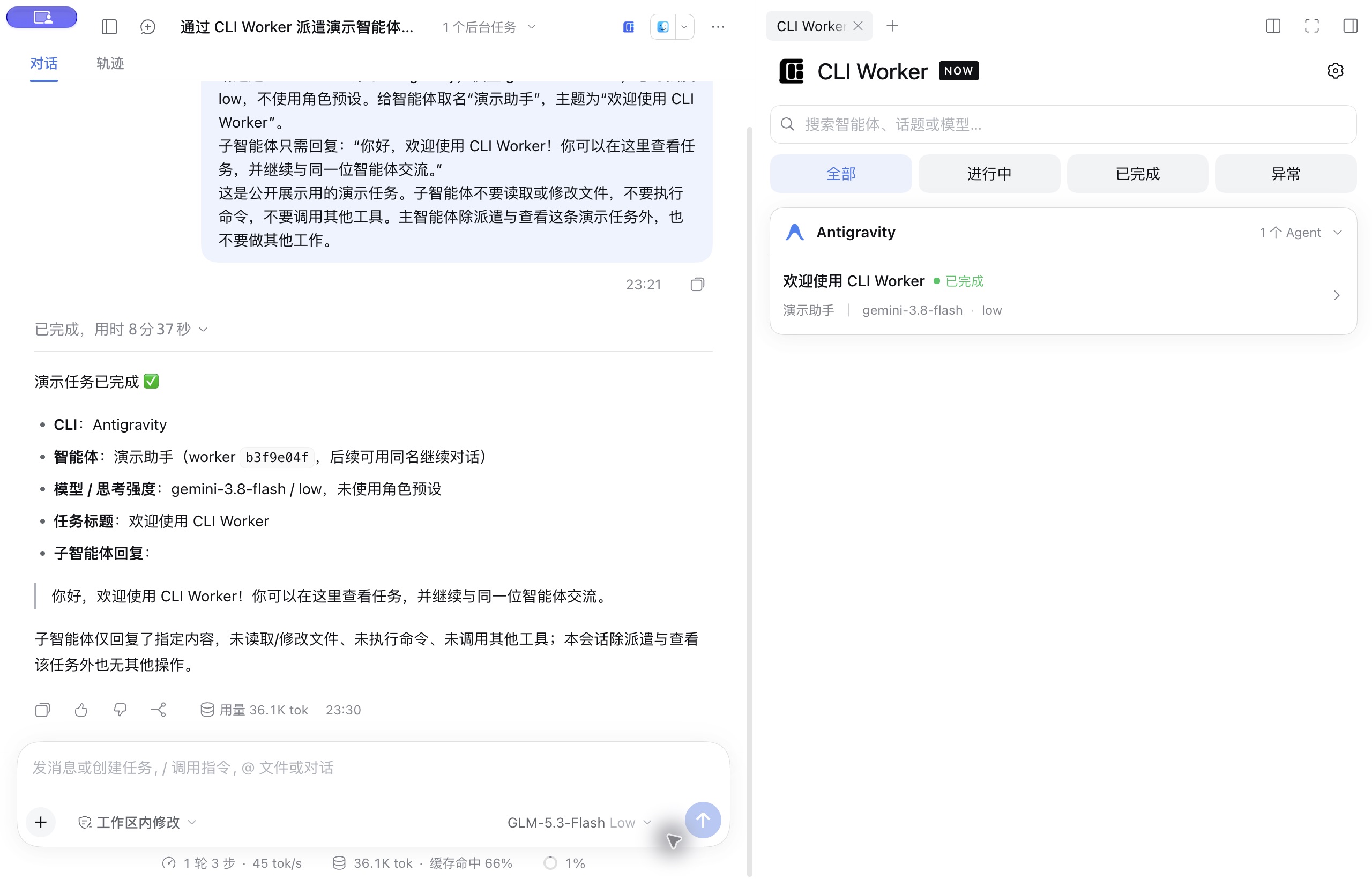
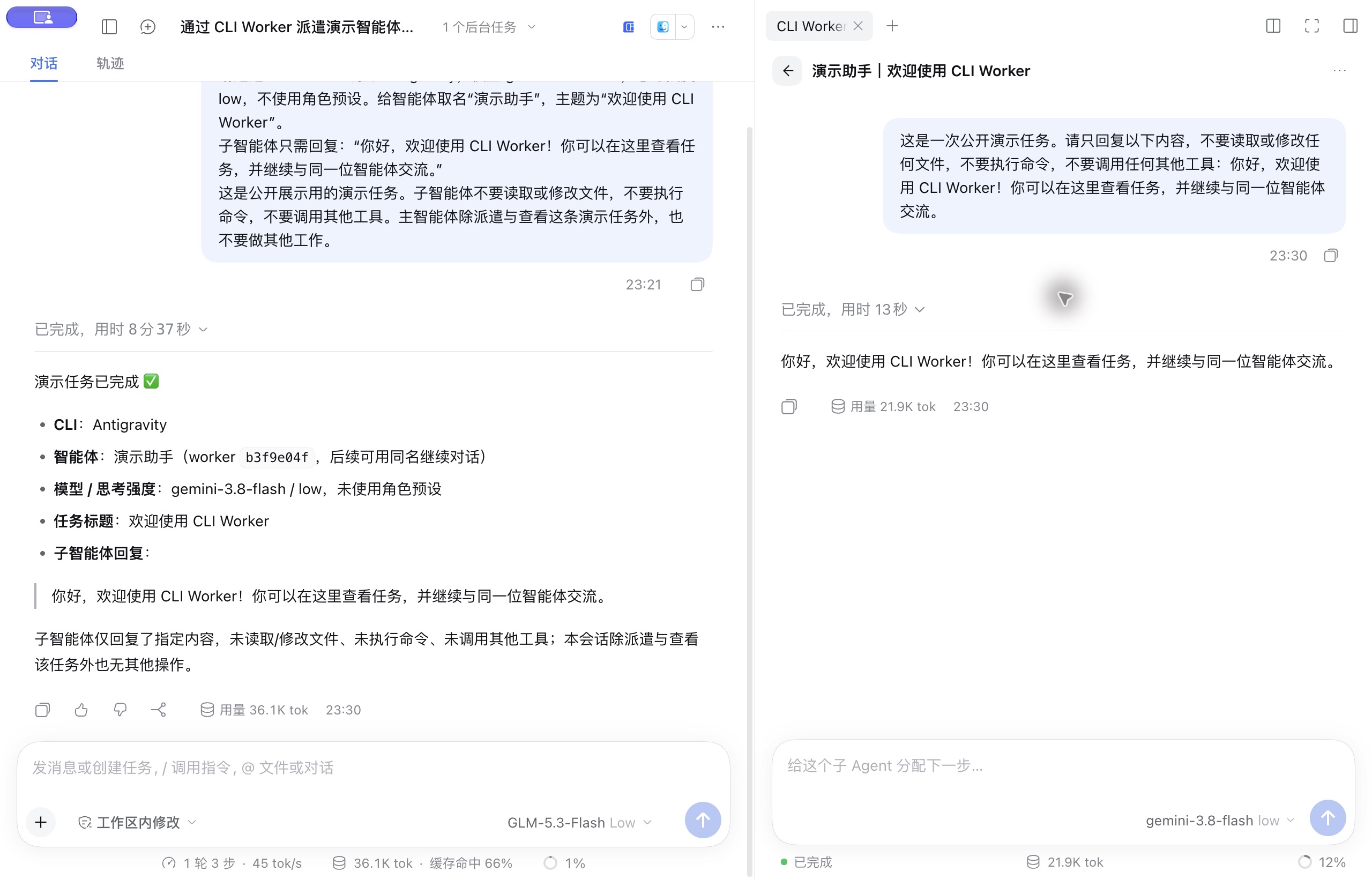
dsh-cliworker-now is a multi-CLI agent plugin for DeepSeek Harness. It brings your terminal AI CLIs into Harness: the main conversation dispatches work and receives results, and the right sidebar shows each agent in Harness's own full conversation view, with its process, usage and status.
Each CLI keeps its own account, models and native sessions; the plugin organizes the work. It does not include any model service, subscription or API quota.
- Development: ask Codex to review code, then keep asking the same named agent.
- Writing and editing: set up separate roles for logic, style, commercial review and revision.
- Long tasks: each agent keeps its own conversation and records, so you can pick up where it stopped.
Once installed, the plugin appears in Harness as CLI Worker / CLI Worker Now.
Features
- One entry, many CLIs: name a CLI in the main conversation and see every task grouped by CLI in the sidebar.
- Native conversation experience: child sessions use Harness's own conversation view, composer, model and permission controls, "+" menu and usage indicators, with queueing, stopping and follow-ups.
- Native CLI behavior: each CLI uses its own protocol, login and sessions. Models and reasoning effort come from that CLI's real catalog and current account.
- Native tools first, DSH tools as fallbacks: each CLI uses its own read, write, search, shell and web tools and skills first. DSH tools that overlap them are no longer handed to the CLI, and an MCP server configured in both places is kept only on the CLI's side. Capabilities the CLI lacks (such as shell commands in Pi) and DSH-only MCP servers and skills are offered through
dsh_worker_toolsas labelled fallbacks, and every call still goes through Harness permissions and approval. Codex, Claude Code, Pi, OpenCode, MiMo and Grok receive a short native-first note naming the offered fallbacks; it is appended to the CLI's own prompt and never changes your task or instruction files (Codex skips it when you configureddeveloper_instructions). ZCode's bridge execution is not verified yet, so it gets no DSH tools; OMP, Hermes and isolated-copy runs have no bridge. - Named agents with roles: unique names, role presets and custom instructions, so you can call the same agent again.
- Predictable scheduling: nothing starts before you explicitly choose a model (you can turn later questions off and use the saved defaults). One turn per session, serialized writes per directory by default, and no silent fallback to another CLI.
- Optional parallel writes in one project: turn on the same-directory parallel writes switch in CLI Worker settings, and a new writer that would wait runs in a plugin-owned copy of the project instead. Merge it back from the task card as uncommitted changes (no Git required, nothing is committed); on conflict the project stays untouched, or discard the copy.
- Goal, plan, feedback and fork: use these Harness features in CLI child sessions; unsupported entries explain why.
Screenshots
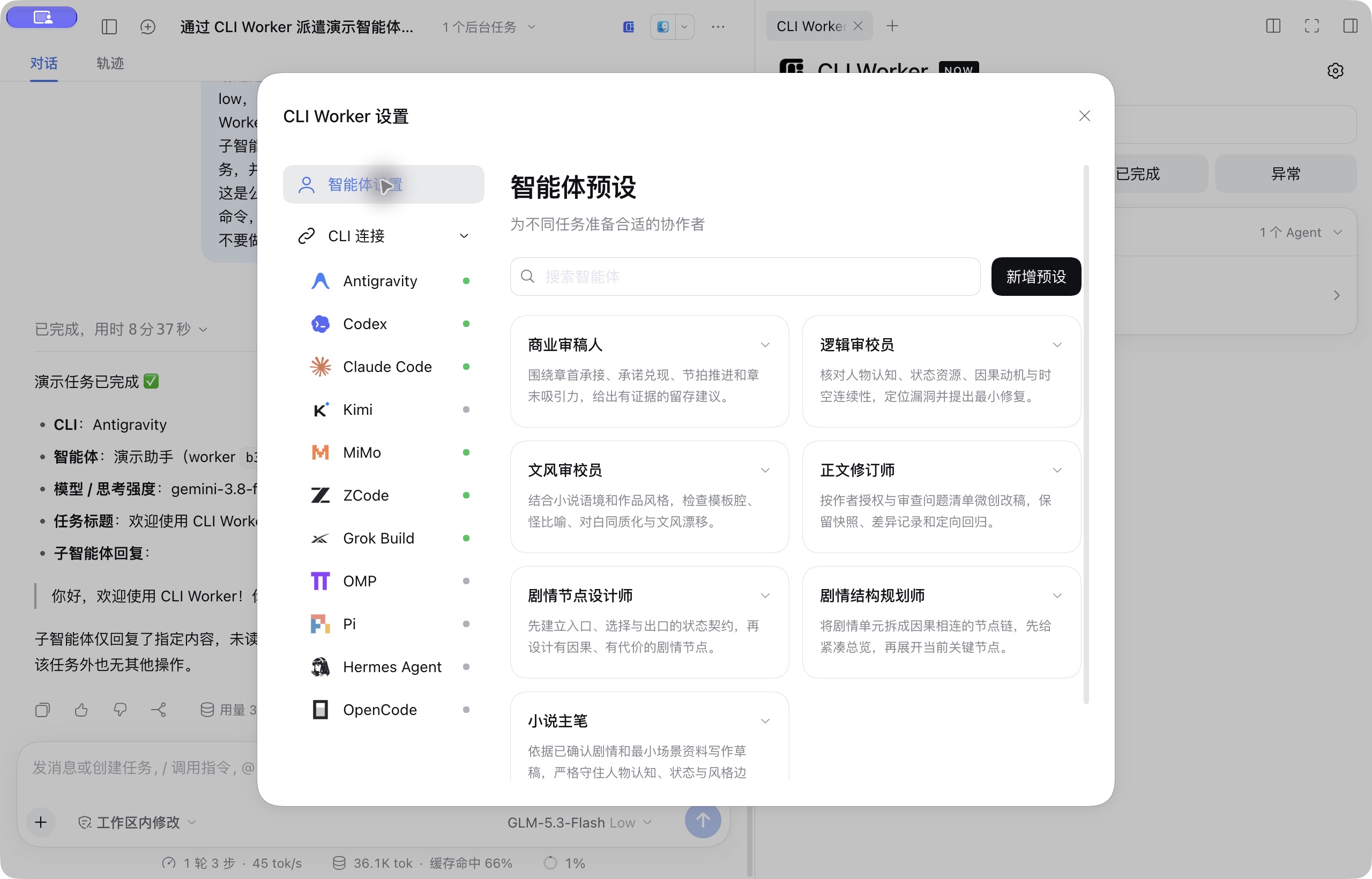
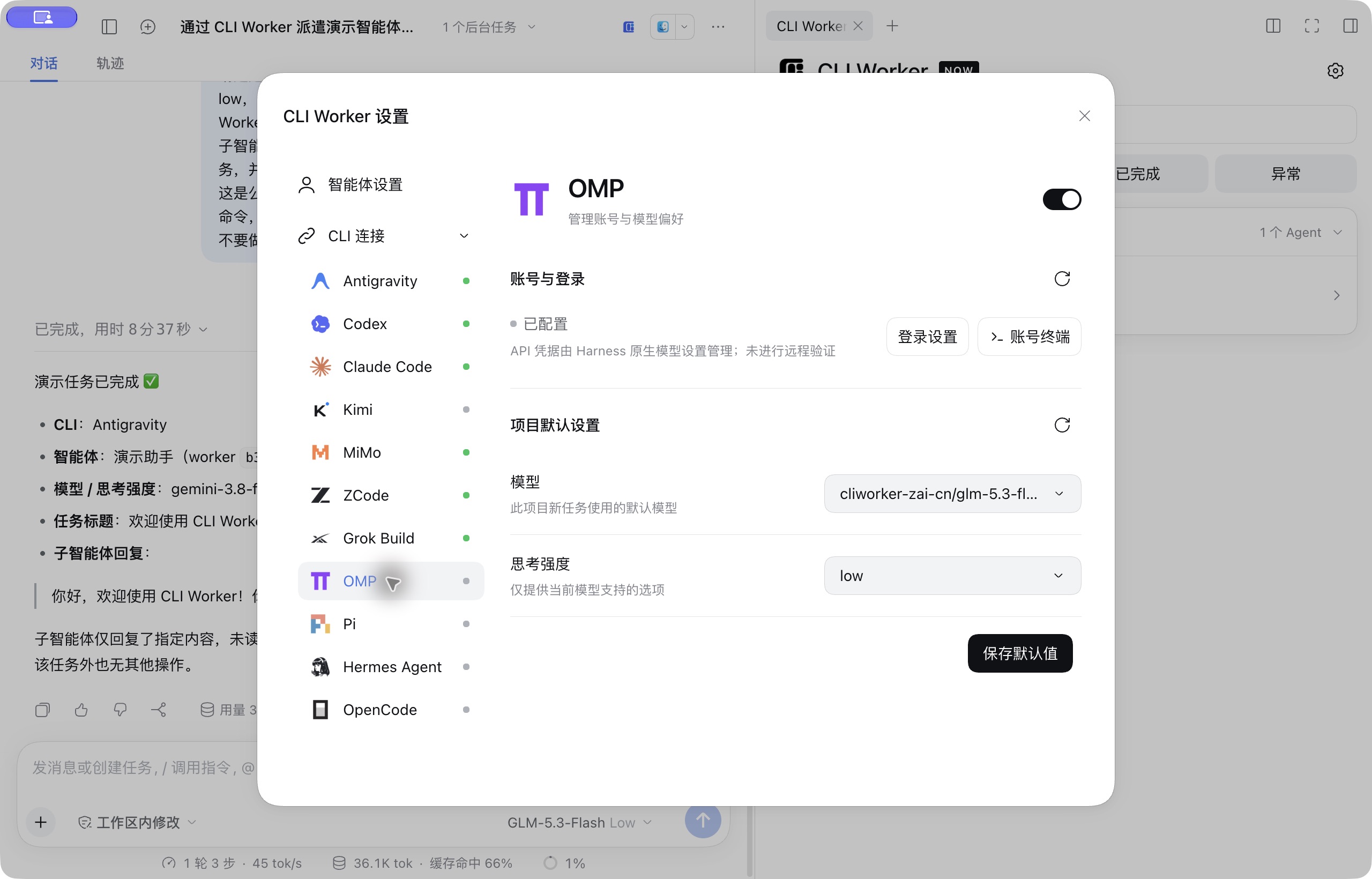
Captured from a real demo session in Harness Desktop (taken with v0.6.5; details may differ in the current version).
| Role presets | CLI connections and model preferences |
|---|---|
 |
 |
Supported CLIs
| CLI | Native transport | CLI | Native transport |
|---|---|---|---|
| Antigravity | ACP (legacy stream-json fallback) | OMP (Oh My Pi) | RPC |
| Codex | app-server | Pi | RPC |
| Claude Code | stream-json | Hermes Agent | Runs API |
| Kimi Code | ACP | OpenCode | HTTP + SSE |
| Official MiMo Code | HTTP + SSE | Qoder | ACP |
| ZCode | app-server | Qoder CN | ACP |
| Grok Build | ACP | CodeBuddy Code | ACP |
| TRAE CN | ACP | ||
WorkBuddy CN (workbuddycn) |
ACP · experimental | WorkBuddy (workbuddy) |
ACP · experimental |
WorkBuddy CN and WorkBuddy use the CLI bundled with their respective desktop apps. Experimental: relies on private WorkBuddy desktop interfaces. Install the matching desktop app. The account row offers “Manage in desktop app”, a plugin guide that opens the verified edition and observes current status; it provides no CLI sign-in/sign-out commands. Sign in, sign out, or switch accounts in the desktop app. Opening the guide reads once; opening the app or continuing observation starts serial polling at least 15 seconds after each completed query, for at most five minutes or 20 automatic queries. Manual refresh shares an in-flight query. Closing the guide cancels queries without closing the desktop app. Generic authentication errors do not prove sign-out, and same-site account switches cannot be confirmed. In advanced path settings, enter an app directory, bundled runtime, or built-in CLI entry. Discovery validates the product site and never falls back to CodeBuddy on PATH or the other edition. Generic “WorkBuddy” uses the sole installed edition or asks which edition to use when both are installed; “WorkBuddy international” (also accepted as “WorkBuddy AI”) explicitly selects the international edition. Models and effort options come from a fresh native metadata handshake. Each metadata query leaves an empty native session. Native plan mode and ask/auto/full tiers are wired; Turn usage is shown in credits (read from the built-in CLI's native session file) along with native context usage and its categories such as system prompt, tool definitions and messages (read after each turn by a non-persistent helper process running the native /context; values are native estimates; CodeBuddy Code works the same way); DSH tools and native forks (the built-in CLI does not implement session/fork) are unavailable. WorkBuddy CN has passed real tasks, ask-level approvals and UI checks on macOS and Windows Desktop; the international edition remains unverified. See WorkBuddy protocol.
- Platforms: macOS / Windows. Install the native build of each CLI you use and complete that CLI's own login or API setup.
- Host: DeepSeek Harness (the current target host and all four bundled native UI packages are 0.2.2-rc.2; the earlier rc.3 resources passed isolated enable/disable, page boot and native settings checks on 0.2.1-rc.2 and rc.3); Node.js ≥ 22.19.0.
- Verification: selected UI checks passed on Mac Desktop 0.2.2-rc.2 for this upgrade; Windows and real model/CLI dispatch remain unverified. See the upgrade verification record for boundaries. Tested versions and what has or has not been verified for each CLI are in usage details and the implementation log. Listing models does not prove you can call them.
Installation, login and path notes for Qoder, Claude Code (including CC Switch), ZCode, Hermes and others are in usage details.
TRAE CN (traecn) uses the official traecli only. Its official installer at https://trae.cn/trae-cli/install_v2.sh needs direct access to trae.cn; the 2026-11-07 probe from outside mainland China returned HTTP 403 (denied by region block). Use the official installer; no unofficial installer is provided. Official documentation restricts CLI access to the enterprise flagship plan. Personal login uses traecli --enable personal_user_login login --personal and depends on the under-development personal_user_login feature; enterprise SSO uses traecli login --enterprise, and enterprise PAT uses traecli login --with-trae-pat. Since v0.8.9 an Ask level is offered (native read-only sandbox plus on-request approvals); there is no effort selector. On 2026-11-11, with Seed-Code on macOS and Windows, file writes asked first and nothing was written after a rejection. On Windows, TRAE's native read-only sandbox also asks before read-only PowerShell commands; if an earlier tool in the same turn already failed, a rejection there shows the turn as failed. No official international CLI was found as of 2026-11-07. Windows sign-in and a real dispatch passed on 2026-11-09. TRAE has no native source for context categories, so system prompt, tool definitions and messages show —. See TRAE installation, account and permission notes.
TRAE CN's account window offers personal, enterprise SSO and enterprise PAT cards. Personal sign-in shows a browser link and callback URL field; enterprise methods use the native flow. Switching first runs logout, confirms the signed-out state and process cleanup, then asks for a method again. CodeBuddy shows the current account card and asks for folder trust in the window. It opens /login from a recognized empty editor, guides Chinese/International browser sign-in, and leaves enterprise/iOA to the native terminal. Switching runs /logout on the verified path and requires signed-out state and cleanup before login; unknown screens stay native. See the pre-authorization capture and remaining acceptance work.
Install and update
End active tasks and quit Harness completely, then run:
dsh plugin --profile desktop add dsh-cliworker-now@latest
Reopen Harness afterwards. Enable the dsh command from the Desktop menu "Manage dsh command…". For a Web profile, replace desktop with web. You can also enter dsh-cliworker-now@latest under "Add plugin" on the Plugins page.
- Starting Harness does not update the plugin. pnpm 11 waits 24 hours after a release by default and may keep the previous version; check with
dsh plugin --profile desktop ls dsh-cliworker-now --depth=0. - Fallback package:
dsh plugin --profile desktop add https://github.com/SuperWheel/dsh-cliworker-now/releases/download/v0.8.9/dsh-cliworker-now-0.8.9.tgz. Each release includesSHA256SUMS.txt. - The package ships the interface extensions that native child conversations need; no host build is required, and uninstalling restores the official interface. If it conflicts with an existing interface override, the startup check refuses without changing your configuration. See runtime-host.
- Enabling or disabling this plugin while the page is open makes DSH swap the native session UI live; the page may go blank for about a second, then the plugin has DSH remount the interface in place (unsent composer text may be lost). If an in-place recovery is not possible, the browser reloads once and DSH Desktop asks you to quit and reopen it. A failed live toggle in older dshmarket releases (such as 1.70.1) can leave inconsistent configuration, which still needs a full restart; see the investigation and verification limits and dsh-market/dsh-market#1010. Native chat display and busy-Enter preferences retain their original settings entries.
- Uninstall with
dsh plugin --profile desktop remove dsh-cliworker-now; local accounts, history and preferences are kept.
Install from GitHub source or develop locally
Requires Node.js ≥ 22.19 and pnpm 11.25.0 on PATH:
dsh plugin --profile desktop add github:SuperWheel/dsh-cliworker-now
Or build locally and link it (keep the source folder):
git clone https://github.com/SuperWheel/dsh-cliworker-now.git
cd dsh-cliworker-now
pnpm install --frozen-lockfile
pnpm --config.verifyDepsBeforeRun=false build
dsh plugin --profile desktop add .
For ERR_PNPM_GIT_DEP_PREPARE_NOT_ALLOWED, ERR_PNPM_IGNORED_BUILDS or pinning a commit, see installation details.
Usage
1. Dispatch
In a main conversation with a working folder selected, name the CLI explicitly:
Use Codex to check this project's login error handling, and name the agent "Code Reviewer".
Short names work too: agy → Antigravity, glm / zhipu → ZCode, harmes → Hermes Agent. An ambiguous name returns candidates instead of dispatching.
The first time you use a CLI in a project, Harness question cards ask for the model, reasoning effort and role; the task starts only after all three are confirmed. A new main conversation in the same project asks whether to reuse the previous choice. Cancelling saves nothing and starts nothing.
To skip the questions, turn off Ask for model before dispatch under "CLI Worker settings → Task scheduling". It is on by default and applies to every CLI. When off, a new main conversation starts directly with the project's default model, effort and last confirmed role. If no complete choice was ever confirmed (for example, only a model was picked in settings) or it is no longer valid (model removed, effort unsupported, account changed), the full selection still appears; nothing is guessed.
flowchart LR
    A[First use of the CLI] --> B[Model · effort · role]
    N[New main conversation] --> Q{Reuse previous choice?}
    Q -->|No| B
    Q -->|Yes| C[Named agent]
    B --> C
    C --> D[Follow in sidebar]
    D --> E[Result returns to main conversation]
    D --> F[Continue by name]
    F --> C
2. Follow, stop and continue
- Click a task card to open that agent's native conversation on the right; closing the sidebar does not stop background tasks.
- The "+" menu matches Harness: Add (file, image, goal, plan, feedback) and Commands (permission, model, fork).
- Stop reports success only after the process has fully exited. Messages sent during a run follow the native Inbox rules.
- After a turn ends, reply in the child session, or say in the main conversation: "Ask Code Reviewer to also check test coverage."
- Right-click a card to rename it or delete it; deleted idle tasks can be restored.
3. Roles and CLI settings
| Setting | What it does |
|---|---|
| Agent settings | Manage name / summary / role-prompt presets; seven built-in fiction roles, see role presets |
| CLI connections | Enable each CLI, check login status, sign in or out through guided account windows, or open the native terminal; set the CLI path under Advanced |
| Project defaults | Save the default model and reasoning effort for the project; with “Ask for model before dispatch” off, new conversations use them directly |
| Child controls | Change the agent's model or permission with native controls; locked while running or while messages are queued |
Pi and OMP load sign-in choices from the installed native registry, including supported BigModel Coding (China) and Z.AI (international) options. Their China provider IDs differ. If discovery fails, continue in the native terminal. OMP rows and replacement choices show the native credential number so old and new keys can be distinguished. Sign-out targets one source and credential; success requires native removal and completed process cleanup. Replacement saves the new credential before removing the selected old one, and reports removal failures. Environment and model-configuration keys remain managed in their original configuration. When one provider has several credentials, a credential the provider rejects no longer empties the model list: settings show the models of the remaining credentials and say how many rejected credentials were skipped. If every credential is rejected, settings report an authentication failure instead of an empty catalog. OpenCode reports authentication failures the same way.
4. Goal, plan, feedback and fork
| Feature | Behavior | Support |
|---|---|---|
| Goal | Set from the goal bar, the "+" menu or /goal; an active goal is sent with each turn and never starts a turn by itself |
All CLIs |
| Plan | Maps to the CLI's native plan or read-only mode; CLIs without it show no plan button, and the "+" menu explains why | Not on Hermes, Qoder, Qoder CN or the legacy Kimi transport; CodeBuddy Code maps to native plan |
| Feedback | Likes, dislikes and feedback stay in Harness and are never sent to the CLI or its vendor | All CLIs |
| Fork | Creates a native CLI fork from a completed turn as a new child session under the same main conversation | Latest turn: Codex, Claude Code, Kimi (ACP), MiMo, ZCode, Pi, OpenCode, Qoder, Qoder CN, TRAE CN; earlier turns: Codex only |
TRAE CN does not use the DSH tool bridge: its MCP configuration replacement semantics remain unverified. In-run steering is advertised but untested, so messages use the native Inbox queue. A TRAE turn ending with cancelled after a rejected approval, without a user stop, shows “Ended after approval was rejected” and can be continued. A failed native session load reports an error without creating a new session.
DS Bot long-conversation segments (since v0.8.9): when its context nears the limit, DS Bot moves the conversation to a new session and archives the old segment. The plugin reads DS Bot's <DSH_HOME>/bot/state.json (read-only) to recognize one segment chain; when the plugin is used from the new segment, idle Workers of earlier segments move to it with their native CLI session unchanged, so you can keep checking, continuing and opening them. A running Worker moves after it finishes. If the file cannot be read or the chain cannot be confirmed, cross-conversation access is still refused. A DS Bot data directory changed through its home setting is not recognized.
Permissions and data
- Runs what you chose: a missing or failing CLI is never replaced by another one, and CLIs started outside the plugin are not taken over.
- Three Worker permission levels: a child session's permission menu (
/permission) lists the CLI's three levels, and each turn runs in the CLI's own native mode. No extra OS sandbox is added:- First level ("Ask" for most CLIs): reads and read-only commands run directly; file changes and commands with side effects ask you first, and nothing changes if you deny. OpenCode/MiMo cannot tell read-only commands apart, so every command asks. CLIs that cannot ask before every change are named for what they do: Kimi's is "Workspace edits only" (when the working directory is a Git repository, Kimi approves edits inside it automatically and asks for the rest); Antigravity's is "Plan only" (ACP has no verified plan mode, so native stream plan is retained); Hermes has no first level; TRAE CN implements Ask with its native read-only sandbox and on-request approvals (
approvals_reviewer="user"), so changes need approval, and on Windows read-only commands ask as well. Pi has no native approvals, so each turn the plugin loads a private Pi extension that uses Pi's documented tool-call hook and confirm dialog to ask you; reading files does not ask. - Middle level, "Auto approval": the CLI's native auto-approval (Codex
auto_review, Claude Codeauto, Kimiyolo, Qoderauto, Grok auto-review, Hermessmart, Antigravity ACP skipping confirmations inside its terminal sandbox, or confirming each request when the host has none (legacy--mode auto), MiMoskip-all). The CLI decides what to allow and may allow actions outside the workspace; whatever it still wants confirmed asks you. CLIs without native auto-approval use their native edit mode instead: ZCode (edit) and OpenCode call it "Workspace edits only", OMP (write) and Pi call it "Auto-approve edits": edits are approved automatically in any folder, and commands still ask you. TRAE CN usesdefaultfor Workspace edit: workspace changes and commands are automatically approved, while outside-workspace requests go to DSH; nativeautois not used. - Full access: the CLI's native no-confirmation/full-access mode (Codex
danger-full-access, Claude CodebypassPermissions, Kimi ACPauto, Qoderbypass_permissions/yolo, ZCodeyolo, Grok--always-approve, Hermes approvals off, Antigravity skipping confirmations with its terminal sandbox off, OMPyolo, every tool allowed for OpenCode/MiMo, native shell for Pi, TRAE CNbypass_permissions); nothing asks. At this level the CLI can run commands, change files outside the workspace and reach the network without asking; use it only for tasks you trust. - Your choice wins: the menu always lists all of the CLI's levels. A Worker you never set follows the main conversation (read only → first level; workspace write → middle level; full access → full access). Once you pick a level, every turn of that Worker — including the main agent's dispatches and follow-ups — runs at it, even above the main conversation, and the main agent does not ask again. Picking full access still shows the DSH confirmation. Under read only, dispatch to an Antigravity, Hermes or Kimi Worker you never set is refused. Changing the main conversation's preset mid-run applies to Workers that follow it from the next turn; requests in the current turn are decided by the preset at that moment.
- Plan mode is separate from the level:
/planor the plan marker only switches native plan mode, and leaving plan mode keeps the level. Hermes, Qoder and Qoder CN have no plan mode. - Falling back when a native mode is missing: if the installed CLI lacks the target mode, or the mode reads back differently, the turn runs one level stricter and the timeline says so; if even the first level cannot be confirmed, the turn does not start. A wider mode is never used instead. Antigravity requires agy 1.4.11 or later with
acp --stdioconfirmed by the installed help. Older versions, failed capability probes and plan mode retain stream. ACP uses the project as both process and session cwd and injects the bridge throughmcpServers, without a private workspace. Explicit project add-directories remain and can affect the native default command directory. ACP reports no sandbox state, so each auto turn first starts the stream entry once without input and reads agy's own pre-input report, the same evidence the stream fallback uses. When the host has a terminal sandbox, ACP runs with--sandbox --dangerously-skip-permissions, matching the previous Mac auto mode. When agy reports no terminal sandbox (for example Windows 11 23H2) or nothing can be confirmed, confirmations are not skipped: native permission requests go to DSH one at a time, with allow-once or deny and no session grant. Whether workspace edits ask is up to agy: in the Windows test, writing a file inside the project did not ask, and only the command did. Full access disables the terminal sandbox and skips confirmations. Models and effort are selected from native catalogs and read back. Existing IDs are loaded; an incompatible load falls back to stream with the same ID, never a new conversation. Sandboxless stream has no supported command approval channel and warns that commands may be denied.denied_actionsrequires verification andfinished_reasonis partial failure. Cancellation and timeout still require confirmed process cleanup; ACP usage is per turn. Real MCP loading, tool calls, continuation and stopping remain tracked inopenspec/archives/migrate-agy-acp/tasks.md. - Requests go to DSH: denied while Harness is in plan mode; allowed automatically when the Worker is at full access (if the main conversation is also at full access, its approval policy applies); denied at the middle level when the main conversation's policy is "never"; otherwise you are asked.
- Codex Computer Use app approval: verified
cua_replempty-form app grants (such as "Allow Codex to use DeepSeek Harness?") follow the same DSH policy, including plan-mode denial and existing full-access rules. A session grant is offered only when the native request explicitly supports it; the plugin never sends permanent grants or caches permission. A denial followed by normal Codex completion remains completed, with the denial in the timeline. Forms requiring input, URL login and unknown elicitations remain unsupported and fail the run. Synthetic regressions are covered; real Windows request frames and DSH approval round trips remain unverified. - Tasks started by the main agent (
cliworker_start/cliworker_followup) ask on the main conversation page. Turns you start in a child session (follow-ups, queued messages, reruns) ask in that child session, and the task card shows "Waiting for approval". Where the CLI natively offers a session-wide grant (Codex, Claude Code, Kimi, Qoder, Hermes), the main-page question also offers 「本会话始终允许」 (always allow for this session; the question text is in Chinese), remembered by the CLI itself; the child-session approval panel offers only allow once / deny. Approvals requested through a DSH fallback tool (for example a fallback shell tool asking for a wider sandbox) are asked the same way, with allow once / deny only. No answer, or a stopped task, counts as a denial. - Write tasks are still refused while Harness is in plan mode. OMP gets its native shell at every level, and each native confirmation for a command or write goes to DSH under the rules above. Antigravity ACP forwards native permission requests to DSH; Pi gets its native shell only under full access and otherwise runs commands through the DSH fallback shell tool.
- First level ("Ask" for most CLIs): reads and read-only commands run directly; file changes and commands with side effects ask you first, and nothing changes if you deny. OpenCode/MiMo cannot tell read-only commands apart, so every command asks. CLIs that cannot ask before every change are named for what they do: Kimi's is "Workspace edits only" (when the working directory is a Git repository, Kimi approves edits inside it automatically and asks for the rest); Antigravity's is "Plan only" (ACP has no verified plan mode, so native stream plan is retained); Hermes has no first level; TRAE CN implements Ask with its native read-only sandbox and on-request approvals (
- Native features that stay off: the plugin keeps a CLI's native features by default (Grok web search and fetch and your own OpenCode/MiMo skills are enabled) and turns one off only for these reasons:
- Account isolation: OpenCode/MiMo external plugins and imported Claude Code commands and MCP; for OpenCode, project config, the
~/.opencodeconfig in your home folder (skills there are still provided), CLAUDE.md and the.claude/.agentscompatible skill folders; for MiMo, the import of Claude Code session transcripts at startup; Pi/OMP extensions, user skills and rules; Hermes plugins and MCP (including external memory services). MiMo's project config and~/.mimocodeare its own account and model sources and stay on. - Cannot follow the DSH preset: Pi's native shell (except under full access).
- Other: LSP for OpenCode/MiMo/OMP (avoids automatic downloads); ZCode's browser REPL (runs arbitrary code; to be reviewed); OMP memory (OMP rebuilds its memory files wholesale from the Worker's private session store, which holds the account, so sharing them with your own OMP or other Workers would overwrite one another).
- Account isolation: OpenCode/MiMo external plugins and imported Claude Code commands and MCP; for OpenCode, project config, the
- CLI memory follows your own setting: Grok, Hermes and ZCode memory is on in a Worker exactly when it is on in the CLI itself. Grok reads
~/.grok/config.toml(plusrequirements.tomlandGROK_MEMORY) and is off by default; Hermes reads the memory section of the current account'sconfig.yamland is on by default; ZCode reads the desktop memory switch and is off by default. When on, the Worker shares the same memory you use directly (Grok~/.grok/memory-v2,memoriesin the Hermes account folder, ZCode~/.zcode/cli/memories), so Worker tasks are remembered too, and the CLI may call its model in the background to organize memory. Managed remote settings are not visible to the plugin and count as unset. - Denied authorization: when a request is denied (including one from a DSH fallback tool) and the CLI then finishes the turn on its own, the task is marked completed with no extra notice; the denial stays in the timeline.
- Results follow the CLI's own turn outcome: one failed tool step does not fail the whole turn. When the CLI recovers and finishes, the task is completed with a note "N tool steps failed this turn; the CLI handled them". When the CLI stops right after a failed tool step, the task is marked "Result unverified". Only a failed or interrupted turn, a missing end signal, an unfinished tool or an abnormal CLI exit counts as a failure.
- Sibling dispatch: a direct CLI Worker or DSH child can call
cliworker_start; the new Worker belongs to the same main conversation.cliworker_statusreads that conversation's Workers without waiting for completion. Stopping or deleting the initiator does not stop its siblings. Each main conversation admits up to 6 unfinished child-initiated Workers, also subject to the global queue (2 concurrent by default, up to 8). Third-level callers and unresolved parents are rejected. - Sibling selection and permissions: the main conversation supplies project, permission and plan state. The new Worker does not inherit the initiator's model, effort, role, session ID or permission level. Selection and approval follow the initiating turn: main-agent turns and DSH children ask on the main page; Worker-window turns ask in that Worker's child session. The tool bridge admits only visible
cliworker_startandcliworker_status; other dispatch tools remain blocked. - Native CLI sub-agents follow native settings: Grok reads
requirements.toml,GROK_SUBAGENTS, thenconfig.toml(native default: on). ZCode follows user/projectfeatures.subagent,features.skillandpermission.disallowedTools(both features default on). Its nativedynamicWorkflowModeuser setting takes precedence overZCODE_DYNAMIC_WORKFLOW_MODE; unset defaults to disabled. Unavailable managed remote settings count as unset. User-disabled features stay disabled, and resume follows the same deny-list rules. Native sub-agent activity stays inside the Worker's conversation at the granularity exposed by the CLI; no extra panel entries are invented. Antigravity'sinvoke_subagent(for example image generation) runs in the background and agy only hands over its result on the next message, so the Worker keeps the session open after the turn and sends checks labelled “CLI Worker automatic follow-up (not a user message)” at growing intervals until agy reports the result (about 10 minutes at most, within the task timeout; on expiry the result is marked unverified). Each wait and follow-up appears as a notice line in the Worker process and its conversation window; the internal pending marker never shows in the reply. - Time limits: "CLI Worker settings → Time limits" sets a total time limit (30 minutes by default; 1–8 hours or no limit, at most 24 hours) and an idle time limit (off by default; 5/10/30 minutes: the task stops only when the CLI sends no reply, tool or reasoning event for that long; time spent waiting for your answer to an authorization request, including one from a DSH fallback tool, does not count). Each task fixes its deadline when it starts, so changes apply to later tasks only. A timed-out task is marked interrupted only after every CLI process has exited, with a note saying whether the total or the idle limit was reached. A
timeoutMsset earlier in the plugin config file becomes the default total limit. - DSH subagents: native direct children of the current main conversation appear in a sibling DSH group and participate in search and status filters. The group carries the DSH mark, and cards show a name and model like CLI Worker cards. Each DSH subagent is named dsh-1, dsh-2 and so on in order of appearance (stable and never reused within a main conversation), so you can ask the main agent to continue one by name, for example “continue dsh-1”; CLI Workers cannot use dsh- names. Opening one uses the same native child conversation and statistics. Continuable children support messages and stop; one-shot or unknown modes are read-only. Delete in the context menu only hides the entry here. Turn off “Show DSH subagents in the CLI Worker window” under CLI Worker Settings → CLI Worker Settings to hide the group (on by default), without changing native DSH conversations.
- Interface language: "CLI Worker settings → Language" offers Follow DSH (default), 中文 or English. A saved choice switches every open CLI Worker panel at once, without a reload. CLI output, model names, your own content and Host errors that are not in the dictionary stay as they are; the tool descriptions given to the main agent do not change with the interface language.
- Local records: stored in
~/.dsh/cliworker-now(folders0700, files0600). Each CLI still sends model requests to its provider according to its own configuration. - Usage with a source: only data the CLI provides or that can be checked is shown; unknown values show
—and are never filled with zeros or guesses.
FAQ
The CLI works in my terminal, but Desktop can't find it.
Desktop does not read .zshrc. The plugin checks common install locations; if it still can't find the CLI, set the full executable path under that CLI's Advanced settings.
After updating, the model menu fails or shows HTTP 404.
End running tasks, quit Harness completely and reopen it. Refreshing only the plugin list can leave an old Host with a new Client.
I'm logged in, so why do calls still fail?
Subscriptions, billing and model access are decided by each CLI's provider. Logging in or listing models does not guarantee access; check the CLI account's permissions when you see errors such as 403.
Grok sign-ins expire after about 6 hours. When that happens, the plugin runs grok models once in the background before listing models or dispatching, so Grok renews itself and writes ~/.grok/auth.json back, just as when you run grok in a terminal; the plugin never reads or copies the refresh token, sends no renewal request of its own and makes no model call. If renewal fails, the message names the reason: “no longer valid” means sign in again in the account terminal; a temporary renewal failure means check the network or proxy and refresh; “account terminal is running” means close the account terminal first.
Why is there no reasoning effort or context percentage?
The plugin offers only the effort levels the CLI supports. When the CLI provides no verifiable context data, the indicator shows — instead of a guess based on the model name.
Output shows “truncated” when reading large files, or the model says the file was cut off.
These are two different budgets:
- Plugin display budget (plugin settings): one tool output or reasoning block shows at most
maxToolPreviewBytes(default 256 KiB), and one run shows at mostmaxRunBytes(default 16 MiB) of tool output and reasoning. Beyond that, only the display is cut and marked “Output truncated; the full content is in the CLI's native session or the actual output files”. The CLI keeps running and the run's result is unchanged; tool receipts passed to the main agent carry the same note. Running output is sent as increments only, never resent as it grows. - Inbound frame protection: a single protocol frame from the CLI larger than
maxNativeLineBytes(default 32 MiB) stops the run, and the error names the limit. - The CLI's own model-visible budget: how much tool output the model actually reads is decided by the CLI. The plugin neither overrides it nor offers a setting for it, and raising the plugin budgets above does not let the model see more. For Codex it is decided by the
max_output_tokensthe model sets on each call and by Codex'stool_output_token_limitsetting; the Codex launched by the plugin reads$CODEX_HOME/config.toml(~/.codex/config.tomlwhen unset), and a project.codex/config.tomlor command-line settings take precedence. gpt-6.x also uses the code-mode exec/wait tools in native Codex, so it behaves the same as in the plugin.
Settings say “this CLI is paused”.
When a CLI process that read the account or models cannot be confirmed to have exited, the plugin pauses sign-in, sign-out, model refresh and dispatch for that CLI so nothing collides with a process that may be left. Other CLIs are unaffected, and restarting Harness does not release it. The notice ends with the reason, with paths removed.
First check Task Manager (Windows) or Activity Monitor (macOS) that no process of that CLI is left, then choose “Release pause” on the account row and confirm. The plugin refuses, and says why, while that CLI still has a running or queued task, an open account terminal or a status read in progress. A failed cleanup of a real task still pauses all dispatch and has no such release.
More account, path and model rules are in usage details.
Development
TypeScript ESM + React: the Host owns processes and persistence, and the Client reaches the Host only through the Harness Gateway.
pnpm install --frozen-lockfile
pnpm typecheck
pnpm test
pnpm build:preview   # isolated package in .cache/preview-package
pnpm build
Changes are managed with OpenSpec (pnpm spec:list, pnpm spec:check). Real CLI acceptance uses account quota; start with pnpm smoke:extended --help. For Windows remote testing see the guide.
Documentation
- Usage details and CLI notes: per-CLI accounts, paths, model rules and full installation notes
- Design · Native protocols · Native UI contract
- Implementation log · Version notes · Documentation index
- New CLI onboarding (Chinese): steps, files to change and acceptance checklist for adding a CLI
- Report an issue: include Harness / plugin / CLI versions, reproduction steps and redacted logs. Keep tokens and private project content out.
License and acknowledgments
MIT License. This is an independent community plugin; DeepSeek Harness and CLI names and trademarks belong to their owners, and no official affiliation or endorsement is implied.
Thanks to the authors and contributors of codex-host, Codingns4DSH and DeepSeek Harness, and to the developers of Codex, Hermes Agent, Kimi Code, Grok Build, Pi, Oh My Pi, OpenCode, MiMo Code and ZCode for their public source and protocol documentation. See the CLI data interface audit and Codingns4DSH reference notes for the scope of these references.