
SunkwiBOT/twitch-miner
About
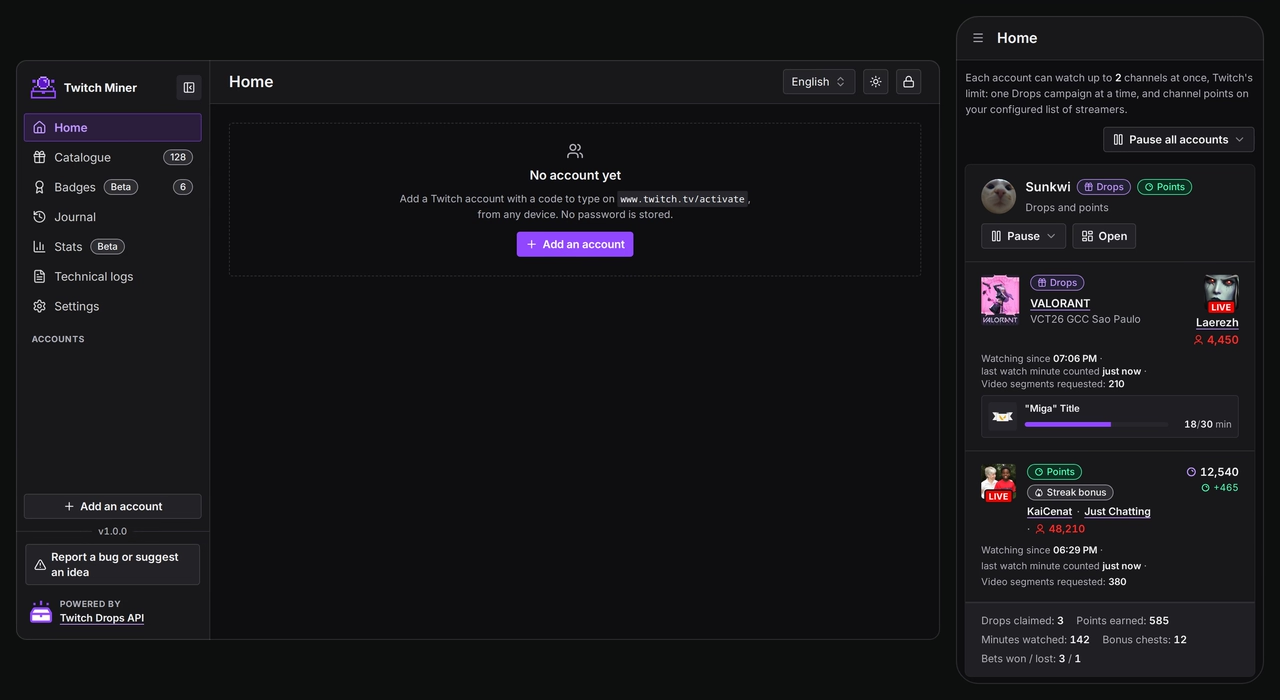
Mine Twitch Drops, badges and channel points on as many accounts as you want, with no browser and no Twitch tab open. Desktop app for Linux, Windows and macOS, or a Docker web dashboard for a home server.
Self-hostedMeasured star growth
- in 24h
- +1
- in 7 days
- Collecting history
- in 15 days
- Collecting history
- in 1 month
- Collecting history
Net star changes over overlapping periods, not daily totals. Missing measurements are left blank. Stars measure attention, not software quality.
README.md
Original

Twitch Miner
Try the demo
Mine Twitch Drops, badges and channel points on as many accounts as you want, with no browser and no Twitch tab open.
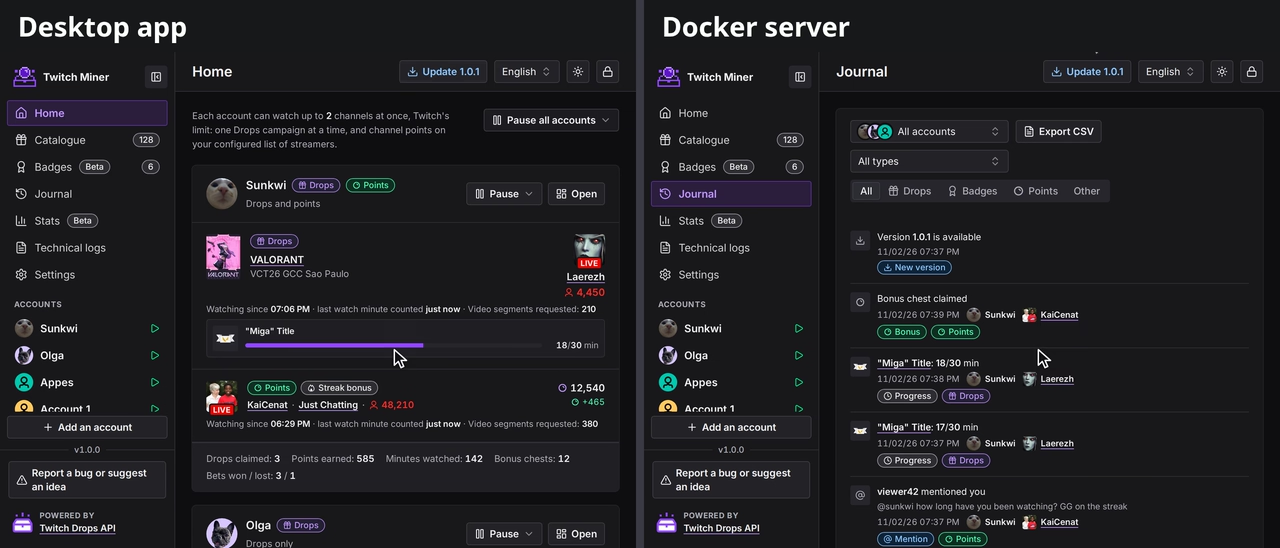
A desktop app for Linux, Windows and macOS, or a Docker image with the same web dashboard, to run on a home server or on a Raspberry Pi. Each account uses about 3 MB of memory and almost no CPU.





Download • Try the demo • Docker • Drops Alerts • Twitch Alerts 🔔 • Kick Alerts 🔔 • Report a bug
English · Français · Deutsch · Español (España) · Español (Latinoamérica) · Português (Portugal) · Português (Brasil) · Italiano · Nederlands · Polski · Русский · Українська · Čeština · Magyar · Română · Български · Ελληνικά · Türkçe · Svenska · Dansk · Norsk bokmål · Suomi · 简体中文 · 繁體中文 · 日本語 · 한국어 · ไทย · Tiếng Việt · Bahasa Indonesia
Download
Download the file for your system from the latest release.
| System | Package |
|---|---|
| Windows · x64 | Installer or portable executable |
| Windows · ARM64 | Installer or portable executable |
| macOS 13 or later · universal: Intel and Apple Silicon | Disk image (.dmg) |
| Linux · x86-64 | .AppImage, .deb (Debian, Ubuntu) or .rpm (Fedora, openSUSE) |
| Linux · ARM64 | .AppImage, .deb (Debian, Ubuntu, Raspberry Pi OS) or .rpm (Fedora, openSUSE) |
| Linux server · x86-64 or ARM64 | The server alone, without Docker (x86-64 or ARM64): see Without Docker |
On Linux, you can also install from a terminal. On ARM64, replace x64 with arm64 in
the commands.
Debian, Ubuntu, Raspberry Pi OS:
curl -LO https://github.com/SunkwiBOT/twitch-miner/releases/latest/download/twitch-miner_linux_x64.deb
sudo apt install ./twitch-miner_linux_x64.deb
Fedora, openSUSE:
curl -LO https://github.com/SunkwiBOT/twitch-miner/releases/latest/download/twitch-miner_linux_x64.rpm
sudo dnf install ./twitch-miner_linux_x64.rpm
# openSUSE: sudo zypper install ./twitch-miner_linux_x64.rpm
AppImage, on any distribution:
curl -LO https://github.com/SunkwiBOT/twitch-miner/releases/latest/download/twitch-miner_linux_x64.AppImage
chmod +x twitch-miner_linux_x64.AppImage
./twitch-miner_linux_x64.AppImage
The same commands update an existing install: the file names do not change.
The macOS build is not notarized. The first time, open the app: macOS blocks it. Then go to System Settings › Privacy & Security and click Open Anyway.
Updates are signed. The app checks for a new version when it starts, then every hour (you can change how often in Settings › About). It never installs one by itself: you install it in one click, from the message that appears or from Settings › About.
Data lives in the user data folder:
- Linux:
~/.local/share/twitch-miner - Windows:
%APPDATA%\twitch-miner - macOS:
~/Library/Application Support/twitch-miner
Features
Accounts and streamers
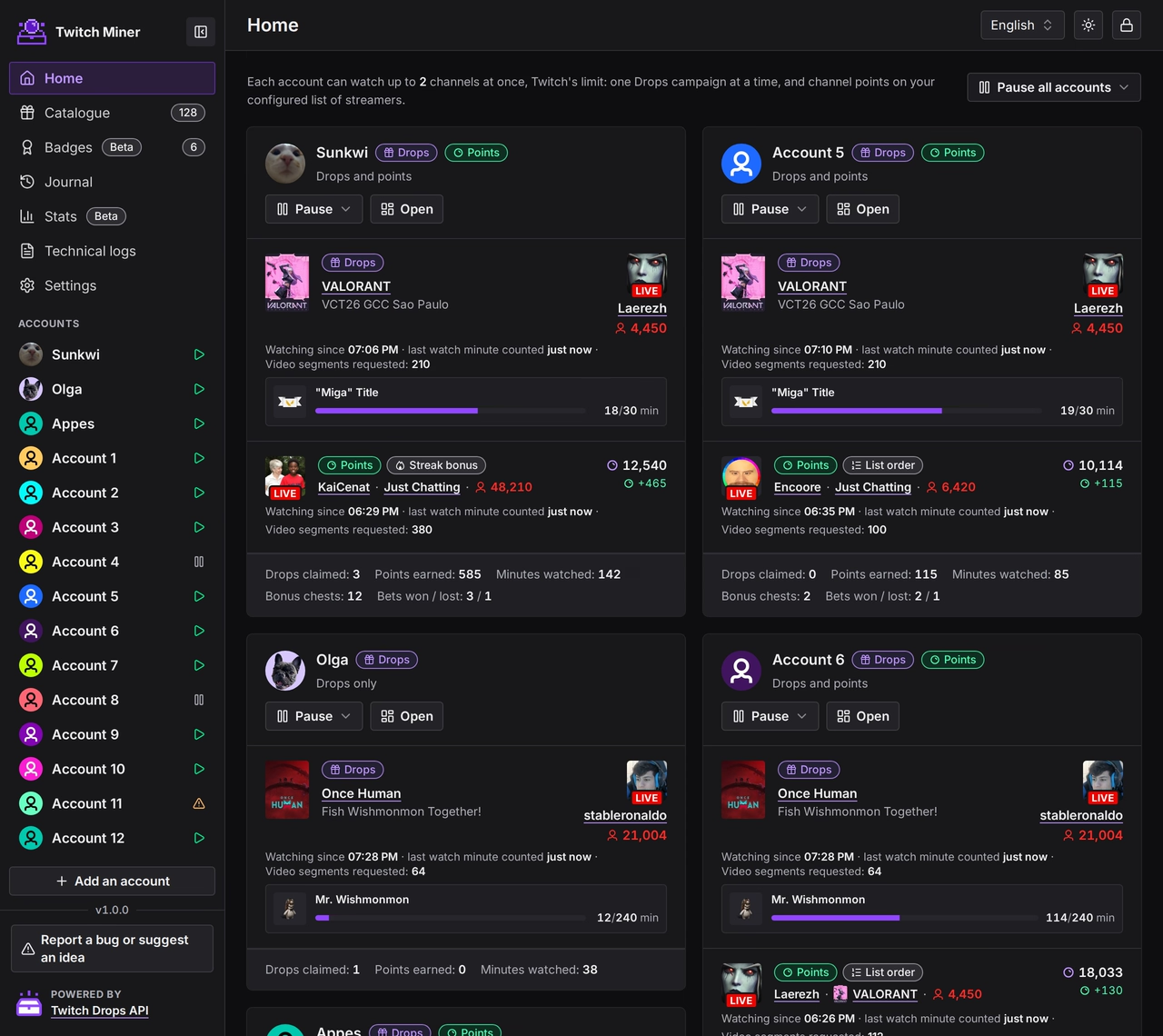
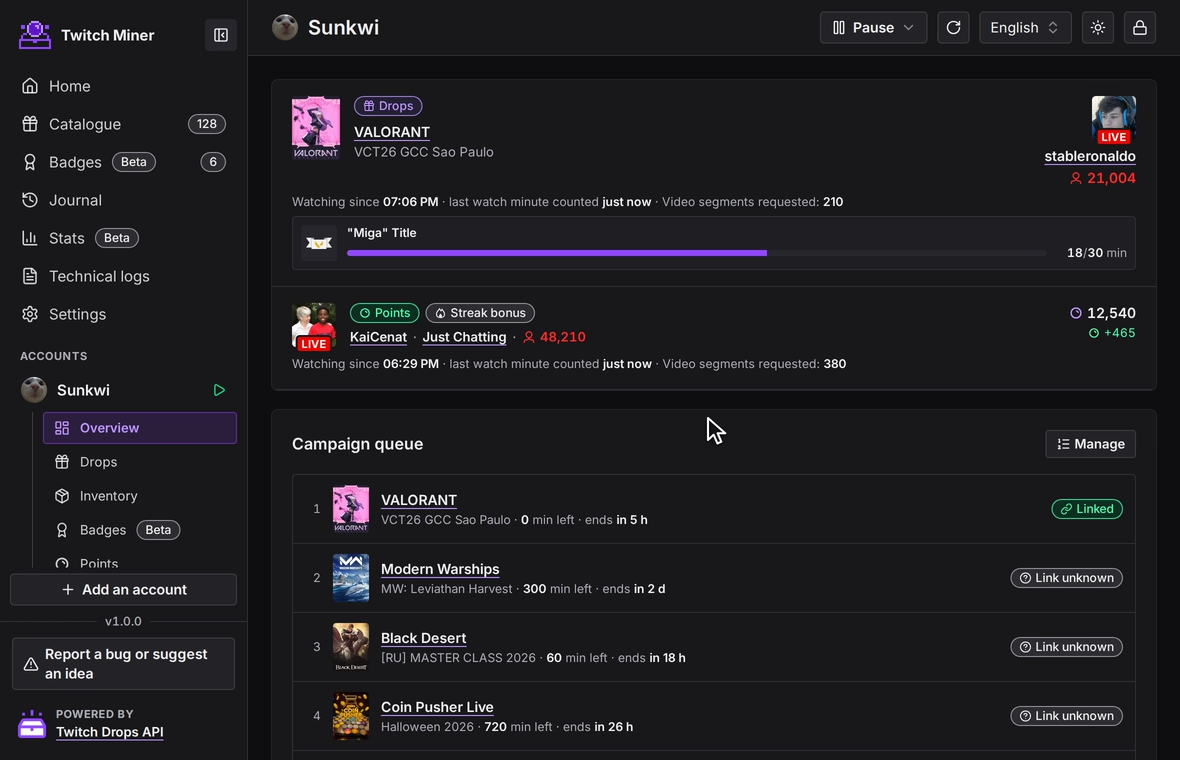
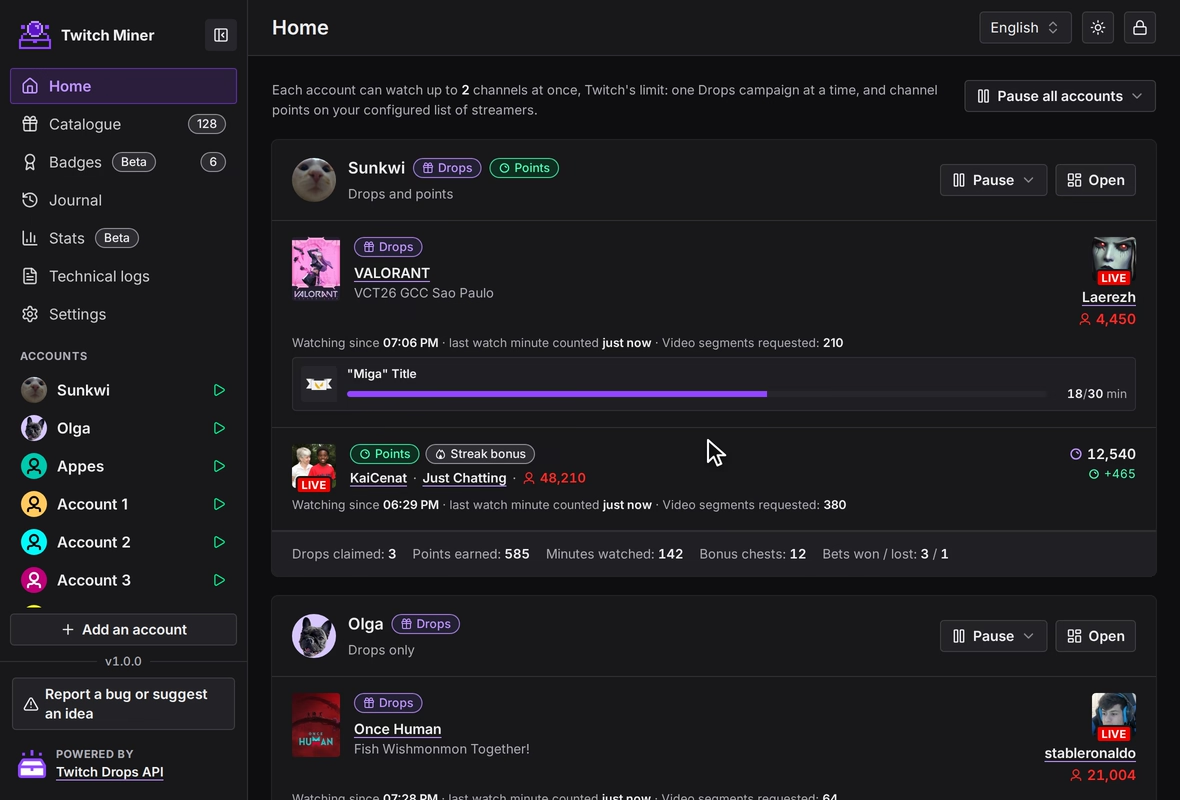
As many accounts as you want in one app. Each account mines on its own, in its own mode: Drops and points (one channel for the best campaign, the other for your streamers), Drops only or Points only.
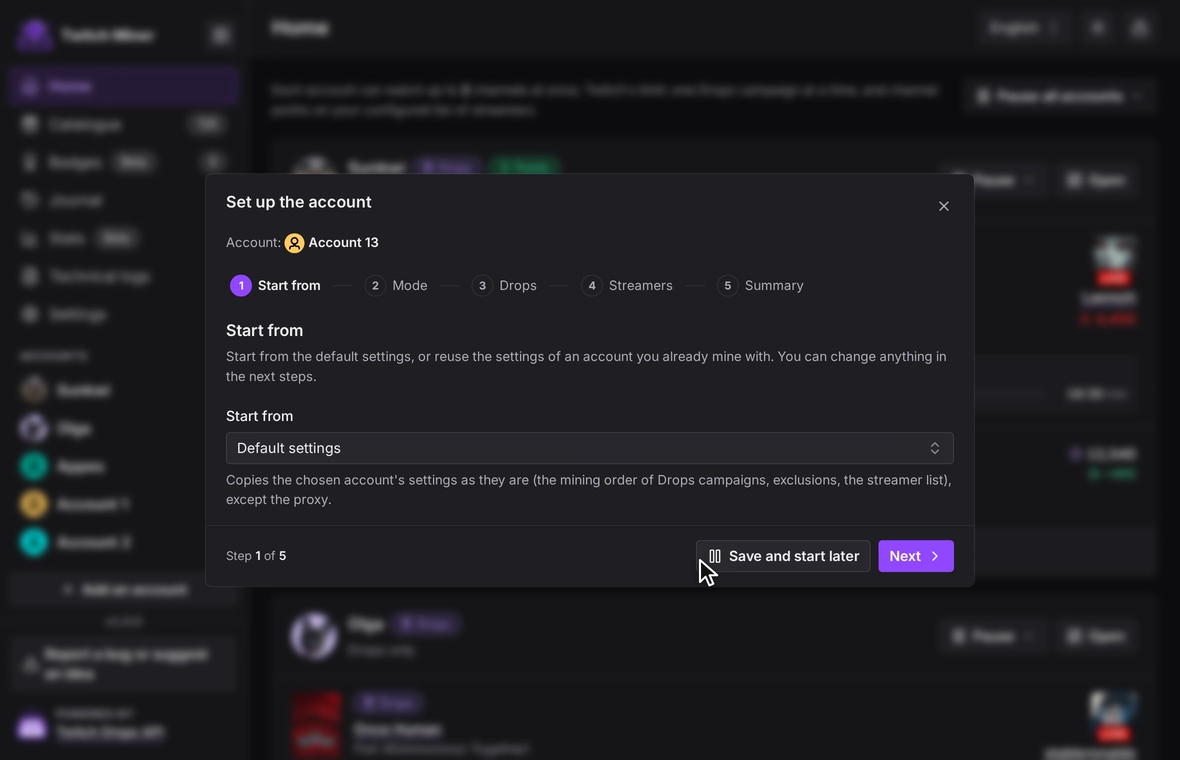
A wizard for each new account. After signing in, start from the default settings or from another account's. Choose the mode, the campaigns and the streamers, then “Start mining” or “Save and start later”.
One change applied to other accounts in one click. After you change something on an account, the confirmation message offers “Apply to other accounts”. The change is made again on the accounts you tick, and they keep the rest of their settings.
Add a streamer. It starts right away with the default options: the app's, or the ones you chose for this account. Adjust them on the spot if needed: bonus chests, raids, moments, watch streak, chat, predictions.
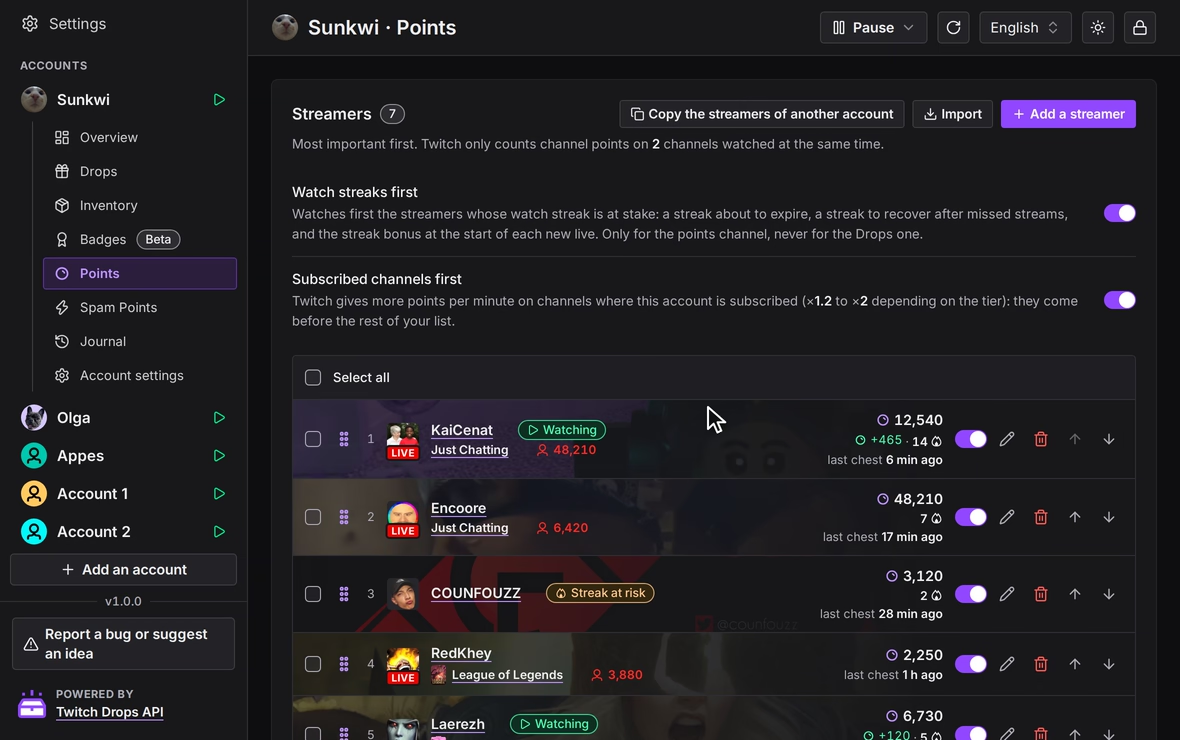
Edit a streamer. “Edit” opens its options: bonus chests, raids, moments, watch streak, chat, predictions… A switch turns it on or off without removing it from the list.
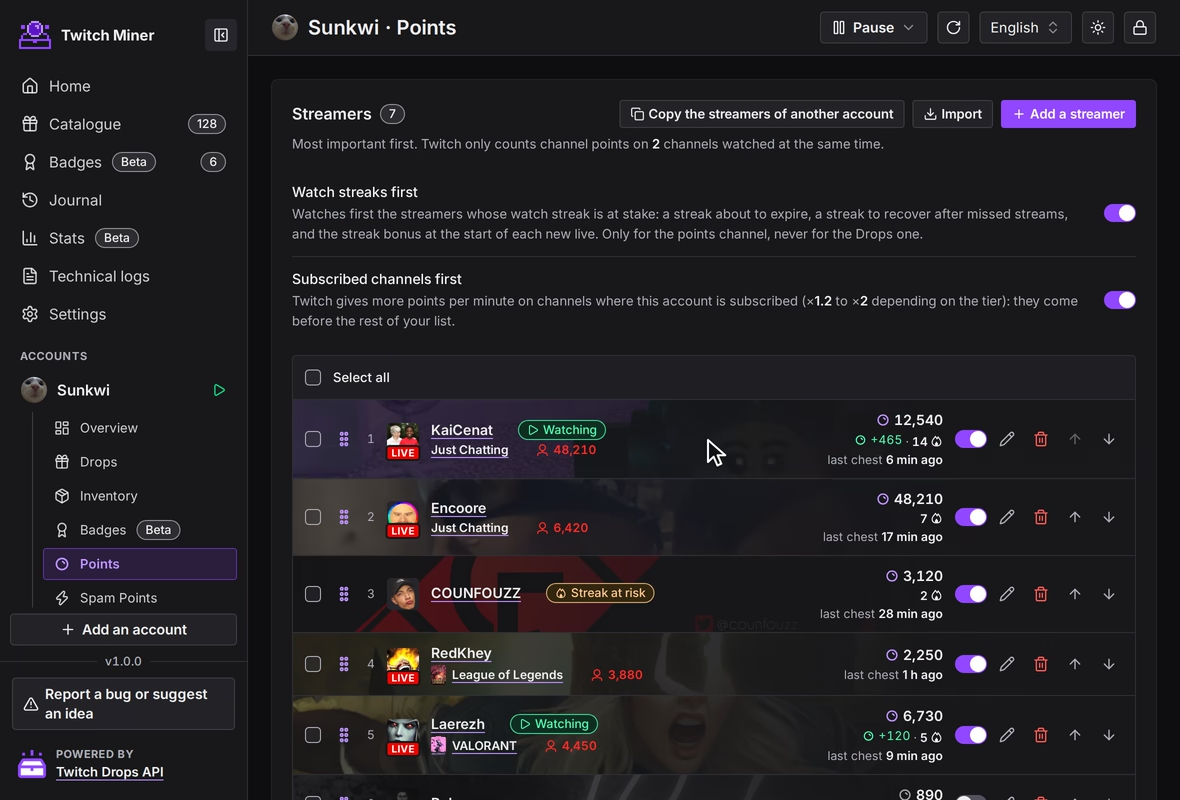
Edit several streamers at once. Tick them, then “Edit the N selected streamers”. Only the options you change are applied. An option that differs between them shows “Mixed”, and its switch becomes two buttons, “Yes” and “No”. The app then offers to make them the default options for new streamers.
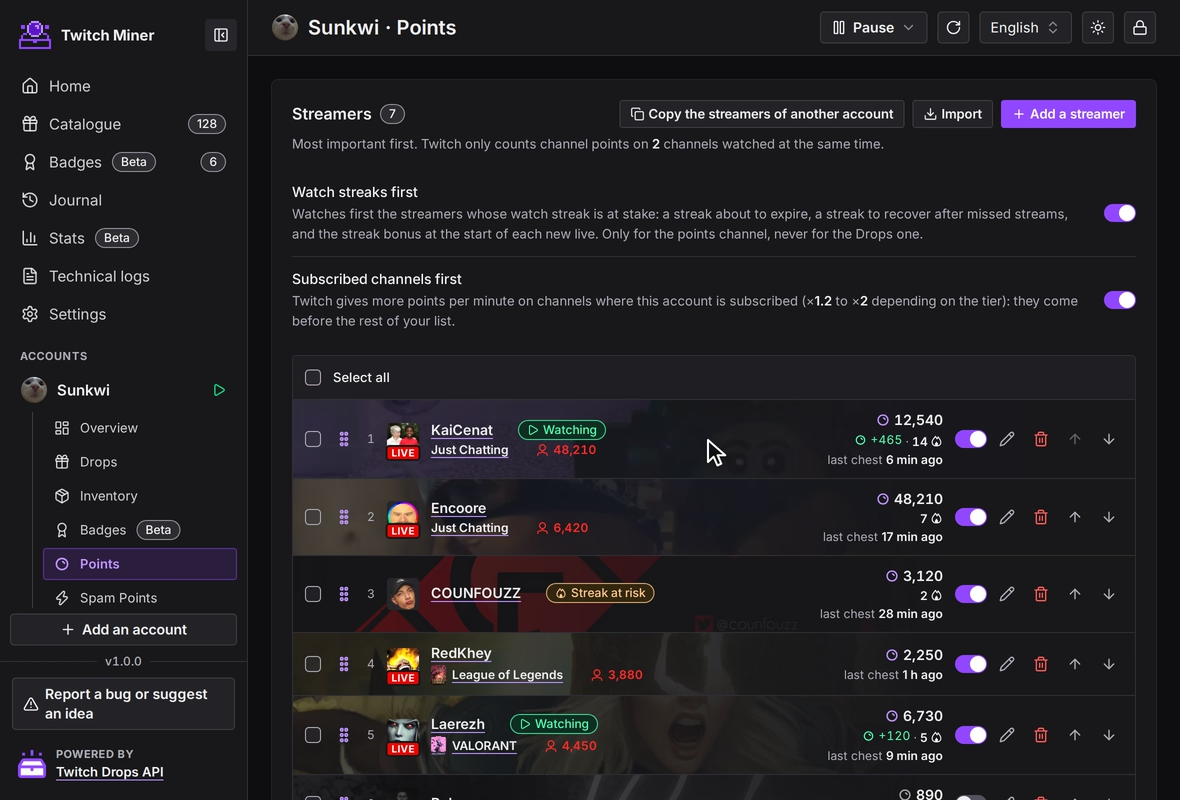
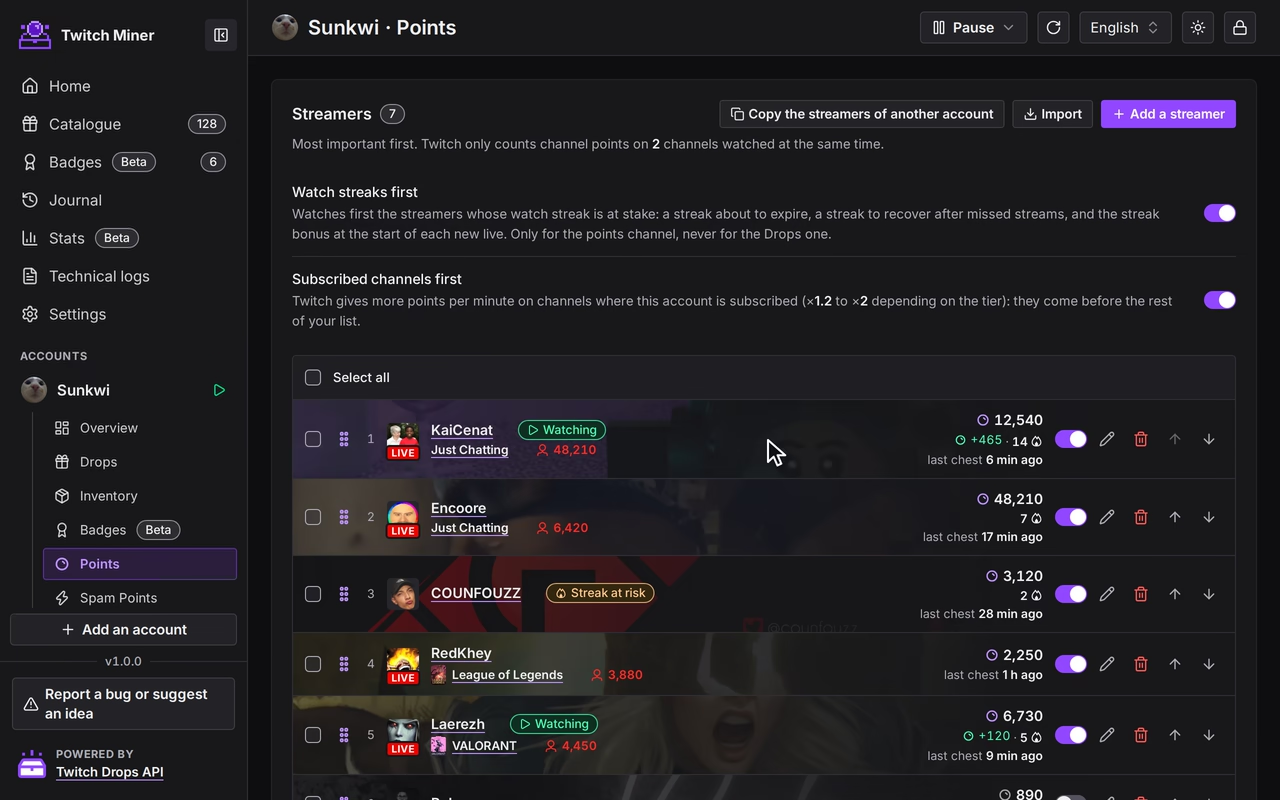
Import streamers. Paste a list (up to 500 names), or reuse another account's list or the channels the account follows. The list is checked so that only channels that exist are added. Live updates cover 46 streamers per account: the next ones in the list get no raids, moments or predictions.
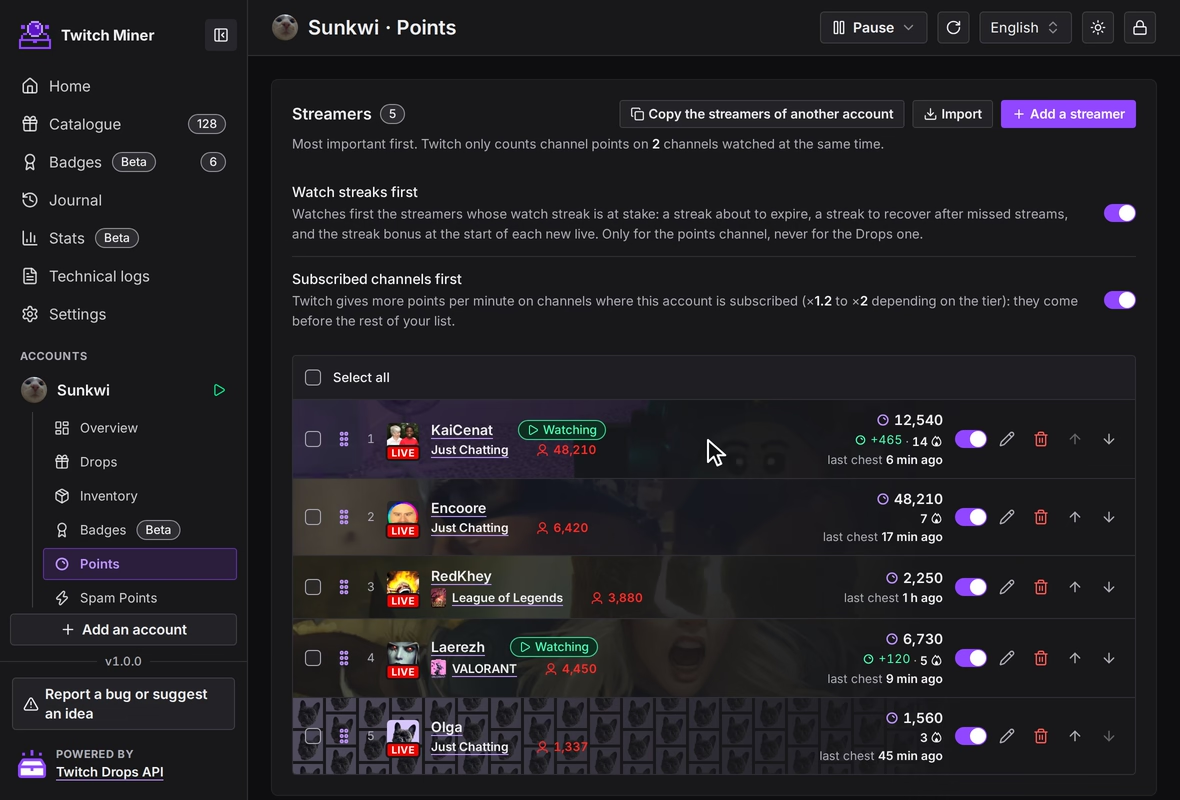
Spam Points. Redeem a channel's custom reward several times in a row. Pick a channel from your Points list, or any channel found with the Twitch search: its rewards show with the account's balance, read live. Set the quantity (up to 25, within the balance), then “Redeem”. The result shows when the burst ends, and each burst has its line in the Journal.
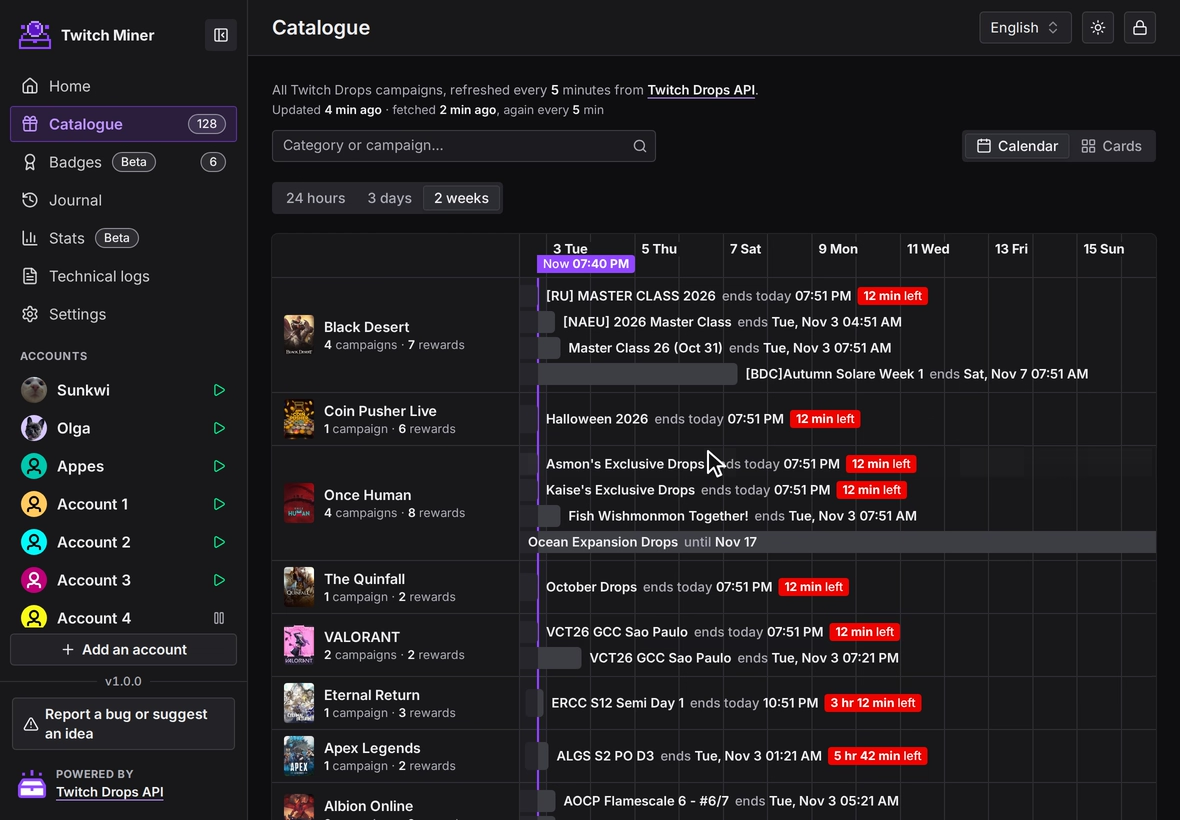
Drops
Every running Drops campaign. Each campaign has its own details: rewards, publisher account linking, “Mine first”. The list comes from the Drops Alerts project and refreshes every 5 minutes.
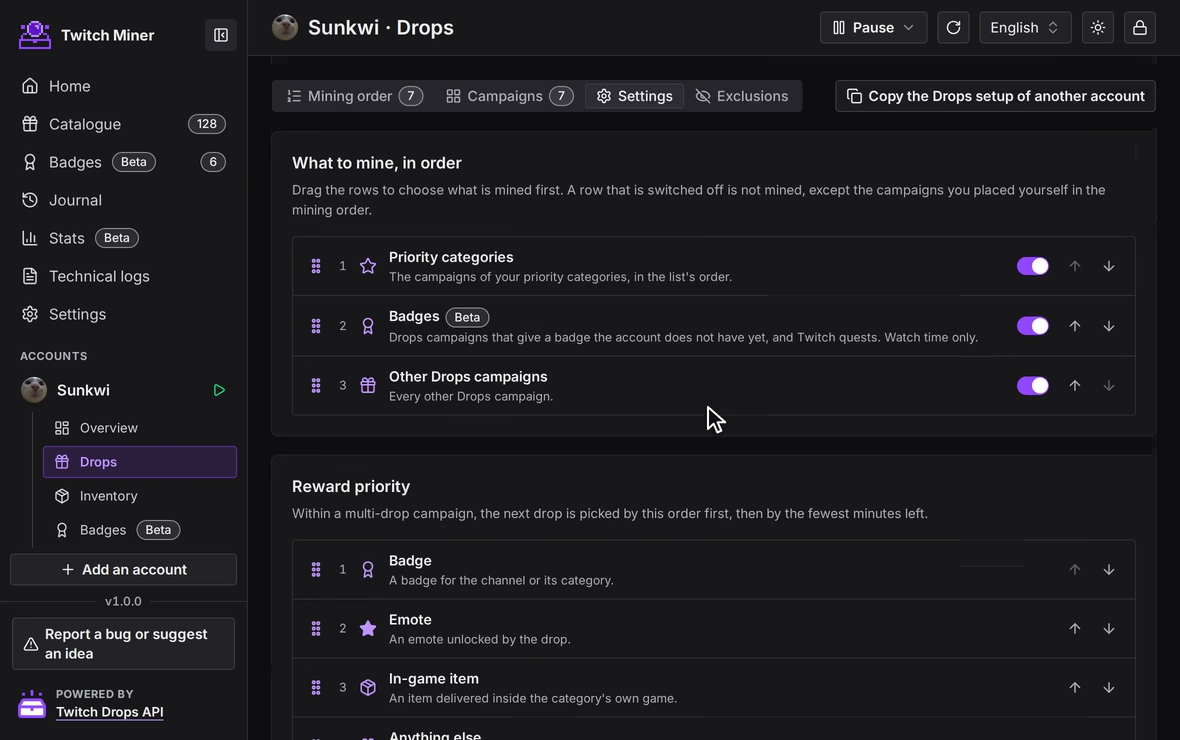
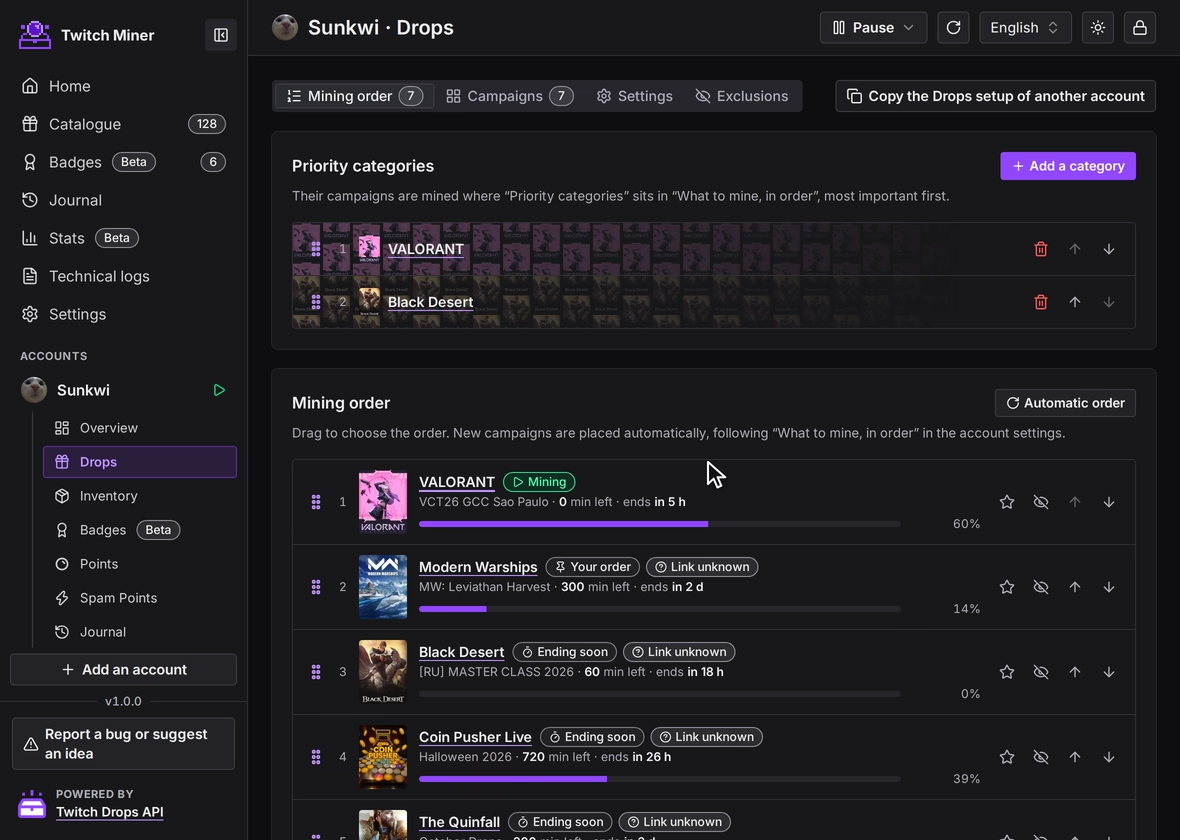
Your mining order. Drag the campaigns into the order you want. New ones find their own place: your priority categories first, then the soonest end or the fewest minutes left. Exclude categories, words, a campaign or a single reward, and skip the campaigns that cannot finish in time. “Mine first”, in a campaign's details, puts it at the top.
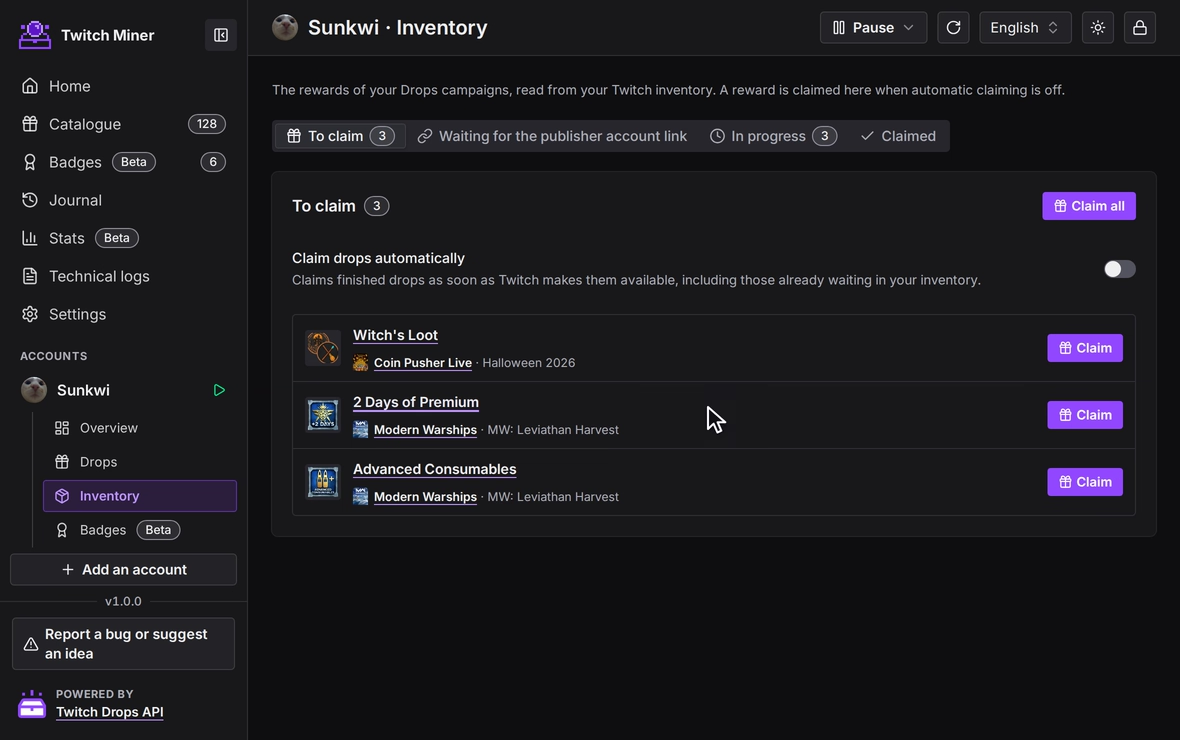
Inventory and “Claim all”. The Inventory page sorts rewards into “To claim”, “In progress” and “Claimed”. Claim them one by one, all at once, or turn on “Claim drops automatically”. After “Link the publisher account”, the account is read again as soon as you come back to the app, so the link shows right away.
“My streamers first for Drops and badges”. For the current campaign, a streamer from your list whose stream counts for that campaign comes before other channels. The same channel moves the drop forward and earns you its channel points. On by default.
Reward priority. When two campaigns are equally ranked, the miner first picks the one whose rewards match your preferred type (badge, emote, in-game item). It never overrides your mining order.
Badges (beta). The Badges page lists every global Twitch chat badge and how to get it. Each account has its own Badges page: the badges in progress with their progress, the ones still to get and the ones it owns. The miner goes after the badges of Drops campaigns and Twitch quests, and skips those the account already owns. A badge watched every day is mined again each day until the last one (“20 min per day, 3 days”), and a channel in any of the campaign's categories counts. A chest gives “1 random badge out of N”. A badge that needs a subscription is mined once you have subscribed or gifted a subscription during the campaign, on a channel in the category, and Twitch counts it; a subscription already running, a Prime subscription or a renewal does not count. Nothing is mined before its campaign starts. In “What to mine, in order”, drag priority categories, badges and other Drops campaigns into the order you want, or switch one off. A Twitch quest is mined only on a channel where Twitch offers it in its Drops panel. An evolution (Pichu → Pikachu) is mined once the account owns the badge it evolves from: the miner equips that badge itself just before and does not put the old one back; “Mine badge evolutions”, in the account's badge settings, turns this off. A click on a badge opens its details: the whole requirement, every category and channel, the collection, the evolution and each account's progress. This feature is in beta.
Tracking
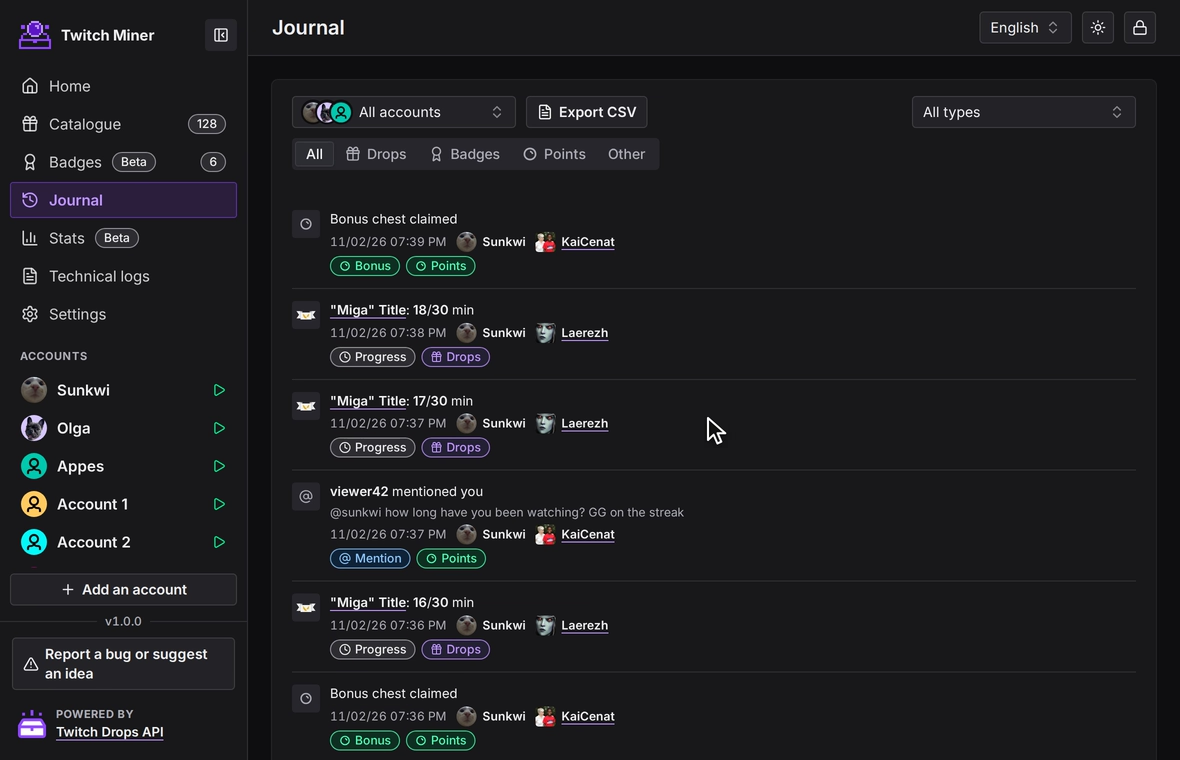
A journal of everything, and every request. The Journal keeps every event: drops, points earned and spent, chests, bets, raids, streams going live… Filter it by account, by tab (Drops, Badges, Points, Other) and by type. Technical logs › Requests lists every request sent to Twitch and to other services, with its result and how long it took. Logs and requests contain no token or secret: “Copy for a bug report” copies them, ready to paste into a bug report on GitHub or Discord.
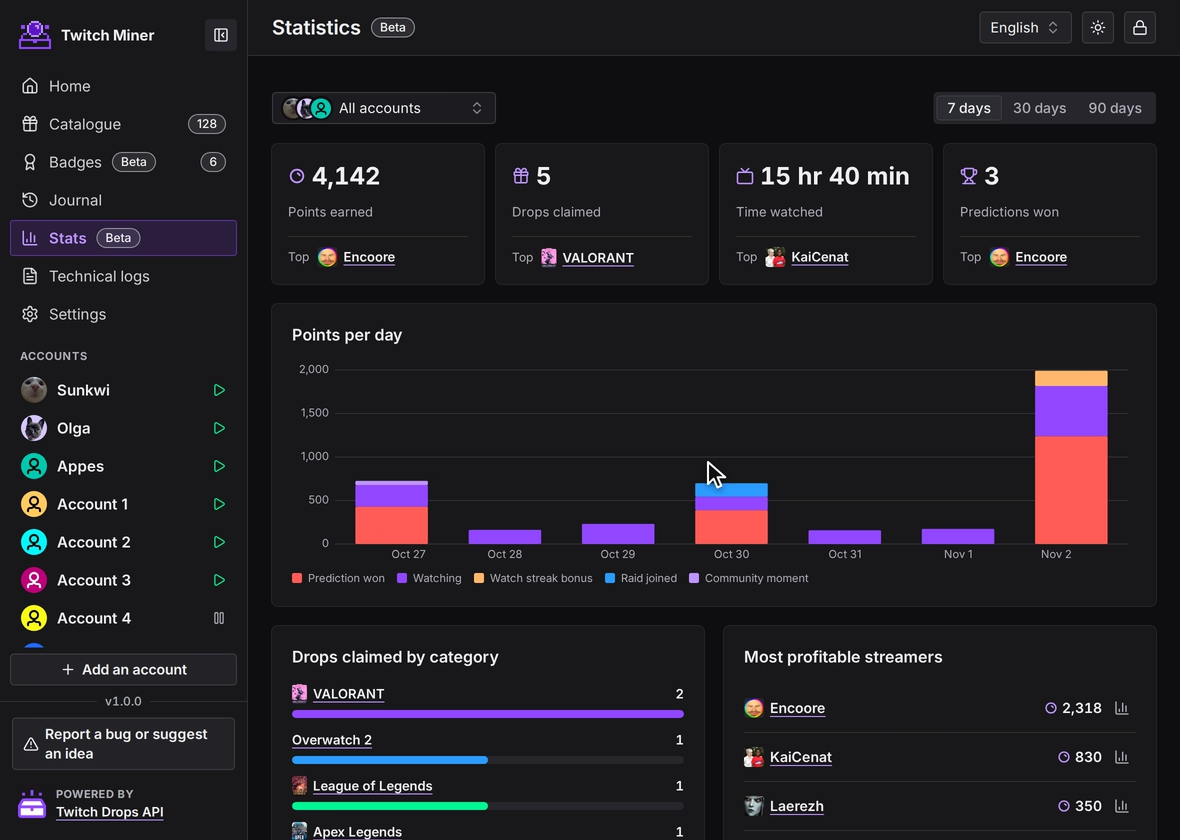
A Statistics page. Points earned, drops claimed, time watched and predictions won over 7, 30 or 90 days, with the top streamer or category behind each number. A per-streamer points curve shows the balance over time, with markers for streaks, raids, moments and predictions and a tooltip on each.
Pause and a daily pause. One pause button, for one account or for all of them: pause until you resume, or for 30 minutes, 1 hour, 4 hours, until tomorrow at 09:00, or a custom date and time; while paused, the same button reads “Resume”. A badge shows the time a timed pause ends, and each account in the sidebar shows its state: running, paused, or a problem to look at. A daily pause stops mining on every account every day between two times, in the time zone you choose, and resumes it once it ends, with its own badge in the top bar.
CSV export and counts by category. The Journal exports the claimed drops as a CSV file (date, account, category, campaign, drop, minutes), filtered by account, and a dialog lists how many drops were claimed in each category. The desktop app saves the file through a save dialog; the web dashboard downloads it.
On the desktop or on a server
- The same interface everywhere. The desktop app (Linux, Windows, macOS) and the Docker image show the same dashboard. Docker runs on a VPS, a NAS or a Raspberry Pi, with no screen or browser on that machine: the dashboard opens in any browser. On a phone, the dashboard fits the screen, and over HTTPS it installs like an app.
- Light. About 3 MB of memory per account, almost no CPU, and a Docker image of about 12 MB.
Security and updates
Your sessions, protected. No Twitch password: you sign in on
twitch.tv/activate, from your browser. Sessions are encrypted on disk, and you can revoke them in your Twitch settings. On the desktop, an optional app password locks the app: nothing is mined until it is typed. With Docker, the dashboard has its own password, locks itself after a few minutes without activity and runs over HTTPS behind a proxy. Five wrong passwords in a row block the IP address for 30 seconds.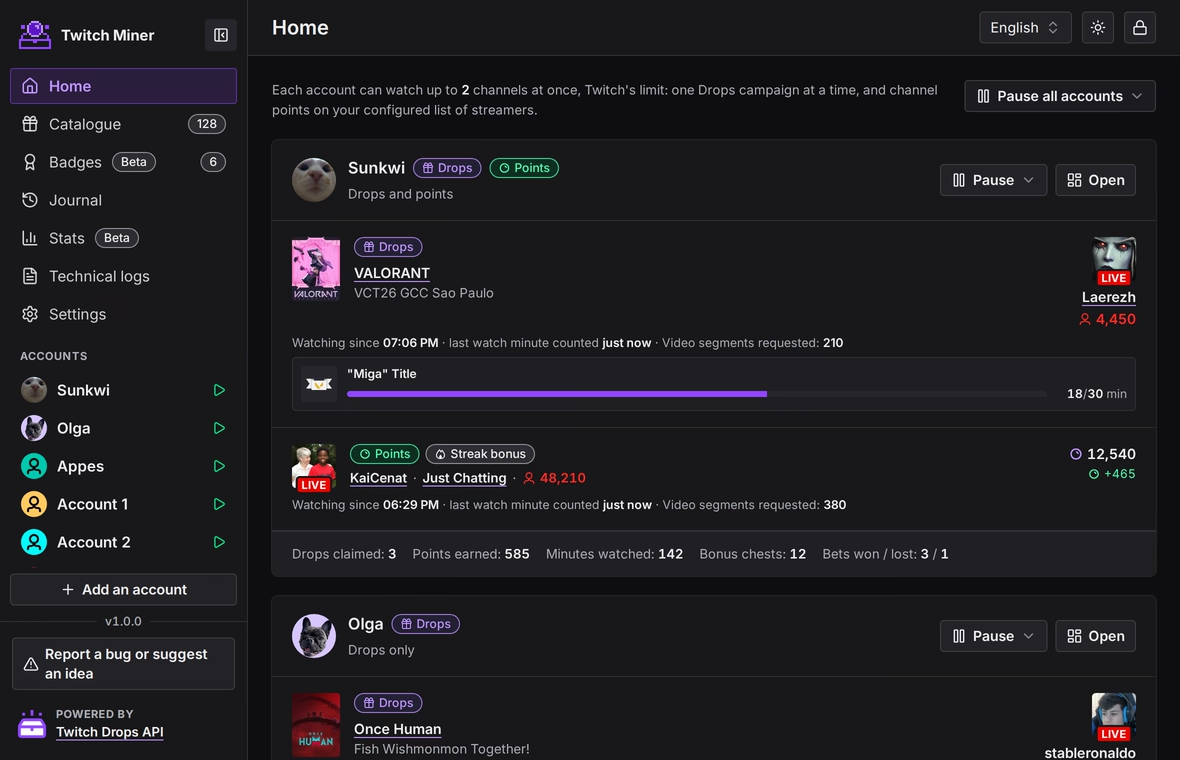
Signed updates, never automatic. An “Update” badge with the version number appears in the top bar, and a desktop notification tells you too, on by default (a switch in Settings › Notifications turns it off; in a browser, click “Allow” when it asks). “Install and restart” first asks you to confirm, then the app installs the version and restarts. With an app password, it restarts locked: type it again to resume mining. Only a version signed by the project is installed. The Docker dashboard and the systemd binary tell you too, with the commands to run.
And also
Like other miners: bonus chests, raids, moments, community goals, predictions (strategies, when to bet, conditions), watch streaks and subscribed channels first, chat presence (can be turned off), default options for new streamers, Discord, Telegram and webhook notifications with images and a “Test” button for each (on the server, their language is chosen in Settings › Notifications), a global or per-account proxy.
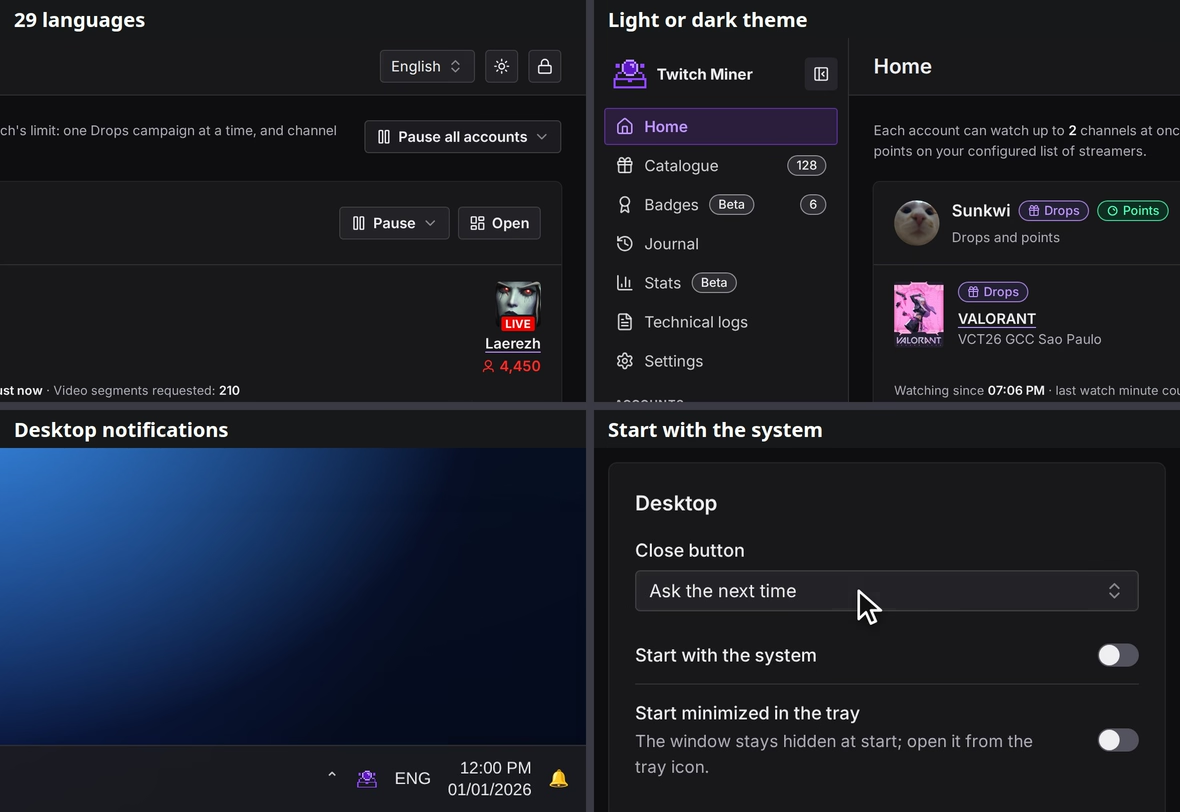
29 languages, dark and light themes, desktop notifications, a tray icon, start with the system.
Import a list of tokens. Already signed in elsewhere? Paste a list of access tokens, one per line (up to 50); each is checked live, with a “Checked: n/N” counter and a retry for any line that failed, then one settings step applies to the whole batch. The import itself runs in the background with live per-account progress, can be cancelled mid-way, and a later retry only resends the accounts that failed. Removing an account imported this way offers to revoke its token on Twitch too.
[!WARNING] This project is not affiliated with Twitch. Automating an account may break Twitch's terms or a campaign's rules.
Contents
Comparison
How Twitch Miner compares with Twitch Channel Points Miner v2 (channel points) and TwitchDropsMiner (Drops). Checked against their code and READMEs in November 2026.
| This project | Channel Points Miner v2 | TwitchDropsMiner | |
|---|---|---|---|
| Drops campaigns: finds, mines and claims them | ✅ | ❌ ¹ | ✅ |
| Twitch badges: the list of every badge, each account's badges, badge Drops and Twitch quests mined in your order (beta) | ✅ | ❌ | partly ² |
| Channel points: chests, raids, moments, predictions | ✅ | ✅ | ❌ |
| Spam Points: a channel's custom reward redeemed several times in a row | ✅ | ❌ | ❌ |
| Drops and channel points at the same time on one account | ✅ | partly ¹ | ❌ |
| As many accounts as you want in one app | ✅ | ❌ ³ | ❌ |
| Change the settings of several accounts at once | ✅ | ❌ | ❌ |
| Graphical interface | ✅ desktop and web ⁴ | ❌ ⁵ | ✅ desktop |
| Web dashboard for a home server (Docker), with a password, reachable over HTTPS | ✅ | ❌ ⁵ | ❌ |
| Sessions encrypted on disk, optional app password | ✅ | ❌ | ❌ |
| Interface in 29 languages | ✅ | ❌ | partly ⁶ |
| Signed updates from inside the app (desktop) | ✅ | ❌ | ❌ |
| Setup wizard for each new account | ✅ | ❌ ⁵ | ❌ |
| Streamers added and edited in the interface, one at a time or several at once | ✅ | ❌ ⁵ | — |
| Streamers imported by search, a list, another account or followed channels | ✅ | partly ⁷ | — |
| Discord, Telegram and webhook notifications with images | ✅ | partly ⁸ | ❌ |
| Calendar of every Drops campaign, with search | ✅ | ❌ | partly ⁹ |
| Mining order by campaign, excluded words, ignored campaign or reward | ✅ | ❌ | ❌ ¹⁰ |
| Your listed streamers watched first for a campaign's Drops | ✅ | partly ¹¹ | ❌ |
| Filterable event journal and a list of every request, in the interface | ✅ | ❌ ⁵ | ❌ |
| About 3 MB of memory per account (Docker server) | ✅ | — ¹² | — ¹² |
¹ It only watches the streamers on its list: it makes progress on the Drops of their
streams and claims them, without choosing a campaign.
² A setting to mine or leave out the Drops campaigns whose rewards are badges or emotes;
no Twitch quests and no list of badges.
³ One process per account.
⁴ On your PC as a desktop app, and/or on a server (VPS, NAS, Raspberry Pi) with Docker,
with no graphical environment and no browser on that machine: the dashboard opens in any
browser.
⁵ Configured in a Python file; its web page shows points charts and the log file.
⁶ 21 languages.
⁷ It can follow the channels the account follows.
⁸ Text only, without images. It also has Matrix, Pushover and Gotify, which this project
does not.
⁹ A list of campaigns with filters, without a calendar or search.
¹⁰ It has priority categories and excluded categories, chosen by category name.
¹¹ By default, it first watches the streamers on its list whose stream carries Drops (its
DROPS priority), but never another channel.
¹² Not measured.
Docker
The server shows the same dashboard in a browser. The image is
ghcr.io/sunkwibot/twitch-miner, for amd64 and arm64. When a new
version is out, the dashboard says so: docker compose pull, then
docker compose up -d.
services:
  miner:
    image: ghcr.io/sunkwibot/twitch-miner:latest
    pull_policy: always   # take the newest image at every start
    restart: unless-stopped
    ports: ["8080:8080"]   # behind an HTTPS reverse proxy: remove, or "127.0.0.1:8080:8080"
    environment:
      MINER_PASSWORD: "change-me"   # required, 12 characters or more
      # MINER_PUBLIC_URL: "https://miner.example.com"   # only behind an HTTPS reverse proxy
    volumes:
      - miner-data:/data

volumes:
  miner-data:
docker compose up -d
Open http://localhost:8080 (or the machine's address on your network) and enter the password.
Variables
| Variable | Default | Purpose |
|---|---|---|
MINER_PASSWORD |
none | Dashboard password, required: the server refuses to start without it. 12 characters or more (a shorter one shows a warning at start). The example value change-me is refused. |
MINER_PASSWORD_FILE |
none | Reads MINER_PASSWORD from a file, such as a Docker secret. One or the other, not both. |
MINER_PUBLIC_URL |
none | Only behind an HTTPS reverse proxy (Caddy, nginx, Traefik, Cloudflare Tunnel…): the dashboard's https:// address, without a path, like https://miner.example.com. The proxy must forward X-Forwarded-Proto, X-Forwarded-For and websockets, which common proxies do by default, and the container's port must not be reachable directly. The dashboard then refuses anything that does not come through the proxy over HTTPS, and locks out an address for 30 seconds after 5 wrong passwords. The proxy must run on the same machine or its local network: a connection from a public address is refused. |
MINER_TRUSTED_HOPS |
1 |
With MINER_PUBLIC_URL only: how many proxies add an entry to X-Forwarded-For, from 1 to 10. 2 with two proxies one behind the other, like Cloudflare in front of Traefik. |
MINER_PROXY_NETWORKS |
none | With MINER_PUBLIC_URL only: the networks the proxy connects from, separated by commas, spaces or newlines: a single address or a network like 192.168.1.0/24 or 2001:db8:1::/64. Once it is set, the proxy is accepted only from the loopback address and these networks, no longer from the whole private local network. A blank value, /0 or a network with host bits set stop the start only when MINER_AUTH_HEADER is also set; without it, they are accepted with a warning. |
MINER_AUTH_HEADER |
none | Forward auth / SSO: the name of a header the proxy sets to the signed-in user: Remote-User for Authelia, X-authentik-username for Authentik, X-Auth-Request-User for oauth2-proxy (with --set-xauthrequest). A request admitted through the proxy — from an address in MINER_PROXY_NETWORKS, with a Host matching MINER_PUBLIC_URL — with one non-empty line in that header signs in without MINER_PASSWORD. Needs MINER_PUBLIC_URL and an explicit MINER_PROXY_NETWORKS; loopback alone is never enough for it. Refuses a header the proxy, a browser or a client already writes (X-Forwarded-*, Host, Cookie, Authorization, X-Real-IP, Forwarded, Via, User-Agent, Accept*, Sec-Fetch-*, Cache-Control, CF-Connecting-IP, Priority, Connection, Origin, Referer, X-Request-Id, Content-Type…). |
MINER_AUTH_USERS |
none | With MINER_AUTH_HEADER only: the header values allowed to sign in, separated by commas, spaces or newlines, like MINER_PROXY_NETWORKS. Matching is case-sensitive. A value that is set but names none is refused, like a blank MINER_PROXY_NETWORKS with the header set. Without it, any value the proxy sets signs in — every signed-in SSO user is an admin — and the server warns about this at start; with it, the server logs the parsed count at start. |
MINER_VAULT_PASSPHRASE |
none | Only for a data folder copied from the desktop app with an app password: unlocks it at start. A server set up from scratch never needs it. |
MINER_VAULT_PASSPHRASE_FILE |
none | Reads MINER_VAULT_PASSPHRASE from a file. One or the other, not both. |
DATA_DIR |
/data in the image, otherwise data in the working directory |
Database, key file and logs. |
LOG_DIR |
$DATA_DIR/logs |
Log files: one a day, the last 14 kept. |
HOST / PORT |
0.0.0.0 / 8080 |
Listen address: an IP address and a port from 1 to 65535. |
RUST_LOG |
info,hyper=warn,reqwest=warn |
Log level. |
The server reads and checks the variables once, at start. An invalid value stops the server with a message, instead of a silent fallback.
Behind a reverse proxy, set MINER_PUBLIC_URL: without it, the first request that comes
through a proxy writes a warning in the logs, because sign-in tries are then counted on
the proxy's address and one visitor's wrong passwords would lock everyone out. The live
connection sends a ping every 30 seconds, so a proxy does not close it while nothing
happens. When Twitch or the network fails, the server answers 424, never 502 or
504: behind Cloudflare, you see the real error instead of Cloudflare's page.
Signing in from a trusted proxy (forward auth / SSO)
Available from v1.16.0.
With a single sign-in in front of several self-hosted apps (Authelia, Authentik,
oauth2-proxy…), MINER_AUTH_HEADER skips the dashboard's own password: the proxy's
sign-in is enough. Set MINER_AUTH_USERS to the allowed values too, or any SSO user
signs in as admin. MINER_PASSWORD still works for scripts that sign in directly with
POST /api/auth, never through a browser: the router below sends every other request
through forwardAuth, so a browser visiting the dashboard always needs the SSO up
first. A second router matches only POST and DELETE on /api/auth — the password
sign-in and sign-out — and blanks the header itself instead of dropping forwardAuth:
widen its rule to match more than that one path and a client-forged header works there too.
The proxy must keep the request's original Host unchanged on its way to the miner, or
MINER_PUBLIC_URL never matches it and the header is silently ignored, with a warning in
the logs the first time it happens: nginx needs proxy_set_header Host $host;, Apache
needs ProxyPreserveHost On. Traefik and Caddy keep it unchanged by default, nothing to
add for either.
None of these products strip a header a client sent itself: every route from the proxy
to the miner needs its own rule that overwrites it (Traefik's forwardAuth only deletes
the headers listed in authResponseHeaders, and forwards any other client header
unchanged). Run the proxy and the miner alone on a network of their own, with a static
address for the proxy, and never publish the miner's port: anything else reaching it —
another container, a host process — could set the header itself.
Authelia behind Traefik, the two alone on miner-net, forwarding the signed-in user in
Remote-User:
networks:
  edge: {}          # Traefik and Authelia talk here
  miner-net:        # only Traefik and the miner are on this one
    ipam:
      config:
        - subnet: 10.10.0.0/29

services:
  traefik:
    # your normal Traefik setup: entrypoints, other networks, other apps
    networks:
      edge: {}
      miner-net:
        ipv4_address: 10.10.0.2

  authelia:
    # your normal Authelia setup
    networks:
      edge: {}
    labels:
      traefik.http.middlewares.authelia.forwardAuth.address: "http://authelia:9091/api/authz/forward-auth"
      traefik.http.middlewares.authelia.forwardAuth.trustForwardHeader: "true"
      traefik.http.middlewares.authelia.forwardAuth.authResponseHeaders: "Remote-User"
      # for the scripts' router below: blanks Remote-User instead of skipping
      # auth, so a client-forged header still does not work on that route either
      traefik.http.middlewares.blank-remote-user.headers.customrequestheaders.Remote-User: ""

  miner:
    image: ghcr.io/sunkwibot/twitch-miner:latest
    networks:
      miner-net:
        ipv4_address: 10.10.0.3   # static too: an address picked at random could collide
    # no "ports": this network only reaches Traefik, from 10.10.0.2
    environment:
      MINER_PASSWORD: "change-me"
      MINER_PUBLIC_URL: "https://miner.example.com"
      MINER_PROXY_NETWORKS: "10.10.0.2"
      MINER_AUTH_HEADER: "Remote-User"
      MINER_AUTH_USERS: "alice,bob"
    volumes:
      - miner-data:/data
    labels:
      traefik.http.routers.miner.rule: "Host(`miner.example.com`)"
      traefik.http.routers.miner.middlewares: "authelia@docker" # repeat on every router to the miner
      # only the password sign-in/out, for scripts with MINER_PASSWORD: bypasses
      # Authelia, never the header blanking; a wider rule would too
      traefik.http.routers.miner-api.rule: "Host(`miner.example.com`) && Path(`/api/auth`) && (Method(`POST`) || Method(`DELETE`))"
      traefik.http.routers.miner-api.middlewares: "blank-remote-user@docker"

volumes:
  miner-data:
Hardening another proxy
None of these strips a client's own copy of the header on its own: add the removal line below before the directive that sets it from the SSO's answer, on every route to the miner, the scripts' route included. Traefik, Caddy, nginx, Apache and HAProxy below were each checked against a real TLS-terminating instance with a forged header, a doubled header, and a case/underscore variant; Cloudflare Tunnel and Tailscale Serve come from their own documentation and source, not independently tested here.
- nginx:
auth_requestonly validates, it never touches headers by itself — a config that calls it but never setsRemote-Userforwards the client's own line through unchanged (proven: a forgedRemote-User: adminreached the miner verbatim without the next two lines). Always addauth_request_set $auth_user $upstream_http_remote_user;thenproxy_set_header Remote-User $auth_user;, which overwrites it — never optional. Alsoproxy_set_header Host $host;, or$http_hostifMINER_PUBLIC_URLnames a non-default port ($hostdrops the port, and the header is then silently never trusted). nginx also drops any header whose name has an underscore unlessunderscores_in_headers on;is set, which is whyMINER_AUTH_HEADERrefuses one. - Caddy:
forward_authwithcopy_headers Remote-Useralready overwrites a client's own copy on its own, proven, nothing else required.request_header -Remote-Userright before it is harmless extra defense-in-depth, not a requirement, unlike Traefik, where a second router that skipsforwardAuthentirely does need the explicit blank. - Apache:
RequestHeader unset Remote-Userunconditionally, thenRequestHeader set Remote-User "…" env=AUTH_OKfrom whatever validates the session, andProxyPreserveHost Onfor the sameHostrequirement as above. - HAProxy:
http-request del-header Remote-Userunconditionally, thenhttp-request set-header Remote-User alice if <valid-session-acl>. HAProxy also never touchesX-Forwarded-Foron its own: addhttp-request set-header X-Forwarded-For %[src], or a spoofed value reaches the miner unchanged. - Cloudflare Tunnel: leave
httpHostHeaderunset (its default already forwards the publicHostthe client asked for); it is a tunnel, not a header-stripping proxy, so pair it with one of the proxies above forMINER_AUTH_HEADERrather than trusting it on its own. - Tailscale Serve:
Tailscale-User-Login.tailscaledalready deletes any client-sent copy of it before adding its own, so there is nothing to strip yourself; what matters is that onlytailscale serve, never a direct connection, can reach the miner — bind it to127.0.0.1and let Serve alone proxy to it.
Whichever proxy you use, test it once before trusting it: with the SSO signed out,
curl the miner's own address directly (bypassing the proxy, from the machine or
container it runs on) with the header set by hand, like
curl -H "Remote-User: mallory" http://127.0.0.1:8080/api/snapshot; it must answer
401, never the snapshot.
Tested, copy-paste-ready Compose examples for five common setups:
| Proxy | Example | What it shows |
|---|---|---|
| Traefik + Authelia | docs/reverse-proxy/traefik-authelia/ |
A full single sign-on stack: real Authelia, file backend, forward-auth through Traefik. |
| Caddy | docs/reverse-proxy/caddy/ |
forward_auth + copy_headers, the shortest config of the five. |
| nginx | docs/reverse-proxy/nginx/ |
auth_request, with the overwrite line that's easy to skip by mistake — and what happens if you do. |
| Apache httpd | docs/reverse-proxy/apache/ |
No built-in forward-auth, so a small SSO-aware proxy sits between Apache and the miner instead. |
| HAProxy | docs/reverse-proxy/haproxy/ |
Same pattern as Apache, with http-request del-header stripping a client's own copy. |
Without Docker (systemd)
On a Linux server without Docker, the release also has the server as a single file, with
the dashboard inside: twitch-miner-server_linux_x64 or
twitch-miner-server_linux_arm64. It is the program the Docker image runs,
statically linked: nothing else to install, besides the system's CA certificates it reads
for HTTPS (the Docker image copies them in for the same reason). It takes the same variables.
# ARM64: twitch-miner-server_linux_arm64
sudo install -m 755 twitch-miner-server_linux_x64 /usr/local/bin/twitch-miner
sudo install -m 600 /dev/null /etc/twitch-miner.env
Write your own password, 12 characters or more, in /etc/twitch-miner.env, which only
root can read:
MINER_PASSWORD=change-me
Then the service, in /etc/systemd/system/twitch-miner.service:
[Unit]
Description=Twitch Miner
Wants=network-online.target
After=network-online.target

[Service]
ExecStart=/usr/local/bin/twitch-miner
EnvironmentFile=/etc/twitch-miner.env
Environment=DATA_DIR=/var/lib/twitch-miner
DynamicUser=yes
StateDirectory=twitch-miner
Restart=on-failure

[Install]
WantedBy=multi-user.target
sudo systemctl daemon-reload
sudo systemctl enable --now twitch-miner
systemd creates /var/lib/twitch-miner for the data and runs the server under its own
user, never as root. Open http://<the server's address>:8080; the logs are in
journalctl -u twitch-miner.
This file does not update itself. When the dashboard shows a new version, download the new file from the release, then replace the old one and restart:
# ARM64: twitch-miner-server_linux_arm64
sudo install -m 755 twitch-miner-server_linux_x64 /usr/local/bin/twitch-miner
sudo systemctl restart twitch-miner
How it works
Every 20 seconds, each account picks its two channels: the best live channel for the top campaign of its queue, then the streamers of its points list. A campaign with no live channel is skipped for the next one that has one (“No live channel” in its queue); live channels are checked again every 90 seconds, and the account goes back to it as soon as one of its streamers goes live.
Twitch credits one Drops campaign and two channels for points at a time per account. Since October 2026, a drop can only be claimed when the publisher account is linked. Unlinked campaigns still make progress, and the dashboard shows the link.
If Twitch's own progress on the top campaign hasn't moved after 30 minutes of real watching, it is not crediting that campaign: the account sets it aside, the next-ranked campaign gets the slot, and it is retried automatically 6 hours later — sooner if progress reappears first, though the retried campaign may still wait behind whichever one is being mined. Any progress resets the wait, and it applies to every campaign kind (Drops, badges, quests). If Twitch credits another campaign of the same category instead and that one finishes or is claimed, the set-aside lifts right away instead of waiting out the full 6 hours. Restarting the app or the server forgets every set-aside: a stuck campaign simply gets a fresh 30 minutes.
The campaign list comes from the Drops Alerts project (refreshed every 5 minutes), because Twitch hides it from the TV client.
FAQ
Risks and Twitch
Could my account get banned?
Nobody can promise it won't. This project is not affiliated with Twitch, and automating an
account may break its terms or a campaign's rules. The miner watches at most two channels
per account, Twitch's limit, without downloading any video. It's your call.
Is the video really watched?
No, no video is downloaded. For Drops, every 15 seconds the miner reads the stream's
playlist at the lowest quality and only requests the header of each new segment. For
points, it sends Twitch's “minute watched” signal every minute. Each watched channel shows
how many segments were requested.
Why two channels at most?
That is Twitch's limit: it only credits two channels watched at the same time per account,
and only one Drops campaign at a time. In Drops and points mode, one channel serves the
campaign and the other your streamers. The “One channel” setting, in Account settings,
is quieter.
Drops
A campaign is not being mined, or a drop is not progressing.
Open the account's Drops page. In “Mining order”, each waiting campaign says why: “No
live channel” or “Waiting (one campaign at a time)”. “Twitch isn't crediting it — retrying
…” means 30 minutes of real watching brought no progress on Twitch's side: the campaign is
set aside and tried again automatically in the time shown, or sooner if progress reappears
first. A campaign that does not appear in that list was left out — open the Campaigns
tab's Blocked group to see why: by “What to mine, in order”, by the “Which campaigns”
setting, by a rule in the Exclusions tab, because it cannot finish in time, or because
all the rewards it has left need a subscription. A reward that needs a subscription waits
until you subscribe or gift a subscription during the campaign, on a channel in the
category (a subscription already running, a Prime subscription or a renewal does not
count), a badge watched every day waits for its next day, nothing is mined before its
campaign starts, and a drop that follows another one waits until the first is done. In
Points only mode, the miner picks no campaign. “Mine first”, in a campaign's details,
puts it at the top; an ignored campaign can come back with “Mine again”, in the
Exclusions tab.
Do I need to link the publisher account?
To claim, yes: since October 2026, Twitch only lets you claim a drop when the publisher account
is linked. By default, an unlinked campaign still makes progress and the claim waits for
the link. The “Not linked” badge flags it, and “Link the publisher account”, in the campaign's
details, opens the linking page. To mine linked categories only, choose
“Only categories whose publisher account is linked”.
Install and data
Desktop app or Docker?
The desktop app mines while your PC is on, with its tray icon, an optional password and
one-click updates. Docker mines day and night on a machine that is always on (VPS, NAS,
Raspberry Pi); you open it in a browser, protected by MINER_PASSWORD. The interface is the
same.
Where is my data?
In the data folder: ~/.local/share/twitch-miner on Linux,
%APPDATA%\twitch-miner on Windows,
~/Library/Application Support/twitch-miner on macOS, and the /data volume
with Docker. On the desktop, Settings › Desktop opens it in one click. It holds
miner.db (accounts, settings, journal), master.key (the session key, when no app
password is set) and the logs.
How do I update?
The desktop app checks for a new version when it starts, then every hour (you can change
this in Settings › About), and can notify you when it finds one. Click the “Update”
badge, then “Install and restart”. With Docker, the dashboard tells you too: run
docker compose pull, then docker compose up -d. Without Docker, the dashboard tells
you the same way: see Without Docker to replace the file and restart the
service. The app lists what changed in every version since yours, newest first; each
version's notes are also on its GitHub release.
I forgot the app password.
It cannot be recovered: it is what encrypts your Twitch sessions. Quit the app, delete the
data folder, then add your accounts again; their settings have to be set up again. With
Docker, the dashboard password is changed in MINER_PASSWORD, then
docker compose up -d.
Points and predictions
How many points per hour?
It depends on Twitch and on each channel. The miner earns what Twitch gives a viewer:
watch-time points, bonus chests (about one every 15 minutes) and the watch streak bonus. A
subscription multiplies the points, from ×1.2 to ×2 depending on the tier, and with
“Subscribed channels first”, on by default, those channels come before the rest of your
list. The Home page shows the points earned, and the Journal each gain.
Are bets risky?
Yes, points can be lost. Predictions are off by default, streamer by streamer. You set the
strategy, when to bet, the stake (5% of the balance by default, 50,000 points at most), a
minimum balance and, if you want, a condition, such as odds of at least 1.5. Keep the
stake small.
A bet under 10 points is never placed.
A streamer is not being watched.
Only streamers that are turned on and live are watched, and only on a free channel: in
Drops and points mode, one of the two serves the current campaign; in Drops only
mode, no streamer is watched; a paused account watches nothing. The slots go in this
order, shown as a badge on each watched channel: “Streak at risk”, “Streak bonus”,
“Subscribed”, then “List order”. Move the streamer up the list, or turn off
“Watch streaks first” and “Subscribed channels first”.
Related projects
Other projects by the same author:
- Drops Alerts: a free public API of every running Twitch Drops and reward campaign, updated every minute. This app reads its campaign catalogue from it.
- Twitch Alerts 🔔: a Discord bot that announces Twitch live streams and Drops campaigns in your server.
- Kick Alerts 🔔: a Discord bot that announces Kick live streams and Drops campaigns in your server.
Security
- Tokens are sealed with AES-256-GCM. The key is either a random
master.keynext to the database (default, nothing to do) or derived from the app password with Argon2id. - The data folder and the log folder are private (
0700): only the user that runs the miner can open them. - The HTTP dashboard checks the password in constant time and uses HttpOnly,
SameSite=Strict cookies (
Secure, with the__Host-prefix, behind HTTPS). The server keeps only a SHA-256 of each session. It ends a session after 30 days or at sign-out. It checks the session before reading any request body and limits bodies to 256 KiB. - After 5 wrong passwords in a row from one IP address (sign-in form or bearer), that
address waits 30 seconds. The server answers
429withRetry-Afterwithout looking at the password. Each wrong password also takes half a second to answer. Past 30 wrong passwords in a minute from one connection address, a shared proxy included, that address gets one try every 2 seconds: guessing slows down and nobody is locked out. - Outside your network, put the dashboard behind an HTTPS reverse proxy with
MINER_PUBLIC_URL(see Docker). - The miner only talks to
twitch.tv,ttvnw.net,jtvnw.net,twitchcdn.net,dropsalerts.comand the notification targets you configure. The app (desktop and Docker) checks for new versions and their notes ongithub.comandapi.github.com, and the desktop app downloads them from the project's GitHub releases. They are signed: only the version shown is installed.
Build from source
Prerequisites: Rust, Node.js and the Tauri prerequisites for your system.
npm ci
npm run build          # dashboard
cargo build --release -p miner-server   # server: target/release/twitch-miner
npm run bundle:linux   # desktop bundles (Tauri's Linux dependencies required)
Code checks:
cargo fmt --all --check
cargo clippy --workspace --all-targets --locked -- -D warnings
npm run verify         # prettier, oxlint (type-aware), svelte-check and the inlang i18n check
The TypeScript types of the interface are generated from the Rust types with
ts-rs into ui/src/lib/bindings. After changing a
type the interface sees, run npm run bindings.
Licence
MIT. Inspired by DevilXD's TwitchDropsMiner, Twitch-Channel-Points-Miner-v2 and their forks.
Explore related projects
Loading…