
Sulaiman-Dauda/windlass
Sulaiman-Dauda/windlass has 28 GitHub stars and 6 forks. GitHot measured 0 stars in 24 hours and 0 in 7 days. Last checked 2026-11-14 05:26 UTC. Last push 2026-11-02.
What you can do
- Manual, Git, webhook, template, and rollback deployments
- Crash-resumable deployment jobs and replayable deployment events
- Staging per project: pushes deploy to a copy with its own domains and data, and Promote deploys the commit and image digests it verified to live
- Caddy application domains and a Settings-managed HTTPS domain for the panel itself
Measured star growth
- in 24h
- 0
- in 7 days
- 0
- in 15 days
- Collecting history
- in 1 month
- Collecting history
Net star changes over overlapping periods, not daily totals. Missing measurements are left blank. Stars measure attention, not software quality.
About
Lightweight self-hosted Docker Compose control plane: projects, Git deployments, HTTPS domains, logs and backups. Wraps the real docker compose rather than replacing it, so your containers keep running if Windlass stops.
Self-hostedREADME.md
OriginalWindlass
A self-hosted panel for Docker Compose that never rewrites your compose file.


Windlass gives one server Git deployments, HTTPS domains, logs, a terminal, metrics,
backups and users, and does all of it by running the real docker compose CLI on your own
compose.yaml. No Swarm, no Postgres, no Redis: one Go binary, one SQLite file and Caddy.
The process idles at about 24 MB, and CI fails any build that reaches 40 MB.
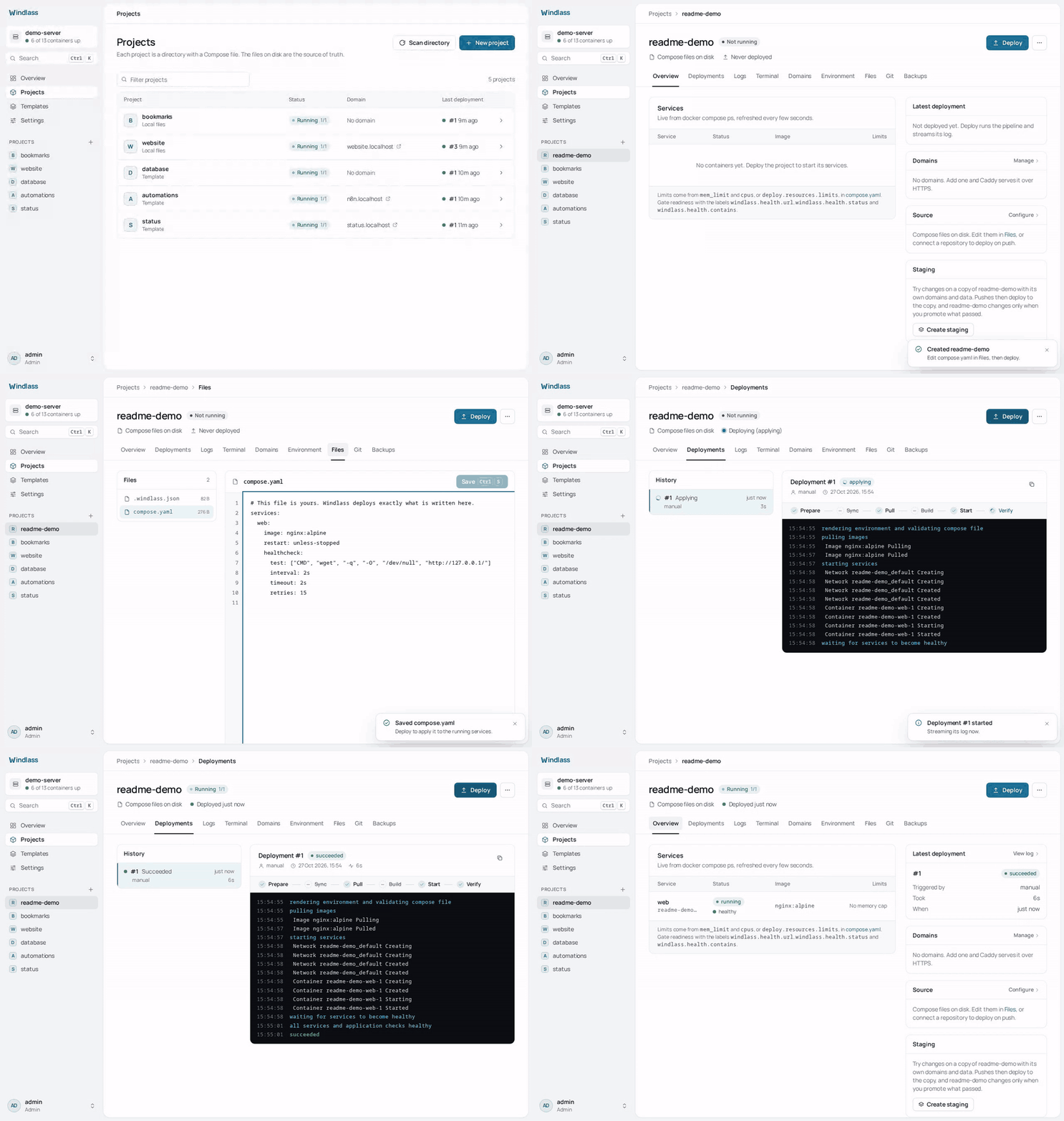
curl -fsSL https://get.windlass.run | sudo sh
Runs on Linux, x86_64 or arm64. Claiming the instance and setting the panel domain are under Install.
Why Windlass
- Your compose file stays yours. Windlass adds no labels, networks or renamed volumes to
it. Routes go to Caddy through its API, so
docker compose up -dby hand still works, and the panel reads the same files you edit. - The panel is not in the request path. Stop Windlass and your sites keep serving: the containers are ordinary Compose containers with a restart policy, and Caddy keeps its routes. See life without the panel.
- Nothing to migrate off. Everything that defines an app is a plain file in
/var/lib/windlass/projects/<name>/. Uninstall Windlass and you keep a folder of Compose projects that run withdocker composealone. - Small enough for the cheapest VPS. No database server or cache to feed besides your apps.
How it compares
Checked against each project's own docs and source on 30/10/2026. Corrections welcome.
| Windlass | Coolify | Dokploy | CapRover | Dokku | |
|---|---|---|---|---|---|
| Deploys your compose file with | docker compose, file unchanged |
its own labels, networks and volume names added ("Raw" mode leaves it mostly alone) | docker compose, Traefik labels written into the file |
converted into CapRover apps; build, networks and deploy ignored |
no compose support; git push, image or archive |
| Runs alongside | Caddy, SQLite | Postgres, Redis, Traefik or Caddy | Docker Swarm, Postgres, Traefik | Docker Swarm, nginx | nginx (other proxies optional) |
| Stated server minimum | none; the panel idles at about 24 MB | 2 GB RAM | 2 GB RAM | 1 GB RAM recommended | 1 GB RAM |
| Licence | Apache-2.0 | Apache-2.0 | Apache-2.0, except /proprietary |
Apache-2.0 | MIT |
If you want a Heroku-style git push workflow, Dokku is the better fit. If you already write Compose files and want a panel that leaves them alone, that is what Windlass is for.
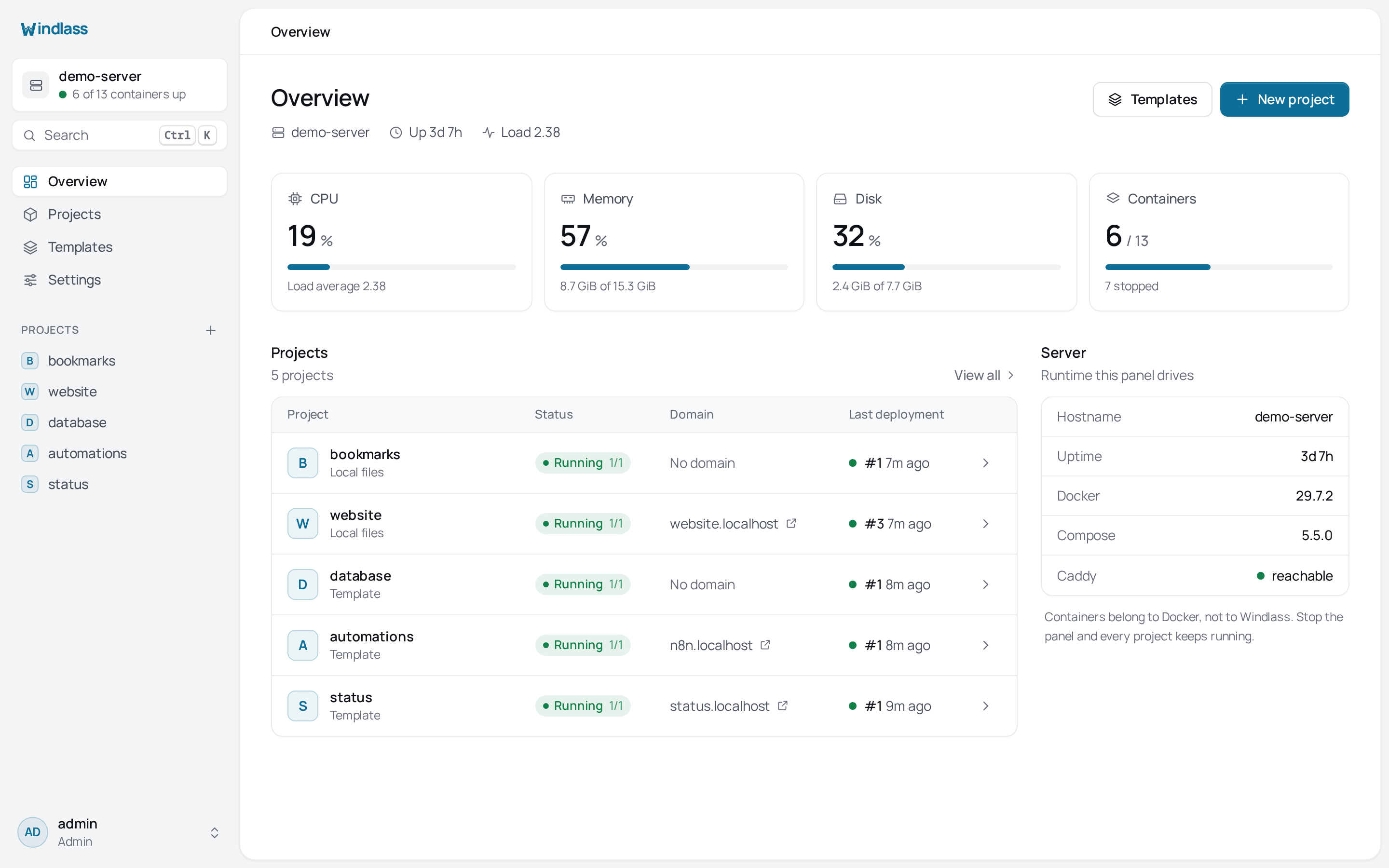
More screens in docs/screenshots, and the full guides at windlass.run.
Source-of-truth model
Application configuration lives under the projects directory:
<projects>/<name>/
├── compose.yaml       # services, images, ports, volumes, networks, env references, limits
├── .env               # optional standard dotenv file; mode 0600
└── .windlass.json     # source repository, branch, auto-deploy, and domains
Windlass executes the real docker compose CLI in that directory. Hand-editing the files
and running docker compose up -d is supported. The Files and Environment screens read the
same files, and Scan directory rebuilds the SQLite project/domain index.
SQLite is not application configuration. It contains platform state such as users, sessions, audit entries, deployment history, jobs, backup records, settings, encrypted credentials, and rebuildable project/domain/environment indexes. Removing SQLite does not stop running containers; filesystem scanning restores the application index, but platform history and accounts require a platform backup.
Runtime model
- One Go process serves the API and embedded React frontend.
- Docker Compose performs deployments.
- Caddy owns routing and certificates. Windlass changes only its tagged route objects.
- A loopback-only Docker socket proxy exposes the API families Compose needs. The
windlasssystem user is not a member of thedockergroup. - No Redis, Kubernetes, Swarm, Prometheus, or separate job service is required.
- CI enforces an idle RSS budget below 40 MiB for the Go process.
Stopping or removing Windlass does not stop deployed applications. See Life without the panel.
Main features
- Manual, Git, webhook, template, and rollback deployments
- Crash-resumable deployment jobs and replayable deployment events
- Staging per project: pushes deploy to a copy with its own domains and data, and Promote deploys the commit and image digests it verified to live
- Caddy application domains and a Settings-managed HTTPS domain for the panel itself
- Raw file editing plus individual or bulk-paste environment variable editing
- Compose-native CPU/memory limit visibility and application readiness checks
- Container logs, browser terminal, host/container metrics, and image cleanup
- Local and S3-compatible backups with optional schedules
- Local users, roles, TOTP, and optional GitHub or Google sign-in
- Personal API tokens, read-only or read-write, for scripts and CI
- Private registry credentials, applied to the host with a real
docker login - Optional external-process plugins
Application readiness is configured with ordinary Compose labels:
services:
  web:
    labels:
      windlass.health.url: https://app.example.com/health
      windlass.health.status: "200"
      windlass.health.contains: ready
      windlass.health.stability_seconds: "10"
Install
curl -fsSL https://get.windlass.run | sudo sh
Claim the instance using the one-time token from sudo journalctl -u windlass | grep setup_token, then open Settings, General, Panel domain after pointing a DNS record at
the server. Caddy obtains and
renews the panel certificate automatically.
See Installation for systemd, container, configuration, update, and uninstall details.
Development and verification
go test ./...
go vet ./...
cd web && npm ci && npm run build
go test -tags integration ./...   # Linux with Docker and Caddy
The production binary embeds web/dist:
CGO_ENABLED=0 go build -trimpath -tags embedweb ./cmd/windlass
Licence
Apache-2.0
Explore related projects
awesome-selfhosted/awesome-selfhosted
A list of Free Software network services and web applications which can be hosted on your own servers
336,883 starsimmich-app/immich
High performance self-hosted photo and video management solution.
119,132 starsStirling-Tools/Stirling-PDF
#1 PDF Application on GitHub that lets you edit PDFs on any device anywhere
96,551 starslouislam/uptime-kuma
A fancy self-hosted monitoring tool
94,013 stars