
StylishThemes/GitHub-Dark
StylishThemes/GitHub-Dark has 10,012 GitHub stars and 640 forks. GitHot measured +1 stars in 24 hours, +7 in 7 days, and +14 in 15 days. Last checked 2026-11-11 05:19 UTC. Last push 2026-10-27.
:octocat: Dark GitHub style with custom syntax themes for code, editors and notebooks
Measured star growth
- in 24h
- +1
- in 7 days
- +7
- in 15 days
- +14
- in 1 month
- Update delayed
Net star changes over overlapping periods, not daily totals. Missing measurements are left blank. Stars measure attention, not software quality.
README.md
Original


Your eyes will :heart: you.
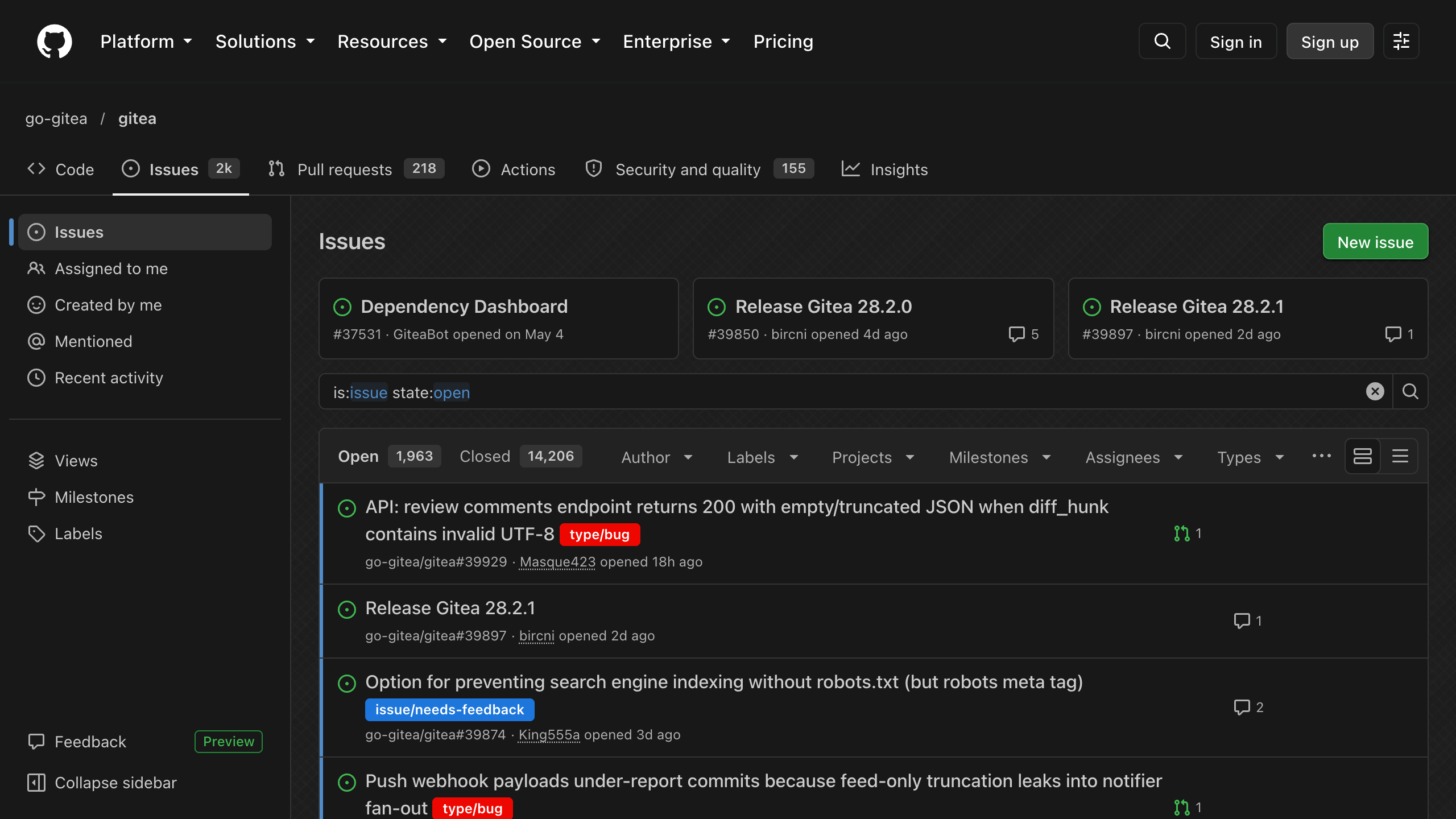
Installation
- Install Stylus for Firefox, Chrome or Cascadea for Safari.
- Install github-dark.user.css.
- Set GitHub itself to dark mode, the style builds on GitHub's dark theme.
For GitHub Enterprise, add domain("github.example.com") to both GitHub @-moz-document rules in the installed style. Extensions that use GitHub's CSS variables, like Refined GitHub, follow the theme automatically.
Options
Change these in the style's settings, in Stylus via the gear icon next to the style.
- Base color: color of links and highlights.
- Background color: page color behind the background image.
- Background: Cross-Hatch, Uniform Tile, Random Tile, None, or Custom to use the image from Custom Background.
- Background image type: tile the image, or scale it to fit the window.
- Background image attachment: scroll the image with the page, or keep it fixed.
- GitHub syntax theme: colors code views, diffs and markdown.
- CodeMirror syntax theme: colors the file and gist editors.
- Jupyter syntax theme: colors notebook previews.
- Code Tab size: width of tabs in code, 2, 4 or 8.
- Unrounded labels and avatars: enabled by default, gives labels, counters, state badges, topics and avatars slightly rounded corners instead of pill and circle shapes.
Custom Background
Set Background to Custom and Custom Background to an image wrapped in url(), like url(https://github.com/user-attachments/assets/…), a bare URL won't work. GitHub's Content Security Policy only allows images from github.com, *.githubusercontent.com and data: URIs, so use one of these:
- Drag the image into any GitHub comment box and copy the uploaded URL, there's no need to submit the comment.
- Commit it to a public repository and use its
raw.githubusercontent.comURL. - Inline a small image as a base64
data:URI.
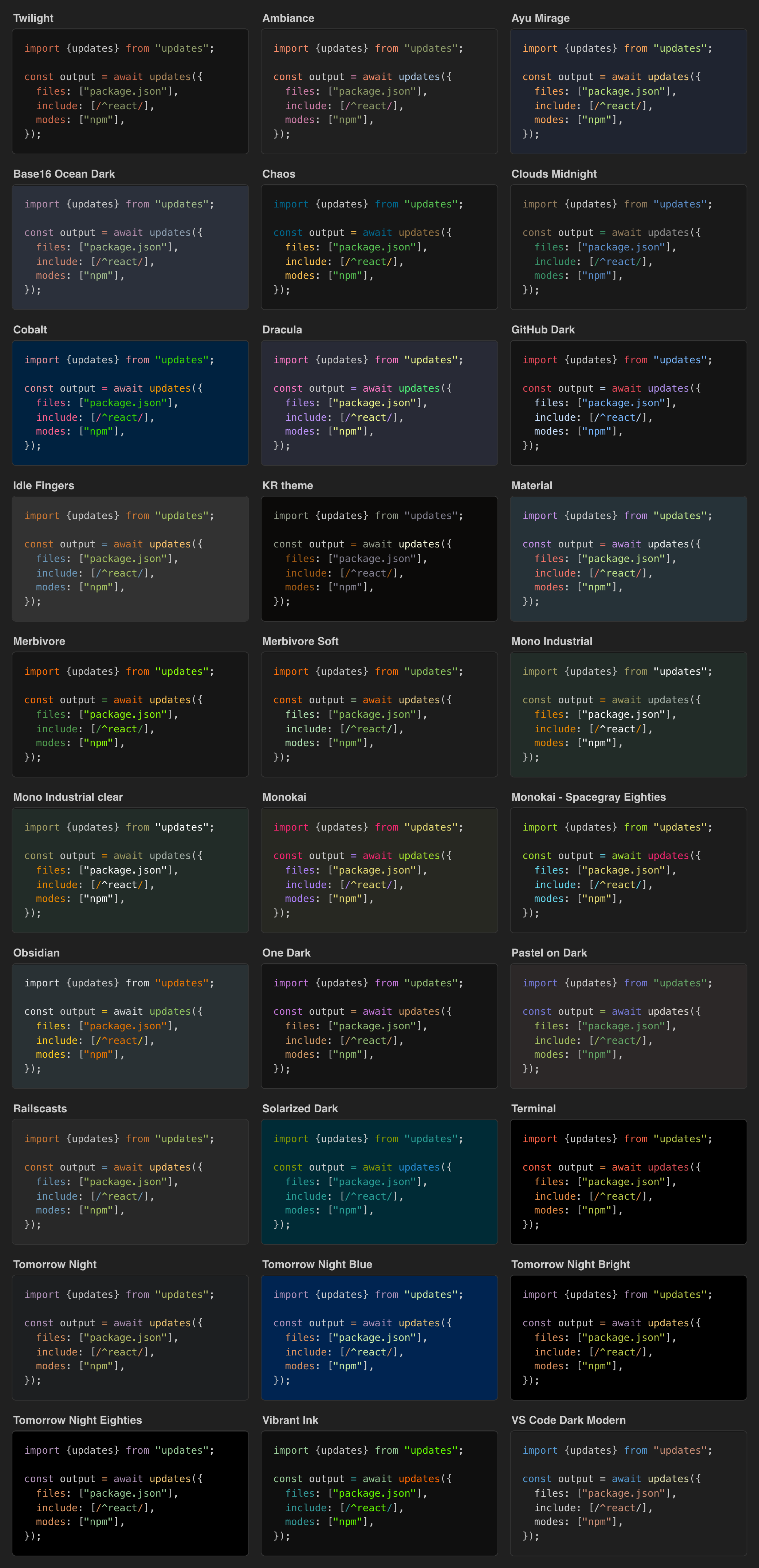
Syntax Themes
Every theme is available for all three syntax theme options. The preview shows the GitHub syntax themes.
Styled Sites
- github.com
- gist.github.com
- support.github.com
- vscode-auth.github.com
- githubstatus.com
- Raw files on raw.githubusercontent.com and gist.githubusercontent.com
- Rendered Jupyter notebooks on notebooks.githubusercontent.com
Additional Userstyles
- GitHub Custom Fonts: code font family and size, the font must be installed locally.
- GitHub Code Wrap: wrap long code lines in diffs, gists and markdown.
- GitHub Dark Diff Color Customizer: custom diff colors, colorblind friendly by default.
Development
Edit github-dark.user.css, there is no build step. It overrides GitHub's Primer CSS variables, plus a few rules with stable selectors for things variables can't reach. Prefer a variable over a rule and never use GitHub's hashed class names.
Run make install to test it in Stylus and make lint to lint it. Release with make patch, make minor or make major, which bump the version of all styles, then commit, tag and push.
Explore related projects
sindresorhus/awesome
😎 Awesome lists about all kinds of interesting topics [NOTE: Pull requests are temporarily disabled until I have a chance to catch up with the existing ones]
535,257 starsEbookFoundation/free-programming-books
:books: Freely available programming books
401,419 starsnilbuild/developer-roadmap
Interactive roadmaps, guides and other educational content to help developers grow in their careers.
371,822 starsvinta/awesome-python
The definitive list that answers "I want to do X in Python, which tool should I use?"
334,065 stars