
StartupHakk/OpenMonoAgent.ai
StartupHakk/OpenMonoAgent.ai has 1,914 GitHub stars and 224 forks. GitHot measured 0 stars in 24 hours. Last checked 2026-11-07 01:09 UTC. Last push 2026-11-02.
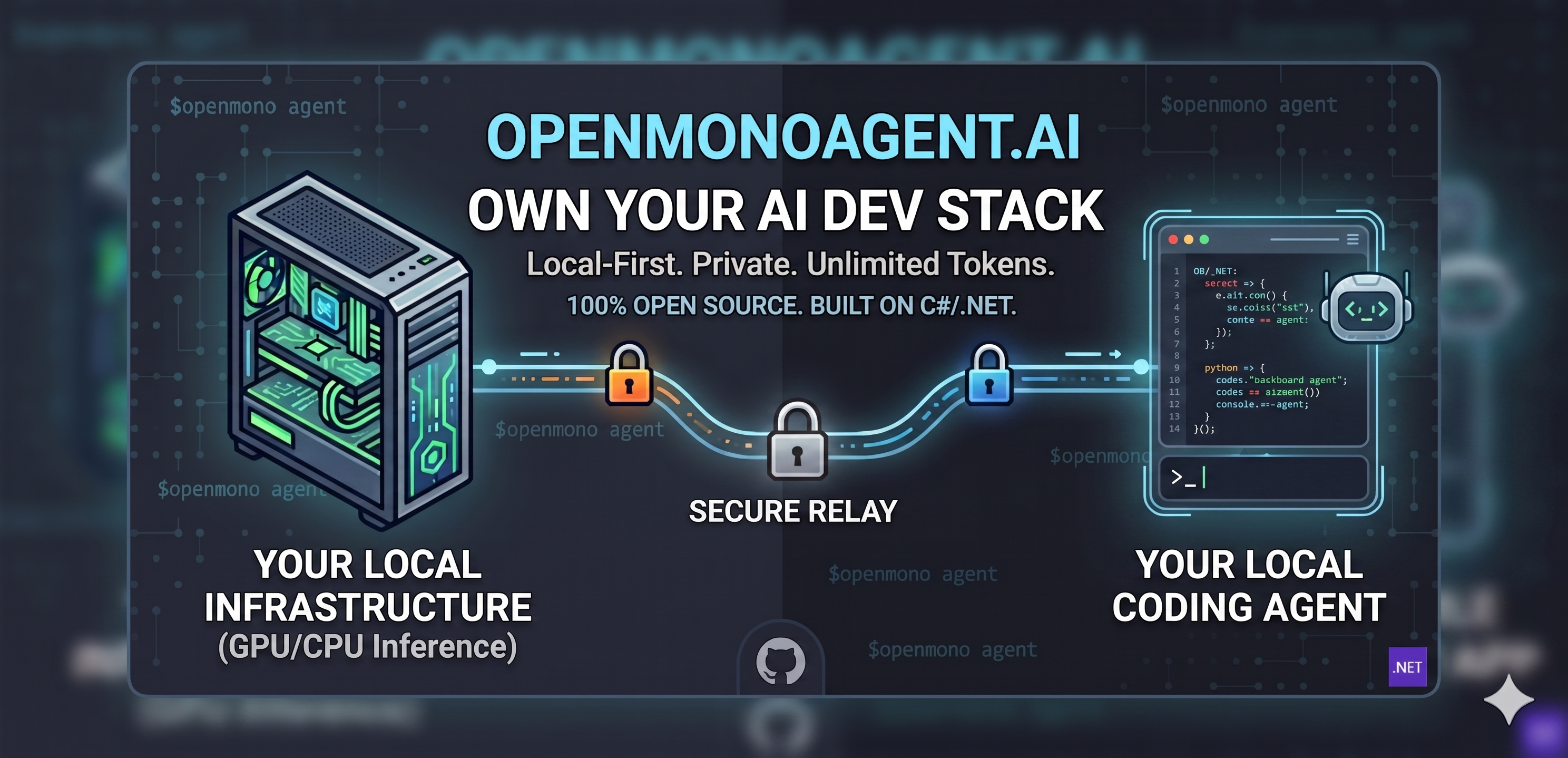
(BETA) AI shouldn't have a meter. Unlimited tokens. Forever. Your machine. Your agent. Use it from anywhere. Terminal-native coding agent powered by local LLMs — 100% open source, free forever, and installed with a single command. Proudly built on C#/.NET, because AI tooling should be infrastructure, not a subscription.
Measured star growth
- in 24h
- 0
- in 7 days
- Collecting history
- in 15 days
- Collecting history
- in 1 month
- Collecting history
Net star changes over overlapping periods, not daily totals. Missing measurements are left blank. Stars measure attention, not software quality.
README.md
Original
Built to democratize AI. Powered by .NET.










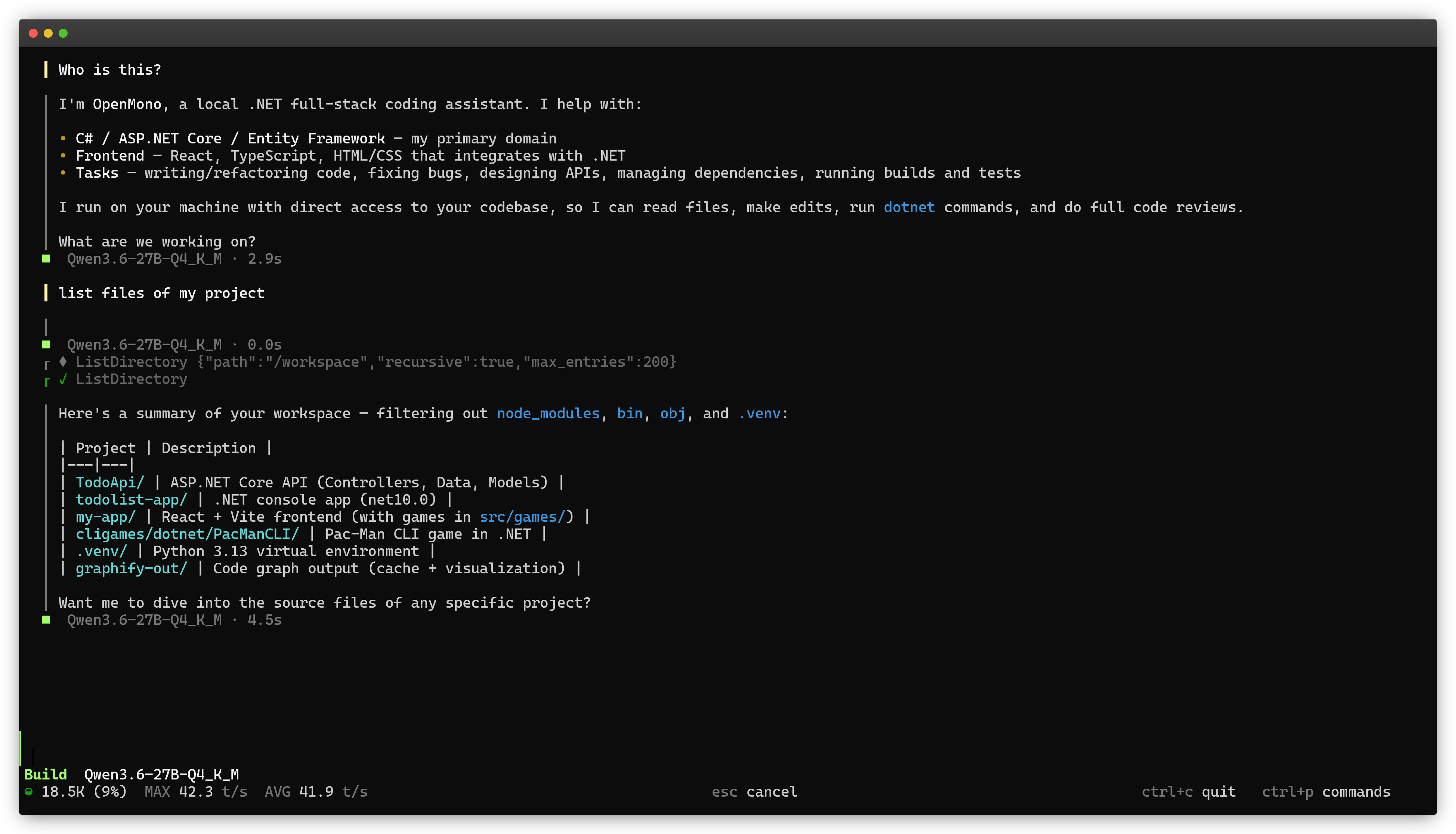
OpenMono is a coding agent that runs entirely on your hardware. No subscriptions, no data leaving your network, no per-token billing. It pairs a .NET 10 CLI with its own llama.cpp inference server, giving you a full agentic loop with 21 built-in tools, Docker sandboxing, and deep code intelligence. NVIDIA GPU, AMD APU (Ryzen 9 7940HS / Radeon 780M iGPU, unified memory), CPU, or Apple Silicon (Metal). It auto-configures itself. You own the model, the compute, and the data.
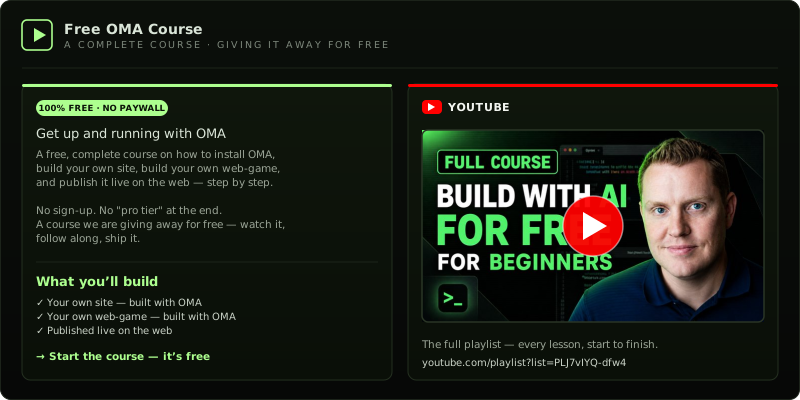
Free Course — Get Started with OMA
Quickstart
One command. Auto-detects an NVIDIA GPU, the AMD Ryzen 9 7940HS iGPU (Radeon 780M), CPU, or Apple Silicon. Installs model, runtime, and Docker containers.
bash <(curl -fsSL https://raw.githubusercontent.com/StartupHakk/OpenMonoAgent.ai/refs/heads/main/get-openmono.sh)
Then from any project:
openmono agent            # TUI mode (default)
openmono agent --classic  # classic scrolling terminal
→ Full command reference. Daily commands, setup flags, GPU/iGPU options · Need help? Book a call
What's shipping
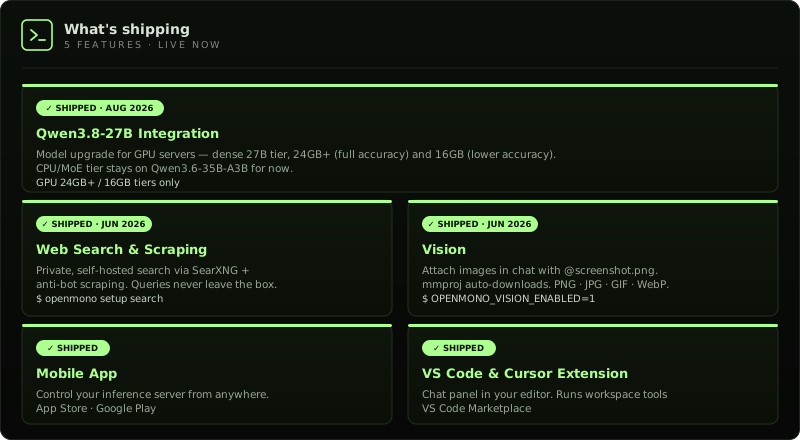
Get them: openmono setup search · OPENMONO_VISION_ENABLED=1 · App Store · Google Play · VS Code Marketplace
How it compares
Most coding agents are cloud products wearing an open-source label. Your prompts, your code, and your context hit someone else's servers on every keystroke. OpenMono runs the model on your hardware — after the one-time setup, inference costs nothing. Your code never leaves the machine. No account. No usage dashboard. No API key.
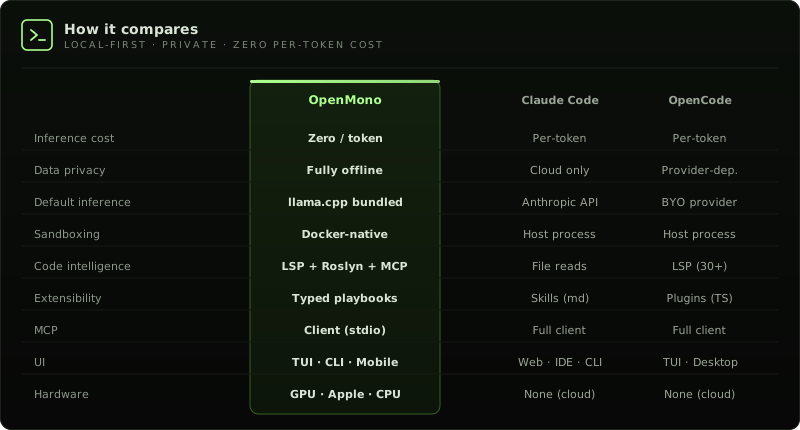
→ Full architecture + diagram · 5 provider backends · runs at ~45 tok/s on GPU, ~20 tok/s on AMD iGPU (APU)
What's inside
01 · Bundled inference — zero config, zero cost
|
02 · Agentic loop that earns its name |
03 · 21 tools, guarded pipeline |
04 · 5 specialist sub-agents
|
05 · Docker sandbox |
06 · Deep code intelligence Auto-detects graphify (semantic concept graph, 25+ languages) and code-review-graph (structural call graph via MCP, ~22 tools) if installed — no config needed. |
07 · Playbooks |
08 · 5 provider backends |
09 · Distributed inference |
10 · Vision |
11 · Private web search & scraping
|
12 · VS Code extension
|
Agent Host (whole-machine mode)
HostExec is a first-class tool, backed by a host-bridge daemon that runs the command on the machine. It is opt-in. openmono setup offers it, and the default is No, because it breaks the container sandbox's isolation by design. Add it later with bash scripts/install-host-bridge.sh. Non-interactive:
OPENMONO_HOST_BRIDGE=1 OPENMONO_HOST_EXEC_DEFAULT=ask openmono setup --agent
Drop --agent for the full role. Set OPENMONO_HOST_EXEC_DEFAULT=allow to skip the per-command prompt. The deny list, sudo policy, and audit log still apply.
openmono upgrade updates the checkout and rebuilds the agent image. openmono upgrade --check previews and does not apply. openmono agent --host starts the daemon, then the agent. Manage it with openmono host daemon, status, stop, requests, approve <id>, deny <id>, and invite. Inside the agent: /host status, /host on, /host off.
HostExec is available only while the session is paired. Parameters: command, timeout_ms (default 300000, max 600000), background, as_root. The default permission is Ask. The HostExec permission card is Allow, Allow all, Deny, or Deny all. A HOST EXECUTION card accepts allow once, allow all for this session, allow 30 minutes, allow today, deny, and deny all. A blanket allow never covers root. host.sudo_policy defaults to ask. The daemon that openmono agent --host starts has no one to prompt, so an ask policy fails closed: as_root runs only when host.sudo_policy is allow. The operator bridge prompts for each escalation when the policy is ask.
Settings live in ~/.openmono/host-bridge.json (mode 0600): host.exec_default (ask, allow, or deny; default ask), host.sudo_policy (ask, allow, or deny; default ask), host.run_as, host.allow_list, host.deny_list (checked first), host.timeout_ms. Every command is audited under ~/.openmono/logs/.
The daemon binds 127.0.0.1:7476 (OPENMONO_HOST_DAEMON_PORT overrides) plus the Docker bridge IP on Linux, and the vmnet bridge on macOS for Colima or Lima. It never binds 0.0.0.0. Pair with the pair secret, a launcher invite, or an approval request you accept with openmono host approve. Invites are TTL-bounded, not single-use (default 900 seconds, range 30 seconds to 86,400 seconds). An idle pairing token expires after 2 hours.
Stand up a server, trace a crash from system logs, or install and configure software. You decide per call how far it reaches.
Supported Hardware
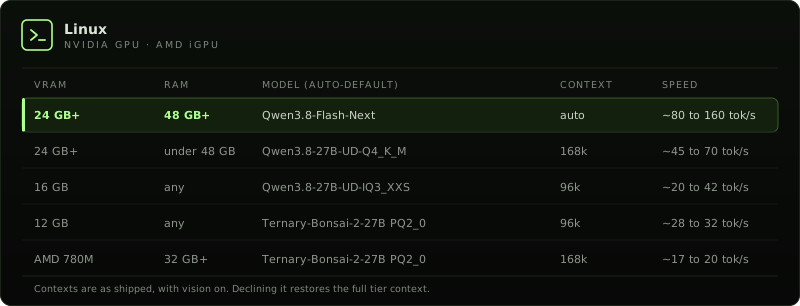
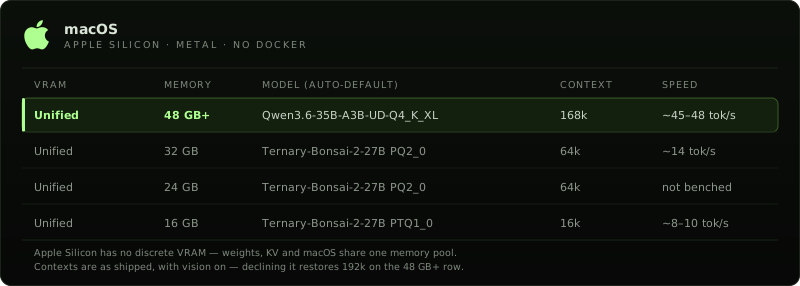
Setup auto-detects GPU, iGPU/APU, and Apple Silicon. No prompts. Pass --options to choose the model, vision, and parallel slots yourself, or --model=<name> to pin one. See Pick your model for the menu, flags, and Linux context presets. The pick depends on VRAM and system RAM: on Linux a 24 GB+ card gets Qwen3.8-Flash-Next (Strata) on a 48 GB-class box and Qwen3.8-27B below that, a 16 GB card keeps Qwen3.8-27B, and a 12 GB card and AMD 780M iGPUs (Ryzen 9 7940HS, 32 GB+ RAM) get Ternary-Bonsai-2-27B via Prism. CPU mode runs Qwen on stock llama.cpp (about 20 GB RAM). Linux setup is for Ubuntu and Ubuntu derivatives, tested on Ubuntu 24.04 LTS. On macOS, the full and inference roles require Apple Silicon (M1+); 48 GB+ unified memory is the recommended, tested configuration. 24 to 47 GB and 16 to 23 GB Macs run Ternary-Bonsai (PQ2_0 / PTQ1_0) with a tighter context window. Intel Macs: agent-only mode. macOS 14+ (Sonoma/Sequoia) recommended.
Pick your model
By default, setup picks a model for the hardware and does not ask. On a terminal, openmono setup --options shows a menu of what this machine can run. The default answer is 1, Qwen on stock llama.cpp (always available, the safe default). Pin one with --model=qwen|bonsai-pq2|bonsai-ptq1|flash-next. Shorthands: --qwen, --bonsai, --bonsai-ptq1, --flash-next.
Qwen is stock llama.cpp, including CPU mode (about 20 GB RAM). Bonsai 2 27B is a ternary build on the PrismML llama.cpp fork (PQ2_0 about 7.2 GB, PTQ1_0 about 5.9 GB). On Linux it runs on an NVIDIA GPU, or on the AMD Ryzen 9 7940HS iGPU (Radeon 780M) through the Prism Vulkan image. There is no CPU image. It keeps a real 27B on 12 GB NVIDIA cards, where Qwen drops to a 9B, and it is the auto-pick on that iGPU. Qwen3.8-Flash-Next runs on Strata: Linux, an NVIDIA GPU, and a 48 GB-class box (about 44 GiB or more of system RAM), with weights streamed from disk. Setup auto-picks it on those boxes when the card has 24 GB or more of VRAM. Otherwise it appears only in the --options menu, and only when the machine can run it.
Linux context presets, before the vision trim: Bonsai 196,608 on 24 GB, 131,072 on 16 GB, 98,304 on 12 GB, 32,768 on 8 GB. Qwen 196,608 on 24 GB and 180,224 on 16 GB. On a 24 GB card the two match. Bonsai's benefit is fitting a 27B model in less VRAM, not a longer window. Vision is on by default and trims the 24 GB preset to 172,032 for both (a 16 GB card goes to 98,304 for both).
Need Help?
Stuck on setup, or want OpenMono on your own servers? We install and support private OpenMono deployments — contact us, book a call, and we'll walk you through getting it running on your hardware. Pick your hardware. We handle the rest.

Docs
Roadmap |
What's next |
Setup & commands |
Daily commands, TUI vs classic, flags |
Deployment modes |
Single-box vs split-box, server-ops runbook |
Architecture |
.NET CLI + llama.cpp + Docker, full diagram |
Models & reasoning |
Model tiers, reasoning mode, provider config |
Configuration |
settings.json, providers, permissions, MCP servers |
Host bridge |
Whole-machine mode: consent, daemon, host-bridge.json |
Playbooks |
YAML workflows, typed params, checkpoint/resume |
graphify |
Semantic code graph, 25+ languages |
code-review-graph |
Structural call graph via MCP |
VS Code extension |
Chat panel for VS Code 1.85+ · also works in Cursor · Marketplace |
Contributing |
How to contribute |
| PUBLIC BETA Early access is open — we're shipping updates fast. Try it out and tell us what you'd like to see next. |
Contributing
| OpenMono is early and moving fast. Contributions are welcome — new tools, providers, LSP servers, playbooks, bug fixes, or docs. |
→ Read the contributing guide before opening a PR
|
"AI shouldn't be a subscription you rent. It should be infrastructure you own —
sitting on your desk, serving your code, answering only to you."
— Startup Hakk

GNU AFFERO GENERAL PUBLIC LICENSE v3.0 · © 2026 StartupHakk
Explore related projects
affaan-m/ECC
The agent harness performance optimization system. Skills, instincts, memory, security, and research-first development for Claude Code, Codex, Opencode, Cursor and beyond.
298,744 starsNousResearch/hermes-agent
The agent that grows with you
261,290 starsmultica-ai/andrej-karpathy-skills
A single CLAUDE.md file to improve Claude Code behavior, derived from Andrej Karpathy's observations on LLM coding pitfalls.
230,384 starsfirecrawl/firecrawl
Supercharge your AI agents with data from the web and beyond. Building the library for superintelligence. 🔥
199,303 stars