
Skardyy/mcat has 1,463 GitHub stars and 57 forks. GitHot measured +1 stars in 24 hours. Last checked 2026-11-07 06:07 UTC. Last push 2026-11-02.
Terminal image, video, PDF, and Markdown viewer
Measured star growth
- in 24h
- +1
- in 7 days
- Collecting history
- in 15 days
- Collecting history
- in 1 month
- Collecting history
Net star changes over overlapping periods, not daily totals. Missing measurements are left blank. Stars measure attention, not software quality.
README.md
OriginalMcat

View images, video, Markdown, PDF, and Office documents
In your Terminal


Installation • Examples • CHANGELOG
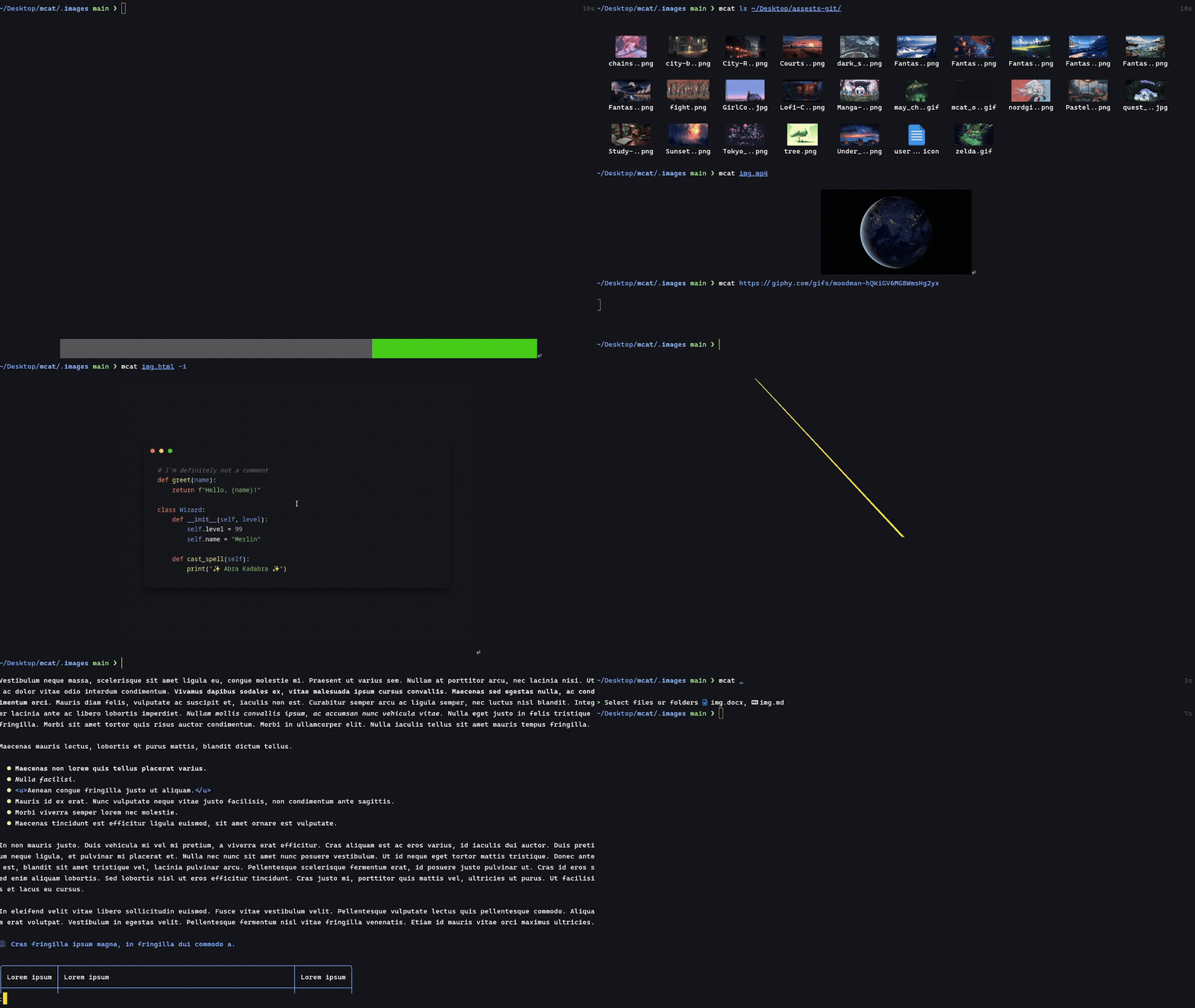
Installation
From Source
cargo install mcat
or ~
git clone https://github.com/Skardyy/mcat
cd mcat
cargo install --path ./crates/core
Prebuilt
follow the instructions at the latest release
Homebrew (macOS/Linux)
brew install mcat
AUR (Arch linux)
yay -S mcat-bin
Nix
environment.systemPackages = [ pkgs.mcat ];
Scoop (Windows)
scoop install mcat
Conda (conda-forge)
conda install -c conda-forge mcat
How it works
Advanced explanation
| Input |
|---|
Inputs can be:
- local file
- url
- bytes from stdin
The type of each input is inferred automatically, and it continues through the pipeline until it reaches the output format the user requested.
| In the pipeline |
|---|
For example, if the user runs:
mcat file.docx file.pdf -o inline
mcat will:
- Convert both
file.docxandfile.pdfinto a single Markdown file - Convert that Markdown into HTML
- Convert the HTML into an image
- Convert the image into an inline terminal image and print it
You can also start from the middle of the pipeline.
For example:
mcat file.html -o image > image.png
This starts at an HTML file and directly converts it into a PNG image.
| Explanation of the blocks |
|---|
Markdown- set when-o mdor when the stdout isn't the terminal (piped)Markdown Vieweris markdown with ANSI formatting, and is the default for any non video / image file. (the-cflag forces it)HTMLset when-o html-- only works for non image / video filesPNG Imageset when-o imageand gives an imageInteractive Viewerset when-o interactiveor-Iand launches an interactive view to zoom and pan the image in the terminal.Inline Displayset when-o inlineor-iand prints the content as image in the terminal
Example Usage
#---------------------------------------#
#  View documents with ANSI formatting  #
#  in the terminal                      #
#---------------------------------------#

mcat resume.typst
mcat project.docx -t monokai           # With a different theme
mcat "https://realmdfm.com/file.md"    # From a url
cat file.pptx | mcat                   # From stdin
mcat .                                 # Select files interactively

#-----------------#
#  Convert files  #
#-----------------#

mcat archive.zip > README.md           # Into Markdown
mcat f1.rs f2.rs -o html > index.html  # Into HTML
mcat index.html -o image > page.png    # Into image

#--------------------------#
#  View Images and Videos  #
#  in the terminal         #
#--------------------------#

mcat resume.pdf                        # Pdf
mcat img.png                           # Image
mcat video.mp4                         # Video
mcat "https://giphy.com/gifs/..."      # From a URL
mcat README.md -i                      # Converts to image and then shows it
mcat ls                                # ls command with images
mcat massive_image.png -I              # zoom and pan the image interactively in the terminal
mcat document.pdf -I                   # view PDF rendered as images interactively
mcat img.png README.md -I              # view multiple files as images interactively

#--------------------------#
#  What I use it most for  #
#--------------------------#

mcat ls                                # To find the image i was looking for
mcat . | pbcopy                        # Selects files, concat them, and copy to clipboard
mcat index.html -o image > save.png    # Render HTML into images
mcat archive.zip                       # View the content of a zip file.
Support
To see which file types support which features, see the table here.
Optional Dependencies
Mcat will continue working without them
Chromium (for rendering HTML/Markdown/Text to image)
- Available by default on most Windows machines via Microsoft Edge.
- Also works with any installed Chrome, Edge, or Chromium.
- You can install it manually via
mcat --fetch-chromium
FFmpeg (for videos)
- If it's already on your machine.
- Otherwise, you can install it with
mcat --fetch-ffmpeg
Thanks to all contributors
Explore related projects
codecrafters-io/build-your-own-x
Master programming by recreating your favorite technologies from scratch.
560,555 starspublic-apis/public-apis
A collective list of free APIs
496,835 starsmorluto/rea
Reverse engineer anything with agents, from app behavior down to native binaries.
439,090 starsopenclaw/openclaw
The AI that really does things. Any OS. Any Platform. The lobster way. 🦞
394,097 stars