
SkardiLabs/skardi
SkardiLabs/skardi has 111 GitHub stars and 10 forks. GitHot measured 0 stars in 24 hours. Last checked 2026-11-18 08:32 UTC. Last push 2026-11-15.
Measured star growth
- in 24h
- 0
- in 7 days
- Collecting history
- in 15 days
- Collecting history
- in 1 month
- Collecting history
Net star changes over overlapping periods, not daily totals. Missing measurements are left blank. Stars measure attention, not software quality.
About
Skardi is a self-improving context framework for ai agents
AIREADME.md
Original
Skardi is an open-source self-improving context framework.
Let your agent query any of your data, declaring why it asks. Skardi records every ask, so the intentions that keep coming back can become named tools and standing routines.
Observe · every query, with intent · Learn · what recurs across sessions · Act · new tools and routines — automation in flight
How the loop works • Install • Documentation • Discord






The loop
Most agent stacks freeze their data tools at ship time: you guess which queries the agent will need, wrap each one by hand, and find out in production what you guessed wrong. Skardi inverts that. The agent gets one general way in, and the tools it ends up with are the ones it demonstrably reached for.
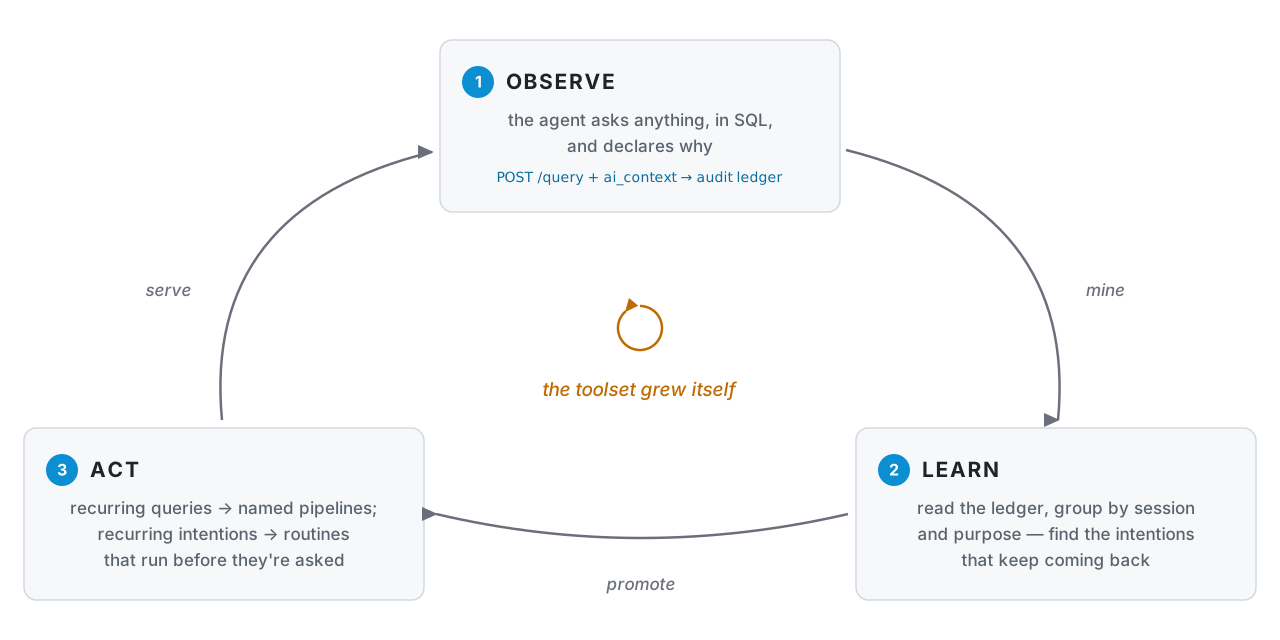
1 — Serve your data, with the ledger on. One ctx.yaml names your sources
(full reference); --query-audit-db turns on the durable
record that makes the rest of the loop possible.
kind: context
metadata: { name: acme }
spec:
  data_sources:
    - name: warehouse            # step 2 queries warehouse.public.subs
      type: postgres
      hierarchy_level: catalog   # register every table in the database
      connection_string: postgres://localhost:5432/acme
# from a source checkout; the v0.6.0 Docker image takes the same flags (Docker & cloud, under More)
git clone https://github.com/SkardiLabs/skardi.git && cd skardi
cargo run --release --bin skardi-server -- \
  --ctx ctx.yaml --query-audit-db ./audit.db --port 8080
2 — Your agent explores freely, declaring intent. Any SQL over any
registered source, federated in one statement. ai_context is how the agent
says why — purpose (this query), session_id (this run), and optional
task (the larger work a run of queries serves) are recorded, never executed.
curl -X POST localhost:8080/query -H 'Content-Type: application/json' -d @- <<'JSON'
{ "sql": "SELECT plan, COUNT(*) AS cancels FROM warehouse.public.subs WHERE cancelled_at > now() - interval '7 days' GROUP BY plan",
  "ai_context": { "purpose": "weekly churn check, by plan", "session_id": "sess-1a2b", "task": "Q3 retention review" } }
JSON
3 — Promote what recurs. in flight — the
skardi-query-log skill
reads the ledger, writes the pipeline, reloads the server, health-checks it, and
rolls back if the install fails. The server flag it relies on,
--query-audit-db, ships in v0.6.0; the skill itself is still in review, and
until it lands you can read the ledger yourself with plain SQL — it is a SQLite
file indexed on (session_id, created_at).
# /skardi-query-log --db ./audit.db --dir pipelines/ --port 8080 --restart-cmd '...'
#   → 4 sessions asked the same churn question with different windows
#   → wrote pipelines/weekly-churn.yaml, reloaded, /health/weekly-churn ok
kind: pipeline
metadata: { name: weekly-churn, version: "1.0.0" }
spec:
  query: |                                   # the varying window, parameterized
    SELECT plan, COUNT(*) AS cancels FROM warehouse.public.subs
    WHERE cancelled_at > now() - CAST({window} AS INTERVAL)
    GROUP BY plan ORDER BY cancels DESC
4 — The agent has a new tool. One definition, every binding — shell, REST, and MCP over both transports (local stdio and remote streamable HTTP) — so the same promoted pipeline works in Claude Code, Cursor, your own loop, claude.ai, or any HTTP host, with no wrapper code to maintain.
# shell verb — any agent with a Bash tool, no MCP config
skardi run weekly-churn -p window='7 days'
# same pipeline, served as REST
curl -X POST localhost:8080/weekly-churn/execute \
  -H 'Content-Type: application/json' -d '{"window": "7 days"}'
# same pipeline as an MCP tool — hosts that spawn a local process (Claude Desktop, …)
# (v0.6.0 or later)
skardi mcp
# … and as remote MCP — hosts that only take a URL (claude.ai, hosted agents):
# the server above already serves http://localhost:8080/mcp. With auth enabled
# every request carries a Bearer token; a public hostname is declared with
# --mcp-allowed-host api.example.com (loopback is always allowed).
Both MCP bindings — the local skardi mcp bridge and the server's /mcp
endpoint — project the same tool surface; docs/mcp.md covers
host setup, auth, the host allowlist, and reverse proxies for both.
Promoting queries into pipelines is only the simplest form of Act. The same ledger supports
acting on intentions: when every weekday morning ends with the same GitHub +
Slack queries, each declaring purpose: "daily standup", the pattern isn't a
pipeline — it's a routine, and any harness that can run an agent on a schedule
(Claude Code routines, a cron-driven CLI run) can have the standup drafted
before anyone asks. And because the ledger is one SQLite file (or one
Postgres database, via SKARDI_QUERY_AUDIT_PG_DSN — same fail-closed
contract, storage swapped), you can hand a window of it to an LLM and ask
what keeps being needed that nobody turned into a tool — recurring
intentions the user hasn't noticed yet. One boundary is yours
to set: ledger rows carry raw SQL, literals included, so keep that analysis on a
local model or redact first — sending a window to a hosted LLM should be a
deliberate opt-in, not a default. Both land as skills on
top of the ledger, like
skardi-query-log —
no server changes required.
Then back to Observe, with one fewer thing your agent has to figure out from scratch.
Why it compounds
- Intent is recorded, not inferred. The ledger stores why each query ran, not just what ran. Two statements with different SQL and the same purpose are the same question — which is the difference between mining patterns and grepping strings.
- One chokepoint means one memory. Every source sits behind one engine, so a recurring need spanning Postgres, Parquet on S3 and a SaaS API is visible as one pattern. Across N SDKs it is N unrelated log files.
- Promotion is reviewable. What the loop produces is pipeline YAML you read,
diff, edit and revert — not a learned weight you have to trust. Writes stay
governed on the way in too:
access_modegates DML per source, DDL is always rejected, and literals never reach your logs or OTLP stream (why).
Beta. Skardi is under active development and APIs may move. Hit us on Discord if you want to co-design a POC.
Install
One line installs the CLI, then offers to set up the Claude Code, Codex
and Cursor it finds on your machine: the skills below in each agent's skills
directory, and Skardi's MCP server in each agent's config (Skardi Cloud by
URL, with sign-in in the browser; or a local skardi-server through
skardi mcp):
curl -fsSL https://raw.githubusercontent.com/SkardiLabs/skardi/main/install.sh | bash
Run it as yourself, not with sudo. Add --agents-only to update the skills
or set up an agent you installed later, and --help for the rest. The
sections below are the same steps by hand.
On Windows, one line in PowerShell does the same: it installs skardi.exe,
adds it to your user PATH with no admin rights needed, then offers to set up
the Claude Code, Codex and Cursor it finds:
irm https://raw.githubusercontent.com/SkardiLabs/skardi/main/install.ps1 | iex
To pass -AgentsOnly or another option, run it as a script block:
& ([scriptblock]::Create((irm https://raw.githubusercontent.com/SkardiLabs/skardi/main/install.ps1))) -AgentsOnly.
Four skills. auto-context
turns a folder of documents — or a datastore you already run — into governed,
searchable context served over HTTP by skardi-server: hybrid search (vector +
FTS + RRF), defaulting to a local SQLite file the skill creates and owns, or
pointed at Postgres + pgvector, MongoDB, or Lance.
retrieval
teaches the agent to answer questions from a skardi-server you already run.
graph-source
connects a property graph and queries it through SQL, and
graph-rag
answers questions whose evidence is in graph relationships.
All four run on every Agent Skills host below. They differ only in where the skill directory goes.
Claude Code installs from the marketplace:
/plugin marketplace add SkardiLabs/skardi-skills
/plugin install skardi@skardi-skills
Every other host installs from a checkout:
git clone https://github.com/SkardiLabs/skardi-skills.git && cd skardi-skills
Codex, Cursor, Pi, dsh and OpenCode all read the cross-tool
~/.agents/skills/ convention, so one copy covers all five:
mkdir -p ~/.agents/skills
cp -r skills/auto-context ~/.agents/skills/auto-context
cp -r skills/retrieval ~/.agents/skills/retrieval
cp -r skills/graph-source ~/.agents/skills/graph-source
cp -r skills/graph-rag ~/.agents/skills/graph-rag
OpenClaw installs through its own CLI
instead of copying, and Hermes
reads ~/.hermes/skills/:
openclaw skills install ./skills/auto-context   # add --global for every workspace
mkdir -p ~/.hermes/skills && cp -r skills/auto-context ~/.hermes/skills/auto-context
Per-host native directories, project-scoped installs and the Hermes
external_dirs option are covered in the
skardi-skills README.
CLI — pre-built for x86_64/aarch64 Linux and Apple Silicon (Intel Macs:
build from source — the one-liner below has no published artifact there):
curl -fSL "https://github.com/SkardiLabs/skardi/releases/latest/download/skardi-$(uname -m | sed 's/arm64/aarch64/')-$(uname -s | sed 's/Linux/unknown-linux-gnu/' | sed 's/Darwin/apple-darwin/').tar.gz" | tar xz
sudo mv skardi /usr/local/bin/
Against skardi-cloud, one command signs the CLI in — the console authenticates you in a browser and you approve one workspace, so there is no OAuth client to provision per deployment:
skardi login
That goes to the hosted console, https://console.skardi.ai. A self-hosted
deployment names its own with --control-plane https://your-console.example.com
(or $SKARDI_CONTROL_PLANE_URL, or console: in ~/.skardi/config.yaml).
It writes a workspace-scoped token into ~/.skardi/config.yaml. --no-browser
prints the approval URL instead of opening one, which is how a headless or
SSH'd host logs in: nothing has to come back to the machine running skardi.
See docs/cli.md for the
other way in (--client-id, which selects workspaces from the terminal) and
for what a cloud context can and cannot do.
A coding agent can also connect your data sources for you: skardi login --control asks you to approve a 24-hour control token beside the query
token, after which skardi integrations … connects a provider through a page
only you can open — the agent is never handed a secret — and every command
prints the next one. skardi mcp register claude-code adds the workspace's
MCP server to Claude Code. See
docs/cli.md.
Server — a Docker image, or a source build (no pre-built binary yet):
git clone https://github.com/SkardiLabs/skardi.git && cd skardi
cargo build --release -p skardi-server --features candle,chunking   # local embeddings + chunk(); pure Rust
cargo install --locked --path crates/cli                            # the CLI, from the same checkout
That gives the retrieval skills what they need — chunk() plus a local
embedding UDF — and builds with cargo alone. (chunking is already a default
server feature; naming it keeps the line correct against older tags.)
--features rag widens that to all four embedding backends, and one of them
— gguf — compiles llama.cpp through cmake, so that build needs cmake and a
C++ toolchain on the machine. Reach for rag when you want gguf, onnx or
remote_embed; otherwise the line above is the cheaper build. Or skip building
altogether and run a published server image that ships the embedding backends
(see Docker & cloud under More).
What's underneath
One Rust process (DataFusion in-process) plus a small SQLite file for the ledger and optional auth. One server serves many agents; deploy it next to your data, behind your usual auth.
- Federated SQL — one statement across every registered source, no application-side joins. docs/federated-queries.md
- Pipelines — a YAML file with parameterized SQL becomes a REST endpoint
(schema inferred) and a
skardi runverb. This is what the loop promotes into. docs/pipelines.md - Semantic overlay — plain-English descriptions of tables and columns served
on
GET /data_source, so the agent reads what data means before querying instead of guessing from a schema dump. docs/semantics.md - Offline jobs — async batch writes (append, or upsert into Lance on merge keys) with atomic commit, crash recovery and a run ledger you can list and inspect. docs/jobs.md
- Webhooks — a
kind: webhookYAML becomes a public route that verifies a provider's push deliveries (WhatsApp Cloud API today) and appends them to a table, with the same column grammar as a source pack; a job then dedups them into Lance. docs/webhooks.md - Retrieval built in — KNN, FTS and hybrid RRF in SQL;
candle()embeddings,chunk(),onnx_predict()andllm_extract()as UDFs, so content and vector land on the same row atomically. docs/embeddings/
Supported data sources
| Type | CRUD | Catalog | Notes | Docs |
|---|---|---|---|---|
| PostgreSQL | Full | Yes | pgvector KNN, FTS (pg_fts, plus tsvector predicates pushed down from raw SQL), one-dimensional bigint[] read/write (non-NULL elements) and membership filters, configurable read/write pools and initialization budgets |
docs |
| MySQL | Full | Yes | Table or catalog registration | docs |
| SQLite | Full | Yes | sqlite-vec KNN, FTS | docs |
| MongoDB | Full | No | Collections with point lookups | docs |
| Redis | Full | No | Hashes mapped to SQL rows | docs |
| DynamoDB | Full | Yes | Scan + filter pushdown | docs |
| SeekDB | Full | Yes | MySQL-wire CRUD, FULLTEXT, HNSW | docs |
| ClickHouse | Read | Yes | Columnar OLAP, filter/limit pushdown | docs |
| Lance | Read + job-write | No | KNN, BM25 FTS; job destination, local or in S3 | docs, S3 |
| Apache Iceberg | Read | No | Schema evolution, partition pruning | docs |
| InfluxDB 3 | Read | No | Time series over Arrow Flight SQL | docs |
| S3 / GCS / Azure | Read | No | CSV, Parquet, Lance in object stores | docs |
| CSV / Parquet | Read | No | Local or remote files | docs |
| SaaS via Open Connector | Read | Yes | GitHub, Slack, Notion, Feishu, Lark, Gmail, Discord, Outlook, OneDrive, Google Drive, Dropbox, WhatsApp packs as stable SQL tables; Slack channel history and Feishu/Lark document text as content tables, with time-window pushdown for incremental scans; pushdown + TTL cache | docs |
| Documents | Read | No | PDF/Office/ODF/image → per-page Markdown, tables, images; Markdown and plain text read directly, one row per heading or paragraph run; optional empty-text rows | docs |
| RSS / Atom | Read | Yes | Feeds as feeds + items; per-feed TTL cache, fault isolation, un-sandboxed fetch egress |
docs |
| Obsidian | Read | Yes | Vault as notes/links/tags; frontmatter JSON, resolved link graph, tags (feature obsidian) |
docs |
| Graph (Apache AGE) | Read | Yes | Read-only openCypher over Postgres; YAML views as catalog tables, cypher_query UDTF |
docs |
More
Architecture diagram
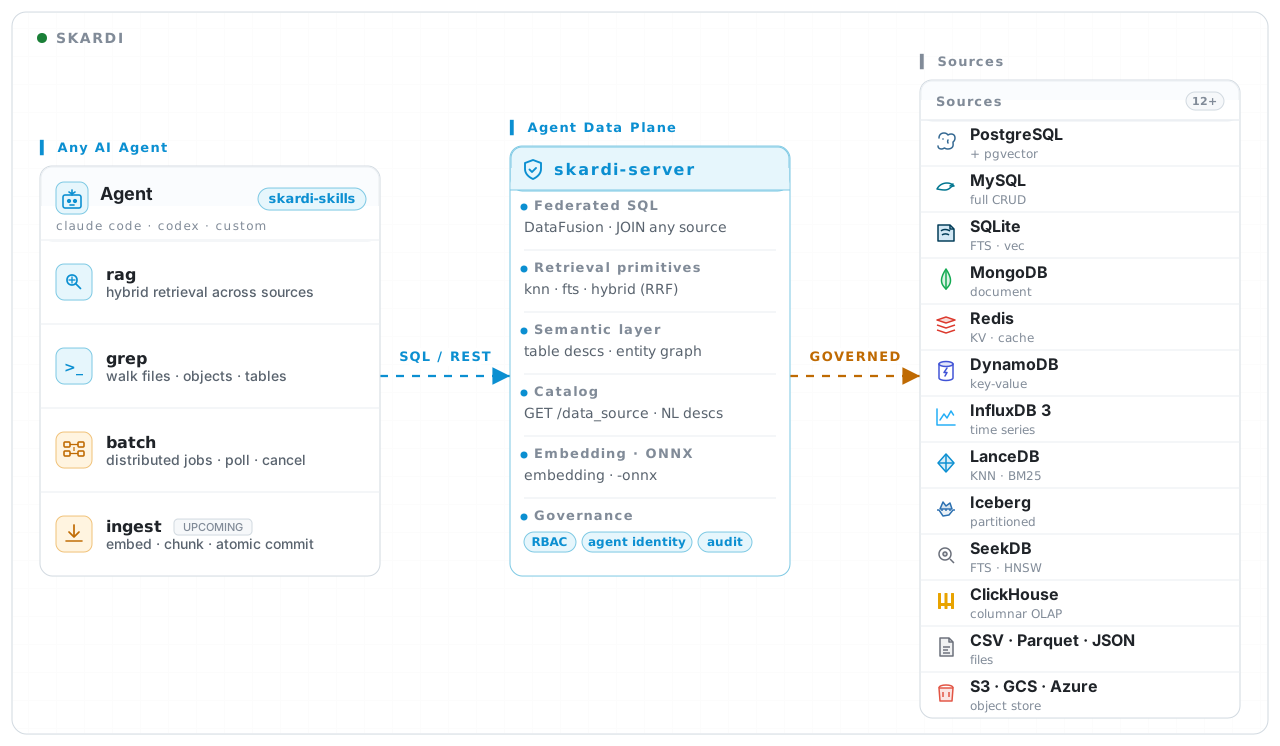
Most sources read a store that already holds rows. RSS/Atom is the one that reaches out over the open web at query time — one DataFusion partition per feed so a dead feed degrades alone, and, because feed URLs are agent-authored input, a fetch deliberately left un-sandboxed in OSS for operators to gate at the infrastructure layer. See docs/rss.md.
Docker & cloud
docker run --rm -p 8080:8080 \
  -v /path/to/ctx.yaml:/config/ctx.yaml \
  -v /path/to/pipelines:/config/pipelines \
  ghcr.io/skardilabs/skardi/skardi-server-lite:latest \
  --ctx /config/ctx.yaml --pipeline /config/pipelines --port 8080
Two images are published per release: skardi-server-lite (default build —
chunking only) and skardi-server-full (every stable feature: RAG/embedding,
LLM extraction, documents, RSS). For anything in between, build locally with
docker build -t skardi --build-arg FEATURES=<flags> . (e.g. FEATURES=rag).
The fastest cloud path is the
Sealos template.
The full image's documents support is PDF-only: it ships PDFium, but not
the LibreOffice/ImageMagick converters that Office/ODF/image inputs need, and
OCR is HTTP-only (ocr_server_url) in every build. For a non-PDF corpus,
derive an image that installs those tools —
FROM ghcr.io/skardilabs/skardi/skardi-server-full:latest plus
apt-get install -y libreoffice imagemagick. See
docs/documents.md.
Worked examples & docs index
Each demo ships a self-contained ctx.yaml plus pipelines, so reading the YAML
shows the shape in practice: llm_wiki (agent-native wiki —
hybrid search, inline embeddings), rag,
simple_backend (REST on SQLite + auth),
movie_recommendation (ONNX NCF model).
Source-specific demos are linked from the table above.
Reference: server (ad-hoc queries, ai_context, the audit
ledger) · CLI · pipelines ·
jobs · webhooks · semantics ·
federated queries ·
embeddings · chunking ·
ONNX · LLM extraction ·
JSON packing · auth ·
observability.
Community
Pick the channel that fits:
- Discord — real-time chat, POC co-design, and shaping what lands next.
- GitHub issues — bug reports and feature requests; we'll pair with you on design and review.
- Security — vulnerabilities go to a private channel, never a public issue.
We read everything — and a ⭐️ helps other agent builders find the project.
Contributors
Security
Skardi sits between your agents and your data, so we treat reports seriously. Please don't post vulnerabilities as public issues — report them privately via GitHub security advisories and we'll follow up with you there.
License
Apache 2.0 — see LICENSE.