
Sived80/vedetta
Sived80/vedetta has 108 GitHub stars and 5 forks. GitHot measured 0 stars in 24 hours. Last checked 2026-11-16 19:44 UTC. Last push 2026-11-15.
Measured star growth
- in 24h
- 0
- in 7 days
- Collecting history
- in 15 days
- Collecting history
- in 1 month
- Collecting history
Net star changes over overlapping periods, not daily totals. Missing measurements are left blank. Stars measure attention, not software quality.
About
Home Assistant app: a local network scanner that finds, recognizes and explains every device on your LAN (name, brand, model, presence, latency). No cloud, no accounts.
Self-hostedREADME.md
Original
Your router says “Unknown device”.
Vedetta tells you what it is — and shows you why.
A Home Assistant app that finds the devices on your LAN, works out what each one is, and shows the evidence.








🌐 Try Live Demo · Install in 2 minutes · How it explains itself · Report a device · Docs · Roadmap
🌐 Try the live interactive demo — experience Vedetta with 39 household devices directly in your browser. No installation or setup required.
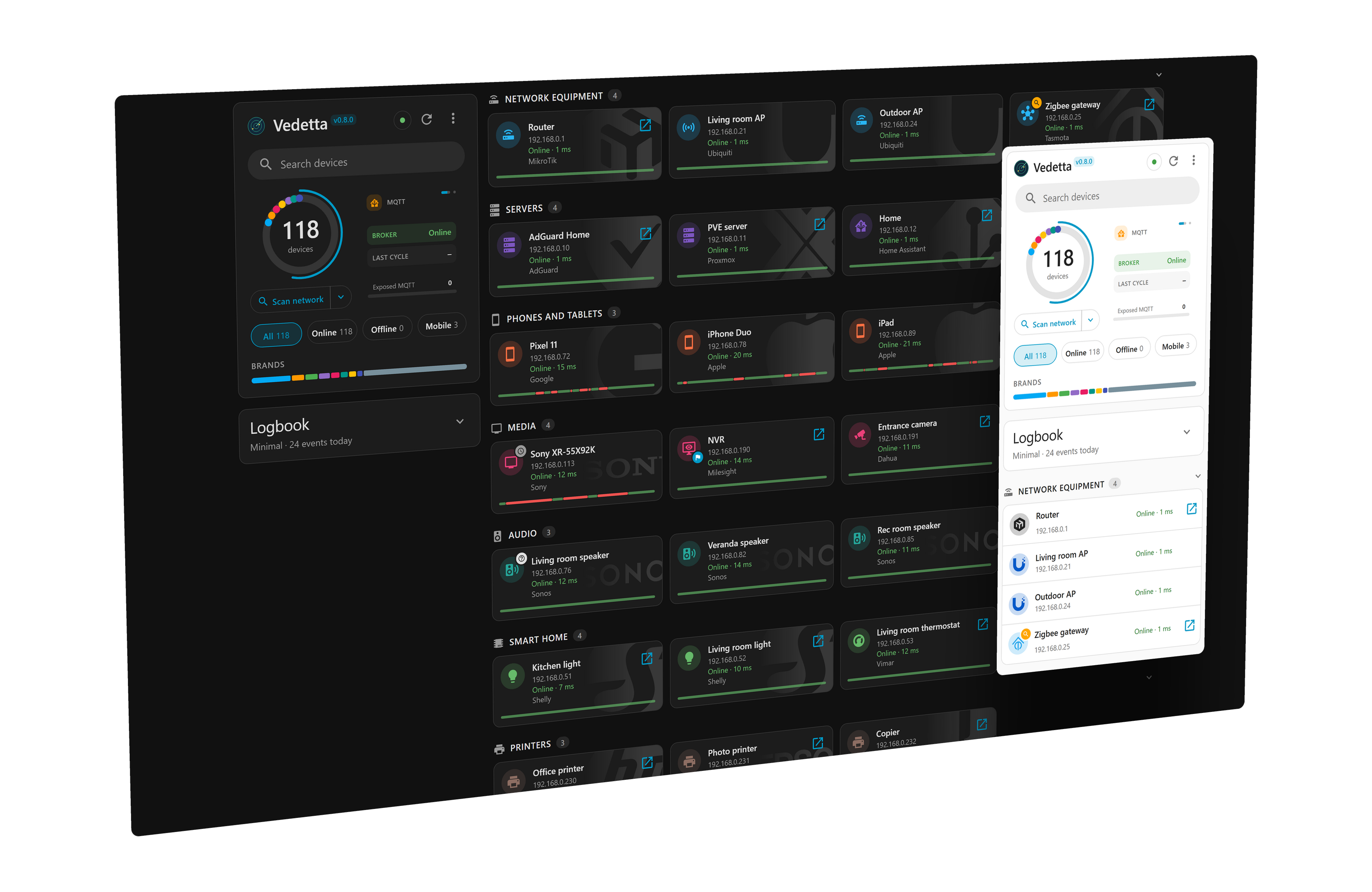
Tiles or list · light or dark · one tap to the evidence behind every name
What is Vedetta
You have a few dozen devices on your network. Your router lists their IP addresses and, if you are lucky, a name like Android_7F3A or “Unknown device”. Home Assistant knows some of them. The rest are a guess.
Vedetta is the lookout of your LAN. It does three things, in this order:
| 🔭 Discover | 🧠 Recognize | 🔎 Explain |
|---|---|---|
| Finds every device on your network, with presence and latency history. | Works out name, brand, model and category from many weak clues, and stays honest when it does not know. | For every answer, shows the clues behind it and how much each one counted. |
It is a Home Assistant app (not a custom integration): install it from the App store, no YAML. It reads Home Assistant’s registry to learn the names and rooms you already chose, and publishes back only what you decide to share.
Not another network scanner
A scanner gives you a list. Vedetta gives you an answer and the reason. The same device, seen two ways (an example):
| A typical scanner | Vedetta | |
|---|---|---|
| What you see | 192.168.1.23 · AA:BB:CC:… · Espressif Inc. |
Kitchen light · Shelly · smart switch |
| When it is not sure | “Unknown device”, Android_7F3A |
It says so and keeps the device in Other |
| Why that name | Not explained | Every clue behind it is one tap away, with its weight |
| What you set by hand | Can be lost at the next scan | Is never overwritten |
Show your work
Every clue is weak on its own. Vedetta weighs them together, counts a repeated fact once, and shows doubt as doubt. The weights are public.
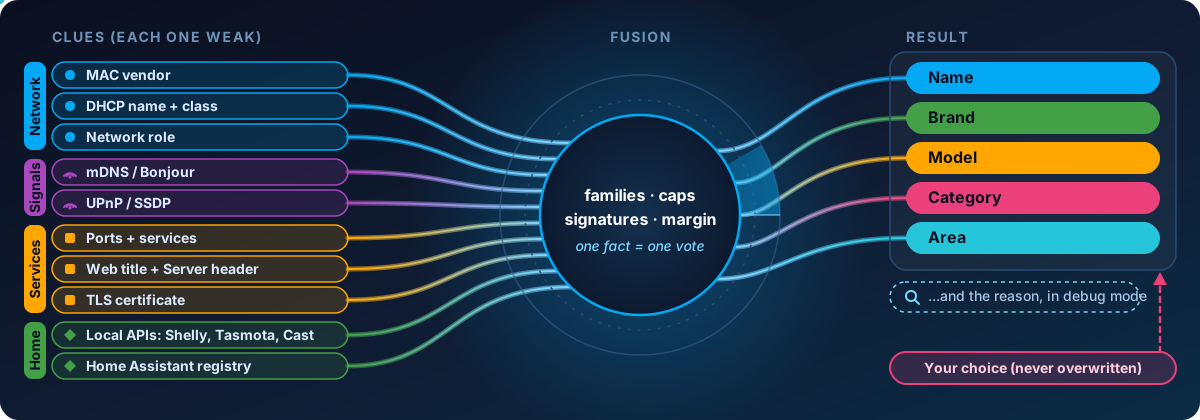
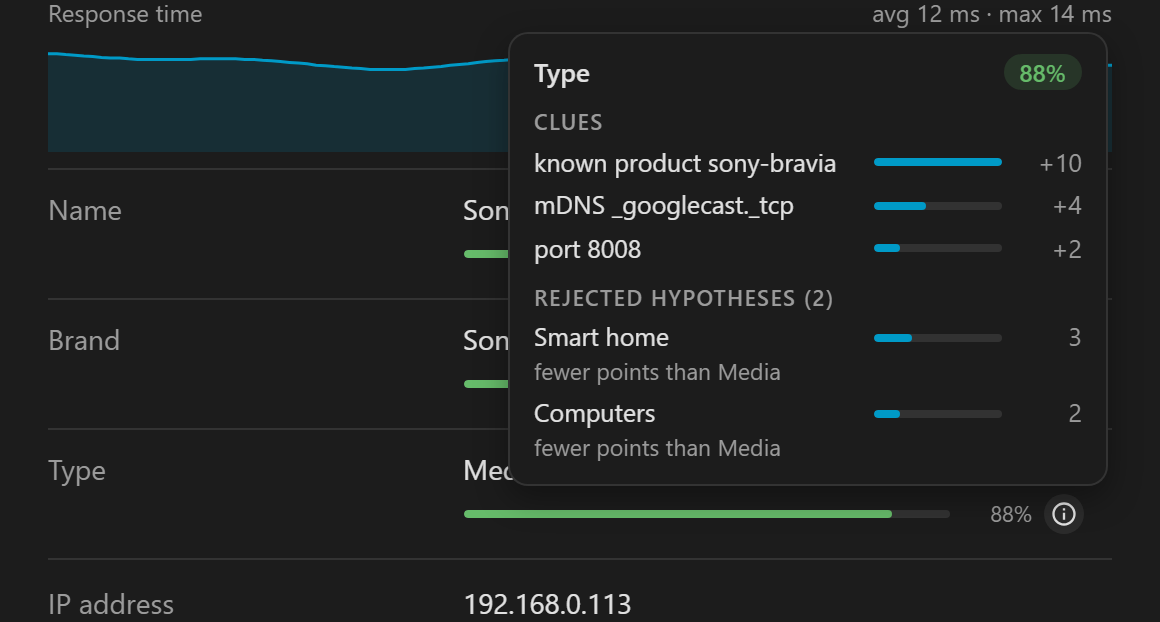
Tap the (i) next to a name, brand or type: every clue, its weight, and what was ruled out
Sources, weights and certainty bars: Recognition.
🐞 A device is wrong or unknown? Tell me.

Every report is read and becomes a fix or a new recognition rule, and Vedetta is updated. Attach the encrypted export: it is safe to post.
Want to do more? Teach it a device.
[!IMPORTANT] Give it a day or two. Right after the install Vedetta only knows what it could see in the first minutes. Phones sleep, names are announced now and then, and the presence history is what tells a phone with a changing MAC from a fixed device. A deep search also runs by itself every night at 03:00. Please leave it running for 24 hours (48 is better) before judging a device. Why, and what to do if one is still wrong.
Install
[!NOTE] Needs Home Assistant OS or Supervised (Settings shows Apps). Home Assistant Container or Core has no app store.
Add the repository with this button, or add
https://github.com/Sived80/vedettaby hand in the App store:
Search Vedetta in the App store and press Install.
Switch on Show in sidebar, press Start, open Vedetta and press Scan network.
Step by step, the local-app option and the first launch: Installation.
⭐ If Vedetta names your devices right, a star helps others find it. Watch → Custom → Releases tells you when a new version comes out.
☕ Support the project
Vedetta is free and open source, and it stays that way. If it saved you time, you can help to keep it going:

Gallery

Tiles or list · light or dark · computer or phone
Also inside
📱 Sleeping phones remembered · 📊 Presence and latency history · 🔭 Three search levels, you choose the risk · 🏠 Home Assistant and optional MQTT · 🌐 Devices on other networks, seen through Home Assistant · 🩺 A network doctor: duplicate addresses, repeated restarts, devices that drop together, a slower gateway
All the details: How Vedetta works.
🌍 Your language?
Vedetta speaks English, Italian, Czech and German (thanks to the community for the Czech; the German is a first translation, not yet read by a native speaker). Adding yours takes no code: copy the en folder, translate the texts, open a pull request. Step by step →
Documentation
| Page | What it covers |
|---|---|
| Installation | Both install options, first launch, updating, permissions |
| How Vedetta works | What it is, features, search methods |
| Recognition | Sources, weights, certainty bars, phones |
| Home Assistant · MQTT | The two directions of the integration, MQTT setup |
| Networks seen by Home Assistant | Showing the devices of other networks (VLANs) through your router integration, without probing them |
| Privacy and safety | What stays local, exports, reporting a mistake |
| Troubleshooting | The first 24 hours, common problems |
| Roadmap | What is done, with date and version, and what is planned |
| How Vedetta is tested | Real exports replayed, a virtual LAN, the numbers of the last release |
| Development | Teach it a new device or logo, tests, stack |
| Changelog | Every version |
📜 License and credits
Vedetta is open source under the MIT License. Everything it builds on is listed, with its license, in THIRD_PARTY_NOTICES.md.
- 🧰 Nmap and arp-scan are installed from the Alpine package repository when the app is built on your Home Assistant. They are not included in this repository; Vedetta runs them as separate programs.
- 🏭 MAC vendor names come from the public IEEE registries; icons from Material Design Icons (Apache-2.0).
- ™️ Brand and product names are used only to describe the devices Vedetta recognizes. This project is not affiliated with or endorsed by any of them.