
ShirAmir/dino-vit-features
ShirAmir/dino-vit-features has 473 GitHub stars and 57 forks. GitHot measured 0 stars in 24 hours. Last checked 2026-11-09 10:49 UTC. Last push 2022-09-09.
Official implementation for the paper "Deep ViT Features as Dense Visual Descriptors".
Measured star growth
- in 24h
- 0
- in 7 days
- Update delayed
- in 15 days
- Update delayed
- in 1 month
- Update delayed
Net star changes over overlapping periods, not daily totals. Missing measurements are left blank. Stars measure attention, not software quality.
README.md
Originaldino-vit-features
[paper] [project page]
Official implementation of the paper "Deep ViT Features as Dense Visual Descriptors".
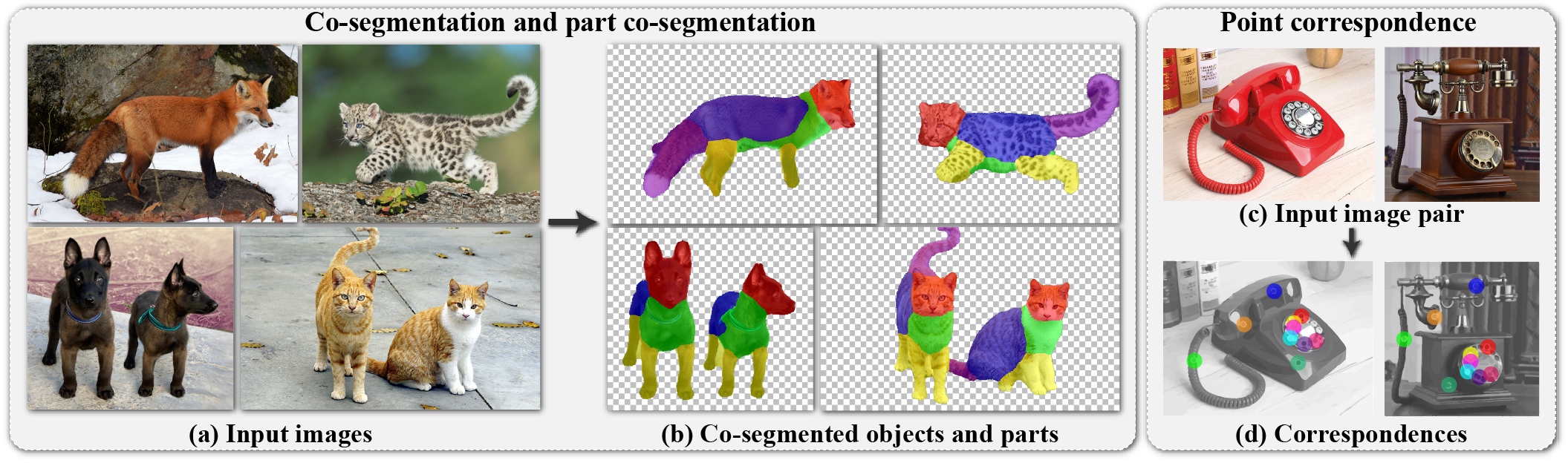
We demonstrate the effectiveness of deep features extracted from a self-supervised, pre-trained ViT model (DINO-ViT) as dense patch descriptors via real-world vision tasks: (a-b) co-segmentation & part co-segmentation: given a set of input images (e.g., 4 input images), we automatically co-segment semantically common foreground objects (e.g., animals), and then further partition them into common parts; (c-d) point correspondence: given a pair of input images, we automatically extract a sparse set of corresponding points. We tackle these tasks by applying only lightweight, simple methodologies such as clustering or binning, to deep ViT features.
Setup
Our code is developed in pytorch on and requires the following modules: tqdm, faiss, timm, matplotlib, pydensecrf, opencv, scikit-learn.
We use python=3.9 but our code should be runnable on any version above 3.6.
We recomment running our code with any CUDA supported GPU for faster performance.
We recommend setting the running environment via Anaconda by running the following commands:
$ conda env create -f env/dino-vit-feats-env.yml
$ conda activate dino-vit-feats-env
Otherwise, run the following commands in your conda environment:
$ conda install pytorch torchvision torchaudio cudatoolkit=11 -c pytorch
$ conda install tqdm
$ conda install -c conda-forge faiss
$ conda install -c conda-forge timm
$ conda install matplotlib
$ pip install opencv-python
$ pip install git+https://github.com/lucasb-eyer/pydensecrf.git
$ conda install -c anaconda scikit-learn
ViT Extractor
Code Snippet
from extractor import ViTExtractor
extractor = ViTExtractor()
# imgs should be imagenet normalized tensors. shape BxCxHxW
descriptors = extractor.extract_descriptors(imgs)
We provide a wrapper class for a ViT model to extract dense visual descriptors in extractor.py.
You can extract descriptors to .pt files using the following command:
python extractor.py --image_path <image_path> --output_path <output_path>
You can specify the pretrained model using the --model flag with the following options:
dino_vits8,dino_vits16,dino_vitb8,dino_vitb16from the DINO repo.vit_small_patch8_224,vit_small_patch16_224,vit_base_patch8_224,vit_base_patch16_224from the timm repo.
You can specify the stride of patch extracting layer to increase resolution using the --stride flag.
Part Co-segmentation 
We provide a notebook for running on a single example in part_cosegmentation.ipynb.
To run on several image sets, arrange each set in a directory, inside a data root directory:
<sets_root_name>
|
|_ <set1_name>
|  |
|  |_ img1.png
|  |_ img2.png
|
|_ <set2_name>
   |
   |_ img1.png
   |_ img2.png
   |_ img3.png
...
The following command will produce results in the specified <save_root_name>:
python part_cosegmentation.py --root_dir <sets_root_name> --save_dir <save_root_name>
Note: The default configuration in part_cosegmentation.ipynb is suited for running on small sets (e.g. < 10). Increase amount of num_crop_augmentations for more stable results (and increased runtime). The default configuration in part_cosegmentation.py is suited for larger sets (e.g. >> 10).
Co-segmentation
We provide a notebook for running on a single example in cosegmentation.ipynb.
To run on several image sets, arrange each set in a directory, inside a data root directory:
<sets_root_name>
|
|_ <set1_name>
|  |
|  |_ img1.png
|  |_ img2.png
|
|_ <set2_name>
   |
   |_ img1.png
   |_ img2.png
   |_ img3.png
...
The following command will produce results in the specified <save_root_name>:
python cosegmentation.py --root_dir <sets_root_name> --save_dir <save_root_name>
Point Correspondences
We provide a notebook for running on a single example in correpondences.ipynb.
To run on several image pairs, arrange each image pair in a directory, inside a data root directory:
<pairs_root_name>
|
|_ <pair1_name>
|  |
|  |_ img1.png
|  |_ img2.png
|
|_ <pair2_name>
   |
   |_ img1.png
   |_ img2.png
...
The following command will produce results in the specified <save_root_name>:
python correspondences.py --root_dir <pairs_root_name> --save_dir <save_root_name>
Other Utilities
PCA
We provide code for computing the PCA of several images in a single directory:
python pca.py --root_dir <images_root_name> --save_dir <save_root_name>
Similarity Inspection
We provide code for interactively visualizing the similarity of a chosen descriptor in the source image to all target descriptors in a terget image.
python inspect_similarity --image_a <path_to_image_a> --image_b <path_to_image_b>
Citation
If you found this repository useful please consider starring ⭐ and citing :
@article{amir2021deep,
    author    = {Shir Amir and Yossi Gandelsman and Shai Bagon and Tali Dekel},
    title     = {Deep ViT Features as Dense Visual Descriptors},
    journal   = {arXiv preprint arXiv:2112.05814},
    year      = {2021}
}
Explore related projects
tensorflow/tensorflow
An Open Source Machine Learning Framework for Everyone
201,427 starshuggingface/transformers
🤗 Transformers: the model-definition framework for state-of-the-art machine learning models in text, vision, audio, and multimodal models, for both inference and training.
168,711 starsAUTOMATIC1111/stable-diffusion-webui
Stable Diffusion web UI
165,274 starsComfy-Org/ComfyUI
The most powerful and modular diffusion model GUI, api and backend with a graph/nodes interface. The fastest local inference engine in the world.
146,024 stars