
Shilin-LU/VINE has 393 GitHub stars and 35 forks. GitHot measured 0 stars in 24 hours and +1 in 7 days. Last checked 2026-11-09 08:43 UTC. Last push 2026-03-27.
[ICLR 2025] "Robust Watermarking Using Generative Priors Against Image Editing: From Benchmarking to Advances" (Official Implementation)
Measured star growth
- in 24h
- 0
- in 7 days
- +1
- in 15 days
- Update delayed
- in 1 month
- Update delayed
Net star changes over overlapping periods, not daily totals. Missing measurements are left blank. Stars measure attention, not software quality.
README.md
Original[ICLR 2025] Robust Watermarking Using Generative Priors Against Image Editing: From Benchmarking to Advances


Official implementation of Robust Watermarking Using Generative Priors Against Image Editing: From Benchmarking to Advances
Robust Watermarking Using Generative Priors Against Image Editing: From Benchmarking to Advances
Shilin Lu, Zihan Zhou, Jiayou Lu, Yuanzhi Zhu, and Adams Wai-Kin Kong
ICLR 2025Abstract:
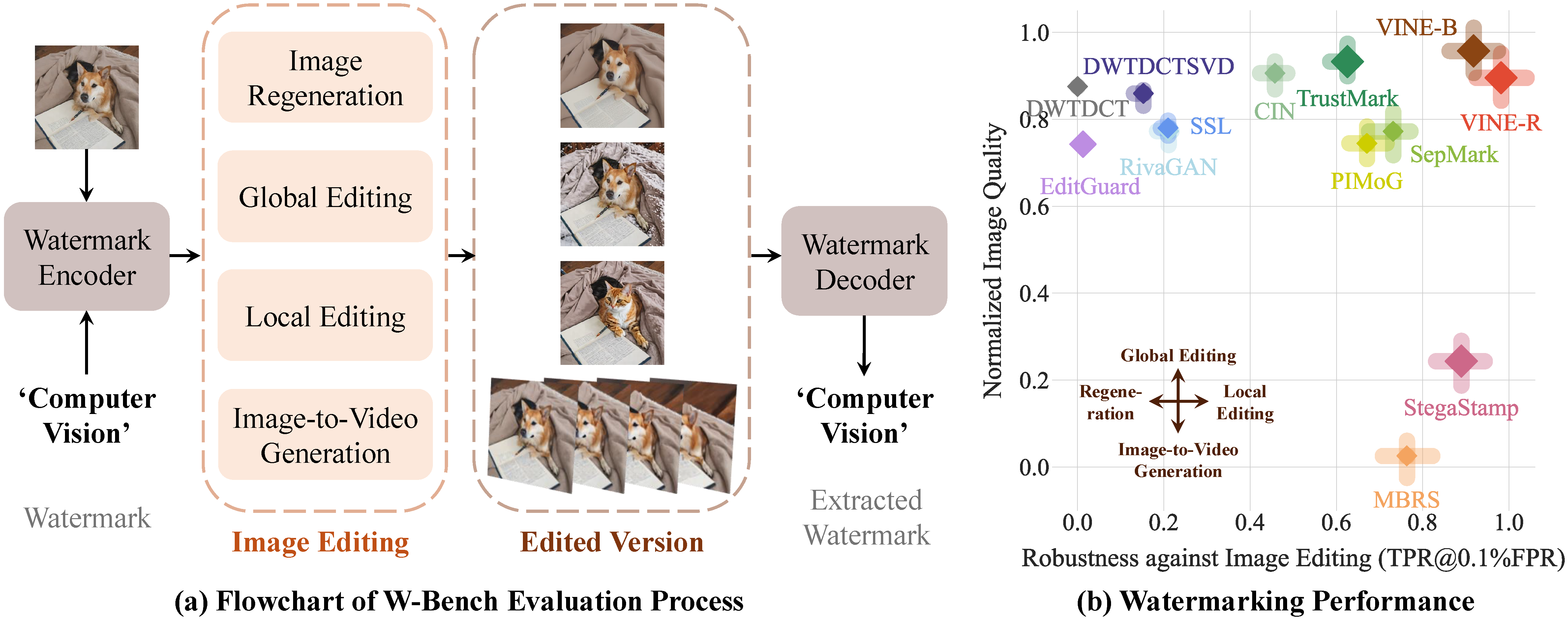
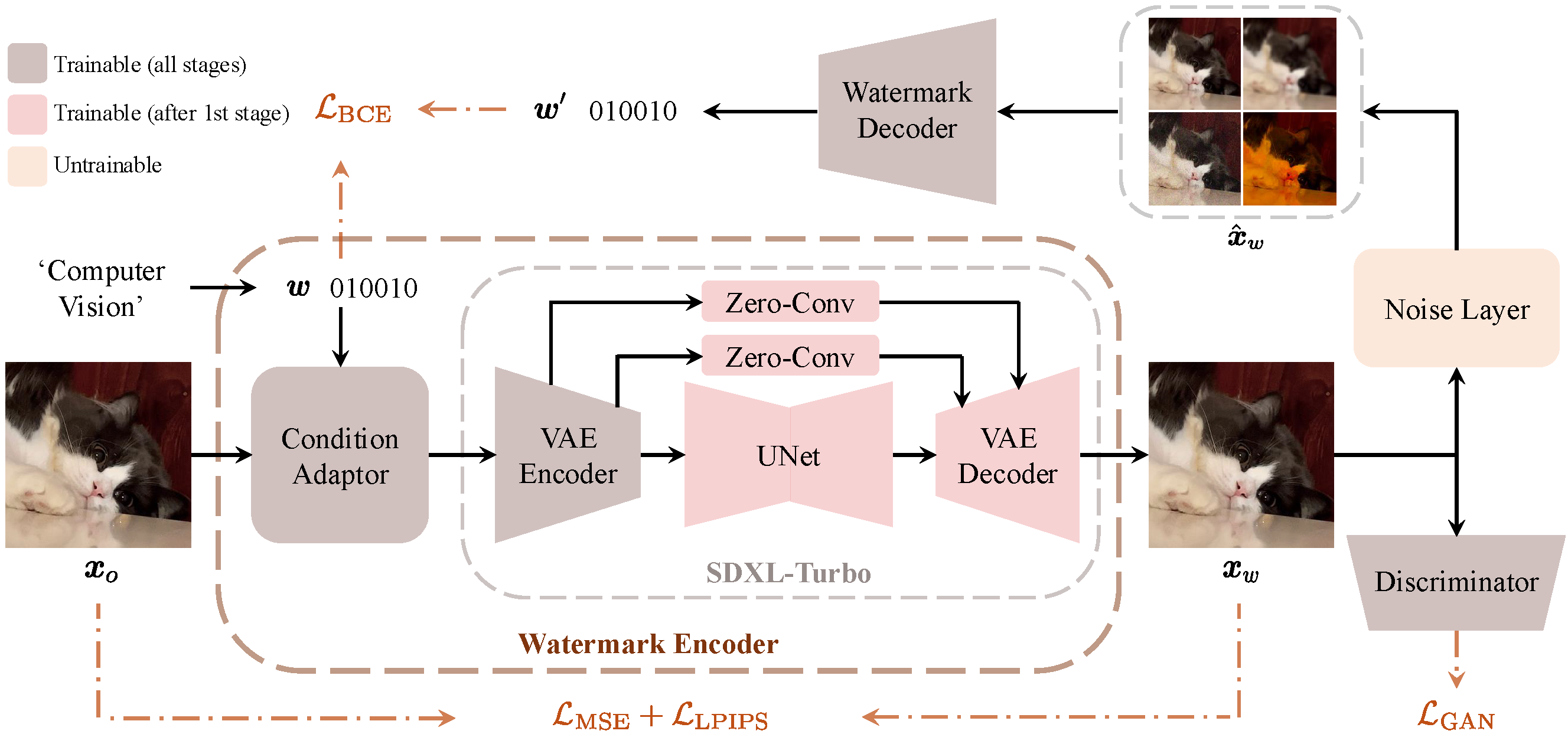
Current image watermarking methods are vulnerable to advanced image editing techniques enabled by large-scale text-to-image models. These models can distort embedded watermarks during editing, posing significant challenges to copyright protection. In this work, we introduce W-Bench, the first comprehensive benchmark designed to evaluate the robustness of watermarking methods against a wide range of image editing techniques, including image regeneration, global editing, local editing, and image-to-video generation. Through extensive evaluations of eleven representative watermarking methods against prevalent editing techniques, we demonstrate that most methods fail to detect watermarks after such edits. To address this limitation, we propose VINE, a watermarking method that significantly enhances robustness against various image editing techniques while maintaining high image quality. Our approach involves two key innovations: (1) we analyze the frequency characteristics of image editing and identify that blurring distortions exhibit similar frequency properties, which allows us to use them as surrogate attacks during training to bolster watermark robustness; (2) we leverage a large-scale pretrained diffusion model SDXL-Turbo, adapting it for the watermarking task to achieve more imperceptible and robust watermark embedding. Experimental results show that our method achieves outstanding watermarking performance under various image editing techniques, outperforming existing methods in both image quality and robustness.
News
- [Mar 02, 2025] 😊 W-Bench Release: W-Bench has been officially released.
- [Jan 23, 2025] 🥳 ICLR 2025 Acceptance: VINE has been accepted by ICLR 2025. Check the OpenReview page for more details.
- [Oct 24, 2024] 🚀 Checkpoint Release: The checkpoints for VINE along with our technical report are available on arXiv.
Contents
Setup
Creating a Conda Environment
git clone https://github.com/Shilin-LU/VINE.git
cd VINE
conda create -n vine python=3.10
conda activate vine
pip install git+https://github.com/Shilin-LU/VINE

# To train the model, you also need to install the following package:
conda activate vine
cd vine/src/training_src/imagenet_c
pip install -e .
Tip: Note that when editing images using MagicBrush and SVD, the environment should use the specific environments listed in their respective sections below. In all other cases, the vine environment is sufficient to run all code, including watermark encoding, decoding, regeneration, local editing, and other global editing tasks.
Downloading VINE Checkpoints
Our models, VINE-B and VINE-R, have been released on HuggingFace (VINE-B-Enc, VINE-B-Dec, VINE-R-Enc, VINE-R-Dec).
Demo
An interactive Colab demo is available. It walks you through watermark encoding, image editing, watermark decoding, and quality metrics calculation. This demo is a starting point to familiarize yourself with the workflow.
Training
Pre-training
export TORCH_HOME=$(pwd) && export PYTHONPATH=$(pwd)
accelerate launch --num_processes=8 --main_process_port 17736 vine/src/train.py --enable_xformers_memory_efficient_attention --train_batch_size 14 --secret_loss_scale 1.5 --G_loss_scale 0.5 --l2_loss_scale 2.0 --lpips_loss_scale 1.5 --tracker_project_name pretraining --key_change pretraining --learning_rate 1e-4 --output_dir output/pretraining --fixed_input
Fine-tuning
accelerate launch --num_processes=8 --main_process_port 17358 vine/src/finetune.py --enable_xformers_memory_efficient_attention --train_batch_size 20 --secret_loss_scale 1.5 --G_loss_scale 0.5 --l2_loss_scale 2.0 --lpips_loss_scale 1.5 --tracker_project_name finetuning --key_change finetuning --learning_rate 1e-4 --output_dir output/finetune --no_im_loss_steps 0 --fixed_input --imagenetc_step 500000000 --l2_loss_ramp 1 --l2_edge_ramp 1 --G_loss_ramp 1
Inference
Watermark Encoding
Embed a message into a single image:
python vine/src/watermark_encoding.py          \
  --pretrained_model_name Shilin-LU/VINE-R-Enc \
  --input_path ./example/input/2.png           \
  --output_dir ./example/watermarked_img       \
  --message 'Hello World!'
Watermark a list of images:
python vine/src/watermark_encoding_list.py     \
  --pretrained_model_name Shilin-LU/VINE-R-Enc \
  --input_dir ./example/input                  \
  --output_dir ./example/watermarked_img       \
  --message 'Your Secret'
Watermark the entire W-Bench:
python vine/src/watermark_encoding_wbench.py   \
  --pretrained_model_name Shilin-LU/VINE-R-Enc \
  --input_dir ./W-Bench                        \
  --output_dir ./vine_encoded_wbench           \
  --message 'Your Secret'
Image Editing
Apply image editing techniques to watermarked images. For example, using InstructPix2Pix, UltraEdit, or Image Inversion:
python vine/src/image_editing.py                  \
  --model ultraedit                               \
  --input_path ./example/watermarked_img/2_wm.png \
  --output_dir ./example/edited_watermarked_img
For batch processing and additional editing methods (e.g., InstructPix2Pix, MagicBrush), see the W-Bench section.
Watermark Decoding
Extract the embedded message from a watermarked image:
python vine/src/watermark_decoding.py                         \
  --pretrained_model_name Shilin-LU/VINE-R-Dec                \
  --input_path ./example/edited_watermarked_img/2_wm_edit.png \
  --groundtruth_message 'Hello World!'
Extract the embedded message from a list of images:
python vine/src/watermark_decoding_list.py     \
  --pretrained_model_name Shilin-LU/VINE-R-Dec \
  --input_path ./example/watermarked_img       \
  --groundtruth_message 'Hello World!'
Decode messages from the edited W-Bench:
python vine/src/watermark_decoding_wbench.py     \
  --pretrained_model_name Shilin-LU/VINE-R-Dec   \
  --groundtruth_message 'Your Secret'            \
  --unwm_images_dir ./W-Bench                    \
  --wm_images_dir ./output/edited_wmed_wbench    \
  --output_dir ./output/detection_results/vine_r \
  --transformation edit                          \
  --decode_wbench_raw_data n
Quality Metrics Calculation
Evaluate watermark imperceptibility (PSNR, SSIM, LPIPS):
python vine/src/quality_metrics.py    \
  --input_path ./example/input/2.png  \
  --wmed_input_path ./example/watermarked_img/2_wm.png
Decoding Accuracy Metrics Calculation
To compute statistical decoding metrics over a batch of images, including [email protected]% FPR, TPR@1% FPR, and AUROC, refer to the W-Bench section. These metrics can be calculated using vine/src/watermark_decoding_wbench.py.
W-Bench
W-Bench is our comprehensive benchmark designed to evaluate the robustness of watermarking across four image editing techniques:
- Regeneration: Both stochastic and deterministic (image inversion) methods.
- Global Editing: Methods like UltraEdit, InstructPix2Pix, and MagicBrush.
- Local Editing: Techniques including UltraEdit and ControlNet-Inpainting.
- Image to Video: Converting watermarked images into videos using Stable Video Diffusion (SVD).
The benchmark comprises 10,000 samples sourced from datasets like COCO, Flickr, and ShareGPT4V.
The images of W-Bench have been released on HuggingFace. Below is a detailed guide on how to use all the image editing techniques listed in W-Bench.
1. Download W-Bench
cd VINE
huggingface-cli download Shilin-LU/W-Bench --repo-type=dataset --local-dir W-Bench
2. Encode the Entire W-Bench
Embed watermarks into every image in W-Bench:
python vine/src/watermark_encoding_wbench.py   \
  --pretrained_model_name Shilin-LU/VINE-R-Enc \
  --input_dir ./W-Bench                        \
  --output_dir ./vine_encoded_wbench           \
  --message 'Your Secret'
Optionally, run quality assessments on the encoded dataset:
python vine/src/quality_metrics_wbench.py \
  --input_dir ./vine_encoded_wbench       \
  --wbench_path ./W-Bench
3. Edit the Encoded W-Bench (or Distortion)
Regeneration
- Stochastic Regeneration:
python vine/w_bench_utils/regeneration/stochastic_regeneration.py  \
  --wm_images_folder ./vine_encoded_wbench/512/STO_REGENERATION_1K \
  --edited_output_folder ./output/edited_wmed_wbench/STO_REGENERATION_1K
- Deterministic Regeneration (aka, Image Inversion):
python vine/w_bench_utils/regeneration/stochastic_regeneration.py \
  --wm_images_folder ./vine_encoded_wbench/512/DET_INVERSION_1K   \
  --edited_output_folder ./output/edited_wmed_wbench/DET_INVERSION_1K
Global Editing
- UltraEdit:
python vine/w_bench_utils/global_editing/global_editing_ultraedit.py \
  --wm_images_folder ./vine_encoded_wbench/512/INSTRUCT_1K           \
  --edited_output_folder ./output/edited_wmed_wbench                 \
  --editing_prompt_path ./W-Bench/INSTRUCT_1K/prompts.csv
- InstructPix2Pix:
python vine/w_bench_utils/global_editing/global_editing_instructpix2pix.py \
  --wm_images_folder ./vine_encoded_wbench/512/INSTRUCT_1K                 \
  --edited_output_folder ./output/edited_wmed_wbench                       \
  --editing_prompt_path ./W-Bench/INSTRUCT_1K/prompts.csv
- MagicBrush:
- Setup for MagicBrush:
cd vine/w_bench_utils/global_editing
git clone https://github.com/timothybrooks/instruct-pix2pix.git
cd instruct-pix2pix
conda env create -f environment.yaml
conda activate ip2p
- Download the MagicBrush Checkpoint:
mkdir checkpoints && cd checkpoints
wget https://huggingface.co/osunlp/InstructPix2Pix-MagicBrush/resolve/main/MagicBrush-epoch-52-step-4999.ckpt
- Run MagicBrush Editing:
python vine/w_bench_utils/global_editing/global_editing_magicbrush.py \
  --wm_images_folder ./vine_encoded_wbench/512/INSTRUCT_1K            \
  --edited_output_folder ./output/edited_wmed_wbench                  \
  --editing_prompt_path ./W-Bench/INSTRUCT_1K/prompts.csv
Local Editing
- UltraEdit:
python vine/w_bench_utils/local_editing/local_editing_ultraedit.py \
  --wm_images_folder ./vine_encoded_wbench/512/LOCAL_EDITING_5K    \
  --edited_output_folder ./output/edited_wmed_wbench               \
  --wbench_path ./W-Bench/LOCAL_EDITING_5K
- ControlNet-Inpainting:
python vine/w_bench_utils/local_editing/local_editing_controlnet_inpainting.py \
  --wm_images_folder ./vine_encoded_wbench/512/LOCAL_EDITING_5K                \
  --edited_output_folder ./output/edited_wmed_wbench                           \
  --wbench_path ./W-Bench/LOCAL_EDITING_5K
Image to Video
- Stable Video Diffusion (SVD):
- Setup for SVD:
conda create -n svd python=3.8.5
conda activate svd
cd vine/w_bench_utils/image_to_video/generative-models
pip3 install -r requirements/pt2.txt
- Download the SVD Checkpoint:
mkdir checkpoints && cd checkpoints
huggingface-cli download stabilityai/stable-video-diffusion-img2vid-xt --repo-type=model --local-dir svd_xt
Alternatively, use the provided script download_svd_ckpt.py to download.
- Run Image-to-Video Conversion:
python vine/w_bench_utils/image_to_video/image_to_video_svd.py \
  --wm_images_folder ./vine_encoded_wbench/512/SVD_1K          \
  --edited_output_folder ./output/edited_wmed_wbench/SVD_raw
- Post-process Video Frames:
python vine/w_bench_utils/image_to_video/i2v_utils.py \
  --source_folder ./output/edited_wmed_wbench/SVD_raw \
  --target_folder ./output/edited_wmed_wbench/SVD_1K
Traditional Distortion (Brightness, Contrast, Blurring, Noise, Compression)
Apply all traditional distortion techniques to the entire W-Bench dataset:
python vine/w_bench_utils/distortion/distortions.py \
  --wm_images_folder ./vine_encoded_wbench          \
  --edited_output_folder ./output/distorted_wmed_wbench
4. Decode the Entire W-Bench
Decode watermarked messages after editing:
python vine/src/watermark_decoding_wbench.py     \
  --pretrained_model_name Shilin-LU/VINE-R-Dec   \
  --groundtruth_message 'Your Secret'            \
  --unwm_images_dir ./W-Bench                    \
  --wm_images_dir ./output/edited_wmed_wbench    \
  --output_dir ./output/detection_results/vine_r \
  --transformation edit                          \
  --decode_wbench_raw_data n
Baseline Evaluation Data on W-Bench
We have evaluated 11 baseline watermarking methods + VINE-B + VINE-R on the W-Bench dataset. For each baseline, the following data have been generated and saved:
Watermarked Images:
Each baseline applied its watermarking algorithm to the entire W-Bench dataset.Edited Images:
The watermarked images from all baselines were processed using every image editing method defined in W-Bench (e.g., regeneration, global editing, local editing, and image-to-video generation).Distorted Images:
In addition to editing, the watermarked images were also subjected to all image distortion methods available in W-Bench.
All the data (watermarked, edited, and distorted images) have been uploaded publicly on HuggingFace for easy access and further research. You can download the full dataset using the command below:
huggingface-cli download Shilin-LU/Evaluation_Results_on_WBench --repo-type=dataset --local-dir Evaluation_Results_on_WBench
Note: These data are provided for research purposes only. Please cite our work if you use our code and W-Bench in your research.
Acknowledgement
We thank the following contributors that our code and benchmark are based on: Diffusers, img2img-turbo, WatermarkAttacker, UltraEdit, InstructPix2Pix, MagicBrush, SVD.
Citation
If you find the repo useful, please consider giving a star and citing:
@article{lu2024robust,
  title={Robust watermarking using generative priors against image editing: From benchmarking to advances},
  author={Lu, Shilin and Zhou, Zihan and Lu, Jiayou and Zhu, Yuanzhi and Kong, Adams Wai-Kin},
  journal={arXiv preprint arXiv:2410.18775},
  year={2024}
}
Explore related projects
ytdl-org/youtube-dl
Command-line program to download videos from YouTube.com and other video sites
141,500 starsexcalidraw/excalidraw
Virtual whiteboard for sketching hand-drawn like diagrams
135,396 starsgodotengine/godot
Godot Engine – Multi-platform 2D and 3D game engine
119,840 starsmrdoob/three.js
JavaScript 3D Library.
117,905 stars