
Sanyam-G/Airpipe
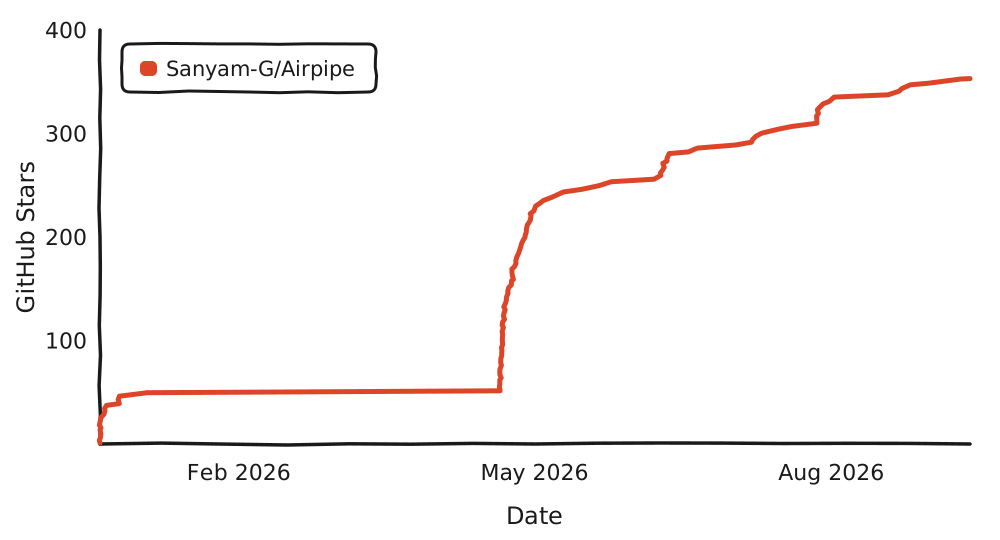
Sanyam-G/Airpipe has 360 GitHub stars and 16 forks. GitHot measured 0 stars in 24 hours and +3 in 7 days. Last checked 2026-11-09 11:49 UTC. Last push 2026-11-02.
Send files between your terminal and any phone or computer by scanning a QR code. End-to-end encrypted, with a self-hostable relay.
Measured star growth
- in 24h
- 0
- in 7 days
- +3
- in 15 days
- Update delayed
- in 1 month
- Update delayed
Net star changes over overlapping periods, not daily totals. Missing measurements are left blank. Stars measure attention, not software quality.
README.md
Original
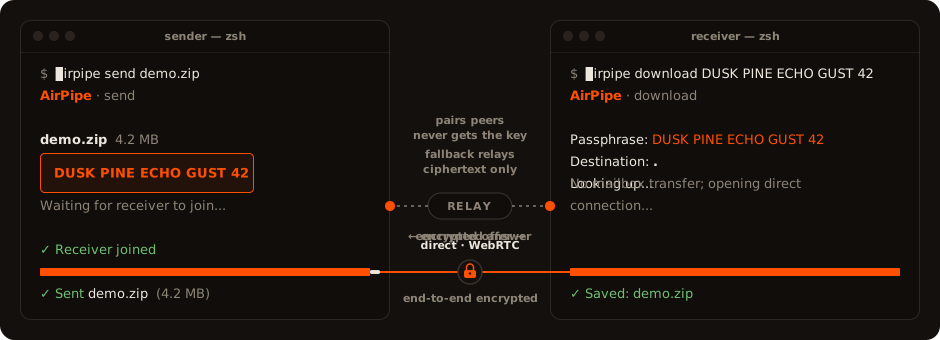
Send a file to any device by sharing a passphrase. It streams straight from one machine to the other, encrypted end to end. The relay that connects the two ends only handles encrypted data.
Try it: airpipe.sanyamgarg.com
How it works
The sender picks a file and gets a passphrase like DUSK PINE ECHO GUST 42. The receiver enters it on the website, in the terminal (airpipe download DUSK PINE ECHO GUST 42), or by scanning the QR. The file then transfers directly between the two devices, encrypted the whole way.
If the receiver is offline, the sender can use mailbox mode: the relay holds the encrypted file for 10 minutes until it's picked up. Same passphrase either way. The receiver never has to know which mode was used.
Getting past NAT
Two devices on home or office networks usually can't reach each other directly. Each one sits behind a router doing NAT, which drops connections it didn't expect, so neither side can just dial the other.
AirPipe gets around this the way peer-to-peer normally does. Both devices open an outbound connection to the relay (outbound traffic passes through NAT freely), and the relay introduces them. Over that channel they run a short handshake, trading their public addresses and candidate routes until they find a path that punches through both NATs. Once it's open the file flows directly between them and the relay drops out.
If the NATs are too strict to punch through, the transfer falls back to the relay, which forwards the encrypted bytes. They stay encrypted with the key derived from the passphrase.
Self-host
docker run -p 8080:8080 ghcr.io/sanyam-g/airpipe-relay
One Go binary, ~15 MB image, bundling the web UI and install script. Or clone and docker compose up -d (ships an opt-in Watchtower auto-updater).
Point the CLI at your relay with export AIRPIPE_RELAY=https://your-server.example (or --relay per call). Tunables, all optional:
| Var | Default | Notes |
|---|---|---|
PORT |
8080 |
|
AIRPIPE_ALLOWED_ORIGINS |
same-origin | Extra origins if pages serve from another domain. * = any. |
AIRPIPE_RATE_LIMIT_PER_MIN |
60 |
|
AIRPIPE_MAX_UPLOAD_MB |
500 |
Mailbox size cap. |
AIRPIPE_FILE_EXPIRY |
10m |
Mailbox expiry (Go duration). |
AIRPIPE_MINIMAL_UI |
off | Serve just the send/receive page at / instead of the full site. |
AIRPIPE_PUBLIC_STATS |
off | Expose /metrics and live stats in /health publicly. |
AIRPIPE_TRUST_PROXY_HEADERS |
off | Rate-limit by Cf-Connecting-Ip / X-Forwarded-For. Set only behind a proxy that strips client-sent copies; required behind a tunnel, or every visitor shares one limit. |
/health (JSON) always reports the relay's limits, which the web UI reads, and its protocol version, which the CLI checks before each transfer. Uptime, active-file counts, and Prometheus /metrics stay private unless you set AIRPIPE_PUBLIC_STATS.
CLI
curl -sSL https://airpipe.sanyamgarg.com/install.sh | sh
brew install sanyam-g/airpipe/airpipe
go install github.com/Sanyam-G/Airpipe/v5/cmd/airpipe@latest
Linux, macOS, Windows (amd64 + arm64). Self-update with airpipe update, or brew upgrade airpipe if you installed with Homebrew.
v5 changed how a passphrase becomes a key, so v5 can't exchange files with v4 or older, and a v5 relay turns older clients away with a message to update. Update both ends.
airpipe send report.pdf              # prompts: direct (P2P) or mailbox
airpipe send file1.txt photos/       # multiple files / folders auto-zip
airpipe download DUSK PINE ECHO GUST 42
airpipe receive ./downloads          # wait for someone to send to you; prints a QR
Browser to browser
Open /live for a passphrase + QR, no install on either side. The receiver enters it at the homepage and the file transfers between the two browsers.
Encryption
Files are encrypted with NaCl secretbox (XSalsa20-Poly1305, 256-bit key). The direct path also runs inside WebRTC's DTLS.
A passphrase is four words from a 1024-word list plus a number from 10 to 99, about 10^14 possibilities. The CLI and the browser both run it through PBKDF2-HMAC-SHA256 with 600,000 iterations and a fixed salt, then split the result with HKDF into the encryption key and the room tokens. The browser uses WebCrypto for this. Each transfer derives them once, which takes well under a second on a laptop.
The relay sees a room token, both IP addresses, sizes and timing, and the ciphertext of mailbox and relayed transfers. It never receives the key. Links and QR codes carry the key after the #, and browsers don't send that part to the server. The key in a link is the same one the passphrase produces.
The token comes from the passphrase, so whoever runs the relay can still guess passphrases offline and check each guess against the token. Each guess costs a full PBKDF2 run. On one high-end GPU, trying every passphrase takes on the order of 200 years, about 100 on average. An attacker with many GPUs and a specific target can still get there. For files that need more than that, use a relay you run or trust. A PAKE handshake, which would stop offline guessing, is planned.
Stack
Go relay (gorilla/websocket, pion/webrtc), embedded HTML/CSS/JS frontend (tweetnacl.js in the browser), Docker, optional Cloudflare Tunnel. Single static binary.
Star History
License
MIT
Explore related projects
codecrafters-io/build-your-own-x
Master programming by recreating your favorite technologies from scratch.
561,398 starspublic-apis/public-apis
A collective list of free APIs
497,679 starsmorluto/rea
Reverse engineer anything with agents, from app behavior down to native binaries.
447,495 starsopenclaw/openclaw
The AI that really does things. Any OS. Any Platform. The lobster way. 🦞
394,261 stars