
SagarBiswas-MultiHAT/osint-exposure-toolkit
About
OSINT Exposure Toolkit: A modular, passive reconnaissance CLI that inspects emails, domains, and usernames for leaks and misconfigurations. Generates interactive HTML, JSON and Markdown reports and a visual exposure graph. Includes GitHub secret scans, HIBP/LeakCheck support, Shodan, Google dorks, JS and metadata scanning.
SecurityMeasured star growth
- in 24h
- 0
- in 7 days
- 0
- in 15 days
- Collecting history
- in 1 month
- Collecting history
Net star changes over overlapping periods, not daily totals. Missing measurements are left blank. Stars measure attention, not software quality.
README.md
OriginalOSINT Exposure Toolkit



Passive, ethical OSINT toolkit for one practical question:
How exposed is this person, account, or organization on the public internet right now?
It collects public signals (credential leaks, public code, DNS/email posture, social exposure, indexed content, and Shodan metadata), scores them, and exports a report pack that is immediately usable by security teams or clients.
Currently, I do not have premium access to HIBP/LeakCheck, which is why I tested using the "--demo-mode." However, I am confident that they will work perfectly.
Pictures
Click to expand
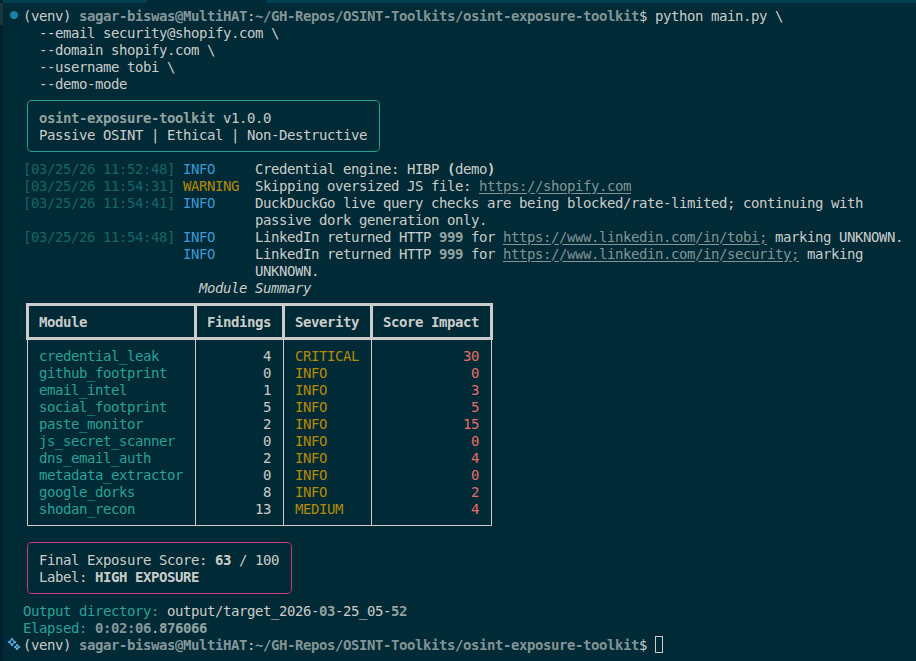
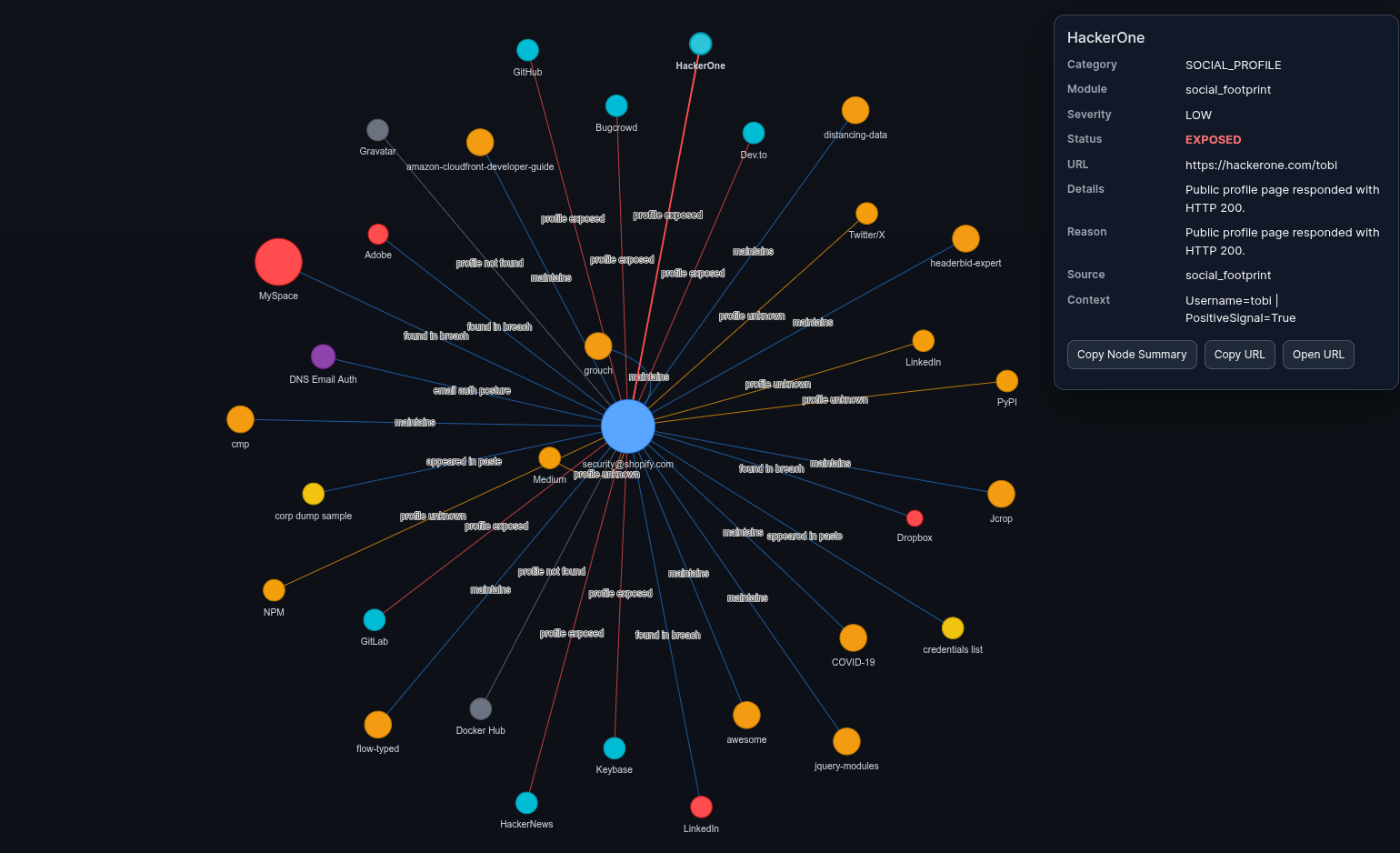
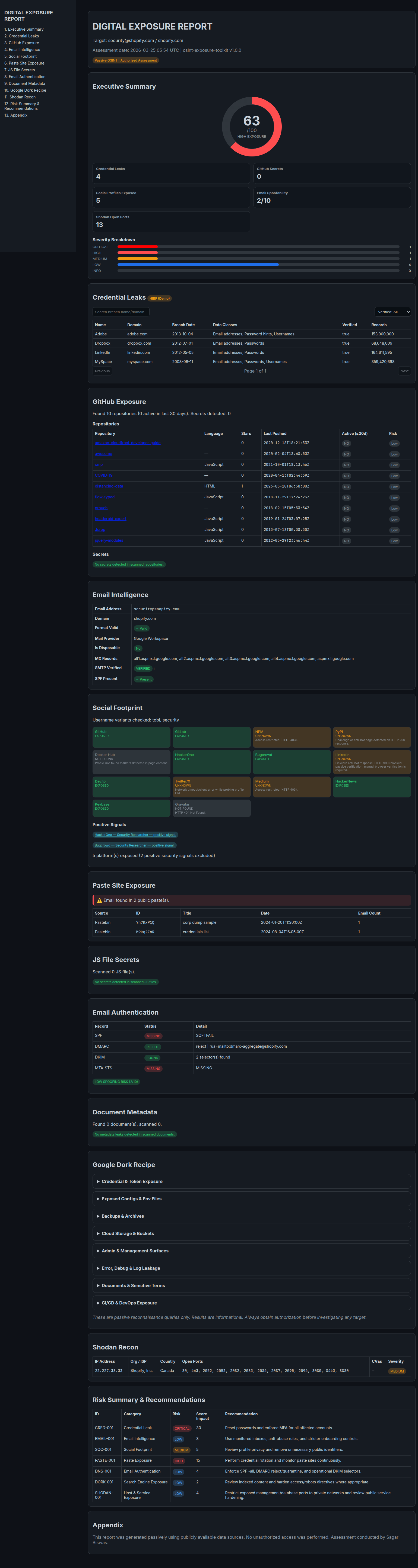
Live Outputs:
exposure_graph.html: https://sagarbiswas-multihat.github.io/osint-exposure-toolkit/output/target_2026-03-25_05-52/exposure_graph.html
report.html: https://sagarbiswas-multihat.github.io/osint-exposure-toolkit/output/target_2026-03-25_05-52/report.html
Table of Contents
- Who this is for
- What this toolkit does
- What it does not do
- How scoring works
- Modules (end-to-end)
- Credential leak modes (important)
- Outputs
- Project structure
- Setup
- Configuration guide
- CLI usage
- Examples by scenario
- Troubleshooting
- Testing and quality
- Ethics and legal use
- Support MultiHAT Open-Source
- License
Who this is for
This project is useful if you are:
- a security consultant preparing a pre-assessment exposure baseline,
- a startup security engineer building a lightweight external exposure check,
- a blue team member who needs repeatable, passive recon snapshots,
- a portfolio builder demonstrating practical AppSec + OSINT automation.
What this toolkit does
Given any combination of --email, --domain, and --username, the toolkit:
- Runs a passive scan pipeline across enabled modules.
- Normalizes findings into typed models.
- Aggregates a score (0–100) with severity label.
- Produces HTML, JSON, Markdown, and graph outputs.
The result is a single timestamped folder under output/ you can share or archive.
What it does not do
This toolkit does not perform:
- exploitation,
- brute force,
- payload delivery,
- vulnerability proof-of-exploit,
- unauthorized access of any kind.
It is intentionally passive and report-oriented.
How scoring works
Each module contributes a bounded score_impact, and total score is capped at 100.
- Low score = lower observed public exposure.
- High score = broader or more critical public exposure.
The scoring layer also creates normalized finding IDs (for example, module-prefixed finding references) so remediation tracking is easier across repeated runs.
Modules (end-to-end)
Credential Leak
- Engine: LeakCheck (default) or HIBP (opt-in)
- Output: breach count, severity, and mode-specific notes
GitHub Footprint
- Discovers public repositories and flags secret-like patterns
Email Intelligence
- Email syntax, MX provider hints, SPF hints, SMTP verification signal
Social Footprint
- Username variant probing across configured platforms
Paste Monitor
- Uses credential leak context to summarize paste exposure
JS Secret Scanner
- Scans public JavaScript artifacts for secret-like patterns
DNS Email Authentication
- SPF, DMARC, DKIM, MTA-STS posture and spoofability score
Google Dorks
- Generates passive dork recipes and optional limited DDG checks
Metadata Extractor
- Pulls leaked metadata from public docs
Shodan Recon
- Host/service/port/CVE exposure metadata for target domain assets
Exposure Scorer + Reporting
- Unifies all module outputs into score + HTML/JSON/MD + graph
Credential leak modes (important)
Credential leak scanning supports two engines.
1) LeakCheck (default)
- Selected automatically unless HIBP flags are used.
- With API key: authenticated mode (richer source detail).
- Without API key or rejected key: public mode fallback.
2) HIBP (opt-in)
Use one of:
--use-hibp(interactive mode choice)--free-hibp--demo-mode
HIBP modes:
- Free: global breach landscape view (not per-email premium lookup)
- Live/Premium path: per-email endpoint usage when key is configured
- Demo: fixture-backed deterministic output from
tests/fixtures/hibp_mock.json
--demo-modeis ideal for demos, CI smoke runs, and report-template validation.
Outputs
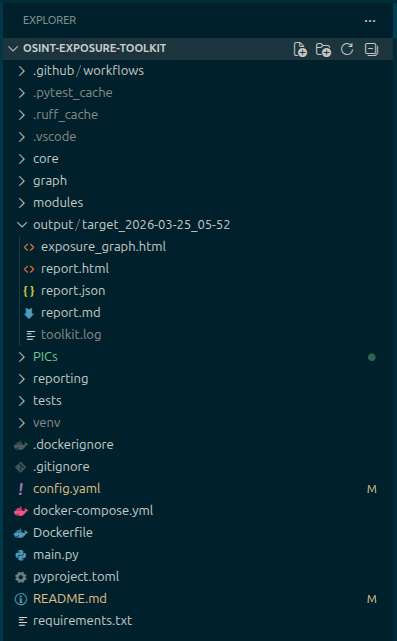
Each run creates a folder like:
output/target_YYYY-MM-DD_HH-MM/
Generated artifacts:
report.html— interactive client-facing reportreport.json— machine-readable payload for automationreport.md— concise text report for quick sharingexposure_graph.html— graph visualization (unless--no-graph)
Project structure
main.py
core/
  config_loader.py
  constants.py
  logger.py
  models.py
  rate_limiter.py
modules/
  credential_leak.py
  github_footprint.py
  email_intel.py
  social_footprint.py
  paste_monitor.py
  js_secret_scanner.py
  dns_email_auth.py
  google_dorks.py
  metadata_extractor.py
  shodan_recon.py
  exposure_scorer.py
reporting/
  html_report.py
  json_report.py
  markdown_report.py
  templates/report.html.jinja
graph/
  exposure_graph.py
tests/
Setup
Local (recommended)
python -m venv .venv
source .venv/bin/activate
pip install -r requirements.txt
Docker
docker build -t osint-exposure-toolkit .
docker run --rm -v $(pwd)/output:/app/output osint-exposure-toolkit --domain example.com --demo-mode
Docker Compose
docker compose up --build
Configuration guide
Main config file: config.yaml
Key sections:
general- output directory, log level, timeout, concurrency, default output formats
api_keyshibp,leakcheck,github,shodan
modules- enable/disable each module independently
rate_limits- request pacing per provider
scan_limits- safety caps for repository, file, and host volume
Security recommendation
Do not commit real API keys into version control.
Use one of these approaches:
- local untracked config,
- environment-variable templating,
- secret manager injection in CI/CD.
CLI usage
python main.py [OPTIONS]
Core target options
--email TEXT--domain TEXT--username TEXT
At least one is required.
Credential engine options
--use-hibp--free-hibp--demo-mode
Note: --use-hibp cannot be combined with --free-hibp or --demo-mode.
Execution controls
--skip-pastes--modules TEXT(comma-separated aliases)--output TEXT(comma-separated:html,json,md)--no-graph--config TEXT(default:config.yaml)
Module aliases for --modules
credgithubemailsocialpastesjsdnsmetadatadorksshodan
Examples by scenario
1) Fast demo run (recommended first run)
python main.py --email [email protected] --domain example.com --username demo --demo-mode
2) Default real-world run (LeakCheck path)
python main.py --email [email protected] --domain example.com --username secops
3) HIBP interactive path
python main.py --email [email protected] --domain example.com --use-hibp
4) Domain-only exposure check
python main.py --domain example.com
5) Focused module run
python main.py --domain example.com --modules github,js,dns,shodan
6) Output customization
python main.py --email [email protected] --domain example.com --output html,json --no-graph
7) Tested
python main.py \
  --email [email protected] \
  --domain shopify.com \
  --username tobi \
  --demo-mode
Troubleshooting
Demo mode shows empty Credential Leaks table
- Ensure you are opening the newly generated
report.htmlin the latest output folder. - Hard-refresh browser cache.
- Confirm
--demo-modewas used andtests/fixtures/hibp_mock.jsonexists.
“At least one of --email, --domain, or --username is required.”
Provide one or more target identifiers.
Missing optional integrations
If API keys are empty, modules still run in reduced capability mode where possible.
Slow runs or rate-limit behavior
Tune rate_limits and scan_limits in config.yaml for your environment.
Testing and quality
ruff check .
python -m pytest tests/ -v
Suggested release gate:
- Lint clean.
- Tests green.
- One CLI smoke run (
--demo-mode) and confirm output artifacts.
Ethics and legal use
Use this toolkit only on assets you own or are explicitly authorized to assess.
The toolkit is intentionally passive, but passive reconnaissance can still create legal or contractual risk in some environments without prior approval.
Support MultiHAT Open-Source
If you find this project useful in your workflow, development, or security research, consider supporting SagarBiswas-MultiHAT in its ongoing maintenance and future updates (supports both One-Time and Monthly backing):



License
MIT
Explore related projects
Loading…