
SUNET/cnaas-nms
SUNET/cnaas-nms has 94 GitHub stars and 21 forks. GitHot measured 0 stars in 24 hours. Last checked 2026-11-15 16:30 UTC. Last push 2026-11-10.
Measured star growth
- in 24h
- 0
- in 7 days
- Update delayed
- in 15 days
- Update delayed
- in 1 month
- Update delayed
Net star changes over overlapping periods, not daily totals. Missing measurements are left blank. Stars measure attention, not software quality.
About
Campus Network as-a-Service - Network Management System (Campus network automation software)
ProductivityREADME.md
Original


CNaaS-NMS
Campus Network-as-a-Service - Network Management System. Software to automate management of a campus network (LAN). This is an open source software developed as part of SUNETs managed service.
Planned features:
- Zero-touch provisioning of switches
- Automation of common changes for campus LAN
- Automated procedure for firmware upgrades
- Multi-vendor support
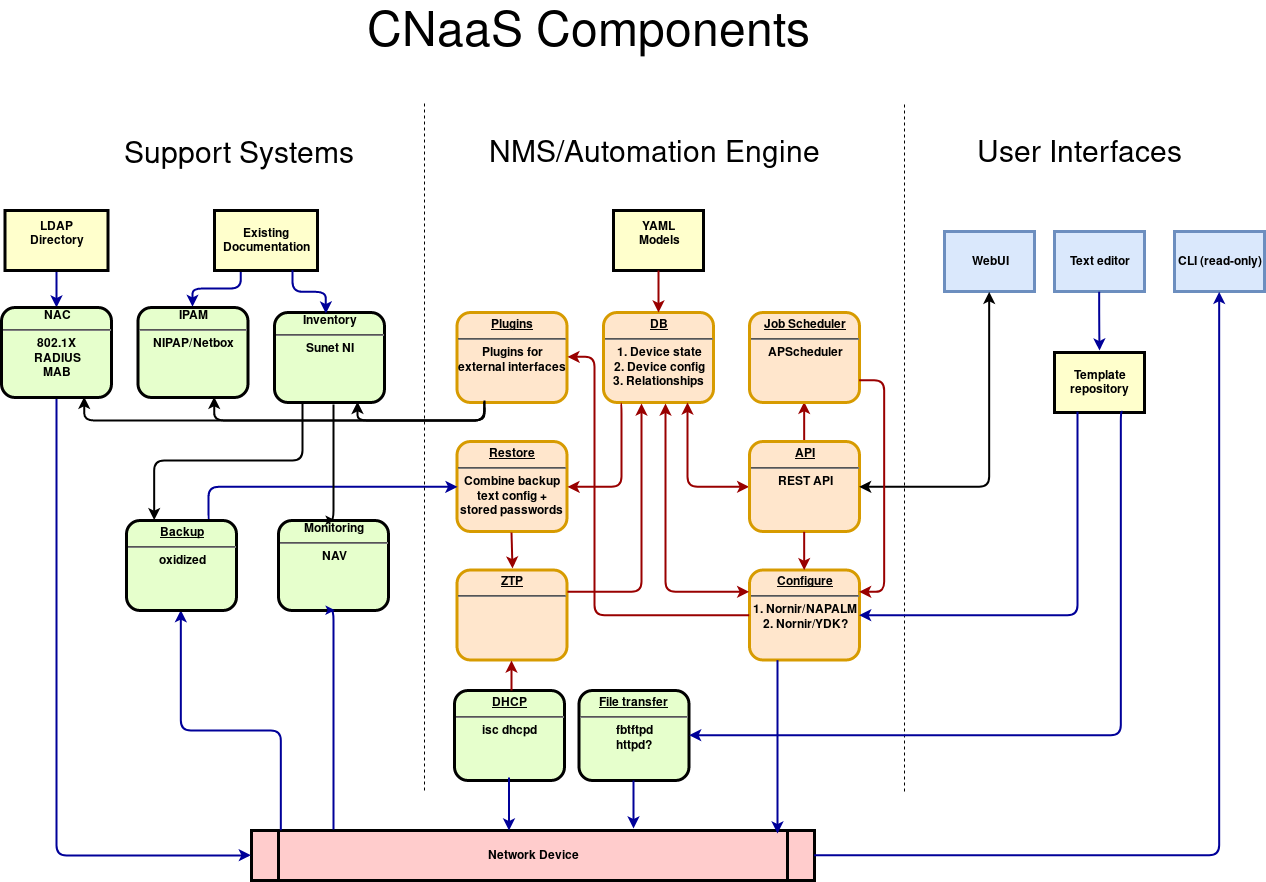
Components
Dependencies
Runtime dependencies are specified in [project].dependencies in pyproject.toml.
Development dependencies are in [dependency-groups] with two groups: dev and docs.
uv sync                   # runtime dependencies
uv sync --group dev       # test/lint tools (pytest, mypy, ruff, etc.)
uv sync --group docs      # documentation tools (sphinx)
Requirements
Docker and docker compose or:
- Python 3.14
uv sync(anduv sync --group devfor development)- SQL database, Redis
Installation
Docker
Build and run the production image:
docker compose -f docker/docker-compose.yaml build
Local Development
Local development builds on the test compose (with test data) and adds source mounting:
docker compose -f docker/docker-compose_test.yaml -f docker/docker-compose.dev.yaml build
docker compose -f docker/docker-compose_test.yaml -f docker/docker-compose.dev.yaml up -d
The dev overlay automatically:
- Mounts your local
src/directory with hot reloading (uwsgi auto-reloads on Python file changes) - Generates JWT keypair and CA certificates
- Clones integrationtest templates and settings repositories
Access points:
- API: https://localhost/api/v1.0/
- Swagger UI: https://localhost/api/doc/
Get a dev token for API access:
docker compose -f docker/docker-compose_test.yaml -f docker/docker-compose.dev.yaml exec cnaas_api cat /opt/cnaas/jwtcert/dev-token
Use the token:
- Swagger UI: Click "Authorize", enter
Bearer <token>, then click "Authorize" - curl:
curl -ks -H "Authorization: Bearer <token>" https://localhost/api/v1.0/devices
Tear down containers when done:
docker compose -f docker/docker-compose_test.yaml -f docker/docker-compose.dev.yaml down
Venv
Install locally with uv, which creates and manages a virtualenv automatically:
uv sync
cp etc/db_config.yml.sample /etc/cnaas-nms/db_config.yml
Edit db_config.yml to point to your SQL and Redis database.
Test
Local with Docker
Run tests locally with pre-provisioned test data:
./docker/run-tests-local.sh
This script:
- Starts PostgreSQL and Redis containers if not running
- Clones test templates/settings to
.test-data/(once, reused on subsequent runs) - Runs unit tests first, then integration tests
Integration tests
Integration tests need Containerlab running, and the integration-tools dependency
group (coverage/pytest), which is not installed by default. Build the api image with
the build arg to include it:
cd docker
INCLUDE_INTEGRATION_TOOLS=1 docker compose build cnaas_api
cd ../test && AUTOTEST=1 ./integrationtests.sh
Release
First bump __version__ in src/cnaas_nms/version.py to the new version and merge it to develop. This is the version the application reports, and pyproject.toml reads it from there.
Then create an annotated tag on up-to-date develop and push it to the remote repository, where the workflows build-api and build-dhcpd will pick it up and build new Docker images:
git checkout develop && git pull
git tag -a vX.Y.Z -m "Release vX.Y.Z"
git push platform vX.Y.Z
This pushes nms_api:X.Y.Z and X.Y, and nms_dhcpd:X.Y.Z and X.Y, to the package registry. latest is only built from the develop branch. Old sha-* images are pruned automatically; release tags are kept.
Never move or re-push an existing tag, create a new version instead.
The images can be pulled from the registry with:
docker pull platform.sunet.se/cnaas/nms_api:X.Y.Z
docker pull platform.sunet.se/cnaas/nms_dhcpd:X.Y.Z
Authorization
Currently we can use two styles for the authorization. We can use the original style or use OIDC style. For OIDC we need to define some env variables or add a auth_config.yaml in the config. The needed variables are: OIDC_CONF_WELL_KNOWN_URL, OIDC_CLIENT_SECRET, OIDC_CLIENT_ID, FRONTEND_CALLBACK_URL and OIDC_ENABLED. To use the OIDC style the last variable needs to be set to true.
License
Copyright (c) 2019 - 2020, SUNET (BSD 2-clause license)
See LICENSE.txt for more info.