
RxSwiftCommunity/RxRealm
RxSwiftCommunity/RxRealm has 1,158 GitHub stars and 283 forks. GitHot measured 0 stars in 24 hours and 0 in 7 days. Last checked 2026-11-10 23:04 UTC. Last push 2026-10-26.
RxSwift extension for RealmSwift's types
Measured star growth
- in 24h
- 0
- in 7 days
- 0
- in 15 days
- Update delayed
- in 1 month
- Update delayed
Net star changes over overlapping periods, not daily totals. Missing measurements are left blank. Stars measure attention, not software quality.
README.md
OriginalRxRealm


This library is a thin wrapper around RealmSwift ( Realm Docs ).
Table of contents:
- Observing object collections
- Observing a single object
- Write transactions
- Automatically binding table and collection views
- Example app
Observing object collections
RxRealm can be used to create Observables from objects of type Results, List, LinkingObjects or AnyRealmCollection. These types are typically used to load and observe object collections from the Realm Mobile Database.
Observable.collection(from:synchronousStart:)
Emits an event each time the collection changes:
let realm = try! Realm()
let laps = realm.objects(Lap.self)

Observable.collection(from: laps)
  .map {
    laps in "\(laps.count) laps"
  }
  .subscribe(onNext: { text  in
    print(text)
  })
The above prints out "X laps" each time a lap is added or removed from the database. If you set synchronousStart to true (the default value), the first element will be emitted synchronously - e.g. when you're binding UI it might not be possible for an asynchronous notification to come through.
Observable.array(from:synchronousStart:)
Upon each change fetches a snapshot of the Realm collection and converts it to an array value (for example if you want to use array methods on the collection):
let realm = try! Realm()
let laps = realm.objects(Lap.self)

Observable.array(from: laps)
  .map { array in
    return array.prefix(3) //slice of first 3 items
  }
  .subscribe(onNext: { text  in
    print(text)
  })
Observable.changeset(from:synchronousStart:)
Emits every time the collection changes and provides the exact indexes that has been deleted, inserted or updated:
let realm = try! Realm()
let laps = realm.objects(Lap.self)

Observable.changeset(from: laps)
  .subscribe(onNext: { results, changes in
    if let changes = changes {
      // it's an update
      print(results)
      print("deleted: \(changes.deleted)")
      print("inserted: \(changes.inserted)")
      print("updated: \(changes.updated)")
    } else {
      // it's the initial data
      print(results)
    }
  })
Observable.arrayWithChangeset(from:synchronousStart:)
Combines the result of Observable.array(from:) and Observable.changeset(from:) returning an Observable<Array<T>, RealmChangeset?>
let realm = try! Realm()
let laps = realm.objects(Lap.self))

Observable.arrayWithChangeset(from: laps)
  .subscribe(onNext: { array, changes in
    if let changes = changes {
    // it's an update
    print(array.first)
    print("deleted: \(changes.deleted)")
    print("inserted: \(changes.inserted)")
    print("updated: \(changes.updated)")
  } else {
    // it's the initial data
    print(array)
  }
  })
Observing a single object
There's a separate API to make it easier to observe a single object:
Observable.from(object: ticker)
    .map { ticker -> String in
        return "\(ticker.ticks) ticks"
    }
    .bind(to: footer.rx.text)
This API uses the Realm object notifications under the hood to listen for changes.
This method will by default emit the object initial state as its first next event. You can disable this behavior by using the emitInitialValue parameter and setting it to false.
Finally you can set changes to which properties constitute an object change you'd like to observe for:
Observable.from(object: ticker, properties: ["name", "id", "family"]) ...
Write transactions
rx.add()
Writing objects to existing realm reference. You can add newly created objects to a Realm that you already have initialized:
let realm = try! Realm()
let messages = [Message("hello"), Message("world")]

Observable.from(messages)
  .subscribe(realm.rx.add())
Be careful, this will retain your Realm until the Observable completes or errors out.
Realm.rx.add()
Writing to the default Realm. You can leave it to RxRealm to grab the default Realm on any thread your subscribe and write objects to it:
let messages = [Message("hello"), Message("world")]

Observable.from(messages)
  .subscribe(Realm.rx.add())
Realm.rx.add(configuration:)
Writing to a custom Realm. If you want to switch threads and not use the default Realm, provide a Realm.Configuration. You an also provide an error handler for the observer to be called if either creating the realm reference or the write transaction raise an error:
var config = Realm.Configuration()
/* custom configuration settings */

let messages = [Message("hello"), Message("world")]
Observable.from(messages)
  .observe(on: /* you can switch threads here */ )
  .subscribe(Realm.rx.add(configuration: config, onError: {elements, error in
    if let elements = elements {
      print("Error \(error.localizedDescription) while saving objects \(String(describing: elements))")
    } else {
      print("Error \(error.localizedDescription) while opening realm.")
    }
  }))
If you want to create a Realm on a different thread manually, allowing you to handle errors, you can do that too:
let messages = [Message("hello"), Message("world")]

Observable.from(messages)
  .observe(on: /* you can switch threads here */ )
  .subscribe(onNext: {messages in
    let realm = try! Realm()
    try! realm.write {
      realm.add(messages)
    }
  })
rx.delete()
Deleting object(s) from an existing realm reference:
let realm = try! Realm()
let messages = realm.objects(Message.self)
Observable.from(messages)
  .subscribe(realm.rx.delete())
Be careful, this will retain your realm until the Observable completes or errors out.
Realm.rx.delete()
Deleting from the object's realm automatically. You can leave it to RxRealm to grab the Realm from the first object and use it:
Observable.from(someCollectionOfPersistedObjects)
  .subscribe(Realm.rx.delete())
Automatically binding table and collection views
RxRealm does not depend on UIKit/Cocoa and it doesn't provide built-in way to bind Realm collections to UI components.
a) Non-animated binding
You can use the built-in RxCocoa bind(to:) method, which will automatically drive your table view from your Realm results:
Observable.from( [Realm collection] )
  .bind(to: tableView.rx.items) {tv, ip, element in
    let cell = tv.dequeueReusableCell(withIdentifier: "Cell")!
    cell.textLabel?.text = element.text
    return cell
  }
  .disposed(by: bag)
b) Animated binding with RxRealmDataSources
The separate library RxRealmDataSources mimics the default data sources library behavior for RxSwift.
RxRealmDataSources allows you to bind an observable collection of Realm objects directly to a table or collection view:
// create data source
let dataSource = RxTableViewRealmDataSource<Lap>(
  cellIdentifier: "Cell", cellType: PersonCell.self) {cell, ip, lap in
    cell.customLabel.text = "\(ip.row). \(lap.text)"
}

// RxRealm to get Observable<Results>
let realm = try! Realm()
let lapsList = realm.objects(Timer.self).first!.laps
let laps = Observable.changeset(from: lapsList)

// bind to table view
laps
  .bind(to: tableView.rx.realmChanges(dataSource))
  .disposed(by: bag)
The data source will reflect all changes via animations to the table view:
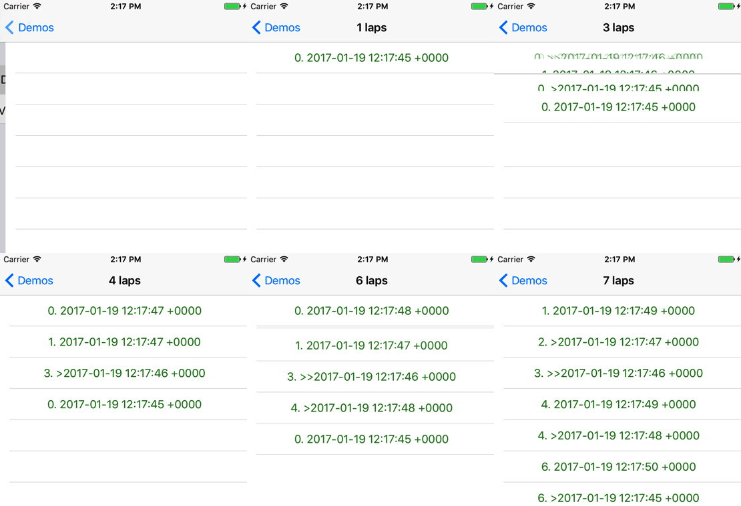
If you want to learn more about the features beyond animating changes, check the RxRealmDataSources README.
Example app
To run the example project, clone the repo and run ./pod_install.sh from the Examples directory (needs XcodeGen and CocoaPods). The app uses RxSwift, RxCocoa using RealmSwift, RxRealm to observe Results from Realm.
The library's unit tests are in the Tests/RxRealmTests folder.
Documentation
API documentation is hosted on the Swift Package Index.
Installation
| RxRealm | RealmSwift | RxSwift | Minimum OS |
|---|---|---|---|
| 6.x | 20.0.6+ | 6.9+ | iOS 15, macOS 12, tvOS 15, watchOS 9 |
| 5.x | 10.x | 6.x | iOS 12, macOS 10.13, tvOS 12, watchOS 4 |
Swift Package Manager (recommended)
In Xcode choose File → Add Package Dependencies… and enter https://github.com/RxSwiftCommunity/RxRealm.git, or add it to your Package.swift:
let package = Package(
  name: "Example",
  dependencies: [
    .package(url: "https://github.com/RxSwiftCommunity/RxRealm.git", from: "6.0.0")
  ],
  targets: [
    .target(name: "Example", dependencies: ["RxRealm"])
  ]
)
The package has two products: RxRealm (static) and RxRealm-Dynamic (dynamic). Use the dynamic one if several targets in your app link RxRealm.
CocoaPods
pod "RxRealm", "~> 6.0"
CocoaPods trunk becomes read-only on December 2, 2026. Versions already published keep working, but later RxRealm releases may only be available through Swift Package Manager.
Carthage
Carthage is no longer supported as of 6.0.0. Use Swift Package Manager, or stay on RxRealm 5.x.
License
This library belongs to RxSwiftCommunity. Maintainer is Joe Mattiello. Previous maintainer was Marin Todorov.
RxRealm is available under the MIT license. See the LICENSE file for more info.
Explore related projects
Asabeneh/30-Days-Of-Python
The 30 Days of Python programming challenge is a step-by-step guide to learn the Python programming language in 30 days. This challenge may take more than 100 days. Follow your own pace. These videos may help too: https://www.youtube.com/channel/UC7PNRuno1rzYPb1xLa4yktw
78,560 starsgrafana/grafana
The open and composable observability and data visualization platform. Visualize metrics, logs, and traces from multiple sources like Prometheus, Loki, Elasticsearch, InfluxDB, Postgres and many more.
77,830 starsredis/redis
For developers, who are building real-time data-driven applications, Redis is the preferred, fastest, and most feature-rich cache, data structure server, and document and vector query engine.
77,395 starsapache/superset
Apache Superset is a Data Visualization and Data Exploration Platform
75,473 stars