
Rezwanul-Haque/byteTable
Rezwanul-Haque/byteTable has 31 GitHub stars and 4 forks. GitHot measured 0 stars in 24 hours. Last checked 2026-11-15 04:09 UTC. Last push 2026-11-12.
What you can do
- Virtualized data grid: type-aware cells, sort, server-side paging (rows-per-page footer), inline cell editing (parameterized UPDATE, production-confirm).
- Stackable filter builder (13 operators, parameterized) + raw WHERE escape hatch.
- SQL editor: syntax highlighting, ⌘↩ run, per-tab history, global saved queries (optionally scoped to a workspace), and an Explain panel + execution-order minimap. Results render in a virtualized grid with client-side header sort (asc → desc → none, NULLs last) and CSV export.
- Structure view: columns / indexes / foreign keys / referenced-by / DDL, with inline editing staged into reviewable ALTER statements (apply/discard).
Measured star growth
- in 24h
- 0
- in 7 days
- Collecting history
- in 15 days
- Collecting history
- in 1 month
- Collecting history
Net star changes over overlapping periods, not daily totals. Missing measurements are left blank. Stars measure attention, not software quality.
About
A fast, local-first GUI for SQLite, MySQL, PostgreSQL, Ms SQL Server, Redis, DynamoDB, MongoDB, Cassandra, ClickHouse and Typesense. Cross-platform, fully native on MacOS, Linux, Windows, no account, no subscription.
Web & AppsREADME.md
OriginalByteTable
A free, open-source, local-first desktop database client — a TablePlus / BeekeeperStudio like tool with first-class Linux, MacOS, Windows support, no pro tier, and no subscription. One window, Multiple workspace, ten engines: SQLite · MySQL · PostgreSQL · SQL Server · Redis · DynamoDB · MongoDB · Cassandra · ClickHouse · Typesense. Many more engines to come.
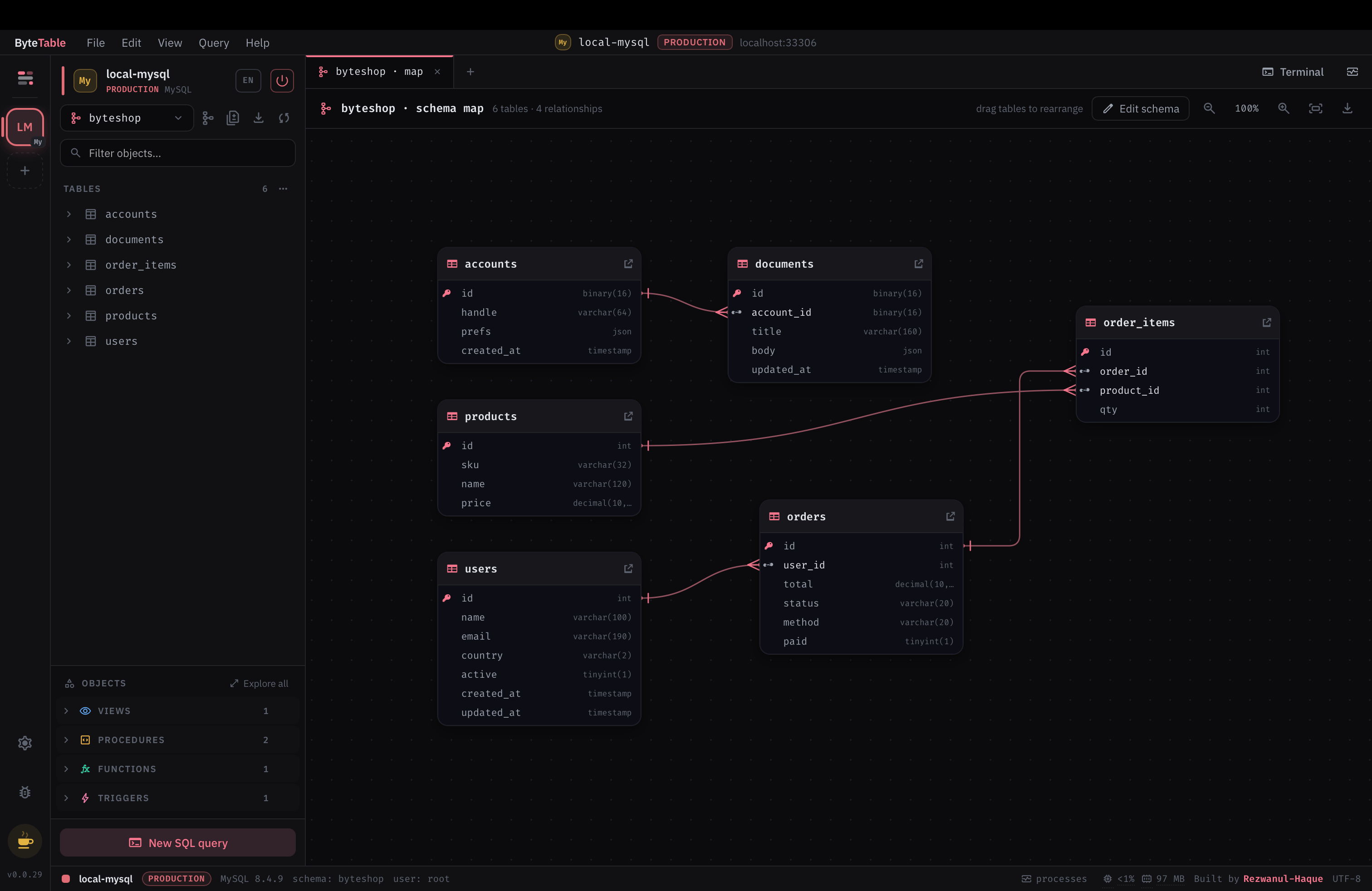
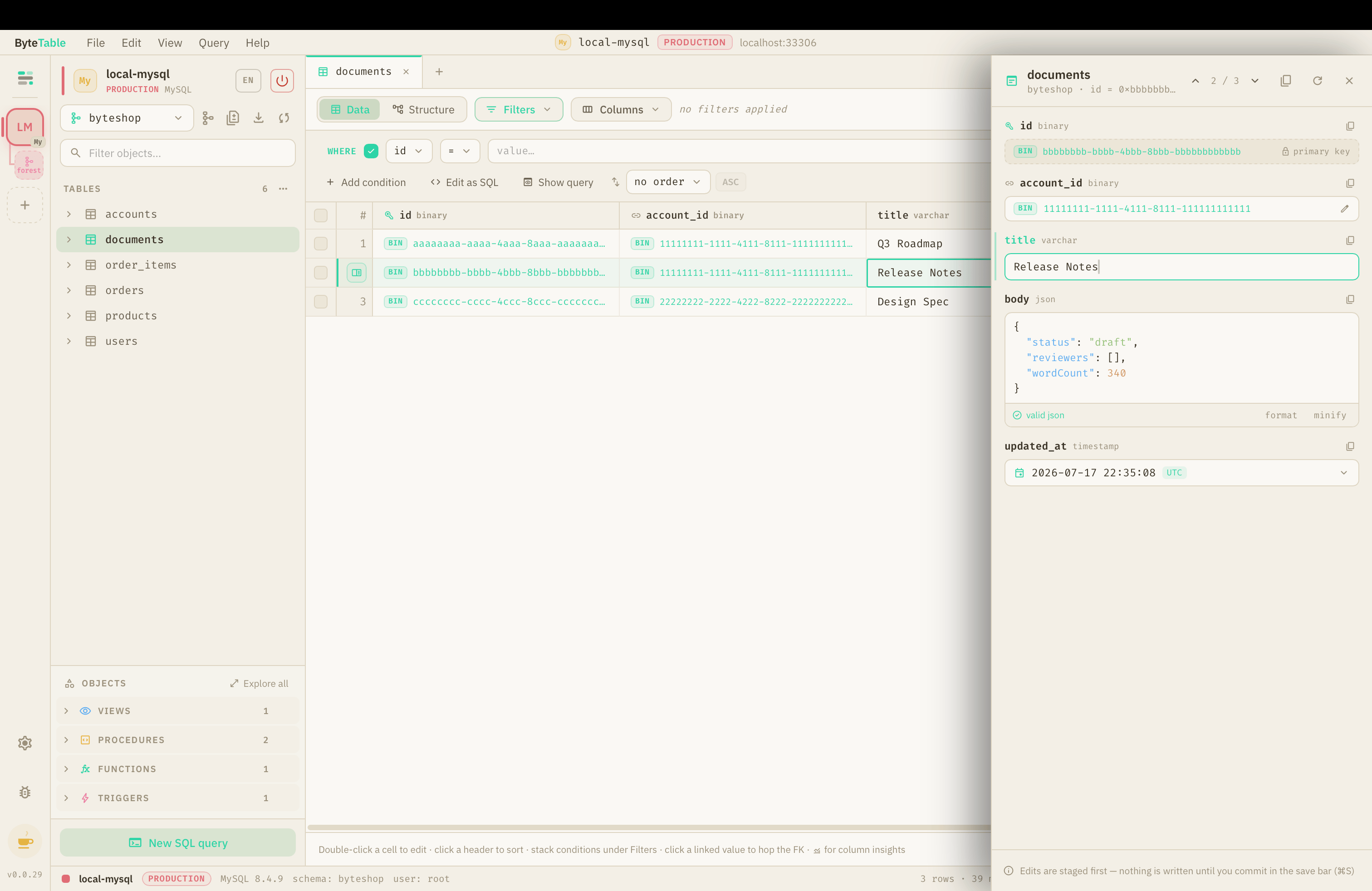
Your credentials never leave your machine: all database I/O happens in the Rust core, secrets live in the OS keychain, and the renderer only ever sees opaque connection ids.
Table of contents
- Features
- Tech stack
- Prerequisites
- Run it (dev mode)
- Common commands (Makefile)
- Try it against real databases
- Project layout
- Install
- Building a distributable
- Contributing
- License & funding
Features
Workspaces — multiple simultaneous connections as colored, renamable tiles in a left rail, each with its own tab set and sidebar state.
SQL engines (SQLite / MySQL / PostgreSQL / SQL Server)
- Virtualized data grid: type-aware cells, sort, server-side paging (rows-per-page footer), inline cell editing (parameterized
UPDATE, production-confirm). - Stackable filter builder (13 operators, parameterized) + raw
WHEREescape hatch. - SQL editor: syntax highlighting,
⌘↩run, per-tab history, global saved queries (optionally scoped to a workspace), and an Explain panel + execution-order minimap. Results render in a virtualized grid with client-side header sort (asc → desc → none, NULLs last) and CSV export. - Structure view: columns / indexes / foreign keys / referenced-by / DDL, with inline editing staged into reviewable
ALTERstatements (apply/discard). - FK hop (peek a referenced row → open it filtered), column insights (distinct/nulls/min/max/avg + top-5 over the current filter).
- Schema map: draggable ER diagram with movable FK edges, zoom, and PNG/SVG export.
- Export a table or schema to CSV / SQL; truncate with a confirm dialog.
- SQL Server plugs into the same relational surface as a fourth engine — T-SQL dialect throughout (bracket-quoted identifiers,
OFFSET…FETCHpaging,IDENTITY, thesys.*catalog,dbodefault schema, indexed views in place of materialized views) and asqlcmdterminal. Backed by thetiberiusTDS driver.
Redis — a purpose-built keyspace browser (not shoehorned into a grid): db0–db15 switcher, SCAN-based key list (tree + flat), type-aware viewers/editors for string/hash/list/set/zset/stream, key TTL/encoding/memory info, and a keyspace dashboard.
DynamoDB — its own document/single-table-design surface (not forced into a relational grid): table list with key schema + GSI/LSI preview, scan/query with sort-key operators, attribute-union item grid + JSON item editor, a DescribeTable-driven dashboard, PartiQL console, a single-table-design schema map (with PNG/SVG export), and CSV / JSON export & import.
MongoDB — a document/collection surface: database selector + collection list with index sub-rows, the Find tab (filter / projection / sort / limit) with Tree ⇄ Table views, a JSON document editor with $jsonSchema validation, an aggregation-pipeline builder (inline + standalone, incl. $lookup), a real explain("executionStats") panel, an inferred-schema / Indexes / Validation Structure tab, a mongosh console, a collection schema map (with PNG/SVG export), and JSON / mongosh-script / CSV export & import. BSON ObjectId / ISODate survive read → edit → write.
Cassandra — a query-first wide-column surface (not forced into a relational grid): keyspace selector + table list, a CQL-correct query builder (partition / clustering / non-key predicates with an explicit ALLOW FILTERING opt-in), per-query consistency level, hybrid inline editing (regular scalars inline, complex types in a row modal, key columns locked), a Structure tab with secondary indexes / materialized views, a standalone CQL query tab + cqlsh terminal (incl. nodetool status), a denormalization schema map (with PNG/SVG export), create-keyspace / create-table flows, and CQL / CSV / JSON export & import. CQL types (uuid / timeuuid / timestamp / collections) survive read → edit → write.
Settings — a tabbed preferences modal (⌘,): 12 themes (incl. light), accent + font (editor mono + UI) + size + density, and behavior toggles (ligatures, reduce-motion, row-hover, default row limit, production-write confirm). Applied app-wide via CSS variables; persisted locally (localStorage + an editable on-disk mirror).
ClickHouse — the columnar OLAP store as a first-class relational engine: the analytics/default/system database switcher, browse grid + filter builder + row inspector, a Structure tab that renders ENGINE + ORDER BY sort key + PARTITION BY with Nullable(…) wrapping and data-skipping (secondary) indexes as ALTER TABLE … ADD INDEX, an object browser (views / materialized views / SQL UDF functions — no procedures or triggers), inline edits as ALTER TABLE … UPDATE mutations, and a clickhouse-client terminal (:) prompt, PrettyCompact output). Spoken over the ClickHouse HTTP interface.
Typesense — a search workspace rather than a table browser, because Typesense is a search API: collections replace databases and every read is a search call. A relevance playground that makes ranking legible — live query_by field weights, typo budget with the min_len gate explained, prefix / synonym / curation toggles, a facet rail that writes filter_by, and a per-hit relevance x-ray built from the server's own highlights and text_match_info. When a query finds nothing it says why, naming the nearest indexed terms and offering one-click fixes. Plus a cluster dashboard (raft state, replication position, per-node request rate), schema and document tabs with JSON upsert/delete, curation (synonyms + pinned/hidden results), API keys (prefixes only — Typesense never returns a full key), and a forgiving HTTP console that runs a pasted curl unchanged. Search-only keys degrade gracefully instead of erroring.
Shared — a VS Code-style docked terminal panel (per-engine REPL: psql/mysql/sqlite3-style for SQL, sqlcmd for SQL Server, redis-cli for Redis, mongosh for MongoDB, cqlsh for Cassandra, clickhouse-client for ClickHouse; PartiQL for DynamoDB; an HTTP console for Typesense; Ctrl+\``), command palette (⌘K`), system tray, and live theming via the Settings modal.
Tech stack
- Shell: Rust + Tauri 2 (small binaries; macOS / Linux / Windows).
- UI: React + TypeScript + Vite in the Tauri webview.
- Architecture: vertical-slice + clean architecture — one feature per capability
(
connections,introspection,browse,query,structure,mutate,export,keyvalue,dynamo,mongo,cassandra,schema_map,insights,preferences,settings), each with domain / application / ports / infrastructure / thin Tauri-command layers. Engine drivers (rusqlite,sqlx,tiberius,redis,aws-sdk-dynamodb,mongodb,scylla,reqwestfor ClickHouse's HTTP interface) are infrastructure adapters behind shared port traits (a separate port family per data model: SQL, key-value, DynamoDB-document, MongoDB, and Cassandra wide-column).
Prerequisites
- Rust ≥ 1.77 (stable toolchain via rustup). Optional, Linux/macOS/BSD
only: the
maketargets auto-install it for you ifcargois missing (see the note below). - Node ≥ 18 and pnpm 10 (
corepack enableornpm i -g pnpm). - Tauri 2 system deps — see the Tauri prerequisites guide. On Linux that means WebKitGTK 4.1 + build essentials; macOS needs Xcode command-line tools; Windows needs the MSVC build tools + WebView2.
- Docker (optional) — only to run the bundled test databases (see below).
Windows: the
makerecipes are POSIX, so fromcmd/PowerShell they run under thesh.exethat Git for Windows ships. Usual install locations are detected automatically; if yours is elsewhere, pass a space-free path:make GIT_SH=C:/path/to/Git/usr/bin/sh.exe dev. You also need GNUmakeitself (winget / Chocolatey / Scoop / MSYS2 all package it) and Rust's MSVC toolchain. Git Bash and MSYS2 are left alone — they already have a POSIX shell. Not usingmakeat all works too: run the underlyingpnpm/cargocommands directly.
Auto-install:
make build/dev/test/lint/fmtrunpnpm installfirst, and anensure-cargostep that installs the Rust toolchain via the official rustup script (-y --no-modify-path) whencargois not already on your PATH — so a fresh machine can build with one command. It is a no-op once Rust is installed. This runs a network install of a toolchain on your machine; if you'd rather control that, install Rust yourself first (then the step just skips), or run the underlyingpnpm/cargocommands directly. Auto-install covers Linux/macOS/BSD only (curlis required). On Windows — including Git Bash and MSYS2 —ensure-cargoprints an install instruction instead: the Unix rustup script would give you thewindows-gnutoolchain, and Tauri needs MSVC. Install it yourself withwinget install --id Rustlang.Rustup -e(or from rustup.rs), then re-run.
Run it (dev mode)
git clone [email protected]:Rezwanul-Haque/byteTable.git && cd byteTable
pnpm install        # or: make install
make dev            # or: pnpm tauri dev
make dev launches the Vite dev server and the Tauri window together with hot reload. First run
compiles the Rust core, so it takes a few minutes; subsequent runs are fast.
Common commands (Makefile)
| Command | What it does |
|---|---|
make dev |
Run the app in development (Tauri + Vite, hot reload) |
make test |
Rust unit + integration tests + TS typecheck |
make lint |
ESLint + Prettier check + cargo fmt --check + cargo clippy -D warnings |
make fmt |
Auto-format (Prettier + rustfmt) |
make build |
Production desktop bundle (tauri build) |
make build-debug / make run |
Fast debug build / build-then-launch |
make db-up / make db-down |
Start+seed / wipe the test databases |
make |
List all targets |
(Each maps to the underlying pnpm / cargo command — run those directly if you prefer.)
Try it against real databases
A ready-to-use set of throwaway databases lives in test-fixtures/:
make db-up # Postgres + MySQL + SQL Server + Redis + DynamoDB + MongoDB + Cassandra + ClickHouse + Typesense (seeded) on offset ports
Then in the app's New connection modal (TLS: disable), use the credentials in
test-fixtures/README.md — e.g. Postgres localhost:55432,
user postgres, password bytetable, database byteshop. SQL Server is
localhost:11433, user sa, password ByteTable1!, database byteshop. For
SQLite, choose "Open SQLite file…" → test-fixtures/byteshop.db. Stop them
with make db-down.
To exercise the SSH tunnel feature, make tunnel-up starts a bastion with
MySQL/PostgreSQL/Redis reachable only through it — see
docs/SSH_TUNNEL_TESTING.md.
Project layout
src/                     Renderer (React/TS), one folder per feature
  features/<feature>/    components / state (Zustand) / api (typed invoke wrappers)
  shared/                design tokens, UI primitives, wire types
src-tauri/               Rust core
  src/engines/           engine adapters (sqlite, postgres, mysql, mssql, redis, dynamo, mongo, cassandra, ssh tunnel)
  src/features/<slice>/  domain / application / ports / infrastructure / commands
  src/shared/            error type, engine + key-value + document + mongo + wide-column port traits
test-fixtures/           docker-compose + seeds + sample SQLite
docs/                    design specs
Install
macOS / Linux — recommended. One line; it detects your OS/arch, installs the latest release, and on macOS clears the Gatekeeper flag so there's no first-launch prompt:
curl -fsSL https://raw.githubusercontent.com/rezwanul-Haque/byteTable/main/install.sh | sh
- macOS mounts the
.dmgand copiesByteTable.appto/Applications(and clears the Gatekeeper quarantine flag, since the build isn't notarized yet). - Linux
- Debian / Ubuntu → installs the
.debviaapt(app-menu entry + dependency resolution; needssudo). This is preferred because AppImages needlibfuse2, which Ubuntu 22.04+ no longer ships, so they often won't launch. - Other distros (or no matching
.debin the release) → drops the.AppImageinto~/.local/bin/bytetable(nosudo); if it won't run,sudo apt install libfuse2.
- Debian / Ubuntu → installs the
Package managers
macOS — Homebrew:
brew install --cask rezwanul-haque/tap/bytetable
[!NOTE] Homebrew and
.dmginstalls need one extra step on first launch. macOS shows a Gatekeeper prompt because ByteTable isn't notarized yet — there's no Apple Developer account behind it for now. It's open source and safe; macOS is just being cautious.Open it either way:
- System Settings → Privacy & Security → scroll to ByteTable → "Open Anyway", or
- clear the quarantine flag yourself:
xattr -dr com.apple.quarantine /Applications/ByteTable.appThe recommended install script already does this for you — only the Homebrew cask and direct
.dmgdownloads hit the prompt. It goes away for good once the app is notarized.
Windows — PowerShell:
irm https://raw.githubusercontent.com/rezwanul-Haque/byteTable/main/install.ps1 | iex
Or grab the .exe from the latest release.
Prefer not to pipe to a shell? Read
install.sh/install.ps1first, or just download the installer for your OS from the releases page. The scripts need a published release to exist.
Building a distributable
make build (= pnpm tauri build) produces installers for the OS you run it on — Tauri
builds natively per platform, so build each target on that OS (or in CI). Output lands in
src-tauri/target/release/bundle/.
macOS
make build                                   # → bundle/macos/ByteTable.app + bundle/dmg/*.dmg
# Apple-silicon + Intel universal binary:
rustup target add aarch64-apple-darwin x86_64-apple-darwin
pnpm tauri build --target universal-apple-darwin
Requires Xcode command-line tools. Distributing outside your own machine needs code signing +
notarization (an Apple Developer ID); set APPLE_CERTIFICATE, APPLE_ID, APPLE_PASSWORD,
APPLE_TEAM_ID env vars and Tauri signs/notarizes during the build. Unsigned .apps run locally
but Gatekeeper blocks them elsewhere.
Linux
make build # → bundle/deb/*.deb + bundle/appimage/*.AppImage (+ bundle/rpm/*.rpm)
Install the Tauri 2 Linux deps first (Debian/Ubuntu):
sudo apt install libwebkit2gtk-4.1-dev libgtk-3-dev libayatana-appindicator3-dev \
                 librsvg2-dev build-essential curl wget file
.deb/.rpm are tied to the building distro's libraries; the .AppImage is the most
portable single-file artifact. Build on the oldest distro you intend to support (glibc
compatibility is forward, not backward).
Installing the build on Linux
.AppImage— no install. Make it executable and run it:chmod +x ByteTable_*.AppImage ./ByteTable_*.AppImage.deb(Debian/Ubuntu) — install from a terminal:
Then launch from your app menu or runsudo apt install ./bytetable_*_amd64.deb # resolves dependencies # or: sudo dpkg -i ./bytetable_*_amd64.deb && sudo apt -f installbytetable.⚠️ Don't double-click the
.deb. On Ubuntu 22.04+ that opens it in the snap-based "App Center", which cannot install local.debfiles — it appears to do nothing. This is an Ubuntu limitation, not a problem with the package; use theapt install ./…command above..rpm(Fedora/RHEL/openSUSE) —sudo dnf install ./bytetable-*.rpm(orsudo zypper install).
App icon in the dock / taskbar
Unlike macOS (where the .app bundle carries the icon and the Dock reads it directly), Linux
docks resolve an icon by matching the running window — its app_id (Wayland) or WM_CLASS
(X11) — to an installed .desktop entry, then showing that entry's Icon=.
A raw
.AppImageinstalls nothing, so there is no.desktopto match → the dock shows a generic icon. Either install the.deb/.rpm(they install the.desktop+ hicolor icons, so the icon appears in the dock and app menu), or integrate the AppImage with AppImageLauncher / Gear Lever ("Add to menu"), which creates the.desktop+ extracts the icon.GNOME on Wayland maps a window to its launcher — for both the icon and the running-window dot — by matching the window's
app_idto a.desktopfile name (it largely ignoresStartupWMClass). The catch: GNOME lowercases theapp_idbefore looking up<app_id>.desktop. The window's class is the binary name, not the bundle identifier (com.bytetable.appis macOS/updater-only) — so a capitalized binary likeByteTablereportsByteTable, GNOME searchesbytetable.desktop, and aByteTable.desktopentry never matches → generic icon and no running dot. ByteTable fixes this at the source:mainBinaryNameis set to the lowercasebytetable, so the binary,Exec=, the installed.desktopfile name, the windowapp_id, andStartupWMClass=are all the single lowercase tokenbytetable. On a current build there's nothing to do. If you're on an older build (capitalized binary) and still see a generic icon / missing dot on Wayland, drop a matching lowercase entry into your user applications:# confirm the class/app-id the window actually reports: xprop WM_CLASS # X11 — click the ByteTable window # (Wayland: Alt+F2 → "lg" → Windows tab shows each window's app_id) # install a user .desktop whose FILE NAME equals the lowercased app_id: cat > ~/.local/share/applications/bytetable.desktop <<'EOF' [Desktop Entry] Type=Application Name=ByteTable Exec=bytetable Icon=bytetable StartupWMClass=bytetable Categories=Development;Database; Terminal=false EOF update-desktop-database ~/.local/share/applications 2>/dev/null || trueAdjust the file name /
StartupWMClassto whateverxprop/Looking Glass actually reported.Icon looks small / not aligned with neighbors? macOS Dock icons carry a ~10% transparent margin (the look Apple wants), but Linux/GNOME icons are full-bleed — they fill the canvas edge-to-edge. The Linux hicolor PNGs (
src-tauri/icons/{32x32,128x128,128x128@2x}.png) are therefore rendered fromsrc-tauri/icon-source-linux.svg(cropped to the brand tile, ~98% fill), not the paddedicon-source.svgused foricon.icns. To regenerate after editing the artwork:cd src-tauri for s in "32 32x32" "64 64x64" "128 128x128" "256 128x128@2x" "512 icon"; do set -- $s; rsvg-convert -w "$1" -h "$1" icon-source-linux.svg -o "icons/$2.png" done
Windows
make build # → bundle\msi\*.msi (WiX) + bundle\nsis\*-setup.exe (NSIS)
Requires the Microsoft C++ Build Tools (MSVC) and WebView2 (preinstalled on Windows 11; the
installer auto-fetches it on older Windows). Signing is optional — set WINDOWS_CERTIFICATE /
WINDOWS_CERTIFICATE_PASSWORD to sign the installers and avoid SmartScreen warnings.
Cross-OS builds: Tauri does not reliably cross-compile desktop bundles (each needs that OS's webview + toolchain). The repo's GitHub Actions CI already builds on an ubuntu/macos/windows matrix — use that to produce all three from one push, or run
make buildon each OS.
Contributing
Contributions are welcome — bug reports, fixes, features, and docs. See CONTRIBUTING.md for the dev setup, project layout, and the checks a PR must pass.
License & funding
Licensed under the Apache License 2.0.
Free forever — no feature is ever paywalled. Development is donation-funded (the in-app donate button links to GitHub Sponsors / Buy Me a Coffee).