
RaphiaRa/tiny_http
RaphiaRa/tiny_http has 28 GitHub stars and 0 forks. GitHot measured 0 stars in 24 hours and 0 in 7 days. Last checked 2026-11-14 09:45 UTC. Last push 2026-11-01.
What you can do
- Simple integration (just copy the th.h and th.c files to your project)
- HTTPS support (via OpenSSL)
- Path capturing (e.g. /user/{id})
- Supports Linux and MacOS (Windows support is planned)
Measured star growth
- in 24h
- 0
- in 7 days
- 0
- in 15 days
- Collecting history
- in 1 month
- Collecting history
Net star changes over overlapping periods, not daily totals. Missing measurements are left blank. Stars measure attention, not software quality.
About
lightweight, fast, easy-to-use, and embeddable HTTP server library in C
Web & AppsREADME.md
Originaltiny_http


Hello, World! Example:
#include "th.h"

static th_err
handler(void* userp, const th_request* req, th_response* resp)
{
    th_set_body(resp, "Hello, World!");
    th_add_header(resp, "Content-Type", "text/plain");
    return TH_ERR_OK;
}

int main(void)
{
    th_server* server;
    th_server_create(&server, NULL);
    th_bind(server, "0.0.0.0", "8080", NULL);
    th_route(server, TH_METHOD_GET, "/", handler, NULL);
    while (1) {
        th_poll(server, 1000);
    }
    return 0;
}
Simply copy the code above to a file (e.g. hello.c) where you have the th.h and th.c files, and compile it with:
$ gcc -o hello hello.c th.c
Then run the server with:
$ ./hello
I wrote this library because I wanted a simple drop-in solution for the legacy C and C++ codebases I work with, hence the lack of dependencies and new language features. It is not designed to be a full-fledged web server, but rather a simple tool to build small web applications or to serve static files. No threading or forking is used.
Features
- Simple integration (just copy the
th.handth.cfiles to your project) - HTTPS support (via OpenSSL)
- Path capturing (e.g.
/user/{id}) - Supports Linux and MacOS (Windows support is planned)
- Fully customizable memory allocation and logging
- File Uploads (Multipart form data)
- Websockets
Dependencies
- The C standard library
- OpenSSL (optional, for HTTPS support)
- gperf (optional, for binary builds and amalgamation)
- python3 (optional, for running the amalgamation script)
Enabling HTTPS
To enable HTTPS support, you need to link against OpenSSL and set TH_WITH_SSL=1 when compiling the library.
$ gcc -o myserver myserver.c th.c -lssl -lcrypto -DTH_WITH_SSL=1
Pass the certificate and private key file paths to th_bind:
th_bind_opt opt = {
    .cert_file = "cert.pem",
    .key_file = "key.pem",
};
th_bind(server, "0.0.0.0", "433", &opt);
Logging
Logging can be configured via the TH_LOG_LEVEL macro.
$ gcc -o myserver myserver.c th.c -DTH_LOG_LEVEL=TH_LOG_LEVEL_TRACE
Possible values are:
TH_LOG_LEVEL_NONE
TH_LOG_LEVEL_ERROR
TH_LOG_LEVEL_WARN
TH_LOG_LEVEL_INFO
TH_LOG_LEVEL_DEBUG
TH_LOG_LEVEL_TRACE
By default, tiny_http logs to stderr,
but users can provide their own logging function (See examples/custom_logger.c).
Building binaries, examples, and tests
Library builds, examples, and tests can be built using CMake (This requires gperf to be installed).
$ mkdir build; cd build
$ cmake ..
$ make
More examples
Example - Path capturing:
#include "th.h"

static th_err
handler(void* userp, const th_request* req, th_response* resp)
{
    const char* msg = th_find_pathvar(req, "msg");
    th_printf_body(resp, "Hello, %s!", msg);
    th_add_header(resp, "Content-Type", "text/plain");
    return TH_ERR_OK;
}

int main(void)
{
    th_server* server;
    th_server_create(&server, NULL);
    th_bind(server, "0.0.0.0", "8080", NULL);
    th_route(server, TH_METHOD_GET, "/{msg}", handler, NULL);
    while (1) {
        th_poll(server, 1000);
    }
    return 0;
}
It's possible to specify a capture type by adding a colon before the parameter name: {string:param} (Default if nothing is specified), {int:param}, {path:param}.
Example - File serving:
#include "th.h"

static th_err
handle_path(void* userp, const th_request* req, th_response* resp)
{
    const char* path = th_find_pathvar(req, "path");
    th_set_body_from_file(resp, "root", path);
    return TH_ERR_OK;
}

static th_err
handle_index(void* userp, const th_request* req, th_response* resp)
{
    th_set_body_from_file(resp, "root", "index.html");
    return TH_ERR_OK;
}

int main(void)
{
    th_server* server;
    th_server_create(&server, NULL);
    th_bind(server, "0.0.0.0", "8080", NULL);
    th_add_dir(server, "root", "/path/to/your/files");
    th_route(server, TH_METHOD_GET, "/{path:path}", handle_path, NULL);
    th_route(server, TH_METHOD_GET, "/", handle_index, NULL);
    while (1) {
        th_poll(server, 1000);
    }
    return 0;
}
More detailed examples can be found in the examples directory.
Performance
Although tiny_http is not designed to be high-performance, it's still quite fast.
Here is a comparison with Drogon (One of my favorite C++ web frameworks) on my cloud server (2 dedicated AMD Epyc vCPUs).
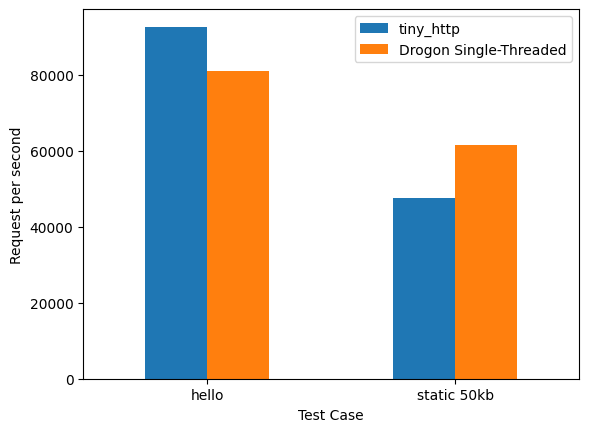
Notes:
- Drogon will, of course scale much better with more threads. This is just to give a rough idea of tiny_http's performance.
- The slower static file test is probably because of tiny_http not using
sendfileon Linux yet.
Explore related projects
freeCodeCamp/freeCodeCamp
freeCodeCamp.org's open-source codebase and curriculum. Learn math, programming, and computer science for free.
459,116 starsdonnemartin/system-design-primer
Learn how to design large-scale systems. Prep for the system design interview. Includes Anki flashcards.
377,840 starsreact/react
The library for web and native user interfaces.
252,596 starsvuejs/vue
This is the repo for Vue 2. For Vue 3, go to https://github.com/vuejs/core
212,524 stars