
RanFeng/clipsketch-ai
RanFeng/clipsketch-ai has 1,877 GitHub stars and 244 forks. GitHot measured 0 stars in 24 hours and -1 in 7 days. Last checked 2026-11-11 14:50 UTC. Last push 2026-01-14.
将视频瞬间转化为手绘故事 Turn Video Moments into Hand-Drawn Stories
Measured star growth
- in 24h
- 0
- in 7 days
- -1
- in 15 days
- Collecting history
- in 1 month
- Collecting history
Net star changes over overlapping periods, not daily totals. Missing measurements are left blank. Stars measure attention, not software quality.
README.en.md
OriginalClipSketch AI
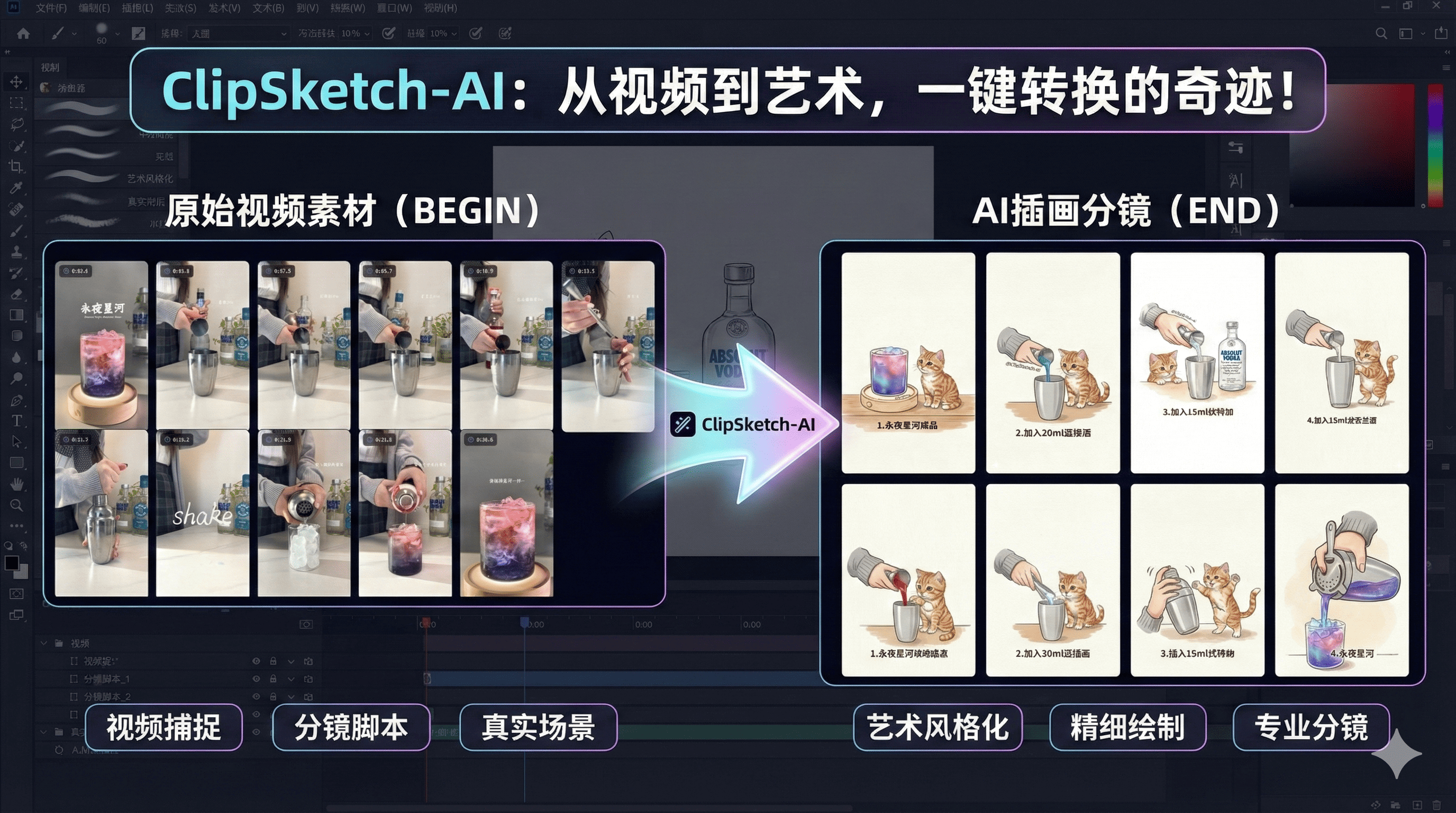
Turn Video Moments into Hand-Drawn Stories




[Features] • [Quick Start] • [User Guide] • [Tech Stack]
📖 Introduction
ClipSketch AI is a full-process productivity tool designed for video creators, social media managers, and fan-art enthusiasts.
More than just a video player, it is an AI-powered content creation workbench. It can parse video links from Bilibili and Xiaohongshu (RedNote), allowing you to tag key moments with frame-level precision. Integrating Google Gemini's latest multimodal models, it transforms these moments into exquisite hand-drawn storyboards with one click and automatically generates viral copy adapted for social media.
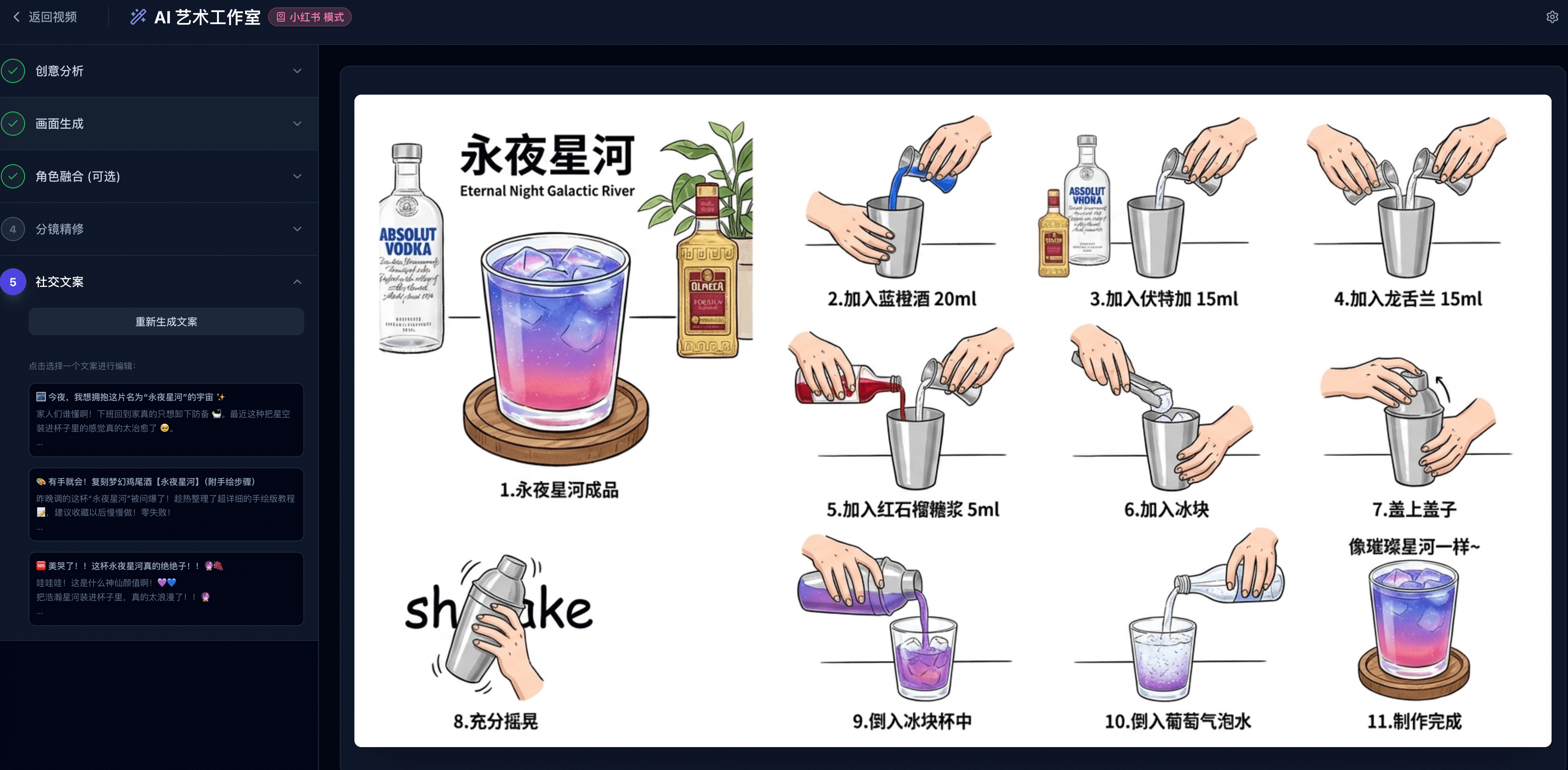
🖥️ Interface Preview
✨ Key Features

🎥 Powerful Video Capture
- Multi-Source Import: Supports parsing sharing links from Bilibili and Xiaohongshu (Short links and mixed text supported).
- HD Playback: Optimized adaptive layout for both vertical (9:16) and widescreen videos.
- Precision Control: Supports keyboard shortcuts (Space to play/pause, Arrow keys for frame-by-frame/smart stepping).
🏷️ Frame-Level Tagging
- Millisecond Precision: Accurately capture every exciting moment.
- Quick Shortcuts: Press
Tto tag instantly. - Data Export: Export tags as TXT or package tagged frames as a ZIP file.
🎨 AI Art Studio (Powered by Gemini)
- Smart Drawing: Uses the
gemini-3-pro-image-previewmodel to synthesize multiple tagged frames into a coherent, cute hand-drawn storyboard. - Social Copywriting: Uses
gemini-3-pro-previewto generate 3 different styles of viral copy based on visual content (Emotional Story, Tutorial, Punchy/种草). - Character Integration: Upload a custom character/avatar, and AI will automatically blend it into the storyboard scenes.
- Cover Generation: Generate high-quality vertical video covers based on selected copy and original footage.
- Batch Refining: Support for batch generation and optimization of storyboard panels (Configurable Batch API for cost savings).
📱 Cross-Platform Adaptation
- Responsive Design: Perfectly adapted for PC widescreen, iPad, and mobile vertical screens.
- Mobile Optimization: Automatically switches to a top-bottom layout on mobile devices for easier operation.
🚀 Quick Start
Prerequisites
- Node.js (v18+)
- A valid Google Gemini API Key
Install & Run
Clone the Repository
git clone https://github.com/RanFeng/clipsketch-ai.git
cd clipsketch-ai
Install Dependencies
npm installConfigure Environment Variables Create a
.env.localfile in the root directory and add your API Key:GEMINI_API_KEY=your_api_key_hereStart Development Server
npm run devVisit App Open your browser and visit
http://localhost:3000.
Docker Deployment
docker run -d --restart=always --name clipsketch-ai -p 3000:3000 earisty/clipsketch-ai:latest
📚 User Guide
- Import Video:
- Copy a sharing link from Bilibili or Xiaohongshu.
- Paste it into the input box on the home page and click "Import Video".
- Tag Footage:
- Use
Spaceto control playback,←/→to adjust progress. - When you see a great moment, click the Tag button or press the
Tkey.
- Use
- Enter AI Studio:
- After tagging, click "Next: AI Drawing" at the bottom of the right list.
- Create Content:
- Paste your Gemini API Key in the top right (if not configured in env).
- Creative Analysis: AI analyzes video steps.
- Generate Base: Generate hand-drawn storyboards, optionally integrating a custom character.
- Refine Panels: High-definition redrawing of each panel (supports batch mode).
- Copy & Cover: Generate social media copy and create matching covers.
- Export & Share:
- Download generated storyboard images, covers, or package all assets.
- One-click copy for your favorite captions.
🛠️ Tech Stack
- Core Framework: React 19, TypeScript
- Styling: Tailwind CSS
- Icons: Lucide React
- AI SDK: Google GenAI SDK (
@google/genai) - Utilities: JSZip (Bundling), Canvas API (Screenshots)
- Storage: IndexedDB (Local state persistence)
⚠️ Notes
- API Permissions: Using AI drawing features requires your API Key to have access to the
gemini-3-pro-image-previewmodel. If you encounter a 403 error, please check your Google Cloud project settings. - Cross-Origin: To support external video playback and screenshots, this project uses specific proxy strategies and
referrerPolicy="no-referrer".
📄 License
MIT License © 2024 ClipSketch AI
Explore related projects
ytdl-org/youtube-dl
Command-line program to download videos from YouTube.com and other video sites
141,527 starsexcalidraw/excalidraw
Virtual whiteboard for sketching hand-drawn like diagrams
135,492 starsgodotengine/godot
Godot Engine – Multi-platform 2D and 3D game engine
119,942 starsmrdoob/three.js
JavaScript 3D Library.
118,122 stars