
Ramotion/preview-transition
Ramotion/preview-transition has 2,070 GitHub stars and 201 forks. GitHot measured 0 stars in 24 hours. Last checked 2026-11-06 23:54 UTC. Last push 2020-04-06.
:octocat: PreviewTransition is a simple preview gallery UI controller with animated tranisitions. Swift UI library made by @Ramotion
Measured star growth
- in 24h
- 0
- in 7 days
- Collecting history
- in 15 days
- Collecting history
- in 1 month
- Collecting history
Net star changes over overlapping periods, not daily totals. Missing measurements are left blank. Stars measure attention, not software quality.
README.md
Original
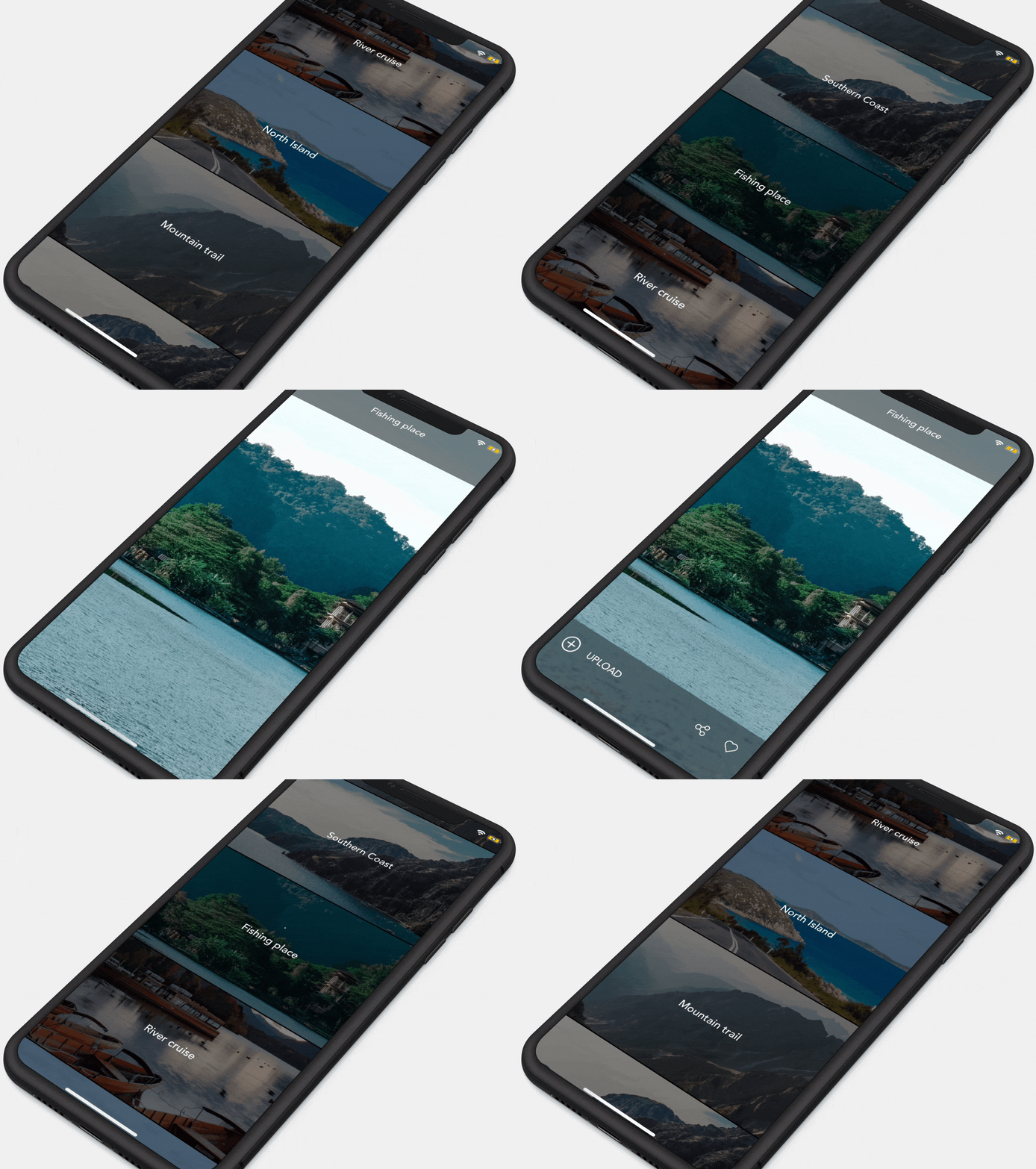
PREVIEW TRANSITION
Preview Transition is a simple preview gallery UI controller with animated tranisitions
We specialize in the designing and coding of custom UI for Mobile Apps and Websites.

Stay tuned for the latest updates:




About
This project is maintained by Ramotion, Inc.
We specialize in the designing and coding of custom UI for Mobile Apps and Websites.
Looking for developers for your project?
This project is maintained by Ramotion, Inc. We specialize in the designing and coding of custom UI for Mobile Apps and Websites.
Requirements
- iOS 9.0+
- Xcode 9
Licence
Preview-transition is released under the MIT license. See LICENSE for details.
Installation
Just add the Source folder to your project or use CocoaPods like this:
pod "PreviewTransition"
or Carthage users can simply add to their Cartfile:
github "Ramotion/preview-transition"
Usage
import PreviewTransitionCreate UITableViewController inherit, inheriting from
PTTableViewControllerAdd UITableViewDelegate methods
public override func tableView(tableView: UITableView, numberOfRowsInSection section: Int) -> Int {
    return <RowsCount>
}

public override func tableView(tableView: UITableView, cellForRowAtIndexPath indexPath: NSIndexPath) -> UITableViewCell {
    return tableView.dequeueReusableCellWithIdentifier(<CellIdentifier>, forIndexPath: indexPath)
}
- add a ParallaxCell
storyboards:
create a cell and inherit from ParallaxCell; don't forget set the identifier <CellIdentifier>
or programmatically:
register a cell in viewDidLoad tableView.registerClass(ParallaxCell, forCellReuseIdentifier:<CellIdentifier>)
set cell height
create image names (image sizes must be equal to screen size or bigger)
let images = [image_name, image_name, image_name, image_name, image_name] // image names
- set image and text for ParallaxCell
public override func tableView(tableView: UITableView, willDisplayCell cell: UITableViewCell, forRowAtIndexPath indexPath: NSIndexPath) {

    guard let cell = cell as? ParallaxCell else {
      return
    }

    let imageName = images[indexPath.row]

    if let image = UIImage(named: imageName) {
      cell.setImage(image, title: <SetText>)
    }
}
your tableViewController should look like DemoTableViewController
Method public override func tableView(tableView: didSelectRowAtIndexPath indexPath:) we will add later. (step 10)
Create UIViewController, inheriting from
PTDetailViewControllerAdd action for backButton and call
popViewController()
func backButtonHandler() {
    popViewController()
}
- Push this UIViewController in UITableViewController. Add method
public override func tableView(tableView: UITableView, didSelectRowAtIndexPath indexPath: NSIndexPath) {

  // create viewController
  let <YourViewController> = storyboard?.instantiateViewControllerWithIdentifier(<identifier>)
  if case let viewController as <YourViewController> = viewController {
     pushViewController(viewController)
  }
}
- Configure UINavigationBar
// transparent background
UINavigationBar.appearance().setBackgroundImage(UIImage(), forBarMetrics: .Default)
UINavigationBar.appearance().shadowImage = UIImage()
UINavigationBar.appearance().translucent = true
UINavigationBar.appearance().tintColor = .whiteColor()

// set font
if let font = UIFont(name: <Font name> , size: 18) {
      UINavigationBar.appearance().titleTextAttributes = [
        NSForegroundColorAttributeName : UIColor.whiteColor(),
        NSFontAttributeName : font
      ]
}
📄 License
Preview Transition is released under the MIT license. See LICENSE for details.
This library is a part of a selection of our best UI open-source projects.
If you use the open-source library in your project, please make sure to credit and backlink to https://www.ramotion.com/
📱 Get the Showroom App for iOS to give it a try
Try this UI component and more like this in our iOS app. Contact us if interested.

Explore related projects
codecrafters-io/build-your-own-x
Master programming by recreating your favorite technologies from scratch.
560,444 starspublic-apis/public-apis
A collective list of free APIs
496,762 starsmorluto/rea
Reverse engineer anything with agents, from app behavior down to native binaries.
438,060 starsopenclaw/openclaw
The AI that really does things. Any OS. Any Platform. The lobster way. 🦞
394,071 stars