
RYOITABASHI/Shelly
RYOITABASHI/Shelly has 73 GitHub stars and 12 forks. Star changes are not measured yet. Last checked 2026-11-13 10:07 UTC. Last push 2026-11-12.
What you can do
- shelly device battery - Battery level, charging state, plug type, health, temperature and voltage, as JSON
- shelly device info - Manufacturer, model, Android version, screen size and density, locale, time zone, network type (wifi / cellular / none) and the Shelly version, as JSON. It never includes identifiers such as IMEI, serial number, Android ID or IP/MAC addresses
- shelly device clipboard get [--json] - Print the clipboard text. Android lets only the focused app read the clipboard, so this works while Shelly is on screen and exits 3 otherwise. Every read shows "A script read your clipboard" on the phone
- shelly device clipboard set [--sensitive] <text | -> - Set the clipboard. Pass the text, or - to read stdin (date | shelly device clipboard set -). Without either it refuses, so it never empties the clipboard by accident. --sensitive hides the text from clipboard previews
Measured star growth
- in 24h
- Collecting history
- in 7 days
- Collecting history
- in 15 days
- Collecting history
- in 1 month
- Collecting history
Net star changes over overlapping periods, not daily totals. Missing measurements are left blank. Stars measure attention, not software quality.
About
AI terminal and agent runtime for Android — Codex and Claude Code on the phone, with an approval gate.
Developer ToolsREADME.md
Original

Shelly
Let ChatGPT use your Android phone — and approve every move yourself.
An open-source AI terminal and agent runtime that lives on the phone. No PC. No Termux. No cloud runner.
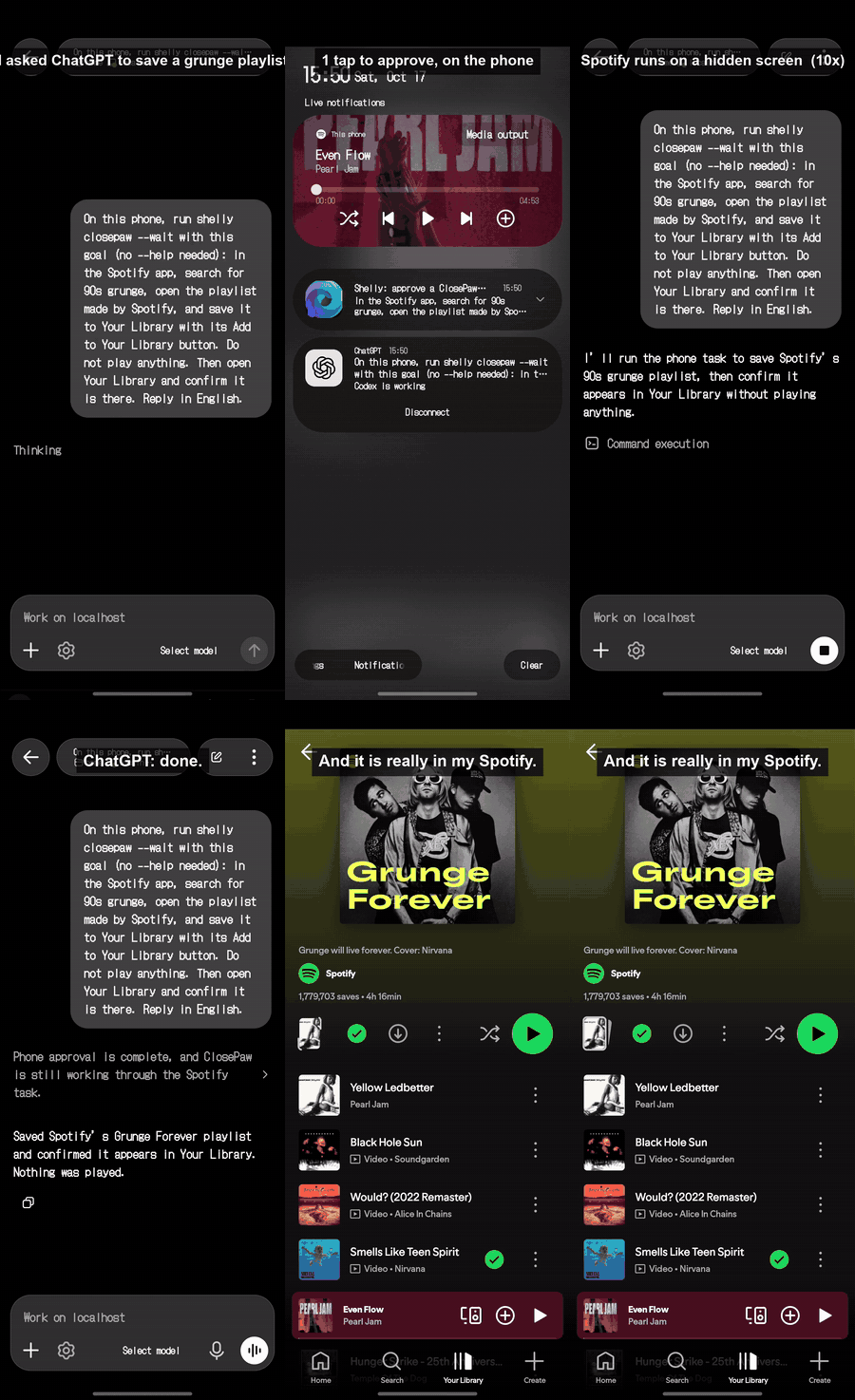
"Save a grunge playlist in Spotify" → one tap to approve on the phone → Spotify runs on a hidden screen → ChatGPT says done → it's really there. (sped up)
Try it in 3 steps:
① Install the APK from Releases
② In Shelly, run shelly codex pair and pair it in the ChatGPT app (Codex)
③ Ask ChatGPT to do something on your phone (app tasks like the clip use the ClosePaw Shelly build)
You need: a ChatGPT sign-in for Codex (API keys are not supported for remote control); for app tasks, the ClosePaw Shelly build (uninstall the official ClosePaw first) set up with an API key or an OpenAI-compatible endpoint, and Shizuku running.
Runs on arm64 Android phones, Android 7.0+ (minSdk 24). The APK is about 700 MB; leave room for it plus the tools first launch extracts.
What's new: v8.2.0 release notes — agent roles, parallel Codex + Claude Code steps, MONITOR.
If Shelly is useful or interesting to you, a ⭐ helps other people find it.



Shelly also wakes on its own alarm — screen off — and runs scheduled agents with your own AI accounts, local LLMs and a real terminal underneath: the Codex CLI in an app-owned JNI PTY, bash / git / Python 3 / Node.js bundled in the APK, and API-backed AI panes beside it.
The full unattended cycle is verified end-to-end on a real Galaxy Z Fold6 (N=1) — see the Status table. Running it on another phone? Paste shelly doctor --report into a device report.
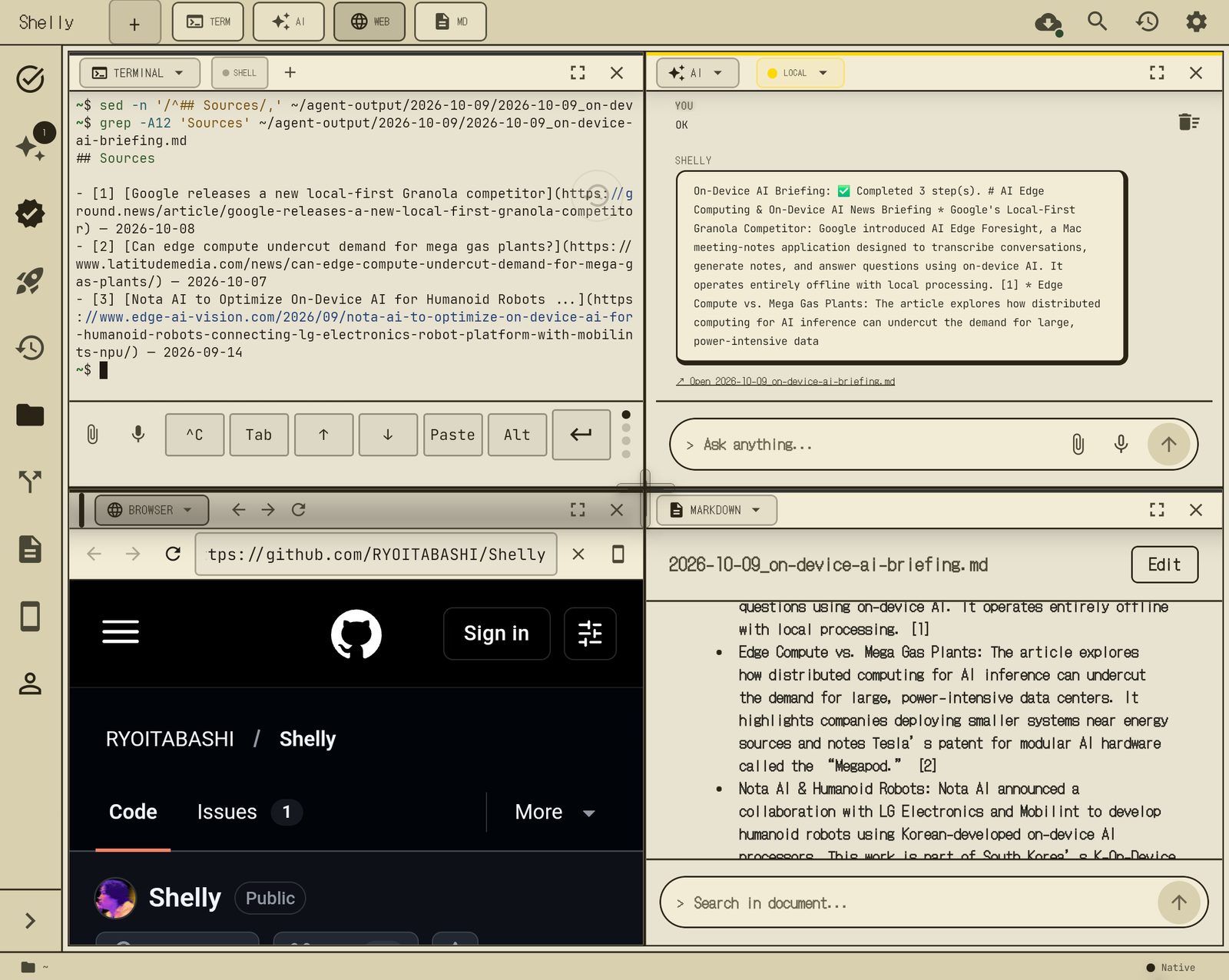
A scheduled agent's on-device briefing: Perplexity research → local LLM summary → a markdown file whose every item cites its source.
Demo · Quick Start · Manual · Why Shelly? · Features · Architecture · Release Integrity · Status · Contributing · Support
See it run
Codex vs Claude Code on one phone — an on-device judge picks the winner
https://github.com/user-attachments/assets/f6509457-d845-424e-9d72-436eae06d122
One line in chat — "have both implementers build a neon snake game and compare" — and Codex and Claude Code build it at the same time, each in its own folder. A judge running on the local LLM reads both codebases as "Candidate A/B" (no engine names) and answers WINNER:. MONITOR shows both steps recording live.
Waits are sped up (20x build, 15x judging); the A/B play footage is real time.
One AI writes, another reviews — and it keeps going with the app closed
https://github.com/user-attachments/assets/700e7547-5645-435d-ba93-c5e2e2ce68ca
Codex implements → Claude Code reviews and sends it back → Codex revises → the second review answers VERDICT: PASS. Every command both CLIs run goes through Shelly's gate, and MONITOR follows each step.
Captioned and sped up.
Drive your phone from ChatGPT — Shelly is the bridge
https://github.com/user-attachments/assets/2fe4de3b-1c8f-4171-b61e-a88ddf8664b6
- In the ChatGPT app (Codex, connected to Shelly with
shelly codex pair), ask: save the top-rated vintage clothing stores near Shimokitazawa to a new Google Maps list. ChatGPT runsshelly closepaw --wait "<goal>"on the phone. - Shelly asks you to approve — once, on the phone (notification or Shelly chat). ChatGPT itself can never approve a phone action.
- Shelly hands the task to ClosePaw, which drives Google Maps on a background virtual display. The front of the phone stays yours (ClosePaw's viewer shows the live run; sped up 4x in the clip).
- Shelly brings ClosePaw's result back to ChatGPT, and the list is really there in Google Maps.
Uses the Shelly-trusted ClosePaw build (signature-pinned to Shelly). Captioned and partly sped up.
Register a daily agent from ChatGPT — it runs on the phone by itself
https://github.com/user-attachments/assets/bceec161-e5e3-46f1-bc28-35819f09961a
- From ChatGPT:
shelly agent add "Every day at 16:27, collect the latest AI research papers from arXiv and Hugging Face, pick 3 notable ones and summarize them. Write the summaries in English." - You confirm once in Shelly.
- At 16:27 — no ChatGPT, no tap — Shelly wakes up, researches with Perplexity, and saves a sourced note into Obsidian (
20_Literature/AI_Papers/<date>/). Every day after that, too.
The wait between registering and the scheduled time is cut ("3 minutes later"); the on-screen clock is the real time.
An agent that works while you do
https://github.com/user-attachments/assets/ac89f1a9-fecc-4e58-bb37-b33421e862d2
- Schedule an agent in plain language: "In 3 minutes, first search the web with Perplexity for the top 3 on-device AI news stories. Then summarize them with the local LLM. Finally, write a markdown briefing."
- Meanwhile, a Python
JSONDecodeErrorin the terminal: long-press it → Ask AI quotes it into the AI pane, and the on-device model (Qwen3.5-2B) explains the fix. shelly teach start→ fix it by hand →shelly teach stopsaves those steps as a reusable workflow (shelly workflow run <name>).- The agent fires on its own — Perplexity → local LLM → markdown (sped up 16x in the clip) — and narrates each hand-off in its chat thread.
- Open the briefing: every item carries a citation, and a
## Sourceslist is appended.
Captioned and partly sped up (the agent run is shown at 16x).
Registering an autonomous agent from the home-screen widget — no need to open the app
https://github.com/user-attachments/assets/fbda309f-ad12-4a6d-a5b8-96b6ee4d4e57
Type or speak @agent ... straight into the Scouter widget's ASK box. It routes through the exact same confirm flow as typing into the AI pane — same parse, same confirmation in chat (you type OK; there is no card UI) — then shows up in the scheduled-agent list with its next run time.
The terminal underneath: a real AI coding CLI running natively on Android
https://github.com/user-attachments/assets/c87ea206-12f8-4b21-9089-0a373b0e8a2a
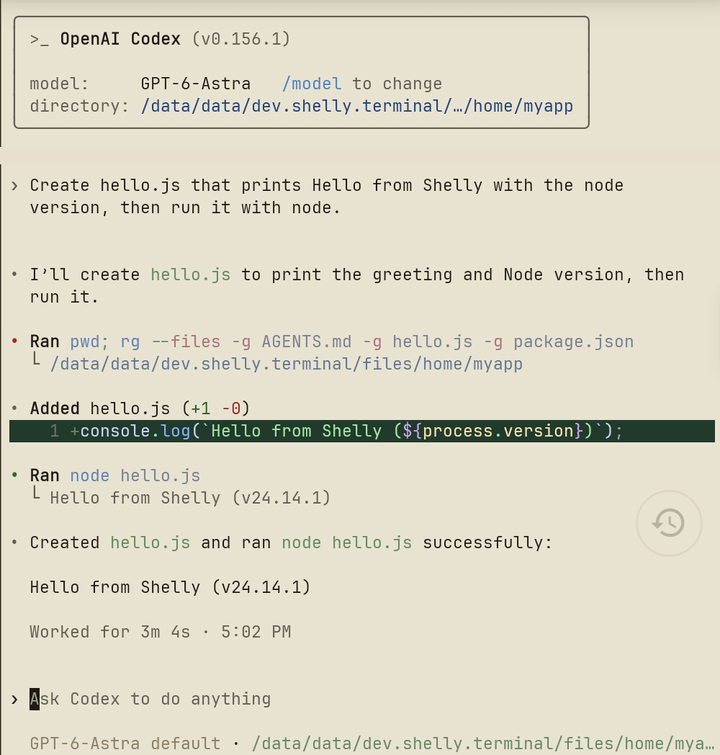
No Termux. No proot. No remote dev server. OpenAI Codex — a real, full-featured coding CLI — invokes directly through Shelly's own JNI PTY, the same native terminal you can open and drive by hand.
Ask AI: long-press an error, quote it into the on-device AI
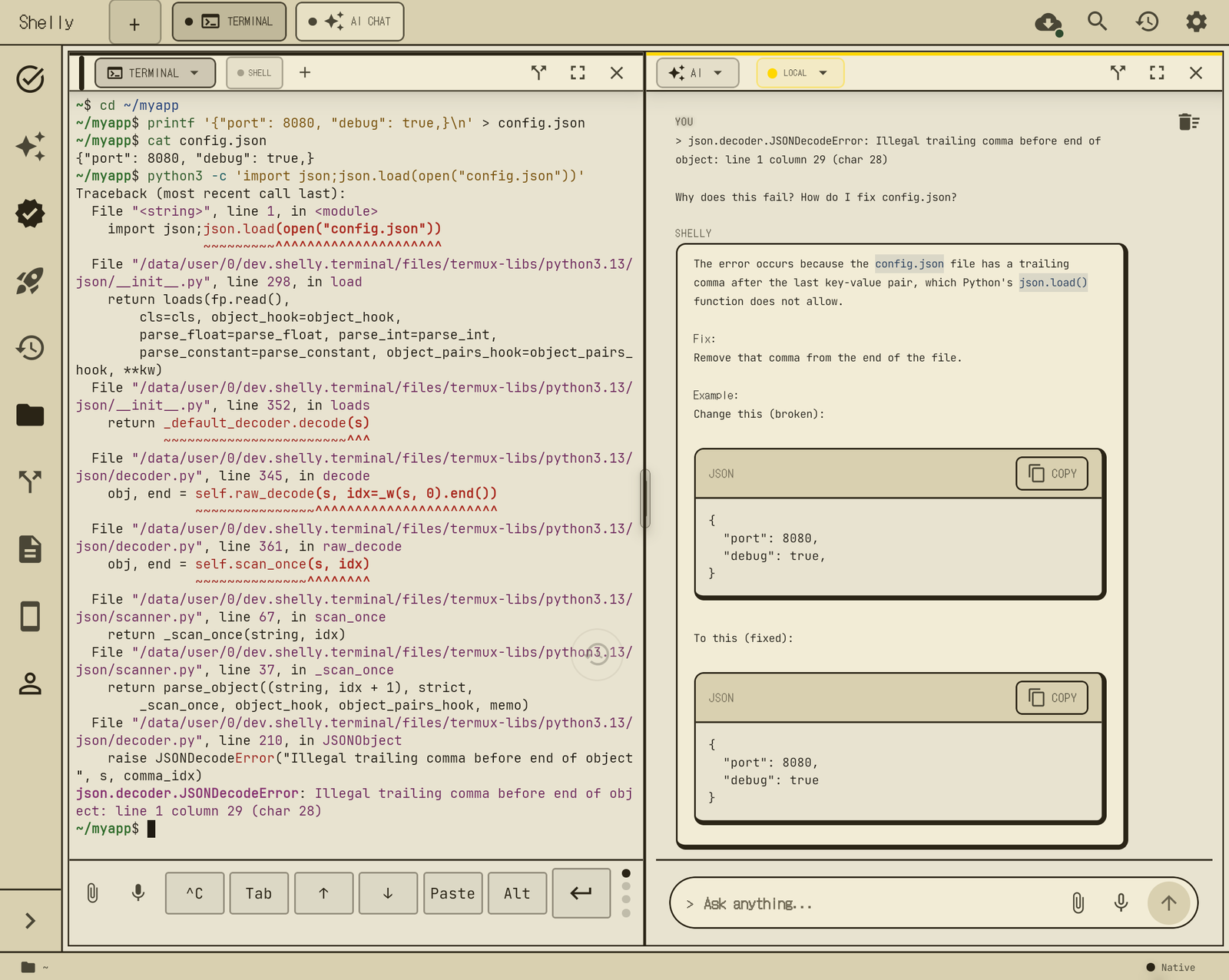
Select terminal output, tap Ask AI in the selection menu, and the text is quoted into the AI pane's composer as a draft — nothing is sent until you add your question and hit send. With a local model running, the error never leaves the phone.
Why Shelly?
Most of what exists today only covers one piece of this. A terminal app (like Termux) gives you a shell but no AI built in. An AI chat app gives you a smart assistant with no shell underneath it and no access to your files. A cloud coding workspace (like Replit) gives you both, but on a rented computer far from your device. Cloud "agents" run the same way — somewhere else, on files that aren't yours.
Shelly's bet: the phone in your pocket is already the best agent host you own — always on, always with you, and already holding your files, your accounts, your context. Shelly turns it into a self-contained agent machine, and grounds that agent in a real terminal IDE so you can see, verify, and drive by hand everything it does on its own.
Two layers, one trust chain:
- The agent layer — say what you want in plain language; Shelly registers a scheduled agent that wakes on an AlarmManager alarm, screen off, runs on your own keys and local models, and reports when it ran. (details — and the Status caveats that go with them)
- The terminal layer — everything the agent can do runs through the same on-device shell and toolchain you use interactively: an app-owned native PTY, the real Codex CLI, bundled bash / git / Python / Node. The agent isn't a cloud sandbox you take on faith; it's your own machine, inspectable down to the transcript.
The copy-paste problem
You're running an AI coding tool in a terminal — Codex, or any other AI CLI. It throws an error. You copy it. You switch to ChatGPT. You paste. You ask "what went wrong?" You read the answer. You copy the fix. You switch back. You paste. You run it.
Seven steps. Every single time.
This is a familiar workflow for developers using CLI-based AI tools. The terminal and the AI live in different worlds, and you are the copy-paste bridge between them.
Shelly puts the terminal and the AI side by side. The AI reads your terminal output automatically.
Say "fix the error on the right". Shelly reads the terminal output, explains the error, and generates an executable command. Tap [Run] and the fix lands directly in the Terminal pane.
No copy. No paste. No tab switching.
Four levels of value:
- Single pane: a native terminal that is faster, smarter, and more usable than Termux alone — with content blocks, syntax highlighting, and clickable errors.
- Split panes: terminal + AI side by side — the AI reads what the terminal shows and executes fixes with one tap. No copy-paste bridge needed.
- Full layout: sidebar + up to 4 live panes + agent bar — a mobile IDE. Browse docs in the browser pane, preview code or markdown on the right, use API-backed agents in the background, and keep your terminal front and center.
- Unattended: register a plain-language scheduled agent — the same machinery runs while the phone sits in your pocket, and tells you when it ran.
On a foldable, that full layout is the default rather than an aspiration. Folded, Shelly is a single-pane terminal. Unfold, and the same live shell expands into a sidebar plus up to four panes in a 2×2 grid — terminal, AI, browser, preview — without restarting the session. Shelly is developed daily on a Galaxy Z Fold6, which is why the unfolded layout is the design target and not an afterthought. (Rapid fold ↔ unfold during an active CLI stream is still listed under Known Limitations.)
Important Android Notes
- APK is ~700 MB because Shelly bundles real tools, not shims. bash, Node.js, Python 3, git, curl, ripgrep, jq, tmux, vim, less, sqlite3, make, ssh — plus the OpenAI Codex CLI runtime — ship inside the APK. No Termux, no repository server, no package manager bootstrap. First launch extracts the binaries into app-private data.
- All files access is requested on first launch so
/sdcardworks the way a desktop terminal expects (cd /sdcard/Download, editing files there, etc.). Scoped Storage without this permission silently blocks writes. You can refuse — Shelly still works inside its own sandbox, but/sdcardpaths willPermission denied. - LD_PRELOAD + /system/bin/linker64 is how Shelly runs Linux-layout
binaries on Android bionic (SELinux blocks direct execve on
app-private ELFs). The wrapper rewrites
/bin/Xand/usr/bin/Xto/system/bin/Xand routes app-bundled ELFs throughlinker64. Source is inmodules/terminal-emulator/android/src/main/jni/exec-wrapper.c. - Not Termux-compatible by design. Shelly does not use Termux paths or Termux's prefix assumptions, and it does not need Termux installed. CI takes some Android binaries from Termux's packages, Codex among them, and bundles them with the app. If you already have Termux installed, Shelly still bundles its own copies of everything. No conflict, but also no sharing.
Quick Start
Install
Download the current Android APK from GitHub Releases. The rolling android-latest release is the source of truth for the newest Shelly build, and the latest tagged vX.Y.Z release APK is cut from that same build — the exact versionCode, commit, and SHA-256 are live in android-latest/latest.json.

Prefer an app-store-style updater? Obtainium can install Shelly from GitHub and notify you of new versions: tap the badge on your phone, or add https://github.com/RYOITABASHI/Shelly in Obtainium. It follows the tagged vX.Y.Z releases (each carries the APK built from its tagged commit), so it updates less often than the in-app updater, which tracks every android-latest build.
After the first install, Shelly can update itself from inside the app: open the cloud-download button in the top bar or Settings → Updates. Shelly reads the public android-latest/latest.json manifest, compares Android versionCode, enqueues the APK with Android DownloadManager as /sdcard/Android/data/dev.shelly.terminal/files/Download/Shelly-android-*.apk, verifies SHA-256, then opens Android's package installer. The system download keeps running if Shelly is backgrounded or restarted. Old downloaded APKs are deleted automatically (since v8.2.0). Android still asks you to confirm the install because Shelly is distributed outside the Play Store.
Expo OTA is disabled for release APKs. JS, native, and bundled-tool changes ship together through a new APK so the installed binary and app code stay in sync.
Signing-key rotation (2026-10)
Shelly builds up to v8.0.x were signed with the public React Native / Expo debug key, which anyone can use. Newer builds are signed with Shelly's private release key (certificate SHA-256 14:76:D9:52:0A:49:BF:8D:A7:A7:67:CB:41:39:18:CC:D5:C5:FC:D7:F6:26:03:76:6A:F6:52:1F:30:DE:21:2D) using APK Signature Scheme v3 key rotation: the APK carries a proof-of-rotation lineage from the old key to the new key.
- Android 9 (API 28) and newer — nothing to do. Update with the in-app updater (or install the APK from GitHub Releases) as usual. Android verifies the lineage, updates Shelly in place (all data, API keys and logins are kept) and from then on trusts only the new key. The lineage revokes the old key's rollback capability, so an APK signed only with the public debug key can no longer update a rotated install.
- Android 7–8 (API 24–27) do not understand key rotation. They keep verifying the old-key signature, so updates still install in place, but those devices remain on the old, public key's level of trust.
- Safety net: Settings → Backup & restore. Before a big update you can export
shelly-backup-<timestamp>.tar(your projects and other plain files — no secrets, no shell/AI-CLI histories or transcripts) andshelly-backup-<timestamp>.shellybak(settings, API keys and other SecureStore secrets, everything in~/.shelly— agents, workflows, memory —, AI/cloud CLI config such as~/.codex,~/.claude,~/.aws, and optionally your Codex login, encrypted with AES-256-GCM under a scrypt-derived key from your passphrase) to/sdcard/Download/. Write the passphrase down — it cannot be recovered. Files in/sdcard/Downloadare readable by other apps with storage permission; only the encrypted file contains secrets. If you ever have to reinstall (for example an APK signed with the new key but without the lineage), install, then Restore, enter the passphrase and restart Shelly; re-pair Codex remote control from the ChatGPT app afterwards (shelly codex pair), because that enrollment is tied to the old install. - The updater refuses an APK whose signer is neither the installed key nor the pinned release key. The ClosePaw Shelly variant trusts only the new key; update it after Shelly has rotated.
Build from source
git clone https://github.com/RYOITABASHI/Shelly.git && cd Shelly
pnpm install && pnpm android
Requirements:
- arm64 Android device, Android 7.0+ (minSdk 24)
- Node.js 22+ (CI currently builds on Node 22)
- pnpm
- Android NDK 26.1.10909125 (or an Android SDK/Gradle setup that resolves that pinned NDK)
Expo Go is not supported — Shelly uses native Kotlin/C modules.
Termux is not required. Shelly ships with bash, Node.js, Python 3, git, curl, ssh, sqlite3, tmux, vim, less, jq, make, and ripgrep. For tools beyond the bundled set, Termux can be used alongside Shelly.
First launch
On first launch Shelly asks for All files access so the terminal can read scripts in /sdcard/Download and anywhere else on your phone. Tap Allow and you're done — source /sdcard/Download/foo.sh just works. Shelly is distributed through GitHub Releases for now; Play Store / F-Droid submission is still future work.
Configure AI
After that, open Settings → API Keys (or run shelly config from the terminal pane) to paste API keys for Gemini, Cerebras, Groq, Perplexity, OpenRouter, OpenAI-compatible local servers, or other explicit API providers. Keys are stored in expo-secure-store and never written to logs.
Sign in
Shelly's bundled AI CLI is Codex. Claude Code is one command away (claude-install, see Claude Code), and Google's Antigravity CLI (agy) can be installed for terminal use. Everything else is an API provider you configure with a key.
| Surface | How to sign in | Notes |
|---|---|---|
| Codex CLI (ChatGPT subscription) | Run codex, or codex-login --open directly |
Bundled with the APK. If ~/.codex/auth.json is missing or invalid, the codex wrapper starts Shelly's device-code login, opens the OpenAI device-code page in the in-app Browser Pane, writes ~/.codex/auth.json (mode 0600) on success, then launches the normal Codex TUI. No OpenAI API key required — this rides your ChatGPT subscription. |
Claude Code (claude-install) |
Run claude and sign in, or set Settings → Anthropic API Key |
Sign in inside the claude TUI; the sign-in URL opens only when you tap it (Shelly never opens URLs from terminal output by itself). For agent steps, the Anthropic API key is used when set; otherwise attended runs use the signed-in subscription, and unattended runs follow Settings → Claude subscription for unattended runs (on by default). |
Antigravity (agy) |
agy-install, then agy |
Terminal TUI only (download is SHA-512 checked). Shelly never starts it from agents or schedules. Sign-in happens inside agy. |
| API providers (Gemini, Cerebras, Groq, Perplexity, OpenRouter, local) | Settings → API Keys or shelly config |
Paste a key per provider for AI-Pane / @mention / @team / background-agent use (OpenRouter is attended-only). Keys live in expo-secure-store. Local/OpenAI-compatible servers need only a base URL. |
Codex login note.
codex /logininside the REPL is not the supported path on Shelly. Use barecodexand let Shelly's wrapper launch device-code auth, or runcodex-login --openfrom bash.
Bundled Shelly commands
| Command | Use |
|---|---|
codex |
Launch the foreground Codex TUI in the native terminal. If auth is missing, Shelly starts the device-code login flow first. |
codex-login --open |
Start ChatGPT subscription device-code auth and open the verification page in Shelly's Browser Pane. |
claude-install |
Download the official Claude Code and the glibc libraries it needs, check them, and make claude work (see Claude Code). --channel stable follows the slower channel; --agent adds the reviewed version agents use. |
claude |
Start the Claude Code TUI. If it is not installed, it says to run claude-install. |
agy-install / agy |
Install or update Google's Antigravity CLI (SHA-512 checked) and start its TUI. Terminal use only; never started by agents or schedules. Settings → Front agent can open the agy or claude TUI in the first terminal tab at launch. |
shelly-doctor / shelly doctor [--report] |
Check shell/native binary presence, bundled Codex binaries, JS dispatcher, local LLM endpoints, and Codex auth file presence. shelly doctor runs the same check; --report prints a paste-ready device report. |
shelly-codex-diagnose |
Run deeper Codex smoke/canary/edit/patch diagnostics. |
shelly-update-clis codex --check-only |
Probe the active Codex runtime. Runtime installs are normally driven by the Updates UI. |
shelly-update-clis claude rollback / agy rollback |
Go back to the previous Claude Code or Antigravity version. The version you left is held, so an update does not bring it straight back. |
shelly-cs / cs |
GitHub Codespaces helper commands. |
shelly teach start [name] / stop / cancel / status |
Record the commands you run into a reusable workflow (see Learning loop). |
shelly install <pack> / shelly install --list / shelly uninstall <pack> |
Optional tool packs (dev-tools: python3, sqlite3, jq, make, gh; editor-tools: vim, tmux, nano, less, unzip, rg). Each release build pins the sha256 of its pack archives and verifies the download before installing it. Installed tools work offline and in already-open tabs. A missing pack tool prints <cmd> is available: shelly install <pack>; nothing downloads unless you run the command. Today these tools also ship inside the APK, so the packs only matter if a copy is missing. |
shelly workflow list / show <name> / run <name> / delete <name> |
List, print, replay in the current terminal, or delete saved workflows. |
shelly agent add "<request>" / show / confirm / reject / list |
Experimental. Ask Shelly to draft a new agent from plain language (the same flow as @agent in the AI pane); it prints the parsed summary. Nothing is registered until it is approved: in Shelly's chat, from its notification (device unlock required), or — if allowed in Settings — with shelly agent confirm <requestId> <hash> after you approved the summary. list shows registered agents (read-only). |
shelly device <battery|info|clipboard|notify|toast|vibrate|tts|share> |
Phone features for scripts, agents and Codex: battery and device info as JSON, clipboard, notifications, toast, vibration, text-to-speech and the share sheet (see Phone features from the shell). |
shelly codex pair / code / trust / untrust / status / stop / autostart |
Experimental. Host Codex remote control (codex remote-control --no-daemon) in this tab (or detached with pair --background) and print a pairing code with its expiry for the ChatGPT app's Codex; code prints a fresh code; trust <dir> marks a folder as a trusted Codex project so the app can open it, untrust <dir> removes it; status / stop manage the background host; autostart off|status controls "Keep ChatGPT connected" (it can only be turned on in Settings). Needs a ChatGPT sign-in. |
First thing to try: once a provider key is set, type @agent in any pane followed by a plain-language instruction and a time — e.g. @agent every day at 8am, collect the latest quantum computing papers and news, summarize them, and save to Obsidian. Shelly turns that into a scheduled on-device agent (see it run above).
Phone features from the shell
shelly device gives scripts, agents and Codex a few phone features without installing a separate add-on app. It is a built-in subset of the most-used Termux:API commands. Verified on device (Galaxy Z Fold6, N=1, 2026-11-03): battery, info, notify (post, replace, remove) and clipboard get with Shelly on screen.
| Command | What it does |
|---|---|
shelly device battery |
Battery level, charging state, plug type, health, temperature and voltage, as JSON |
shelly device info |
Manufacturer, model, Android version, screen size and density, locale, time zone, network type (wifi / cellular / none) and the Shelly version, as JSON. It never includes identifiers such as IMEI, serial number, Android ID or IP/MAC addresses |
shelly device clipboard get [--json] |
Print the clipboard text. Android lets only the focused app read the clipboard, so this works while Shelly is on screen and exits 3 otherwise. Every read shows "A script read your clipboard" on the phone |
shelly device clipboard set [--sensitive] <text | -> |
Set the clipboard. Pass the text, or - to read stdin (date | shelly device clipboard set -). Without either it refuses, so it never empties the clipboard by accident. --sensitive hides the text from clipboard previews |
shelly device notify [--title T] [--id N] <text> |
Post a notification on Shelly's own Scripts channel, which you can mute in Android settings. Posting again with the same id (0-9999, default 0) replaces it. notify --remove N removes it |
shelly device toast <text> |
Show a short toast, prefixed "Script:" so it can't pass for a system message |
shelly device vibrate [ms] |
Vibrate (default 300 ms, capped at 2000 ms) |
shelly device tts [--lang en-US] <text> |
Speak with Android text-to-speech, in the phone's language unless --lang says otherwise |
shelly device share --file <path> / --text <text> |
Open the Android share sheet. You pick the target app. If Shelly is in the background, a "Tap to share" notification naming the file appears instead, because Android blocks background apps from opening screens. Files must be in Shelly's home or shared storage (/sdcard) and must not be hidden or inside a hidden folder, so ~/.ssh, ~/.codex, ~/.shelly and .env are refused. Shelly shares a copy taken at that moment (deleted after 30 minutes), not the original. Scripts should always pass --file or --text; without them, an argument that names an existing file is shared as a file |
$ shelly device battery
{
  "level": 83,
  "charging": true,
  "plugged": "usb",
  "status": "charging",
  "health": "good",
  "temperatureC": 31.5,
  "voltageMv": 4123
}
$ make && shelly device notify --title Build "make finished" || shelly device vibrate 800
- Exit codes: 0 ok, 1 failed, 2 usage error, 3 permission missing or not possible right now (notifications off, clipboard read in the background, no TTS voice), 4 rate limited, 124 Shelly did not answer (the action may still happen, so check before retrying). Errors go to stderr.
shelly device --helpandshelly device <command> --helpprint usage and never do anything. - Rate limits: notify 30 per minute; toast, vibrate and tts 10 per minute; share 5 per minute. These stop a looping script or agent from flooding the phone.
- Clipboard privacy:
clipboard getgives whatever you copied (passwords, one-time codes) to the program that ran it, including Codex driven from the ChatGPT app. Agents' command gate treats it like reading a secret file, however the command is quoted: it always asks you first and is refused at the most autonomous level. Reading the bridge files directly is gated the same way. Every read shows a "A script read your clipboard" toast and notification, and the answer file is deleted within 15 seconds. Android may also show its own "Shelly pasted from your clipboard" notice. - How it works: the command writes a request file in Shelly's home and the app answers it natively, the same file bridge
shelly closepawuses. It works while Shelly is in the background, as long as the app is running. - Not included in this version: location, camera, microphone, SMS, contacts and call log. Each of these needs an explicit permission flow first.
Runtime model
Under the agent sits Shelly's structural advantage: the runtime itself — a native PTY and a managed Codex CLI running in the same on-device shell as your files, with API-backed agents layered on top. Not a WebView terminal, not a remote IDE client.
If your AI coding CLI workflow stalled in Termux, proot, or another Android terminal setup, Shelly gives you a maintained on-device environment built around the constraints of real Android devices (bionic libc, linker64 exec rules, SELinux on app_data_file).
No fragile terminal stack. No WebView terminal crashes. No copy-paste-driven workflow.
- Native execution path — Codex runs through Shelly's app-owned native PTY (JNI
forkpty), not a remote bridge or socket terminal. - Managed latest, not blind latest — Shelly ships a pinned Codex runtime in each APK, and the Updates UI can install a newer verified Codex runtime from the rolling
codex-runtime-latestrelease without waiting for the next APK. - Visible state — the app can show recent terminal logs, so version drift and startup failures are easier to debug on the device itself.
- Which account does what — AI Pane chat uses only the explicit API providers you configure. Agent steps can also run on CLI workers: Codex (your ChatGPT sign-in) and Claude Code (Settings → Anthropic API Key when set; otherwise the signed-in subscription for attended runs, and for unattended runs only while Settings → "Claude subscription for unattended runs" is on, which is the default). Every CLI step goes through the same command gate.
This is the part that makes Shelly more than a terminal skin. It is the reason the app can ship a fast-moving CLI on Android without turning the user into the update mechanism.
Release surface
| Surface | Status | What that means |
|---|---|---|
| Codex CLI | Supported (bundled) | Bare codex launches the normal Codex TUI after Shelly verifies or creates ~/.codex/auth.json through in-app device-code auth, running over the native PTY. Also an agent worker. |
| Claude Code | Supported, one-command install | Not bundled. claude-install has the device fetch the official, unmodified linux-arm64 build from Anthropic (details). claude starts its TUI; agent steps can run a reviewed version as a worker through the same gate as Codex. |
Antigravity (agy) |
Terminal only | agy-install / agy. Never an agent worker or role engine, never started by agents or schedules. Settings → Front agent can open its TUI (or claude) in the first terminal tab. |
| AI Pane chat | Supported through APIs | Uses configured providers: Gemini API, Cerebras, Groq, Perplexity, OpenRouter (attended AI-Pane use only), and local OpenAI-compatible servers. |
| Background / agent steps | APIs, local LLM and CLI workers | API and local steps use the providers above. CLI steps run on Codex (ChatGPT sign-in) or Claude Code (Anthropic API key, or the signed-in subscription as described in Sign in), all through the same command gate. |
| Gemini API | Supported where configured | Available for the AI Pane, @gemini routing, @team, multimodal/API-backed tasks, and background agents when a Gemini API key is set. (This is the API provider — there is no bundled Gemini CLI.) |
Claude Code
Run claude-install in a terminal, or tap Install under Claude Code in the Builds screen. Then run claude and sign in, or set Settings → Anthropic API Key.
Shelly does not bundle or redistribute Claude Code. Your device downloads it directly, and nothing is modified:
- Claude Code comes from Anthropic's release bucket. Its manifest must carry a signature from Anthropic's published release key, which is pinned in Shelly, and that manifest's SHA-256 and size must match the download.
- The glibc libraries it needs (about 30 MB) come from Termux's
termux-glibcpackages. A key pinned in Shelly must sign the repository index, and the package hashes must match it. Unlikeapt, this does not check how old the index is. - A new version is tried with
--versionand--helpbefore it replaces anything. If that fails, the previous version stays, and after a second failure the new one is put on hold. A failed signature or checksum holds it at once.
Shelly starts Claude Code through its own userland loader (no root, no proot). Android is not on Anthropic's list of supported systems, so this path is not supported by Anthropic. Claude Code stays Anthropic's software under Anthropic's terms, and you sign in with your own account or key.
Updates. The Builds screen shows the installed and latest versions, with Update and a button to go back to the previous version. Updates use the latest channel. Update on Wi-Fi is off by default; turned on, Shelly checks when the app starts, at most every 6 hours, on unmetered Wi-Fi. Claude Code's built-in updater is switched off, so Shelly is the only thing changing the version. A running session is not touched; the new version starts with the next claude. Each version is about 350 MB, and the current and previous ones are both kept.
Agents use a reviewed version, not the newest one. Agent safety depends on details of how Claude Code behaves, and those were reviewed against one version (2.1.314). An update never changes what agents run. Until you run claude-install --agent or tap Enable for agents, a Claude Code agent step stops and tells you to do so. That downloads the reviewed version as well, about 300 MB.
If you staged Claude Code by hand before, claude keeps working. Agents stop until you run claude-install once: it takes your copy over, and if that copy is exactly the reviewed build, agents work again with no download. Otherwise claude-install --agent downloads the reviewed build.
Antigravity
agy-install fetches Google's official Android build, checks the SHA-512 in Google's manifest, and keeps versions the same way. Updates work the same way, and Antigravity's built-in updater is off. Google publishes no signature for this file, so the check is only as strong as HTTPS and that manifest. Shelly does not run Antigravity to test an update: it checks the hash and that the file is an Android ARM64 executable. So a build that does not start shows up when you run agy, and shelly-update-clis agy rollback goes back.
What Shelly is not
Shelly is not a Termux skin, a WebView terminal, or a remote IDE client. It owns the Android terminal stack inside the app, runs Codex on-device in the same shell as your files, and layers API-backed agents next to that terminal instead of forcing you through copy/paste or a cloud workspace.
It is also not a cloud agent service. Scheduled agents run on the device, on your keys, with no server-side component and no subscription runner — if the phone is off, nothing pretends otherwise, and missed runs are surfaced instead of hidden.
It is also not a messaging-platform bot operator. There's no Discord bot, no Slack app, no WhatsApp/Signal Business API integration, and none planned — that's the server-resident-bot model a service like Hermes runs, and it needs a server Shelly doesn't have. The substitute is on-device: the notification-triggered-agent channel (lib/notification-inbound.ts) reacts to any app's Android notification — package allowlist, exact sender-name match, tainted-input only, never treated as instructions — so it covers LINE, Discord, Slack, WhatsApp, Signal, or anything else that posts a notification, with no per-platform bot registration or approval process for any of them.
No Termux install. No proot. No ttyd. No remote bridge. No cloud runner.
Features
Features below describe implemented paths in the current build.
Highlights
| Sourced multi-step briefings | A research → summarize → write agent carries Perplexity's citations through every step: claims not backed by a cited source are dropped, each item keeps its [n] marker, and a ## Sources list is appended to the saved markdown. Each step hand-off is narrated as a short line in the agent's own chat thread. On-device verified (Galaxy Z Fold6, N=1). |
| On-device autonomous agent | Say it in plain language → a scheduled agent runs on the phone by itself (screen off), on your own keys and tools, and tells you when it ran. It works where a cloud agent can't reach — your files, terminal, local LLM, the device itself. N=1 verified so far — see Status. (details) |
| Shelly companion | The default local-persona AI Pane is one persistent companion named Shelly, not a provider-branded form — no provider tag on any reply. Its conversation follows you across AI panes and splits, auto-distills what you talked about into its own memory whenever you switch providers (browsable/editable in Settings), remembers confirmed preferences for itself and every background agent, and adds completed agent results to the same thread automatically. Explicit provider routes keep their own per-pane histories, with a short carry-forward of recent context when you switch into or out of them. |
| Multi-platform delivery | An agent's output isn't limited to a notification or an Obsidian draft — it can post directly to Bluesky, Discord, Slack, Telegram, Mastodon, Misskey, WordPress, or X, or call a webhook. Store each platform's key once, then point an agent at it in plain language. Bluesky is verified live end-to-end. |
| Notification-triggered agents | An agent can also fire when another app posts a matching notification — LINE, Discord, Slack, whatever you allowlist — instead of only on a schedule. Package allowlist gates first, an exact sender-name match narrows it further (fail-closed if unset), and the triggering text is always injected as tainted, untrusted data, never instructions. Separately, the opt-in Telegram inbound gateway (off by default) accepts @agent messages from one authorized chat and queues them for your confirmation in Shelly. |
| Agent browser automation | An agent can click, fill, or extract text from the page already open in the Browser pane — a deliberately narrow action set (no navigation, no arbitrary script injection), gated to an explicit page-URL allowlist and a per-action approval tap; page-derived output is always treated as untrusted at the next capability boundary. |
| Cross-pane intelligence | Say "fix the error." AI reads your terminal, suggests a fix, one tap to run. Zero copy-paste. |
| Ask AI (quote to AI) | Long-press terminal output → Ask AI in the selection menu quotes it into the AI pane's composer (single line as a blockquote, multi-line as a fenced block). It is only a draft — nothing is sent until you do — and it is never quoted into a masked/secret input. On-device verified (Galaxy Z Fold6, N=1). |
| Teach mode | shelly teach start <name> records the commands you run in the terminal; shelly teach stop turns them into a saved workflow (~/.shelly/workflows/<name>.sh), dropping failed commands and secret-looking lines, without running anything. Conversion uses the on-device LLM by default (cloud only if you opt in), with a rule-based fallback. Replay with shelly workflow run <name>. On-device verified (Galaxy Z Fold6, N=1). |
| AI → Terminal insert | Any AI-chat reply's fenced ```bash block gets an Insert button next to Copy — tap it and the code lands in the focused Terminal pane's input line (no auto-Enter, review before running); opens a new terminal and queues the insert if none is open. On-device verified 2026-08-31. |
| Nacre Bridge | While Shelly is foregrounded, it shares sanitized live terminal context (cwd, git branch, a handful of safe recent-command terms — never raw commands or secrets) with Nacre, the author's own Android IME, so its kana-kanji conversion can lean toward what you're actually doing; the context file is deleted the moment Shelly leaves the foreground. On Nacre's own side, its Dev Mode detects focus inside Shelly specifically and suppresses auto-punctuation conversion, defaulting its symbol panel to a programming tab instead. Requires Nacre installed; toggle in Settings → Nacre Bridge (on by default). On-device verified 2026-08-31. |
| AI Edit golden path | Tap a file in the sidebar → preview it → hit [✨ AI] → describe the change → accept per hunk → the file is rewritten on disk, the preview reloads automatically. |
| Codex apply_patch on-device | Codex file edits land through the agent's native patch tool on Android, not a shell-only fallback. |
| Native PTY (JNI forkpty) | Kotlin + C, direct PTY fd, no TCP/socket bridge — an embedded native terminal, not a WebView terminal. |
| Batteries included | bash, Node.js, Python 3, git, curl, ssh, sqlite3, tmux, vim, less, make, ripgrep, jq ship inside the APK. Termux not required. |
| 10 pane types | Terminal, Agent Chat, AI, Browser (+ background audio), Markdown, Preview, Ask, Agent Runs, Memory Workbench, and Monitor. Split up to 4 live panes freely, and swap any two from the pane header. |
| Multi-agent AI | API-backed Gemini, Cerebras, Groq, Perplexity, OpenRouter, Local LLM, plus the foreground Codex terminal CLI. Agent steps can also run on Codex or Claude Code as CLI workers, both through the same command gate. Auto-routed or @mention where supported. |
| MONITOR pane + widget | A camera-wall view of a live agent run: one channel per step (named after its role), provider, progress, tokens and cost, pending approvals you answer by typing OK / NO, and a MAP view of the steps. Tap a channel to switch that step's provider mid-run. A 4x3 / 4x2 home-screen widget shows your role roster on standby and the same run while it is recording. The pane and the widget (roster on standby, REC while running) are verified on device (Galaxy Z Fold6, N=1). |
| Approve by typing | Pending agent approvals are posted in the agent's chat and in MONITOR; type OK / NO, or ok <hash> when two are waiting. An attended CLI step waits up to 10 minutes for an answer. Only text typed in the chat composer counts — voice transcripts cannot answer an approval. |
| Runs keep going in the background | An attended run keeps going when Shelly is closed or the phone is folded, and run-without-approval answers keep working meanwhile. Verified on device (Galaxy Z Fold6, N=1). |
| Continuous mode | "keep going until I stop it" runs an agent as short iterations with a cooldown, stopped by Stop, STOP-ALL, 50 iterations, 24 hours, 3 failures in a row or a daily paid-API budget (default 0). |
| STOP-ALL | Stops every agent: future alarms and chains / executor runs already in progress (a stopped run is reported as stopped, not "Done."); RESUME restores them. Stopping a running Codex step is verified on device (N=1). |
| Local LLM (on-device, llama.cpp) | Qwen3.5 models run on-device through the bundled llama.cpp / llama-server flow. Qwen3.5-0.8B ships as the actual default (light enough to stay always-on for background/autonomous use); Qwen3.5-2B is the recommended step-up for on-demand use when you can spare the RAM/battery, Qwen3 1.7B sits between the two, and 4B+ models are reserved for short quality checks. The llama.cpp download is pinned to release b11433 and checked against a sha256. MiniCPM5-2B is listed as Experimental only — evaluated on the Fold6 and not adopted (see Status). |
| Codex on Android | Shelly keeps Codex on a managed-latest path without trusting upstream blindly: each APK bundles a pinned runtime, the Updates UI can promote verified runtime releases, and Reset falls back to the bundled runtime. Codex runs over the native PTY with a Shelly-owned device-code login wrapper. No proot, no root. |
| Scouter home widget | A home-screen agent launcher and health list — up to 3 upcoming scheduled agents, each with a status glyph (last run's success/error/skipped) and next-fire time, without opening the app. It is interactive: RUN starts that already-registered agent through the unattended execution gates; ASK can also register a brand-new agent — type or speak @agent ... and it routes through the same confirm flow as typing it in the AI Pane. |
| Color themes | Case File (the default for new installs — a cream-and-ink retro-terminal palette, with its own optional DotGothic16 bitmap font, typewriter-reveal AI replies, and boot-flash transition), plus Blue / Red / Purple / Green — five presets on the existing preset IDs, so runtime swaps keep your shell alive without settings migration. Switching is live: panes, settings, modals, the sidebar and the terminal's own ANSI palette all follow the new preset without a restart. The app font is now a separate picker from the color preset, so any theme can run with either font. The screenshots in this README use Case File. |
| Voice input | Speak your commands or AI prompts. With a Groq key, Groq Whisper handles transcription; without one, Shelly falls back to Android's on-device speech recognizer (keyless, API 31+; force it in Settings → Voice Input to keep audio off the network). VoiceChain then routes the text through the same input router the keyboard uses. |
| Realtime voice (Gemini Live) | An opt-in full-duplex voice mode — talk and get spoken replies back with server-side interruption handling, instead of the turn-based record → transcribe → send loop. Separate toggle from ordinary voice input (Settings → Realtime Voice, off by default); note that unlike text, audio through the Gemini Live API is billed per-token even on a free-tier key. |
| A2A server (Agent2Agent) | An opt-in local HTTP server (Settings → A2A Server, off by default) exposing a standard A2A protocol Agent Card and a list_agents skill, so another A2A-aware agent/tool on your network can see what Shelly has registered. Read-only today; no exec or write skills are exposed. |
| MCP server | An opt-in local Model Context Protocol server (Settings → MCP Server, off by default, bearer-token authenticated) exposing four read-only tools — read_terminal_output, git_status, list_agents, list_repos — so a desktop MCP client such as Claude Code or Claude Desktop can look into what's running on the phone. Two more tools, run_command and write_file, stay disabled unless you turn on Settings → Agents → "MCP: Allow exec/write", and even then every call waits for an approval tap on the phone. It speaks both the older spec revisions (session handshake) and the stateless 2026-07-28 revision. |
| Agent safety rules (beta, off by default) | POLICY-001: tell Shelly rules in plain language ("always ask before anything involving money", "X posts stop at a draft") — echoed back and stored only after you confirm, listable and revocable the same way. Runs not started by you (schedule, widget, notification, boot) are limited to read / draft / notify, and after repeated clean approvals of one action class Shelly can offer to stop asking for it (never for payments, posting, network sends or high-risk commands). Off by default (Settings → Agent Safety Rules (beta)). |
| Persistent run notification | A scheduled or manually-triggered agent now posts a sticky "▶ running" notification for the duration of its run, not just a result notification afterward, so an in-progress run is visible from the notification shade instead of only showing up once it finishes. |
Autonomous agents
Say what you want in plain language; Shelly registers a scheduled agent that runs on the device, by itself — even with the screen off. It wakes via Android AlarmManager (setExactAndAllowWhileIdle, designed to fire under Doze, unlike cron-under-Termux), runs on-device with your own keys and tools, and tells you when it ran (notification + per-agent next/last-run, with a missed-run warning if an expected run didn't record).
The wedge isn't "smarter than a cloud agent" — it's that it works where a cloud agent can't reach: your files, your terminal/scripts, your local LLM, the phone itself.
It's a capability you point at your own tools, not a fixed feature. One example:
@agent every day at 8am, collect the latest quantum computing papers and news,
and write the primary-source links + a short summary to my Obsidian vault
The schedule above registers an agent that, when it fires, wakes the phone, researches via Perplexity, and drops a dated, sourced summary into Obsidian — unattended, the same run shown in the demo above. Swap in your own schedule, source, and output.
Scheduling also understands a relative start, not just a recurrence — "starting next week, check the news every morning" registers the agent now but holds its first fire until the resolved date, instead of running tomorrow by mistake. (Confirmed on-device for the registration and chat-confirmation path.)
Schedules can also be one-shot: "in 5 minutes", "at 14:55", "tomorrow morning at 8am", 「5分後に」, 「今日の14時55分」 register an agent that fires once on an exact alarm and is then retired (it stays listed with its run log). A relative delay counts from your confirm tap, and a bare time with no recurrence word is always shown back to you as a one-time interpretation before it's registered. After a reboot, a missed one-shot is caught up within a 10-minute grace window or marked missed — never fired late. (Verified on-device for "in 5 minutes", "at 14:55" and 「5分後に」.)
Sourced briefings. When a multi-step chain includes web research (a Perplexity step, or an explicit web/news cue), the citations Perplexity returned are carried through the later summarize/write steps. Before the agent's action runs, each item must cite a source, and numbers, names and entities in it must appear in that source's text — otherwise the item is rewritten to the research's own wording or dropped; uncited intro/outro prose is dropped, and a ## Sources list (title, link, date) is appended. Fetched source text is fenced as untrusted data. If nothing verifiable is left, the run fails closed instead of saving an unsourced briefing. Step hand-offs ("researcher → summarizer: passed 3 items…") are posted as short lines into the agent's own chat thread, so you can follow the run without opening the log.
Unattended runs whose action is only a local draft file (inside the scoped output folders) or a notify no longer wait for the manual approval tap — both stay on the device. Every other action type (webhook, CLI, social post, …) still needs it, and the safety rules above take precedence when enabled.
ClosePaw hand-off (Experimental). An agent can hand a phone task off to ClosePaw, an open-source (Apache-2.0) Android phone-use agent: say "have ClosePaw open Chrome and search the weather in Tokyo" (or 「ClosePawでChromeを開いて東京の天気を検索して」). Each run asks you in Review first ("Hand off to ClosePaw: "), never auto-approved; ClosePaw then shows its own "External Goal" confirmation before it runs. The official ClosePaw sends no result back, so the run ends as handed off to ClosePaw, not as a result (results do come back with the Shelly-trusted build's background run, below). Install ClosePaw yourself from its GitHub releases and set it up with an API key / OpenAI-compatible endpoint — Shelly's small on-device model is not able to drive it. From any Shelly terminal — including a Codex session running inside it — shelly closepaw "Open Chrome and search for Tokyo weather" hands a goal off directly (ClosePaw's own Run confirmation is the consent step; at most one hand-off per 5 seconds, requests older than 30 s are dropped). This also works while Shelly is in the background (for example while you drive Codex from the ChatGPT app): Android does not let a backgrounded app open another app, so Shelly then posts a "Hand off to ClosePaw" notification instead — tap it to continue. Shelly-trusted ClosePaw build (optional): a ClosePaw variant built from RYOITABASHI/closepaw (shelly-trusted-caller, APK at https://github.com/RYOITABASHI/closepaw/releases/tag/shelly-v0.1.0-2) skips ClosePaw's own confirmation when Shelly launches it, because Shelly has already asked you. Installing it requires uninstalling the official ClosePaw first (different signature). Shelly only treats it as trusted when its signing certificate matches the pinned one; the official ClosePaw never gets the token and keeps its dialog. With the variant installed, shelly closepaw "<goal>" no longer fires directly: Shelly asks you first, and only on the phone — tap Approve on its notification (device unlock) or reply approve <hash> in Shelly's chat (a plain "OK" does not count). ChatGPT/the terminal can reject (shelly closepaw reject <requestId>) but never approve it, and each request needs its own approval. Likewise, an agent with a ClosePaw step can't be approved from ChatGPT while the variant is installed; approving it on the phone approves that step for its future runs until the agent is edited. Background run (variant v0.1.0-4+): with the variant release shelly-v0.1.0-4 or later, an approved hand-off no longer brings ClosePaw to the front: Shelly sends it to ClosePaw's background entry and ClosePaw works on its own virtual display (Shizuku must be running), so you can keep using your phone — just avoid the app ClosePaw is using. Shelly reports the outcome in the terminal, the agent run and the chat ("working in the background"), or says exactly what to fix (start Shizuku, turn on ClosePaw's accessibility service, grant the overlay permission, add credentials, ClosePaw is busy). Shelly never asks ClosePaw to take over the main screen. Older ClosePaw builds keep the previous launch behaviour. Only this background run returns ClosePaw's result: shelly closepaw --wait "<goal>" (or shelly closepaw wait <requestId>) waits for your approval and ClosePaw's answer and prints it; otherwise --wait exits 3 (hand-off only, no result). The ChatGPT → shelly closepaw --wait → background run → result path is verified on device (Galaxy Z Fold6, N=1, see Status).
If the request itself is too vague to act on — "help me out" with no object or domain — Shelly asks what you actually want done before it asks when to run it, instead of scheduling an agent with an empty task.
Honest caveat: unattended firing depends on Android's background limits, which vary by manufacturer (Samsung / Xiaomi / Oppo / OnePlus battery-freezers). Shelly uses Android's highest-priority alarm path (named above) and surfaces missed runs, but it can't guarantee a fire on every device — grant the battery-optimization exemption and check the agent's run view.
Agent roles
A role is a reusable worker definition: a name, an engine (Codex CLI, Claude Code, the local LLM or an API provider), instructions, a workspace and a run-without-approval level. You create, edit, list and delete roles in plain chat; each change is echoed back and saved only after you type OK.
make a reviewer role using Claude Code that reviews code for bugs and security issues and lists them by severity
create a role called Implementer with Codex: write working code in the workspace and run a syntax check
add a role "Judge" using the local LLM that compares two implementations and picks the better one
@agent Right now, build a brick breaker game in ~/demo
@agent Right now, have both implementers build a brick breaker game in ~/demo and compare
- An
@agentrequest that names no tool is assigned to your roles and shown as[role · engine]lines in the confirm text. Say "without roles" to skip this, or name a tool yourself. - An implementer followed by a reviewer runs as implement → review → revise, up to 2 rounds, and stops early when the review answers
VERDICT: PASS. - "compete" / "both ... and compare" runs 2–3 implementers in parallel, each in its own folder (
~/demo/a,~/demo/b); a judge role compares them as "Candidate A/B" without engine or role names. - MONITOR names each channel after its role (
REVIEWER·R2for a second round).list my rolesshows what you have; Antigravity is never accepted as a role engine. - Roles are stored in
~/.shelly/agents/roles.json, sealed by a hash in Keystore-backed storage (a changed file turns roles off until you reset them). Levels are kept only in that storage, and an agent gets the lowest level among its roles.
Run without approval is a per-agent setting, OFF by default, and applies only to attended runs. Standard auto-approves pure reads anywhere, writes inside the agent's workspace, and the agent's draft / notify action approvals — never a command that command-safety rates CRITICAL or HIGH. All — only when you type "run fully without approval" in chat, and never for agents that read web, URL or notification input — also allows creating, editing, moving and deleting files in the workspace, the home folder, $TMPDIR and /tmp (including rm -rf there, but not hidden folders, keys or .env files), and read-only syntax checks (node --check, python3 -m py_compile, bash -n). Both levels still ask for running scripts, network access, secrets, Shelly's own runtime paths and anything that creates a link; external sends and posts still ask too. Unattended runs never auto-approve, and each auto-approval is written to the agent's chat. When the paths in a request share one folder (for example ~/demo/a.html and ~/demo/b.html), that folder becomes the agent's workspace and the confirm text says so.
Learning loop
Registering an agent isn't a fixed form. When what you asked for is ambiguous, an LLM — not a hardcoded pipeline — drives the rest of the conversation in its own words, asks follow-up questions one at a time, and only proposes a final registration once it believes it has enough (LLM-Led Agent Registration, on by default, toggle in Settings → Agents; tries a fast cloud provider first if you've configured one, then falls back to the on-device model, then to Shelly's fixed one-field-at-a-time prompts if nothing is reachable — so the conversation degrades gracefully instead of getting stuck). A request that turns out to have several ordered steps ("look this up, summarize it, then post it") is kept as a real multi-step chain — the same orchestration engine deterministic registration already used — instead of being collapsed into one prompt. Every value the model proposes is still independently re-checked before it's trusted: a schedule phrase is re-parsed by the same deterministic cron logic every other path uses, a posting destination has to match a connector you actually registered, and a webhook URL or shell command is only accepted when it's a literal, character-for-character copy of something you typed in that same conversation — never something the model invented. The human confirmation tap is never skipped, no matter which path produced the draft.
Agents also get better with use, on-device, without a server:
- Skill distillation — after a successful run, Shelly can distill it into a reusable "skill recipe" (a markdown file, GLOBAL across agents, not tied to the one that created it) and offers to save it; a later task that matches gets the recipe recalled and reused instead of solving the same problem from scratch. Nothing saves silently — you always see what would be kept.
- Teach mode —
shelly teach start fix-config, do the task by hand in the terminal,shelly teach stop: Shelly turns what you ran into a saved workflow script, keeping successful commands andcds, dropping failed attempts and secret-looking lines, and grounding any LLM rewrite in the programs you actually ran. Conversion stays on the on-device LLM unless you allow cloud providers.shelly workflow run fix-configreplays it in the current terminal, with every step visible. - Skills catalog — the Sidebar's Browse Catalog action fetches Shelly's first-party catalog of importable skill recipes, verifies each download, and places it in the same quarantine/review flow as a local skill import; catalog availability follows the published
skills-catalog-latestrelease. - Persistent memory — agents can write and recall small facts across runs ("remember that…"). Per-agent writes now use the encrypted MEMORY-001 store by default, with the older markdown/Obsidian path retained as a fallback; shared
_globalwrites still use that older path. See Privacy for the current storage limits.
The Companion
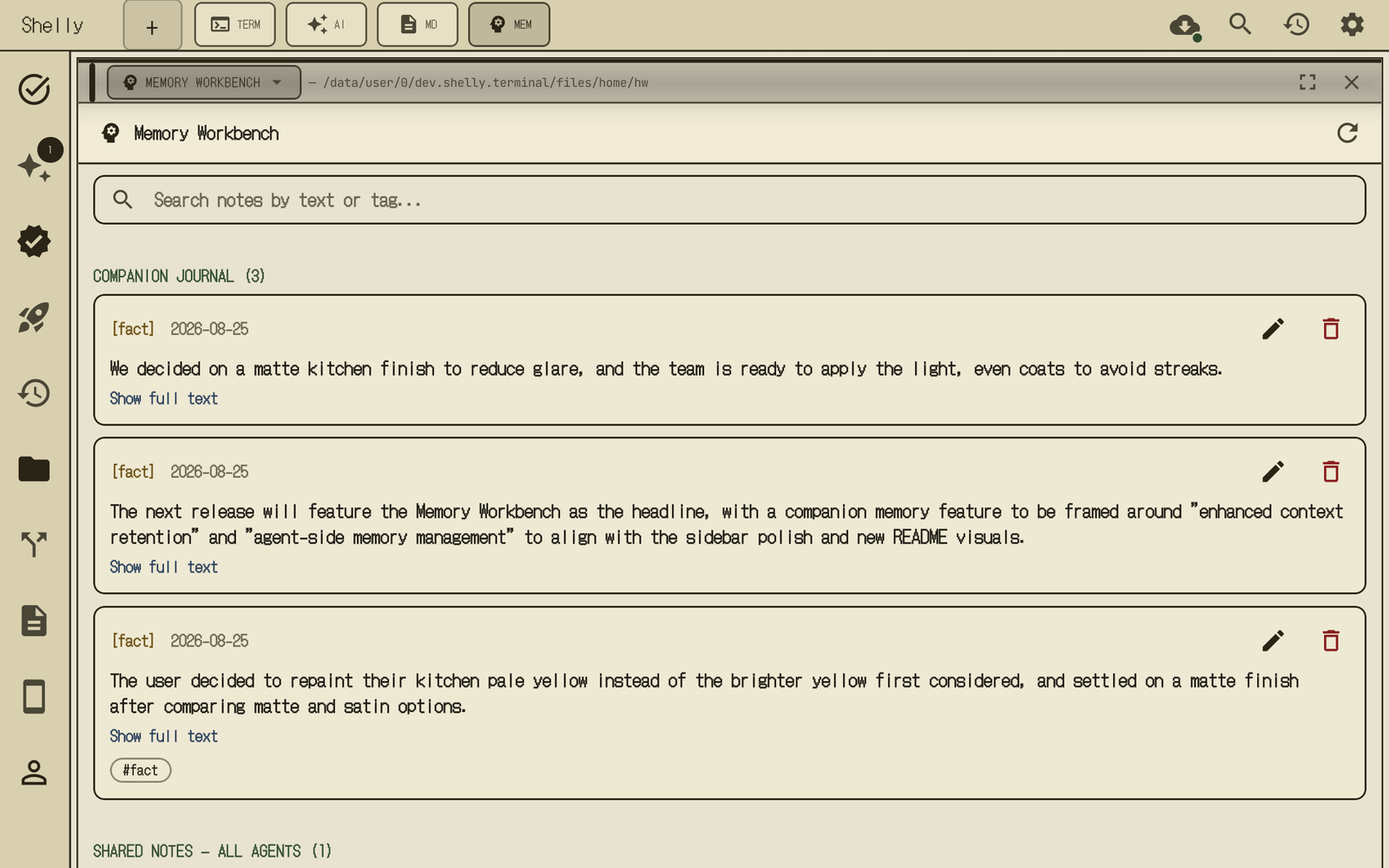
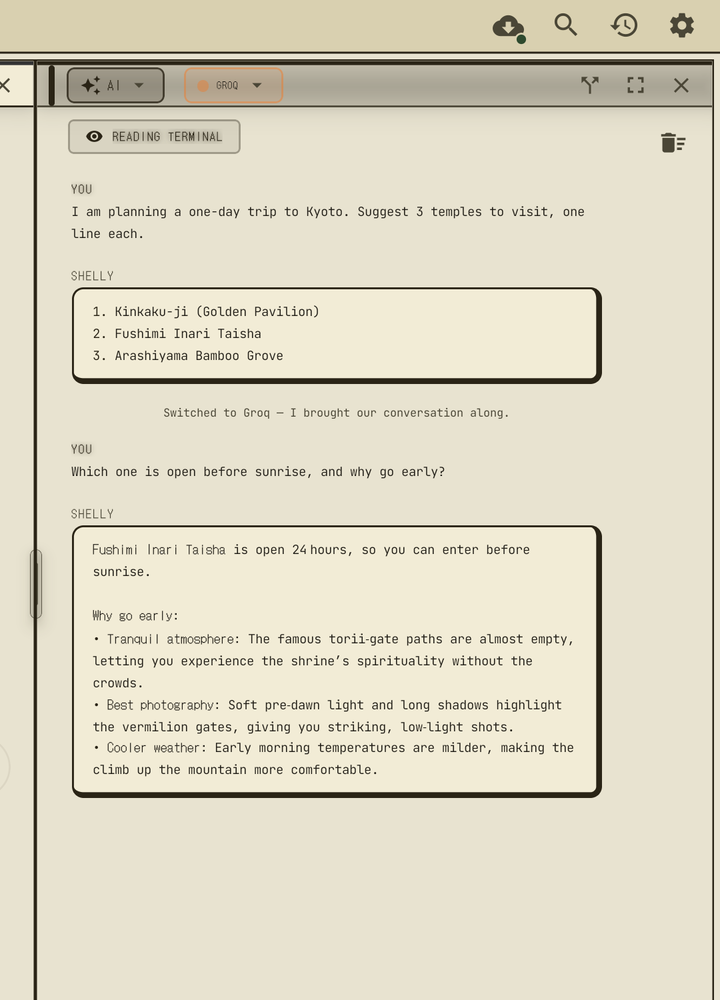
Shelly keeps its own journal. Whenever a pane switches away from it, it writes a digest of that conversation for itself; anything you ask it to remember is recalled by the companion and every background agent — and you can read, edit, or delete all of it from Settings → Companion Memory or the Memory Workbench pane, reachable even before you've registered a single agent. Switch a pane to an explicit provider mid-conversation and Shelly carries the last few messages along with it, so the new provider already has the thread's context on its very first reply — same companion, different brain.
Scouter Widget
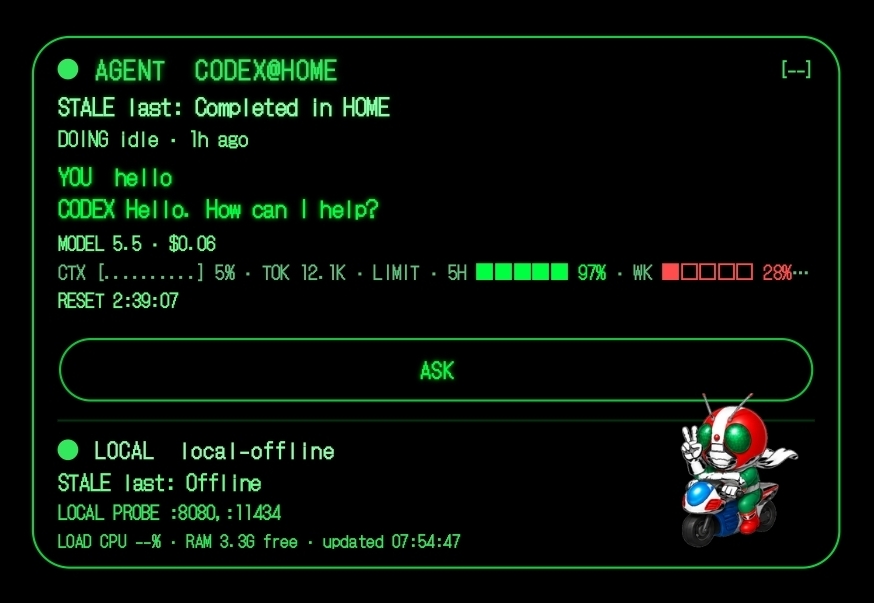
Scouter is Shelly's home-screen agent launcher and health list. It shows up to 3 upcoming scheduled agents (name, last-run status glyph, next-fire time) and lets you run one, or register a new one via ASK, without opening the app. An earlier version of this widget also carried a live Codex session HUD (status/DOING line, token/context/rate-limit cells, local LLM health row) plus Allow/Deny and numbered-choice pills that wrote straight to the foreground Codex PTY — that was deliberately removed in a 2026-07-18 redesign to keep the widget a launcher, not a second copy of the terminal; approvals and choices are still available through Codex notification channels and the in-app Agent Chat pane (see docs/FEATURES.md).
See docs/FEATURES.md for the full feature-by-feature breakdown (Scouter Widget internals, Layout System, Cross-Pane Intelligence, Agent Chat, AI Edit, Terminal Enhancements, AI Pane, Browser Pane, File Tree, Preview Pane, Sidebar, Command Palette, Theme & Fonts, Git Integration, Settings/API Keys/Background Agents).
Codex Runtime
- Native runtime — the npm
@openai/codexpackage is only part of the JS dispatcher story. Release APKs bundle the Android-nativecodexfrom Termux's official package, pinned in.ci-versions/after CI checks Termux's signed apt index, ascodex_tui. Runtime updates install the same shape under~/.shelly-runtime/codex/current. - Managed promotion — a new runtime candidate is promoted only after download, SHA-256 verification, extraction, executable checks, and
codex_tui --version/codex_tui exec --helpsmoke checks. - Repair / reset path — if the app-data runtime is broken or unwanted, the Updates UI can repair it from the latest runtime release or reset to the APK-bundled Codex runtime.
- Remote control (Experimental) —
shelly codex pairhosts Codex's officialcodex remote-controlin a terminal tab and prints a short-lived pairing code to enter in the ChatGPT app's Codex;shelly codex codeprints a new one. Requires a ChatGPT sign-in (API keys are not supported). Pairing and running commands from the app have been verified on device.- Projects — the ChatGPT app only opens folders Codex trusts (otherwise it reports that it cannot verify the project's trust setting).
shelly codex pairlists the trusted projects;shelly codex trust <dir>adds one, writing the same[projects."<realpath>"] trust_level = "trusted"entry that Codex's own trust prompt writes (runningcodexonce inside the folder and accepting the prompt does the same). It refuses/, storage roots, the Shelly home itself and its parents. A folder on shared storage (/sdcard,/storage) also needs--yes. - Host name — the app lists the device as
Shelly (<model>)instead oflocalhost. SetSHELLY_CODEX_HOST_NAMEto choose another name (up to 63 bytes). Codex has no setting for this name, so Shelly's exec wrapper supplies it throughgethostname(). It does this only inside the Codex process itself; the commands Codex runs still see the real host name. - Register agents by asking ChatGPT — in the ChatGPT app's Codex, ask e.g. Run:
shelly agent add "毎朝8時にAIニュースを調べてブリーフィングにまとめて". Shelly drafts the agent with its normal@agentflow and Codex prints the summary (name, schedule, steps, and which part ClosePaw would do on the phone), a request id and a short definition hash. You approve in one of three ways: reply OK in Shelly's chat, tap Approve on Shelly's notification (device unlock required, Android 12+), or tell ChatGPT to runshelly agent confirm <requestId> <hash>(Settings → Approve Agents from ChatGPT, on by default; the hash binds the approval to exactly the summary you saw). Because the AI could run that command itself, every approval from ChatGPT is announced with a notification that disables the agent in one tap, and is recorded in the chat. Plans with posting, webhooks, commands, API calls, browser actions, autonomous mode or notification triggers can only be approved in Shelly itself. If a step has to operate another app's screen ("LINEで自分に送って", "open Spotify and play …") and ClosePaw is installed, only that step is handed to ClosePaw and the summary says so; approving the agent also approves that ClosePaw step for its future runs until the agent is edited.shelly agent listlets Codex check the result. If Shelly is in the background, it posts a "New agent request from Codex — tap to review" notification instead. - Background —
shelly codex pair --backgroundkeeps the host running after its tab closes. Useshelly codex statusto check it andshelly codex stopto stop it. - Keep ChatGPT connected — Settings → Codex Login can keep the host running in Shelly's foreground service, so ChatGPT reconnects by itself after app restarts, updates, reboots and network changes. It can only be turned on in Settings; the shell can only turn it off (
shelly codex autostart off) or check it (shelly codex autostart status). It stops on Disconnect, STOP-ALL, or when notifications are off. Reconnecting after an in-app update is verified on device. - Untrust and sign out —
shelly codex untrust <dir>removes a trusted folder. Settings → Codex Login → Sign out of Codex stops remote control first, then runscodex logout.
- Projects — the ChatGPT app only opens folders Codex trusts (otherwise it reports that it cannot verify the project's trust setting).
Status
Full verification log with dates, devices, and evidence for every area: docs/STATUS.md. The core terminal, layout, AI Edit, and agent-registration paths are broadly shipping and re-verified on-device across many passes; below is what's most worth knowing before you rely on something specific.
| Area | State |
|---|---|
| Core terminal — native PTY, multi-pane layout, AI Edit golden path, FileTree/git, Command Palette | ✅ shipping, broadly on-device verified |
Background/autonomous agents — @agent registration → unattended AlarmManager fire → notify |
✅ wired; unattended firing confirmed end-to-end on one real device (Z Fold6, N=1) |
Sub-agent fan-out (parallelGroup) — isolated branch context, concurrent unattended dispatch |
✅ on-device verified 2026-08-17 via a real 3-branch concurrent AlarmManager fire |
| Nacre Bridge — live terminal context shared with the author's own Nacre IME, plus Nacre-side Dev Mode | ✅ on-device verified 2026-08-31 |
| Agent social-post connectors — Bluesky, Discord, Slack, Telegram, Mastodon, Misskey, WordPress, X | ✅ Bluesky verified live end-to-end |
| Ask AI — quote a terminal selection into the AI pane composer | ✅ verified on device (Galaxy Z Fold6, N=1) |
Teach mode — shelly teach start/stop → saved workflow → shelly workflow run |
✅ verified on device (Galaxy Z Fold6, N=1) |
Multi-step agent with a sourced briefing — Perplexity citations carried through, uncited claims dropped, ## Sources appended |
✅ verified on device (Galaxy Z Fold6, N=1) |
| One-shot schedules — "in 5 minutes", "at 14:55", 「5分後に」 | ✅ verified on device (Galaxy Z Fold6, N=1) |
| Hand-off narration lines in the agent's chat thread | ✅ verified on device (Galaxy Z Fold6, N=1) |
| Keyboard/IME-aware pane layout — panes reserve only the real IME overlap | ✅ verified on device (Galaxy Z Fold6, N=1) |
| Live theme switching — Case File and the other presets applied without restart, terminal palette included | ✅ verified on device (Galaxy Z Fold6, N=1) |
Agent roles — reusable roles ("make a reviewer role using Claude Code that …"), @agent requests assigned to them automatically, implement → review → revise (up to 2 rounds), "compete" with a judge, shown as [role · engine] lines you OK in chat; "without roles" opts out |
✅ verified on device (Galaxy Z Fold6, N=1, 2026-11-02): roles created by chat; an untooled request routed Implementer (Codex) → Reviewer (Claude Code) with a REVISE → revise → PASS round; a compete run (cli=2) judged by a local-LLM judge that read both candidates' files (WINNER: B), each branch in its own folder (a/, b/) |
| Parallel CLI steps — Codex and Claude Code steps of one attended run at the same time (at most 2 CLI workers, 1 per engine) | ✅ verified on device (Galaxy Z Fold6, N=1, 2026-11-01): cli=2, no worker processes left after the run |
Claude Code as an agent worker — official linux-arm64 glibc binary staged under ~/.shelly-runtime/claude-glibc/, every tool call through the same gate as Codex |
✅ ran as a parallel worker on device (Galaxy Z Fold6, N=1) |
| Run without approval — per agent, OFF / standard / all | ✅ "all" ran a parallel Codex / Claude Code task in ~/demo on device (2026-11-02) |
| MONITOR pane (LIVE) and home-screen widget | ✅ pane verified on device with a 3-branch parallel run (2026-10-31); widget verified on device showing the role roster on standby and REC while running |
| Attended runs with Shelly closed or the phone folded — the run keeps going, run-without-approval answers keep working | ✅ verified on device (Galaxy Z Fold6, N=1, builds 2815 / 2818): a 6-step review-loop run finished while Shelly was in the background, MONITOR showed DONE 6/6 |
| STOP-ALL stops runs already in progress (not only future alarms); RESUME restores | ✅ verified on device (Galaxy Z Fold6, N=1, build 2818): a running Codex step ended within 10 seconds |
Approve by typing — OK / NO (or ok <hash> when two are waiting) in the agent's chat or MONITOR; an attended CLI step waits up to 10 minutes |
✅ approving from the notification is verified on device |
Antigravity agy-install / agy |
✅ agy --version verified on device |
| Sample agents added by older versions are turned off once on update | 🟡 new in this build; tested off device, not yet verified on device |
claude-install, and Claude Code / Antigravity updates from the Builds screen |
🟡 new in this build; checks run against the real vendor files on a PC, not yet verified on device |
Codex remote control host — shelly codex pair runs the official codex remote-control --no-daemon so the ChatGPT app's Codex can drive this device (ChatGPT sign-in required) |
🟡 Experimental — pairing, command execution and reconnecting after an in-app update with Keep ChatGPT connected verified on device |
| MiniCPM5-2B local model | 🟡 experimental, evaluated and not adopted: on the Fold6 it scored 83% vs Qwen3.5-2B's 100% on routing and 50% vs 88% on native tool calls |
ChatGPT → phone-app task — Codex runs shelly closepaw --wait "<goal>" → owner approves on the phone → the ClosePaw Shelly build works on a background virtual display → the result returns to ChatGPT |
✅ verified on device (Galaxy Z Fold6, N=1) — e.g. saving a Spotify playlist, saving places to a Google Maps list; long multi-step goals are still unreliable |
Optional tool packs — shelly install <pack> / --list / uninstall, sha256 pinned per build, atomic install, not-found hint |
✅ download → extract → run verified on device for dev-tools (2026-08-29, Galaxy Z Fold6, N=1); the APK still bundles every pack tool, so the APK is not smaller yet |
shelly device — battery / info / clipboard / notify / toast / vibrate / tts / share from the shell (built-in Termux:API subset, rate limited, clipboard read gated for agents) |
✅ verified on device (Galaxy Z Fold6, N=1, 2026-11-03): battery, info, notify (post / replace / remove) and clipboard get with Shelly on screen |
| Distribution | 🟡 GitHub Releases only (android-latest); no Play Store / F-Droid listing yet |
Coming Soon
These are on the short-term roadmap, not in the current build:
- Play Store / F-Droid distribution — the APK is published via GitHub Releases only; store submission flow not yet done
- Cross-OEM autonomous-agent reliability — unattended scheduled firing is observed on the Z Fold6 (N=1), but Android background limits vary by manufacturer (Samsung / Xiaomi / Oppo / OnePlus battery-freezers); broad cross-device reliability + a device health/permission checklist are not done yet
- Snippet authoring UI — the Command Palette shows the first 20 entries from your snippet store and dispatches them to the terminal, but the in-app create/import/edit flow was removed in an earlier cleanup pass. Snippets are stored in Android's AsyncStorage (
store/snippet-store.ts), not a plain file — there is currently no supported way to bulk-add them outside the (removed) in-app UI.
The Story
I don't hand-write code.
I'm a Creative Director, not an engineer by training. I don't hand-write production code; implementation is delegated to AI coding agents under my direction. Shelly is designed around and verified on a Galaxy Z Fold6, and built through conversation with AI coding agents running on the phone and on a PC — then reviewed, tested on the phone, and shipped. In git, about 2,200 of 2,830 commits carry an AI author or co-author marker (as of 2026-11-04); the rest carry no marker either way, so git can't prove the origin of every line. The terminal core is adapted from Termux (Apache-2.0). I make the architectural calls; the AI proposes, I decide. The keystrokes are not mine. What I bring is product judgment about what belongs on a screen and what doesn't — and that turns out to be most of the job.
That's the origin story. It is deliberately not the trust story — "an AI wrote it" is a reason to hold the code to a higher verification standard, not a lower one. You're deciding whether to give this app shell execution, broad storage, and your API keys, so the honest answer to "why trust it?" is the discipline around the code, all of which is auditable in this repo:
- On-device verification before "done." Features aren't marked shipped until they've been observed working on real hardware, and results from a single device stay labeled as such — the N=1 caveats in this README's Status table are that policy in public.
- Tests that execute the real code. The agent pipeline's regression tests run the actual generated scripts with real processes — real bash execution, real HTTP-failure surfaces — instead of hand-copied re-implementations that can silently drift from what ships.
- Adversarial review before risky merges. Native, OAuth, IPC, and security-boundary changes get an explicit second-agent review pass before they land; the signed-approval channel and the autonomous-agent execution gates went through dedicated security reviews.
- An engineering ledger instead of vibes.
docs/superpowers/DEFERRED.mdis the single source of truth for what's shipped vs. flag-gated-off vs. known-broken, with reasons and priorities. When this README hedges, that's where the hedge comes from. - The agent stack is engineered to fail loudly and closed. Unattended runs climb an escalation ladder across local and cloud backends (
lib/agent-escalation-ladder.ts), a quality gate rejects completions that merely announce the work instead of doing it, and unattended actions that would need approval fail closed rather than running unreviewed.
The keyboard you see in the screenshots? I built that too. It's called Nacre — an Android IME written in Kotlin, also created entirely through AI conversation. I'm typing on it right now, inside Shelly, improving both apps simultaneously.
This is not a portfolio project. This is a tool I use every day to build things. If you find something that could be better, that's what the issue tracker is for.
Why any of this exists
Mobile development never took off — not because phones lack computing power, but because the input and interface weren't designed for creation.
Chat apps (ChatGPT, Claude, Gemini) can talk about code, but they can't run it. Terminal emulators (Termux) can run anything, but they're hostile to anyone who isn't already a developer.
Shelly fills the gap. You type "make me a portfolio site" in the AI pane, and a real shell runs the commands, generates files, and shows you the results — right next to the terminal that produced them.
And once that machinery exists, the next step is obvious: let it run without you watching. Describe a recurring task once, and the phone does it on its own alarm — no laptop left running, no cloud runner subscription.
Why every design decision is shaped like a question
Every feature in Shelly started as a frustration I had with existing tools:
- The cross-pane system comes from "Why do I have to copy an error from one window and paste it into another?"
- The native terminal comes from "Why does the terminal die every time I switch apps?"
- The Codex notification channels and Agent Chat's Approve/Deny bubbles come from "An AI CLI is asking me to approve something in English. I don't know what it means."
- The VoiceChain comes from "I can't type on a phone keyboard fast enough to keep up with my ideas."
- The layout system comes from "Why can't I have a browser, a terminal, and an AI all on the same screen at the same time?"
- The color theme presets come from "Why do I have to choose between a usable UI and an aesthetically interesting one?"
Every limitation became an innovation that engineers need just as much.
Why native — the WebView pivot
Early versions used ttyd and a WebView. WebSocket connections dropped. Android's Phantom Process Killer terminated background processes. Every time you switched apps, the terminal was dead.
So I directed the AI to throw it all away and go native. Shelly now embeds a native terminal emulator — Kotlin code derived from Termux's own terminal-emulator library — connected to an app-owned PTY through a JNI C layer. No TCP terminal server. No WebSocket boundary. No ttyd process to drop.
For a React Native app this is an unusual architecture: an embedded native terminal emulator backed by an app-owned PTY via JNI forkpty, rather than a WebView or a socket bridge to an external terminal server.
Who is this for?
- People who want an agent on their own hardware — scheduled, unattended tasks that run on your alarm, your keys, and your files, auditable down to the shell transcript
- Vibe Coders — Lovable / Bolt / Replit Agent, but on your phone with a real terminal underneath
- Mobile-first developers — Codex CLI users and anyone serious about CLI-first AI coding workflows who want a proper multi-pane IDE around real local terminals
- Non-engineers with ideas — Shelly translates everything. Dangerous operations are surfaced with explanations and approval steps before they run
Architecture
System Architecture
flowchart TB
  U["User on Android"] --> UI["Shelly UI\nReact Native panes"]

  subgraph P["Pane runtime"]
    TP["Terminal pane\nCodex foreground CLI"]
    AP["AI pane\nAPI and local providers"]
    BP["Browser pane\nDocs and localhost"]
    PP["Preview pane\nCode, Markdown, images"]
  end

  UI --> TP
  UI --> AP
  UI --> BP
  UI --> PP

  subgraph N["Native Android bridge"]
    KT["Expo Kotlin modules"]
    JNI["JNI C layer\nforkpty and exec"]
    TV["Terminal renderer\nTermux-derived emulator"]
  end

  TP --> KT --> JNI
  JNI --> SH["App-owned shell\nbash, git, node, python"]
  JNI --> WR["exec wrapper\nlinker64 and LD_PRELOAD"]
  SH --> CX["Codex runtime\nunified codex_tui"]
  TP --> TV

  subgraph A["Agent context"]
    LOG["Terminal transcript"]
    CTX["Context builder\nredaction and compaction"]
    ACT["User-approved actions\nrun command or apply diff"]
  end

  TP --> LOG --> CTX --> AP
  AP --> ACT --> TP

  subgraph R["Release pipeline"]
    CI["GitHub Actions\nlint, typecheck, tests, APK build"]
    APK["android-latest\nAPK and latest.json"]
    CRT["codex-runtime-latest\nruntime tarball and manifest"]
  end

  CI --> APK
  CI --> CRT
  APK --> UP["Updates UI\nSHA-256 verify, installer handoff"]
  CRT --> RU["Runtime updater\nverify, smoke-test, promote, reset"]
  UP --> UI
  RU --> CX
Shelly's core is the connection between three systems that are usually separate: a native Android terminal runtime, a foreground Codex CLI, and context-aware AI panes. The terminal is not a WebView or remote bridge; it is an app-owned PTY read by Kotlin through JNI. The update system is also split: APK releases update the app and native payload, while the Codex runtime lane can move faster after SHA-256 verification and smoke tests.
Cross-Pane Intelligence
flowchart LR
  subgraph AI Pane
    U["User: 'fix the error'"]
    R["AI: missing import path..."]
    RUN["▶ Run fix"]
  end
  subgraph Terminal Pane
    CMD["$ npm run build"]
    ERR["Error: Cannot find './utils'"]
    FIX["$ mv util.ts utils.ts"]
  end
  ERR -- "transcript injected" --> R
  RUN -- "execute" --> FIX
  U --> R
AI reads Terminal. Terminal executes AI. The user just talks.
See docs/ARCHITECTURE.md for the Screen Layout diagram, AI Edit Golden Path, Native PTY (JNI forkpty), and Runtime Theme Swap internals.
Release Integrity
These are intentionally operational rather than synthetic — they show the cost
of shipping a real Android-native toolchain, not a thin client. The exact
per-build numbers (versionCode, commit, asset name, byte size, SHA-256) live
in the release manifests, which the in-app updater reads directly, so they never
drift out of sync with this page:
- Android APK —
android-latest/latest.json:versionCode,versionName,gitSha,apkAssetName,apkSizeBytes,sha256. - Codex runtime —
codex-runtime-latest/codex-runtime-termux.json:codexVersion, asset name,sha256.
| What | Shape | Why it costs that |
|---|---|---|
| APK size | ~700 MB | bundles bash / Node.js / Python 3 / git / ripgrep / … plus the Codex runtime as real binaries, not shims |
| Codex runtime | shipped + managed on its own lane (~160 MB) | promoted separately so it can move faster than the APK |
| Release verification | SHA-256 checked before the installer handoff | the updater refuses an APK whose hash doesn't match the manifest |
| Release signing | private release key via APK Signature Scheme v3 key rotation, checked by apksigner in CI |
CI fails unless the API 28+ signer is the pinned certificate (14:76:D9:52:…:21:2D) with a debug → release lineage; the updater refuses unknown signers |
| Runtime verification | SHA-256 + codex_tui --version / codex_tui exec --help smoke tests |
a runtime candidate is only promoted after it actually runs |
| CI per release | lint · typecheck · unit tests · native release build · signed APK + manifest publish | every release artifact is built and verified by GitHub Actions |
The point: a large APK, a separately managed Codex runtime, and a CI pipeline that builds native release artifacts and generates verified update manifests before anything reaches a device. The exact, current numbers live in the manifests linked above rather than being copied here where they would go stale.
Built With
| Layer | Technology |
|---|---|
| Framework | Expo 54 / React Native 0.81 |
| Language | TypeScript (strict) + Kotlin + C |
| UI | NativeWind (TailwindCSS 3) |
| State | Zustand |
| Navigation | expo-router v6 |
| Terminal | Native emulator (Kotlin, Termux-derived) + JNI forkpty (C, app-owned PTY) |
| Fonts | JetBrains Mono for app/terminal readability, with bundled legacy pixel fonts retained for compatibility |
| i18n | expo-localization + Zustand (900+ keys, EN/JA) |
Contributing
This started as a personal tool. Community contributions are shaping it into a true OSS project.
Looking for a first contribution? Check the good first issue label. Unit tests are already wired through Jest; focused tests around routing, update manifests, command safety, and native bridge helpers are especially useful.
Key files to explore:
lib/input-router.ts— the brain; classifies natural language into shell commands, AI requests, or@mentionslib/command-safety.ts— risk assessment engine; blocks dangerous commands with 5 severity levelslib/auto-savepoint.ts— watches for file changes and auto-commits; the "game save" systemlib/ai-edit.ts— stage / apply / fuzzy-re-anchor unified diffs against the staged filelib/theme-presets.ts— palette + runtime preset swap + Text.render monkey-patchcomponents/panes/InlineDiff.tsx— per-hunk Accept / Reject with write-backmodules/terminal-view/android/.../ShellyTerminalView.kt— the native terminal renderer (Kotlin + Android Canvas)modules/terminal-emulator/android/src/main/jni/shelly-pty.c— the JNI forkpty layer
If you find something that could be better — a cleaner pattern, a performance optimization, a bug fix — please open an issue or PR. That's exactly why this is open source.
Read the contributing guide: CONTRIBUTING.md
Vision
In two years, phones won't just run AI chat — they'll run agents that work while you're not looking. The hardware is already here — 40+ TOPS NPUs, 12 GB of RAM, multi-billion-parameter models running on-device at usable speeds — and the missing piece was never compute. It was an interface that could hold a real terminal, a real toolchain, and a real scheduler in one place you already carry.
When local-LLM inference doesn't have to phone home and a scheduled task can wake the phone itself, you get agents that work on your own keys, from places no cloud runner reaches — no laptop left on, no server to pay for, no wifi required until the result needs to go somewhere. Real, unattended work from a plane without wifi needs something like this.
Shelly was built for that future, agent-first: the escalation ladder across local and cloud backends is already wired, the scheduler and quality gates are already hardening under real on-device testing, and underneath all of it is the native terminal — the same environment a scheduled agent uses is the one you can open and drive by hand.
The question isn't whether unattended, on-device AI will happen. It's whether the tools built for it are honest about what's actually been verified along the way.
About the Creator
RYO ITABASHI — Creative Director at Rebuild Factoryz. Branding and design are my profession. Code is not. See The Story above for how that actually works and why it doesn't lower the bar for what ships.
The keyboard in the screenshots is Nacre — a split-layout Android IME I built (also through AI) to solve the input problem on mobile. Shelly handles the interface. Nacre handles the input. Together, they make serious development on a phone practical.
Both were designed, tested and shipped from a Galaxy Z Fold6. The AI agents that wrote the code ran on the phone and on a Windows PC.
Case study, talk topics and project inquiries: ryoitabashi.github.io
Support
Shelly is a solo, self-funded project. If it saves you a Termux setup or makes phone development viable for you, a coffee goes a long way. (A Z Fold8 also works — purely for testing purposes, obviously.)

You can also support the project by:
- ⭐ Starring this repo
- 🐛 Reporting bugs
- 🔧 Sending a PR — see Contributing
- 💬 Sharing what you built with Shelly
- 👍 Liking or reviewing Shelly on AlternativeTo

GitHub Sponsors is also enabled via the "Sponsor" button at the top of this repo.
Known Limitations
Shelly is pre-release Android software. Here's what we know isn't perfect yet.
Verified on one device so far — everything marked verified was checked on a real Galaxy Z Fold6 (N=1). If you run Shelly on another phone, a device report (run
shelly doctor --reportand paste it) tells us what works and what breaks there. See docs/device-testing.md.No offline mode by default — Cloud AI features require an internet connection. Local LLM via
@localworks offline with the bundled catalog and llama.cpp / llama-server controls; Qwen3.5-0.8B Q4_K_M ships as the actual default, Qwen3.5-2B Q4_K_M is the recommended step-up for on-demand use, Qwen3 1.7B is a middle option, and 4B/9B models are reserved for short quality checks.Additional tools beyond the bundle — Shelly ships with bash, Node.js, Python 3, git, curl, ssh, sqlite3, tmux, vim, less, jq, make, and the GNU coreutils set. Notable tools not bundled include
busybox,watch(procps-ng),htop, and most network daemons. If you needwatch, use the workaroundwhile true; do clear; <cmd>; sleep 1; done(tracked as bug #34) or install Termux alongside Shelly; for anything else, open a PR adding the binary tomodules/terminal-emulator/android/src/main/jniLibs/.busyboxis not bundled —busybox httpd,busybox nc, and other applets returncommand not found. Use the standalone equivalents where available (curl,ncfrom the bundle,python3 -m http.server), or bundlebusybox-staticyourself. Tracked as bug #35.@teamroutes to multiple APIs simultaneously — this consumes credits on every provider at once, with no confirmation step before it runs. Use it deliberately.Multi-hunk Accept against a partially-edited file — per-hunk Accept uses fuzzy re-anchoring so successive hunks land, but if the AI's diff references context that has already been edited to something else, the hunk will be rejected with a toast asking you to regenerate.
Terminal font mismatch — if a saved legacy theme looks wrong after upgrading, switch Settings → Display → Theme to one of the five color presets (Case File, Blue, Red, Purple, Green).
Codex CLI runs through Shelly-managed runtime routing — Shelly prefers a healthy app-data runtime under
~/.shelly-runtime/codex/current, then falls back to the APK-bundled runtime. Agent workers run the APK-bundled version, which moves only by a reviewed change, so a runtime update does not change them. Ifcodex --versionfails, runshelly-doctor,shelly-update-clis codex --check-only, or use Settings → Updates → Repair Codex / Reset.Codex login uses an in-app device-code OAuth flow — run bare
codexorcodex-login --openfrom any terminal pane. Shelly validates~/.codex/auth.json; if it is missing or invalid, Shelly opens the OpenAI verification page in the in-app Browser Pane, writes~/.codex/auth.json(mode0600) on success, then launches the normal Codex TUI. No OpenAI API key is required; this rides your ChatGPT Plus/Pro/Business/Enterprise subscription. The flow has a 15-minute device-code timeout — re-run if it expires. Verify withshelly-doctor(it reports whether~/.codex/auth.jsonis present)./sdcardaccess requires MANAGE_EXTERNAL_STORAGE — Android 11+ Scoped Storage blocks directopen(2)on/sdcardpaths without this permission. Shelly asks for it on first launch; if you deny it,source /sdcard/Download/foo.shwill fail withPermission denied. Re-grant from system Settings → Apps → Shelly → Permissions → Files and media → Allow management of all files.Gemini is API-only — Gemini is available as an API provider (AI Pane,
@gemini,@team, background agents) with a configured key. There is no bundled Gemini CLI and no interactivegeminilogin flow in this release.Very large or binary pastes — the paste path is a one-shot write into the PTY. Multi-megabyte clipboard payloads will take noticeable time and may stall the UI briefly; binary content (non-UTF-8 bytes, null characters) is not a supported transport mechanism and may corrupt the shell buffer. Use
curl -O/scp//sdcard/Download/drop-point for binary transfer.Fold/rotate/split-screen during an active CLI session — Shelly survives layout changes, but terminal state is not always persisted across an Android Activity recreate. Save or commit work before aggressive multitasking (fold ↔ unfold rapidly, split-screen drag while a foreground job is running). AI CLI streams specifically are best completed or interrupted (Ctrl-C) before rotating.
Permissions
Shelly is a terminal app that runs shell commands, edits files, calls AI APIs, and stores credentials. That combination requires more Android permissions than a typical app. Here's why each exists, what happens if you deny it, and what alternatives exist.
| Permission | Why | If denied | Alternative |
|---|---|---|---|
| MANAGE_EXTERNAL_STORAGE | Lets the terminal read scripts in /sdcard/Download and other shared directories. The standard "adb push a file, source it from the shell" workflow requires this. |
source /sdcard/Download/*.sh fails with Permission denied. Everything inside $HOME (the app's private data dir) still works. |
SAF-based per-file import UI is planned for Play Store distribution (DEFERRED P3). For now, grant from Settings → Apps → Shelly → Permissions → Files and media → Allow management of all files. |
| INTERNET | AI API calls (Gemini, Groq, Perplexity, Cerebras, OpenRouter, OpenAI-compatible/local servers) and CLI account/device-auth flows. Also used by runtime checks for CLI updates. | Cloud AI features and login/update flows stop working. Local LLM (@local) and all terminal features still work. |
Use @local for fully on-device inference. |
| POST_NOTIFICATIONS | CLI completion notifications (long-running commands surface a system notification). | You won't see the "command finished" toast. | — |
| FOREGROUND_SERVICE | Keeps the terminal alive when the app is backgrounded. | Shell processes may be killed by the OS when you switch apps. | — |
| RECORD_AUDIO | Voice input (VoiceChat + VoiceChain). | Voice features are disabled. Typing works normally. | — |
Shelly is distributed via GitHub Releases for now, not Google Play or F-Droid yet. The MANAGE_EXTERNAL_STORAGE permission would require a Play Store all-files-access audit, which is why Play Store distribution is deferred until a SAF-based import path is available as a fallback.
Security
Shelly runs commands on your device. The safety system is a best-effort layer, not a guarantee.
- Security model — Shelly is a normal Android app sandbox, not a hardened VM. Terminal commands and approved AI-agent actions run as the app uid and can read/write whatever the app can access.
- Command safety is best-effort pattern matching — The 5-level risk assessment uses pattern matching, now with quote-aware lexing and detection of network tools split by shell quoting (
cu''rl,"c"url,w\get). It catches common dangerous patterns (rm -rf /,dd if=, etc.) but is not a sandbox. Treat it as a seatbelt, not a firewall. - Agent command gate — every command a CLI worker (Codex or Claude Code) wants to run goes through one gate: command-safety, a workspace boundary check (including paths attached to options and redirects), and the agent safety rules (POLICY-001) when enabled. Unattended runs that hit something needing approval are declined. Per agent, Run without approval can be OFF (default), Standard or All (details); it applies only to attended runs, and every auto-approval is written to the agent's chat.
- APK distribution uses CI release APKs — GitHub Actions builds release APKs, signs them with Shelly's private release key (see Signing-key rotation), and publishes them to the rolling
android-latestrelease. For production-grade signing guarantees, clone the repo and build with your own keystore. See Build from source. - Autonomous agents are gated, not free-roaming — AI Pane chat uses explicit API providers. Agent steps may also run on Codex (your ChatGPT sign-in) or Claude Code (Settings → Anthropic API Key when set; otherwise the signed-in subscription for attended runs, and for unattended runs only while Settings → "Claude subscription for unattended runs" is on — the default). Shell-command execution and risky actions go through Shelly's approval / command-gate path whichever engine runs them; when an agent runs unattended and an action needs approval, it fails closed rather than running unreviewed.
- API keys are stored in SecureStore — Keys are never written to logs or debug output. SecureStore uses Android Keystore encryption on supported devices.
shelly-doctor/shelly doctor— reports shell/native binary presence, bundled Codex binaries, JS dispatcher, local LLM endpoints, and whether~/.codex/auth.jsonexists. Run it when something feels broken.- Log redaction — Shelly redacts common API key and token patterns before writing app debug logs. This is a guardrail, not permission to paste secrets into prompts or terminal output.
- Convenience ≠ security — Shelly combines shell execution, AI dispatch, file editing, API key storage, and broad storage access in a single app. This is powerful but means a compromise of any one layer could affect the others. Review the source, build from your own keystore, and treat Shelly as a development tool — not as a production server environment.
See SECURITY.md for the threat model and private vulnerability reporting process.
To turn off or revoke ChatGPT remote control, the ClosePaw hand-off, the MCP server, scheduled agents and stored keys, see docs/revoke-access.md.
Privacy
- User profile learning — Shelly observes your command patterns and AI usage to personalize suggestions (
lib/user-profile.ts). This data stays on-device in AsyncStorage. When Profile Learning is enabled and you send a message to a cloud AI, the profile context is included in the API request to improve response quality. Settings → Agents includes a Profile Learning toggle and a Reset Profile action. - Companion brain routing — the companion (default Shelly persona) thread's replies follow the SAME cloud-sending behavior as an explicitly selected provider whenever "Companion brain" (Settings → Agents) is left on its default Auto setting: if a Cerebras, Groq, Gemini, or OpenRouter key is configured, that provider generates the companion's replies (falling back to on-device on failure or when no key is configured); switch it to "On-device only" to keep the companion fully local regardless of configured keys (
lib/companion-brain.ts). - Persistent agent memory —
MEMORY_ENABLEDistrue: per-agent recall, writes, and lists use MEMORY-001 by default. Its JSON records are encrypted at rest with AES-256-GCM and a device SecureStore-backed key, then fall back to the older G2 markdown/Obsidian path if the new store fails; shared_globalwrites still go directly through G2. ThetouchesPiiclassifier signal is produced but does not yet gate model eligibility, so do not assume non-secret sensitive prose is kept away from cloud routing. - No telemetry — Shelly does not phone home: no analytics, no crash reporting, no usage tracking. Network traffic comes only from things you initiate — your AI API calls, Codex auth, update checks/downloads, Browser Pane use, and any local/API endpoints you configure.
- Local LLM mode — For fully private usage, configure a local GGUF model through llama.cpp. Qwen3.5-0.8B Q4_K_M ships as the default; Qwen3.5-2B Q4_K_M is the recommended step-up when you can spare the memory, Qwen3 1.7B sits in between, and 4B/9B models are available for short quality checks. All processing stays on-device.
Facts for reviewers and writers (author-written, with a test plan): docs/press-kit.md
License
GPLv3 — Copyright (c) 2026 RYO ITABASHI
This project includes code derived from Termux: the terminal-emulator and terminal-view libraries, which are licensed under the Apache License 2.0 (the Termux app as a whole is GPLv3).
Explore related projects
codecrafters-io/build-your-own-x
Master programming by recreating your favorite technologies from scratch.
562,274 starspublic-apis/public-apis
A collective list of free APIs
498,681 starsmorluto/rea
Reverse engineer anything with agents, from app behavior down to native binaries.
456,836 starsopenclaw/openclaw
The AI that really does things. Any OS. Any Platform. The lobster way. 🦞
394,443 stars