
Qinjingxue/Sunpack
Qinjingxue/Sunpack has 33 GitHub stars and 2 forks. GitHot measured 0 stars in 24 hours. Last checked 2026-11-09 22:58 UTC. Last push 2026-11-06.
Windows 全自动压缩包处理工具:后台监控、识别、解压、递归处理与崩溃恢复。 Automated archive processing for Windows — watch folders, detect, extract, verify and recursively process archives in the background.
Measured star growth
- in 24h
- 0
- in 7 days
- Collecting history
- in 15 days
- Collecting history
- in 1 month
- Collecting history
Net star changes over overlapping periods, not daily totals. Missing measurements are left blank. Stars measure attention, not software quality.
README.en.md
Original

SunPack
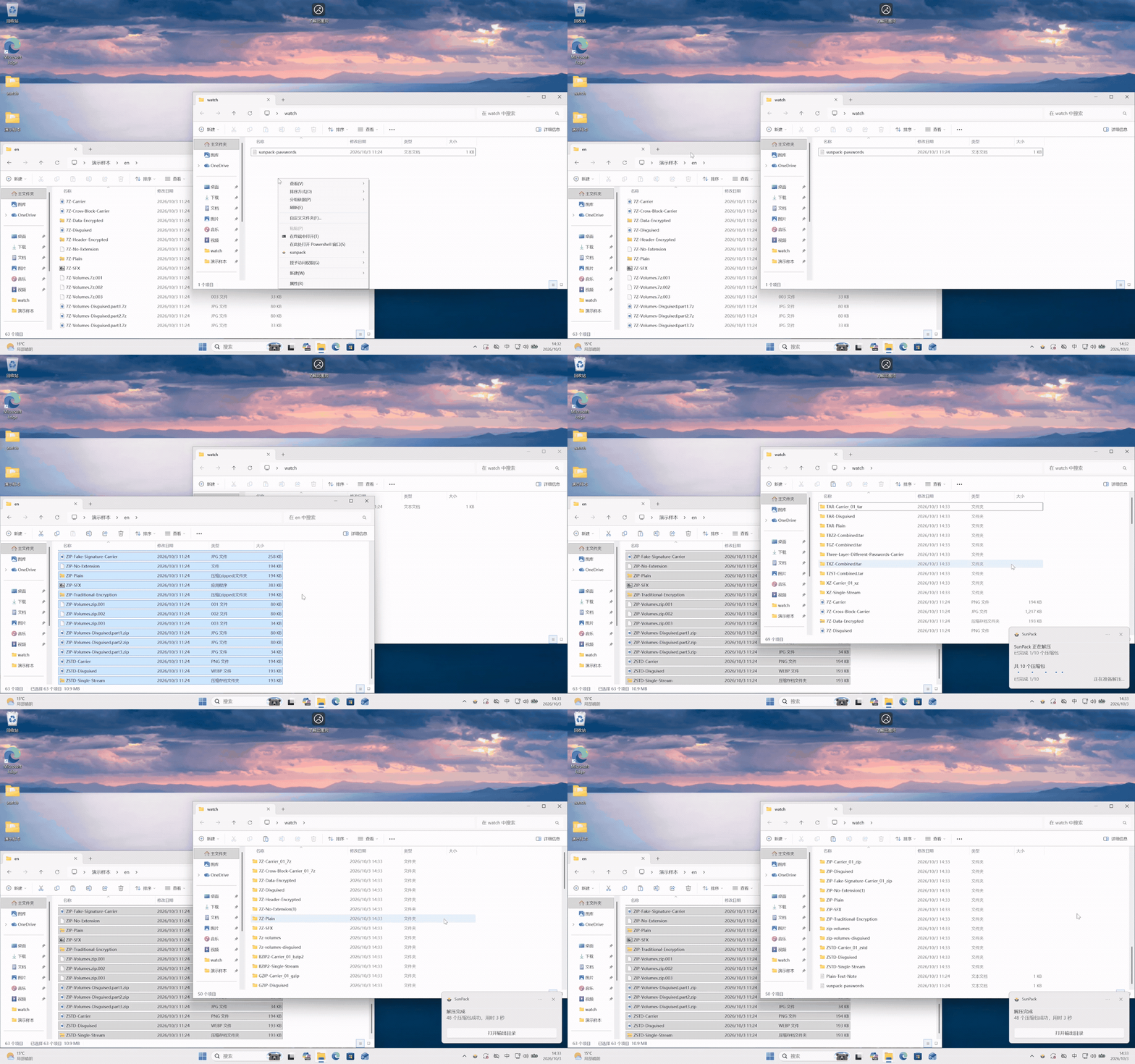
A fully automated archive processing tool for Windows that handles compressed files in the background—no manual extraction required.



Contents
- Installation
- Usage guide
- Core capabilities
- Configuration
- Development and testing
- Known Issue
- Contributing
- Acknowledgements
- License
Installation
System requirements
SunPack supports only Windows 10 version 1709 or later and Windows 11. Watch mode only supports NTFS.
Download the latest sunpack-windows-<arch>-<version>-setup.exe from GitHub Releases.
- Pick the installer that matches your system architecture:
x64for Intel/AMD 64-bit Windows,arm64for Windows on ARM. - Run the installer and accept the UAC elevation prompt. It installs to
C:\Program Files\SunPackby default; installing the Watch Broker service requires administrator privileges. - Choose the optional items in the setup wizard as needed:
- Add the installation directory to the machine
PATH. Reopen PowerShell after the installation completes. - Register the Explorer context menu for folders and folder backgrounds.
- Start SunPack Watch with Windows (disabled by default).
- Add the installation directory to the machine
You can also run this command in PowerShell to download and install the latest version for your system architecture:
$r = Invoke-RestMethod 'https://api.github.com/repos/Qinjingxue/Sunpack/releases/latest'; $arch = if ([Runtime.InteropServices.RuntimeInformation]::OSArchitecture -eq 'Arm64') { 'arm64' } else { 'x64' }; $a = $r.assets | Where-Object name -eq "sunpack-windows-$arch-$($r.tag_name)-setup.exe"; if (-not $a) { throw "Installer not found for $arch" }; $p = Join-Path $env:TEMP $a.name; Invoke-WebRequest $a.browser_download_url -OutFile $p; Start-Process $p -ArgumentList '/VERYSILENT','/SUPPRESSMSGBOXES','/NORESTART' -Wait
Usage guide
Command overview
| Command | Short form | Description |
|---|---|---|
extract |
x |
Extract files. |
watch |
w |
Monitor directories and extract archives automatically once found. |
scan |
s |
Scan a directory for archives; useful for identifying archives. |
inspect |
i |
Print detailed detection data; a debugging command with JSON output. |
passwords |
pw |
Show the password list that will be attempted in this run. |
config |
cfg |
Show or validate the effective configuration. |
doctor |
d |
Non-destructive check of installation and runtime health. |
version |
ver |
Print the installed SunPack version. |
See CLI parameter reference for detailed options.
Password management
Use the manager to edit passwords by folder or save clipboard history entries as password candidates.
For maximum convenience, SunPack gathers passwords from several sources at run time, tries all candidate passwords at high speed — with thousands of candidates it is nearly imperceptible — and automatically finds and uses the correct one. The password sources are:
- JSON password file: the installed version uses
%ProgramData%\SunPack\builtin_passwords.json, editable on the manager's Passwords page. Records inpasswordscontainvalueand optionalscopeslisting absolute directories; omitscopesfor global use. Watch maintains a separateclipboard_history, limited to 30 entries by default. - User input: the context menu, and the interactive password prompt launched from the CLI.
- Clipboard: the clipboard text is read as a password before extraction.
Recent successes only reorder currently eligible candidates and never expand their scope. File events refresh the password snapshot when the JSON file changes.
GUI manager
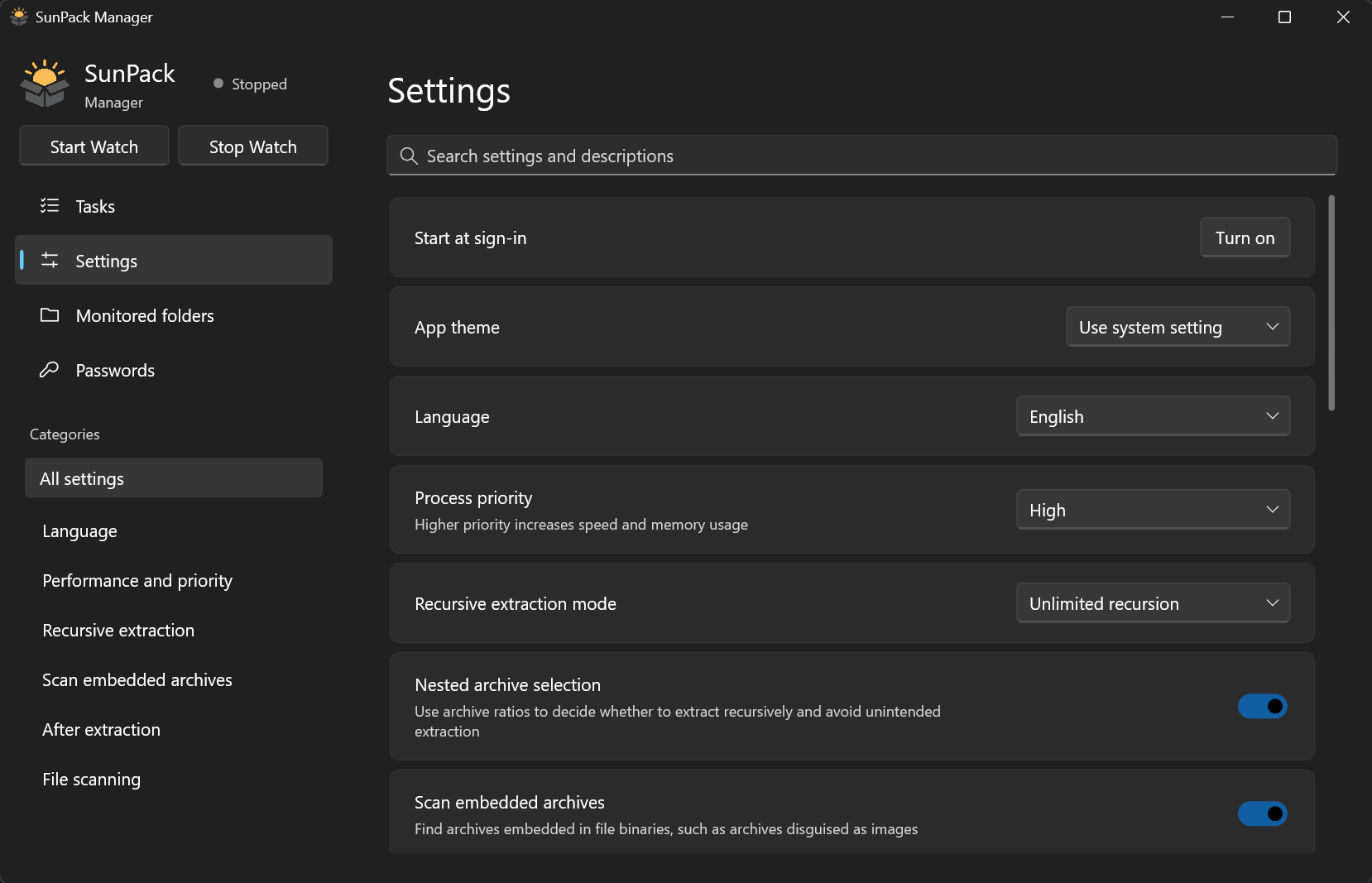
Open the manager from the Watch tray or by searching for Sunpackgui in the Start menu to manage tasks, monitored folders, passwords, and settings in one place.
- Compact: the GUI executable is about 4 MB and uses little memory.
- No extra runtime: a C++ Windows interface with no dependency on a browser engine, .NET, or similar external runtimes.
- Fast and responsive: opens quickly and keeps interactions snappy while managing tasks, folders, passwords, and settings.
- Exits when closed: the GUI does not stay resident in the background.
Usage note
- Deep detection: SunPack's normal mode can already detect almost all disguised files. Enable deep detection only when the program cannot recognize a particularly well-disguised file in normal mode. Leaving it enabled during everyday use may cause many regular files to be mistakenly extracted.
Core capabilities
Recognition Capability
- Identifies potential archive files by analyzing their binary data, including disguised archives embedded within carrier files and multi-volume archives.Currently supports ZIP, ZIPX, RAR, 7z, Zstandard (Zstd), Gzip, TAR, TBZ2, XZ, LZ4, ENCV4. ZIPX does not support WinZip-specific JPEG, MP3, or WavPack compression methods. LZ4 does not support legacy format or dictionaries.
Recursive processing
- Recursively searches for nested archives by default: after a successful extraction it checks whether the resulting folder contains archives that clearly should be extracted further, and processes them recursively. The algorithm is tuned so that, in most cases, it does not wrongly extract files that should not be extracted further.
Post-processing
- Automatically flattens meaningless nested single-child directories after a successful extraction, keeping only the top-level folder, and moves the original archive to the Recycle Bin or deletes it (controlled by the
"archive_cleanup_mode": "r"setting; the Recycle Bin is the default). If processing fails, it automatically cleans up the failed output and reports an error. - If files downloaded to a monitored folder need to remain available for BitTorrent seeding, please manually change "archive_cleanup_mode": "r" to "archive_cleanup_mode": "k". Otherwise, the source files may be deleted too quickly due to a race condition.
Watch mode monitoring system
- The watch system is built on a carefully designed identification algorithm that monitors and processes archives. It quickly detects and identifies newly added archives in the relevant directories and ignores non-archive files.
- It can recognize situations with missing volumes or passwords, and automatically retries after the password sources or the volumes change. It uses Windows notifications to show progress while processing.
- Each monitored directory can be configured with its own output root. See CLI parameter reference for the exact commands and the persistence format.
Robustness and WAL crash recovery
- Automatically pauses extraction tasks when disk space runs out, and resumes them once enough disk space is available again — no manual retry needed.
- Has a file verification system that allows partially damaged files to yield whatever usable files they can, instead of failing outright. When everything fails, it automatically cleans up the damaged files, leaving no leftovers that need manual cleanup.
- Adopts a database-like WAL design: an unexpected power loss or process crash during extraction leaves no half-finished or corrupted state; the program handles it correctly and completes the task after recovery.
- The test suite covers a wide range of complex archive formats, concurrency scenarios, and crash recovery cases to continuously verify processing correctness.
High concurrency and speed optimization
- Processes large numbers of archives concurrently, and has a concurrency algorithm that distributes work sensibly. In multi-file scenarios there is no need to extract files one by one — just drop them into a directory and they are all extracted quickly and automatically.
- Handles the high-performance computation and I/O paths in Rust and C++ native code, using overlapped I/O to overlap the read, compute, and output stages of 7z extraction. Resource utilization is good.
- For the 7-Zip backend decoders, zlib-ng was used to accelerate Deflate decompression, while parallel decoding was implemented to improve RAR and BZip2 decompression performance.
- Has a rich set of benchmark cases for various scenarios, and is optimized for those benchmarks close to the maintainability limit.
Low background resource usage
- Manages cache lifetimes well and automatically releases useless caches after processing files.
- Uses purely event notifications while the system is idle; an idle background process consumes no CPU on polling.
Configuration
The main configuration file is sunpack_config.json; sunpack_advanced_config.json supplies additional defaults. Watch automatically reloads configuration changes.
The main configuration automatically overrides the advanced configuration, and fields can be freely moved between the two.
Configuration validation command:
python sunpack.py config validate
See the configuration guide for common settings and examples.
Development and testing
Development
Prepare the development environment:
.\scripts\setup_windows_dev.ps1
Build the project:
.\scripts\build_windows.ps1
See the documentation for development environment and build instructions. See the documentation for development boundaries. Developers using AI must ensure that the AI reads the repository's AGENTS.md before making any changes and follows the development guidelines specified therein.
Architecture at a glance
CLI / Watch / Explorer (runtime)
  -> pipeline coordinator
     -> filesystem routing
        +-- Relations (RAR / 7z / ZIP, including volumes)
        +-- Detection (TAR and compression streams)
        +-- Embedded discovery (unresolved files)
     -> recursive authorization -> password handling -> extraction
     -> verification -> post-processing
Rust provides low-level scanning and archive analysis; the C++ worker extracts with the integrated 7-Zip source code.
Testing
Install the test dependencies and run the default tests:
uv sync --locked --extra test
uv run --locked pytest
Acceptance tests:
.\run_acceptance_tests.ps1
Reproducible worker vs. 7-Zip benchmark
Detailed machine identity, archive construction, compression methods, and
reproduction instructions are in the benchmark document.
The latest four-thread IOCP experiment, including output flush timings, is documented in
the Gzip/ZIP concurrency report (Chinese).
The follow-up full-format regression
and 1/4/8 IOCP consumer comparison
include paired timings and explicit output flushes.
The current 8-thread IOCP worker vs. concurrent 7z.exe retest
covers all 18 format/variant cases, a mixed queue, and targeted input/CPU diagnostics.
The subsequent parallelism optimization report
records retained CRC32/Open changes, administrator CPU sampling, and remaining gaps.
These results use SunPack v0.7.9 from repository commit b9fdfa6d, with the
worker built from the same commit. The retest ran on 2026-10-03: 18 cases, five
measured runs per case, and no warmups. Times and sampled process-tree peak RSS
are per-case medians; RSS is in MiB. Worker time and memory are grouped together,
followed by the same metrics for 7z.exe. The raw full-matrix report is
benchmarks/results/worker-vs-7z-300m-v0.7.9-b9fdfa6-rss-20261003.json.
| Format / variant | Worker time (ms) | 7z.exe time (ms) |
Time ratio | Worker peak RSS (MiB) | 7z.exe peak RSS (MiB) |
RSS ratio |
|---|---|---|---|---|---|---|
| 7z split | 141.886 | 203.605 | 0.697 | 476.199 | 458.379 | 1.039 |
| 7z non-solid | 188.029 | 250.020 | 0.752 | 324.137 | 308.047 | 1.052 |
| 7z solid | 142.802 | 204.641 | 0.698 | 475.652 | 458.309 | 1.038 |
| BZip2 | 1,670.859 | 2,914.191 | 0.573 | 43.289 | 12.625 | 3.429 |
| Gzip | 81.731 | 209.743 | 0.390 | 25.188 | 8.215 | 3.066 |
| RAR5 split | 172.453 | 768.066 | 0.225 | 54.242 | 40.516 | 1.339 |
| RAR4 non-solid | 80.926 | 185.464 | 0.436 | 27.488 | 11.598 | 2.370 |
| RAR4 solid | 539.789 | 652.330 | 0.827 | 28.211 | 12.348 | 2.285 |
| RAR5 non-solid | 95.293 | 186.992 | 0.510 | 56.250 | 39.605 | 1.420 |
| RAR5 solid | 168.938 | 745.597 | 0.227 | 57.289 | 40.477 | 1.415 |
| TAR | 76.350 | 120.331 | 0.634 | 24.031 | 7.297 | 3.293 |
| TBZ2 | 1,663.736 | 2,890.008 | 0.576 | 44.141 | 12.625 | 3.496 |
| TGZ | 84.974 | 213.233 | 0.399 | 25.215 | 8.219 | 3.068 |
| TXZ | 156.893 | 181.328 | 0.865 | 474.617 | 458.523 | 1.035 |
| TZST | 100.259 | 188.752 | 0.531 | 23.012 | 9.789 | 2.351 |
| XZ | 169.011 | 183.459 | 0.921 | 474.621 | 458.520 | 1.035 |
| ZIP | 76.254 | 198.892 | 0.383 | 25.289 | 7.984 | 3.167 |
| ZST | 104.599 | 181.936 | 0.575 | 23.039 | 9.789 | 2.354 |
Known Issue
- Not found so far. Welcome to report!
Contributing
Contributions are welcome. Use GitHub Issues to report bugs or suggest improvements, and submit a Pull Request to help improve the project.
When reporting a problem, you can attach relevant logs. Default locations for installed SunPack:
- Watch events:
%ProgramData%\SunPack\.sunpack_watch\events.jsonandevents.json.store - Extraction failure reports:
%ProgramData%\SunPack\.sunpack_watch\failures\failed-*.txt - Windows notifications:
%ProgramData%\SunPack\.sunpack_watch\toast_host_events.jsonl - Background runtime:
%ProgramData%\SunPack\runtime-*.state.events.jsonand matching.storedirectories
Include both the display manifest and its .store directory; display history is not a JSONL text log. If you changed watch.state_dir, the first three locations use that custom state directory. Remove passwords, private paths and other sensitive information before posting.
Acknowledgements
Thank you to everyone who contributes code, reports issues, or shares suggestions for SunPack. The project also benefits from many open-source projects. Special thanks to the maintainers and contributors of Core UI (SunPack's native UI framework), 7-Zip, zlib-ng, LZ4, and RustCrypto. See THIRD_PARTY_NOTICES.md for details about third-party components and their licenses.
License
The root LICENSE (MIT) applies to SunPack-original code. It does not mean that third-party code or binaries are also licensed under MIT.
The repository includes several third-party components, including 7-Zip 26.04 at native/sevenzip_bridge/7z2604-src/, zlib-ng 2.3.3 at native/sevenzip_bridge/zlib-ng-2.3.3/, LZ4 1.10.0 at native/third_party/lz4/, and cryptographic algorithm implementations adapted from RustCrypto. These components remain subject to their respective original licenses. For component scope, copyright and license information, and the license materials required for releases, see THIRD_PARTY_NOTICES.md, licenses/, and docs/licensing.md.
The 7-Zip source license is copied at licenses/7zip-source-license.txt, and the full GNU LGPL 2.1 text is available at licenses/LGPL-2.1.txt. License copies for other components are in licenses/.
The input prefetch optimization experiments were rejected because gains did not hold across single-job and concurrent workloads.
Explore related projects
n8n-io/n8n
Fair-code workflow automation platform with native AI capabilities. Combine visual building with custom code, self-host or cloud, 400+ integrations.
209,959 starslanggenius/dify
Build Agentic workflows, RAG pipelines, with rich AI model and tool support on one collaborative workspace. Deploy on cloud, VPC, or self-hosted, so teams move from prototype to production without rebuilding the stack.
160,773 starsmicrosoft/PowerToys
Microsoft PowerToys is a collection of utilities that supercharge productivity and customization on Windows
140,755 starsstablyai/orca
Orca is the place for working with a fleet of agents (e.g. Grok Bot, Claude Code). Run any coding agent with your own subscription. Available on desktop, mobile and remote runtime.
120,604 stars