
Puteitous/HippoBuddy
Puteitous/HippoBuddy has 56 GitHub stars and 11 forks. GitHot measured 0 stars in 24 hours, +1 in 7 days, and +1 in 15 days. Last checked 2026-11-15 20:35 UTC. Last push 2026-10-07.
Measured star growth
- in 24h
- 0
- in 7 days
- +1
- in 15 days
- +1
- in 1 month
- Update delayed
Net star changes over overlapping periods, not daily totals. Missing measurements are left blank. Stars measure attention, not software quality.
About
HippoBuddy — AI-powered desktop assistant for chat, coding, and office workflows.
Productivitydocs/README.en.md
Original
 HippoBuddy
AI-powered desktop assistant for chat, coding, and office productivity.
简体中文 | English







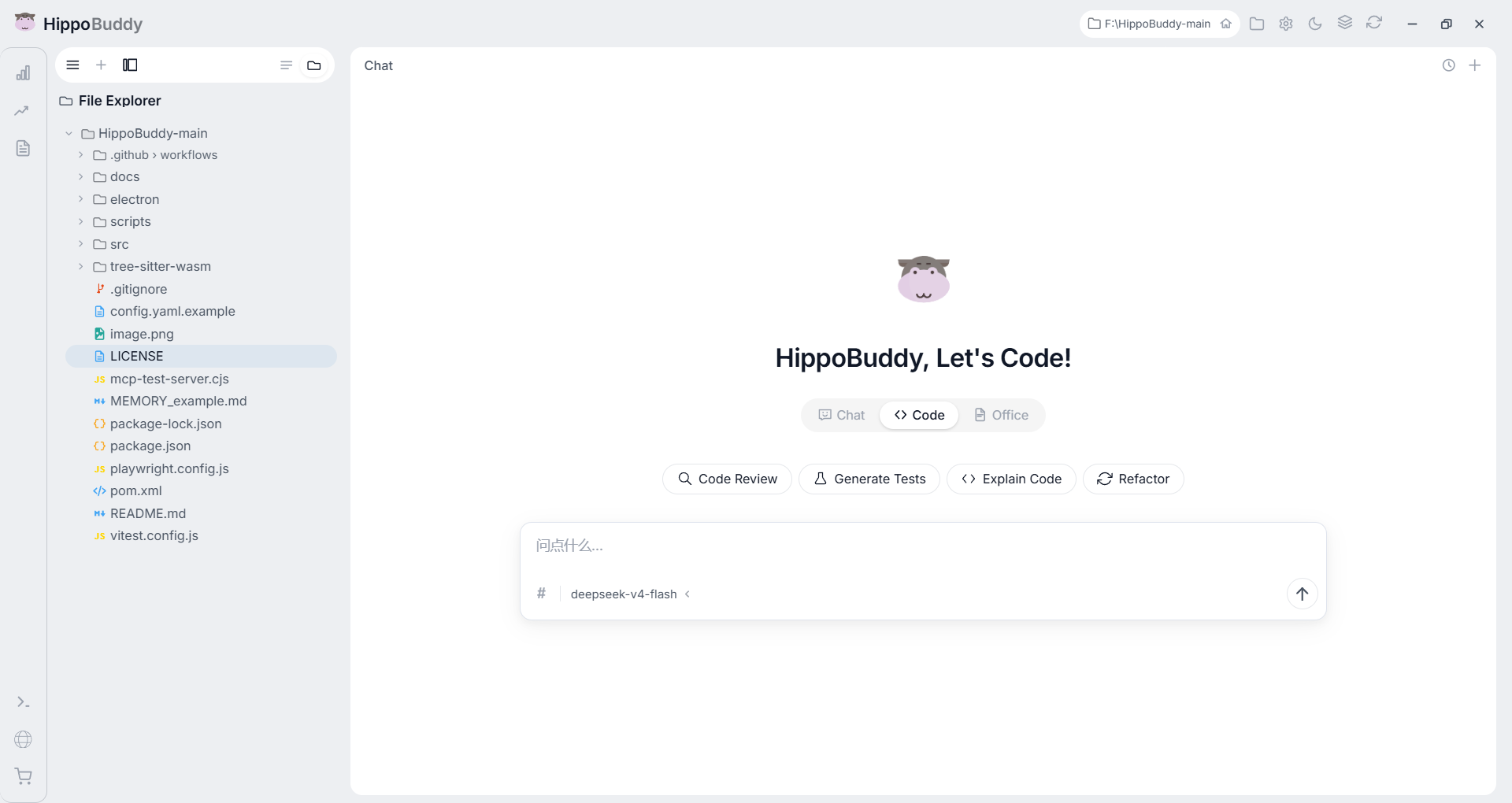
Download
| Platform | Download |
|---|---|
| Windows | HippoBuddy Setup |
| macOS (Intel) | HippoBuddy.dmg |
| macOS (Apple Silicon) | HippoBuddy-arm64.dmg |
| Linux (AppImage) | HippoBuddy.AppImage |
📖 Online documentation: https://www.hippobuddy.cn/
🪞 Gitee mirror repository: https://gitee.com/putetou/HippoBuddy
🔗 Baidu Netdisk: https://pan.baidu.com/s/1L78e0I7N4zaz_yZsVTeW7A?pwd=pfga
💬 QQ Group (1102524202) — feedback, feature requests, help, and casual chat
Features
| Feature | Description |
|---|---|
| Smart Chat | Chat / Code / Office modes, switch anytime |
| AI Coding | Understand project context, generate & refactor code |
| File Ops | Read, write, edit, delete with diff preview & rollback |
| Sessions | Create, rename, delete, fork discussions |
| Office Read/Write | Native parse & generation for Word / Excel / PPT / CSV |
| Subagent | Fork, cancel, and run parallel subagents (worker agents) |
| Memory | Extract, consolidate & retrieve cross-session memory |
| MCP Extension | Built-in SSE & Stdio MCP clients, plug in external tools |
| Skill System | Load and orchestrate reusable skill libraries on demand |
| Toolbox | Token stats, terminal, browser, live monitor |
| Onboarding | Spotlight tour on first launch |
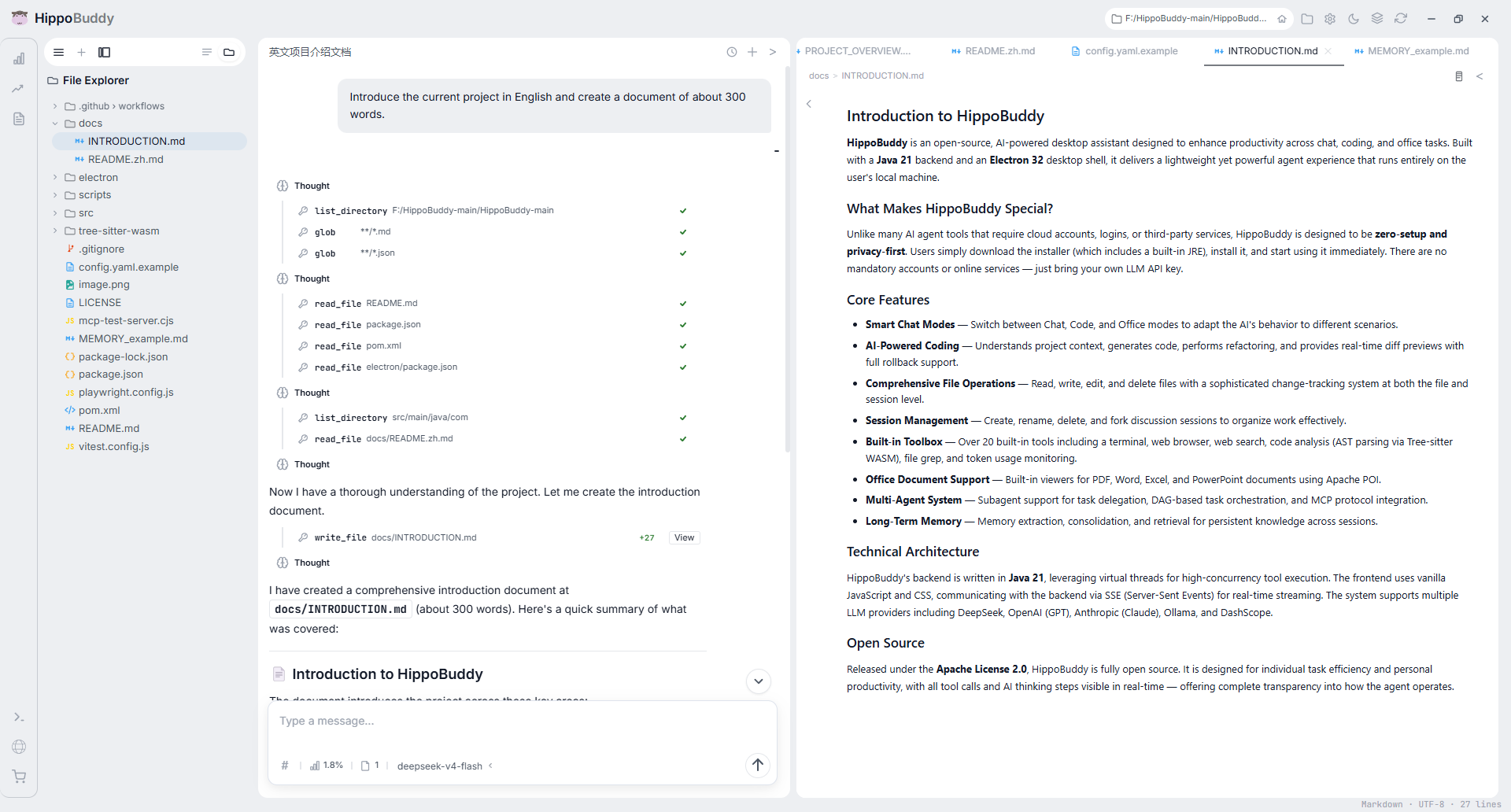
Chat panel and preview panel working together
Why HippoBuddy?
Compared to other AI agent tools (Codex, Claude Code, Copilot, Kimi, Trae Work, WorkBuddy):
| Dimension | HippoBuddy |
|---|---|
| Open Source | Full source, Apache 2.0 license |
| Zero Setup | No login, no accounts, no third-party services — download and use |
| LLM Visibility | Every tool call and thinking step is visible in real-time |
| Code Editing | Full read/write/edit with diff preview and rollback |
| Office Documents | Built-in viewer for PDF, Word, Excel, PPT, and more |
| File Change System | Track changes at file and session level, rollback anytime |
| Context & Token Monitor | Real-time token stats, context usage, LLM monitoring |
| Built-in Tools | 16+ built-in tools: terminal, browser, search, code analysis, etc., extensible via MCP |
| Performance | Lightweight desktop app, Java virtual-thread concurrency |
| UI Design | Minimalist and clean |
| Platform | Desktop (Windows / macOS / Linux) |
Roadmap
HippoBuddy is under active iteration. Core capabilities (MCP, subagents, memory, Office read/write, skill system) are already shipped and will be continuously polished:
- Requires personal LLM API key + web search tool config
- Subagent, MCP, and Memory are supported but being hardened for stability & ease of use
- Automated task pipeline and browser automation are planned
- More complex Office layout editing will be improved further
- Third-party software integration is still limited
- Designed for personal task efficiency, not 24/7 online service
🎬 Video Intro
A 6-minute quick look at HippoBuddy:


Quick Start
Option 1: Desktop (Recommended)
Download installer -> Install -> Launch -> Start using
Option 2: From Source
# 1. Build the frontend (Vite output goes to src/main/resources/static)
cd frontend && npm install && npm run build && cd ..

# 2. Compile and package the Java backend (includes the static assets above)
mvn package -DskipTests

# 3a. Launch desktop (Electron)
cd electron && npm install && npm start

# 3b. Or run web-only (no Electron)
mvn exec:java -Dexec.mainClass="com.example.agent.WebApplication"
Configuration — When running from source, the app auto-creates
config.yamlfromconfig.yaml.exampleon first launch. Edit it with your LLM settings:llm: api_key: ${DEEPSEEK_API_KEY:-your-api-key-here} model: deepseek-v4-flash base_url: https://api.deepseek.comSupports DeepSeek / Claude / GPT / Ollama. See
config.yaml.examplefor full reference.
Tech Stack
| Layer | Technology |
|---|---|
| Desktop Shell | Electron 35 |
| Frontend | React 18 + TypeScript + Vite 5 |
| State Management | Zustand 4 |
| Code Editor | CodeMirror 6 |
| Backend | Java 21 + Virtual Threads |
| Build | Maven 3.9 + npm |
| AI Protocol | OpenAI / Claude / Ollama |
| Testing | JUnit 5 + Vitest + Testing Library |
Project Structure
src/main/java/com/example/agent/
├── WebApplication.java           Web entry
├── DesktopApplication.java       Desktop entry
├── core/                         DI, event bus, security blockers
├── llm/                          LLM clients (OpenAI, Claude, Ollama...)
├── tools/                        Built-in tools (16, MCP-extensible)
├── execute/                      Agent conversation loop
├── subagent/                     Multi-agent system
├── mcp/                          MCP protocol
├── memory/                       Long-term memory
├── context/                      Context budget & compaction
├── session/                      Session storage & transcripts
├── web/                          HTTP handlers & SSE streaming
│   └── orchestrator/             Task orchestration (DAG)
├── application/                  Conversation application service
├── service/                      Token estimation, title generation
├── desktop/                      Desktop workspace context
├── console/                      Console interaction
├── progress/                     Progress & diff preview
├── logging/                      Logging & metrics collection
├── prompt/                       Prompt library & management
├── domain/                       Rules, skills, content truncation
└── config/                       Configuration models
Documentation
| Title | Link |
|---|---|
| HippoBuddy — Introduction | docs/intro |
| Quick Start | docs/quick-start |
| HippoBuddy Architecture Philosophy | docs/architecture/philosophy |
| AI Agent Usage Tips | docs/guides/agent-mindset |
| What Is an AI Desktop App Loading on Startup? | docs/guides/startup-loading |