
PulseBeamDev/pulsebeam
PulseBeamDev/pulsebeam has 69 GitHub stars and 6 forks. GitHot measured 0 stars in 24 hours. Last checked 2026-11-12 20:53 UTC. Last push 2026-11-06.
The open-source realtime stack for audio, video, and data. Built to stay out of your way.
Measured star growth
- in 24h
- 0
- in 7 days
- Update delayed
- in 15 days
- Update delayed
- in 1 month
- Update delayed
Net star changes over overlapping periods, not daily totals. Missing measurements are left blank. Stars measure attention, not software quality.
README.md
Original PulseBeam
The open-source realtime stack for audio, video, and data.
Built to stay out of your way.
PulseBeam is a Rust media server and SDK stack for browser and native applications. Web and React SDKs are available today; native SDKs are in development.
Participants publish named audio, video, and data tracks into a room. Each participant can both send and receive tracks. We'd rather improve a default than add another knob.
Get started · Documentation · Meet example · Discord
The model
- Room: A namespace for discovering participants and tracks. It does not own your application's lifecycle.
- Participant: An identity in a room. It can represent a person, agent, device, or service.
- Track: Named audio, video, or application data published by a participant.
- Agent: The bidirectional SDK handle for one participant: publish local tracks, discover and receive remote tracks, send and receive data, and observe connection state.
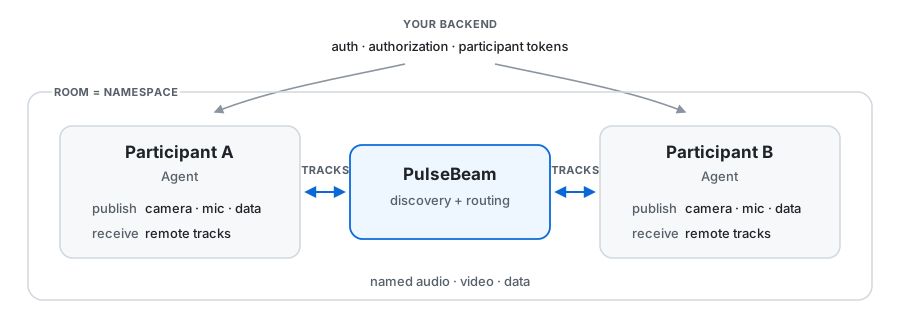
Your backend owns authentication, authorization, application state, persistence, and APIs. PulseBeam owns the realtime path.
Work with tracks
React today:
const capture = useCapture("device", { video: true, audio: true })
const agent = useAgent({ endpoint, token })

const videos = agent.remote.participants.flatMap(({ tracks }) =>
  tracks.filter(
    (track): track is RemoteVideoTrack => track.kind === "video",
  ),
)

return (
  <>
    <button onClick={() => void capture.request().catch(() => {})}>
      Enable camera & mic
    </button>
    {capture.error && <p role="alert">{capture.error.message}</p>}
    <button onClick={() => agent.connect()}>
      Connect
    </button>

    <Publish track={agent.video("camera")} source={capture.video} />
    <Publish track={agent.audio("microphone")} source={capture.audio} />

    {videos.map((video) => (
      <Video
        key={`${video.participantId}:${video.label}`}
        source={video}
        style={{ width: 320, height: 240 }}
      />
    ))}

    <Audio agent={agent} />
  </>
)
Publish is a renderless component: mount it to own publication; capture stays independent.
Video demand follows the UI
Video is more than playback. A visible, nonzero-sized video creates receive demand, and the runtime adapts what it requests as layout and bandwidth change.
Use receive when application intent matters:
<Video
  source={video}
  receive={{
    priority: pinned ? 200 : 10,
    minFps: 15,
    playoutDelay: { minMs: 100, maxMs: 200 },
  }}
/>
So the default path follows the UI automatically, while pinned tiles, latency-sensitive views, or other application-specific cases can override policy.
Data is a track, too
const cursor = agent.data("cursor", "latest")
const reactions = agent.data("reactions", "lossy")
const messages = agent.data("messages", "ordered")
| Mode | Semantics |
|---|---|
latest |
Only the newest state matters |
lossy |
Missing events are not recovered |
ordered |
Preserve order with bounded recovery |
Payloads are bytes. ordered reports a gap when recovery history is no longer available. Data is live delivery, not durable storage.
Local development demo
The source development setup currently targets Linux x86_64. Start from a checkout with the host prerequisites.
Start the server:
./bazel run --config=dev //:server -- --dev
Start Meet:
./bazel run //:meet_dev -- --port 3000
Create two participant tokens:
./bazel run //:cli -- token \
  --room demo \
  --participant alice

./bazel run //:cli -- token \
  --room demo \
  --participant bob
Open http://localhost:3000 in two tabs. Use a different token in each tab, set the server URL to http://localhost:7070, allow camera and microphone access, and join.
Each tab should discover the other participant. Select the remote video tile to view its camera. Mute both microphones to avoid feedback.
Development mode uses public credentials. Do not expose a --dev server to the internet. The local server uses TCP 7070 for signaling and TCP/UDP 3478 for WebRTC.
How we test
We run the server and native SDK together in a deterministic simulator, using real signaling and media code over a controlled network. We check what arrives, whether video decodes, and whether clients recover after failures.
Virtual time lets us run many repeatable network scenarios, sometimes faster than real time. It does not reproduce every browser or operating system behavior, so we also test in browsers and against real network sockets.
The native SDK uses libwebrtc. The Web and native SDKs share the same Rust core for connection state and recovery, and the simulator exercises that core through the native SDK.
We also check the checks by injecting faults and verifying that the test suite catches them. The testing guide explains the current QA boundaries.
WebRTC
WebRTC is our transport today: boring, battle-tested.
PulseBeam keeps SDP, ICE candidates, transceivers, and renegotiation below the participant-and-track API.
Where things stand
PulseBeam is under active development.
| Component | Status |
|---|---|
| Server | Self-hostable |
| Web SDK | Available |
| React SDK | Available |
| Native SDKs | In development, not yet published |
| Audio | Opus |
| Video | H.264 Baseline |
| Transport | WebRTC |
If something breaks or does not fit what you are building, open an issue or talk with us on Discord.
Metrics and profiling
Prometheus metrics:
http://localhost:6060/metrics
CPU profiles:
http://localhost:6060/debug/pprof/profile?seconds=30
Keep port 6060 private.
Build and development · Roadmap · Benchmark write-up
License: Server: AGPL-3.0 · Client SDKs: Apache-2.0
Explore related projects
awesome-selfhosted/awesome-selfhosted
A list of Free Software network services and web applications which can be hosted on your own servers
336,615 starsimmich-app/immich
High performance self-hosted photo and video management solution.
119,024 starsStirling-Tools/Stirling-PDF
#1 PDF Application on GitHub that lets you edit PDFs on any device anywhere
96,434 starslouislam/uptime-kuma
A fancy self-hosted monitoring tool
93,575 stars