
PriyanshuGeTRekT/Claude-Code-Desktop-Switcher
PriyanshuGeTRekT/Claude-Code-Desktop-Switcher has 40 GitHub stars and 8 forks. GitHot measured 0 stars in 24 hours. Last checked 2026-11-09 19:11 UTC. Last push 2026-11-07.
Use multiple Claude desktop accounts at the same time on Windows, macOS and Linux: one-click add and switch, separate logins, sign-ins routed to the right account, Claude Code chat transfer. Unofficial.
What you can do
- Several accounts open at once, each with its own login - ✓ - ✓ - ✓
- One-click Add Account, straight to the sign-in screen - ✓ - ✓ - ✓
- Switch to, quit or restart any account - ✓ - ✓ - ✓
- Edit: name, colour badge, environment variables, launch flags - ✓ - ✓ - ✓
Measured star growth
- in 24h
- 0
- in 7 days
- Collecting history
- in 15 days
- Collecting history
- in 1 month
- Collecting history
Net star changes over overlapping periods, not daily totals. Missing measurements are left blank. Stars measure attention, not software quality.
README.md
OriginalClaude Profile Switcher
Use several Claude desktop accounts at the same time, on Windows, macOS and Linux.
Separate logins side by side, one click to add or switch, and nothing to sign out of.










| Windows | macOS |
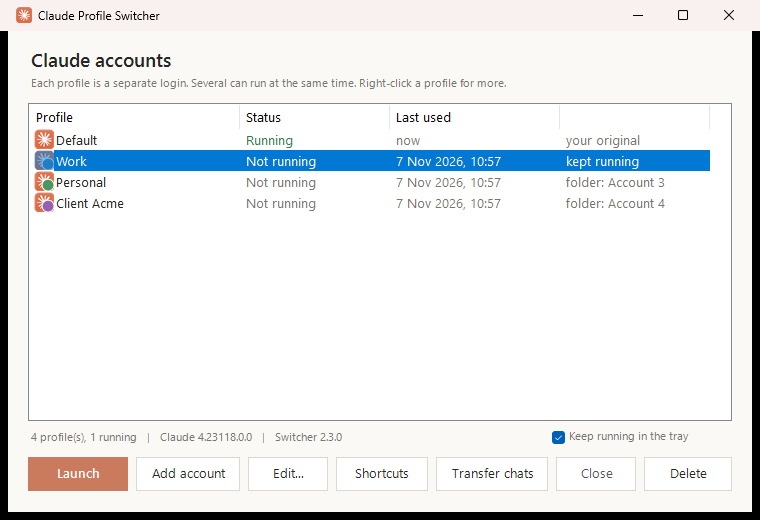 |
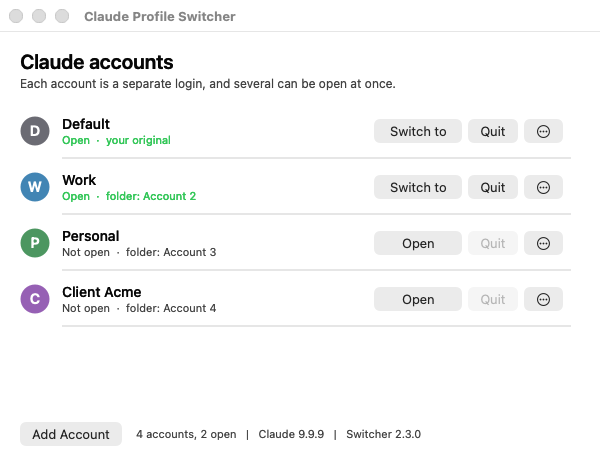
|
| Linux | |
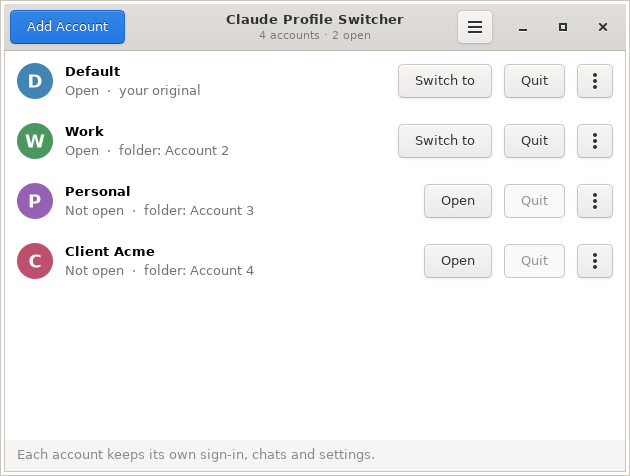
|
Why
The Claude desktop app signs in one account at a time. If you have a work and a personal account, or several clients, switching means signing out, signing back in and losing your place. Claude Profile Switcher gives each account its own copy of the app with its own login, so they all stay signed in and run at the same time, Claude Code included.
Install
Windows 10 or 11
Download Install-ClaudeProfileSwitcher.cmd and double-click it. It adds Claude Profile Switcher to the desktop and Start menu and opens it. Or in PowerShell:
irm https://github.com/PriyanshuGeTRekT/Claude-Code-Desktop-Switcher/releases/latest/download/ClaudeSwitcher.ps1 -OutFile "$env:TEMP\ClaudeSwitcher.ps1"; powershell -ExecutionPolicy Bypass -File "$env:TEMP\ClaudeSwitcher.ps1" -Install
macOS 12 or later
Download ClaudeProfileSwitcher-macOS.zip, unzip it, and drag Claude Profile Switcher to Applications. The first time, right-click it and choose Open: it is not notarized by Apple, so a plain double-click is refused once. Or clear that flag in Terminal:
xattr -dr com.apple.quarantine "/Applications/Claude Profile Switcher.app"
It lives in the menu bar, and updates itself from Check for Updates... there.
Linux (Ubuntu 22.04+, Debian 12+ and others)
It works with Anthropic's Claude Desktop for Linux (beta, the
claude-desktop package) and with the community claude-desktop-unofficial build. On Ubuntu
or Debian, download claude-profile-switcher_all.deb
and install it:
sudo apt install ./claude-profile-switcher_all.deb
On any other distribution, or without sudo, install it for your user only:
curl -fsSL https://github.com/PriyanshuGeTRekT/Claude-Code-Desktop-Switcher/releases/latest/download/ClaudeProfileSwitcher-linux.tar.gz | tar -xz && sh ClaudeProfileSwitcher-linux/install.sh
Then open Claude Profile Switcher from the app menu, or run claude-switcher.
Add your second account in three steps
- Click Add Account in the switcher (also in the macOS menu bar).
- A new Claude window opens at the sign-in screen. Sign in with your other account.
- Done. Both accounts stay signed in from now on. Give the new one a name like
Workwith Edit...: F2 on Windows, under More on macOS, under ⋮ on Linux.
From then on, Launch opens an account, or brings it to the front if it is already open.
Features
| Windows | macOS | Linux | |
|---|---|---|---|
| Several accounts open at once, each with its own login | ✓ | ✓ | ✓ |
| One-click Add Account, straight to the sign-in screen | ✓ | ✓ | ✓ |
| Switch to, quit or restart any account | ✓ | ✓ | ✓ |
| Edit: name, colour badge, environment variables, launch flags | ✓ | ✓ | ✓ |
| Browser sign-ins go to the account that asked | ✓ | ✓ | ✓ |
| Move Claude Code chats between accounts | ✓ | ✓ | ✓ |
| Each account has its own taskbar or Dock entry | ✓ | ✓ | ✓ |
| Launchers per account | Desktop, Start menu | App menu, dock actions | |
| Reopen accounts after Claude's own auto-update closes them | ✓ | ✓ | not needed¹ |
| Tray or menu bar, start at login | ✓ | ✓ | |
| Self-update, checksum verified | ✓ | ✓ | ✓² |
| Diagnostics, clean uninstall, command line | ✓ | ✓ | ✓ |
| Your original account is never touched | ✓ | ✓ | ✓ |
¹ Claude for Linux does not update itself while running; updates come with apt upgrade.
² For a per-user install. The .deb is updated by installing the new .deb.
Windows guide
| Action | In the window | Keyboard |
|---|---|---|
| Open an account, or switch to it | Launch / Switch to, double-click | Enter, Ctrl+1..9 |
| Add an account | Add account | Ctrl+N |
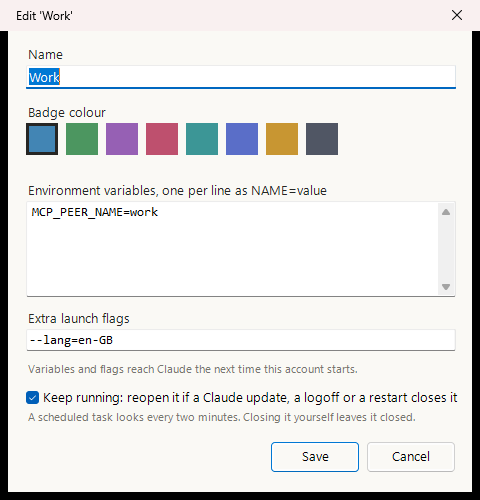
| Name, colour, variables, flags, keep running | Edit... | F2 |
| Close or restart its Claude | Close, right-click Restart | |
| Shortcuts on the desktop and Start menu | Shortcuts | |
| Copy Claude Code chats to another account | Transfer chats | |
| Delete an account | Delete | Del |
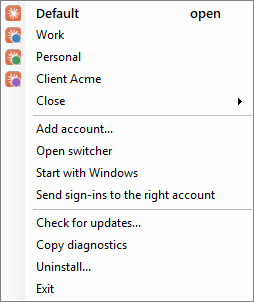
Right-click any account for the same actions. Closing the window keeps the switcher in the notification area: right-click its icon to switch accounts, add one, close one, check for updates, or turn on Start with Windows.
Browser sign-ins and claude:// links
Signing in through the browser ends with a claude:// link, and Windows sends every one of
those to your original account. The first time you add an account, the switcher offers to
handle those links and pass each sign-in to the account that asked for it. Turn it on or off
from the tray (Send sign-ins to the right account), or with -RouteSignIns and -Revert.
A sign-in goes to the first of these that applies: the account you launched while it was
signed out, the only open account that is signed out, the open account you used last, and
otherwise your original one. Other claude:// links, such as a link to a Claude Code session,
open in your original account unless you choose otherwise: -OpenLinksIn Work sends them all
to Work, and -OpenLink <url> -Account Work opens a single link there.
[!NOTE] On the Store build of Claude, Windows keeps
claude://links for Claude until you choose otherwise. Turning routing on opens Settings at the right page: set CLAUDE to Claude Profile Router.-Statusshows whether that step is still to do.
Keeping accounts open through Claude's updates
When Claude installs an update while idle, Windows closes every copy of it and the app
brings back only your original account. Logoff and restart do the same. For an account that
has to stay up (Remote Control, scheduled tasks, long Claude Code sessions), tick Keep
running in Edit..., or run -KeepRunning Work.
A per-user scheduled task then looks every two minutes and at logon, and reopens a kept
account only when its own log ends in a forced close; one you closed yourself stays closed.
It waits out an update in progress, reopens minimized, never takes the foreground, and never
reopens the same account twice within ten minutes. Each action is written to
%LOCALAPPDATA%\ClaudeProfiles\.switcher\watchdog.log.
Shortcuts and taskbar buttons

Shortcuts puts a Claude - <name> shortcut on the desktop and in the Start menu, so you can
search for an account or pin it. Each extra account's window also gets its own taskbar button
with its badge instead of piling onto Claude's, and a pinned shortcut shares that button. Your
original account keeps Claude's own button.
Moving Claude Code chats between accounts
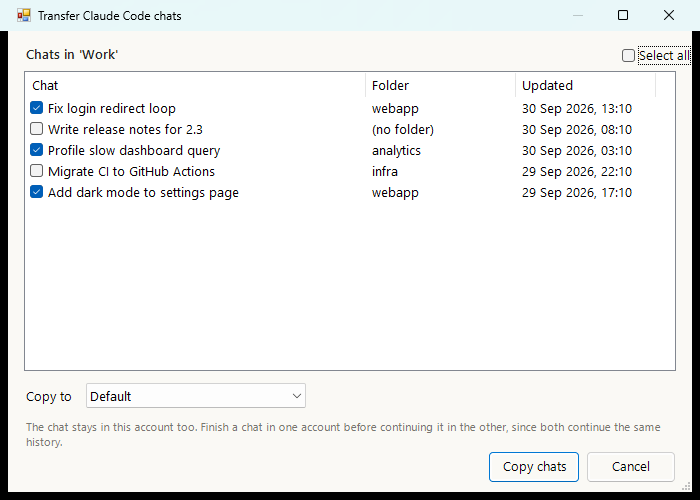
Select an account, click Transfer chats, tick the chats and pick where they go. The chat stays in the original account too, and both continue the same history, so finish in one before picking it up in the other. The target account needs to have opened the Code tab once.
Environment variables and launch flags per account
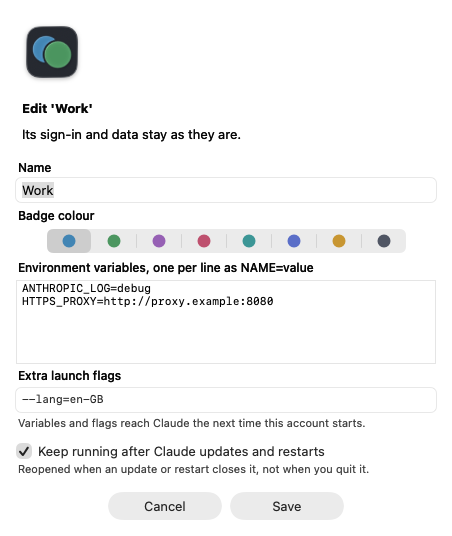
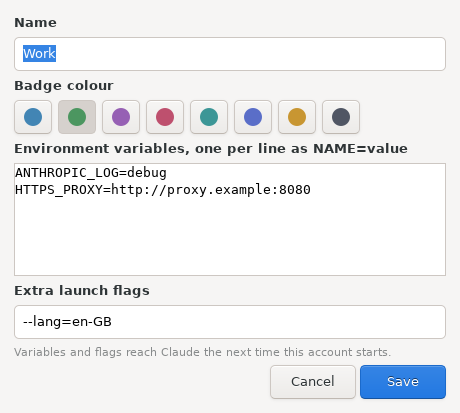
Set them in Edit...: variables one per line as NAME=value, flags as you would type them.
If the account is open, the switcher offers to restart it so they take effect. They are stored
in %LOCALAPPDATA%\ClaudeProfiles\settings.json, keyed by the account's folder name:
"ProfileEnv":  { "Work": { "MCP_PEER_NAME": "work" } },
"ProfileArgs": { "Work": "--lang=en-GB", "Personal": ["--lang", "fr-FR"] }
A copy that is already open keeps what it started with. Your original account on the Store build starts through Windows and takes neither.
The tray menu
macOS guide
The switcher sits in the menu bar. Its menu lists every account with its badge (open ones are ticked) and ⌘+1..9 to open them, plus Add Account (⌘+N), Quit Account, Show Accounts..., Open at Login, Send Sign-ins to the Right Account and Check for Updates.... The window has Open / Switch to and Quit for each account, and More for Edit, Restart, Transfer Code Chats, Show in Finder and Delete. Each open account gets its own Dock icon.
- Sign-ins. With Send Sign-ins to the Right Account on, the switcher handles
claude://links and hands each sign-in to the account waiting for it, as on Windows. macOS asks once whether the switcher may control Claude: allow it, since that is how the link reaches the right copy. - Keep running (in Edit...) reopens an account when a Claude update, a logoff or a restart closed it, through a per-user launch agent that checks every two minutes.
- Your original account uses Claude's own data in
~/Library/Application Support/Claude, which the switcher never touches. Extra accounts live in~/Library/Application Support/ClaudeProfiles/<name>, withsettings.jsonbeside them using the same keys as on Windows.
The app is one Swift file with no dependencies; macos/build.sh builds it. It is built and
tested on every change against a stand-in Claude (the screenshots come from that run), but
not yet against the real Claude on a real Mac. Please
open an issue with
what you see.
Linux guide
Run Claude Profile Switcher from the app menu. The window lists every account with Open / Switch to and Quit, and ⋮ for Edit, Restart, Transfer Code Chats, Open Folder and Delete. The ☰ menu turns on sign-in routing and Show Accounts in the App Menu, which gives each account its own launcher and coloured icon and lists them all as quick actions when you right-click the switcher in the dock.
- Its own taskbar entry. Each account runs with a window class of its own, so it is not grouped with your other Claude windows, and pinning it keeps that account.
- Sign-ins. With routing on, the switcher is the
claude://handler (in your~/.config/mimeapps.list, with the previous handler restored on --revert), and hands each sign-in to the account waiting for it. - Your original account is Claude's own
~/.config/Claude. Extra accounts live in~/.config/ClaudeProfiles/<name>, with the samesettings.jsonkeys as everywhere else. - The window needs GTK 3 for Python (
python3-gi), which Ubuntu and Debian desktops include. Everything also works from the command line.
Claude for Linux is a beta from Anthropic. The switcher is tested on every change on Ubuntu against a stand-in Claude that behaves like Electron, but not yet against the real beta. Reports are very welcome.
Command line
Windows (ClaudeSwitcher.ps1)
| Command | Does |
|---|---|
-AddAccount |
Add an account and open Claude at its sign-in screen |
-Launch Work |
Open an account, or bring it forward if it is open |
-Close Work / -Restart Work |
Close its Claude / close it and open it again |
-List |
Accounts and which are running |
-Shortcut Work [-To <dir>] |
Shortcuts for one account |
-KeepRunning Work / -StopKeeping Work |
Reopen it after Claude's updates, or stop |
-RouteSignIns / -Revert / -Status |
Sign-in routing on, off, and its state |
-OpenLink <url> -Account Work |
Open one claude:// link in an account |
-OpenLinksIn Work |
Send links that are not sign-ins there from now on |
-Update / -Version |
Install the latest release / print the version |
-Install / -Uninstall [-RemoveProfiles] |
Install or refresh; remove everything it created |
-ShortcutStyle headless|hidden|plain |
Remake launchers in a plainer shape for strict antivirus |
-Doctor |
What a bug report needs, user name redacted |
-Tray / -ClaudePath <exe> |
Start in the tray / use this Claude.exe |
Names can be an account's label or its folder name.
macOS ("/Applications/Claude Profile Switcher.app/Contents/MacOS/ClaudeSwitcher")
| Command | Does |
|---|---|
--add-account |
Add an account and open Claude at its sign-in screen |
--launch Work |
Open an account, or bring it forward if it is open |
--quit Work / --restart Work |
Quit its Claude / quit it and open it again |
--list |
Accounts and which are open |
--rename Work Client |
Rename (the folder and sign-in stay) |
--delete Work |
Delete an account and its folder |
--chats Work / --transfer Work Personal --all |
List Claude Code chats / copy them to another account |
--keep-running Work / --stop-keeping Work |
Reopen it after Claude's updates, or stop |
--route-sign-ins / --revert / --status |
Sign-in routing on, off, and its state |
--open-link <url> --account Work / --open-links-in Work |
Open one claude:// link there / send other links there |
--open-at-login on|off |
Start the switcher at login |
--check-update / --update |
Look for / install the latest release |
--doctor / --uninstall [--remove-profiles] |
Bug report details / remove what it made |
--claude-path <app> / --version |
Use this Claude.app / print the version |
Linux (claude-switcher)
| Command | Does |
|---|---|
--add-account |
Add an account and open Claude at its sign-in screen |
--launch Work |
Open an account, or bring it forward if it is open |
--quit Work / --restart Work |
Quit its Claude / quit it and open it again |
--list |
Accounts and which are open |
--rename Work Client / --delete Work |
Rename (folder and sign-in stay) / delete |
--edit Work --color 2 --flags=--lang=en-GB --env K=V |
Change colour, flags or variables |
--chats Work / --transfer Work Personal --all |
List Claude Code chats / copy them to another account |
--install-launchers / --remove-launchers |
Put each account in the app menu, or take them out |
--route-sign-ins / --revert / --status |
Sign-in routing on, off, and its state |
--open-link <url> --account Work / --open-links-in Work |
Open one claude:// link there / send other links there |
--check-update / --update |
Look for / install the latest release |
--doctor / --uninstall [--remove-profiles] |
Bug report details / remove what it made |
--claude-path <path> / --version |
Use this Claude / print the version |
How it works
The Claude desktop app is built on Electron, which honours --user-data-dir. An account is
just a folder with its own cookies, local storage and settings, so each folder is an
independent login, and Electron's single-instance lock is per folder, so copies pointed at
different folders run side by side.
flowchart LR
    S["Claude Profile Switcher"]
    S -->|as usual| D["Claude: your original account"]
    S -->|--user-data-dir| W["Claude: Work"]
    S -->|--user-data-dir| P["Claude: Personal"]
    D --- DD[("Claude's own data, never touched")]
    W --- WD[("its own folder")]
    P --- PD[("its own folder")]
Nothing in Claude is modified, patched or proxied, and the switcher never handles passwords or tokens: you sign in to each account in Claude itself.
Windows details
- Two builds of Claude, both detected: the Store (MSIX) build, whose original data lives in
%LOCALAPPDATA%\Packages\Claude_<id>\LocalCache\Roaming\Claudeand which the switcher starts through the shell so it keeps auto-update andclaude://links; and the installer build, with its data in%APPDATA%\Claude. - Extra accounts live in
%LOCALAPPDATA%\ClaudeProfile-<name>, directly under%LOCALAPPDATA%, because Cowork's local VM service only finds its disk image there. Older versions used%LOCALAPPDATA%\ClaudeProfiles\<name>; those move once, and a link left at the old place keeps Code chats that remember the old path working. - Renaming changes a label only. A folder is an account's permanent id, because Electron stores absolute paths inside its data.
- Running detection counts only the desktop app's own process, not the Claude Code CLI,
which is also called
claude.exe. - Sign-in routing is off until you turn it on. It then takes over the
claude://handler inHKCU, after saving Claude's own to.switcher\claude-handler-backup.json, which-Revertrestores. Links are validated before use and never logged, because a sign-in link carries a one-time code. - Updates fetch a 300-byte checksum file from this repository's releases once a day, and the
script only when it changed. A new script is installed only when it matches the published
checksum, and only after you agree.
"UpdateCheck": falseinsettings.jsonturns the daily check off. See SECURITY.md for everything the switcher writes or reads.
macOS and Linux details
- Running detection reads each process's arguments: an account is the Claude process
started with its folder, and Electron's helper processes (
--type=...) are not counted. - Sign-in routing works the same way everywhere: the account started while signed out,
else the only open account that is signed out (read from its
config.json, key presence and length only), else the one whose window was used last, else your original account. On macOS the link is handed over as an Apple Event to that account's process; on Linux, by starting that account's Claude with the link, which Electron's single-instance lock passes to the copy already open. Claude making itself the handler again as it starts is undone at once. - Updates look at where GitHub's "latest release" points, once a day, and install the new
app or program only when it matches the release's
SHA256SUMS.txt(and on macOS, passescodesign --verifyand carries the same bundle id).
FAQ
Can I use two Claude accounts at the same time?
Yes. Each account runs in its own copy of the Claude desktop app with its own login, so you can have a work and a personal account (or several) open and signed in at once.
Does it work with Claude Code in the desktop app?
Yes. Each account has its own Code tab and sessions. You can also copy Code chats from one account to another, and on Windows and macOS keep accounts that run long Code sessions open through Claude's updates.
Will it sign me out of my current account?
No. Your original account keeps using Claude's own data, which the switcher never touches. New accounts get folders of their own.
Does it modify Claude or see my password?
No. It only starts the official app with a different data folder. You sign in inside Claude itself, and the switcher never reads tokens or passwords.
How much memory does each account use?
Each open account is a full copy of the app, so roughly one Claude's worth of memory per account. A folder grows to a few hundred MB, mostly caches. On Windows, an account that runs Cowork tasks locally also starts its own Linux VM (about 4 GB of memory, 10 GB of disk).
What about the claude command line tool?
This is for the desktop app. The claude CLI already supports several accounts through its
CLAUDE_CONFIG_DIR environment variable.
Troubleshooting
Claude cannot be found
Point at it once and it is remembered: -ClaudePath C:\path\to\Claude.exe on Windows,
--claude-path /path/to/Claude.app on macOS, --claude-path /path/to/claude-desktop on Linux.
On Linux the switcher looks for the claude-desktop and claude-desktop-unofficial commands.
The window does not open (Linux)
It needs GTK 3 for Python: sudo apt install python3-gi python3-gi-cairo gir1.2-gtk-3.0.
Everything else works without it from the command line.
My antivirus deletes the shortcuts (Windows)
The shortcuts run conhost --headless powershell -ExecutionPolicy Bypass -File ..., which some
products (Huorong has been reported) take for a trojan pattern. Remake them in a plainer shape:
.\ClaudeSwitcher.ps1 -ShortcutStyle hidden    # no conhost; a console may flicker
.\ClaudeSwitcher.ps1 -ShortcutStyle plain     # also without -ExecutionPolicy Bypass
plain needs Set-ExecutionPolicy -Scope CurrentUser RemoteSigned once.
-ShortcutStyle headless goes back to the default.
"Claude Profile Switcher cannot be opened" (macOS)
The app is not notarized by Apple. Right-click it in Applications and choose Open once, or
run xattr -dr com.apple.quarantine "/Applications/Claude Profile Switcher.app".
The script will not run, or a shortcut does nothing (Windows)
Use -ExecutionPolicy Bypass as in the install line, and Get-ChildItem -Recurse | Unblock-File
if you downloaded the ZIP. Anything fatal is shown in a message box and written to
%LOCALAPPDATA%\ClaudeProfiles\switcher-error.log. For a bug report, paste the output of
.\ClaudeSwitcher.ps1 -Doctor (or the tray's Copy diagnostics): versions, accounts and
recent log lines, with your user name replaced.
Removing it
Windows: the tray's Uninstall..., or -Uninstall. That removes shortcuts, the watchdog task,
sign-in routing and the installed copy, and keeps your accounts and settings unless you add
-RemoveProfiles. macOS: run --uninstall (launch agents and sign-in routing), quit it from
the menu bar and move the app to the Bin. Linux: claude-switcher --uninstall, then
sudo apt remove claude-profile-switcher for the .deb. On both, accounts stay unless you add
--remove-profiles.
What has been verified
- Windows: tested on Windows 11 with the Store build of Claude: install, adding accounts, switching, running detection beside Claude Code sessions, shortcuts and taskbar buttons, sign-in routing with real sign-ins, the tray, updates, and the watchdog's task. Ten test suites run on every change in Windows PowerShell 5.1 and PowerShell 7. The installer build of Claude, and chat transfer between two real accounts, have not been tried yet.
- macOS: built for Apple Silicon and Intel and tested end to end on every change against a stand-in Claude: adding, opening, switching, flags and variables, rename, quit, delete, chat transfer, keep running through its launch agent, sign-in routing, self-update with a tampered checksum, all in a folder path with spaces. Not yet run against the real Claude on a real Mac.
- Linux: tested end to end on every change on Ubuntu against a stand-in Claude that starts Electron-style helper processes and hands a second start to the first copy: accounts, edit, chat transfer, app menu launchers (validated), sign-in routing including a link opened through the desktop, self-update, and installing the .deb and the tarball. Not yet run against Anthropic's real Linux beta.
Reports from any of those untested setups are the most useful contribution anyone can make right now.
Star history
Contributing
Issues and pull requests are welcome. See CONTRIBUTING.md for setup, the tests to run on each platform, and the traps that have already caused bugs here. Please also read the Code of Conduct.
Disclaimer
Unofficial, and not affiliated with, endorsed by, or supported by Anthropic. It uses only documented Electron command line switches and does not modify the Claude application. Using multiple accounts is subject to Anthropic's terms of service.
License
MIT, see LICENSE.
Explore related projects
n8n-io/n8n
Fair-code workflow automation platform with native AI capabilities. Combine visual building with custom code, self-host or cloud, 400+ integrations.
209,959 starslanggenius/dify
Build Agentic workflows, RAG pipelines, with rich AI model and tool support on one collaborative workspace. Deploy on cloud, VPC, or self-hosted, so teams move from prototype to production without rebuilding the stack.
160,773 starsmicrosoft/PowerToys
Microsoft PowerToys is a collection of utilities that supercharge productivity and customization on Windows
140,755 starsstablyai/orca
Orca is the place for working with a fleet of agents (e.g. Grok Bot, Claude Code). Run any coding agent with your own subscription. Available on desktop, mobile and remote runtime.
120,604 stars