
PrivyXe/PocketHost
PrivyXe/PocketHost has 64 GitHub stars and 7 forks. GitHot measured +2 stars in 24 hours. Last checked 2026-11-15 17:25 UTC. Last push 2026-11-06.
Measured star growth
- in 24h
- +2
- in 7 days
- Update delayed
- in 15 days
- Update delayed
- in 1 month
- Update delayed
Net star changes over overlapping periods, not daily totals. Missing measurements are left blank. Stars measure attention, not software quality.
About
Turn your Android phone into a real static web server. Go engine, Termux, Reverse Proxy,one-tap ZIP import, LAN + Cloudflare Tunnel, live metrics. No root..
Self-hostedREADME.md
Original
PocketHost
A real web server in your pocket — static sites + Termux port proxies.
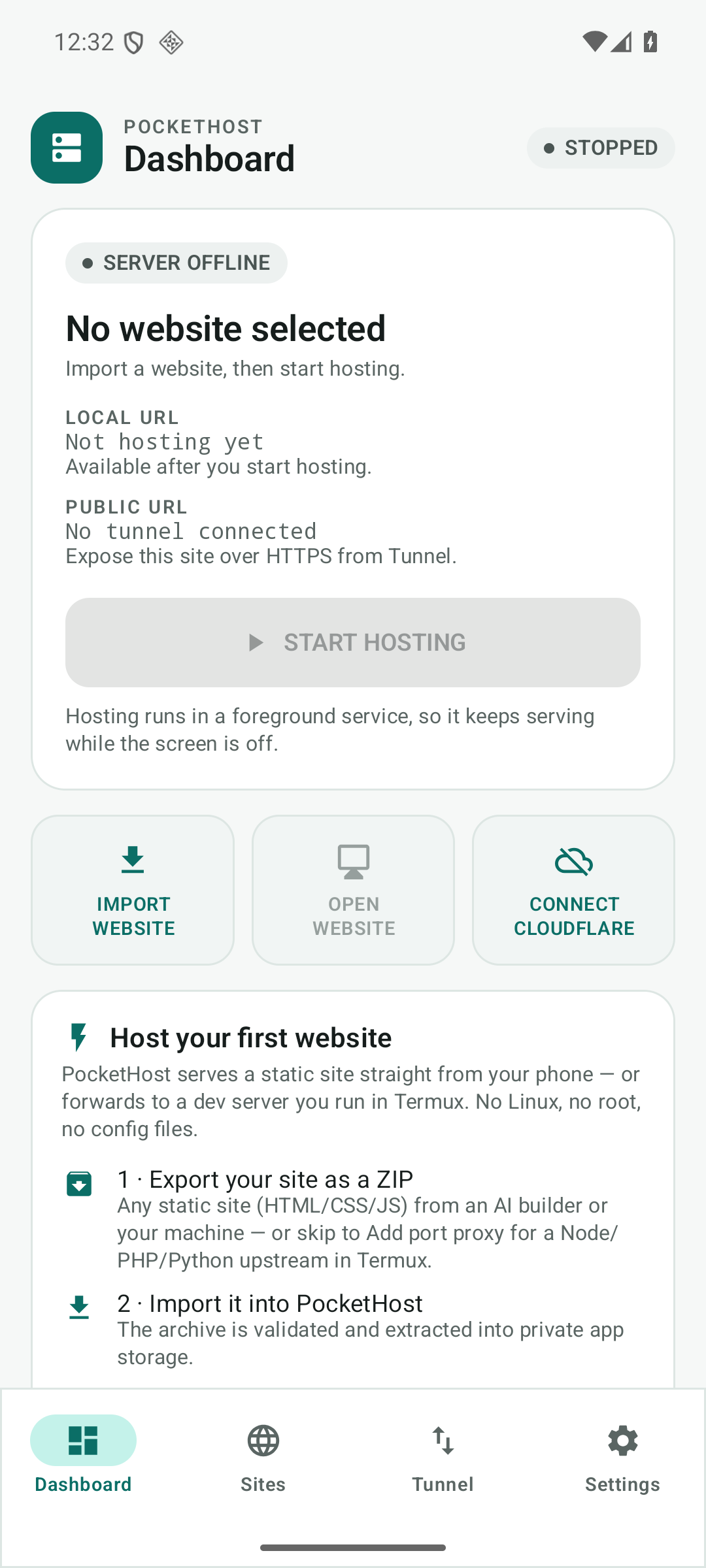
Turn an ordinary Android phone into a personal website host — no Linux, no root, no command
line. Drop in a ZIP from any AI website builder, press START HOSTING, and the site is live on
Wi-Fi. Or reverse-proxy a Node/PHP/Python server already running in Termux (127.0.0.1:<port>)
under the same address — all methods, SSE and WebSocket included. Optionally expose it over HTTPS
with Cloudflare Tunnel.












🌐 Public hostname (served from the phone when hosting + tunnel are connected): downmonitor.app · Mirror: privyxe.github.io/PocketHost · ⬇️ Download: latest release
Download
Get the signed APK from Releases:
| File | Details |
|---|---|
PocketHost-1.1.4-arm64.apk |
13.77 MB · arm64-v8a only · Android 8.0+ · signed v2+v3 |
PocketHost-1.1.4-arm64.apk.sha256 |
SHA-256 checksum — verify before installing |
PocketHost-1.1.4.json |
machine-readable build manifest (versionCode 11) |
Sideload only. PocketHost is not on Google Play. No account, no ads, no analytics. Install: open the APK on an ARM64 Android 8.0+ phone → allow "install unknown apps" → install.
Table of contents
- Why PocketHost?
- How it compares
- Status
- Screens
- Features
- How it works
- Architecture
- Security model
- Requirements
- Install & first site
- Using the app
- Quality & verification
- Repository contents
- Known limitations
- FAQ
- Troubleshooting
- Roadmap
- 🇹🇷 Türkçe özet
- License
Why PocketHost?
AI website builders made it trivial to create a site. Actually getting it online from a phone is still painful: Termux, a VPS, a CI pipeline, or a monthly host. PocketHost exists to make that last step one tap:
- Real hosting, not a mock — a Go
net/httpserver running inside the app process. - No root, no Termux, no Linux — a normal, unrooted Android phone is all you need.
- Private by default — nothing leaves your LAN unless you explicitly connect a tunnel.
- Honest telemetry — real metrics from the platform; anything unavailable is shown as unavailable, never invented.
- One free, ad-free APK — no account, no analytics, no paywall for local hosting.
How it compares
| PocketHost | Termux + nginx | VPS / cloud | Static host (Netlify, etc.) | |
|---|---|---|---|---|
| Hardware needed | your phone | your phone | rented server | none |
| Root / Linux / terminal | ❌ | ✅ (terminal) | ✅ | ❌ |
| Works on local Wi-Fi only | ✅ | ✅ | ❌ (needs routing) | ❌ |
| HTTPS for the world | optional Cloudflare Tunnel | manual setup | manual DNS/TLS | ✅ |
| Cost | free | free | monthly | free tier / monthly |
| Setup time | one tap + ZIP | long | long | account + deploy config |
| Data stays on device | ✅ | ✅ | ❌ | ❌ |
| Real device metrics | ✅ | ❌ | ❌ | ❌ |
PocketHost is deliberately not a production server and does not embed a dynamic runtime. It hosts static sites and can reverse-proxy a Node/PHP/Python/Go process you already run in Termux (no Node/PHP binary in the APK, no MySQL, no Docker). It is a pocket-sized host for demos, prototypes, portfolios and local testing.
Status
| Release | 1.1.4 (versionCode 11) — signed ARM64 APK, 13.77 MB, arm64-v8a only |
| Signed with | project JKS, APK Signature Scheme v2 + v3, R8-minified |
| Verified on | Android 16 / API 36 emulator (x86_64): import → host → real HTTP round-trips, proxy E2E (all methods, SSE, WebSocket 101, 502, scan), Room 1→3 migration; verified live on a physical Android 16 phone via Named Tunnel → downmonitor.app |
| Engine | Go stdlib net/http + httputil.ReverseProxy, embedded via gomobile bind (libgojni.so), 16 KB page-aligned; reverse proxy is loopback-only |
| Tests | 207 JVM unit tests (23 suites) + 103 top-level Go tests / 254 total + instrumented end-to-end runs (20 executed) |
| Tunnel | bundled cloudflared 2026.10.7 (pinned source, patched DNS resolver); Quick Tunnel verified externally; Named Tunnel + custom domain verified live (4 parallel edge connections) → downmonitor.app |
| License | MIT |
The phone is the origin: when hosting and the Named Tunnel are disconnected (or Android kills the app process), Cloudflare answers
1033for this hostname. Start hosting and connect the tunnel to bring it back.
Screens
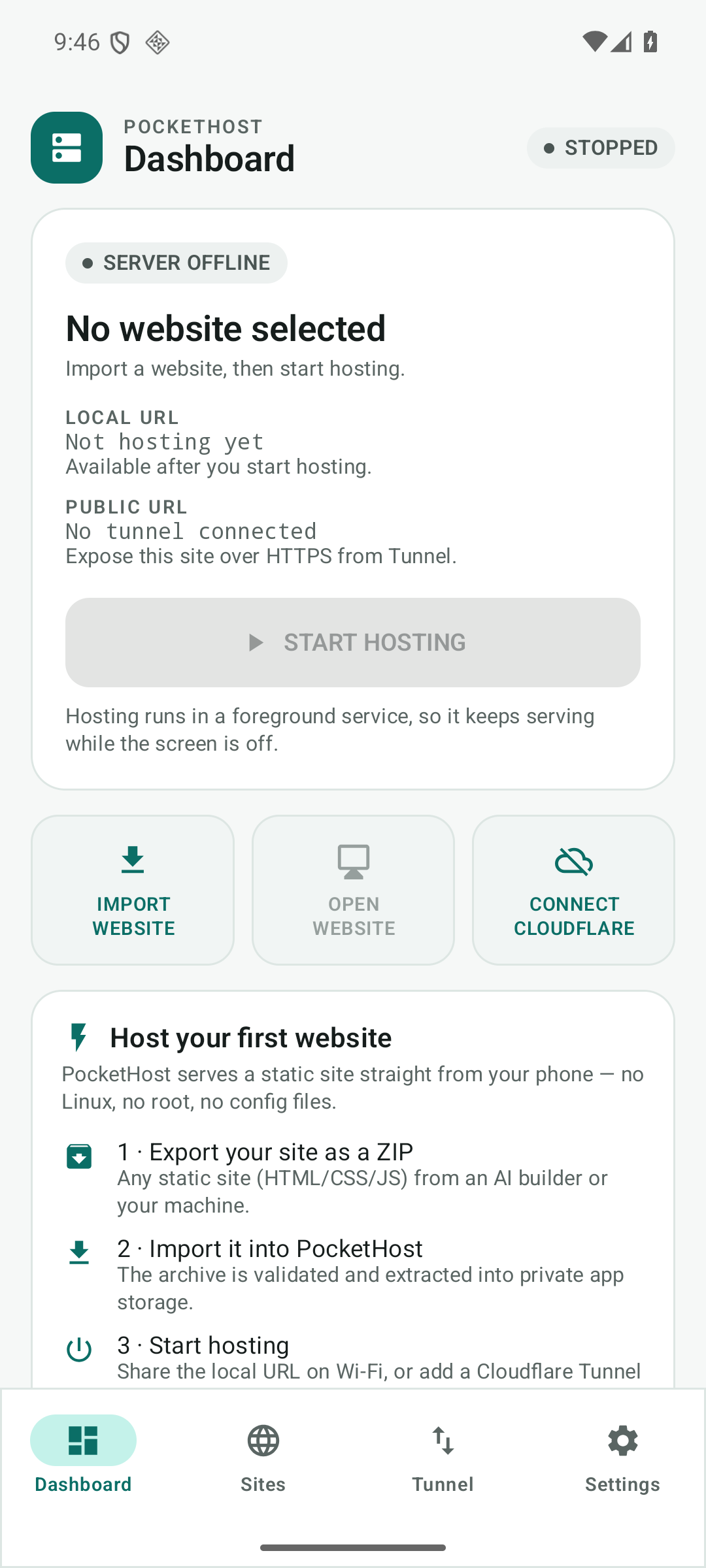
Dashboard server status, LAN URL, site summary |
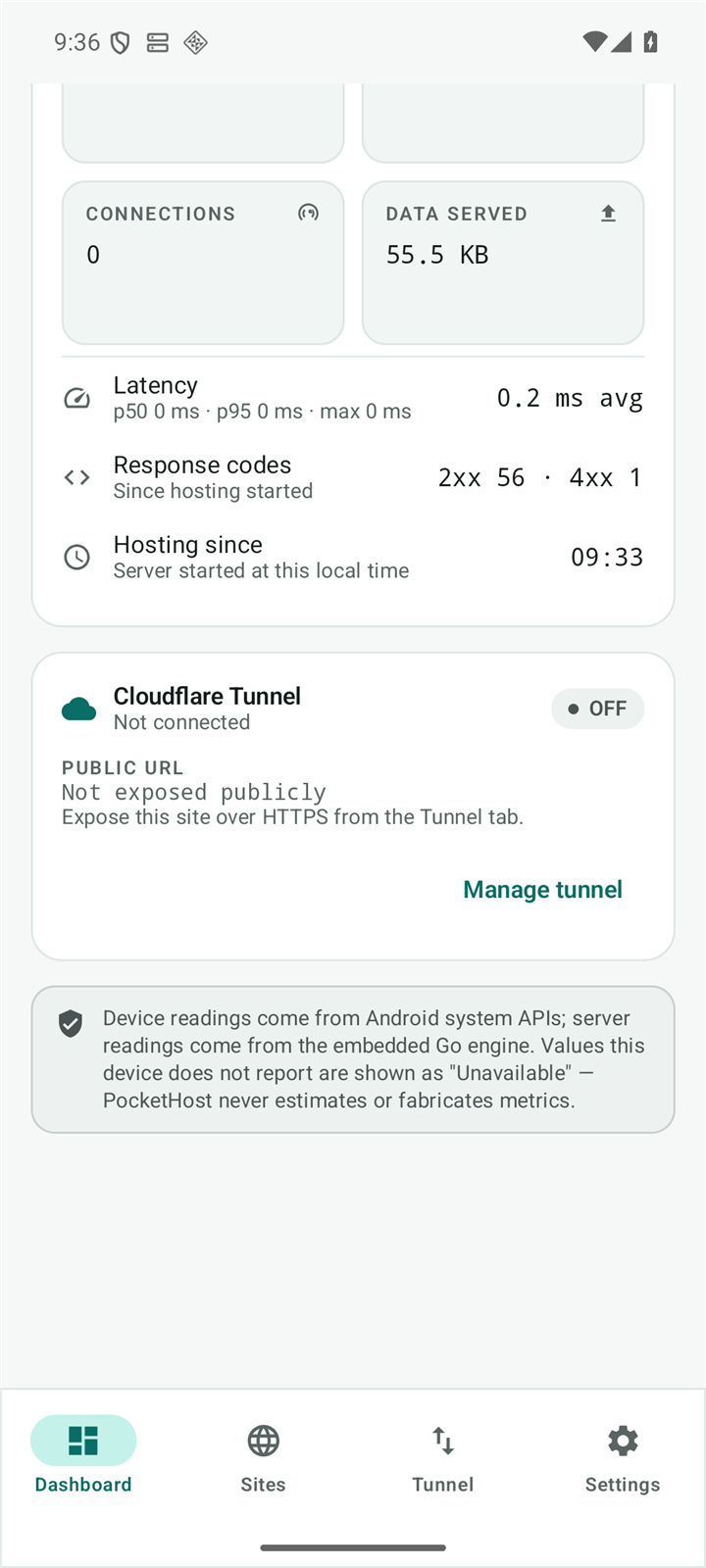 Metrics requests, latency, response codes |
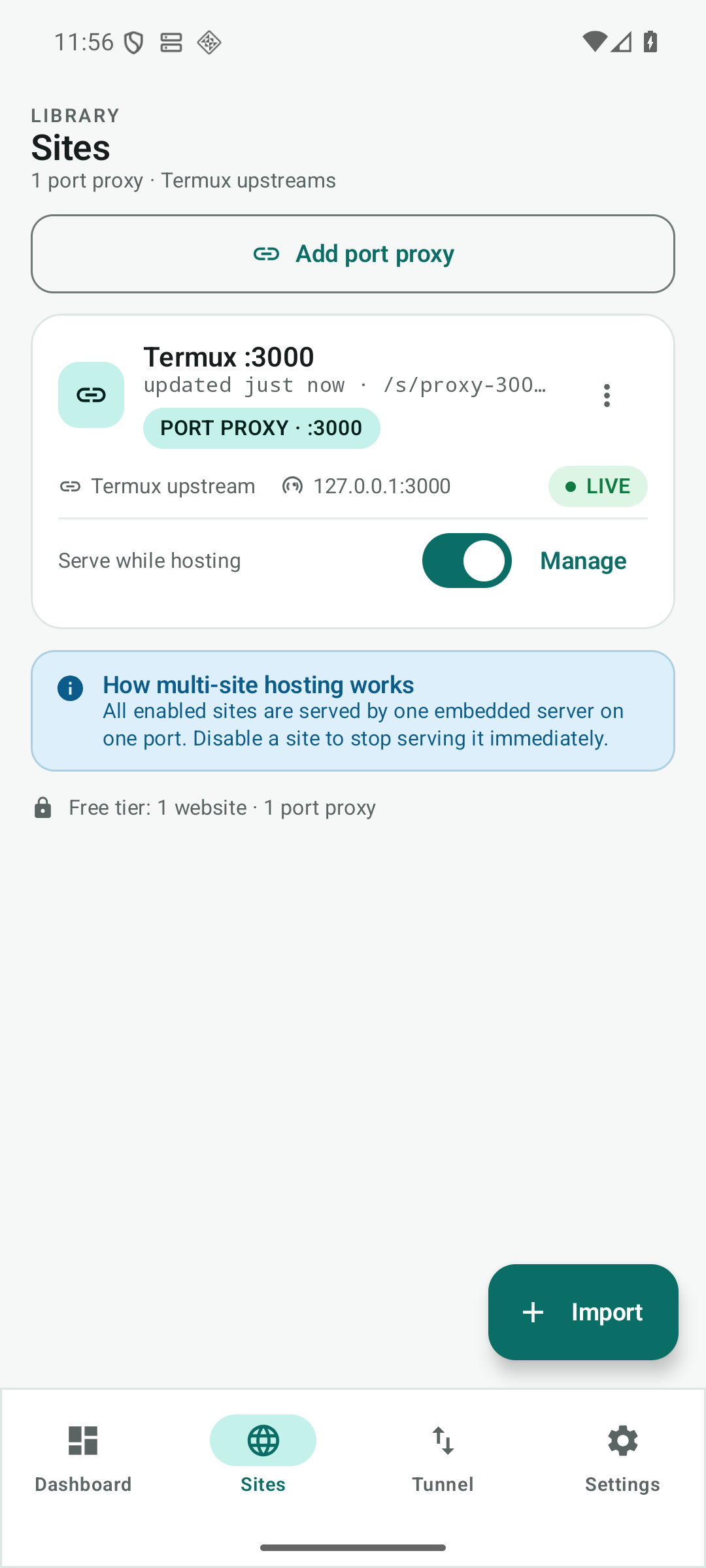 Sites static sites + Termux port proxies |
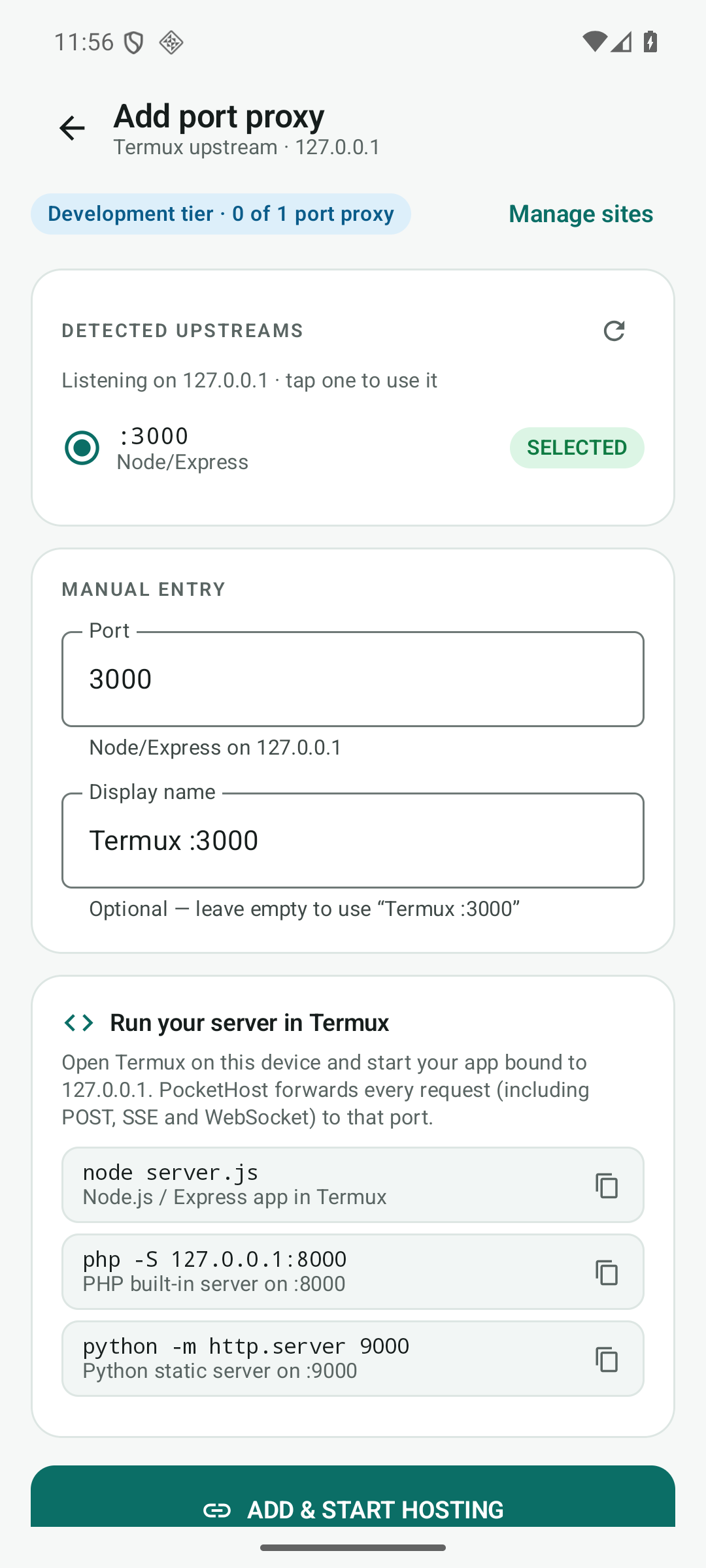 Add port proxy detects live upstreams :3000/:5173/… |
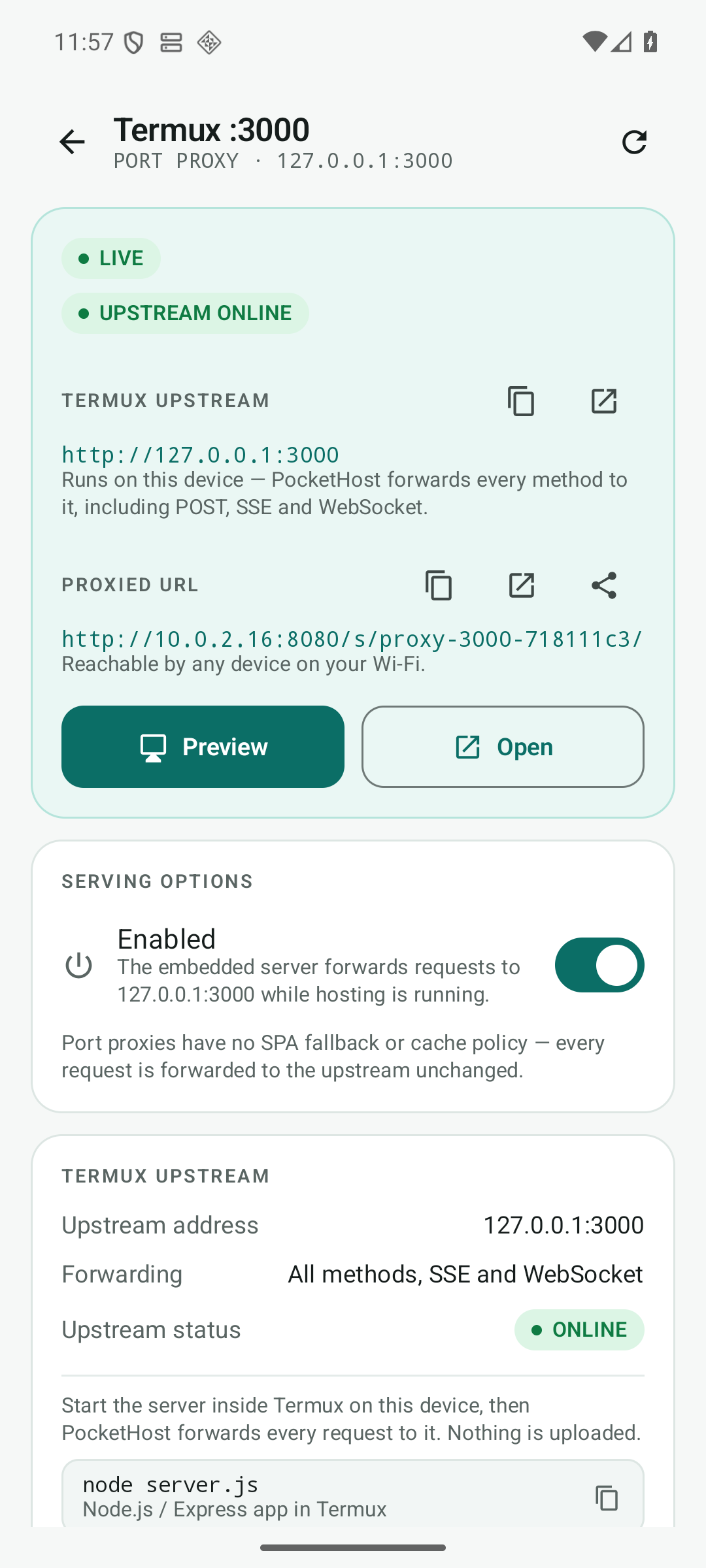 Proxy detail upstream, proxied URL, per-proxy Host mode |
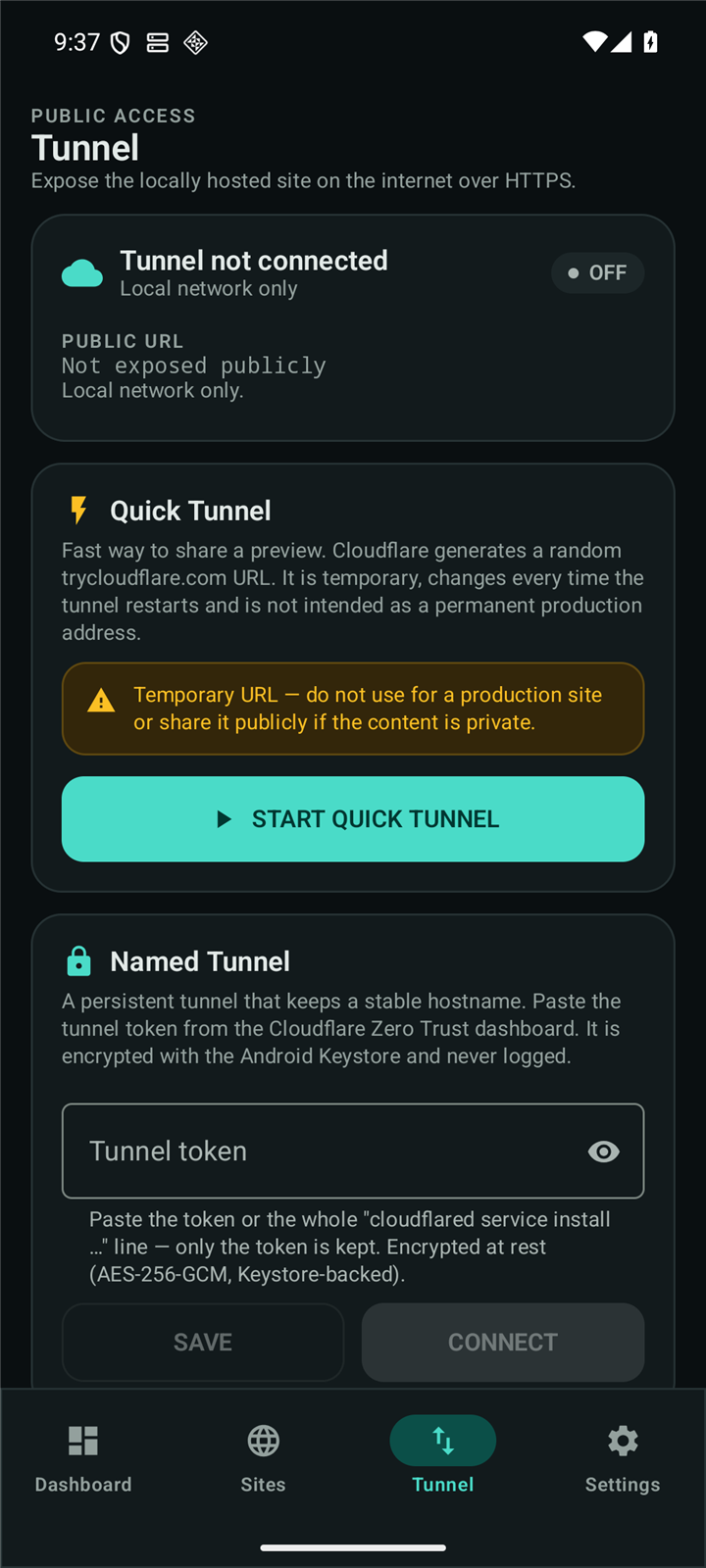 Tunnel Quick & Named Cloudflare Tunnel |
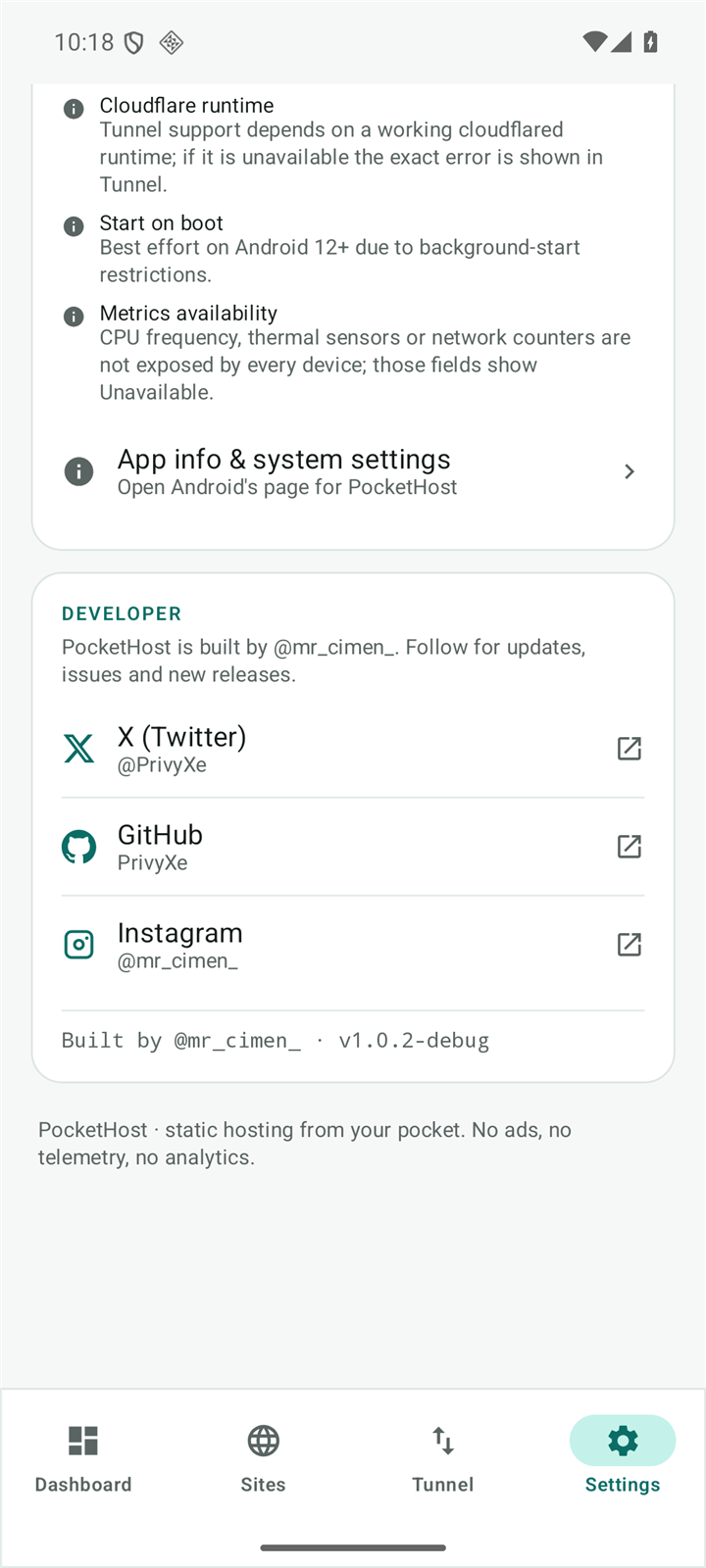 Settings port, bind mode, default proxy Host |
 Signed release minified build running |
Features
Hosting
- Embedded Go HTTP server — starts in milliseconds, no child process, no shell.
- Multiple sites: default site at
/, secondary sites at/s/<id>/. - SPA fallback, ETag / Last-Modified /
304, gzip, per-site cache policy. - Directory index handling, custom 404/405 responses, byte-range requests.
- Foreground service (
specialUse) + partial wake lock + Wi-Fi lock: keeps serving with the screen off, stops cleanly on every path (nav-bar stop, notification action, app kill, reboot). - Port proxies: forward every method (GET/POST/PUT/PATCH/DELETE/OPTIONS), request bodies, query strings, SSE/long-poll and WebSocket upgrades to a loopback upstream.
Port proxy (Termux)
- Start a server in Termux (e.g.
node server.json:3000,php -S 127.0.0.1:8000,python -m http.server 9000), then Sites → ADD PORT PROXY. - The app scans common dev ports, lists what is actually listening and offers one-tap selection.
- The upstream is always
127.0.0.1:<port>— no arbitrary host, no SSRF gadget. A proxy that points at PocketHost's own listening port is rejected (PROXY_LOOP) before it can recurse. - Mounted under
/s/<id>/: the prefix is stripped,X-Forwarded-Prefix/X-Forwarded-Hostare set, absolute-pathLocationredirects are rewritten to the prefix, and absolute asset/API calls are routed back to the proxy via the page Referer. - Per-proxy Host header: each proxy chooses
Preserve client(original Host +X-Forwarded-Host) orUpstream loopback(127.0.0.1:<port>for ViteallowedHosts, DjangoALLOWED_HOSTS, ...). - If the upstream is offline, visitors get a branded 502 page naming the port and the Termux command to start it — never a fake success page. The app shows a live upstream-ONLINE check.
- Development tier: 1 static website + 3 port proxies (independent quotas). No Node/PHP runtime is embedded; nothing is executed inside the app.
Import
- ZIP, a single HTML file, or a folder (SAF document tree via OpenDocumentTree).
- Validates before touching storage: ZIP-Slip, symlinks, zip bombs, encrypted entries, duplicate names, corrupted entries and per-entry CRC32.
- Auto-detects the real website root (root
index.html, single top-level folder, nestedpublic/). - Extracts atomically into app-private storage, shows a summary (root, file count, assets, storage) before hosting. Re-import replaces a site safely.
Dashboard & metrics
- Real RAM, storage, battery temperature, thermal status, network counters, uptime, total requests, active connections, response-status distribution and latency.
- Device-wide metrics and PocketHost-process metrics are shown separately with their source.
- Latency percentiles are computed from a single sorted sample set, so
p50 ≤ p95 ≤ maxalways. - CPU % is shown as Unavailable on devices where SELinux denies
/proc/statto apps — because that is the truth, and PocketHost does not fabricate numbers.
Tunnel
- Optional Quick Tunnel → temporary
https://*.trycloudflare.comURL (no Cloudflare account). - Optional Named Tunnel → persistent hostname (verified live at
downmonitor.app); tokens are encrypted at rest with Android Keystore AES-256-GCM and never written to logs or passed on the command line (env-only). - Bundled
cloudflaredis built from pinned source with a small Android DNS patch (net.DefaultResolver→1.1.1.1/8.8.8.8), so no--edgehacks are needed.
Privacy & security
- No accounts, no ads, no analytics, no telemetry, no crash reporting.
- JNI-only control surface — the management API is not exposed over HTTP at all.
- Every site's file access is confined to its root with Go's
os.Root. - WebView preview locked to loopback, no JavaScript bridge.
- Token redaction in logs; tokens never appear in the UI after saving.
How it works
ZIP / HTML / folder
        │
        ▼
  SAF import ──► validate ──► extract to app-private storage ──► site metadata
                                                                    │
                                                                    ▼
                                                        START HOSTING (tap)
                                                                    │
                                       ┌────────────────────────────┴──────────────────────┐
                                       ▼                                                   ▼
                          http://<phone-ip>:8080                         Cloudflare Tunnel (optional)
                          (same Wi-Fi, no internet)                     https://<name>.trycloudflare.com
                                                                        or your named hostname
The Kotlin layer never serves files itself: it starts the Go engine over a JSON command bus and the Go engine owns the HTTP server, routing, static file access and the loopback reverse proxy.
Architecture
flowchart LR
  subgraph APP["Android app — Kotlin + Jetpack Compose (Material 3)"]
    UI["Dashboard · Sites · Tunnel · Settings"] --> VM["ViewModels"]
    VM --> REPO["Repositories"]
    REPO --> DB[("Room / SQLite")]
    REPO --> VAULT["Keystore AES-256-GCM vault"]
    REPO -->|"JSON command bus"| JNI["JNI bridge"]
    SVC["Foreground service (specialUse)"] --> JNI
  end
  subgraph GO["Go engine — in-process .so"]
    JNI --> HTTP["net/http static server"]
    HTTP --> FS[("site files · os.Root")]
  end
  subgraph TUN["cloudflared — bundled .so, child process"]
    CF["cloudflared run --protocol http2"]
  end
  SVC --> CF
  HTTP --> LAN["Wi-Fi visitors · http://phone-ip:8080"]
  CF --> EDGE["Cloudflare edge · HTTPS"]
Key decisions
| Area | Choice | Why |
|---|---|---|
| Server | Go net/http, stdlib only |
tiny, fast, no external deps; compiled to a .so with gomobile bind |
| App ↔ engine | JSON command bus over JNI, off the main thread | no HTTP management surface to attack or expose |
| UI | Kotlin, Compose, Material 3, single activity | modern Android baseline (minSdk 26) |
| Storage | Room + app-private files | no broad storage permissions |
| Secrets | Android Keystore AES-256-GCM | tunnel tokens never stored in plain text |
| Proxy | httputil.ReverseProxy to 127.0.0.1:<port> |
all methods/SSE/WebSocket for free, loopback-only by construction |
| Tunnel | pinned cloudflared built for Android |
real Cloudflare connectivity, reproducible build |
Security model
| Threat | Mitigation |
|---|---|
| Malicious ZIP (path traversal, symlink escape) | validated before extraction; os.Root confinement at serve time |
| Zip bomb / huge archive | entry count, size and compression-ratio limits; atomic extraction |
| Corrupted archive | per-entry CRC32 verification, fail with a clear error |
| Token theft from storage | Android Keystore AES-256-GCM; token passed via env, never argv |
| Token leaking into logs | redaction + never echoed in UI; log ring keeps a bounded tail |
| Remote control of the server | no management HTTP endpoint; JNI-only command bus |
| WebView-based site preview escape | loopback-only URL, JS disabled bridge, no file access |
| Unwanted internet exposure | LAN bind by default; public exposure requires explicit tunnel consent |
| Port-proxy SSRF / loop | upstream host is not user-editable (loopback only); PROXY_LOOP guard covers start and hot sync |
Requirements
- Android 8.0+ (API 26), ARM64 device, 4 GB RAM or more recommended.
- Optional: a Cloudflare account + tunnel token for a persistent public hostname.
- Optional: Termux with a Node/PHP/Python/Go server bound to
127.0.0.1for port-proxy hosting. - Local hosting needs no internet and no account.
Install & first site
- Download
PocketHost-1.0.5-arm64.apkfrom Releases; optionally verify the published SHA-256. - Open it on the phone → allow "install unknown apps" → install → launch.
- Allow notifications (required for background hosting).
- Export your website as a
.zipwithindex.htmlat the root (or inside one folder). - IMPORT WEBSITE → pick the ZIP → review the summary → confirm.
- START HOSTING → open
http://<phone-ip>:8080/from any device on the same Wi-Fi.
Optional: host a Termux backend (port proxy)
- Start your server in Termux bound to loopback, e.g.
node server.json127.0.0.1:3000. - Sites → ADD PORT PROXY → the app detects
:3000→ ADD & START HOSTING. - Open
http://<phone-ip>:8080/s/<proxy-id>/. If your dev server validates the Host header (Vite, Django, Rails), set Upstream Host header → Upstream loopback on the proxy detail screen. - Stop the Termux server and reload: PocketHost answers a branded
502page with the command to start it again.
Optional: a custom domain with Cloudflare Tunnel
A Quick Tunnel gives you a temporary *.trycloudflare.com URL and needs no account. For a
persistent domain of your own, use a Cloudflare Named Tunnel:
Put the domain on Cloudflare first.
- Cloudflare dashboard → Add a site → your domain → free plan.
- At your registrar, replace the nameservers with the two Cloudflare nameservers shown.
- Wait until the zone is Active. Tunnel hostnames will not resolve before that.
Create the tunnel and copy its token.
- Cloudflare dashboard → Networking → Tunnels (Zero Trust) → Create a tunnel.
- Connector: cloudflared → name it, e.g.
pockethost-phone→ Save tunnel. - On the install screen copy the token from
cloudflared service install eyJ...— the longeyJ...string is the token.
Connect PocketHost to the tunnel.
- In the app: import a site and START HOSTING first.
- Tunnel → Named Tunnel → paste the token → SAVE → CONNECT.
- Wait for the state to become CONNECTED.
Route the domain to the phone.
- Back in Cloudflare → Networking → Tunnels → click the tunnel's name.
- Open the Routes tab (in some dashboard versions: Public Hostname) → Add route:
- subdomain: leave empty for the apex domain (
yourdomain.com) or enterwww - domain: your domain
- service type: HTTP
- URL:
http://localhost:8080— must match Settings → Port in the app (8080 is the default)
- subdomain: leave empty for the apex domain (
- Save. Cloudflare creates the DNS record automatically.
Open
https://yourdomain.com. Cloudflare terminates TLS and the tunnel forwards plain HTTP to your phone. If hosting is stopped or the phone is offline, the domain answers 502.
Use
http://for the origin URL, nothttps://: the Go server on the phone speaks plain HTTP, and TLS is handled by Cloudflare's edge.
Using the app
- Dashboard — start/stop hosting, see the LAN URL, public URL and the default site summary.
- Sites — import, preview, enable/disable, delete, inspect files, or ADD PORT PROXY for a
Termux upstream. Secondary sites/proxies are served at
/s/<site-id>/. - Metrics — requests, connections, status codes, latency percentiles, device/process memory, battery temperature, storage and network counters. Reset at any time.
- Tunnel — connect a Quick Tunnel or paste a Named Tunnel token; watch the live log tail and copy the public URL.
- Settings — port, bind mode, theme, diagnostics, developer links, known limitations.
The ongoing notification keeps hosting alive in the background and offers a STOP action.
Quality & verification
- 207 JVM unit tests across 23 suites (ZIP security, root detection, engine protocol, log redaction, settings, tunnel parsing, metrics maths, plan quotas, proxy rules, per-proxy Host mode).
- 103 top-level Go tests / 254 test+subtest PASS lines across 5 packages (routing,
default/secondary sites,
304/HEAD/405, traversal reject, ZIP validation + CRC, percentiles, command bus, reverse proxy: methods/body/SSE/WebSocket/502/PROXY_LOOP/ports.scan, Location rewrite, Referer fallback, upstream Host mode). - Instrumented end-to-end run on the API 36 emulator: real ZIP import → real Go engine → real
HTTP (
200/304/HEAD/404/405/traversal-reject/secondary site) → clean stop; proxy E2E (methods, SSE, WebSocket 101, 502, scan); Room 1→3 migration replay; STOP→START regression; notification STOP while backgrounded. Latest run: 20 executed / 0 failed / 6 intentional skips. - Quick Tunnel connected and verified from an external host (
curl→ HTTP 200 through Cloudflare).
Repository contents
This public repository is a release & marketing repo — it intentionally does not contain the application source code:
index.html, css/, js/, assets/    ← the trilingual marketing site (GitHub Pages)
assets/screenshots/               ← real app screenshots used in this README
README.md                         ← this document
LICENSE                           ← MIT
CHANGELOG.md                      ← version history
The APK and its checksum are attached to Releases, not committed to the repository. The Android/Go source tree is maintained privately.
Known limitations
- The public hostname is only as available as the phone: when hosting is stopped and the tunnel is
disconnected, or the app process is killed, Cloudflare answers
1033for it. - Automated tests run on the API 36 emulator; the ARM64 release also runs live on a physical Android 16 phone (user-operated) serving
https://downmonitor.app/, but this workspace did not run instrumented tests on that device. www.downmonitor.app(and any additional hostname) is not configured yet; only the apex hostname is published on the live Named Tunnel.- Longest continuous soak so far is a short measured session, not 24 h.
- Absolute-path assets on secondary
/s/<id>/sites are routed back via the page Referer; requests without a Referer (some privacy settings/tools) still fall through to the default site. The default site at/is unaffected. - Folder import needs a provider that exposes child documents (DocumentsContract); some cloud or file-manager providers only work through a ZIP.
- Port proxies reach only a loopback upstream on the same phone; the Termux process must stay running (Android may freeze/kill it). No PHP/Node runtime is embedded, and there is no MySQL/Docker.
- The per-proxy Host mode is stored with schema v3; existing proxies default to
Preserve client. - Android 17 local-network permission is not yet handled (OS not released at build time).
FAQ
Do I need root, Termux or a Linux install?
No. PocketHost targets an ordinary, non-rooted Android phone. There is no shell, no SSH and no server configuration — the Go server is embedded in the app itself.
Is it free? Will it stay free?
Local hosting is free and ad-free in this release. Optional future add-ons (managed tunnel, custom domain helpers) may be paid, but the core hosting feature is designed to stay free.
Will my site be exposed to the internet?
By default, only devices on the same Wi-Fi can reach it. Going public requires you to explicitly connect Cloudflare Tunnel, and the app asks for confirmation before exposing anything.
Which sites are supported?
Static sites: HTML, CSS, JavaScript, images, fonts, wasm assets — plus port proxies to a
Node/PHP/Python/Go server you run in Termux on 127.0.0.1. No PHP/Node runtime is embedded in the
APK; MySQL and Docker are not supported.
Does it work on iPhone?
No. iOS platform rules do not allow a continuously running background server, so PocketHost is Android-only (8.0+ / ARM64).
Can I use a custom domain?
With a Cloudflare Named Tunnel you can attach any domain you manage in Cloudflare. A built-in domain setup wizard is on the roadmap.
Can I host a Node/PHP/Python app?
Yes — run it in Termux bound to 127.0.0.1:<port> and add a port proxy. PocketHost forwards
every method, body, SSE and WebSocket upgrade; set the per-proxy Host mode if your dev server
validates the Host header. The upstream must stay running; otherwise visitors see a branded 502.
Troubleshooting
| Symptom | Check |
|---|---|
INSTALL_FAILED_NO_MATCHING_ABIS |
the release APK is arm64-v8a only — use an ARM64 phone |
| Site loads locally but tunnel URL doesn't | confirm the tunnel state is connected, then open the log tail for Cloudflare errors |
502 Bad Gateway on your own domain |
hosting must be running; tunnel connected; route URL must be http://localhost:8080 matching Settings → Port; the Cloudflare zone must be Active |
| Your domain does not resolve | its nameservers must point to Cloudflare and the zone must be Active (propagation can take a few hours); only then will tunnel hostnames work |
| CPU gauge says Unavailable | expected on devices where SELinux denies /proc/stat to apps — not a bug |
| Import rejected | the ZIP is validated strictly; check for symlinks, duplicate names or CRC errors |
| Secondary site broken assets | use relative paths, or rely on the Referer fallback added in 1.0.1 |
Roadmap
- Physical ARM64 execution: live at downmonitor.app (user-operated Android 16 phone)
- Named Tunnel end-to-end verification with a real Cloudflare token (2026-11-05)
- Port proxy mode + upstream scan + branded 502 (1.1.0, 2026-11-06)
- Prefix-safe redirects, Referer fallback, per-proxy Host mode (1.1.2/1.1.4, 2026-11-06)
- 24-hour soak with power/thermal measurements on real hardware
- Optional custom domain helper and richer tunnel diagnostics
- Play Store build (
specialUsejustification + privacy policy) once device coverage is done
🇹🇷 Türkçe özet
PocketHost, sıradan bir Android telefonu gerçek bir web sunucusuna dönüştürür. AI aracından çıkan ZIP'i içe aktar, BAŞLAT'a bas; siten aynı Wi-Fi'deki herkes için açılır. İstersen Termux'ta çalışan Node/PHP/Python sunucunu port proxy ile aynı adresten yayınla (tüm metotlar, SSE, WebSocket) ve her proxy için Host modunu ayrı seç. Cloudflare Tunnel ile HTTPS üzerinden dünyaya aç.
- Root / Termux / Linux gerekmez; reklam, hesap ve telemetri yoktur.
- Motor, uygulama sürecinde çalışan Go
net/httpsunucusudur (JNI köprüsü, harici süreç yok). - Metrikler gerçektir; cihazın vermediği değer "kullanılamıyor" olarak gösterilir.
- Port proxy'de upstream yalnızca
127.0.0.1:<port>olabilir; Termux sunucusu açık kalmalıdır. - Kurulum: Releases →
PocketHost-*-arm64.apk→ kur → ZIP'i içe aktar → BAŞLAT. - Site (TR/EN/中文): privyxe.github.io/PocketHost
- Lisans: MIT.
License
This project is licensed under the MIT License — see LICENSE.
MIT License · Copyright (c) 2026 PrivyXe
Third-party components keep their own licenses: AndroidX / Jetpack Compose (Apache-2.0), Kotlin (Apache-2.0), Go standard library (BSD-3-Clause), cloudflared (Apache-2.0).
PocketHost is an independent project. It is not affiliated with Google, Android, or Cloudflare; Cloudflare Tunnel is an optional third-party service and is subject to Cloudflare's terms.