
PrismarineJS/prismarine-web-client
PrismarineJS/prismarine-web-client has 559 GitHub stars and 396 forks. GitHot measured +1 stars in 24 hours and +1 in 7 days. Last checked 2026-11-10 00:28 UTC. Last push 2026-10-06.
Minecraft web client running in your browser
What you can do
- Display mobs and players
- Movement (you can move, and you see entities moving live)
- Place and break blocks
Measured star growth
- in 24h
- +1
- in 7 days
- +1
- in 15 days
- Update delayed
- in 1 month
- Update delayed
Net star changes over overlapping periods, not daily totals. Missing measurements are left blank. Stars measure attention, not software quality.
README.md
Originalprismarine-web-client




| 🇺🇸 English | 🇷🇺 Russian | 🇵🇹 Portuguese |
|---|
A Minecraft client running in a web page. Live demo at https://prismarinejs.github.io/prismarine-web-client/
How it Works
prismarine-web-client runs mineflayer and prismarine-viewer in the browser, which connects over WebSocket to a proxy which translates the WebSocket connection into TCP to connect to normal Minecraft servers. Prismarine-web-client is based on:
- prismarine-viewer for the world rendering
- mineflayer for the high-level Minecraft client API
Check these modules if you want to understand more how it works and contribute!
Screenshot
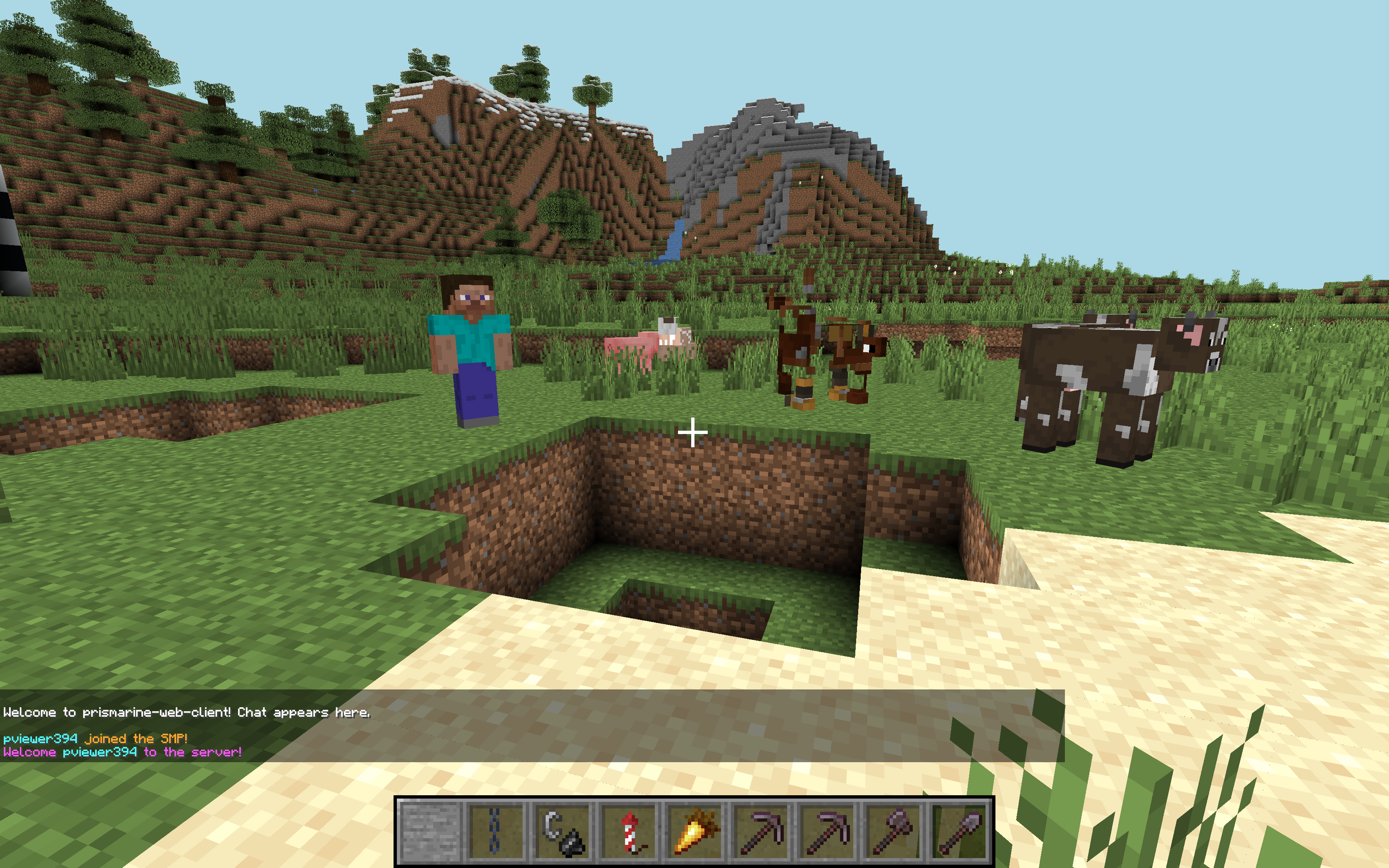
Live Demo
Click on this link to open it in your browser, no installation necessary: https://prismarinejs.github.io/prismarine-web-client/
Tested on Chrome & Firefox for desktop platforms.
Usage
To host it yourself, run these commands in bash:
$ npm install -g prismarine-web-client
$ prismarine-web-client
Finally, open http://localhost:8080 in your browser.
Features
- Display mobs and players
- Display blocks
- Movement (you can move, and you see entities moving live)
- Place and break blocks
Roadmap
- Containers (inventory, chests, etc.)
- Sounds
- More world interactions (attacking entities, etc.)
- Cosmetic rendering features (day night cycle, fog, etc.)
Development
If you're contributing/making changes, you need to install it differently.
First, clone the repo.
Then, set your working directory to that of the repo. For example:
$ cd ~/prismarine-web-client/
Finally, run
$ npm install
$ npm start
This will start express and webpack in development mode; whenever you save a file, the build will be redone (it takes 5s), and you can refresh the page to get the new result.
Connect to http://localhost:8080 in your browser.
You may want to disable auto saving in your IDE to avoid constant rebuilding; see https://webpack.js.org/guides/development/#adjusting-your-text-editor.
To check the production build (will take a minute to build), you can run npm run build-start.
If you're interested in contributing, you can check projects at https://github.com/PrismarineJS/prismarine-web-client/projects.
Some variables are exposed in the global window object for debugging:
botviewermcDataworldViewVec3pathfinderdebugMenu
Adding stuff to the debugMenu
debugMenu.customEntries['myKey'] = 'myValue' delete debugMenu.customEntries['myKey']
Some debugging examples
In Chrome DevTools:
bot.chat('test')allows you to use the chatbot.chat(JSON.stringify(Object.values(bot.players).map(({username, ping}) => ({username, ping}))))display the ping of everyonewindow.bot.entity.position.y += 5jumpsbot.chat(JSON.stringify(bot.findBlock({matching:(block) => block.name==='diamond_ore', maxDistance:256}).position))finds the position of a diamond blockbot.physics.stepHeight = 2allows you to walk about blocksbot.physics.sprintSpeed = 5walks fasterbot.loadPlugin(pathfinder.pathfinder)thenbot.pathfinder.goto(new pathfinder.goals.GoalXZ(100, 100))goes to position 100, 100
For more debugging ideas, read the mineflayer doc.
Explore related projects
freeCodeCamp/freeCodeCamp
freeCodeCamp.org's open-source codebase and curriculum. Learn math, programming, and computer science for free.
458,826 starsdonnemartin/system-design-primer
Learn how to design large-scale systems. Prep for the system design interview. Includes Anki flashcards.
377,475 starsreact/react
The library for web and native user interfaces.
252,467 starsvuejs/vue
This is the repo for Vue 2. For Vue 3, go to https://github.com/vuejs/core
212,625 stars