
PowerDNS-Admin/PowerDNS-Admin
PowerDNS-Admin/PowerDNS-Admin has 2,829 GitHub stars and 686 forks. GitHot measured -1 stars in 24 hours and -1 in 7 days. Last checked 2026-11-09 17:48 UTC. Last push 2026-11-02.
A PowerDNS web interface with advanced features
What you can do
- Forward and reverse zone management
- Zone templating
- User management with role-based access control
- Zone-specific access control
Measured star growth
- in 24h
- -1
- in 7 days
- -1
- in 15 days
- Update delayed
- in 1 month
- Update delayed
Net star changes over overlapping periods, not daily totals. Missing measurements are left blank. Stars measure attention, not software quality.
README.md
OriginalPowerDNS-Admin
A web interface for PowerDNS with advanced features.
Development status


Features
- Forward and reverse zone management
- Zone templating
- User management with role-based access control
- Zone-specific access control
- Activity logging
- Authentication:
- Local users
- SAML
- LDAP (OpenLDAP / Active Directory)
- OAuth (Google / GitHub / Microsoft Entra ID / OpenID)
- Two-factor authentication (TOTP)
- PDNS service configuration and statistics monitoring
- DynDNS 2 protocol support
- Easy IPv6 PTR record editing
- API for zone and record management
- Full IDN/Punycode support
Compatibility
PowerDNS-Admin is built and tested against the current stable release of
the PowerDNS Authoritative Server, plus recent prior minor releases.
Support for versions older than 5.0 has been dropped entirely, even where
PowerDNS itself continues to backport critical/security fixes to them.
See app-support.json
for the exact PowerDNS, Python, and browser versions supported by the
current release.
Running PowerDNS-Admin
The quickest way to run PowerDNS-Admin is with Docker. For instructions on installing PowerDNS-Admin directly on your system, please refer to our installation documentation.
Docker
We offer two options for running PowerDNS-Admin with Docker.
Option 1: From Docker Hub
This option is ideal for getting started quickly. To run the latest stable release from Docker Hub, execute the following command:
$ docker run -d \
    -e SECRET_KEY='a-very-secret-key' \
    -e SQLALCHEMY_DATABASE_URI='sqlite:////data/powerdns-admin.db' \
    -v pda-data:/data \
    -p 9191:80 \
    powerdnsadmin/pda-legacy:latest
This example explicitly selects SQLite and creates a volume named pda-data to persist its database. PowerDNS-Admin does not select a database by default.
Note on image name: While the image is named pda-legacy, it is the current and actively maintained version. The name is a historical artifact.
Option 2: Using Docker Compose
This option is recommended if you need to customize the configuration.
Update the configuration
The included Compose configuration starts MySQL and connects PowerDNS-Admin to it automatically. Before deploying, replace the example database passwords in
docker/docker-compose.yml. You can find a list of other environment variables in theAppSettings.defaultsfile.Database settings can be passed as a single
SQLALCHEMY_DATABASE_URIor as separateDATABASE_DRIVER,DATABASE_USER,DATABASE_PASSWORD,DATABASE_HOST,DATABASE_PORT,DATABASE_NAME, andDATABASE_EXTRA_PARAMSvariables. Split variables are percent-encoded automatically, so a password with@or#does not need a second encoded copy.DATABASE_EXTRA_PARAMScarries driver-specific URI flags such asssl=true. To use Docker-style secrets, append_FILEto an environment variable with a path to a file containing the secret (e.g.,DATABASE_PASSWORD_FILE=/run/secrets/db_password).Ensure you set the
SECRET_KEYenvironment variable to a long, random string. For more information, please see the Flask configuration documentation.Start the container
# From the root of the project
$ docker compose -f docker/docker-compose.yml up --build
You can now access PowerDNS-Admin in your browser at http://localhost:9191.
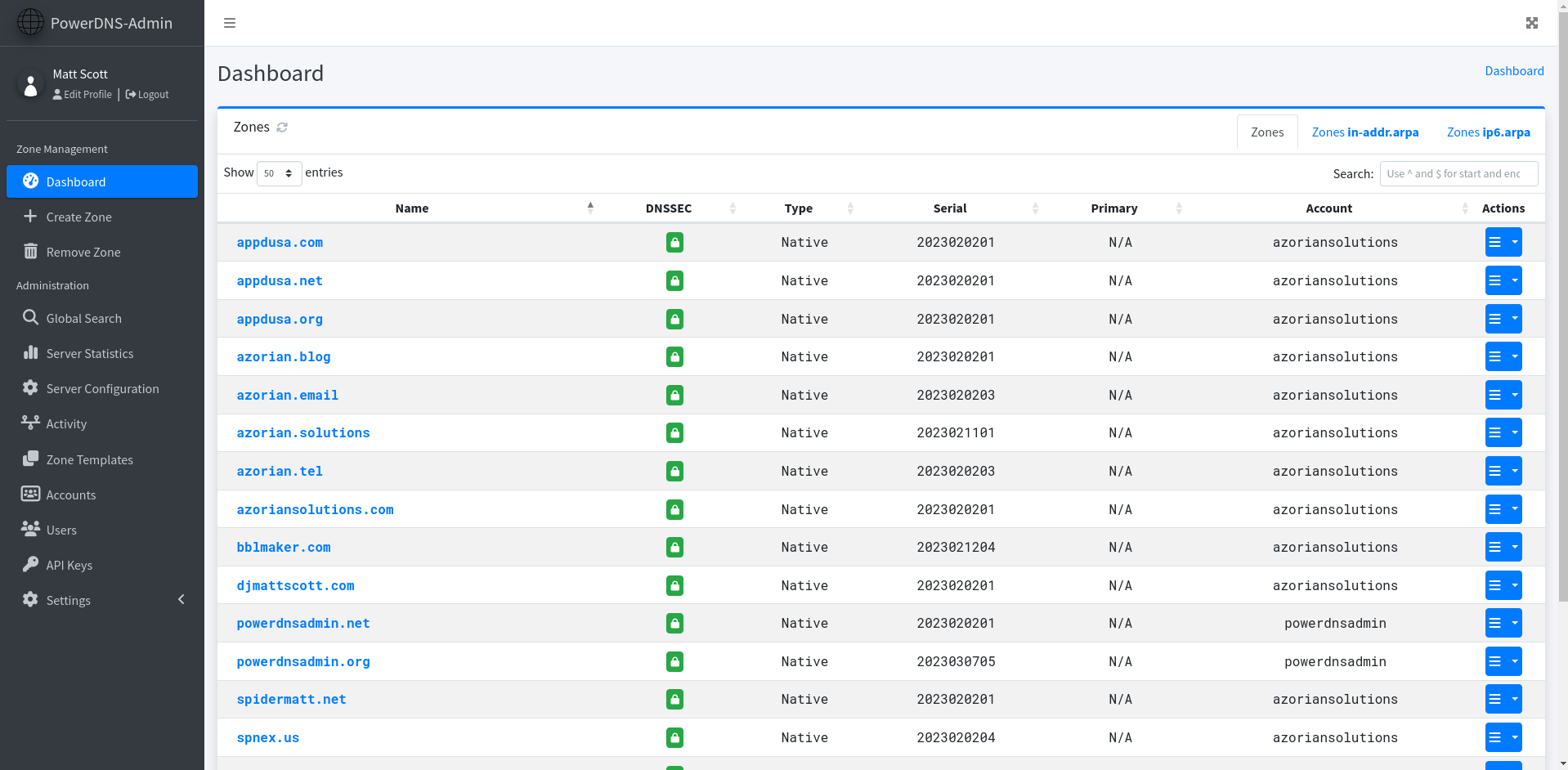
Screenshots
Support
For assistance, please see our Support Guide or join our Discord Server.
Security
Please refer to our Security Policy for information on reporting security vulnerabilities.
Contributing
We welcome contributions to PowerDNS-Admin. Please see our Contribution Guide for more information.
Code of Conduct
We are committed to providing a welcoming and inclusive environment for everyone. Please review our Code of Conduct for our community standards.
License
PowerDNS-Admin is released under the MIT License. For more information, please see the full license.
Explore related projects
freeCodeCamp/freeCodeCamp
freeCodeCamp.org's open-source codebase and curriculum. Learn math, programming, and computer science for free.
458,826 starsdonnemartin/system-design-primer
Learn how to design large-scale systems. Prep for the system design interview. Includes Anki flashcards.
377,475 starsreact/react
The library for web and native user interfaces.
252,467 starsvuejs/vue
This is the repo for Vue 2. For Vue 3, go to https://github.com/vuejs/core
212,625 stars