
Positronic-Robotics/positronic
Positronic-Robotics/positronic has 90 GitHub stars and 16 forks. GitHot measured 0 stars in 24 hours. Last checked 2026-11-15 15:27 UTC. Last push 2026-11-14.
Measured star growth
- in 24h
- 0
- in 7 days
- Update delayed
- in 15 days
- Update delayed
- in 1 month
- Update delayed
Net star changes over overlapping periods, not daily totals. Missing measurements are left blank. Stars measure attention, not software quality.
About
Python-native stack for real-life ML robotics
Developer ToolsREADME.md
OriginalPositronic — Python-native stack for real-life ML robotics


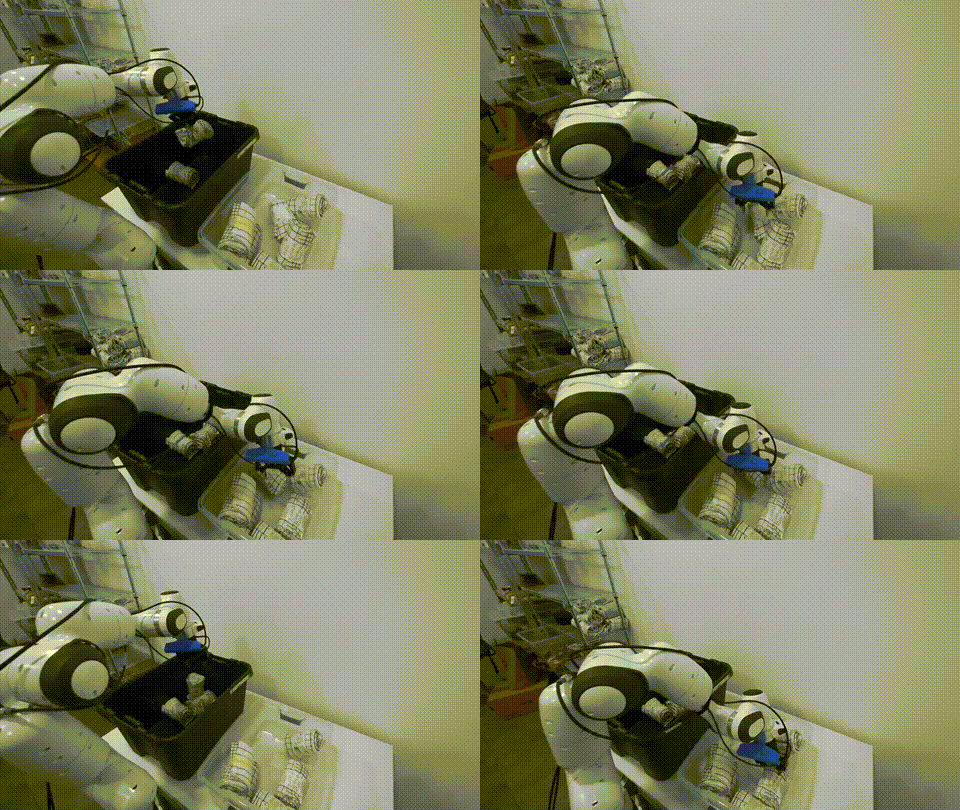
GR00T model evaluated on bin-to-bin order picking — PhAIL benchmark
Positronic is the open stack behind PhAIL — independent evaluation of VLA models on real robots and in simulation, through one API. It's the full engine underneath: bring robots online, capture and curate data, run inference across model vendors, and evaluate policies in sim and on real hardware.
→ Evaluating a model? Start here: docs/evaluation.md. Submitting one to the platform? docs/submit-a-policy-image.md lists five example images to start from. Entering the Physical AI Competition? docs/nebius-competition.md.
The Problem
AI promises to transform robotics: teach robots through demonstrations instead of code. ML-driven approaches can unlock capabilities traditional analytical control can't reach.
The field is early. The ecosystem lacks dedicated instruments to make development simple, repeatable, and accessible:
- Data collection is expensive: Hardware integration, teleoperation setup, dataset curation all require specialized expertise
- Data is messy: Multi-rate sensors, format fragmentation, re-recording for each framework, datasets thrown away when you try different state/action representations
- Deployment is complex: Vendor-specific APIs, hardware compatibility issues, monitoring infrastructure from scratch
Positronic solves these operational challenges so teams building manipulation systems can focus on what their robots should do, not how to make the infrastructure work.
What is Positronic
Positronic is an end-to-end toolkit for building ML-driven robotics systems.
It covers the full lifecycle: bring new hardware online, capture and curate datasets, train and evaluate policies, deploy inference, monitor performance, and iterate when behaviour drifts.
Every subsystem is implemented in plain Python. No ROS required. Compatible with LeRobot training and foundation models like OpenPI and GR00T.
Our goal is to make professional-grade ML robotics approachable. Join the conversation on the Positronic Discord to share feedback, showcase projects, and get help from the community.
Positronic is under heavy development and in alpha stage. APIs, interfaces, and workflows may change significantly between releases.
Why Positronic
Standing on Giants' Shoulders
Positronic builds on the robotics ML ecosystem:
- LeRobot/HuggingFace for training scripts and workflows
- MuJoCo for physics simulation
- Rerun.io for visualization
- Foundation model builders: Physical Intelligence and NVIDIA
We focus on what's missing: the plumbing, hardware integration, and operational lifecycle that production systems need.
The ecosystem provides: Training frameworks, foundation models, simulation engines, model research Positronic adds: Data ops, hardware drivers, unified inference API, iteration workflows, deployment infrastructure
Store Once, Use Everywhere: Dataset Library
Problem solved: Stop re-recording datasets for each framework AND stop throwing away datasets when you want different state/action formats.
The Positronic dataset library provides raw data storage and a unified API for plumbing, preprocessing, and backward compatibility. Codecs apply lazy transforms to convert one dataset into LeRobot, GR00T, or OpenPI format without re-recording.
Try different state representations (joint space vs end-effector space), action formats (absolute vs delta), observation encodings, all from the same raw data. Immutable storage, composable transforms, infinite uses.
Connect ANY Hardware to ANY Model: Unified Inference API
Problem solved: Vendor lock-in and API fragmentation.
The offboard inference system provides one session protocol (v1) across all vendors, over a WebSocket or a gRPC wire. The RemotePolicy client works interchangeably with LeRobot, GR00T, and OpenPI servers.
Built-in status streaming handles long model loads (120-300s) gracefully. Swap models without changing hardware code.
Immediate-Mode Runtime (Pimm)
pimm wires sensors, controllers, inference, and GUIs without ROS launch files or bespoke DSLs. Control loops stay testable and readable. See the Pimm README for details.
Foundation Models — Choose by Capability
Positronic supports state-of-the-art foundation models with first-class workflows:
| Model | Capability | Training | Inference | Best For |
|---|---|---|---|---|
| OpenPI (π₀.₅) | Most capable, generalist | Capable GPU (~78GB, LoRA) | Capable GPU (~62GB) | Complex multi-task manipulation |
| GR00T N1.7 DROID | DROID robot policy | CUDA GPU | CUDA GPU | Joint control with 2 or 3 camera views |
| LeRobot SmolVLA | VLM-based, multi-task | Consumer GPU | Consumer GPU | Multi-task manipulation with language |
| LeRobot ACT | Single-task, efficient | Consumer GPU | Consumer GPU | Specific manipulation tasks |
Recommendation: Start with ACT if you want something quick and low-cost. Progress to GR00T or OpenPI if you need more capable models. Positronic makes switching easy.
Two LeRobot Versions
Positronic ships two LeRobot integrations because the ecosystem straddles a format transition:
- LeRobot 0.4.x (
lerobot-train,lerobot-server,lerobot-convert) — latest version with SmolVLA, Diffusion, and ACT support. Uses its own dataset format. - LeRobot 0.3.3 (
lerobot-0_3_3-train,lerobot-0_3_3-server,lerobot-0_3_3-convert) — stable ACT training. Also provides dataset conversion for all other vendors (GR00T, OpenPI) since their training scripts expect the 0.3.3 LeRobot dataset format.
Use lerobot-convert for 0.4.x training, lerobot-0_3_3-convert for everything else (0.3.3, GR00T, OpenPI).
Why Multiple Vendors?
Our goal is to democratize ML/AI in robotics. You shouldn't be locked to a single vendor or architecture.
Positronic's plug-and-play structure means:
- Same dataset format — Record once, train on any model
- Same inference API — Swap models without changing hardware code
- Easy experimentation — Try all models with your data, pick what works best
- Future-proof — We'll keep adding foundation models as they emerge
See Model Selection Guide for detailed comparison and decision criteria.
Installation
Clone the repository and set up a local uv environment.
Local Installation via uv
Prerequisites: Python 3.11, uv, libturbojpeg, and FFmpeg
sudo apt install libturbojpeg ffmpeg portaudio19-dev  # Linux
brew install jpeg-turbo ffmpeg                        # macOS
git clone [email protected]:Positronic-Robotics/positronic.git
cd positronic

uv venv -p 3.11               # optional but keeps the interpreter isolated
source .venv/bin/activate     # activate the venv if you created one
uv sync --locked              # core + dev tooling; dev is a default group, so no flag is needed
Install hardware extras only when you need physical robot drivers (Linux only):
uv sync --locked --extra hardware
Two arms carry their vendor package in an extra of their own, because each one needs more than a pip
install: franka builds against a libfranka that the machine must already carry, and yam installs the i2rt
package from git. Name the extra of the arm the station has:
uv sync --locked --extra hardware --extra franka   # a Franka station
uv sync --locked --extra hardware --extra yam      # a YAM station
The Franka robot's system version sets the libfranka version: 0.15.3 for system version 5.7.2 up to, not including,
5.9.0, and 0.21.3 from 5.9.0. positronic-franka builds against either one. Its
README lists the packages each version
needs, and how to rebuild the extension after a change of libfranka.
After installation, the following command-line scripts will be available:
positronic-data-collection: Collect demonstrations in simulation or on hardwarepositronic-dataset-viewer: Browse and inspect datasetslerobot-0_3_3-convert: Convert datasets to model formatpositronic: Run evals in simulation or on hardware, and read back the ones sent to the platformpositronic-inference: Run an attended session on hardware, from the keyboard or from a browser console
All commands work both inside an activated virtual environment and with uv run --locked prefix (e.g., uv run --locked positronic-dataset-viewer). Use --locked so the installed environment matches the committed uv.lock — uv errors loudly if you edited pyproject.toml without re-running uv lock.
On Linux x86_64, the extras that pull torch (molmoact2, lerobot, lerobot_0_3_3) install its CUDA 12.8 build. That build needs NVIDIA driver 570 or newer.
For training and inference servers, use vendor-specific Docker services (see Training Workflow).
Quick Start — 30 Seconds to Data Collection
uv run --locked positronic-data-collection sim \
    --output_dir=~/datasets/stack_cubes_raw \
    --sound=None --webxr=.iphone
Opens MuJoCo simulation with phone-based teleoperation. Record demonstrations by moving your phone to control the robot arm and using the on-screen controls to open/close the gripper and start/stop recording.
Then browse your episodes:
uv run --locked positronic-dataset-viewer --dataset.path=~/datasets/stack_cubes_raw --port=5001
Visit http://localhost:5001 to view episodes. Continue to full workflow below.
End-to-End Workflow
The usual loop is: collect demonstrations → review and curate → train → validate and iterate.
1. Collect Demonstrations
Use the data collection script for both simulation and hardware captures.
Quick start in simulation:
uv run --locked positronic-data-collection sim \
    --output_dir=~/datasets/stack_cubes_raw \
    --sound=None --webxr=.iphone --operator_position=.BACK
Loads the MuJoCo scene, starts the DearPyGui UI, and records episodes into the local dataset.
Teleoperation:
- Phone (iPhone/Android) or VR headset (Oculus) control the robot in 6-DOF
- Browser shows AR interface with Track, Record, Reset buttons
- See Data Collection Guide for complete setup
Physical robots:
uv run --locked positronic-data-collection real  --output_dir=~/datasets/franka_kitchen
uv run --locked positronic-data-collection so101 --output_dir=~/datasets/so101_runs
uv run --locked positronic-data-collection droid --output_dir=~/datasets/droid_runs
2. Review and Curate
Browse datasets with the positronic-dataset-viewer:
uv run --locked positronic-dataset-viewer \
    --dataset.path=~/datasets/stack_cubes_raw \
    --port=5001
Visit http://localhost:5001 to view episodes. The viewer is read-only for now: mark low-quality runs while watching, then rename or remove the corresponding episode directories manually.
To preview exactly what the training will see, pass the same codec configuration you'll use for conversion:
uv run --locked positronic-dataset-viewer \
    [email protected]_all \
    --dataset.path=~/datasets/stack_cubes_raw \
    [email protected] \
    --port=5001
3. Prepare Data for Training
Convert curated runs using a codec:
cd docker && docker compose run --rm lerobot-0_3_3-convert convert \
    --dataset.dataset=.local \
    --dataset.dataset.path=~/datasets/stack_cubes_raw \
    [email protected] \
    --output_dir=~/datasets/lerobot/stack_cubes \
    --task="pick up the green cube and place it on the red cube"
Train using vendor-specific workflows:
Training is handled through Docker services. Example with ACT (fastest baseline):
cd docker && docker compose run --rm lerobot-train expert_only \
    --input_path=~/datasets/lerobot/stack_cubes \
    --exp_name=stack_cubes_act \
    --output_dir=~/checkpoints/lerobot/
Progress to OpenPI or GR00T when you need more capable models. See:
4. Run Inference and Iterate
Run a model server on the same machine or a GPU host, then connect it to the eval runner.
Remote inference (run policy on a different machine):
# On inference server (the subcommand selects the codec pipeline; must match training):
cd docker && docker compose run --rm --service-ports lerobot-server ee \
    --model.checkpoints_dir=~/checkpoints/lerobot/<run_id> \
    [email protected]_frame

# On the simulator machine:
uv run --locked positronic eval run --eval=.sim.positronic.stack_cubes \
    --policy=.remote \
    --policy.address.host=<server-ip> --policy.address.port=8000
Monitor performance, collect edge cases, and iterate. See Inference Guide for details.
Documentation
Core Concepts:
- Dataset Library — Storage, codecs, transforms
- Pimm Runtime — Immediate-mode control systems
- Offboard Inference — Unified protocol
Model Workflows:
- OpenPI (π₀.₅) — Recommended for most tasks
- GR00T — NVIDIA's generalist policy
- SmolVLA / LeRobot 0.4.x — Vision-language-action
- LeRobot ACT — Single-task transformer
Guides:
- Architecture — the goals and principles behind the design, who owns the control loop, and how foreign components plug in
- Model Selection | Codecs | Training
- Data Collection | Inference | Teleoperation
Hardware:
- Drivers — Robot arms, cameras, grippers
- Hardware Configs — Franka, Kinova, SO101, DROID
Development workflow
Install development dependencies first:
uv sync --locked # core + dev tooling; dev is a default group, so no flag is needed
Initial Setup
Install pre-commit hooks. pre-commit is a uv tool rather than a project dependency, so that a later
uv sync cannot remove the interpreter the git hook execs:
uv tool install pre-commit
pre-commit install --hook-type pre-commit --hook-type commit-msg --hook-type post-commit
Run both in an existing checkout as well as a fresh one. A hook generated against the project venv
execs an interpreter that no longer carries pre-commit, so committing fails outright — reinstalling
repoints it at the tool.
Daily Development
Run tests and linters from the root directory:
uv run --locked pytest
uv run --locked ruff check .
uv run --locked ruff format .
To modify dependencies: edit pyproject.toml (or uv add / uv remove), run uv lock, and commit pyproject.toml and uv.lock together in one reviewed change. Don't let uv.lock drift implicitly — CI and Docker pass --locked, so any divergence between pyproject.toml and uv.lock fails the build.
Contributing
We welcome contributions from the community! Before submitting a pull request, please:
- Read our Contributing guide for detailed guidelines
- Sign your commits cryptographically (SSH or GPG signing)
- Install and use pre-commit hooks for automated checks
- Follow our code style guidelines (enforced by Ruff)
For questions or to discuss ideas before sending a PR, hop into the Discord server.
How Positronic differs from LeRobot
If you want to explore ML robotics, prototype policies, or learn the basics, use LeRobot. It shines for teaching and fast experiments with imitation/reinforcement learning and public datasets.
If you need to build and operate real applications, use Positronic. Beyond training, it provides the runtime, data tooling, teleoperation, and hardware integrations required to put policies on robots, monitor them, and iterate safely.
- LeRobot: Training-centric; quick demos and learning on reference robots and open datasets
- Positronic: Lifecycle-centric; immediate-mode middleware (Pimm), first-class data ops (Dataset Library), and hardware-first operations (Drivers, WebXR, inference)
We use LeRobot's training infrastructure and build on their excellent work. Positronic adds the operational layer that production systems need.
Roadmap
Our plans evolve with your feedback. Highlights for the next milestones:
- Delivered
- Policy presets for π₀.₅ and GR00T. Full support for both architectures.
- Remote inference primitives. Run policies on different machines over one session protocol, on a WebSocket or a gRPC wire.
- Short term
- Richer Positronic Server. Surface metadata fields, annotation, and filtering flows for rapid triage.
- Direct Positronic Dataset integration. Native adapter for training scripts to stream tensors directly from Positronic datasets.
- Medium term
- SO101 leader support. Promote SO101 from follower mode to first-class leader arm.
- New operator inputs. Keyboard and gamepad controllers for quick teleop.
- Streaming datasets. Cloud-ready dataset backend for long-running collection jobs.
- Community hardware. Continue adding camera, gripper, and arm drivers requested by adopters.
- Long term
- Distributed scheduling. Cross-machine orchestration on
pimmfor coordinating collectors, trainers, and inference nodes. - Hybrid cloud workflows. Episode ingestion into object storage with local curation and optional cloud inference.
- Distributed scheduling. Cross-machine orchestration on
Let us know what you need on our Discord server, drop us a line at [email protected] or open a feature request at GitHub.