
PixDevsApps/sealwax
PixDevsApps/sealwax has 109 GitHub stars and 12 forks. GitHot measured 0 stars in 24 hours. Last checked 2026-11-17 18:50 UTC. Last push 2026-11-14.
What you can do
- IMAP with IDLE push and an offline copy of your mail, and POP3 into local folders (mail left on the server by default).
- Reading: whole conversations; safe HTML (no message script ever runs; nothing remote loads until you allow it, per message or per sender); attachments that open safely, with a warning for programs and disguised files; link warnings; print, Show Original, Save as .eml; graceful display of encrypted and signed mail.
- Triage: archive, delete, junk, move, star, read and unread at once, on one message or many, with Undo, also offline; a right-click menu on messages; Empty Trash on a Trash folder's menu.
- Folders and rules: new subfolders, rename and delete, shown as a tree you can fold; rules in Sieve, the standard mail-filter language, made in a Rules dialog or by hand in rules/<account>.sieve, run by Sealwax on new mail (move, copy, mark read, star, junk, delete), with always-junk and never-junk senders and Create Rule from Message.
Measured star growth
- in 24h
- 0
- in 7 days
- Collecting history
- in 15 days
- Collecting history
- in 1 month
- Collecting history
Net star changes over overlapping periods, not daily totals. Missing measurements are left blank. Stars measure attention, not software quality.
About
Mail, sealed. A fast, private, keyboard-first email client for Linux and Omarchy: Rust and GTK 4, IMAP and POP3, Outlook and Gmail, nothing remote loads until you allow it.
SecurityREADME.md
OriginalSealwax
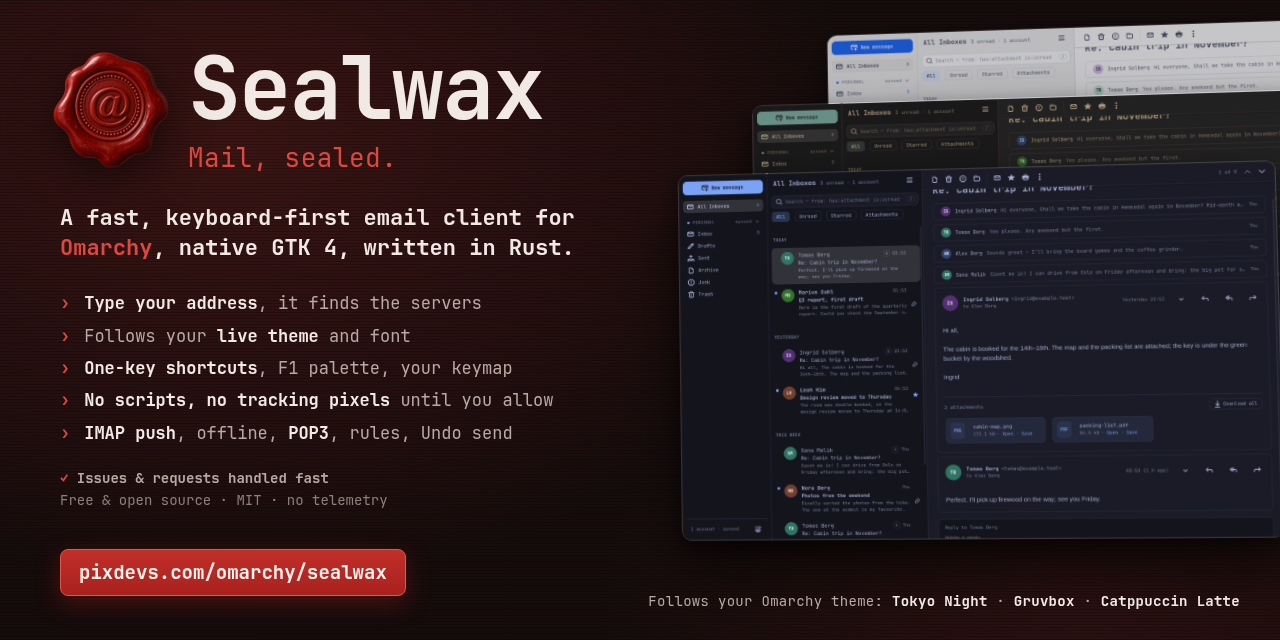
Mail, sealed. A fast, minimal email client for Omarchy: native GTK 4 and libadwaita, written in Rust, following your live Omarchy theme and font, quick to drive from the keyboard, and careful with every message: no script in one ever runs, and nothing from the internet loads until you allow it.
Install
Open a terminal (Super + Return on Omarchy), paste this line and press Enter:
curl -L -o /tmp/sealwax.pkg.tar.zst https://github.com/PixDevsApps/sealwax/releases/latest/download/sealwax-x86_64.pkg.tar.zst && sudo pacman -U /tmp/sealwax.pkg.tar.zst
Run the same line again to update; Check for Updates… in Sealwax's main menu says when there is a new version and gives you the line. To uninstall: sudo pacman -R sealwax.
On other Linux systems (Fedora, Ubuntu, Mint and others), install the Flatpak from Sealwax's own Flatpak repository:
flatpak install --user https://github.com/PixDevsApps/sealwax/releases/latest/download/io.github.pixdevsapps.Sealwax.flatpakref
It updates with flatpak update or your software centre. On Omarchy, the package above is the better fit.
INSTALL.md explains every step in plain words: installing, starting, updating and uninstalling, and what to do if something goes wrong. What's new lists each release.
Need help? The user guide is online too. No GitHub account? Write to [email protected]; Help → Contact Support… in Sealwax's main menu gives you the address and the details that help, and can start the message for you.
Status
Version 1.4.1. The features below are built and tested, and its author has read their own mail with it every day since 7 October 2026: Outlook.com, Microsoft 365 and IMAP, Gmail among them. Testing also covers local test mail servers (Dovecot, Stalwart, Mailpit), a fresh install in a clean Arch Linux container, and measurements on a live desktop; other providers are welcome to report how it goes. The 1.0 release notes say what was checked and what wasn't.
Features
- Accounts without server settings: type your address, and Sealwax finds the servers (its provider list, your domain's autoconfig, Mozilla's ISPDB, DNS). Sign in with Microsoft for Outlook.com and Microsoft 365; app passwords for iCloud, Fastmail, Yahoo and others, with a link to the provider's page; manual settings for the rest. Several accounts and All Inboxes, each account with a name and a muted colour of your choosing, folding away in the sidebar.
- IMAP with IDLE push and an offline copy of your mail, and POP3 into local folders (mail left on the server by default).
- Reading: whole conversations; safe HTML (no message script ever runs; nothing remote loads until you allow it, per message or per sender); attachments that open safely, with a warning for programs and disguised files; link warnings; print, Show Original, Save as
.eml; graceful display of encrypted and signed mail. - Triage: archive, delete, junk, move, star, read and unread at once, on one message or many, with Undo, also offline; a right-click menu on messages; Empty Trash on a Trash folder's menu.
- Folders and rules: new subfolders, rename and delete, shown as a tree you can fold; rules in Sieve, the standard mail-filter language, made in a Rules dialog or by hand in
rules/<account>.sieve, run by Sealwax on new mail (move, copy, mark read, star, junk, delete), with always-junk and never-junk senders and Create Rule from Message. - Writing: a rich-text composer docked in the main window (minimize, expand, several at once), reply, reply all, forward and a quick reply under the conversation; identities and signatures; attachments with the server's size limit checked; drafts saved as you type and kept on the server; an outbox with Undo send that never sends a message twice;
mailto:links, and becoming the default mail app when you choose. - Search on this computer with
from:,to:,subject:,sender:,domain:,has:attachment,is:unread,is:subscription,before:,after:and suggestions as you type. - Newsletters and senders: Unsubscribe in one click from a newsletter's header, the way its sender asks, after a dialog that says how; group any folder by sender or by domain to see who fills your inbox, and archive, delete or mark a sender's mail all at once; pin the senders you mustn't miss, so their mail stays at the top of the Inbox.
- New-mail notifications that open the message, and background mode: closing the window keeps mail syncing; Start Sealwax at Login.
- Omarchy: the live theme and font, light and dark; corners that follow Hyprland; no title bar on Hyprland; layouts for wide, half-screen and narrow tiled windows, with panes you can drag wider or narrower.
- Keyboard first: one-key shortcuts in the list and reader, a command palette (F1), and your own keys in
keys.toml. Settings live in plain files:config.toml,keys.toml,accounts.toml. - Private: passwords and tokens only in your keyring; no telemetry; logs without mail content; outgoing mail without your computer's name or a Bcc header.
Gmail works with an app password, as this step-by-step guide shows; there is no Sign in with Google. Not in 1.0: server-side search, rules uploaded to the server (ManageSieve), PGP and S/MIME, calendars and contacts beyond autocomplete (release notes).
Requirements
The package: Omarchy, or Arch Linux, on x86_64, with GTK 4.18+, libadwaita 1.9+, WebKitGTK 6.0 2.52+, SQLite 3.43+ and a Secret Service such as gnome-keyring; optionally hunspell and a hunspell dictionary for spell checking. Omarchy 4 is the desktop it is made for. The Flatpak: any x86_64 Linux system with Flatpak; it brings GNOME's runtime and needs the desktop's secret portal (GNOME and KDE have one) for passwords. Building needs Rust 1.92+.
Documentation
- User guide: setup (Microsoft sign-in, app passwords, POP3), reading, writing, search, notifications, every keyboard shortcut, theming, the settings files, privacy and troubleshooting
- Install: installing, updating and uninstalling, in plain words; building from source
- What's new: each release
- Release notes for 1.0.0 (a draft until the sign-off)
- Security: the threat model, the rules and the known limitations; to report a vulnerability, see the security policy
- Integrations: Omarchy, Hyprland key bindings and menu entries, providers
- Microsoft sign-in setup: registering a client ID
- Building and testing
- Decisions and design
Thanks
Thanks to everyone who reports bugs and suggests improvements in the issues, and especially to @ocewers for detailed reports and ideas (issues #2 to #8), to @hurricaane and @biddster for the ideas behind 1.1 (issues #14, #24, #25 and #26), and to @alauppe, @chrisonline and @mlamoure for their fixes (pull requests #19, #28 and #33), and to @lama7 for Empty Trash (pull request #35).
License: MIT. The licenses of the crates Sealwax is built from come with the package, in /usr/share/licenses/sealwax/THIRD-PARTY-LICENSES.txt.