
PhyAgentOS/PhyAgentOS-core
PhyAgentOS/PhyAgentOS-core has 2,995 GitHub stars and 137 forks. GitHot measured 0 stars in 24 hours. Last checked 2026-11-08 17:58 UTC. Last push 2026-10-30.
PhyAgentOS is a Recursive Self-Improving (RSI) physical agent operating system that enables agents to recursively self-improve through agentic workflows.
Measured star growth
- in 24h
- 0
- in 7 days
- Collecting history
- in 15 days
- Collecting history
- in 1 month
- Collecting history
Net star changes over overlapping periods, not daily totals. Missing measurements are left blank. Stars measure attention, not software quality.
README.md
Original
Recursive Self-Improvement Infrastructure for Physical Agents
Technical Report · Website · Documentation · Discord




What · Why · v1.1.1 · Install · Quickstart · Examples · Documentation
v1.1.1 · Skill development, execution reliability and the Opper gateway
What is PhyAgentOS?
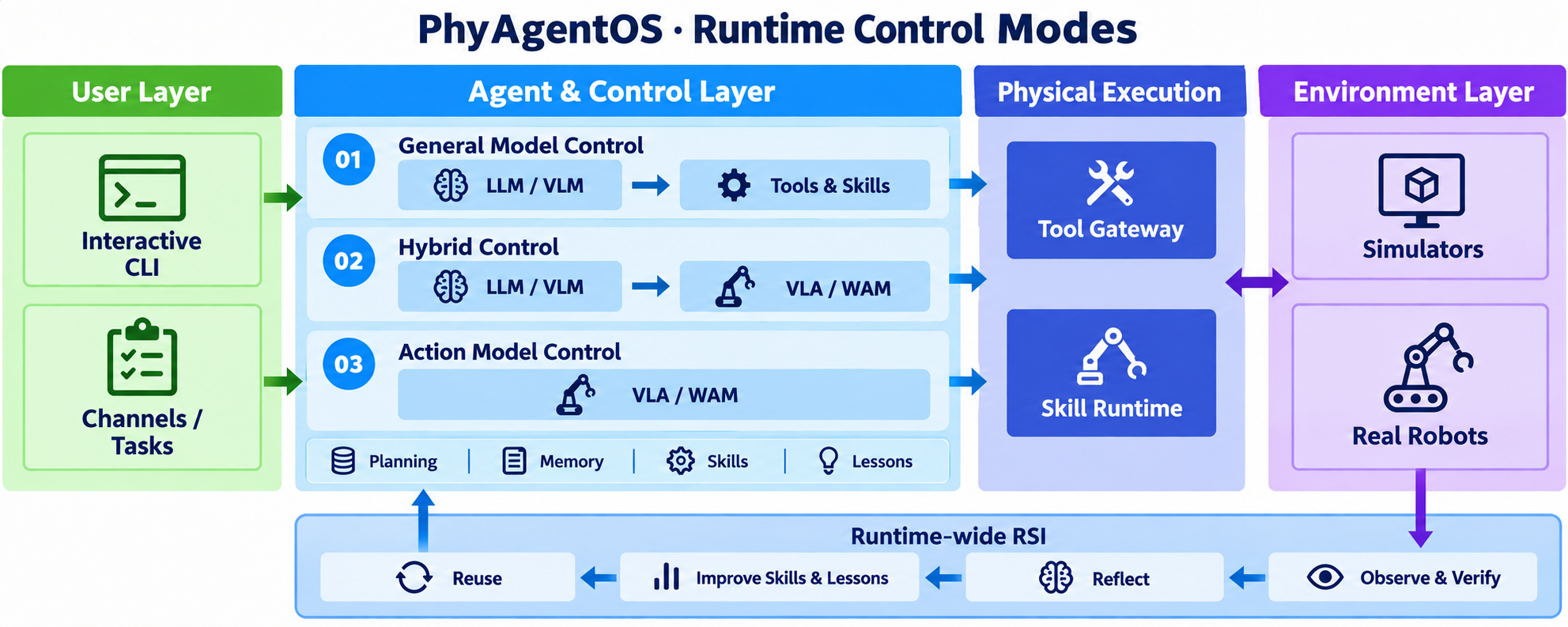
PhyAgentOS is a Recursive Self-Improvement (RSI) framework for embodied agents. It connects cognitive planning, Physical Execution, and task verification in a runtime-wide feedback loop, improving Skills and Lessons from verified experience for future tasks.
Why PhyAgentOS?
| Capability | What it enables |
|---|---|
| One framework, multiple control modes | Combine general-model reasoning, action models, or hybrid control through the capabilities exposed by an installed Skill. |
| Verified task outcomes | Evaluate goals against observations and execution facts, with bounded replanning when recovery is needed. |
| Experience that improves future tasks | Accumulate reusable workflows and scoped Lessons from verified experience, with guarded promotion and revision history. |
| Reusable physical capabilities | Package environment-specific tools and runtimes as versioned Skills, keeping cognitive planning separate from robot integration. |
What's new in v1.1.1
Skill development, execution reliability and the Opper gateway. Changes since v1.1.0:
- Opper gateway: OpenAI-compatible routing with provider selection, environment credentials and unchanged model identifiers.
- Local Skill development: locally edited workflow documents and Node executables can run with warnings, while bindings and experience retain the activated workflow hash. Explicit Node verification and install-cache acceptance remain strict.
- Action rejection handling: structured pre-dispatch Gateway rejections are recorded as failed and do not block a later retry or successful task finalization. Timeouts and uncertain remote execution retain their existing guards.
- Piper X development example: bilingual Track B guides and an independent simulation Skill example cover model conversion, original Node locks, packaging and recorded validation. See the Piper X guide for its original runtime baseline.
- Clearer documentation: consolidated bilingual manuals and contribution guidance, a MuJoCo Quickstart with live GIFs, and retained benchmark documentation links.
See the full changelog and changes since v1.1.0.
Install and configure
Start with a model-backed CLI conversation, then follow the MuJoCo Quickstart below. Prerequisites: Python 3.11 or 3.12, Git, and an API key for your model provider.
1. Install and initialize
git clone --branch v1.1.1 https://github.com/PhyAgentOS/PhyAgentOS-core.git
cd PhyAgentOS-core
python -m venv .venv
source .venv/bin/activate
python -m pip install -e .
paos onboard
On Windows PowerShell, replace the activation command with .venv\Scripts\Activate.ps1.
2. Connect a model
Configure credentials with hidden input, then select the default:
paos provider configure openrouter
paos provider use openrouter --model anthropic/claude-sonnet-4
See the provider CLI guide for
Docker/secret input, process overrides and session commands (/provider, /model, /effort, /status).
Session switches affect subsequent turns only and leave running tasks and other sessions unchanged.
Full configuration reference (v1.1.1)
The configuration file is serialized in camelCase; snake_case keys are also accepted.
{
  "agents": {
    "defaults": {
      "workspace": "~/.PhyAgentOS/workspace",
      "model": "openrouter/openai/gpt-4o-mini",
      "provider": "openrouter"
    },
    "verification": {
      "serviceEnabled": true,
      "evidenceRetention": "failed",
      "maxReplansPerEpisode": 2,
      "maxVerifierCallsPerRun": 50
    },
    "evolution": {
      "enabled": true,
      "scope": "verified_forge_lineage",
      "promotionMode": "guarded_auto",
      "minSuccessfulEpisodes": 3,
      "minLessonEpisodes": 3,
      "maxLessonsPerSkill": 8,
      "maxEvolutionCallsPerRun": 20
    }
  },
  "providers": {
    "openrouter": {
      "apiKey": "YOUR_API_KEY"
    }
  },
  "forge": {
    "requestTimeoutS": 10,
    "pollIntervalS": 0.5,
    "executionTimeoutS": 300,
    "evidence": {
      "requiredImageSources": ["front"],
      "captureTimeoutS": 5,
      "postCaptureTimeoutS": 5,
      "connectionTimeoutS": 2,
      "maxArtifactBytes": 8388608,
      "associationQuality": "best_effort"
    }
  },
  "resourceRegistry": {
    "url": "https://paos-resource-manager.dev.x-era.com"
  }
}
The front source is only an example. resourceRegistry.url selects a generic package registry;
it may be empty when all artifacts are installed from local bundles or a supplied static index.
PAOS connects only to the Gateway URL in the manifest of the explicitly started, healthy Skill
Runtime. It never starts or downloads a concrete Skill merely because the Agent starts.
3. Run your first request
paos status
paos agent -m "Hello! Introduce yourself."
paos agent
You should receive a model response; paos agent opens an interactive conversation. This checks the core Agent and provider connection. Physical execution additionally needs a running Skill Runtime.
Need another provider or deployment option? See the user manual · Docker.
Quickstart · Control a robot in MuJoCo
[!TIP] Developers: bring your own robot — Piper X customization demo. Follow the complete model-to-Skill example for joint and end-effector control. Use the Skill development manual to choose between configuration changes, a new profile and Node development.
Use robot-control-sim to control a simulated Piper arm through joint targets or
end-effector poses. Complete the installation and model configuration above first.
The prebuilt simulation Nodes used here target Linux x86_64 and require a working
graphical display or virtual display for MuJoCo and the image viewer.
1. Install Dora
v1.1.1 retains the Dora CLI 0.4.1 (dora-message 0.7.0) compatibility baseline:
curl --proto '=https' --tlsv1.2 -LsSf \
  https://github.com/dora-rs/dora/releases/download/v0.4.1/dora-cli-installer.sh | sh
dora --version
Dora is required to start the simulation Runtime. See the Dora installation reference for other installation methods.
2. Install robot-control-sim
Set resourceRegistry.url in your config, or PAOS_RESOURCE_REGISTRY_URL, to a deployment
that provides robot-control-sim and its locked Node artifacts. Then run:
paos skill search robot-control-sim
paos skill install robot-control-sim
paos skill inspect robot-control-sim
inspect shows the installed version, profiles and dependencies. This example uses
mujoco-piper; mujoco-franka and mujoco-so101 select other robots. For a separately
obtained Bundle, use paos skill install /path/to/robot-control-sim.tar.gz --local;
its locked Nodes must also be available. Core does not bundle these simulation assets.
3. Start the simulation
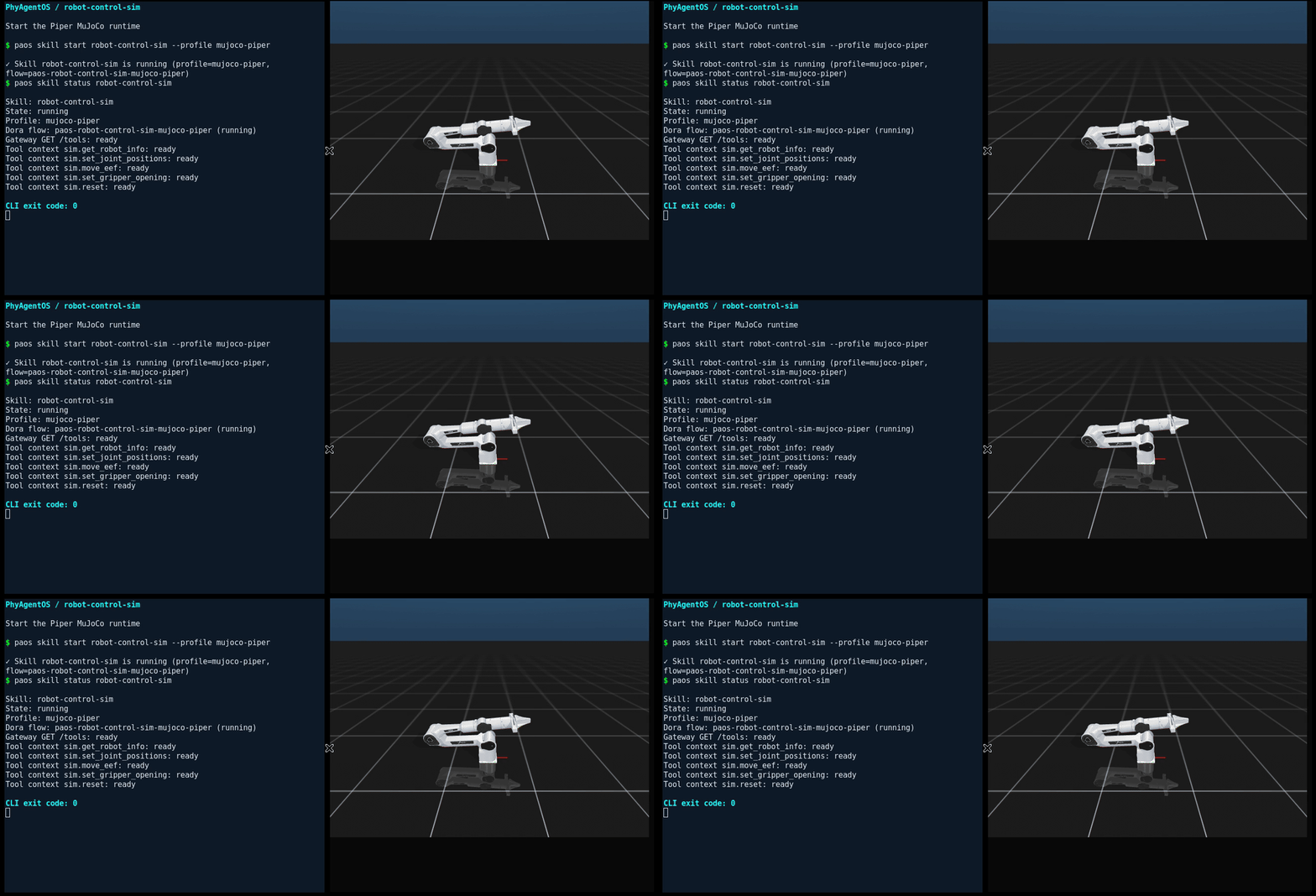
paos skill start robot-control-sim --profile mujoco-piper
paos skill status robot-control-sim
Wait for the Runtime to report healthy and the simulation camera viewer to open. If startup
fails, inspect paos skill logs robot-control-sim before sending a motion request.
4. Control joints and the end effector
The Agent reads sim.get_robot_info and live Tool context to determine joints, limits, frames
and units, then follows the active Skill workflow. The absolute targets below are for
mujoco-piper (arm_base / tcp); use the selected robot's frames and reachable targets when switching profiles.
| Control mode | Tool | Target |
|---|---|---|
| Joint targets | sim.set_joint_positions |
Absolute arm joint positions in radians |
| End-effector pose | sim.move_eef |
Absolute position in meters and quaternion orientation; the motion server solves IK |
These motion demos use verification.mode=off, so success is derived from Tool execution results. For semantic task verification and evidence policies, see the Core developer manual.
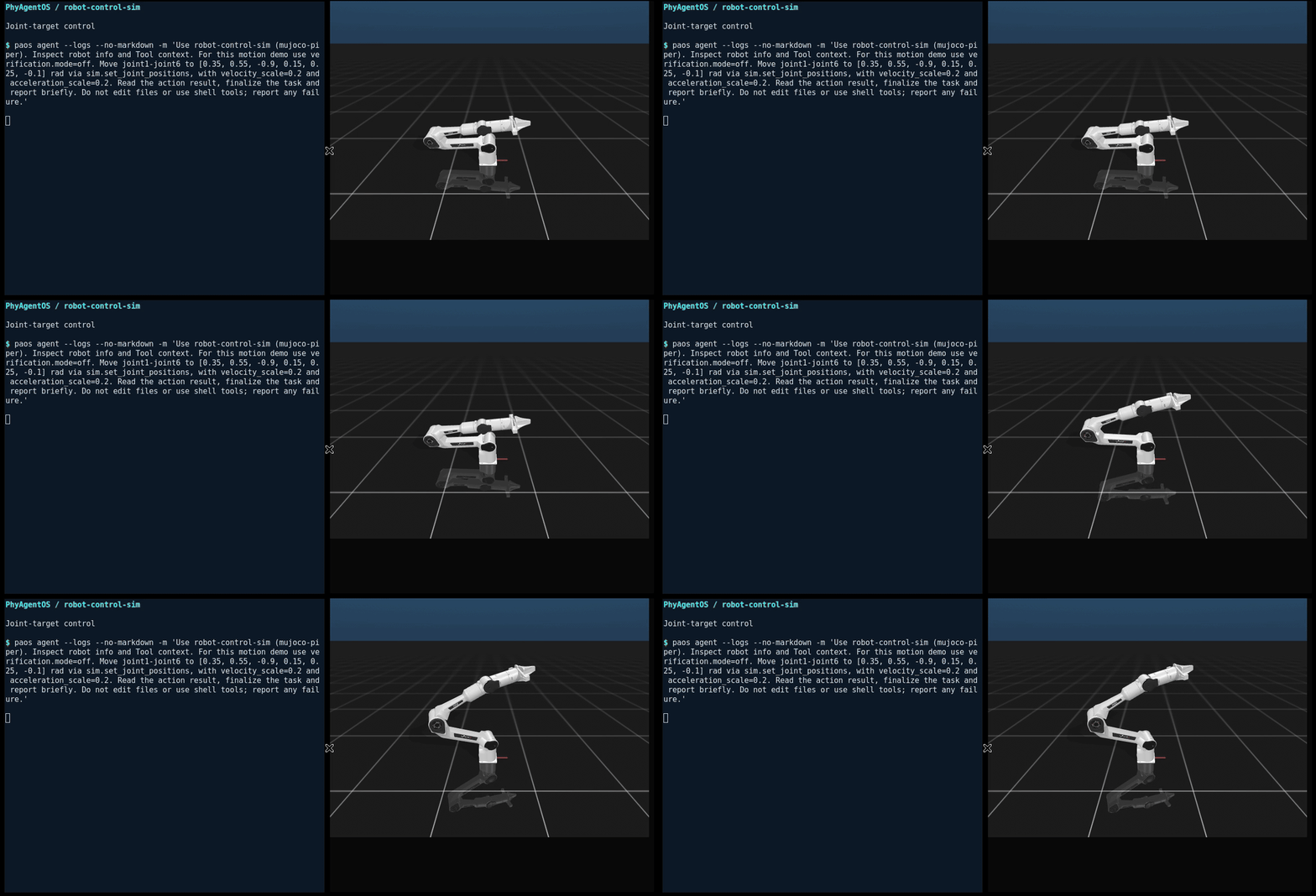
Try a joint-space request:
paos agent -m "Use robot-control-sim (mujoco-piper). Inspect robot info and Tool context. For this \
  motion demo use verification.mode=off. Move joint1-joint6 to [0.35, 0.55, -0.9, 0.15, \
  0.25, -0.1] rad via sim.set_joint_positions, with velocity_scale=0.2 and \
  acceleration_scale=0.2. Read the action result, finalize the task and report briefly. Do \
  not edit files or use shell tools; report any failure."
Then try a Cartesian request:
paos agent -m "Use robot-control-sim (mujoco-piper). Inspect Tool context. For this motion demo use \
  verification.mode=off. Call sim.move_eef for TCP in arm_base: position (0.284045, \
  0.007878, 0.478706) m, quaternion xyzw (-0.002904, 0.693239, 0.008319, 0.720654), \
  position_tolerance_m=0.01, orientation_tolerance_rad=0.05, velocity_scale=0.2, \
  acceleration_scale=0.2. Let the motion server solve IK. Read the action result, finalize \
  the task and report briefly. Do not edit files or use shell tools; report any failure."
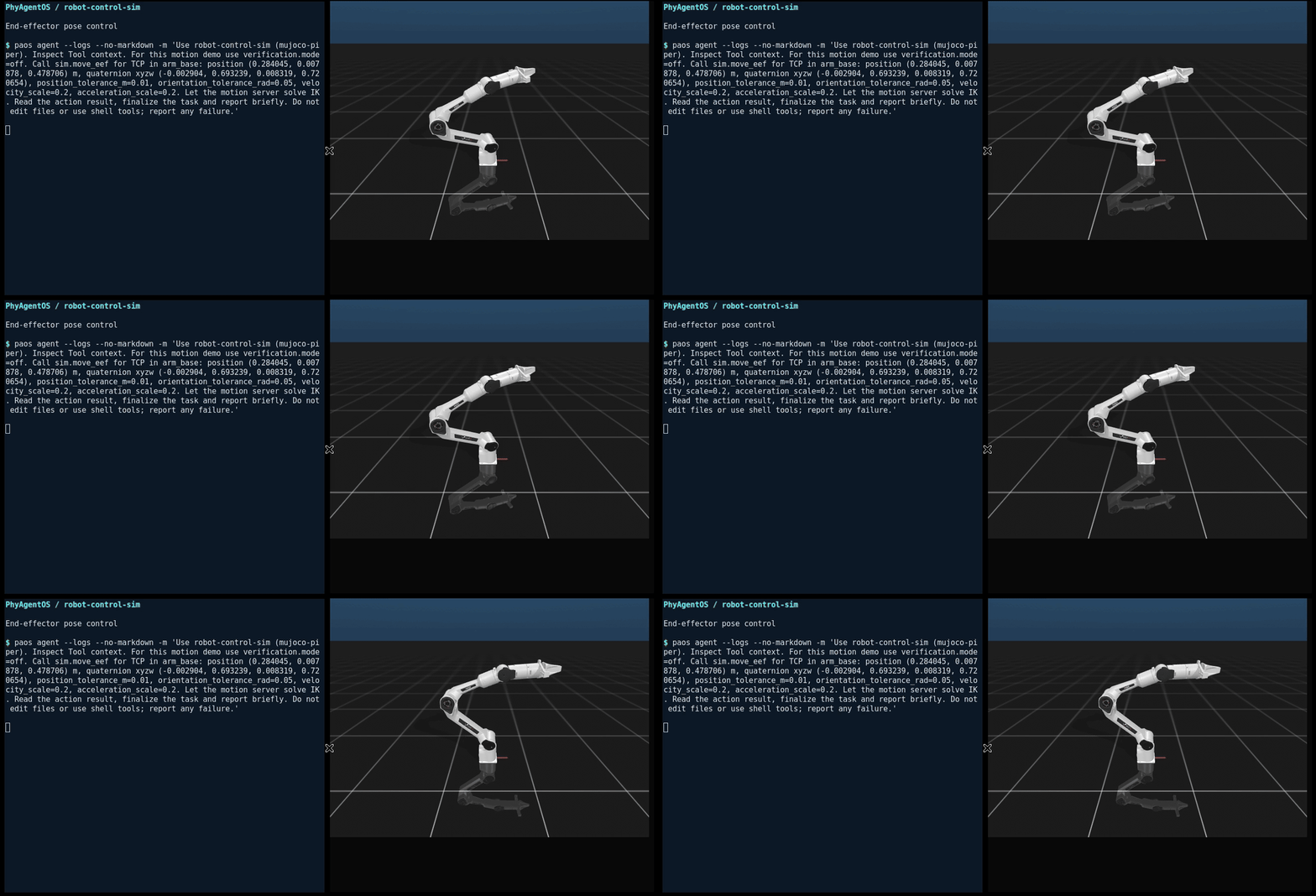
Live recordings of the command and MuJoCo simulation; the captured command panel is held visible and model-wait pauses are shortened.
You can also run paos agent for interactive control. Motion should be visible in the simulation;
read the returned execution result and final state rather than treating admission as completion.
5. Stop the simulation
After the motion task has finished:
paos skill stop robot-control-sim
Normal stop first reconciles retained execution references in the configured workspace.
Use paos skill reconcile robot-control-sim --workspace /path/to/workspace to retry recovery explicitly.
Unconfirmed actions remain protected; --force explicitly authorizes runtime termination.
Each runtime generation has a distinct Dora flow name, shown by paos skill status.
See runtime recovery and process ownership for platform limits.
Extend this example
- TrackB framework guide: architecture, repository catalog and Node protocols.
- Skill development manual: configure a profile, add a profile, or develop Nodes and assemble a Skill.
- Piper X development demo: adapt
robot-control-simto another arm, including model conversion and both control modes. - Bundle and Tool integration reference: manifest fields, packaging and local installation.
Session memory and recovery
contextWindowTokens controls the archival threshold, not the model context limit; a nonpositive value disables automatic archival. When LiteLLM is already loaded, requests resolve the configured model ID against its local catalog (including native anthropic/ and openai/ prefixes), reserve output space within the known window, and keep the latest complete turn. Gateway routes require their own catalog entry; they do not inherit a native model limit. Direct-only custom / openai_responses processes do not load LiteLLM just for this check, so catalog-based request protection is inactive unless another path has loaded it; bounded archival still applies. Unknown deployment aliases do not receive an invented hard limit from the archival threshold. If known-window protection cannot fit the current turn or fixed instructions, PAOS reports the cause without deleting the session. Image inputs receive an approximate 2,048-token allowance per image rather than counting base64 as text; actual vision usage varies by model and resolution.
Memory archival uses automatic tool selection with validated save_memory results and one format-repair retry for plain-text responses. Large histories are processed in bounded fragments with durable progress checkpoints, preferring complete messages when they fit. Archival failures appear in the reply and retries pause for 60 seconds. /new first saves the complete raw session under <workspace>/sessions/archives/; if LLM archival fails, it still starts a new session and reports the backup path. Raw backups retain the original conversation and any pending archival checkpoint for later recovery; a backup is not a completed memory summary.
More examples
| Platform | Coverage | Guide |
|---|---|---|
| Piper robot arm | Skill installation, CAN setup, hardware startup, and tool readiness | Piper quickstart (Chinese) |
| LIBERO-10 simulation benchmark | Skill/Node installation, π0.5 weights, model API setup, and a 50-episode run (π0.5-only or GPT-6 supervised) | LIBERO quickstart (Chinese) |
Documentation
| I want to… | Start here |
|---|---|
| Install, configure, and run PhyAgentOS | User manual |
| Build a Skill or connect an environment | TrackB development guide |
| Understand the Physical Execution API | Physical Execution Tool API |
| Extend robot-control-sim to another arm | Piper X development demo |
| Develop and test Core | Core developer manual |
| Inspect benchmark results and evaluation context | Benchmark documentation |
| Browse all documentation | Documentation index |
News
2026-10-23 · v1.1.1 released: Opper gateway support, local Skill development and Action rejection fixes, plus bilingual Track B and Piper X guides. Release notes and packages.
2026-10-10 · GOSIM Shenzhen 2026: PhyAgentOS has been selected for Spotlight and will present in the Open Source Robotics track. Read the announcement and event details.
| Version | Date | Update |
|---|---|---|
| v1.1.1 | 2026-10-23 | Opper gateway, local Skill development and Action rejection fixes, bilingual Track B and Piper X guides, and a MuJoCo Quickstart. |
| v1.1.0 | 2026-10-09 | Centralized provider management, direct OpenAI Responses and new gateways, Skill Runtime packaging and startup improvements, and an opt-in governed interaction foundation. |
| v1.0.0 | 2026-08-30 | Initial stable release of PhyAgentOS. |
| v0.2.3 | 2026-08-27 | Physical Execution Skills can be installed and managed independently, activated into immutable AgentTask bindings, and used through governed Query, Action, and Session Tool API lifecycles with recovery and version-scoped experience. |
| v0.2.2 | 2026-08-21 | Unified Physical Execution execution on the Query/Action Tool API and added AgentTask aggregation, a verifiable Skill Runtime, Resource Registry integration, and the move-arm-by-ee Skill while retaining Agent verification and evolution. |
See the full changelog.
Contributing & community
Start with the contribution guide and the development manuals. We recommend focusing on TrackB Nodes, Skills and robot/environment integrations. External resource-platform submissions and changes to existing registered repositories are not yet open; they require completion and opening of the approval service. Local development and validation can proceed; see the guide for the current scope and source-review process.
Development checks
python -m pip install -e ".[dev]"
pytest
ruff check PhyAgentOS tests
python -m compileall -q PhyAgentOS tests
Discord · X · Bilibili · LinkedIn · Xiaohongshu
Citation & acknowledgements
If PhyAgentOS helps your research, please cite our technical report.
@article{liu2026phyagentos,
  title={PhyAgentOS: A Self-Evolving Operating System for Embodied Agents with Decoupled Cognitive Planning and Physical Execution},
  author={Liu, Yang and Chen, Weixing and Song, Xinshuai and Pu, Tao and Mo, Siwen and Bai, Yongjie and Chen, Zihao and Sun, Qianran and Zhong, Liruo and Shen, Ying and others},
  journal={arXiv preprint arXiv:2607.16636},
  year={2026}
}
Thanks to the maintainers of MuJoCo, ROS, the open benchmark suites, and every contributor to PhyAgentOS.
Jointly developed by Sun Yat-sen University HCP Lab, Peng Cheng Laboratory, and X-Era Lab.


MIT License · Copyright © 2025–2026 PhyAgentOS
Explore related projects
n8n-io/n8n
Fair-code workflow automation platform with native AI capabilities. Combine visual building with custom code, self-host or cloud, 400+ integrations.
209,838 starslanggenius/dify
Build Agentic workflows, RAG pipelines, with rich AI model and tool support on one collaborative workspace. Deploy on cloud, VPC, or self-hosted, so teams move from prototype to production without rebuilding the stack.
160,627 starsmicrosoft/PowerToys
Microsoft PowerToys is a collection of utilities that supercharge productivity and customization on Windows
140,710 starsstablyai/orca
Orca is the place for working with a fleet of agents (e.g. Grok Bot, Claude Code). Run any coding agent with your own subscription. Available on desktop, mobile and remote runtime.
119,179 stars